Details
Product prices and availability are accurate as of the date/time indicated and are subject to change. Any price and availability information displayed on Amazon.co.uk at the time of purchase will apply to the purchase of this product.Review
Razer Blade 16 2024, RTX review
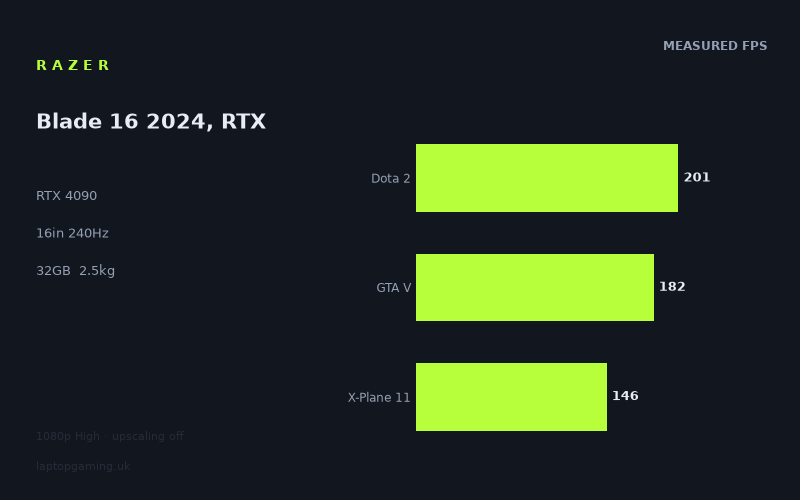
Frame rates
1920×1080, High preset, upscaling off.
Measured on this machine. Source: Notebookcheck, 2024-02-20.
Not scored: incomplete benchmark suite
Every scored laptop on this site is averaged over the same 5 games, and this one is short of Cyberpunk 2077, Baldur's Gate 3. A mean over 3 games is not comparable to a mean over 5, so we publish the figures we have and leave the score blank rather than rank it against machines tested on a different set. The numbers below are real - the suite is just incomplete.
How these numbers were produced
Frame rates here are not measured by us, and we label how each one was arrived at. A figure marked measured comes from a published run on that exact machine. A figure marked representative is derived from the GPU and its power limit (TGP) and cross-referenced against published reviews - a sound estimate of what that configuration delivers, but not a measurement of that specific laptop. Unless stated otherwise, numbers are 1920x1080, High preset, upscaling off. Where a laptop ships in several power configurations we use the wattage of the exact SKU listed, because a 140W RTX 5070 and a 115W one are not the same product.
In use
The short version
The Razer Blade 16 2024 configuration covered here combines an RTX 4090, Core i9-14900HX, 32GB of memory and a 16in 2560x1600 240Hz OLED display. On the available Notebookcheck benchmark data, it is plainly a very fast gaming laptop at 1920x1080 on the High preset with upscaling disabled. The measured figures range from 109fps in Alan Wake 2 to 368fps in Strange Brigade, with the three available scoring-suite games averaging 176fps.
That is enough performance for high-refresh gaming in some titles, strong results in demanding games, and a credible case for pairing a powerful GPU with a 240Hz screen. It is not, however, evidence that every modern game will run at 240fps, nor is it evidence that these results will carry unchanged to the panel’s native 2560x1600 resolution. The published figures are all at 1920x1080, not at 2560x1600, and they use High settings with upscaling off. That distinction matters more here than it would on a lower-refresh display, because the screen can refresh far faster than the measured frame rate in several of the most demanding titles.
The important point is that the Blade 16 does not produce one simple “RTX 4090 result”. Its performance changes sharply by game. Dota 2 reaches 201fps, GTA V reaches 182fps and X-Plane 11 reaches 146fps. Those are strong figures, but only Dota 2 gets close to the 240Hz ceiling. Meanwhile, Cyberpunk 2077 1.6 is measured at 124fps and Alan Wake 2 at 109fps. Those are still high frame rates in absolute terms, but they are less than half of the display’s maximum refresh rate.
Anyone considering this machine should therefore buy it for what the evidence actually supports: very high 1080p High-preset performance across a broad selection of games, a 16in OLED panel with a 240Hz refresh rate, 32GB of memory, and a relatively substantial 2.452kg laptop chassis. It is not the right purchase for someone whose only requirement is to see 240fps in every recent demanding game, because the available benchmark data does not show that. It is also not possible to make a responsible value judgement at present because no confirmed UK price has been supplied.
There is another important limitation. The available scoring-suite data is incomplete. We have results for Dota 2, GTA V and X-Plane 11, but no figures here for Cyberpunk 2077 or Baldur’s Gate 3 within that suite. That means this Razer cannot be ranked directly against laptops assessed over the full five-game scoring suite. The three-game mean of 176fps is useful as a description of the available data, but it is not a substitute for a full like-for-like five-game comparison.
The Blade 16 makes most sense for a buyer who wants a high-performance 16in system and understands that its strongest evidence is at 1920x1080 High, not at the display’s native resolution. It also makes sense for someone who values the particular combination of a 240Hz OLED screen, RTX 4090 graphics, Core i9-14900HX processor and 32GB of memory, rather than choosing solely by the largest laptop screen or the heaviest GPU power figure. The rival data shows why: comparable RTX 4090 laptops can be effectively level in some shared games, while another RTX 4090 system can establish a clear lead. The GPU name alone does not settle the comparison.
Performance
What Notebookcheck’s figures show
The published measurements come from Notebookcheck and were recorded at 1920x1080, using the High preset with upscaling disabled. Those conditions are useful because they make the individual game results directly comparable within this set. They are also deliberately limited conditions. They do not tell us the exact performance at 2560x1600, they do not tell us what happens with upscaling enabled, and they do not show a lower or higher quality setting. The results should be read as measured numbers for one defined configuration, not as a promise for every setting combination a buyer might choose.
At the fastest end of the data, Strange Brigade reaches 368fps and The Witcher 3 reaches 354fps. These are the two figures that most clearly show the Blade 16’s ability to feed its 240Hz panel in favourable titles. Both measured figures are above 240fps. If the aim is to use a 240Hz screen with games that can run at those kinds of frame rates, the data gives this laptop a convincing case.
That does not mean that 240Hz is automatically useful in every game represented here. It means that the system has enough measured performance in Strange Brigade and The Witcher 3 at the stated settings to exceed the display’s refresh rate. That is a specific conclusion from specific games. It should not be expanded into a claim that the Blade 16 exceeds 240fps across the library, because several other measured results are substantially lower.
Dota 2 reaches 201fps. This is a very high measured result and it is close to the panel’s 240Hz refresh rate, but it remains below it. For a buyer primarily playing Dota 2, the 240Hz screen is still a sensible pairing in the broad sense that the game is running at a high frame rate. But the evidence does not show a continuous 240fps result under the published test conditions. That distinction is worth making because buyers of a 240Hz laptop are often attracted by the headline refresh figure and may assume that any RTX 4090 laptop will always reach it.
GTA V is measured at 182fps. Again, that is high enough to make a high-refresh display relevant, but it is not a 240fps result. X-Plane 11 follows at 146fps. The gap between GTA V and X-Plane 11 is already meaningful: both are included in the available scoring-suite data, both were measured under the same stated 1920x1080 High conditions, yet the Blade 16 produces notably different results. This is exactly why a single average needs careful interpretation. A mean tells us something about the set; it does not tell a buyer which number matters for the game they actually play.
The three available scoring-suite games average 176fps: Dota 2 at 201fps, GTA V at 182fps and X-Plane 11 at 146fps. That average is high, but its spread matters. The result does not represent a narrow cluster around one performance level. Dota 2 is comfortably ahead of X-Plane 11, and GTA V sits between them. Someone mainly interested in Dota 2 should pay more attention to 201fps than to the 176fps mean. Someone focused on X-Plane 11 should do the opposite.
The rest of the available results broaden that picture. Dying Light 2 is measured at 156fps, Final Fantasy XV at 138fps and Far Cry 5 at 134fps. All three are clearly above 100fps under the benchmark conditions. They are also all below the panel’s 240Hz maximum. These are the figures that make the Blade 16 look like a strong high-refresh machine rather than a universal 240fps machine. A frame rate in the 134fps to 156fps range remains well above the 109fps and 124fps results in the heaviest games here, but it does not fill a 240Hz panel in the straightforward numerical sense.
Cyberpunk 2077 1.6 is measured at 124fps. Alan Wake 2 is measured at 109fps. These are the two lowest results in the supplied game list, and they set the practical lower edge of the available evidence. Neither figure suggests that the Blade 16 is struggling under the published settings. Both are above 100fps. But they show the reality of demanding modern games: the RTX 4090 and Core i9-14900HX combination does not turn every title into a 240fps experience at 1920x1080 High with upscaling disabled.
The difference between 368fps in Strange Brigade and 109fps in Alan Wake 2 is not a small variation. It is a very wide benchmark spread. The Blade 16’s measured performance changes by more than three times across the supplied game list. That is not a criticism of the laptop in isolation; it is a reason to avoid over-relying on any one result. A buyer playing Strange Brigade and The Witcher 3 will see a performance story that is completely different from a buyer interested chiefly in Alan Wake 2 and Cyberpunk 2077 1.6.
The game-by-game picture
- Strange Brigade: 368fps. This is well above the 240Hz display refresh rate in the stated 1920x1080 High test.
- The Witcher 3: 354fps. Like Strange Brigade, this is above 240fps under the published conditions.
- Dota 2: 201fps. Very high performance and close to 240Hz, but below the screen’s maximum refresh rate.
- GTA V: 182fps. A strong high-refresh result, but not a 240fps result.
- Dying Light 2: 156fps. Clearly above 100fps and below 240fps.
- X-Plane 11: 146fps. The lowest of the three available scoring-suite figures.
- Final Fantasy XV: 138fps. Another result that supports high-refresh play without reaching the panel maximum.
- Far Cry 5: 134fps. Above 100fps, but substantially below the fastest games in the set.
- Cyberpunk 2077 1.6: 124fps. One of the lower figures, showing that the panel’s 240Hz ceiling is not the relevant target in every demanding game.
- Alan Wake 2: 109fps. The lowest measured result supplied, though still above 100fps at 1920x1080 High with upscaling off.
This list is more useful than a blanket statement that the Blade 16 is “fast”. It is fast, but the kind of speed varies. Two games exceed 240fps. One is close at 201fps. Several sit between 134fps and 182fps. The two heaviest figures supplied are 124fps and 109fps. A prospective buyer should match those numbers to the games they genuinely expect to play, not to the marketing hierarchy implied by an RTX 4090 label.
What the GPU power limit means here
The fact sheet identifies this model as an RTX 4090 system, but it does not provide a GPU power limit for the Razer Blade 16 itself. That is a significant omission for performance analysis because the rival list includes RTX 4090 systems at 150W and 175W, as well as an RTX 4050 system at 140W. Without a stated power figure for this Razer, it would be wrong to assign a wattage to it or to claim that it is configured above or below a particular rival.
What can be said is that the measured results are the evidence that matters more than an assumed number. Against the Asus ROG Strix Scar 18 2023, an RTX 4090 laptop listed at 150W, the Blade 16 averages a near-zero difference across three shared games. Against the Lenovo Legion 9, an RTX 4090 laptop listed at 175W, the Blade 16 averages 1fps lower across three shared games. Those are effectively level shared-game outcomes. They do not prove identical GPU configurations, identical cooling, or identical behaviour in every game. They do show that, in the limited shared comparisons supplied, a higher stated rival power figure does not automatically translate into a meaningful lead over the Blade 16.
The Asus ROG Strix Scar 17 tells the other side of that story. It is another RTX 4090 laptop, but its GPU power limit has not been supplied here. In its three shared games it averages 23fps ahead of the Blade 16. That is a materially different result from the near-zero gaps against the Scar 18 and Legion 9. The reason for the lead cannot be established from the supplied facts alone. It would be speculation to attribute it to GPU power, CPU behaviour, cooling, memory, display resolution, test variation or any other factor not given in the sheet. The correct conclusion is simply empirical: this particular RTX 4090 rival is faster by the stated shared-game average.
The key buying lesson is that “RTX 4090” is not enough information on its own. The Blade 16 produces exceptionally high frame rates in some games and substantially lower figures in others. It can match one 150W RTX 4090 rival and sit just behind one 175W RTX 4090 rival in the limited shared-game data, while another RTX 4090 laptop holds a clearer advantage. Buyers comparing premium gaming laptops should use matched benchmark data where possible, especially when the machine’s own GPU power limit is not confirmed.
Why the shared-game gaps can be tiny
The near-zero difference against the Scar 18 and the 1fps difference against the Legion 9 should not be treated as evidence that all RTX 4090 laptops are identical. The supplied comparison notes give an important explanation: at 1920x1080, lighter titles in the shared set can be CPU-bound and compress genuine GPU gaps. In practical terms, this means that a game running at this resolution can place less emphasis on the difference between powerful GPUs than a buyer might expect from the GPU names alone.
That explanation is particularly relevant to a comparison based on only three shared games. The available data is useful, but it is narrow. It can show that the Blade 16 is effectively tied with the Scar 18 and nearly tied with the Legion 9 in those shared results. It cannot prove that the same relationship will hold in every game, at the Blade 16’s 2560x1600 display resolution, or under another graphics preset.
The Razer’s own result spread reinforces that caution. It reaches 368fps in Strange Brigade and 354fps in The Witcher 3, but 124fps in Cyberpunk 2077 1.6 and 109fps in Alan Wake 2. Where frame rates are already extremely high at 1920x1080, a powerful GPU gap may be less visible in the final figure than buyers expect. Where a game is more demanding, performance differences may be easier to expose. The supplied rival comparison itself cannot tell us how the specific rival gaps would change in those particular demanding games unless shared results are available.
The incomplete scoring-suite picture
The 176fps mean across Dota 2, GTA V and X-Plane 11 is a useful performance reference, but it must be labelled accurately. It is a mean across three available scoring-suite games, not a complete five-game suite result. Figures are not supplied here for Cyberpunk 2077 and Baldur’s Gate 3 within the scoring suite.
That means the Blade 16 should not be ranked against laptops with complete five-game results. Every laptop that is fully assessed in that framework is averaged over the same five games. Using three results for the Blade 16 against five results for another machine would give a false impression of precision. The missing games matter precisely because performance varies so much by title. A machine averaging 176fps across Dota 2, GTA V and X-Plane 11 may look very different once two further games are added, particularly when the available broader benchmark list already ranges from 109fps to 368fps.
This is not a reason to dismiss the Razer. It is a reason to be disciplined with the evidence. The published numbers show a high-performing system. They do not justify a complete scoring-suite ranking. For buyers, the better approach is to examine the games that overlap with their own habits and compare only like-for-like figures.
The screen
The Blade 16 has a 16in OLED display with a 2560x1600 resolution and 240Hz refresh rate. On paper, that is a demanding combination: the panel offers a higher native resolution than the 1920x1080 benchmark setting and a refresh rate that only the fastest measured results fully exceed. The display is therefore one of the machine’s major attractions, but it also makes it especially important not to confuse benchmark resolution with panel resolution.
Every frame-rate figure supplied for this review was measured at 1920x1080, High preset, with upscaling off. The screen’s native resolution is 2560x1600. The Notebookcheck figures therefore demonstrate the Blade 16’s performance at the benchmark resolution, not confirmed native-resolution performance. We do not have supplied 2560x1600 frame rates for Strange Brigade, The Witcher 3, Dota 2, GTA V, X-Plane 11, Cyberpunk 2077 1.6, Alan Wake 2 or the other listed games.
That limitation matters most for buyers who see “2560x1600 240Hz” and expect the RTX 4090 to drive every title at both the native pixel count and the full refresh rate. The available evidence cannot support that conclusion. It can support a narrower and more useful one: at 1920x1080 High without upscaling, the Blade 16 exceeds 240fps in Strange Brigade and The Witcher 3, reaches 201fps in Dota 2, and delivers between 109fps and 182fps in the other measured games.
At the panel’s 240Hz refresh rate, the distinction between the titles is clear. Strange Brigade at 368fps and The Witcher 3 at 354fps are above 240fps. Dota 2 at 201fps is close, but not at 240fps. GTA V at 182fps is further away, though still a high frame-rate result. Dying Light 2 at 156fps, X-Plane 11 at 146fps, Final Fantasy XV at 138fps and Far Cry 5 at 134fps all remain firmly in high-refresh territory in the ordinary sense of being far above 60fps, yet none matches the panel’s maximum refresh rate numerically. Cyberpunk 2077 1.6 at 124fps and Alan Wake 2 at 109fps reinforce that the 240Hz specification is not a target the system reaches in every demanding game under the stated test conditions.
The OLED panel type is confirmed, but no measurements have been supplied for brightness, colour coverage, response behaviour, contrast, reflection handling or any other display characteristic. It would be wrong to fill those gaps with assumptions. The available facts establish the panel technology, size, resolution and refresh rate. They do not establish how this specific OLED panel performs in those other areas.
There is also no supplied evidence on display modes, refresh-rate options, adaptive-refresh support, external display support or any relation between screen setting and benchmark result. For a buyer, that means the reliable performance discussion remains focused on the simple relationship visible in the data: the Blade 16 has a 240Hz panel, while its 1920x1080 High results range from 109fps to 368fps depending on game.
The screen specification is most convincing for someone who plays a mixture of lighter and heavier titles. In lighter measured games, the system has enough benchmark performance to exceed the refresh rate. In Dota 2, the result is close to the panel maximum. In more demanding games, the 240Hz panel gives the system headroom beyond the measured results, but the figures do not show the panel being fully driven. That is not a defect in the display; it is simply the numerical relationship between a 240Hz screen and the available frame-rate data.
Build, size and portability
The Blade 16 weighs 2.452kg. That is the key portability figure supplied for this configuration. It places the machine firmly in the substantial end of laptop ownership rather than making it a lightweight system in any meaningful sense. A buyer considering it for regular travel should treat 2.452kg as a real part of the decision, especially when the attraction is a 16in OLED display, RTX 4090 graphics, Core i9-14900HX processor and 32GB of memory.
At the same time, the supplied information does not include physical dimensions. We cannot state the chassis width, depth or thickness, and we cannot usefully claim how much bag space it takes beyond the confirmed 16in screen size and 2.452kg weight. There is no supplied charger weight, battery-life figure or travel-use measurement either. Anyone whose purchase depends on those details should seek them before treating the Blade 16 as a daily portable system.
The right way to interpret the 2.452kg figure is not to call it portable or unportable in the abstract. It is a 2.452kg machine with high-end gaming components and a 16in screen. That is enough information to say that weight should be an active consideration, not an afterthought. A buyer who expects the laptop to remain mostly in one place may reasonably prioritise the RTX 4090, 240Hz OLED panel and 32GB memory. A buyer who expects to carry it frequently should not ignore the weight simply because the machine is smaller than an 18in rival by screen size.
No build-material information, chassis rigidity assessment, keyboard information, touchpad assessment, port list, webcam details, speaker observations, fan-noise figures or temperature measurements have been supplied. Those are not minor omissions for a premium laptop. They affect the ownership experience, but they are outside the evidence available here. The specification confirms a 16in OLED display and a 2.452kg weight; it does not allow a defensible judgement on build quality or comfort in use.
That uncertainty should influence the buying decision. The Blade 16 may appeal because it packages a 16in panel and RTX 4090 graphics rather than using a larger 18in format, but the fact sheet does not provide the physical measurements needed to quantify the size difference in use. It would be misleading to claim that it is easy to carry, compact for its class, thin, or easier to transport than any listed rival. The honest conclusion is narrower: it is a 16in laptop weighing 2.452kg, and prospective owners should decide whether that weight fits their own travel pattern.
How it compares
Against the Schenker XMG Apex 15
The widest gap in the supplied rival set is against the Schenker XMG Apex 15 (Late 23). That laptop uses an RTX 4050 at 140W. Across six shared games, the Blade 16 averages 103fps more. This is the comparison that most strongly demonstrates the value of the Razer’s RTX 4090-class performance in the benchmark data.
A 103fps shared-game advantage is not the sort of difference that needs elaborate interpretation to establish that the Blade 16 is faster. The Razer is decisively ahead in the supplied comparison. However, there is no confirmed UK price for the Schenker, and there is no confirmed UK price for the Blade 16. It is therefore not possible to turn this performance lead into a value judgement. The Blade 16 is much faster across those six shared games; whether it is the better purchase depends on prices that are not confirmed here.
The difference also underlines why the RTX 4090 label has meaning when the alternative is a different GPU tier. The Blade 16’s benchmark set includes 368fps in Strange Brigade, 354fps in The Witcher 3, 201fps in Dota 2 and 182fps in GTA V. The shared-game average advantage against the RTX 4050-equipped Schenker supports the broader picture: this is not merely a small tuning difference between similar systems. It is a large performance separation in the supplied comparison.
Against the Asus ROG Strix Scar 18 2023
The Asus ROG Strix Scar 18 2023 is a much more revealing comparison because it also uses an RTX 4090, listed here at 150W. Across three shared games, the Blade 16 averages a difference of 0fps. That is effectively a tie in the available shared-game data.
The important part is not to repeat “0fps” as if it settles every question. A near-zero gap at 1920x1080 across three shared games is a real result, but the supplied comparison notes explain why the gap can be compressed. Lighter titles at 1920x1080 can be CPU-bound, which can reduce the visible difference between powerful GPUs. The tie therefore says that the Blade 16 and Scar 18 deliver effectively the same average result in those particular shared conditions. It does not establish identical performance in every game or at 2560x1600.
The Scar 18 has a confirmed UK price of £4,000. The Blade 16 has no confirmed UK price. That means the Razer cannot be called cheaper, more expensive or better value than this Asus based on the supplied facts. The useful conclusion is performance-focused: the Blade 16 does not give up a measurable average in the three shared games despite the Scar 18’s stated 150W RTX 4090 configuration.
Against the Lenovo Legion 9
The Lenovo Legion 9 also uses an RTX 4090, here listed at 175W. Across three shared games, the Blade 16 averages 1fps lower. That is another effectively level result. It is not enough of a difference to support an argument that the Legion 9 is meaningfully faster in this limited shared set.
This comparison is particularly useful because it prevents a simplistic reading of power figures. The Lenovo’s stated 175W GPU figure is higher than the Scar 18’s 150W figure, while the Razer’s own GPU power figure is not confirmed in the fact sheet. Yet the Blade 16 is effectively tied with both in the supplied shared-game comparisons: level with the Scar 18 and 1fps behind the Legion 9. The data does not justify explaining why. It does show that the Razer’s observed results are competitive with these specific RTX 4090 rivals where the available games overlap.
There is no confirmed UK price for the Legion 9. With no confirmed UK price for either machine, this remains a performance comparison rather than a value comparison. A buyer choosing between them should not assume that the 175W label on the Lenovo guarantees a clear 1080p High advantage over the Blade 16, because the shared figures supplied do not show one.
Against the Asus ROG Strix Scar 17
The Asus ROG Strix Scar 17 is the RTX 4090 rival that establishes the clearest lead over the Blade 16. Across three shared games, the Razer averages 23fps behind. Unlike the 0fps and 1fps gaps against the Scar 18 and Legion 9, this is a meaningful separation in the supplied comparison.
The Scar 17’s GPU power limit is not supplied here, and neither is the Blade 16’s. There is no confirmed UK price for the Scar 17. Those gaps in the information matter. We cannot attribute the 23fps advantage to a particular component choice or configuration detail, and we cannot decide whether the performance advantage is worth any possible price difference. What we can say is clear: among the listed RTX 4090 rivals, this is the machine that beats the Blade 16 by the largest shared-game average.
This result is a useful corrective to the near-ties elsewhere. The Blade 16 is not automatically the fastest RTX 4090 laptop in every comparison. It can be effectively level with the Scar 18 and Legion 9 in the limited shared set, yet trail the Scar 17 by 23fps across its own three shared games. Buyers seeking the maximum frame rate rather than a particular 16in OLED configuration should take that result seriously and compare the actual games they play.
Who it’s for
The Blade 16 is for a buyer who wants a 16in gaming laptop with an RTX 4090, Core i9-14900HX, 32GB of memory and a 2560x1600 240Hz OLED display, and who values measured 1080p performance over assumptions based on branding. The available Notebookcheck figures support that purchase case well. The machine reaches 368fps in Strange Brigade, 354fps in The Witcher 3, 201fps in Dota 2 and 182fps in GTA V. Those are the numbers of a genuinely high-performance laptop under the published settings.
It is especially suitable for someone who plays a range of games rather than expecting one universal frame-rate answer. The buyer who spends time in Strange Brigade, The Witcher 3 or Dota 2 has evidence that the 240Hz display can be used to good effect at 1920x1080 High. The buyer focused on GTA V, Dying Light 2, X-Plane 11, Final Fantasy XV or Far Cry 5 has evidence of results from 134fps to 182fps. The buyer interested in Cyberpunk 2077 1.6 or Alan Wake 2 has evidence of 124fps and 109fps respectively. These are all credible figures, but they are different use cases.
It is also for a buyer who accepts that the panel’s native 2560x1600 resolution is not represented by the supplied game tests. There is no need to pretend otherwise. If 1920x1080 High with upscaling off is the relevant benchmark condition for your own comparison, the Razer has strong published results. If native 2560x1600 performance is the deciding factor, the evidence here is incomplete and should not be stretched beyond its limits.
The 2.452kg weight makes it more suitable for someone who can accommodate a substantial laptop than someone seeking the lightest possible machine. This does not mean it cannot travel; it means weight should be considered honestly. No dimensions, charger weight or battery-life measurements are supplied, so a buyer who travels heavily should not make a decision from the 2.452kg figure alone.
It is not for the buyer who wants proven 240fps performance in every recent demanding game. The available data directly contradicts that expectation. Alan Wake 2 is measured at 109fps and Cyberpunk 2077 1.6 at 124fps under the stated conditions. Even GTA V at 182fps and X-Plane 11 at 146fps remain below 240fps. The 240Hz panel is a high ceiling, not a guarantee that every game reaches it.
It is not for someone who wants a verified full-suite ranking against other laptops. The necessary data is incomplete. The Blade 16 has only three of the five scoring-suite games available here, with no supplied scoring-suite figures for Cyberpunk 2077 and Baldur’s Gate 3. Any attempt to place it in a complete five-game order would be misleading.
It is not automatically for the buyer chasing the very highest result among RTX 4090 laptops. The Scar 17 averages 23fps more across three shared games. Conversely, the Blade 16 is effectively level with the Scar 18 and Legion 9 in their limited shared comparisons. That makes the Razer competitive, not categorically dominant.
Finally, it is not possible to recommend or reject the Blade 16 on value because its UK price is not confirmed. The same caution applies to several rivals. The Scar 18’s £4,000 price gives a fixed reference for that machine, but no Razer price is supplied to compare against it. Until a confirmed UK price is available, the sound conclusion is performance-led: the Blade 16 is a fast RTX 4090 laptop with a strong 1920x1080 High benchmark record, a 16in 2560x1600 240Hz OLED screen, 32GB of memory and a 2.452kg weight. Whether it is the right buy depends on what it costs, which games matter to you, and whether the available benchmark resolution matches how you intend to use the display.