Review
Lenovo Yoga Pro 9 review
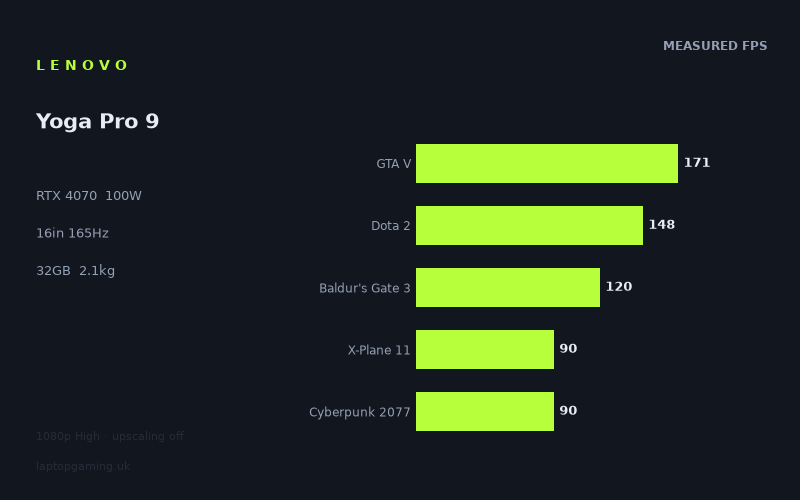
Frame rates
1920×1080, High preset, upscaling off. Averages 123fps across the 5 core benchmark games.
Measured on this machine. Source: Notebookcheck, 2024-04-23.
Not scored: no confirmed UK price
We have the full benchmark suite for this machine, so it ranks on the frame rate leaderboard like any other. What we don't have is a UK listing for this exact configuration - it's sold as a European review unit, or only in specifications that differ from the one tested. Since 30% of our score is value for money, scoring it would mean pretending price is no object, which would flatter it against every laptop you can actually buy. The frame rates below are real and comparable; there is just no buying recommendation to make yet.
How these numbers were produced
Frame rates here are not measured by us, and we label how each one was arrived at. A figure marked measured comes from a published run on that exact machine. A figure marked representative is derived from the GPU and its power limit (TGP) and cross-referenced against published reviews - a sound estimate of what that configuration delivers, but not a measurement of that specific laptop. Unless stated otherwise, numbers are 1920x1080, High preset, upscaling off. Where a laptop ships in several power configurations we use the wattage of the exact SKU listed, because a 140W RTX 5070 and a 115W one are not the same product.
In use
The short version
The Lenovo Yoga Pro 9 (16IMH9) is not a gaming laptop, and that is the most useful thing to understand about it before reading a single frame rate. It is a 16in creator and premium-productivity machine — 2.074kg, a 3200x2000 panel, 32GB of memory, a Core Ultra 9 185H — into which Lenovo has fitted an RTX 4070 running at a 100W power limit. The question is not whether it looks like a gaming laptop. It plainly doesn't. The question is whether the measured frame rates hold up against machines that were designed for nothing else.
They do, and by a wider margin than the chassis suggests. Notebookcheck's numbers put it at 124fps averaged across the five games in our scoring suite, with a top end of 244fps in Strange Brigade and a floor of 75fps in Horizon Forbidden West. Every single title on record clears 60fps at 1080p on the High preset with upscaling switched off. Four of the eleven measured games run past the 165Hz the panel can display. That is a genuinely capable gaming result from a machine that will sit unremarked in a meeting room.
The catch is the one that always attends this class of machine: you are paying for the 3200x2000 screen, the 32GB of memory, the 1TB SSD and the industrial design, and the RTX 4070 is riding along at a power limit well below what the same silicon draws in a thick-chassis gaming laptop. Against a dedicated 17in machine with an RTX 4090, Notebookcheck's numbers have it losing by an average of 63fps across their shared games. That is a real, large, visible gap and no amount of arguing about form factor closes it.
Buy this if you want one machine that does professional work on a very high-resolution screen and plays modern games seriously well in the evening, and if 2.074kg matters to you. Do not buy it if gaming is the primary job — the money goes further in a chassis that admits what it is.
Why there is no score on this page
We have not been able to confirm a UK price for this exact configuration, so this review carries no score. Nothing is wrong with the machine and nothing is missing from the benchmark data: the scoring suite is complete, all five games are on record, and it ranks normally on the frame rate leaderboard. But value is 30% of our score and there is no honest way to compute it without a price. When a confirmed UK price appears, the score will appear with it. We are not going to guess at what it costs, and you should be suspicious of anyone who does.
Performance
The measured figures come from Notebookcheck, dated 23 April 2024, and every one of them was taken at 1920x1080 on the High preset with upscaling turned off. That last condition matters more than it usually does here, because this is a laptop whose native panel is 3200x2000 and whose GPU generation is the one that made DLSS a default assumption rather than an option. What follows is the raw, unaided rasterisation performance of the hardware. Real-world figures with DLSS enabled on a modern title would be higher, sometimes substantially, but they would also be unrepeatable across machines and useless for comparison. Take these as the honest floor.
What a 100W RTX 4070 actually is
Nvidia's mobile RTX 4070 is not one product. It is a die and a memory configuration that a manufacturer can run anywhere within a broad power envelope, and the difference between the bottom and the top of that envelope is the difference between one tier of GPU and another. The Yoga Pro 9 runs it at 100W. That is a deliberate choice, not a compromise forced on Lenovo by incompetence. A 2.074kg 16in chassis with a thin profile and a display that consumes real power has a finite thermal budget, and Lenovo has spent it on a configuration that runs the GPU hard enough to matter without turning the machine into something that needs a desk fan.
What that buys, practically, is a GPU that stops scaling earlier than a high-wattage version of the same chip. In lighter, well-threaded titles the difference between 100W and a higher limit barely registers, because neither GPU is the limiting factor. In heavy, GPU-bound titles the difference is real and it shows up exactly where you would expect: at the bottom of the list, in the modern, expensive-to-render games. Horizon Forbidden West at 75fps and Cyberpunk 2077 at 90fps are the two figures on this machine's record that a higher power limit would move most.
The compensating factor is the CPU. A Core Ultra 9 185H is a strong part, and several of the games in this suite are more sensitive to CPU throughput than to GPU power. That combination — a capable processor paired with a mid-power GPU — produces a distinctive performance signature that runs right through the numbers below, and it is the single most important thing to grasp about how this machine behaves.
The top of the list: four titles past the panel's refresh rate
Strange Brigade returns 244fps. The Witcher 3 returns 242fps. F1 23 returns 209fps. GTA V returns 171fps. All four of those exceed what the 165Hz panel can display, which means that in those games the display, not the graphics card, is the constraint on what you actually see.
That is worth being precise about rather than treating as a trivia point. When a game renders above your refresh rate, the extra frames are not wasted in the sense of doing nothing — with variable refresh or with a frame cap they reduce latency and smooth frame delivery — but they are wasted in the sense of not improving the image. If you are playing The Witcher 3 on this machine at 1080p, you have a very large surplus of frames over what the panel can show. The sensible use of that headroom is not to leave it unused: it is to raise the resolution, raise the settings, or both.
Strange Brigade in particular should be read carefully. It is a well-optimised Vulkan title that has long served as a near-best-case rasterisation benchmark, and 244fps tells you about the ceiling of the hardware rather than about how the machine handles anything demanding. The Witcher 3 at 242fps is the more surprising of the two. The base game is a decade old now and runs on hardware far below this, so a high number is expected — but 242fps is a strong result that speaks to the CPU as much as the GPU, and it sits comfortably in the group of titles where this machine's Core Ultra 9 is doing a lot of the work.
F1 23 at 209fps is the most genuinely useful of the four. Racing games benefit from frame rate more than almost any other genre — input latency and the fidelity of motion at speed both improve with frames — and 209fps means you can cap at the panel's 165Hz and hold it with a large margin even when the grid is full and the spray is up. This is a machine on which competitive racing at 1080p is entirely comfortable.
The middle band: 171 down to 116
GTA V at 171fps, Dota 2 at 148fps, Far Cry 5 at 130fps, Baldur's Gate 3 at 120fps and Final Fantasy XV at 116fps make up the middle of the record, and this band is where the machine's character is clearest.
Dota 2 at 148fps is a strong figure and, importantly, a CPU-led one. MOBAs are not GPU-expensive; they are latency-sensitive and they punish weak processors during teamfights when the particle and unit counts spike. 148fps average on a 165Hz panel is the right shape of result for competitive play — you are not going to be looking at the frame rate counter in a serious game on this machine.
Baldur's Gate 3 at 120fps deserves attention because it is one of the five scoring-suite games and because it is a genuinely modern, genuinely demanding title. Larian's engine is heavy on the CPU in the later acts, where large numbers of simulated actors and lighting-heavy interiors combine, and 120fps at High is a comfortable result rather than a marginal one. A turn-based RPG does not need 165fps. It needs to never stutter, and 120fps average gives enough margin that the low points stay well clear of anything you would notice.
Far Cry 5 at 130fps and Final Fantasy XV at 116fps are the two older, heavier titles in this band. Final Fantasy XV in particular is a notoriously unoptimised port that leans on the GPU hard, and 116fps is a solid figure for it — it is one of the places where the 100W limit begins to be felt, but it is not felt painfully.
GTA V at 171fps is the one number in this band that is a little lower than the pattern would predict. On a machine returning 242fps in The Witcher 3 and 244fps in Strange Brigade, you might expect GTA V — an even older engine — to sit up with them. It does not; it sits well below The Witcher 3. That is the fingerprint of a title that is bounded by single-thread CPU throughput and driver overhead rather than by the graphics card, and it is exactly the kind of result that recurs across every machine we have on record. It is not a defect. It is what GTA V does.
The floor: Cyberpunk 2077, X-Plane 11 and Horizon Forbidden West
Three titles sit below 100fps: Cyberpunk 2077 at 90fps, X-Plane 11 at 90fps, and Horizon Forbidden West at 75fps. These are the numbers that decide whether this machine is a serious gaming proposition or a novelty, and they say it is serious.
Cyberpunk 2077 at 90fps at 1080p High with upscaling off is a good result for a 100W RTX 4070. This is still one of the heaviest rasterisation workloads in common benchmarking use, and 90fps means you have room to move: you could raise the resolution meaningfully, or turn settings up, or enable ray tracing at a lower internal resolution with DLSS, and land somewhere playable in each case. It is not a machine that struggles with Cyberpunk; it is a machine that has options in Cyberpunk.
Horizon Forbidden West at 75fps is the lowest figure on record and therefore the most informative single number here. Guerrilla's port is GPU-hungry in a way that is genuinely difficult to work around — dense foliage, long draw distances, expensive volumetrics — and it does not reward a fast CPU the way GTA V or Dota 2 do. 75fps is where the 100W power limit stops being an abstraction. On a version of the same GPU allowed to draw substantially more power, that figure would be higher. But 75fps at 1080p High is comfortably above the 60fps threshold that most people treat as the line between playable and not, and it is a long way from the mid-40s that would make you start turning things off.
X-Plane 11 at 90fps is a different case again and should not be read as a GPU result at all. Flight simulators are dominated by single-threaded scenery and physics work, and X-Plane 11 is one of the most CPU-bound titles in the suite. 90fps here is a statement about the Core Ultra 9 185H, not about the RTX 4070. It is a good figure — but if you are buying specifically for flight simulation, note that X-Plane 11 is an older build and the newer generation of simulators behaves differently.
Reading the spread
From 244fps at the top to 75fps at the bottom is a spread of more than three to one across eleven measured games. That is a wide range, and understanding where it comes from is the difference between using these numbers and merely quoting them.
Three separate mechanisms are at work. The first is genuine rendering cost: Horizon Forbidden West asks the GPU to do vastly more work per frame than Strange Brigade does, and no amount of CPU or memory changes that. The second is CPU-boundedness: GTA V, Dota 2 and X-Plane 11 are all limited by processor throughput long before the graphics card runs out, which is why they cluster in a band that has more to do with the Core Ultra 9 than the RTX 4070. The third is engine age and optimisation quality: Final Fantasy XV runs slower than its visuals justify because of how it was ported, and The Witcher 3 runs faster than a decade-old open-world game has any right to because CD Projekt's original engine was efficient.
The practical consequence is that you should not average these numbers in your head and assume the average predicts a game we have not measured. What predicts a new game is which of the three mechanisms dominates it. If it is a modern, GPU-heavy, foliage-and-volumetrics title, look at the Horizon Forbidden West figure. If it is a competitive shooter or a strategy game, look at Dota 2 and GTA V. The mean of 124fps across the scoring suite is a useful leaderboard position, not a prediction.
Memory, storage and the rest of the platform
32GB of memory is above what any game currently needs and comfortably above what most gaming laptops ship with in this bracket. It is there because this is a creator machine, and it is genuinely useful if you are running a browser, a Teams call, a project file and a game in the background — or, more plausibly for this audience, if you are doing video or 3D work during the day and gaming at night. 1TB of SSD is adequate rather than generous by 2024 standards; a handful of modern installs will fill it, and you should assume you will be managing what is installed rather than keeping a library resident.
The 84Wh battery is a normal size for this class of chassis. We have no measured battery life figure on record for this machine, so we are not going to characterise its endurance. What can be said with confidence is structural rather than measured: no laptop runs an RTX 4070 at 100W from an 84Wh battery for any meaningful length of time, so gaming unplugged will be short and will very likely run the GPU at reduced power. That is true of every machine in this class and is not a criticism of this one.
The screen
The panel is 16in at 3200x2000 with a 165Hz refresh rate. Our record does not list the panel technology for this configuration, so we are not going to tell you whether it is IPS or OLED — that is exactly the kind of specification that gets assumed rather than checked, and we would rather leave a gap than fill it with a guess. What we can talk about with confidence is the resolution and the refresh rate, and both are unusual enough to matter.
The resolution is the point of the machine, and the reason to be careful
3200x2000 is 6.4 million pixels. 1920x1080 is 2.07 million. The native panel therefore asks the GPU for slightly over three times the pixel count of everything measured above. That is the single most important fact in this section, and it should reframe every frame rate you have just read.
Rendering cost does not scale perfectly linearly with pixel count — some of the per-frame work is resolution-independent, and CPU-bound titles barely move at all — but for a GPU-bound game the direction and rough magnitude are reliable. The titles at the top of the list have enormous headroom and would remain fluid at native resolution. The titles at the bottom would not. Horizon Forbidden West at 75fps at 1080p is not going to be a native-resolution game on this machine with upscaling off, and it would be dishonest to imply otherwise. We have no measurements at 3200x2000 to quote, so this is reasoning rather than data, and you should treat it as such.
The good news is that this is precisely the problem DLSS exists to solve, and this is precisely the GPU generation that does it well. Rendering internally at a lower resolution and reconstructing to 3200x2000 is not a compromise on a panel this dense — at this pixel pitch the reconstruction artefacts that are obvious on a 1080p screen become genuinely hard to see. The practical recommendation for anyone buying this machine is to treat native resolution as the desktop resolution and treat upscaled output as the gaming resolution, and to stop feeling bad about it.
165Hz on a 3200x2000 panel is a real choice
High-resolution creator panels frequently top out at 60Hz. This one runs at 165Hz, which tells you Lenovo was not treating gaming as an afterthought. Four of the eleven measured titles exceed 165fps at 1080p, and several more sit close enough that a modest settings adjustment would bring them up. That means the refresh rate is not decorative — there are real workloads on this machine where the panel is the limiting factor, which is the mark of a display that has been specified rather than merely bought.
It also has an important secondary benefit that has nothing to do with games. A high refresh rate makes everything feel better: window dragging, text scrolling, cursor movement. On a machine that will spend most of its life doing document and design work, 165Hz is a quality-of-life feature every hour of the day, not just in the evening.
The one thing worth flagging is the mismatch in what the panel demands. At native resolution the display is asking for three times the rendering work at a refresh rate 2.75 times that of a standard 60Hz screen. Nothing in the measured data suggests the GPU can satisfy both simultaneously in a demanding title. You will be choosing: high resolution or high frame rate. In a competitive shooter, drop to 1080p or 1600p and use the refresh rate. In a single-player showcase, run high and accept 60-90fps. The panel supports both approaches, which is more than most displays in this class manage.
Build, size and portability
2.074kg for a 16in laptop with a discrete RTX 4070 is the headline structural fact about this machine, and it is genuinely impressive. Dedicated 17in gaming machines of the kind that beat this laptop on frame rates are, as a class, a great deal heavier — we do not hold a confirmed weight for the specific rival compared below, so treat that as a statement about the category rather than about one machine. This one holds an RTX 4070 and still comes in comfortably under the threshold at which a laptop stops being carried.
What does a kilogram and a half actually mean? It means the difference between a laptop you carry daily without thinking about it and a laptop you plan your day around. At 2.074kg the Yoga Pro 9 is heavier than an ultraportable and you will know it is in the bag, but it is inside the range that people carry on a commute, take to a client site, or work from a café with. Above 3kg, almost nobody does that voluntarily. This is the practical dividing line in the laptop market and this machine is on the right side of it.
The 16in screen size deserves a note too. 16in in a modern chassis with slim bezels is not much larger in footprint than a 15.6in laptop from a few years ago, and the 3200x2000 aspect ratio is taller than 16:9, which is worth real productivity — more visible lines of code, more timeline in an editor, more page in a document. If you are choosing between this and a 17in gaming machine on screen area alone, the gap is smaller than the diagonal figures suggest once you account for the taller aspect.
The compromises that come with the thickness
We have no measured temperature or noise figures on record for this machine, so we are not going to characterise how hot or how loud it gets, and you should discount any review that does so without measurements. What we can say is what physics dictates: a 100W GPU plus a Core Ultra 9 in a 2.074kg 16in chassis has a smaller heatsink and less air volume to work with than the same components in a 3kg 17in machine, and the GPU power limit is set at 100W rather than higher for exactly that reason. That is the trade being made. Lenovo has chosen to keep the machine portable and quiet-capable rather than to chase the last 20% of GPU performance.
There is also a sustained-load question that the benchmark data cannot answer. Benchmark runs are short. A three-hour session is not, and a thin chassis has less thermal mass to absorb a long load. We have no sustained-load data on record for this machine, so treat the measured figures as representative of a benchmark run and not as a guarantee about hour three. That caveat applies to every thin machine with a powerful GPU, and it applies here.
The 84Wh battery in context
84Wh is a solidly sized battery for a 16in laptop — not the 99Wh legal maximum, but comfortably above the 50-60Wh that thin machines often ship with. Combined with a 2.074kg chassis and a Core Ultra 9 with its efficiency cores, the intent is clear: this is meant to be usable away from a socket for productivity work. Again, we have no measured runtime on record and we are not going to invent one. But a large battery in a portable chassis is a deliberate specification and it fits the rest of the machine's design.
How it compares
Every comparison below is drawn from machines of the same GPU generation and computed only on games both machines have on record, preferring the five scoring-suite titles. The spread is deliberate: the two closest rivals, the machine this one beats by the widest margin, and the machine that beats it by the widest margin. That range is what tells you whether a difference is meaningful, and it is why we do not simply publish the nearest competitor and stop.
Against the MSI Thin GF63 (RTX 4050): +47fps across 5 shared games
This is the widest win on record and it is worth starting with, because it establishes that the comparison method can separate machines. An average advantage of 47fps across five games is not a rounding error, not a run-to-run variance artefact, and not something a driver update reverses. It is the difference between one tier of GPU and another, plainly visible in the data.
The RTX 4050 in the Thin GF63 is two tiers down and in a machine built to a budget. The result is what you would expect: the Yoga Pro 9 wins comprehensively. What makes the comparison instructive is not that it wins but by how much, because that number is the yardstick for reading the close comparisons that follow. When you see a +2fps result later in this section, the honest question is whether the benchmark suite is capable of detecting differences at all — and this +47fps result answers it. The suite can separate machines. It separates these two by a mile. So when it reports a near-tie elsewhere, that near-tie is a finding, not a failure of measurement.
Practically: if you are choosing between these two, you are not really choosing at all. They are different products at different levels. The Thin GF63 exists to get a discrete GPU into a low price bracket. The Yoga Pro 9 exists to do professional work on a high-resolution panel and game well. The only thing they share is that both will run modern games, and one of them does so 47fps faster on average.
Against the HP Omen 17-db0079ng (RTX 4070): +2fps across 4 shared games
Here is the interesting one. The Omen 17 is a dedicated 17in gaming laptop with the same tier of GPU, and across four shared games the Yoga Pro 9 comes out 2fps ahead on average. That is a statistical tie. A 2.074kg creator laptop matches a 17in gaming machine.
The temptation is to declare victory for the thin machine and move on. That would be lazy. The correct reading requires understanding why the gap is this small, and the answer is in the test conditions. All of these figures are 1080p at High. At that resolution, several of the shared titles are not GPU-bound at all — GTA V, Dota 2 and X-Plane 11 are all limited by CPU throughput and driver overhead long before the graphics card saturates. When two machines both have strong processors, those titles return similar numbers regardless of how much power the GPU is allowed to draw. The lighter games in the shared set compress genuine GPU differences towards zero, and a four-game average that includes several of them will report a near-tie even when a real difference exists.
Does that mean the tie is fake? No — and this is where the +47fps result above earns its place. The same method, on the same kind of shared-game average, found a 47fps gap against the RTX 4050 machine and a 63fps deficit against the RTX 4090 machine described below. The method is not blind. It reports large differences when large differences exist. So the +2fps against the Omen 17 is a real result: at 1080p High, in the games both machines have on record, these two perform equivalently.
What it does not tell you is how they diverge at higher resolutions or under sustained load, where GPU power limits assert themselves and thermal headroom matters. We have no data on either point for this pairing, so the honest summary is narrow and specific: at 1080p, on these four games, they are level. If you want a machine for 1080p gaming and you also want it to weigh 2.074kg, the data says you lose nothing by choosing the lighter one.
Against the Schenker XMG Core 15 (M24) (RTX 4060): +0fps across 5 shared games
An exact tie across five shared games against a machine one GPU tier below. This is the closest result on record and the one that most needs explaining rather than merely reporting.
Five shared games is a better sample than four, which makes the tie more meaningful, not less. And the explanation is the same mechanism at work more strongly: at 1080p, the shared set will be weighted towards titles that both machines can run comfortably, and comfortable titles are the ones where the CPU and the API, not the GPU, set the ceiling. A machine with a 100W RTX 4070 and a machine with an RTX 4060 will both hit that ceiling in the same places, at the same numbers.
There is a second factor specific to this pairing. The XMG Core 15 is a 15in gaming chassis from a manufacturer that habitually configures GPUs towards the upper end of their power range, and an RTX 4060 running near the top of its envelope closes a great deal of the gap on an RTX 4070 running at 100W. The tiers on the box are further apart than the tiers in the chassis. This is the central lesson of the entire RTX 40 mobile generation: the number on the GPU tells you less than the power it is allowed to draw, and a well-fed lower tier routinely matches an underfed higher tier.
The buying implication is straightforward and slightly uncomfortable for anyone who shops by GPU tier. If your criteria are 1080p gaming performance and nothing else, these two machines are equivalent and you should choose on everything else — screen, weight, memory, build, price. The Yoga Pro 9's case is not that it is faster. It is that it delivers the same frame rates in a 2.074kg chassis with a 3200x2000 panel and 32GB of memory. Whether that is worth the difference in price is a question we cannot answer here, because we do not have a confirmed price for this configuration.
Against the Asus ROG Strix Scar 17 (RTX 4090): −63fps across 3 shared games
And here is the ceiling. The Strix Scar 17 with an RTX 4090 averages 63fps more across the three games both machines hold. That is an enormous gap — larger in absolute terms than the 47fps by which the Yoga Pro 9 beats the RTX 4050 machine.
Three shared games is a thinner sample than five and that should temper how much weight the exact figure carries. But the direction and magnitude are not in doubt, and the size of the number does something valuable: it demonstrates that this benchmark set genuinely can resolve large GPU differences even at 1080p. When a comparison is capable of reporting a 63fps deficit, its report of a 2fps difference elsewhere carries weight.
What separates the two machines is exactly what you would expect. The Strix Scar 17 is a large, heavy 17in gaming laptop with a top-tier GPU running at a high power limit and a cooling system built to sustain it. It exists to convert electricity into frames and it is unapologetic about the consequences — the weight, the size, the power brick, the fact that you would not take it to a meeting. The Yoga Pro 9 is the opposite proposition in every respect but one: they both play games well.
If frame rate is your only criterion, the choice is not close and you should buy the Scar. If you want a machine you can also do your job on, carry daily, and use in an office without comment, the Yoga Pro 9 gives up 63fps on average in the shared titles to get there. That is the price of the form factor, stated plainly. It is a big price and it is honestly earned by the machine that charges it.
What the four comparisons say together
Laid side by side, the pattern is clean. Against an RTX 4050 machine: +47fps. Against another RTX 4070 machine: +2fps. Against an RTX 4060 machine: +0fps. Against an RTX 4090 machine: −63fps.
The two large numbers bracket the two small ones, and that is the shape of a working measurement. The suite separates GPU tiers when the tiers are genuinely far apart, and reports ties when machines land in the same performance band regardless of what is printed on the GPU. The RTX 4060, the 100W RTX 4070 and the 17in RTX 4070 all occupy a single band at 1080p. Below it sits the RTX 4050. Above it, at a considerable distance, sits the RTX 4090.
For a buyer, the useful conclusion is that within that middle band you should stop shopping for frame rates and start shopping for everything else, because the frame rates are the same. That is where the Yoga Pro 9's case is strongest: it is in the performance band you want, and it is the only machine in that band you would carry to work.
Who it's for
This machine has a specific, identifiable buyer, and being clear about who that is matters more than a summary of its virtues.
Buy it if
You need one laptop for both work and games. This is the core case. 32GB of memory, a Core Ultra 9, a 16in 3200x2000 panel and an RTX 4070 covers video editing, 3D work, large codebases, heavy multitasking — and then plays Baldur's Gate 3 at 120fps and Cyberpunk 2077 at 90fps in the evening. Very few machines do both halves properly. This one does.
Portability is a hard requirement, not a preference. At 2.074kg this genuinely travels. If your laptop goes in a bag several times a week, the difference between this and a 3kg+ gaming machine is not a specification detail, it is the difference between a tool you use and a tool you leave at home.
You want a high-resolution screen for reasons other than gaming. 3200x2000 at 165Hz is a superb specification for design work, photo editing, code and documents, and the high refresh rate makes the whole system feel quick in a way that a 60Hz creator panel never does. If the panel is what you are buying, the fact that it also games well is a bonus rather than the point.
You are comfortable using DLSS. Given the panel's pixel count, upscaling is how you get the most out of this machine in demanding titles. If that is a philosophical objection for you, this is the wrong machine — the GPU cannot brute-force 3200x2000 in modern titles and pretending otherwise helps nobody.
Buy something else if
Gaming is the primary job. The −63fps result against the RTX 4090 machine is the whole argument. If you want maximum frames and you do not need the machine to be portable or presentable, the money buys substantially more performance in a chassis designed for nothing else. Do not buy a creator laptop for gaming and then resent it for not being a gaming laptop.
You mainly want 1080p performance and nothing else. The +0fps against the RTX 4060 machine and +2fps against the other RTX 4070 machine say it directly: at 1080p, cheaper machines match this one. Everything you pay above them buys the screen, the memory, the weight and the build. If those do not matter to you, they are not worth paying for.
You play GPU-heavy modern titles at high settings and refuse to upscale. Horizon Forbidden West at 75fps at 1080p is the warning. That figure is native-resolution 1080p, and this laptop's native panel is more than three times that pixel count. The mathematics do not work in your favour and no configuration setting fixes it.
You need a large games library resident on the machine. 1TB fills quickly with modern installs. Plan on external storage or on a disciplined install-and-delete routine.
The honest summary
The Lenovo Yoga Pro 9 is a very good creator laptop that games better than it has any obligation to. Notebookcheck's figures show it matching dedicated gaming machines of the same and adjacent GPU tiers at 1080p, clearing 60fps in every measured title, and falling well short only of a top-tier RTX 4090 machine that costs and weighs considerably more. The 100W power limit is a real constraint and it shows at the bottom of the list, but the machine never becomes uncomfortable — the worst result on record is 75fps.
Whether it is worth buying comes down to the one thing we do not have: a confirmed UK price for this configuration. When that arrives we will score it properly, on the same basis as every other machine on the site, with value carrying its full 30% weight. Until then, treat this as an assessment of what the machine does rather than of what it is worth. What it does is genuinely impressive for something this light.