Review
Lenovo Legion 7 16 review
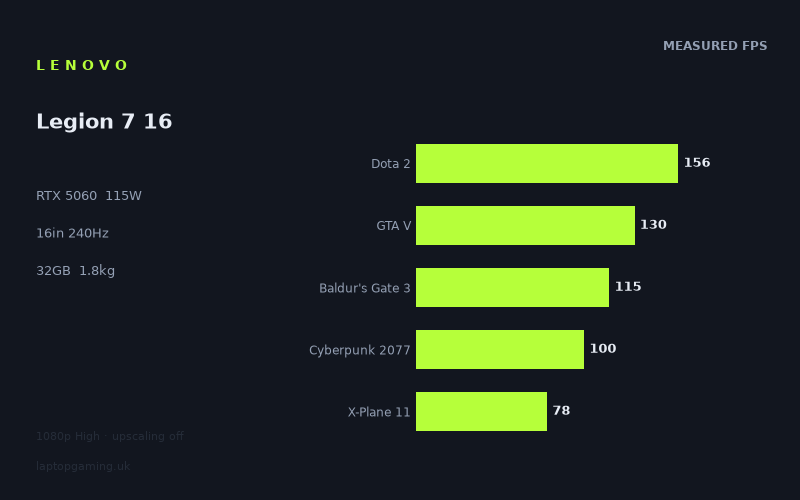
Frame rates
1920×1080, High preset, upscaling off. Averages 115fps across the 5 core benchmark games.
Measured on this machine. Source: Notebookcheck, 2026-04-25.
Not scored: no confirmed UK price
We have the full benchmark suite for this machine, so it ranks on the frame rate leaderboard like any other. What we don't have is a UK listing for this exact configuration - it's sold as a European review unit, or only in specifications that differ from the one tested. Since 30% of our score is value for money, scoring it would mean pretending price is no object, which would flatter it against every laptop you can actually buy. The frame rates below are real and comparable; there is just no buying recommendation to make yet.
How these numbers were produced
Frame rates here are not measured by us, and we label how each one was arrived at. A figure marked measured comes from a published run on that exact machine. A figure marked representative is derived from the GPU and its power limit (TGP) and cross-referenced against published reviews - a sound estimate of what that configuration delivers, but not a measurement of that specific laptop. Unless stated otherwise, numbers are 1920x1080, High preset, upscaling off. Where a laptop ships in several power configurations we use the wattage of the exact SKU listed, because a 140W RTX 5070 and a 115W one are not the same product.
In use
The short version
The Lenovo Legion 7 16 is an unusually interesting gaming laptop on paper because its measured game performance does not sit where the badge alone might lead buyers to expect. It combines an RTX 5060 running at a 115W GPU power limit with a Ryzen AI 9 HX 470, 32GB of memory, a 16in 2560x1600 OLED display and a 240Hz refresh rate. That is a high-spec surrounding package for a machine whose graphics hardware is still, fundamentally, an RTX 5060 with 8GB of VRAM.
Notebookcheck’s benchmark data shows a laptop that is very capable at 1920x1080 on the High preset with upscaling disabled. The measured figures range from 78fps in X-Plane 11 to 264fps in Strange Brigade. Across the five scoring-suite games, the mean is 116fps. That is enough performance for smooth conventional gaming in every result listed, but it is not enough to treat the 240Hz panel as something that will routinely be filled in demanding modern games. The panel’s refresh rate is a ceiling, not a promise that the GPU can reach it.
The strongest argument for the Legion 7 16 is not that it dominates every benchmark. It does not. The argument is that its measured performance is remarkably close to several machines listed with RTX 5070 or RTX 5070 Ti graphics, including an RTX 5070 Ti-equipped Gigabyte Gaming A16 Pro GA6DH that it trails by only 3fps across their shared games. That does not make the Legion’s RTX 5060 equivalent to every higher-tier GPU in every workload, but it does make this a machine worth taking seriously if the published game results matter more than the product name printed on the specification sheet.
There is no overall score for this configuration because the exact UK price has not been confirmed. The benchmark suite is complete and the laptop ranks normally for frame-rate performance, but value cannot be calculated without a confirmed price. That is not a criticism of the machine; it is simply the limit of what can be argued responsibly from the available information.
For a buyer who wants a comparatively light 16in gaming laptop, 32GB of memory, an OLED screen and measured 1080p High-preset performance that is generally well above 100fps outside the more demanding or CPU-sensitive titles, the Legion 7 16 has a persuasive case. For someone buying specifically to play every new demanding game at the screen’s native 2560x1600 resolution and close to 240Hz without leaning on upscaling, the evidence is much less encouraging. The measured figures were collected at 1920x1080, not at 2560x1600, and the available data does not justify pretending that 1080p results automatically transfer to the panel’s native resolution.
This is therefore a laptop to buy for a balanced mix of strong measured gaming performance, a fast OLED display and a portable-for-its-class 1.784kg weight. It is not a laptop to buy on the assumption that every element of the specification operates at its headline maximum all of the time. Its 240Hz panel is genuinely useful in some games, particularly where the measured figures are already very high, but it is ambitious relative to the frame rates seen in the more demanding titles.
Performance
What the benchmark data actually says
The most useful way to read the Legion 7 16’s results is as a spread rather than as a single average. The five-game scoring-suite mean of 116fps is a useful summary, but it does not tell the full story. The individual results vary substantially: Dota 2 runs at 156fps, GTA V at 130fps, Baldur’s Gate 3 at 115fps, Cyberpunk 2077 at 100fps and X-Plane 11 at 78fps. Those are all measured at 1920x1080 using the High preset, with upscaling switched off.
That range matters because buying advice changes depending on the game. A mean of 116fps sounds like a straightforwardly high-refresh experience, and in many games it is. But X-Plane 11 at 78fps is a very different proposition from Dota 2 at 156fps. Both results are playable, both are smooth by ordinary gaming standards, and both are below the panel’s 240Hz maximum. Yet the reason a buyer might choose the Legion for one game could be very different from the reason they might choose it for another.
At the faster end of the data, Strange Brigade reaches 264fps. It is the only listed result above the screen’s 240Hz refresh rate. F1 24 is also very quick at 208fps, while F1 25 records 161fps. Dota 2 reaches 156fps. These are the titles in which the 240Hz display has the clearest practical role. Strange Brigade has enough measured performance to exceed the panel’s refresh limit at the tested settings, while F1 24 comes close enough that the display’s high refresh rate is relevant rather than decorative. F1 25 and Dota 2 do not reach 240fps in the published figures, but they are still operating in a range where a 240Hz panel is more defensible than it would be for a machine whose typical results sat much nearer 60fps.
The middle of the benchmark range is where the Legion looks most balanced. GTA V at 130fps, Final Fantasy XV at 122fps and Baldur’s Gate 3 at 115fps are all comfortably above 100fps at the tested settings. That gives the laptop a meaningful advantage over a system merely capable of sustaining a basic 60fps target. The extra performance can support smoother motion, reduce the extent to which frame-rate drops are felt, and give the user room to adjust settings according to preference. However, those figures should not be recast as 240Hz results. They are good high-frame-rate figures, not evidence that the laptop can consistently supply a full 240 frames every second in these games.
Cyberpunk 2077 at 100fps is an important result because it is a demanding modern game and it reaches a clean three-figure frame rate at 1920x1080 High with upscaling disabled. That is a strong outcome for the stated test conditions. It also shows why upscaling needs to be kept out of the discussion unless it is specifically measured. The 100fps result is useful precisely because it is not being inflated by an unlisted upscaling mode. It gives buyers a direct performance point: at the published settings, this laptop can run Cyberpunk 2077 at 100fps.
X-Plane 11 at 78fps is the counterweight to the headline-friendly results. A figure of 78fps remains comfortably playable, but it is a reminder that some games are constrained by more than the broad RTX product tier. Simulation games can respond differently to hardware than graphics-focused action games, and the benchmark data shows that the Legion is not uniformly a 100fps-plus laptop in every title. The Ryzen AI 9 HX 470 may be a high-end processor, but the available results do not support a claim that it removes every CPU-related limitation in every game. The measured figure is what matters: X-Plane 11 reaches 78fps under the specified test conditions.
The significance of the 115W GPU power limit
The RTX 5060 in this Legion 7 16 has a stated GPU power limit of 115W. That is not a footnote. Laptop GPU names do not tell the whole performance story, because power limits, cooling arrangements, CPU pairing, memory configuration and game behaviour all influence the final frame rate. The 115W figure gives essential context for the published results: these are not generic RTX 5060 figures, but results from an RTX 5060 configured at this specific power limit in this specific Lenovo laptop.
The practical lesson is to judge the machine on its measured output rather than assume that every RTX 5060 laptop will perform the same way. The Legion 7 16’s position against its closest database rivals makes that especially clear. It is only 1fps behind the Lenovo Legion 5 15AHP G10, which also uses an RTX 5060 at 115W, across nine shared games. That close result is unsurprising in the sense that both machines share the same GPU class and stated power limit, but it remains useful evidence that the Legion 7 16 is operating in the same broad performance territory as that similarly configured Lenovo.
More strikingly, the Legion 7 16 is also only 1fps behind the Asus ProArt P16 with an RTX 5070 across nine shared games, and only 1fps behind the ASUS TUF Gaming A18 with an RTX 5070 at 115W across eight shared games. It trails the RTX 5070 Ti-equipped Gigabyte Gaming A16 Pro GA6DH by 3fps across eight shared games. These figures do not prove that RTX 5060, RTX 5070 and RTX 5070 Ti laptops are interchangeable. They are not. The comparisons cover only the games both machines have been measured in, and each laptop may differ in processor, display, cooling, memory, software configuration and other factors not detailed here.
What the rival data does show is that the Legion 7 16’s 115W RTX 5060 should not be dismissed as a low-output configuration simply because it carries the lower GPU name. In the available shared-game comparisons, it is extremely close to machines with ostensibly more powerful graphics hardware. That is an argument for looking at measured results first and specifications second. A laptop buyer should care about the performance delivered in the games they play, not merely the hierarchy implied by a GPU model number.
At the same time, the data should not be stretched into a claim that the GPU power limit guarantees a particular result in an untested game. It does not. The 115W figure describes the configuration; the listed benchmark results describe what that configuration achieved in the named games at 1920x1080 High with upscaling off. It does not establish native-resolution performance, ray-tracing performance, battery-powered gaming performance, fan noise, temperatures, sustained behaviour over an unreported period, or performance in every game engine.
This distinction is important because gaming laptop reviews often turn GPU power figures into shorthand for a whole set of assumptions. A buyer may see 115W and infer that the laptop must be louder, hotter, faster or less portable than another machine. None of those conclusions can be responsibly made here because the fact sheet does not provide noise, thermal or physical-dimension measurements. The only supported point is that the Legion’s RTX 5060 is specified at 115W and produces the listed Notebookcheck frame rates under the stated benchmark conditions.
Fast games, demanding games and CPU-sensitive games
The benchmark selection gives a useful cross-section of the kinds of performance a buyer can expect, even though it cannot answer every question. Strange Brigade at 264fps is the obvious example of a game where the Legion can make meaningful use of the 240Hz screen. The result is above the display’s refresh rate, so the panel rather than the benchmarked frame rate becomes the limiting factor for visible refresh. That does not mean every moment of play will behave identically, but it does mean the published result is high enough for the panel’s maximum refresh rate to have a real purpose.
F1 24 at 208fps is slightly below that point but still notably high. For a player who values rapid on-screen response and smooth movement in racing games, this is one of the Legion’s most attractive published figures. F1 25 at 161fps is lower, demonstrating why a sequel should not be assumed to run identically simply because it belongs to the same series. The difference between the two games is not something that can be pinned on a single component from this data alone. The useful conclusion is simply that this laptop is fast in both, while F1 24 places it closer to the display’s full refresh potential than F1 25 does.
Dota 2 at 156fps is another result that supports the 240Hz panel, though it does not fully exploit it. Competitive players often care about high and consistent frame rates, but only the measured average figure is provided here. There are no reported minimum frame rates, frame-time charts or latency figures, so it would be wrong to claim a particular competitive advantage beyond the published 156fps result. Still, 156fps at 1920x1080 High with upscaling off is a substantial figure and suggests that the Legion has more to offer than a basic 60Hz or 120Hz gaming experience in this particular game.
GTA V at 130fps and Baldur’s Gate 3 at 115fps reinforce the same broader conclusion. The machine is comfortably beyond the threshold at which a 240Hz panel becomes pointless, but it is not delivering 240fps in these titles according to the benchmark data. This is exactly where buyers should avoid binary thinking. The panel is not wasted because the laptop does not reach 240fps everywhere. A refresh ceiling can still accommodate frame rates above 120fps, and the Legion repeatedly produces those levels in the listed games. Equally, a 240Hz badge should not be treated as evidence of universal 240fps gaming.
Cyberpunk 2077 at 100fps is especially useful as a reality check. A laptop capable of 264fps in Strange Brigade may look, from one result alone, like an uncompromised high-refresh gaming machine. Cyberpunk 2077 shows the other side: more demanding modern games can bring the result down to 100fps even at 1920x1080 High and with upscaling disabled. That is still a positive result, but it is a very different class of performance from the lighter or older titles in the list.
X-Plane 11 at 78fps makes the point more sharply. The Legion’s broad benchmark mean should not be read as a minimum expectation. The machine is not a guaranteed 116fps laptop in every game, because the average includes much faster results. Buyers whose main interest is flight simulation should pay much closer attention to the 78fps result than to Strange Brigade’s 264fps. Conversely, a player focused on games represented by the faster end of the data has stronger reason to value the 240Hz panel.
The limits of the available frame-rate evidence
The published figures are detailed enough to support a serious gaming assessment, but they are not a complete performance map. Every result was measured at 1920x1080, on the High preset, with upscaling off. That consistency is a strength because it makes the numbers comparable across the listed games. It is also a limitation because the laptop itself has a 2560x1600 screen. The native panel resolution is higher than the benchmark resolution, and no native-resolution measurements are provided.
That means there is no basis for publishing a native 2560x1600 frame-rate estimate for any of these games. It would be tempting to take the 1080p results and reduce them by a guessed amount, but that would be invented data. Different games scale differently with resolution, and some may become more GPU-limited while others may be constrained elsewhere. The only defensible position is that the Legion 7 16 has measured 1080p High-preset performance, while its native-resolution performance has not been supplied.
The same caution applies to upscaling. The fact that upscaling was off is meaningful because the listed frame rates are not dependent on a mode that might affect image quality or vary between titles. But it does not permit a claim about how much faster the laptop would be with upscaling enabled. There are no corresponding figures in the fact sheet. A buyer can reasonably see the published results as a clean baseline, but not as a complete guide to every graphics option the games may provide.
There is also no information here on ray tracing, path tracing, frame generation, low settings, ultra settings, external displays, plugged-in versus battery operation, or game performance after system updates. None should be guessed at. The performance case for the Legion should rest on what is known: it has a 115W RTX 5060, 8GB of VRAM, a Ryzen AI 9 HX 470, 32GB of memory, and the listed Notebookcheck frame rates at the specified settings.
The screen
A 2560x1600 OLED panel with a 240Hz ceiling
The Legion 7 16 has a 16in OLED screen with a 2560x1600 resolution and a 240Hz refresh rate. This is a premium display specification in structural terms: it is a larger-than-1080p panel, it has a high refresh ceiling, and it uses OLED panel technology. However, the fact sheet does not provide brightness, colour coverage, HDR behaviour, response-time measurements, coating details or panel uniformity data. Those are all important display characteristics, but they cannot be assumed from the OLED label alone.
The central buying question is therefore not whether the specification looks impressive. It does. The question is whether the benchmarked GPU performance lines up with the screen’s resolution and refresh rate. The answer is mixed, and it is mixed in a useful rather than a disastrous way. The 240Hz refresh rate is supported by some of the measured 1080p results, particularly Strange Brigade at 264fps and F1 24 at 208fps. It is less fully used by F1 25 at 161fps, Dota 2 at 156fps, GTA V at 130fps, Final Fantasy XV at 122fps and Baldur’s Gate 3 at 115fps. It is much less aligned with X-Plane 11 at 78fps.
That does not mean the screen specification is mismatched to the laptop. A display does not need to be driven at its maximum refresh rate in every game to be worthwhile. The Legion’s frame-rate range includes enough results above 100fps that a 240Hz panel is not an absurd inclusion. But it does mean buyers should understand what they are paying for. This is not a machine whose benchmark data demonstrates universal 240fps gaming. It is a machine with a 240Hz display that can be used more fully in some games than in others.
Benchmark resolution versus native resolution
The key complication is that Notebookcheck’s figures were measured at 1920x1080, while the Legion’s panel is 2560x1600. The benchmark resolution is not the panel’s native resolution. That matters both for image presentation and for performance expectations, but the fact sheet does not contain the additional measurements required to quantify either issue.
At 1920x1080, the laptop reaches 264fps in Strange Brigade, 208fps in F1 24 and 161fps in F1 25. Those are direct and useful performance results. At 2560x1600, no figures are provided. It would be wrong to write that Strange Brigade will run at a particular native-resolution frame rate, that F1 24 will still approach 240Hz, or that Cyberpunk 2077 will remain at 100fps. The screen has the pixels; the benchmark data does not tell us how the GPU handles every one of them in these games.
This makes the Legion a better fit for buyers comfortable making settings decisions than for those who want a simple promise of native-resolution maximum-detail gaming. A buyer who is happy to use the published 1080p High-preset data as a guide has a clear baseline. A buyer who insists on 2560x1600 in every game has less certainty. That is not because the machine has failed a test; it is because the relevant test results are not included.
The absence of native-resolution figures is particularly important with a screen this sharp and fast. A 2560x1600 240Hz OLED display invites the expectation that games will look detailed and move exceptionally smoothly. The Legion can clearly produce very high measured frame rates in selected titles, but no benchmark result here confirms how often it can combine the native resolution with the panel’s full refresh capability. Buyers should not confuse a high-end display specification with a complete native-resolution performance guarantee.
Where the 240Hz refresh rate matters most
The most convincing case for 240Hz is in the games already approaching or exceeding that refresh rate at the tested settings. Strange Brigade at 264fps is the standout. The measured result is above 240fps, meaning the panel’s refresh limit becomes relevant. F1 24 at 208fps is close enough that the screen’s high-refresh capacity still has clear value. These are the results that justify describing the Legion as capable of high-refresh gaming rather than merely a laptop with a high-refresh display.
Dota 2 at 156fps and F1 25 at 161fps occupy the next tier. Neither reaches 240fps in the listed data, but both are high enough to benefit from a display capable of refreshing well beyond basic 60Hz and 120Hz levels. The benefit should not be overstated because there are no response-time or input-latency measurements in the fact sheet, but the frame-rate figures themselves are substantial.
For GTA V, Final Fantasy XV and Baldur’s Gate 3, the measured results of 130fps, 122fps and 115fps respectively make the 240Hz panel more of a headroom feature than a fully saturated target. There is no problem with that. A display can accommodate frame rates below its ceiling. The important thing is to set expectations accurately: these games demonstrate smooth high-frame-rate potential, not 240fps operation.
Cyberpunk 2077 at 100fps and X-Plane 11 at 78fps reveal the point at which the display’s refresh maximum becomes secondary to the game’s own performance demands. In those cases, the laptop is still producing credible results at the stated settings, but a buyer’s experience will be defined more by the game’s frame rate than by the panel’s 240Hz limit. This is why display specifications should always be read alongside measured results, not independently from them.
Build, size and portability
Weight is known; dimensions are not
The Lenovo Legion 7 16 weighs 1.784kg. For a 16in gaming laptop with a 115W RTX 5060, 32GB of memory, a 512GB SSD, an 84Wh battery and a 2560x1600 240Hz OLED screen, that weight is one of the machine’s most notable stated characteristics. It gives the Legion a clear advantage in portability discussions over the sort of gaming laptop buyer who expects to move between home, work, study or travel rather than leave the machine permanently on a desk.
It is important not to overstate what the weight figure can tell us. The fact sheet does not provide the laptop’s dimensions, charger weight, thickness, port selection, keyboard layout, chassis materials, hinge behaviour or cooling noise. We therefore cannot say whether it is thin, compact, easy to pack with its power supply, rigid, quiet or especially comfortable to use in a particular environment. The supported conclusion is narrower: at 1.784kg, the laptop itself is relatively manageable for a 16in gaming machine.
That weight matters because the Legion’s specification is not limited to casual or entry-level gaming. It pairs the RTX 5060 with a Ryzen AI 9 HX 470 and 32GB of memory, then adds a 16in OLED display with a 240Hz refresh rate. A machine configured this way is intended to do more than sit beside a monitor as a fixed desktop replacement. The 1.784kg figure makes it more plausible as a system that can move around, even though the full carrying burden cannot be assessed without the charger weight and dimensions.
The 84Wh battery needs careful interpretation
The battery is rated at 84Wh. That is the only battery figure provided. There is no measured battery life for web browsing, video playback, office work, light use, gaming, standby or any other scenario. As a result, no claim should be made about how long the Legion 7 16 lasts away from mains power.
The 84Wh capacity is still useful specification context. It tells us the laptop does not rely on an unspecified or tiny battery, but capacity alone is not runtime. Actual endurance depends on workload, screen settings, refresh behaviour, software, power modes and other factors that are not present in the fact sheet. The 240Hz OLED screen, 16in size and gaming-class GPU make runtime assumptions especially unsafe. A buyer who needs a laptop for long unplugged sessions should wait for measured battery-life data rather than infer it from the 84Wh label.
The same caution applies to gaming on battery. There are no battery-powered benchmark figures. The published Notebookcheck frame rates should not be assumed to represent unplugged performance. They are benchmark data under the stated settings, but no battery state is provided. If portable gaming performance is the priority, the available information is insufficient to say how close the laptop remains to its listed frame rates away from mains power.
Memory and storage in practical context
The Legion 7 16 includes 32GB of memory and a 512GB SSD. The 32GB memory allocation is a reassuring part of the configuration because it avoids the immediate concern that the laptop is paired with a minimal memory amount while carrying a high-end CPU, OLED display and fast refresh rate. The fact sheet does not state memory speed, memory upgradeability, storage expansion options or SSD performance, so none of those details can be assumed.
The 512GB SSD is more straightforward. It is the provided storage capacity, and that is all that can be said with certainty. There is no information on usable capacity, second-drive support, drive speed or whether the storage can be replaced. Buyers with a large existing game library should regard 512GB as the starting capacity specified for this exact configuration, not as evidence of a particular expansion path.
The 8GB of VRAM is equally important to acknowledge without exaggeration. It is the stated graphics memory capacity for the RTX 5060. The benchmark data shows that this configuration can reach 100fps in Cyberpunk 2077 and 115fps in Baldur’s Gate 3 at 1920x1080 High with upscaling off, so the published results do not indicate an immediate problem in those tested scenarios. But there is no VRAM-usage data, no native-resolution testing and no ray-tracing data. It would therefore be irresponsible either to declare 8GB universally sufficient or to claim that it is inadequate for all future games. The correct reading is narrower: this laptop has 8GB of VRAM, and the listed 1080p High-preset results were achieved with that configuration.
How it compares
Against the Lenovo Legion 5 15AHP G10
The closest Lenovo comparison is the Legion 5 15AHP G10, another RTX 5060 laptop specified at 115W. Across nine shared games, the Legion 7 16 averages 1fps behind it. That is effectively a near tie in the available comparison data, though the correct wording is still that the Legion 7 16 trails by 1fps.
The comparison is useful because both machines share the same stated GPU class and power limit. It suggests that the Legion 7 16 is delivering performance very close to another 115W RTX 5060 Lenovo in the games both have been measured in. The fact sheet does not provide the Legion 5 15AHP G10’s screen, weight, CPU, memory, storage or battery specification, so there is no basis for declaring one the better overall machine. The measured conclusion is simply that gaming performance is extremely close across their shared titles.
For a buyer deciding specifically between these two Lenovos, the Legion 7 16’s 16in 2560x1600 OLED 240Hz display, 1.784kg weight, 32GB of memory and 84Wh battery are known quantities. But without the corresponding complete specification and a confirmed UK price for either exact configuration, there is not enough evidence to make a categorical value judgement. The 1fps shared-game difference alone should not decide the purchase.
Against the Asus ProArt P16
The Asus ProArt P16 is listed with an RTX 5070. Across nine shared games, the Legion 7 16 is only 1fps behind it. This is one of the most notable comparisons in the database because it places the Legion’s RTX 5060 result almost level with a machine carrying the next GPU designation.
That does not mean the Legion 7 16 should automatically replace the ProArt P16 for every buyer. The shared-game comparison says nothing about unshared games, native 2560x1600 performance, display quality beyond the basic panel specifications, productivity workloads, noise, battery life or price. It does, however, challenge the assumption that choosing RTX 5070 branding necessarily guarantees a large gaming advantage in the measured titles.
For a gaming-led buyer, being 1fps behind across nine shared games is close enough that other known specification differences should matter more than the GPU label alone. The Legion offers a 16in 2560x1600 240Hz OLED screen, 32GB of memory and a weight of 1.784kg. No equivalent ProArt specifications are supplied here, so no direct feature verdict is possible. The practical point is that the Legion’s published frame-rate performance stands up exceptionally well in this particular comparison.
Against the ASUS TUF Gaming A18
The ASUS TUF Gaming A18 has an RTX 5070 at 115W. Across eight shared games, the Legion 7 16 trails by 1fps. Again, this is a remarkably small gap. The comparison is especially relevant because the TUF’s RTX 5070 is also specified at 115W, making the result a useful reminder that a higher GPU designation does not automatically translate into a large real-world separation in every benchmark set.
The Legion’s result is not a win; it is 1fps behind. But the margin is narrow enough that buyers should resist paying attention only to the GPU name. The Legion’s own display specification may appeal more to someone who wants a 16in 2560x1600 OLED 240Hz panel, while the TUF Gaming A18 may have different strengths not detailed in the available facts. There is no confirmed UK price for either exact configuration, so no price-based conclusion can be made.
The number of shared games also matters. Eight shared games is a meaningful comparison set, but it is not every game a buyer may play. The sensible conclusion is that the Legion is competitive with this RTX 5070 115W rival in the games both have been benchmarked in. It is not proof of identical performance everywhere.
Against the Lenovo Yoga Pro 9 16IAH G10 RTX
The Lenovo Yoga Pro 9 16IAH G10 RTX is another RTX 5060 system, and the Legion 7 16 trails it by 2fps across nine shared games. That is still a close comparison, but it is a slightly larger gap than the 1fps deficit seen against the Legion 5 15AHP G10, Asus ProArt P16 and ASUS TUF Gaming A18.
Two frames per second across nine shared games is not enough, by itself, to settle a buying decision. The Legion 7 16’s purpose-built gaming credentials are visible in its 115W GPU power limit and 240Hz display, while the Yoga’s wider role cannot be assessed from the limited rival information given. The useful takeaway is simply that the Legion is very close in gaming performance to another RTX 5060 laptop despite the different product families.
The comparison also underlines a broader point: the Legion 7 16 is not only close to laptops with a higher RTX designation. It is also close to another RTX 5060 machine from Lenovo’s own wider range. This makes it a laptop that should be compared on configuration, measured performance and price when price becomes available, rather than on family name alone.
Against the Gigabyte Gaming A16 Pro GA6DH
The Gigabyte Gaming A16 Pro GA6DH combines a Core 7 240H with an RTX 5070 Ti. On paper, that GPU label suggests a clear step above the Legion’s RTX 5060. Yet across eight shared games, the Legion 7 16 trails by only 3fps. That is the largest deficit among the listed closest rivals, but it remains a small one in context.
This is not evidence that the RTX 5070 Ti has no benefit. The comparison covers only eight shared games, and no assumptions should be made about games outside that group or at different settings. But it is evidence that this exact Legion configuration performs far more competitively than a simple RTX 5060-versus-RTX 5070 Ti comparison might imply.
For buyers tempted to spend more solely to reach an RTX 5070 Ti label, this is the rival that should prompt the closest inspection of actual benchmark data. The Legion is behind, but only by 3fps across the available shared games. Without confirmed UK prices, no value conclusion can follow. Still, if the final pricing puts these machines far apart, the small measured gap would become highly relevant. If their prices end up close, other factors would need to decide the choice. The facts supplied do not permit predicting either scenario.
Who it’s for
Buy the Legion 7 16 if measured 1080p performance is your priority
The Legion 7 16 makes the most sense for buyers who want evidence-based gaming performance rather than a purchase driven solely by component labels. Its 1920x1080 High-preset, no-upscaling results are strong across a varied game list: 264fps in Strange Brigade, 208fps in F1 24, 161fps in F1 25, 156fps in Dota 2, 130fps in GTA V, 122fps in Final Fantasy XV, 115fps in Baldur’s Gate 3, 100fps in Cyberpunk 2077 and 78fps in X-Plane 11.
That set of results suits someone who plays a mixture of competitive, racing, action, role-playing and simulation games and understands that performance will vary by title. It is particularly appealing for players whose main games resemble the faster end of the list, where the 240Hz display can be used meaningfully. Strange Brigade and F1 24 are the clearest examples, while F1 25 and Dota 2 still show high-frame-rate capability even though they do not reach 240fps in the published data.
It also suits a buyer who wants a 16in OLED gaming laptop without accepting an obviously heavy machine. At 1.784kg, the Legion is easier to justify as a system that may travel between locations than a much heavier desktop-replacement design. That does not establish how portable the complete package is, because charger weight and dimensions are unknown, but the laptop weight itself is favourable for its category.
The 32GB memory configuration is another reason to consider it. Buyers who do not want to begin with a minimal memory allocation will find that the Legion arrives with a substantial amount of system memory. The 512GB SSD is less impressive as a capacity statement than the memory allocation, but it is at least clearly specified rather than left ambiguous.
Buy something else if native-resolution certainty is essential
Buyers whose first requirement is proven 2560x1600 gaming performance should look elsewhere or wait for native-resolution measurements. The Legion’s screen is 2560x1600, but the published frame rates are at 1920x1080. There is no basis for claiming what it achieves at the panel’s native resolution in Strange Brigade, F1 24, Cyberpunk 2077, X-Plane 11 or any other listed title.
This matters most for buyers who want to run demanding new games at native resolution, high image settings and a very high frame rate without compromises. The Legion’s 100fps Cyberpunk 2077 result is strong at the tested settings, but it is not a native-2560x1600 measurement. The 78fps X-Plane 11 result shows that even at 1920x1080, game behaviour can vary substantially. A buyer with no interest in adjusting settings or using different resolution choices should not treat this review’s 1080p results as a native-screen guarantee.
Similarly, do not buy this laptop specifically because the 240Hz panel suggests universal 240fps gaming. Notebookcheck’s figures show one listed game above 240fps: Strange Brigade at 264fps. F1 24 reaches 208fps, while the rest of the listed games are lower. The display is a real strength, but the benchmark data supports a selective high-refresh argument, not a blanket one.
Buy something else if battery life, noise or thermals are decisive
A buyer who needs verified all-day battery life, quiet operation, low surface temperatures or detailed cooling behaviour should choose based on a review containing those measurements. The Legion has an 84Wh battery, but no battery-life figures are provided. It has a 115W GPU power limit, but no noise or temperature data is supplied. Those absences are not evidence of poor behaviour; they are simply gaps in the available information.
The same applies to buyers who need extensive connectivity details, a particular keyboard arrangement, a known chassis thickness or storage expansion confirmation. None of those facts are supplied here. The Legion may suit those needs, or it may not, but an attributable review should not fill in missing details with assumptions.
The final buying position
The Lenovo Legion 7 16 is best understood as a strong measured-performance laptop built around an ambitious display. Its RTX 5060 runs at 115W, and the published figures show that configuration delivering anything from 78fps to 264fps depending on the game. It is fast enough to make the 240Hz OLED screen meaningful in selected titles, fast enough to exceed 100fps in several demanding and mainstream games at 1920x1080 High with upscaling off, and close enough to several RTX 5070 and RTX 5070 Ti rivals in shared-game comparisons to make GPU branding alone a poor guide to its actual standing.
The caveat is straightforward. There is no confirmed UK price for this exact configuration, so it cannot be judged as a value purchase yet. There are also no native-resolution frame rates, battery-life figures, temperature results or noise measurements in the supplied data. Those limitations should shape the buying decision rather than be ignored.
If the final UK price is sensible relative to the machine’s measured frame rates and premium screen specification, the Legion 7 16 has the evidence to be a compelling choice for players who value a portable 16in OLED laptop with proven 1080p High-preset gaming performance. If the priority is guaranteed 2560x1600 performance near 240Hz in every demanding game, verified unplugged endurance or a full picture of acoustics and thermals, the available evidence is not enough to make that recommendation.