Review
Alienware 18 Area-51 review
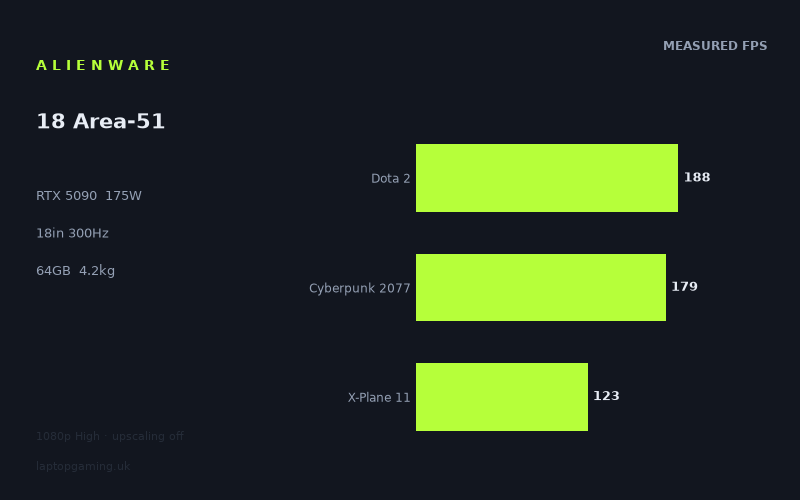
Frame rates
1920×1080, High preset, upscaling off.
Measured on this machine. Source: Notebookcheck, 2025-07-02.
Not scored: incomplete benchmark suite
Every scored laptop on this site is averaged over the same 5 games, and this one is short of Baldur's Gate 3, GTA V. A mean over 3 games is not comparable to a mean over 5, so we publish the figures we have and leave the score blank rather than rank it against machines tested on a different set. The numbers below are real - the suite is just incomplete.
How these numbers were produced
Frame rates here are not measured by us, and we label how each one was arrived at. A figure marked measured comes from a published run on that exact machine. A figure marked representative is derived from the GPU and its power limit (TGP) and cross-referenced against published reviews - a sound estimate of what that configuration delivers, but not a measurement of that specific laptop. Unless stated otherwise, numbers are 1920x1080, High preset, upscaling off. Where a laptop ships in several power configurations we use the wattage of the exact SKU listed, because a 140W RTX 5070 and a 115W one are not the same product.
In use
The short version
The Alienware 18 Area-51 is a desktop replacement that does not pretend to be anything else. An RTX 5090 running to a 175W total graphics power limit, 24GB of video memory, a Core Ultra 9 275HX, 64GB of system memory, a 1TB (1024GB) SSD, and an 18in 2560x1600 IPS panel at 300Hz, all carried in a 4.179kg chassis with a 96Wh battery. Every one of those figures pulls in the same direction: this is a machine designed to sit on a desk, plugged in, and behave like a tower that happens to fold.
The single most important thing about it is the one buyers most often get wrong when they shop by GPU name. A laptop RTX 5090 is not one product. Manufacturers fit the same silicon and the same badge into chassis that feed it wildly different amounts of power, and the frame rate follows the watts far more faithfully than it follows the marketing. Here the badge and the power budget line up: 175W is the top of the range this part is offered at, and the machine gets it. That is not a small thing. It is also not free, and the 4.179kg on the scales is precisely what it costs. An 18in chassis has the internal volume for the heatsink area, the fan diameter and the airflow path that a 175W GPU sitting next to a 275HX actually needs. Take that volume away and the same GPU name arrives with a smaller number attached to it.
So the question this review has to answer is not "is the RTX 5090 fast", which is uninteresting, but what the extra money buys over the tier below, and whether the measured evidence shows it. On that, the honest answer is uncomfortable, and we are going to lead with it rather than bury it: on the frame rates we hold, it largely does not.
The benchmark data covers six games, all at 1920x1080 on a High preset with upscaling off, measured by Notebookcheck on 2 July 2025. The range runs from 212fps in Final Fantasy XV down to 109fps in Black Myth: Wukong. Against an Alienware 16 Area-51 carrying an RTX 5080 at the same 175W limit, this machine averages 1fps ahead across three shared games. Against a Schenker XMG Neo 16 E25 carrying an RTX 5090, also at 175W, it averages 1fps ahead across three shared games. Both of those are ties. One frame per second is inside the noise floor of any repeated benchmark run, and anyone presenting it as a win is selling something.
Buy this machine if you want an 18in 1600p panel with a GPU that has genuine headroom above the resolution the numbers below were taken at, if 64GB of memory and a 24GB frame buffer solve a problem you actually have, and if the laptop is going to live on a desk. Do not buy it if you travel with your machine, if your library sits at the heavy end of the spread we work through below, or — most importantly — if you are making the decision on 1080p frame rates, because on those frame rates the tier below matches it and we can prove that with the data on this page.
What these numbers are, and what they are not
This site exists because most published gaming-laptop frame rates are unsourced, so it is worth being exact about what we are working from before any of it gets used to argue a conclusion.
The frame rates below were measured by Notebookcheck, not by us, on 2 July 2025, at 1920x1080, High preset, with upscaling turned off. We hold six titles: Final Fantasy XV, Dota 2, Cyberpunk 2077, Alan Wake 2, X-Plane 11 and Black Myth: Wukong. That is a reasonable spread of engine types but it is still only six games, and three of the four rival comparisons on this page rest on three shared titles each. Three is a thin basis for any claim about a machine's character. It is enough to catch a large difference and nowhere near enough to resolve a small one, and that distinction does almost all the work later in this review.
Two further gaps matter. First, our scoring suite runs on five games, and for this machine we have three of them: Dota 2, Cyberpunk 2077 and X-Plane 11. We hold no figures for Baldur's Gate 3 or GTA V. Every laptop that carries a rank on this site is averaged over the same five titles, so a machine with three of them cannot be placed against that field without quietly changing the maths in its favour or against it. We are not going to do that. This is a data gap, not a fault in the laptop, and it is stated once here so it does not need re-litigating in every section.
Second, and this one shapes the entire Performance section: the measurements are at 1920x1080 and the panel is 2560x1600. Those are 2,073,600 pixels and 4,096,000 pixels respectively. Dividing one into the other gives about 1.98, so the native panel asks for just under twice the pixel work of the resolution every number below was taken at. The published figures therefore overstate what a buyer sees on the screen the machine actually ships with, in every title, by an amount that varies by engine. We do not hold 1600p figures for this machine and we are not going to manufacture them by dividing, because the relationship between pixel count and frame rate is not linear and pretending otherwise would produce numbers that look authoritative and are not.
Everything below is written with those three constraints in place. Where the data supports a firm opinion, we will give one. Where it does not, we will say so plainly rather than filling the gap with confident prose.
Performance
What 175W actually means here
Total graphics power is the ceiling the laptop will let the GPU draw, and on mobile parts it is the single most predictive spec on the sheet after the GPU name itself. Two laptops with identical GPU badges and different power limits are not close relatives; they are different products with the same sticker. The gap between the top and bottom of the range a given mobile GPU is offered at is wide enough that a well-fed lower-tier part can beat a starved higher-tier one, which is why buying by badge alone is a reliable way to overpay.
The Alienware 18 Area-51 is at the top of that range. 175W is as much as this part is offered with, so there is no configuration of the same GPU that is being held back relative to this one by power budget alone. That is the cleanest version of the product: whatever the silicon can do inside its own design envelope, this machine is in a position to ask for it.
The reason it can is sitting in the weight figure. A GPU pulling 175W with a Core Ultra 9 275HX alongside it produces a heat load that has to leave the chassis continuously, not in bursts, and the variables that govern that are heatsink surface area, fan diameter, the length and cross-section of the airflow path, and how much of the machine's footprint can be given over to exhaust rather than to keyboard and battery. All of those scale with physical size. An 18in chassis at 4.179kg has that volume. A thinner, smaller machine does not, which is why the same GPU appears in thinner, smaller machines at lower limits. The weight is not a compromise the buyer accepts in spite of the performance; it is the mechanism that delivers it. That framing matters when we get to portability, because it stops the size being read as laziness on the designer's part.
What 175W does not do is guarantee that every game shows the benefit. A power limit is permission to work harder, not an instruction that there is work to be done. If the frame rate is being set by something other than the GPU — the processor, the engine's own internal ceilings, the resolution being too low to load the shaders properly — then the extra watts sit unspent. That is not a hypothetical caveat. It is the central finding of the comparison section, and the spread across the six measured titles is where the mechanism becomes visible.
The spread, from top to floor
Ranked, the measured figures at 1920x1080 run: Final Fantasy XV 212fps, Dota 2 188fps, Cyberpunk 2077 179fps, Alan Wake 2 133fps, X-Plane 11 123fps, Black Myth: Wukong 109fps. Top to bottom that is a range of 103fps (212 minus 109), and the top figure is just under twice the bottom one (212 divided by 109 is about 1.94). Across all six the arithmetic mean is 157fps (944 divided by 6). Across the three scoring-suite titles we hold — Dota 2, Cyberpunk 2077 and X-Plane 11 — the mean is 163fps.
A range that wide within a single machine is normal and it is also the most useful thing in the data set, because it tells you that the laptop's behaviour depends far more on what you play than on any single headline figure. Quoting a machine's average frame rate across a mixed suite is a way of describing a laptop that nobody actually experiences, since nobody plays the average. What matters is where the games you own sit in that spread.
Converting to frame times makes the ends of the range easier to weigh, and the arithmetic is simply 1000 divided by the frame rate. 212fps is a frame every 4.7ms. 109fps is a frame every 9.2ms. The 300Hz panel refreshes every 3.3ms. So even the fastest measured title is delivering roughly one frame per one and a half panel refreshes, and the slowest is delivering roughly one per three. We will come back to that under the screen, because it settles what the refresh rate is and is not doing.
The top: Final Fantasy XV and Dota 2
Final Fantasy XV at 212fps is the highest figure in the set and the least informative one about this GPU. It is an older renderer by the standards of the rest of the list, and at 1080p on a machine of this class it is well past the point where the graphics hardware is the constraint. Numbers like this are best read as a statement about the processor and the engine rather than about the GPU: the machine is producing frames as fast as the game is willing to hand them over. The Core Ultra 9 275HX is doing the work that sets this figure, and a slower GPU in the same chassis would very likely land close to it.
Dota 2 at 188fps is the same phenomenon with a different cause. It is a competitive title built to run on modest hardware, because a competitive title that demands a 5090 has no players. Its frame rate on a machine like this is set by draw-call handling and single-thread throughput, not by shader load. This is worth saying clearly because Dota 2 is one of our scoring-suite games and it is therefore pulling the three-game mean of 163fps upwards on the strength of a workload that barely engages the part the buyer is paying for. That is not an argument against including it — a scoring suite that only contained heavy renderers would misdescribe how people actually use these machines — but it is an argument for reading the mean alongside the spread rather than instead of it.
Both figures are genuinely good outcomes. High frame rates in light titles are exactly what a high-refresh panel is for, and there is nothing wrong with a machine that runs esports and older engines fast. The point is narrower: neither number can be used as evidence that the 175W RTX 5090 is doing something a cheaper GPU could not. They are the two titles in the set with the least ability to distinguish one high-end configuration from another, which is precisely why they matter so much when we come to the rival comparisons.
The middle: Cyberpunk 2077 at 179fps
Cyberpunk 2077 at 179fps is a strong showing and the most quotable figure in the set, because it is a demanding modern renderer that a lot of buyers actually own and it is still comfortably clear of every other heavy title measured here. At the High preset with upscaling off, 179fps means the game is being rendered honestly rather than reconstructed from a lower internal resolution, and there is a substantial margin above the rates most players would consider a target.
That margin is the important part rather than the number itself. A game running at 179fps at 1080p has somewhere to fall to when you increase the resolution to the panel's native 2560x1600, raise the preset, or switch ray tracing on. A game running near the bottom of the spread does not. Cyberpunk is therefore one of the better indicators in the set that this machine has genuine headroom at settings the benchmark did not use — and it is also one of the titles where a buyer with the 1600p panel has the most room to spend that headroom on image quality rather than on frames they cannot see.
It sits in the scoring suite alongside Dota 2 and X-Plane 11, and of those three it is by some distance the one carrying real information about the graphics hardware.
The floor: Alan Wake 2 and Black Myth: Wukong
Alan Wake 2 at 133fps and Black Myth: Wukong at 109fps are the two most demanding renderers in the set and, for anyone deciding whether this machine is worth the money, the two most important figures on the page.
They matter for a reason that has nothing to do with whether you own either game. These are the titles whose rendering techniques the rest of the industry is moving towards, and they are the only two here that load the GPU heavily enough to reflect what it is capable of. When a buyer asks how a machine will hold up over the next several years, the answer is not in the Final Fantasy XV figure — it is in these two. The floor of a machine's spread ages faster than the ceiling, because new games arrive at the floor. Games do not get lighter.
109fps at 1080p is a good result in absolute terms. What it is not is a comfortable one relative to the panel this machine ships with. Black Myth: Wukong is the title in the set with the least margin to give away, and it is the title where the roughly 1.98x pixel increase from 1080p to the native 2560x1600 will bite hardest, because it is the one where the GPU is closest to being the actual constraint. Alan Wake 2 at 133fps has slightly more room but is in the same category.
We are deliberately not producing 1600p estimates by dividing these figures by 1.98. That would be presenting invented numbers as measured ones. What we can say about direction, with confidence, is this: the titles that lose the most when the resolution rises are the ones where the GPU is already the limiting factor, and the titles that lose the least are the ones where something else is setting the pace. That inverts the ranking's usefulness. Final Fantasy XV and Dota 2 will hold up best at 1600p precisely because their 1080p figures were never about the GPU in the first place; Black Myth: Wukong and Alan Wake 2 will lose the most because theirs were. The gap between the top and the bottom of the spread will therefore be narrower at the panel's native resolution than the 103fps range at 1080p suggests — but the floor will be lower, and it is the floor that determines whether a game feels right.
If your library is dominated by titles of this kind, the sensible reading of this data set is that the 1080p numbers are not the ones to plan around, and that upscaling — switched off for these measurements — exists for exactly this situation.
X-Plane 11 at 123fps, and why it is not a GPU verdict
X-Plane 11 sits second from bottom at 123fps, below Alan Wake 2, and a reader skimming the list would reasonably conclude it is a heavy graphical workload. It is not, and misreading this title is one of the easier ways to draw a wrong conclusion from a benchmark table.
Flight simulators are dominated by work the graphics hardware cannot help with. Scenery streaming, terrain and object database traversal, flight-model physics running on a fixed timestep, and the simulation of systems that have to remain deterministic all land on the processor, and much of it lands on a small number of threads rather than spreading across all of them. The result is a title whose frame rate is set by single-thread processor throughput and memory latency far more than by shader throughput. Adding graphics power to a machine that is already comfortable in this title changes the number very little.
Two consequences follow. First, 123fps here is a comment on the Core Ultra 9 275HX and the platform around it, not on the RTX 5090, and it should not be read as the GPU struggling. Second — and this is the one that matters for the rest of this review — X-Plane 11 is a scoring-suite title. It is one of the three games our scoring mean of 163fps is built from, and it is a title in which two machines with very different graphics hardware can plausibly land close together. A shared-game comparison that includes it will compress a genuine GPU difference rather than reveal one.
That is not a criticism of the suite. A benchmark set with no processor-bound title in it would flatter every high-end GPU and tell buyers nothing about the simulators, strategy games and older engines that make up a large share of what people actually play. But it does mean that of the three scoring games we hold for this machine, two of them — Dota 2 and X-Plane 11 — have limited ability to separate one fast configuration from another at 1080p, and only Cyberpunk 2077 is doing that job. Hold that thought.
What the measured set does not cover
Three things this machine is sold on are absent from the data entirely, and a review that skated past them would be misleading by omission.
There are no figures at the panel's native 2560x1600. There are no ray-traced figures. And there is nothing that puts pressure on the 24GB frame buffer — a 1080p High-preset workload with upscaling off is not going to approach it, and the amount of video memory a game uses is driven overwhelmingly by texture resolution and render target size, both of which climb with resolution and settings. All three of those are the arguments for this GPU tier over the one below it, and we do not hold the figures. That is stated as a limit on what this review can conclude, not as a claim that the arguments are wrong.
The screen
300Hz against what the machine can actually produce
The panel is 18in, 2560x1600, IPS, at 300Hz. The refresh rate is the specification most likely to be oversold, so it is worth checking against the frame rates directly.
Nothing in the measured set reaches 300fps. The highest figure is Final Fantasy XV at 212fps, which is 88fps short of the cap (300 minus 212), and that is at 1920x1080 — below the panel's own resolution. Dota 2, the fastest scoring-suite title, is at 188fps, 112fps short. Black Myth: Wukong at 109fps is delivering roughly a third of what the panel can display. At the native 2560x1600 every one of those figures moves further from the cap, not closer.
The honest conclusion is that 300Hz is largely unused by the workloads we hold measurements for. It is headroom for esports titles run at low settings — the category the benchmark set represents with Dota 2 at High, which is not how competitive players configure a game — rather than a specification these six titles fill. Anyone choosing this machine because a 300Hz panel implies 300fps gameplay has misread what the number promises.
That is not the same as saying the refresh rate is worthless, and it would be lazy to leave it there. A panel's refresh rate governs how often it can present a new image, and the benefits do not switch on only when the frame rate reaches the cap. Below it, a faster panel still reduces the time a completed frame waits before being shown, which reduces end-to-end latency, and it still improves motion clarity by shortening the interval each image is held in front of the eye — sample-and-hold blur is a function of persistence, and higher refresh shortens persistence whether or not the game is saturating the panel. A title running at 188fps on a 300Hz panel is displayed better than the same title at 188fps on a slower one. It just is not being displayed 300 times a second.
There is also a practical benefit that has nothing to do with games: a high-refresh panel makes ordinary desktop movement, scrolling and window dragging noticeably smoother, and on a machine that will spend most of its life plugged in on a desk, that is a real fraction of the hours it is switched on.
So the fair verdict on the refresh rate is that it is a genuine feature that this machine's measured workloads do not exercise. If the panel were 240Hz instead, none of the six games measured here would behave differently, since none of them reaches 212fps. The 300Hz specification is bought for the games we do not have figures for.
2560x1600 on an 18in panel
The resolution is the more consequential half of the screen specification, and it is the reason the performance section carries the caveat it does. At 2560x1600 the panel asks for about 1.98 times the pixels of the resolution every measured figure was taken at. The published numbers are not wrong, but they describe a configuration the buyer will not be running by default, and the gap between them and native performance is largest exactly where the machine has least margin.
On an 18in diagonal, 2560x1600 is a sensible pairing. It is enough resolution that the pixel structure is not obtrusive at desk distance on a screen this size, without demanding the pixel counts that make a laptop GPU's life genuinely difficult. The 16:10 aspect ratio also gives more vertical space than a 16:9 panel of the same width, which is worth having for anything that is not a game — and on a 4.179kg machine, some of the hours are going to be spent on things that are not games.
It also means the GPU is not obviously over-specified for the display, which is the situation a 5090 finds itself in on a 1080p panel. Here there is a legitimate reason to want the extra graphics power: the screen is asking for it. The frustration is that the measured set does not tell us how well the machine answers.
IPS, and what that trade looks like at this size
An IPS panel at 18in is the conservative, defensible choice. IPS gives wide viewing angles and — the point that matters most on a machine that will sit on a desk displaying the same interface for hours at a time — no risk of burn-in from static elements. Game HUDs, taskbars and dock icons are exactly the kind of persistent bright content that punishes emissive panels over years of use, and an 18in laptop is likely to have a longer working life in one place than a portable one.
The cost is equally well understood. IPS cannot produce the black level an OLED can, because it works by blocking a backlight rather than by switching individual pixels off, and that shows up as raised blacks and reduced contrast in dark scenes. On a machine likely to be used in a dim room playing games with a lot of dark content, that is a real limitation, and anyone who has seen an OLED handle a night scene will notice it.
We hold no measurements for this panel's brightness, contrast ratio, response time or colour gamut coverage, so this review is not going to characterise it beyond the panel technology. Those figures vary substantially between IPS panels — the technology name sets the boundaries of what is possible, not the quality of a specific implementation — and quoting typical values would be inventing them. If panel measurements arrive we will use them. For now, the defensible statement is that IPS at this size is the low-risk option and OLED is the high-contrast one, and which of those you want is a preference rather than a specification error.
Build, size and portability
4.179kg, literally
"Desktop replacement" is used loosely enough to have lost most of its meaning, so it is worth applying it precisely: at 4.179kg this machine replaces a desktop in the sense that it occupies the same role, not in the sense that it can be carried like a laptop. That is more than four bags of sugar, before the power supply, and an 18in machine has a footprint that will not fit comfortably into most bags built for laptops or onto most aircraft tray tables.
Then there is the charger. A 175W graphics power limit alongside a Core Ultra 9 275HX means a power adapter sized for the combined draw of both under load plus the rest of the system, and adapters in that class are large and heavy in their own right. The realistic travelling weight is therefore meaningfully above the 4.179kg on the specification sheet, though we do not hold a figure for the adapter and are not going to guess one. Anyone weighing this machine against a lighter one should weigh the whole kit, not the laptop alone.
We have not handled the machine and cannot comment on materials, panel flex, hinge feel, keyboard travel or fan noise, because those require sitting in front of it and we have no measurements for any of them. What the specifications do support is a straightforward statement about how it will get used: it will be set up somewhere and left there, and moved occasionally rather than daily.
96Wh, and the arithmetic of unplugged use
The battery is 96Wh, which is at or near the practical ceiling for a laptop battery given airline transport limits. It is a large battery in absolute terms, and it is nowhere near enough to feed this hardware.
The reasoning does not need a runtime figure to be convincing. A 175W graphics power limit is 175W of GPU draw alone, before the processor, before memory, before the 18in panel at 300Hz, before storage and fans. A 96Wh cell cannot sustain that kind of combined draw for a meaningful period, which is why machines in this class either reduce the graphics power limit substantially on battery or accept very short runtimes. We hold no measured battery life for this laptop, in either state, so we will not print one — but the direction is not in doubt, and no buyer should plan on unplugged gaming.
The consequence worth stating explicitly is that the frame rates above should be assumed to describe the machine on mains power. That is the normal condition for benchmarking and the normal condition for using a machine like this. It is also the condition it should be bought for.
Why the size is the feature
It would be easy to file the weight as a drawback and move on, but that gets the causality backwards, and the causality is the most interesting thing about this laptop.
Cooling capacity is what allows a sustained 175W in the first place. A GPU's power limit is not a number the manufacturer picks freely; it is constrained by what the thermal solution can move continuously without the machine throttling back. Heatsink volume, fin area, fan size and exhaust path all scale with the chassis, and an 18in machine has more of all of them than a 16in one and far more than a thin-and-light. The 4.179kg is largely metal doing that job, plus the battery, plus the panel.
Which means the trade is coherent rather than careless. You are not being asked to carry 4.179kg because the designers could not be bothered to make it thinner; you are being asked to carry it because a thinner machine could not hold the GPU at the limit that makes this configuration what it is. The weight and the power limit are the same decision viewed from two angles. Whether that is a trade worth making depends entirely on whether the machine moves, which is why the recommendation at the end of this review splits so cleanly on that one question.
How it compares
How these comparisons are built, and what they can carry
Each rival below is compared on games both machines have measured figures for, preferring scoring-suite titles, and each of the four comparisons rests on three shared games. That is the honest description of the method and it needs stating before the results, because it determines how much weight each one can take.
Three titles is enough to detect a large, consistent difference and not enough to resolve a small one. Benchmark runs vary between repetitions for reasons that have nothing to do with the hardware — background processes, driver version, ambient temperature, where in a level the run starts. A difference of a few frames per second averaged over three games is indistinguishable from that variation. A difference of dozens is not.
We also do not publish which three titles are shared in each pairing, and we do not quote rivals' individual frame rates, because a single figure lifted out of a suite invites exactly the misreading this section is trying to avoid. What we have is the average delta, and the average delta is what we will argue from.
Against the Alienware 16 Area-51 (RTX 5080, 175W): a tie
The nearest comparison in the set is the Alienware 16 Area-51 with a Core Ultra 9 290HX Plus and an RTX 5080 at the same 175W limit. Across three shared games, the Alienware 18 averages 1fps ahead.
That is a tie. It has to be called a tie, in those words, because 1fps across three games is comfortably inside run-to-run variance and calling it a win would be dishonest. Set against this machine's own three-game scoring mean of 163fps, a 1fps difference is around six-tenths of one per cent — a rounding error dressed up as a result.
This is the comparison that most directly answers the question the review is built around, and the answer is blunt. Two machines from the same manufacturer, both fed 175W, one with a 5090 and one with a 5080, produce the same frame rates at 1920x1080 in the shared titles. On this evidence, at this test point, the step up in GPU tier is not visible. The 290HX Plus in the 16 is a different processor from the 275HX here, which muddies the picture slightly — some of the outcome may be the CPU rather than the GPU — but it muddies it in a direction that makes the result more interesting, not less, because it means the two machines are not even matched on the component that is plausibly setting the pace.
Against the Schenker XMG Neo 16 E25 (RTX 5090, 175W): also a tie
The second-closest is the Schenker XMG Neo 16 E25, carrying an RTX 5090 at 175W — the same GPU at the same power limit as the machine under review. Across three shared games, the Alienware averages 1fps ahead. Another tie, by exactly the same reasoning.
This one is far less surprising, and it is useful precisely because it is unsurprising. Same GPU, same power limit, near-identical frame rates. That is what the data ought to show, and the fact that it does is a small piece of evidence that the comparison method is behaving sensibly. It also quietly confirms that the Alienware's 18in chassis is not buying it extra performance over a 16in machine at the same power limit in these titles — which stands to reason, since a power limit is a ceiling and both machines are at it.
Reading the two ties together
Individually, each tie is a curiosity. Together they are the core finding of this review, and they point at a specific mechanism rather than a vague one.
A 5080 at 175W and a 5090 at 175W both land within a frame per second of this machine. If the test point were resolving GPU capability, that could not happen — the two GPUs are not equivalent parts. So the test point is not resolving GPU capability, and the reason is visible in the spread we worked through earlier.
At 1920x1080 with upscaling off, a GPU of this class renders each frame quickly enough that the rest of the pipeline becomes the constraint. The processor has to prepare and submit the work, the engine has to run its simulation, physics and scene traversal, and the graphics driver has to translate draw calls. When the GPU finishes its share faster than the rest of the system can produce more, the frame rate settles at whatever the slowest stage allows, and adding graphics capability changes nothing because the graphics stage was not the bottleneck. Some engines add hard internal ceilings on top of that — physics tick rates, animation update rates, or simple frame-rate caps.
Look at what the shared sets are drawn from. Of the three scoring titles we hold, Dota 2 is built to run on modest hardware and X-Plane 11 is dominated by single-thread simulation work. Two of three are titles that structurally cannot separate two fast GPUs at 1080p. The ties are not evidence that a 5090 equals a 5080. They are evidence that this test point cannot tell them apart. Those are different statements and conflating them would mislead in both directions.
The consumer implication is what matters, and it should be stated without hedging. On 1080p evidence alone, the step from a 175W RTX 5080 to a 175W RTX 5090 is not visible. Anyone paying the difference on the strength of 1080p benchmarks — their own research, a spec comparison, or a table like the one on this page — is paying for something the data does not show them receiving.
The case for the 5090 has to be made somewhere else: at 2560x1600, where the pixel load roughly doubles and the GPU is far more likely to be the constraint; with ray tracing enabled, which loads the graphics hardware in a way rasterisation at High does not; and on the 24GB frame buffer, which only becomes decisive when texture and render-target memory demands actually approach the limit of a smaller one. Those are genuine arguments and this review is not dismissing them. It is saying, plainly, that we do not hold those figures, and a buyer paying a premium on the basis of arguments nobody has measured for them should at least know that is what they are doing.
Against the MSI Cyborg 15 (RTX 5050, GBP 984): +92fps, and why it matters
The widest gap in the set is against the MSI Cyborg 15 with an RTX 5050, at GBP 984. Across three shared games, the Alienware averages 92fps ahead.
Ninety-two frames per second is not a rounding error and cannot be explained away by run-to-run variance. To give it scale: this machine's own three-game scoring mean is 163fps, and 92 is more than half of that again — though the three shared titles here are not necessarily the three scoring titles, so treat that as an illustration of magnitude rather than a derivation of anyone's frame rates. Either way, the difference is enormous, and it is exactly what a four-tier GPU gap between an entry-level part and a flagship at 175W ought to produce.
This result does the most important analytical work on the page, and the reason is not the obvious one. It is not interesting that a 5090 beats a 5050 — that was never in question. What it proves is that the 1080p test point has not flattened everything.
The natural objection to the two ties above is that they might be an artefact: perhaps the shared games are so light, or the measurement so imprecise, that this comparison method simply cannot show differences at all. If that were true, every comparison would come out near zero. It does not. Handed a genuine tier gap, the same three-game method against the same kind of shared titles produces a 92fps difference and shows it unambiguously. The instrument works. It resolves real differences when real differences exist.
Which means the ties against the 5080 and the second 5090 are findings, not failures of measurement. The method demonstrably has the resolution to detect a large gap; it found none between those three machines. That is the difference between "our data cannot tell" and "our data says there is nothing to see here at this resolution", and this comparison is what licenses the stronger statement.
GBP 984 is also the only confirmed price in this entire comparison set, which makes it the one hard value anchor available. We hold no confirmed UK price for the Alienware 18 Area-51, none for the Alienware 16 Area-51, and none for either Schenker, so this review is not going to speculate about what any of them costs or construct a value judgement from a number nobody has confirmed. What can be said is that the Cyborg 15 establishes what roughly a thousand pounds buys in this GPU generation, and that the performance gap between that and this machine is real, large and measured. Whatever the Alienware costs, the buyer is getting substantially more frames than the entry tier — and, on this evidence, no more than the tier immediately below it at 1080p.
Against the Schenker XMG Neo 16 A25 (RTX 5090): -33fps, and no tidy explanation
The awkward result, and the one this review is not going to smooth over: against the Schenker XMG Neo 16 A25, which also carries an RTX 5090, the Alienware 18 Area-51 averages 33fps behind across three shared games.
Same GPU generation, same GPU name, and this machine loses by a margin far too large to be noise. For scale, 33fps set against this machine's 163fps three-game scoring mean is around a fifth — again, illustrative rather than derived, since we do not know the shared set. Whatever it is precisely, it is a real difference of the kind the Cyborg comparison just demonstrated this method can detect.
We do not know why, and the responsible thing is to say so rather than to construct a story. Our data does not include the A25's graphics power limit, its processor, or anything about its cooling behaviour under sustained load. Three shared games is thin. Any of the following could contribute, and all are offered as possibilities rather than conclusions:
- The A25 may run its RTX 5090 at a different power limit. Since 175W is the top of the range, it cannot be higher, but that does not rule out other configuration differences affecting sustained clocks.
- It may pair the GPU with a different processor. If the shared titles are processor-bound — which, given how many of the titles in this suite are, is plausible — the difference could be a CPU result wearing a GPU's name.
- The two sets of measurements may have been taken at different times on different driver versions, or with different settings applied within the same nominal preset.
- The three shared titles may simply be unrepresentative. With a set this small, a single game behaving unusually moves the average a long way.
What makes this result genuinely strange is where it sits next to the E25. Two Schenker machines, same GPU generation, landing on opposite sides of the Alienware: the E25 dead level with it and the A25 comfortably ahead of it. Whatever separates the A25 from this machine also separates it from its own stablemate, and that pattern points at configuration rather than silicon — power limits, processor pairing, cooling behaviour or test conditions — rather than at anything intrinsic to the GPUs, which are the same part in all three cases.
It is also a useful corrective to the conclusion a reader might otherwise draw from the ties. The lesson of the two 1fps results is that the GPU name tells you less than you think. The lesson of this one is the same, in the opposite direction: the same GPU name in two machines produced a 33fps average difference. Both point at the same underlying truth, which is that what a laptop does with a GPU matters more than which GPU it has. We simply cannot tell you, from this data, what the A25 is doing differently.
What the four comparisons say together
Taken as a set, the four deltas — plus 92, plus 1, plus 1, minus 33 — describe a machine that comfortably clears the entry tier, sits level with the tier immediately below it at this test point, and trails another laptop carrying the same GPU for reasons the data does not explain.
That is not a flattering picture, but it is not a damning one either, and the distinction rests on the resolution caveat. Every one of these comparisons is at 1920x1080, and this machine ships with a 2560x1600 panel that asks for about 1.98 times as many pixels. The test point that compresses these differences is not the test point the buyer will be running at. It is entirely plausible that at native resolution, with ray tracing on, the ordering changes and the 5090 at 175W separates itself from the 5080 at 175W. Plausible is the operative word. We do not hold those figures and neither, as far as this data set goes, does anyone else who is being asked to justify the price difference.
Who it's for
Buy it if
The machine will live on a desk. This is the first filter and it disqualifies more buyers than any other. 4.179kg plus the power supply a 175W GPU and a Core Ultra 9 275HX require is not a commute. If it moves between a desk and a shelf, fine. If it moves daily, look elsewhere and do not let the frame rates talk you out of that.
You want the 18in 1600p panel specifically. The screen is the clearest justification for this machine that the specification sheet supports. An 18in 16:10 display at 2560x1600 is a genuinely different working and playing surface from a 16in one, and it is the component that most changes the daily experience. It also gives the GPU something worth doing.
Your workload uses the 64GB of memory or the 24GB frame buffer. If you are doing content or development work alongside games, 64GB is a real capability rather than a specification-sheet flourish, and the case for the larger frame buffer is much easier to make in professional workloads than it is in the games measured here. This is the strongest non-gaming argument for the configuration.
You want no risk of panel burn-in. If the machine will display static interfaces for long stretches over several years, IPS is the safer technology, and choosing it deliberately is reasonable.
You accept that you are buying headroom the measured data does not demonstrate. The 5090's case is at 1600p, in ray tracing, and in the frame buffer. Those arguments are legitimate. They are also unmeasured in this data set, and buying on them is a judgement call rather than an evidenced decision. If you make it with your eyes open, it is a defensible one.
Buy something else if
You travel with your laptop. Restating the first filter because it is the one most often ignored. Nothing about this machine is designed for it.
You are deciding on 1080p frame rates. This is the most concrete recommendation in the review. On the shared-game evidence, the Alienware 16 Area-51 with an RTX 5080 at the same 175W is level with this machine, and a Schenker XMG Neo 16 E25 with the same GPU at the same power limit is level too. If your evidence base is 1080p benchmarks and your target is a 1080p display, you are choosing between machines this data cannot separate, and the sensible move is to buy on price, panel, chassis, warranty or keyboard instead — because those are the things that actually differ.
Your library sits at the heavy end of the spread. If what you play looks like Black Myth: Wukong at 109fps and Alan Wake 2 at 133fps rather than Final Fantasy XV at 212fps, understand that those are 1080p figures and your panel is 2560x1600, which asks for about 1.98 times the pixels. Those two titles have the least margin to give away, and they are the ones where you will most want upscaling — which was switched off for these measurements. That is not a reason to avoid the machine, but it is a reason not to expect the top of the spread.
You want a rank you can trust against the full field. We hold three of the five scoring-suite games — Dota 2, Cyberpunk 2077 and X-Plane 11 — and no figures for Baldur's Gate 3 or GTA V. Every laptop with a rank on this site is averaged over the same five titles, so this one cannot be placed among them without distorting the comparison. If a like-for-like ranking is what you need, this machine cannot give you one yet.
Value is your first criterion. We hold no confirmed UK price for this machine, so nobody can tell you what it costs per frame — including us. What we can tell you is that the only confirmed price in the comparison set is the MSI Cyborg 15 at GBP 984, and that the 92fps average gap between it and this machine is the one large, clean, measured difference on this page. Where you land between those two poles depends on a price we do not have.
What we would want measured next
This review has been more about the limits of the evidence than is usual, because the evidence produced an unusual result. Three things would settle the questions it leaves open, and it is worth naming them so the gap is legible rather than merely felt.
Native-resolution figures. Frame rates at 2560x1600 for the same six titles would convert the central argument from reasoning about direction into something measured. If the 5090 at 175W separates from the 5080 at 175W anywhere, it separates there, and until somebody publishes those numbers the price difference between the two tiers is being justified by inference.
Ray-traced figures. The second half of the case for this GPU tier. Rasterisation at a High preset does not load the hardware the way ray tracing does, and it is the workload where a larger GPU has the most to prove.
The A25's configuration. The 33fps deficit against another RTX 5090 is the loose thread in this review. Its power limit, processor and sustained-clock behaviour would very likely explain it in a sentence. Without them, all we can honestly report is the result and the fact that we cannot account for it.
Until then, the summary stands as written. The Alienware 18 Area-51 is a coherently designed desktop replacement whose weight, cooling and power limit are one decision rather than three, with the best screen in this comparison set and a GPU whose advantage over the tier below is real in principle and invisible in the measurements we hold. It is a machine to buy for the panel, the memory and the headroom — and not, on this evidence, for the frame rates.