Review
MSI Vector 16 HX AI review
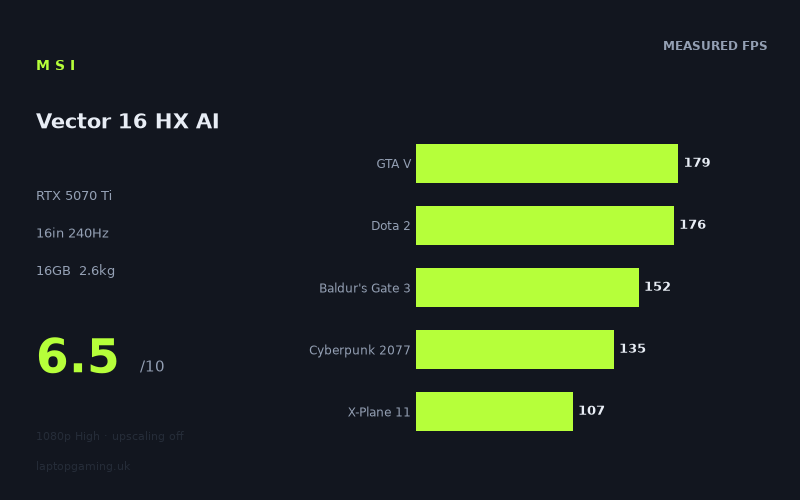
Frame rates
1920×1080, High preset, upscaling off. Averages 149fps across the 5 core benchmark games.
Measured on this machine. Source: Notebookcheck, 2025-06-24.
Not scored: no confirmed UK price
We have the full benchmark suite for this machine, so it ranks on the frame rate leaderboard like any other. What we don't have is a UK listing for this exact configuration - it's sold as a European review unit, or only in specifications that differ from the one tested. Since 30% of our score is value for money, scoring it would mean pretending price is no object, which would flatter it against every laptop you can actually buy. The frame rates below are real and comparable; there is just no buying recommendation to make yet.
How these numbers were produced
Frame rates here are not measured by us, and we label how each one was arrived at. A figure marked measured comes from a published run on that exact machine. A figure marked representative is derived from the GPU and its power limit (TGP) and cross-referenced against published reviews - a sound estimate of what that configuration delivers, but not a measurement of that specific laptop. Unless stated otherwise, numbers are 1920x1080, High preset, upscaling off. Where a laptop ships in several power configurations we use the wattage of the exact SKU listed, because a 140W RTX 5070 and a 115W one are not the same product.
In use
The short version
The MSI Vector 16 HX AI is a serious performance-focused laptop with an RTX 5070 Ti, a Core Ultra 7 255HX, a 16in 2560x1600 240Hz IPS display and a UK price of GBP 1,592. The important part is that the published performance data is strong across a very broad range of games. Notebookcheck’s measured figures put it at 358fps in Prince of Persia The Lost Crown, 265fps in Counter-Strike 2, 188fps in Civilization 7, 179fps in GTA V and 176fps in Dota 2. Even several far more demanding games remain well above the level where smooth play should be a concern at the stated 1920x1080 High settings with upscaling disabled.
That does not mean every game will make full use of the 240Hz display. The panel is capable of showing far more frames than the laptop produces in many modern, visually demanding titles. Notebookcheck’s figures include 89fps in Space Marine 2, 86fps in Until Dawn, 84fps in Doom: The Dark Ages, 83fps in Dragon’s Dogma 2, 78fps in The Elder Scrolls IV Oblivion Remastered, 74fps in Stalker 2, 66fps in Star Wars Outlaws and 55fps in Senua’s Saga Hellblade 2. Those are still substantial results for the stated settings, but they make clear that a 240Hz panel is a capability rather than a promise that every new release will run at 240fps.
The stronger case for the Vector is that it offers a high-refresh 2560x1600 display and RTX 5070 Ti graphics at a price far below several named rivals with similar or even higher GPU branding. It is not a slim travel machine, though. At 2.612kg, it belongs in the category of laptop that can be moved between home, university, work or events, but is less appealing as something to carry constantly. The 90Wh battery is a useful specification to have, but no battery-life measurement is supplied here, so there is no basis for making claims about unplugged gaming or day-to-day endurance.
The most important limitation in the available information is the missing GPU power-limit figure. RTX laptop names do not, by themselves, establish how aggressively a manufacturer allows the graphics processor to run. No GPU power limit is provided for this MSI, so it would be wrong to claim that it is a high-power or low-power RTX 5070 Ti implementation. What can be said is simpler and more useful: the measured results are excellent in lighter and competitive games, strong in a large group of demanding titles, and inevitably lower in the heaviest games in the list.
Buy the Vector 16 HX AI if you want a 16in gaming laptop that can deliver very high frame rates in esports and older blockbuster games, while remaining capable in difficult modern releases without relying on upscaling in the quoted results. It is also a sensible choice for someone who values the 2560x1600 240Hz IPS screen enough to accept a 2.612kg chassis. Do not buy it merely because the panel says 240Hz if your priorities are exclusively the latest cinematic single-player games at native 2560x1600 resolution. The published frame rates are at 1920x1080, not at the panel’s native resolution, and no native-resolution benchmark figures are supplied.
Performance
What the published benchmark data says
Notebookcheck measured the MSI Vector 16 HX AI at 1920x1080 using the High preset with upscaling disabled. That setup matters. It gives a straightforward view of conventional rendered performance without treating frame-generation or upscaling modes as though they were the same thing as native rendering. It also means the figures should not be read as direct 2560x1600 results, because the laptop’s panel has a higher native resolution than the benchmark setting.
The headline performance is excellent. Prince of Persia The Lost Crown reached 358fps, while Counter-Strike 2 reached 265fps. Those are the games in the list where the Vector can genuinely approach or exceed the kind of frame-rate territory for which a 240Hz display makes obvious sense. For players focused on fast competitive play, the key point is not simply that the machine is capable of smooth performance; it has measured headroom in titles where responsiveness and consistently rapid screen updates matter more than maximal image settings.
Civilization 7 at 188fps is another excellent result, though its relevance is slightly different. A strategy game does not demand the same kind of rapid mouse tracking and instant target acquisition as Counter-Strike 2, but a high measured frame rate can still contribute to fluid map movement and interface responsiveness. The result also shows that the Vector is not narrowly suited to one kind of game. It has enough performance to run both fast competitive software and demanding strategy workloads at very high frame rates in the stated benchmark configuration.
The benchmark-suite games provide a useful central picture. GTA V reached 179fps, Dota 2 reached 176fps, Baldur’s Gate 3 reached 152fps, Cyberpunk 2077 reached 135fps and X-Plane 11 reached 107fps. The supplied mean across those benchmark-suite games is 150fps. That is a strong average, but the individual figures are more valuable than the mean because they show the machine’s performance is shaped heavily by the game engine, scene complexity and workload type.
GTA V and Dota 2 are particularly good demonstrations of the Vector’s ability to deliver high-refresh gaming rather than merely acceptable gaming. At 179fps and 176fps respectively, both sit below the display’s 240Hz maximum but still offer a frame-rate level well suited to a fast panel. Baldur’s Gate 3 at 152fps is also very strong. It does not make complete use of 240Hz, but it gives the system substantial performance for a game that can become demanding in busy scenes.
Cyberpunk 2077 at 135fps deserves careful reading. It is an excellent published result at 1920x1080 High with upscaling disabled, and it establishes that the RTX 5070 Ti configuration is not limited to older games or lighter multiplayer titles. At the same time, 135fps is not 240fps. Buyers expecting every visually demanding game to match the maximum refresh rate of the panel should treat the display and the GPU as complementary rather than perfectly matched. The screen gives the machine room to run very fast games at high refresh, while the GPU still produces strong conventional performance in heavier work.
X-Plane 11 at 107fps reinforces why laptop gaming results cannot be reduced to GPU branding alone. Simulation games can respond differently to processor performance, engine behaviour and scene demands than a conventional action game. The Core Ultra 7 255HX is clearly part of this machine’s specification, but no separate processor benchmark data is supplied, so there is no basis for assigning a specific share of the result to the CPU or GPU. What the published figure does show is that the laptop delivers more than 100fps in this particular simulation at the stated settings.
The demanding end of the game list
The Vector remains capable as the games become heavier, but the figures become much more varied. Final Fantasy XV reached 163fps and Helldivers 2 reached 142fps. Kingdom Come Deliverance 2 reached 119fps, Ghost of Tsushima reached 102fps and Horizon Forbidden West reached 98fps. This is the middle of the performance story: very playable-looking results at the stated settings, but a clear move away from the 240fps territory represented by the display’s maximum refresh rate.
The difference between 358fps in Prince of Persia The Lost Crown and 55fps in Senua’s Saga Hellblade 2 is not a contradiction in the data. It is what a broad game list should reveal. Different games have different rendering pipelines, scene complexity, effects workloads, engine behaviour and processor demands. Some are relatively light at 1920x1080 High, while others remain demanding even at that resolution. A useful review should not hide that spread behind one average frame rate, because the buyer does not play an average game.
Space Marine 2 at 89fps, Until Dawn at 86fps, Doom: The Dark Ages at 84fps and Dragon’s Dogma 2 at 83fps form a cluster that is useful for expectation-setting. These results are not weak. They show the machine remains capable of running difficult modern games without upscaling in the stated test configuration. But they also show why the screen’s 240Hz specification should not be treated as a universal performance target. In these games, the practical benefit of the panel is more likely to be the ability to display whatever high frame rate the machine can produce, rather than an expectation of 240fps.
The Elder Scrolls IV Oblivion Remastered at 78fps, Stalker 2 at 74fps and Star Wars Outlaws at 66fps are especially important because they are games buyers may reasonably expect to be difficult on laptop hardware. The Vector is still producing substantial frame rates at 1920x1080 High with upscaling switched off, but these are not results that justify casual claims of effortless maximum-refresh gaming in every new release. The data supports a more grounded conclusion: this is a powerful gaming laptop that has clear limits when a game is unusually demanding.
Senua’s Saga Hellblade 2 is the lowest listed result at 55fps. That figure should not be ignored simply because most of the list is faster. It shows the floor of this particular benchmark set and reminds buyers that an RTX 5070 Ti laptop is not immune to demanding game engines. Anyone whose buying decision is centred on the most technically intensive games should pay attention to the low end of the list, not only the 358fps headline result. This is especially true because the quoted data is at 1920x1080 rather than 2560x1600.
GPU power limit: what is known and what is not
The requested question about GPU power limit cannot be answered with a number because no GPU power limit is included in the fact sheet. That omission matters. Laptop RTX GPUs can differ in their configured operating limits, and it would be misleading to infer a specific limit from the RTX 5070 Ti name, the laptop’s weight or its measured frame rates alone. The published data establishes performance outcomes in the listed games, but it does not establish the manufacturer’s configured GPU power ceiling.
There is still a practical conclusion to draw from the benchmark outcomes. Whatever the underlying configuration, this MSI reaches 265fps in Counter-Strike 2, 188fps in Civilization 7, 179fps in GTA V, 176fps in Dota 2 and 163fps in Final Fantasy XV. It also reaches 135fps in Cyberpunk 2077 and 119fps in Kingdom Come Deliverance 2. That is a strong spread of measured performance, and it is more useful to a prospective buyer than unsupported claims about wattage.
It would also be wrong to make cooling claims from the data provided. There are no temperature figures, noise measurements or internal photographs in the fact sheet. As a result, there is no evidence here for describing the Vector as quiet, loud, cool-running or hot-running. There is likewise no basis for saying whether the GPU sustains a particular operating level over a long session. The honest position is that Notebookcheck’s frame rates show the resulting performance in the supplied benchmarks, while thermal and acoustic behaviour remain unconfirmed by the information available for this review.
What the frame-rate spread means in practice
The Vector’s frame-rate spread creates three broad use cases. The first is high-refresh gaming in titles such as Prince of Persia The Lost Crown, Counter-Strike 2, Civilization 7, GTA V and Dota 2. The published figures from 176fps through 358fps make this laptop a credible choice for someone who wants a 240Hz screen because they genuinely play games that can exploit it.
The second is demanding mainstream gaming where the display will not be driven at its full 240Hz maximum but where the measured results are still very strong. Baldur’s Gate 3 at 152fps, Helldivers 2 at 142fps, Cyberpunk 2077 at 135fps, Kingdom Come Deliverance 2 at 119fps and X-Plane 11 at 107fps belong here. This is where the Vector makes the most balanced argument for itself: it can handle difficult games at frame rates that remain far beyond a basic entry-level experience, without the quoted benchmark figures relying on upscaling.
The third is the hardest group, where the measured numbers from 55fps to 98fps show a machine that is capable but not invulnerable. Horizon Forbidden West, Space Marine 2, Until Dawn, Doom: The Dark Ages, Dragon’s Dogma 2, The Elder Scrolls IV Oblivion Remastered, Stalker 2, Star Wars Outlaws and Senua’s Saga Hellblade 2 all show the limits of expecting a laptop GPU to combine high settings, no upscaling, high resolution and maximum-refresh output in every modern title.
That is not a criticism unique to the MSI. It is simply the practical reading of the available data. The Vector’s 240Hz panel is an asset because it accommodates extremely high frame rates in games where they are available. It is not evidence that 240fps will be reached in the demanding titles where Notebookcheck’s published numbers are 89fps, 74fps or 55fps. Buyers who understand that distinction will have realistic expectations and are more likely to appreciate what this laptop does well.
The screen
The MSI Vector 16 HX AI has a 16in 2560x1600 IPS display with a 240Hz refresh rate. On paper, that is one of the stronger parts of the specification. The 2560x1600 resolution gives the laptop a notably higher native pixel count than the 1920x1080 benchmark setting, while the 240Hz refresh rate is aimed at fast motion and high frame-rate gaming. The IPS panel type is also specified, although no measurements are supplied for brightness, colour coverage, contrast or response behaviour. Those characteristics should therefore not be assumed.
The key issue is whether the RTX 5070 Ti can drive the panel properly. The only responsible answer is that it depends heavily on the game and the chosen settings. Notebookcheck’s figures were gathered at 1920x1080 High with upscaling off, not at the screen’s native 2560x1600 resolution. The 358fps result in Prince of Persia The Lost Crown and the 265fps result in Counter-Strike 2 show that the machine can exceed or approach the 240Hz ceiling in selected games at the benchmark settings. The 188fps result in Civilization 7, 179fps in GTA V and 176fps in Dota 2 show that it can also operate in very high frame-rate territory without actually reaching 240fps.
For many buyers, that is exactly the right reason to choose a 240Hz panel. A high-refresh display does not become pointless just because a game runs at 176fps rather than 240fps. The value lies in having a screen capable of displaying the output in fast games, rather than being constrained by a lower refresh ceiling. The Vector has enough published performance to make that feature meaningful in a useful selection of games.
However, it would be a mistake to buy this laptop on the assumption that its screen resolution and maximum refresh rate will be fully exploited at the same time in every title. The figures for Horizon Forbidden West, Space Marine 2, Until Dawn, Doom: The Dark Ages, Dragon’s Dogma 2, The Elder Scrolls IV Oblivion Remastered, Stalker 2, Star Wars Outlaws and Senua’s Saga Hellblade 2 are already below 100fps at 1920x1080 High with upscaling disabled, apart from Ghost of Tsushima at 102fps. No 2560x1600 data is provided, so a reviewer cannot convert those results into native-resolution predictions.
The screen is therefore best understood as a flexible high-end panel rather than a specification that every game will saturate. Competitive and lighter games have the potential to make very good use of 240Hz. Mainstream demanding games should still look like a strong match for the hardware based on the 107fps to 163fps results seen in X-Plane 11, Cyberpunk 2077, Helldivers 2, Baldur’s Gate 3 and Final Fantasy XV. The most difficult releases require more realism: the screen remains capable of high refresh, but the benchmark data does not support a claim that the GPU will run them at the panel’s ceiling.
The 16in format is also significant. It gives the machine a larger screen than a compact gaming laptop without moving into the largest portable category. The 2560x1600 resolution is likely to appeal to buyers who want a taller display shape than a conventional 1920x1080 panel, but no dimensions, aspect-ratio statement or productivity measurements are supplied, so the review should not overstate the practical workspace advantage. The confirmed facts are the 16in size, 2560x1600 resolution, IPS panel and 240Hz refresh rate.
There is no supplied information on adaptive-sync support, HDR behaviour, brightness, colour accuracy, response-time measurement or whether the screen is best used in a particular mode. Those omissions do not erase the appeal of the panel specification, but they should temper any claim that it is an exceptional display in every respect. What is supported is that MSI has paired a high-resolution 16in IPS panel with a 240Hz refresh rate and hardware that reaches extremely high frame rates in several measured games.
Build, size and portability
The Vector 16 HX AI weighs 2.612kg. That is the portability figure that should shape the buying decision. This is not a laptop to dismiss as immobile: it can be transported, and the fact that it includes a 90Wh battery means it is designed as a self-contained portable computer rather than a desktop tower. But 2.612kg is substantial for a machine intended to be carried all day, especially once a charger and other accessories are considered. No charger weight is provided, so it should not be quantified here.
The sensible use case is regular movement rather than constant carrying. A buyer who travels between rooms, takes the laptop to university, brings it to work occasionally or moves it between a home desk and another location can reasonably consider a 2.612kg system. Someone who wants the least burdensome machine possible for daily commuting should look more carefully at lighter alternatives, because the available information already makes clear that portability is not the Vector’s defining strength.
No chassis dimensions are provided. That means there is no evidence for claims about thickness, desk footprint, bag compatibility or whether the laptop is unusually compact for a 16in model. There is also no supplied material information, keyboard description, webcam specification, port list, hinge assessment or internal-upgrade detail. The right approach is not to invent a build narrative around the Vector name or the RTX 5070 Ti badge. The available facts support a conclusion about weight and screen size, not about every physical detail of the chassis.
The 90Wh battery is a substantial capacity figure, but capacity is not battery life. The fact sheet contains no web-browsing result, video result, office-use result or gaming battery benchmark. It would therefore be irresponsible to claim that the Vector lasts all day, survives a commute, offers good endurance or drains quickly in games. Gaming laptops can behave very differently away from mains power, and battery capacity alone does not tell the whole story. Buyers who need a firm unplugged-use answer should seek a measured battery-life result before purchasing.
Weight also matters because the Vector’s most compelling specification is not its portability but its combination of RTX 5070 Ti graphics, a Core Ultra 7 255HX and a 240Hz 2560x1600 display. The 2.612kg mass is easier to accept when the laptop will spend most of its time on a desk and only occasionally be moved. It is harder to justify if the machine will be held, carried or packed every day. This is a performance-first portable computer, not a minimal-weight travel laptop.
That distinction should influence the way the price is judged. GBP 1,592 is a serious purchase, but it is not in the same price territory as the GBP 2,569 Alienware 16X Aurora, GBP 2,679 Acer Predator Helios Neo 16S AI or GBP 5,000 Razer Blade 16 Core Ultra 9 listed among the closest rivals. The MSI does not need to be the lightest or most premium-feeling machine to make a case. It needs to offer enough measured gaming performance, screen specification and practical value to offset its mass. On the supplied performance data, it has a credible argument, though its portability remains a real compromise.
How it compares
The rival comparisons are based only on games both machines have in common. That restriction is important because it avoids pretending that two laptops have been compared across titles where there is no shared result. It also means the comparison figures should be read as focused snapshots rather than complete declarations of superiority in every game.
MSI Crosshair A16 HX
Against the MSI Crosshair A16 HX with an RTX 5070, the Vector averages +0fps across the shared games. The Crosshair has no confirmed UK price in the supplied information, so there is no responsible way to decide which is better value in Britain. The shared-game result does not support a claim that the Vector is materially faster, despite carrying an RTX 5070 Ti rather than an RTX 5070.
That is a useful warning against choosing solely by GPU label. On the supplied shared-game data, the Vector and Crosshair are effectively level. The Vector’s confirmed 16in 2560x1600 240Hz IPS display, 16GB memory, 512GB SSD, 2.612kg weight and GBP 1,592 price are known. Equivalent Crosshair specifications are not supplied here, so the comparison cannot go further without assumptions. If the Crosshair appears at a significantly different UK price, the buying decision could change, but no confirmed price is available.
Lenovo Legion 5 Pro
Against the Lenovo Legion 5 Pro with an RTX 5070 Ti, the Vector averages +3fps across the shared games. That is an advantage, but not one large enough to treat the MSI as a completely different performance class. Both carry RTX 5070 Ti graphics according to the supplied rival list, and the shared-game comparison suggests close competition rather than a decisive gap.
The Legion 5 Pro also has no confirmed UK price in the provided information. That prevents the most important value comparison. If the Lenovo is cheaper, a small shared-game deficit may be easy to accept. If it is more expensive, the MSI’s measured lead becomes more attractive. Without a confirmed price, the fair conclusion is that the Vector is modestly ahead in the shared games, while the overall buying decision remains unresolved.
Alienware 16X Aurora
The Alienware 16X Aurora with an RTX 5070 costs GBP 2,569 in the supplied data. The Vector averages +4fps against it across the shared games. That is a striking comparison because the MSI is listed at GBP 1,592, yet its shared-game performance is ahead despite the Alienware’s much higher stated UK price.
There may be differences in screen, chassis, memory, storage, ports, support, build or other specifications, but none are supplied here and should not be invented. On the information available, the MSI makes the stronger performance-per-pound argument. A buyer considering the Alienware would need a concrete reason outside the shared-game performance data to justify the higher price, because the benchmark comparison does not support paying more for faster gaming output.
Razer Blade 16 Core Ultra 9
The Razer Blade 16 Core Ultra 9 has an RTX 5090 and costs GBP 5,000. In the shared games, the Vector averages -4fps against it. The Razer is ahead, but the lead reported in the shared titles is small compared with the difference between GBP 1,592 and GBP 5,000.
That does not mean the Razer is a bad laptop or that the MSI is equivalent in every respect. It means the supplied shared-game data does not show a performance advantage proportionate to the price gap. The Razer may have strengths outside these figures, but those are not in the fact sheet. For a buyer whose focus is measurable gaming output in the shared titles, the Vector is the much more rational starting point. Paying GBP 5,000 for a machine that averages only +4fps in the available shared-game comparison would require priorities that go beyond the frame-rate evidence.
Acer Predator Helios Neo 16S AI
The Acer Predator Helios Neo 16S AI also uses an RTX 5070 Ti and is priced at GBP 2,679. The Vector averages +5fps across the shared games. This is one of the clearest comparisons in the supplied rival list. The MSI is cheaper and ahead in the shared benchmark data.
Again, there may be other differences that matter to an individual buyer, but they are not provided here. Based on price and shared-game performance alone, the Acer is difficult to recommend over the Vector. The MSI’s GBP 1,592 price is already substantial, but the data gives no indication that spending GBP 2,679 on the Acer buys higher shared-game frame rates. The Vector is not merely competitive in this comparison; it is the more convincing value proposition on the available evidence.
Who it’s for
The Vector 16 HX AI is for the buyer who wants strong conventional gaming performance without being forced into the highest price tier. At GBP 1,592, it combines an RTX 5070 Ti, Core Ultra 7 255HX, 16GB memory, 512GB SSD and a 16in 2560x1600 240Hz IPS display. More importantly, Notebookcheck’s measured numbers show that this specification produces 358fps in Prince of Persia The Lost Crown, 265fps in Counter-Strike 2, 188fps in Civilization 7, 179fps in GTA V and 176fps in Dota 2.
It is particularly well suited to players who divide their time between competitive games and demanding single-player releases. The competitive side benefits from the very high results in Counter-Strike 2 and other lighter games. The single-player side benefits from 163fps in Final Fantasy XV, 152fps in Baldur’s Gate 3, 142fps in Helldivers 2, 135fps in Cyberpunk 2077 and 119fps in Kingdom Come Deliverance 2. That is the strongest argument for this machine: not that it reaches 240fps everywhere, but that it performs well across very different types of games.
It also suits buyers who want a screen with more ambition than a basic gaming panel. A 16in 2560x1600 IPS display at 240Hz gives the laptop a specification that can serve both high-refresh gaming and higher-resolution desktop use. The caution is straightforward: the benchmark figures are at 1920x1080, so buyers should not assume the same results at 2560x1600. Anyone comfortable adjusting settings according to the game, rather than demanding identical frame rates in every title, is likely to be the right audience.
The Vector is less suitable for the buyer who wants an ultra-portable laptop. At 2.612kg, it is substantial. It can be moved, but it is not the natural choice for someone who carries a computer continuously. The 90Wh battery is encouraging as a capacity specification, but there is no measured battery-life information, so it should not be chosen on the assumption of long unplugged endurance.
It is also not the obvious choice for someone who demands native 2560x1600 figures before buying. The screen is 2560x1600, but the supplied gaming data is 1920x1080 High with upscaling off. That does not diminish the quality of the published 1080p results; it simply defines what they are. If native-resolution performance is your deciding factor, more measurements are needed.
Buy something else if you are considering the MSI Crosshair A16 HX and it appears at a substantially better confirmed UK price, because the supplied shared-game comparison is +0fps for the Vector. Buy something else if the Lenovo Legion 5 Pro is clearly cheaper and its wider specification suits you, because the Vector’s +3fps shared-game advantage is modest. Those are genuine close alternatives where price could matter more than the measured gap.
By contrast, the Alienware 16X Aurora, Razer Blade 16 Core Ultra 9 and Acer Predator Helios Neo 16S AI need a stronger case than the supplied gaming data provides. The Vector averages +4fps against the Alienware while costing GBP 1,592 rather than GBP 2,569. It is only -4fps behind the GBP 5,000 Razer in the shared games. It averages +5fps against the GBP 2,679 Acer. If frame-rate evidence and UK price are the priorities, the MSI is the more persuasive option in each of those comparisons.
The final judgement is uncomplicated. The MSI Vector 16 HX AI is a powerful, heavy 16in gaming laptop with a very capable screen specification and a broad set of strong published frame rates. It is at its best when treated as a desk-first machine that can travel when needed, not as a lightweight everyday carry device. It is at its best in games where its RTX 5070 Ti can push well into high-refresh territory, but it remains credible in the hardest titles even when the results fall to 89fps, 74fps or 55fps. At GBP 1,592, the combination of measured gaming performance and screen specification makes it a compelling option for buyers who want evidence rather than branding promises.