Review
Acer Predator Triton Neo 16 review
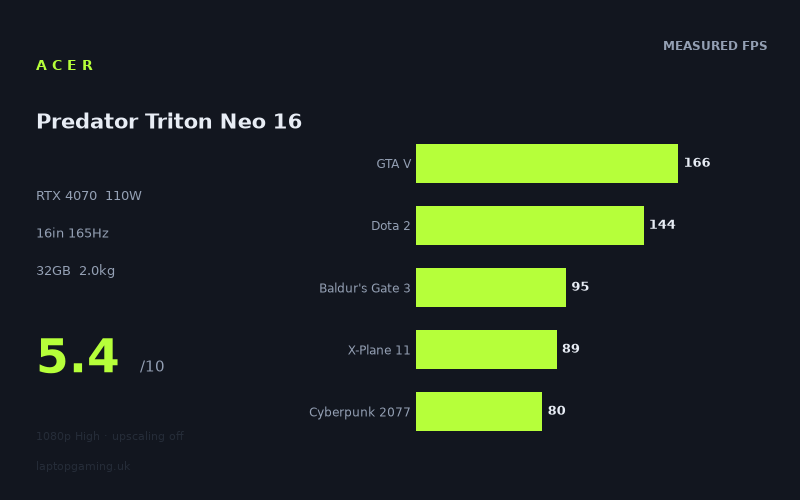
Frame rates
1920×1080, High preset, upscaling off. Averages 114fps across the 5 core benchmark games.
Measured on this machine. Source: Notebookcheck, 2024-12-30.
Not scored: no confirmed UK price
We have the full benchmark suite for this machine, so it ranks on the frame rate leaderboard like any other. What we don't have is a UK listing for this exact configuration - it's sold as a European review unit, or only in specifications that differ from the one tested. Since 30% of our score is value for money, scoring it would mean pretending price is no object, which would flatter it against every laptop you can actually buy. The frame rates below are real and comparable; there is just no buying recommendation to make yet.
How these numbers were produced
Frame rates here are not measured by us, and we label how each one was arrived at. A figure marked measured comes from a published run on that exact machine. A figure marked representative is derived from the GPU and its power limit (TGP) and cross-referenced against published reviews - a sound estimate of what that configuration delivers, but not a measurement of that specific laptop. Unless stated otherwise, numbers are 1920x1080, High preset, upscaling off. Where a laptop ships in several power configurations we use the wattage of the exact SKU listed, because a 140W RTX 5070 and a 115W one are not the same product.
In use
The short version
The Acer Predator Triton Neo 16 in this PTN16-51-978P configuration is a thin 16-inch machine built around an RTX 4070 held to a 110W total board power. That figure matters considerably more than the GPU's name does. The same chip is sold in thicker chassis configured up to 140W, and the distance between the bottom of that band and the top is not a rounding error — it is roughly a quarter more power going into identical silicon, spent on clock speed the card can hold rather than clock speed it has to give back. Two laptops can both print RTX 4070 on the lid and behave like different products, and the only way to tell them apart before you buy is the power limit and the frame rates that follow from it.
The benchmark data here is unusually informative, and the reason is the date. Notebookcheck measured this machine at the very end of December 2024, so the game list is stacked with that year's heavyweights rather than the older, faster-running titles that pad out a lot of laptop benchmark suites. The results run from 166fps at the top to 39fps at the bottom. That is more than a four-to-one spread across twelve games at one resolution and one preset, and it is the most honest picture of a mid-range 2024 GPU that you are likely to find. The light and CPU-limited titles look excellent. The modern engines do not.
One caveat has to sit at the front, because it removes half of any buying argument. We have no confirmed UK price for this configuration, so no value judgement is possible here — not a favourable one, not an unfavourable one. A gaming laptop is a price-performance product before it is anything else. Everything below is about what the hardware does, not what it is worth, and there is no speculation about the price anywhere in this review because a guess would be worse than the silence.
The second thing to hold onto is the screen. This is a 3200x2000 panel at 165Hz, and every published frame rate for the machine was captured at 1920x1080. That is not a small gap to reason across. The native panel carries roughly three times as many pixels as the resolution the benchmark data covers, and the GPU driving it is near the bottom of its power band. Those two decisions pull in opposite directions, and the tension between them is the single most interesting thing about this laptop.
Who it suits, in one line: someone who wants a genuinely portable 16-inch machine with a superb-specification panel and enough graphics performance for older and mid-weight titles at 1080p, who understands that the newest releases will need upscaling and settings work, and who is not buying on the assumption that RTX 4070 means the same thing in every chassis.
Performance
What 110W actually costs
The laptop RTX 4070 is not a single product with a single level of performance. Manufacturers configure it across a wide power band, and the resulting spread is large enough that comparing two machines by GPU name alone is close to useless. This one sits near the bottom of that band at 110W. The same chip in a thicker, heavier chassis runs at 140W, and that machine will produce more frames in every game where the graphics card is the thing setting the pace.
What a power limit does is set the point at which the card stops being allowed to clock higher. In a light workload it never gets there — the game is finished with the frame before the card has drawn enough current to matter, so the limit is invisible and the result is set by something else entirely. In a heavy workload the card hits the ceiling almost immediately and then spends the whole session negotiating against it, trimming clocks to stay inside its allowance. A 110W part and a 140W part will therefore look identical in some games and clearly separated in others, and which games fall into which group is the useful question.
The measured figures answer it directly. At the top of the list the machine is producing 166fps, which is a number set by the game and the processor rather than by the graphics card. At the bottom it is producing 39fps, which is a number set entirely by the graphics card and the power it is allowed to draw. The distance between those two results is where the whole argument about this laptop lives.
The power limit is also not an arbitrary decision Acer made in isolation. It follows from the chassis. A machine that weighs a little over 2kg with a 16-inch display has a cooling system sized to that budget, and a cooling system sized to that budget cannot dissipate 140W from the GPU alongside whatever the processor is drawing. The weight, the thinness and the 110W ceiling are the same design choice described three different ways. You are not being short-changed by a manufacturer cutting corners; you are being sold a portable machine, and this is what portability costs in frames.
The fast end: where the processor sets the pace
One title in the measured set beats the display's refresh rate outright, and a second comes within reach of it.
- GTA V — 166fps. A frame above the panel's 165Hz ceiling. GTA V is more than a decade old on PC, and its engine is famously sensitive to processor throughput rather than graphics horsepower. A result like this tells you almost nothing about the RTX 4070 and quite a lot about the Core Ultra 9 185H feeding it. In practical terms this game is refresh-limited, and the surplus should be spent on resolution or settings rather than left on the table.
- Dota 2 — 144fps. Comfortably fast, and comfortably below what this graphics card is capable of drawing in a game with these visual demands. Dota 2 is not a rendering challenge for any modern discrete GPU. When a MOBA lands in the 140s rather than several hundred, the frame time is being set by the game's own simulation and draw-call pattern and by the single-thread throughput available to service it. This is the clearest processor-limited signal in the whole list.
These two results are the reason a headline average for this machine is misleading, and they are also the reason it does well in the scoring suite relative to how it handles current releases. Both are useful data points if you actually play those games. Neither tells you anything about how the machine handles a 2024 release.
The middle band: 73 to 100fps
Five games fall into a broad middle group, and this is where the machine's everyday character lives.
- Final Fantasy XV — 100fps. A 2018 PC release with an expensive renderer and heavy post-processing work, landing exactly where a genuinely graphics-limited title of that vintage should on this hardware. Triple figures at High with nothing switched on to help it.
- Baldur's Gate 3 — 95fps. A scoring-suite title, and a game whose behaviour changes considerably depending on where in it you are. Dense, heavily populated areas load the processor hard; open combat encounters load the graphics card. 95fps is a strong result for a 2023 release and a comfortable experience by any measure.
- X-Plane 11 — 89fps. The flight simulator in the suite, and another result that is not really about the graphics card. X-Plane 11 issues an enormous number of individual draw calls per frame, every one of which the processor has to prepare before the GPU sees any of it. It is the classic draw-call-bound workload. A faster graphics card moves this number very little; a faster processor moves it a lot.
- Cyberpunk 2077 — 80fps. The most demanding game in the scoring suite, and a genuinely GPU-limited one. 80fps at 1080p High with upscaling off is a good result for a 110W card. It also establishes something worth remembering later: Cyberpunk is often treated as the ceiling of what a laptop has to cope with, and in this data set six games are slower than it.
- Space Marine 2 — 73fps. A 2024 release built on an engine designed to put very large numbers of individually animated enemies on screen at once. It is a heavy workload in an unusual way — the crowd simulation loads both halves of the system — and 73fps is a decent showing for it.
The thing to take from this band is not the numbers themselves but the fact that they are limited by different things. X-Plane 11 at 89fps and Space Marine 2 at 73fps are only sixteen frames apart and have almost nothing in common. Turning settings down in Space Marine 2 will buy you frames because the graphics card is the constraint. Turning settings down in X-Plane 11 will buy you very little, because the graphics card was never the constraint in the first place. That distinction decides whether a more powerful GPU is worth paying for in your particular library.
The floor: five 2024 releases and where they land
The bottom of this list is where the review has to be blunt.
- Final Fantasy XVI — 59fps. A 2024 PC conversion with a reputation for asking a great deal of the hardware for what it puts on screen.
- Until Dawn — 59fps. The 2024 remake, rebuilt on Unreal Engine 5. A largely linear, tightly controlled game, and it still lands here.
- Stalker 2 — 50fps. Unreal Engine 5 again, this time driving a very large open world with long draw distances and dense vegetation. Half the panel's refresh rate is not a typing error.
- Star Wars Outlaws — 41fps. Built on Snowdrop with ray-traced global illumination that is part of the rendering pipeline rather than an optional extra. There is no settings menu route to switching the expensive part off, which is why it sits where it does.
- Senua's Saga: Hellblade 2 — 39fps. The slowest result in the set, and an Unreal Engine 5 showcase that was explicitly built to be one. It is a narrow, cinematic game with an enormous per-pixel cost.
Two things follow from this group, and both are uncomfortable. The first is that 39fps is under a quarter of the panel's refresh rate. This is a 165Hz display being fed frames at a rate that a 60Hz panel would have absorbed without difficulty. The second is that these are all 1920x1080 figures, at a High preset, with upscaling switched off — which is to say they are the numbers before you ask the machine to drive its own screen.
Being fair about it: 39fps and 41fps at native rendering with no assistance are not a verdict on the machine so much as a verdict on 2024's flagship engines running on a mid-range mobile GPU. Nothing in that class handles Hellblade 2 comfortably without upscaling. But the practical conclusion stands regardless of whose fault it is. Several of the games in this list are already asking for DLSS at 1080p, before the panel's native resolution enters the discussion at all. That is the honest state of the hardware, and anyone buying it on the strength of the GTA V result needs to understand it.
Where the spread actually comes from
A four-to-one range across twelve games at identical settings is a large spread, and it is worth being precise about what produces it. It is not inconsistency in the machine. Every one of these results was captured under the same conditions on the same hardware. The spread belongs to the games.
Sort the list by what is limiting it and the pattern is clean. At the fast end you have a decade-old open-world title and a MOBA, both of which finish their rendering work long before the graphics card is troubled and are instead waiting on the processor. In the middle you have mature engines from 2018 to 2023 that genuinely load the graphics card but were designed around the hardware of their own era. At the bottom you have five 2024 releases, four of which are either Unreal Engine 5 titles or carry ray tracing as a structural part of the renderer rather than an option.
That last group is the whole story. Unreal Engine 5's headline features — its virtualised geometry and its software-traced global illumination — are expensive by design. They are not settings that were bolted on to impress reviewers; they are how the engine draws a scene. A GPU generation that predates them, running at near the bottom of its configurable power band, will produce exactly the shape of results shown here: fine in everything built before the shift, and struggling in everything built after it.
This is also why the age of the benchmark data matters in a good way. A suite full of older titles would have put this machine comfortably into three figures almost everywhere and told you very little. A suite measured at the end of 2024, containing Hellblade 2, Stalker 2, Outlaws, Until Dawn and Final Fantasy XVI, tells you what the machine will do with the games that were about to arrive. That is a far more useful thing to know.
The Core Ultra 9 185H, and what it does not bring
The processor is a Core Ultra 9 185H — Intel's Meteor Lake generation, a tile-based design that combines performance cores, efficiency cores and an additional low-power island alongside a substantial integrated GPU and an NPU. It is an H-class part, which is to say it is built to a mobile power envelope, and it is the natural pairing for a chassis of this weight.
What it brings is efficiency, a modern platform, and enough multi-threaded throughput for the productivity work that a 3200x2000 panel and 32GB of memory imply the machine is also meant to do. What it does not bring is the sustained single-thread performance of the HX-class chips that sit in heavier gaming laptops. Those are desktop-derived designs running at higher power ceilings and higher clocks, and in games where the frame rate is set by how fast one thread can prepare draw calls, that difference shows up directly.
Look at where it shows up here. Dota 2 at 144fps is the clearest example — that is a modest figure for a game of its rendering complexity on a discrete GPU of this tier, and no amount of extra graphics power would raise it. X-Plane 11 at 89fps is the same story in a different genre. GTA V at 166fps is fast in absolute terms but is again a processor result rather than a graphics one. There are no comparative processor measurements in the data to size that gap, so this is a directional argument rather than a numerical one, but it is the correct lens for reading the top half of the list.
The buying implication is specific rather than general. If your library is weighted towards competitive titles, simulators, strategy games and older engines, then a large part of what makes this machine expensive — the graphics card — is being underused, and the processor that is actually setting your frame rates is the one component you cannot change. If your library is weighted towards recent single-player releases, the situation reverses: the processor is comfortably sufficient and the 110W graphics card is the thing holding you back.
Why the suite mean flatters the machine
Across the five scoring-suite games the mean is 115fps. That is a respectable figure and it is arithmetically correct, but it needs reading carefully rather than quoting.
Three of those five games — GTA V, Dota 2 and X-Plane 11 — are the processor-limited ones. A fourth, Baldur's Gate 3, sits in the comfortable middle. Only Cyberpunk 2077 is a genuinely heavy graphics workload, and it is the slowest of the five by some distance. The suite is therefore weighted towards the part of the library where this machine looks strongest, which is not a criticism of the suite — a common set of games is what makes cross-machine comparison possible at all — but it does mean the mean should not be read as a summary of the experience.
The seven games outside the suite tell a different story. Their results, taken as a group, sit at roughly half the level of the five inside it. Final Fantasy XV at 100fps is the only one to reach triple figures; the remaining six all fall below 75fps, and five of those fall below 60fps. If you want a single mental model of this laptop, "115fps machine" is the wrong one. "A machine that is fast in older and lighter games and needs help in current ones" is the right one, and the full twelve-game list supports it far better than any average does.
What the measured conditions leave out
Three points about the conditions change how these figures should be read.
Upscaling is off in every result. That is the correct way to benchmark, because it isolates the hardware and makes machines comparable, but it is not how anybody plays a 2024 release on a mid-range mobile GPU. DLSS is available in most of the heavy titles in this list, and in those titles it produces a meaningful uplift. The measured figures are therefore a floor for a real session in supported games rather than a ceiling. How much of a floor is not in the data, and this review will not invent it.
The preset is High, not the maximum. High is a sensible, widely used setting and it is consistent across every machine in the database, which is what makes the comparisons in this review valid at all. It is not the top preset in most of these games. If you habitually push every slider to its limit, the figures above are optimistic.
These are averages. There is no 1% low or frame-time consistency data for this machine. Average frame rate is the crudest of the useful metrics, and it says nothing about stutter. A 50fps average that is smooth and a 50fps average that hitches every few seconds are very different things to live with, and nothing in this data set distinguishes between them.
There is also a date on all of this. These figures were captured on 30 December 2024. Games get patched, drivers get updated, and several of the 2024 titles in this list received substantial performance work after launch. The relative shape — which games are fast, which are slow, and why — is durable. The exact digits are a snapshot.
The screen
3200x2000 is the panel; 1920x1080 is the data
The Triton Neo 16 has a 16-inch IPS panel running 3200x2000 at 165Hz. On its own that is an excellent specification and a genuinely unusual one in a gaming laptop, where a considerably lower pixel count has become the class default. The pixel density is high enough to be in creator-display territory, the 16:10 shape gives real vertical working space, and 165Hz at that resolution is a demanding thing for a display pipeline to deliver.
It is also a mismatch with the graphics card behind it, and it needs confronting rather than glossed over. Every frame rate quoted in this review was captured at 1920x1080. There is no measured native-resolution data for this machine at all. Native performance is therefore an inference, and it is going to be labelled as one every time it comes up.
What can be stated is arithmetic. 3200x2000 is 6,400,000 pixels. 1920x1080 is 2,073,600. The panel's native resolution asks the graphics card to fill a little over three times as many pixels as the resolution all the published results cover. That multiplier does not convert into a frame rate by division — how a game scales with resolution depends on how much of its frame time is spent on pixel work as against geometry, simulation and processor preparation, and that varies enormously between titles. In a draw-call-bound game like X-Plane 11, tripling the pixel count costs relatively little. In Hellblade 2, where essentially all of the cost is per-pixel, it costs a great deal.
So the honest position is that the benchmark data supports firm conclusions about 1080p and no numerical conclusions whatsoever about 3200x2000. What it does support is a shape. The games with the largest surplus at 1080p have the most to give away. The games already at 39fps and 41fps have none.
What upscaling would have to do
This is the part worth thinking through properly, because it is where the panel and the power limit actually meet.
DLSS Quality renders at two-thirds of the output resolution in each dimension. Applied to a 3200x2000 output, that puts the internal render target above 1920x1080 — around a third more pixels than the resolution every measured figure in this review was captured at. DLSS Performance halves each dimension, which lands the render target below 1080p.
Those two sentences have a concrete consequence. If you run this machine at its native resolution with DLSS on Quality, the graphics card is doing more work per frame than it was doing in the measured results, not less. The published figures are an upper bound for that scenario, not a floor. Only at DLSS Performance does the render workload drop below the measured condition, and Performance mode at a 16-inch panel is a visible compromise in a way that Quality mode generally is not.
Apply that to the bottom of the list and the picture is clear without needing a single invented number. Hellblade 2 measured 39fps at 1080p native. Star Wars Outlaws measured 41fps. Both of those are the best case for those games at native panel resolution with Quality upscaling, and both are already well below what anyone would call comfortable. The route to playable in those titles is DLSS Performance, or a lower preset, or both — or simply running the panel at a lower resolution and accepting the scaling.
The middle band is where the panel makes more sense. Cyberpunk at 80fps, Space Marine 2 at 73fps and Baldur's Gate 3 at 95fps all have room to absorb an upscaled native-resolution workload and land somewhere sensible, though this review is not going to say where. And the fast titles — GTA V, Dota 2, and to a degree X-Plane 11 — are limited by the processor rather than the pixel count, which means raising the resolution costs them proportionally less than it costs anything else in the list. A high-resolution panel is at its least painful in exactly the games that were never GPU-limited to begin with.
165Hz IPS, and what actually reaches it
Of the twelve measured games, one exceeds the panel's refresh rate: GTA V at 166fps, by a single frame. Dota 2 at 144fps is close enough to matter. Everything else sits below, and most of it sits a long way below.
That is not damning on its own. A high-refresh panel earns its place in the games where high frame rates are worth having, and it does not waste anything in the games where they are not — a variable-refresh display showing 73fps is still smoother than a fixed 60Hz panel showing 73fps, because it is not fighting the display's own cadence. Whether variable refresh is present on this specific panel is not confirmed in the data, which is worth checking before buying, because on a machine whose frame rates land in the 40s and 50s in current titles it matters more than it would on a machine that lives above 100fps.
The panel type is IPS. That brings wide, stable viewing angles and generally sensible colour behaviour, at the cost of the contrast an OLED would give you. Beyond type, resolution and refresh rate, we have no measured figures for this display — no brightness, no gamut coverage, no contrast ratio, no response-time measurement. On a machine whose panel is clearly one of its main selling points, those are questions worth resolving before committing rather than assumptions worth making.
The deeper point is about the pairing. A 3200x2000 165Hz panel is a specification aimed at someone who values desktop sharpness, colour work and screen real estate. A 110W RTX 4070 is a graphics configuration aimed at someone who accepts a portability compromise on gaming performance. Those are coherent individually and slightly at odds together. The panel is over-specified for the graphics card in games and correctly specified for everything else the machine does, which tells you something real about who Acer built it for.
Build, size and portability
Just over 2kg, and what follows from it
The Triton Neo 16 weighs 2.032kg. For a 16-inch machine with a discrete RTX 4070, that is genuinely light. Plenty of 16-inch gaming laptops sit several hundred grams heavier than this, and the heavyweight desktop-replacement designs are heavier again. Two kilograms is roughly the weight at which a large laptop stops being an object you plan your day around and becomes something you can put in a bag without much thought.
There are no published dimensions or a thickness figure for this machine in the data, so this review is not going to describe the chassis it has not got measurements for. What can be reasoned about is the relationship between the weight, the screen size and the power limit, and that relationship is not subtle. A 16-inch footprint at 2.032kg means the internal volume available for heatsinks, heat pipes, fans and vents is constrained, and a constrained cooling system is precisely why the graphics card is configured at 110W rather than 140W. The lightness is not free. You are paying for it in frames, and the payment is visible at the bottom of the benchmark list.
That trade is a legitimate one and plenty of buyers should take it. It is simply worth naming, because the marketing for machines like this tends to present the weight and the GPU tier as two independent achievements rather than as two ends of the same compromise.
The 76Wh battery
76Wh is a moderate cell by gaming laptop standards. Larger 16-inch and 17-inch chassis routinely carry noticeably bigger batteries, right up to the ceiling that airline cabin rules effectively impose, and this one does not. That fits the weight target, which is rather the point of the machine.
We have no measured battery-life figure for this machine, in gaming or in light use, so how long that 76Wh actually lasts is not something this review can tell you. What can be said is a general truth about the hardware class rather than a measurement: a discrete GPU configured at 110W cannot be fed from a laptop battery at full power. No machine of this class runs at its plugged-in performance unplugged, because the cell cannot supply the current and the firmware will not attempt it. Gaming away from a socket means a substantially reduced power budget and correspondingly reduced frame rates, and on a machine that is already at 39fps in its slowest measured title while plugged in, that is not a mode anyone should be planning around.
Where the battery does its work is in everything else. Meteor Lake is a design built around idle and light-load efficiency, with a low-power island specifically intended to handle background work without waking the performance cores, and a 76Wh cell in a 2kg chassis is a sensible pairing for browsing, document work and video. The charger's rating is not in the data and this review will not guess at it, but the general point holds: this is a machine that behaves like a laptop when you are not gaming and like a desk machine when you are.
Memory and storage
32GB of memory and a 1TB SSD. The storage is the sensible modern minimum given the size of current installs — two or three of the 2024 titles in the benchmark list would fill a good part of it between them — and it is good to see it as standard rather than as a paid upgrade.
The 32GB is more interesting, because it is double the mainstream figure and it is a deliberate signal. A machine specified with 32GB of memory, a 3200x2000 panel and a processor with a capable NPU is not purely a gaming laptop, whatever the Predator badge says. It is a crossover machine aimed at somebody who edits, renders or develops during the day and plays in the evening. Read the configuration that way and the 110W graphics card stops looking like a compromise and starts looking like a coherent decision: portability, screen quality and memory prioritised, with graphics performance taken as far as the chassis allows rather than as far as the GPU tier suggests.
How it compares
Four machines from the same GPU generation share enough measured games with the Triton Neo 16 for a like-for-like comparison. Each comparison covers only the games both machines have been measured in, preferring the scoring suite where possible, and the shared list differs from one pairing to the next. That last point matters more than it sounds, and it explains most of what follows.
MSI Thin GF63 — the gap that shows the GPU does matter
The GF63 runs an RTX 4050, and across the five games the two machines share, the Triton Neo 16 averages 38fps more. That is a large, unambiguous margin, and it is the most straightforwardly useful comparison in the set.
It is useful for two reasons. The obvious one is that it establishes the value of stepping up a GPU tier: an RTX 4050 and an RTX 4070 are separated by a substantial amount of silicon, and five shared games is a wide enough sample that 38fps cannot be dismissed as noise. The less obvious reason is what it proves about the benchmark method. A shared-game comparison can only show a gap if the games in it are actually limited by the component that differs. A 38fps average across five titles is proof that this shared list contains real graphics-limited work — which becomes important when the next two comparisons come out flat.
There is no confirmed UK price for the GF63 either, so the choice between them cannot be resolved on cost here. On performance it is not close.
MSI Stealth 16 Mercedes-AMG Motorsport — the same chip at almost the same power
The Stealth 16 in this trim carries an RTX 4070 configured at 105W, against this machine's 110W. Across the three games they share, the Triton Neo 16 comes out fractionally ahead by an amount that rounds away to nothing.
The temptation is to write that off as "effectively level" and move on, but the result is more informative than that. Two things are producing it. The first is that 105W and 110W are five watts apart on the same silicon — a difference small enough that it would be surprising to detect it in a three-game average even under ideal conditions. These are not two different implementations of the RTX 4070; they are the same implementation with a trivially different allowance. The second is the shared game list. Three titles is a narrow sample, and at 1920x1080 the lighter members of any such list are limited by the processor rather than the graphics card, which compresses genuine differences towards zero. A tiny average across three games says more about which three games than about the hardware.
The honest reading is that these two machines are the same class of product making the same trade: an RTX 4070 in a thin chassis, held near the bottom of its power band because that is what the cooling allows. They land together because they were designed to the same brief.
Razer Blade 14 RTX — a smaller machine in the same place
The Blade 14 also runs an RTX 4070, and across the three games these two share, the Razer finishes fractionally ahead — again by a margin that rounds to nothing. Its power limit is not in our data, so this review will not assign it one.
What makes this comparison worth its space is the size difference. The Blade 14 is a considerably smaller machine with correspondingly less room for cooling, and it is not losing to a 16-inch laptop across their shared titles. On a spec sheet that looks like a Razer win. In practice it is the same phenomenon as the Stealth comparison, seen from a different angle: on three games at 1080p, with a good part of the frame time set by the processor rather than the graphics card, two thin-chassis 4070 machines were always going to land within a frame of each other. Chassis size buys sustained performance in the heavy, GPU-limited titles, and a three-game shared list is unlikely to be made up entirely of those.
The practical conclusion is not that the two machines are interchangeable. It is that these three games cannot separate them, and the decision between them should be made on screen, size, keyboard and price rather than on a frame-rate average that has nothing to say.
Asus ROG Strix Scar 17 — a different class of machine
The Strix Scar 17 is an RTX 4090 laptop, and across the three games they share it averages 66fps more than the Triton Neo 16. That is not a close comparison and it was never going to be. A 4090-class mobile GPU in a 17-inch chassis with the cooling to support it is two tiers and a great deal of power above a 110W 4070, and the measurement reflects exactly that.
The reason this comparison earns its place is not the outcome but what it does to the previous two. If the shared three-game lists were purely processor-limited — if 1080p had flattened everything into a tie — then a 66fps average gap could not appear anywhere. It does appear, which means there is real graphics-limited work in these comparisons and the near-level results against the Stealth and the Blade are genuine findings about similar hardware rather than artefacts of a badly chosen game list. Both things are true at once: the light titles compress small gaps, and large gaps still come through.
The Strix Scar is also a useful reference point for what the Triton Neo 16 is not. It is heavy, it is large, and it is built to the opposite brief — maximum sustained power, portability as an afterthought. If frame rate is the thing you are optimising for, that is the shape of machine that delivers it, and 66fps across three shared games is what the shape is worth.
What the four results say together
Put in order, the pattern is coherent. A clear 38fps win over a machine with a materially smaller GPU. A dead heat with another power-limited 4070 in a thin chassis. Another dead heat with a third power-limited 4070 in an even smaller chassis. A 66fps deficit to a genuine flagship.
That is not four unrelated results. It is one finding: within a GPU tier, the power limit and the chassis largely determine where a machine lands, and between GPU tiers the silicon still decides. The Triton Neo 16 sits precisely where a thin 16-inch 110W RTX 4070 should sit — comfortably clear of the tier below, level with its direct structural equivalents, and a long way behind a machine built without a portability constraint.
One methodological caveat applies to all four. A comparison across shared games is a comparison of that subset, not of the machines' full capability. Three-game samples are narrow, the shared list differs by pairing, and none of these comparisons covers the resolution any of these machines actually runs its own panel at. What the data shows is what these pairs did on the games they both ran, and no more than that.
Why there is no score here
This machine carries no score, and the reason is worth stating plainly and once. There is no confirmed UK price for this configuration. Value is a large part of how the score is computed, and value cannot be calculated without a price. The score is not missing because the benchmark data is incomplete — the scoring suite is complete here, all five games are present, and the machine ranks normally on the frame-rate leaderboard. It is missing because a required input does not exist.
This review will not estimate what the machine costs, or say what it ought to cost, or compare it to what similar machines cost. A guess dressed up as an estimate is worse than an admission, particularly on a site whose entire proposition is that every figure it publishes is attributable. If the price question is the one you need answered, this review cannot answer it, and the sensible move is to compare against machines whose prices are confirmed.
Who it's for
The buyer who wants one machine for work and games and values the screen. This is the strongest case. A 3200x2000 165Hz IPS panel, 32GB of memory, a modern efficiency-focused processor and a discrete RTX 4070 in a 2.032kg chassis is a coherent crossover specification. If your day involves colour-sensitive work, a lot of vertical screen space, or anything that benefits from a high-density display, and your evenings involve games that are not the newest and heaviest releases, this configuration makes sense in a way that a heavier, higher-power machine with a lower-resolution panel would not.
The player whose library sits in the middle band or above. Cyberpunk 2077 at 80fps, Baldur's Gate 3 at 95fps, Final Fantasy XV at 100fps, Space Marine 2 at 73fps — these are good results. If what you play looks like that list rather than like Hellblade 2, the machine has plenty in hand at 1080p and enough to work with at higher resolutions once upscaling is involved.
The competitive or simulator player who also wants a nice screen. Dota 2 at 144fps and X-Plane 11 at 89fps are processor-limited results, which means they would look much the same on a machine with a far more powerful graphics card. If that is your library, you are not losing anything meaningful to the 110W limit, and you are gaining a display and a weight that heavier machines cannot match.
Anyone who actually carries a laptop. Just over 2kg for a 16-inch machine with this GPU is a real portability advantage, and it is the reason to choose this over a thicker 4070 machine. If the laptop moves regularly — between sites, into an office, onto a train — the weight will matter to you far more often than the gap between a 110W graphics card and a 140W one will.
Who should buy something else
Anyone who needs a decision based on price today. With no confirmed UK price, there is no way to say whether this represents sensible spending, and this review will not pretend otherwise.
Anyone who plays the newest releases at high settings without upscaling. Look hard at 39fps in Hellblade 2, 41fps in Star Wars Outlaws and 50fps in Stalker 2 — at 1080p, on High, with nothing switched on to help. Those are the games that define the next few years of PC rendering, and this machine needs assistance in all of them at a resolution well below its own panel. If your buying assumption is native rendering in current Unreal Engine 5 titles, a 110W GPU is not the hardware for it and neither is any mid-range mobile part of this generation. That points at a heavier machine with a higher power limit or a higher GPU tier.
Anyone buying the 3200x2000 panel expecting to game at it natively. The arithmetic above is the argument. Three times the pixel count of every measured figure, with DLSS Quality still landing above the 1080p workload. The panel is excellent for the desktop and for anything that is not a demanding game. Treating it as a gaming resolution for current titles means Performance-mode upscaling and settings work, and there is no measured data at that resolution to promise anything more specific.
Anyone who wants maximum frames per unit of money. Thin chassis cost money and cost performance simultaneously. The comparison against the Strix Scar shows what a machine built without the portability constraint does — 66fps more across their shared games. If the laptop is going to sit on a desk permanently, the portability premium is being spent on something you will never use.
Anyone for whom noise or thermal behaviour is a deciding factor. There are no acoustic or temperature measurements for this chassis in our data. A thin 16-inch machine dissipating 110W from the GPU plus whatever the processor draws has a demanding job to do, and how gracefully any given design manages it varies enormously. That is an open question, not a reassurance, and if you play in a shared room it is worth resolving before buying.
Anyone who needs frame-time consistency data. Averages only here. On a machine producing results in the 40s and 50s in several current titles, the difference between a smooth 50fps and an uneven one is the difference between playable and unpleasant, and nothing in this data set speaks to it.
The bottom line
Stripped to what the data supports, the Acer Predator Triton Neo 16 pairs an RTX 4070 configured at 110W — near the bottom of the band that chip is sold in — with a Core Ultra 9 185H, 32GB of memory, a 1TB SSD and a 16-inch 3200x2000 IPS panel at 165Hz, in a 2.032kg chassis with a 76Wh battery.
Across twelve games measured by Notebookcheck at 1920x1080 on High with upscaling off, the results run from 166fps in GTA V down to 39fps in Senua's Saga: Hellblade 2, with a five-game scoring-suite mean of 115fps. One title clears the panel's refresh rate. Five of the twelve fall below 60fps, and all five of those are 2024 releases. That split is the machine in a sentence: strong on everything built before the current engine generation, and reliant on upscaling for everything built during it.
Against rivals it behaves exactly as its configuration predicts — 38fps clear of an RTX 4050 machine, level with two other power-limited RTX 4070s in thin chassis, and 66fps behind an RTX 4090 laptop built with no portability constraint at all. Nothing in that set is a surprise, which is itself a useful result: the power limit and the chassis explain the outcomes better than the GPU names do.
The screen is the machine's best feature and its central tension. 3200x2000 at 165Hz is a display specification that most gaming laptops cannot match, attached to a graphics card that cannot drive it natively in the hardest games in this list. That is not a fault so much as a statement of who the machine is for — someone who wants the panel for everything except the heaviest games, and accepts upscaling for those.
And without a confirmed UK price, the question of whether any of it is worth paying for stays open.