Review
HP Omen 16 (2024) review
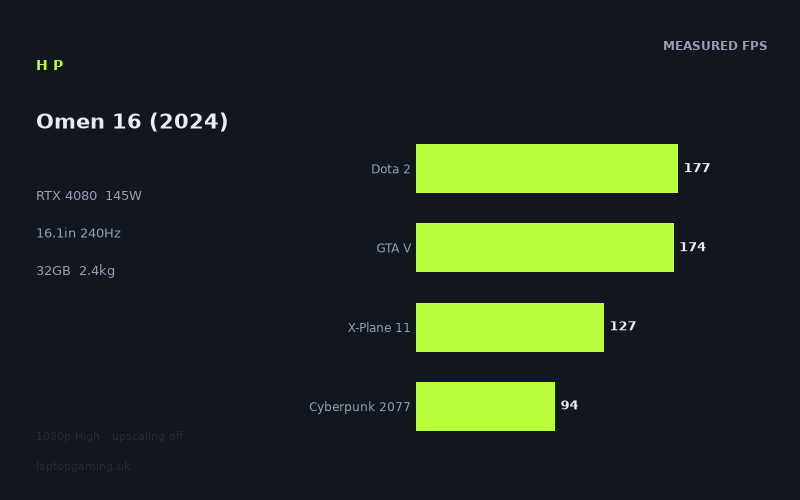
Frame rates
1920×1080, High preset, upscaling off.
Measured on this machine. Source: Notebookcheck, 2024-02-21.
Not scored: incomplete benchmark suite
Every scored laptop on this site is averaged over the same 5 games, and this one is short of Baldur's Gate 3. A mean over 4 games is not comparable to a mean over 5, so we publish the figures we have and leave the score blank rather than rank it against machines tested on a different set. The numbers below are real - the suite is just incomplete.
How these numbers were produced
Frame rates here are not measured by us, and we label how each one was arrived at. A figure marked measured comes from a published run on that exact machine. A figure marked representative is derived from the GPU and its power limit (TGP) and cross-referenced against published reviews - a sound estimate of what that configuration delivers, but not a measurement of that specific laptop. Unless stated otherwise, numbers are 1920x1080, High preset, upscaling off. Where a laptop ships in several power configurations we use the wattage of the exact SKU listed, because a 140W RTX 5070 and a 115W one are not the same product.
In use
The short version
The HP Omen 16 (2024) is one of the better-balanced machines in our records, and the specification explains why before you reach a single frame rate. Our record lists an RTX 4080 running at a 145W power limit — a generous configuration, at the upper end of the band that card is sold in — alongside a Core i9-14900HX, 32GB of memory, a 1TB SSD, a 16.1in 2560x1440 IPS panel at 240Hz, an 83Wh battery and a 2.37kg chassis. There is no obvious weak link in that list, which is rarer than it sounds.
The measured figures back it up. Notebookcheck's numbers, all at 1920x1080 on the High preset with upscaling off, cover ten games and run from 263fps in Strange Brigade down to 94fps in Cyberpunk 2077. That bottom figure is the important one. Cyberpunk 2077 at native 1080p on High with no upscaling and no frame generation is the most demanding entry in our scoring suite, and 94fps is a strong result — it means the heaviest thing in the test set still runs comfortably above the threshold where anyone would notice a problem. Helldivers 2 at 104fps and Ready or Not at 122fps make the same point with more recent software. Nothing measured on this machine falls below 94fps.
The test set itself deserves a mention, because it is unusually contemporary. Alongside the long-standing benchmark staples there are figures for The Finals, Helldivers 2 and Ready or Not — games people were actually playing at the time the measurements were taken, rather than titles that have been in benchmark suites since 2018. That makes the data more directly useful for a buying decision than a set of purely synthetic-feeling results.
There is no score on this page, and the reason is procedural rather than damning. Our scoring suite is five games, identical for every laptop we rank, and we hold four of them here: GTA V at 174fps, Dota 2 at 177fps, X-Plane 11 at 127fps and Cyberpunk 2077 at 94fps, averaging 143fps. We have no Baldur's Gate 3 figure. Averaging four games and ranking that against every other machine's five-game average would quietly corrupt the leaderboard, so we leave it blank. We also hold no confirmed UK price for this configuration, which independently prevents any value judgement.
The reservations are two, and both are about the gap between what the specification promises and what the comparison data can demonstrate. Against a Schenker XMG Pro 16 Studio (Mid 23) carrying an RTX 4070 at 140W, this machine finishes one frame per second behind across four shared games — a dead heat with a smaller graphics card. Against a Lenovo Legion Pro 5 16ARX8 with an RTX 4050 it is level across three. Both results are real, both need explaining rather than excusing, and the explanation runs through most of this review.
Buy it if you want a fast, complete 16in gaming laptop with no glaring compromises and a genuinely generous GPU configuration. Look elsewhere if you are paying a large premium specifically for the RTX 4080 badge, because the comparison data does not show that badge buying separation from a well-configured RTX 4070.
Performance
What a 145W power limit is supposed to buy
Nvidia's laptop graphics cards are not fixed products. The same silicon goes to every manufacturer with a configurable power ceiling, and each manufacturer picks a point in that band according to how much heat the chassis can move, how much fan noise they consider acceptable and what price bracket they are chasing. The consequence drives everything below and is worth restating: the performance gap between a generously configured GPU and a conservatively configured one of the same model routinely exceeds the gap between adjacent model numbers. A well-fed RTX 4070 outrunning a starved RTX 4080 is not an anomaly; it is the normal behaviour of this product stack.
Our record puts this RTX 4080 at 145W. That is at the generous end of how the card gets configured, and it is a genuine advantage over machines that run the same silicon lower. It is also broadly consistent with the rest of the specification. The chassis is 16.1in and weighs 2.37kg, and the processor is a Core i9-14900HX — one of the HX-series desktop-derived parts that go into machines expected to sustain heavy multi-core load, not a lower-power H-class chip. HP has fitted an 83Wh battery, which is substantial. This is a machine designed around sustained performance rather than around being the thinnest thing on the shelf.
Two kilograms and 370 grams across a 16.1in footprint is, if anything, on the light side for a 145W graphics configuration paired with an HX processor. Cooling capacity is broadly a function of internal volume — fan diameter, heat-pipe cross-section, exhaust area, thermal mass available to absorb transients — and a machine that keeps the weight down while feeding the GPU 145W is asking a good deal of its thermal solution. We hold no measured temperatures and no measured noise figures for this laptop, so we cannot tell you what that costs in acoustics or surface heat, and we are not going to guess. What the frame rates show is that whatever the cooling system is doing, it is not obviously failing: 94fps in Cyberpunk 2077 is not the output of a badly throttled RTX 4080.
The measured spread, from top to bottom
Notebookcheck's figures for this machine are dated 21 February 2024 and cover ten titles, running from 263fps to 94fps — a spread of just under three to one. That range is the first thing worth reading, because it tells you the test set is not homogeneous. Some of these games barely engage the graphics card. Others engage almost nothing else.
At the top sits Strange Brigade at 263fps. Strange Brigade has been a benchmark fixture for years because it is a clean, well-optimised Vulkan title that scales predictably and puts almost no unusual load on the processor. A figure over 260fps is what a healthy, generously powered RTX 40-series card of this tier produces, and it serves mainly as a sanity check: nothing is fundamentally wrong with the power delivery or the thermal solution.
The Witcher 3 at 246fps follows. This is the current build of the game rather than any version-tagged variant, and 246fps at 1080p High is a comfortable result in a title that is well past the point of stressing hardware of this class.
Then the character of the data changes. Dota 2 at 177fps and GTA V at 174fps sit almost on top of each other, and both are scoring-suite titles that need reading carefully. GTA V is an old game whose renderer leans heavily on single-thread processor performance; at 1080p on High it stopped being limited by the graphics card on hardware of this class years ago. Dota 2 is in the same category — not a demanding game for any RTX 40-series card, and a figure of 177fps is far below what an RTX 4080 could theoretically produce in it. Both numbers are substantially statements about the Core i9-14900HX and the platform around it, not about the graphics card. That observation becomes the centre of the comparison argument later, so it is worth holding on to.
The Finals at 171fps is a more modern and more interesting data point. It is a live-service shooter with destructible environments, a genuinely demanding workload in places, and a game where high frame rates have competitive value. One hundred and seventy-one frames per second is a good number and it is one of the few in the set that speaks directly to the 240Hz panel.
The middle band — Final Fantasy XV at 129fps, X-Plane 11 at 127fps and Ready or Not at 122fps — is where a lot of the practical experience lives. Final Fantasy XV is a mid-weight GPU test with known engine quirks. X-Plane 11 is the purest processor-bound title in our suite: its simulation loop is famously heavy on the CPU and famously indifferent to graphics hardware, and 127fps is a strong result for the platform rather than a statement about the RTX 4080. Ready or Not at 122fps is a modern tactical shooter and a legitimate mid-weight GPU load.
At the bottom, the two results that actually test the graphics card. Helldivers 2 at 104fps is a demanding, effects-heavy title that was punishing a lot of hardware at the time these figures were taken. Cyberpunk 2077 at 94fps is the headline. Cyberpunk 2077 at native 1080p on High with upscaling off will consume every scrap of GPU performance available to it, and it is the closest thing our five scoring games have to a pure graphics test. Ninety-four frames per second is a genuinely strong number and it is the measurement that should carry the most weight when judging whether the 145W configuration is doing its job. On this evidence, it is.
Four of five, and the shape of what is missing
Our scoring suite exists so machines can be compared on identical software rather than on whichever games a reviewer happened to run. For this laptop we hold four of the five: GTA V at 174fps, Dota 2 at 177fps, X-Plane 11 at 127fps and Cyberpunk 2077 at 94fps, averaging 143fps. The missing title is Baldur's Gate 3.
That is a better position than many machines on this site are in, and the composition matters. Three of the four we hold — GTA V, Dota 2 and X-Plane 11 — are substantially processor-bound at 1080p on hardware of this class. Only Cyberpunk 2077 is a serious GPU test. So the 143fps average is three-quarters weighted towards a component the specification is not selling you on. That is not a criticism of the suite, which has to include games people actually play and cannot consist solely of graphical showcases, but it is essential context for reading the comparison section.
Baldur's Gate 3, had we held it, would have sat somewhere between the two groups. It is a proper modern renderer that asks considerably more of a graphics card than Dota 2 does, while carrying a well-documented processor dependence of its own in the later parts of the game. Its absence costs us a data point rather than distorting the picture badly, and the presence of Cyberpunk 2077 means the GPU is at least represented in the average — which is more than can be said for several machines whose records stop at three scoring games.
The consequence remains that we publish no score. A four-game average cannot be ranked against five-game averages without introducing systematic bias, and we would rather show the working and leave the number blank. The absent UK price would have prevented a score independently in any case.
What the frame rates mean in practice
Strip out the benchmark politics and the practical picture is straightforward and good. Every one of the ten measured games clears 94fps at 1080p on High with no upscaling. Six of the ten clear 120fps. Four clear 170fps.
If your library is competitive shooters, older single-player titles, strategy games or anything short of the heaviest recent releases, this machine will produce frame rates well beyond what most panels or most players can use, with a great deal of settings headroom in reserve.
If your library is the heavy modern tier — the Helldivers 2 and Cyberpunk 2077 end — you are looking at the 94 to 104fps band at 1080p. That is comfortably fast, and it is the sort of margin that gives a machine several years of useful life before settings compromises become necessary. It is also, notably, high enough that raising the resolution is a realistic option rather than a fantasy, which matters a great deal given this machine's panel.
The resolution question
One caveat needs stating clearly, because it applies to this machine more than to a 1080p laptop. Every frame rate above was measured at 1920x1080. The panel is 2560x1440.
That is 3,686,400 pixels against 2,073,600 — roughly 1.8 times as many. Rendering cost does not scale perfectly with pixel count, and modern engines carry overheads that do not grow with resolution, but the direction is not in doubt. We hold no measurements at the panel's native resolution and we are not going to estimate them, because an estimate presented as a number is exactly what this site exists not to do.
What can be said is directional. The titles at the top of the table have such enormous 1080p headroom that even a substantial native-resolution penalty leaves them well clear of the panel's practical requirements. The titles at the bottom have less room. A game measured at 94fps at 1080p will not be at 94fps at 1440p, and a buyer intending to play the heaviest modern releases at native resolution should expect to use DLSS or drop settings for the most demanding of them. That is entirely normal for a 1440p gaming laptop and DLSS exists for exactly this situation — but it should be an informed expectation rather than a surprise.
The more encouraging way to read it is this: 94fps at 1080p in the heaviest title measured is a much better starting point for a 1440p panel than the 60-something-fps figures that machines a tier down produce. This is a laptop whose GPU configuration and whose panel resolution were chosen with each other in mind.
The screen
16.1in at 2560x1440, IPS, 240Hz
Our record lists a 16.1in IPS panel at 2560x1440 and 240Hz. As a combination for a gaming laptop with this graphics configuration, it is well judged — considerably better judged than the high-resolution creator panels or the 360Hz budget panels that turn up elsewhere in our records.
The resolution is the right choice for this class of hardware. At 16.1in, 2560x1440 gives a visibly sharper image than 1080p without the enormous rendering cost of a 4K or 3200x2000 panel, and it is a resolution a well-configured RTX 4080 can genuinely drive in most games. The 16.1in size is also worth a note in its own right: a 16in-class panel gives meaningfully more usable area than a 15.6in one for a modest increase in footprint, and the extra area is useful for everything from strategy games to spreadsheets.
IPS is a sensible choice and not a compromise here. It gives good viewing angles and consistent colour, and it carries none of the burn-in consideration that OLED does — relevant on a machine that will spend hours a day showing static interface elements. We hold no brightness, contrast, colour-gamut or response-time measurements for this panel, so nothing above should be read as a claim about this specific example. It is a statement about the technology and the specification.
Can the GPU drive 240Hz?
Partly, and the split is instructive. At 1080p, four of the ten measured games clear 170fps — Strange Brigade, The Witcher 3, Dota 2, GTA V — with The Finals just behind at 171fps. Those are the titles in which a 240Hz panel is doing genuine work, even if none of them saturates it. The remaining games sit between 94fps and 129fps, where refresh rate above roughly 120Hz has progressively less to contribute.
At the panel's native 1440p, the answer is less generous and we have no measurements to quantify it. The realistic expectation is that the light titles will still produce very high frame rates and the heavy ones will not approach 240Hz without upscaling.
Whether that makes 240Hz excessive depends entirely on what you play. For a competitive player in The Finals, in Counter-Strike, in Valorant or in any title where frame rate has genuine competitive value, a 240Hz panel is a real advantage and this machine has enough GPU to make use of it in that category of game. The Finals at 171fps is direct evidence of that, in a title people actually play competitively. For a single-player buyer working through heavy narrative games, 240Hz is more headroom than the hardware will use.
The important point is that this is a defensible specification rather than a marketing figure. Unlike a 360Hz panel on a machine whose fastest game reaches 192fps, a 240Hz panel on a machine producing 171fps in a modern competitive shooter is a display the hardware can meaningfully approach. It is not saturated, but it is not decorative either.
The pairing, judged as a whole
Resolution, refresh rate and graphics configuration are the three specifications that have to agree with each other on a gaming laptop, and they broadly do here. A 145W RTX 4080 is roughly the right amount of graphics hardware for 1440p at high frame rates. A 240Hz ceiling gives competitive players somewhere to go in light titles without demanding rendering performance the machine cannot supply in heavy ones. Nothing in the display specification is asking the GPU for something it cannot deliver, and nothing in the GPU specification is wasted on a panel that cannot show it. That coherence is the machine's strongest structural quality and it is worth more than any single frame rate in the table.
Build, size and portability
2.37kg and 83Wh
Our record gives the weight as 2.37kg and the battery as 83Wh. Together those describe a machine that is portable in a real sense without pretending to be a thin-and-light.
For a 16.1in laptop with a 145W graphics configuration and an HX-series processor, 2.37kg is genuinely restrained. Comparable machines frequently sit between 2.5kg and 3kg, and the difference is noticeable in a bag. This is a laptop you can reasonably carry between home and an office or a campus several times a week. It is not one you will forget you are carrying.
The cost of keeping the weight down is thermal headroom, and it is worth being explicit about the tension. A 145W GPU alongside a Core i9-14900HX is a substantial amount of heat to move, and a 2.37kg chassis has less internal volume to move it with than a heavier one. We hold no measured temperatures, no fan noise figures and no sustained-load clock data for this machine, so we cannot tell you whether that tension resolves quietly or noisily. The frame rates suggest the cooling is adequate to the task — a badly thermally limited RTX 4080 does not deliver 94fps in Cyberpunk 2077 — but adequate performance and comfortable acoustics are different questions, and our record only answers the first.
Eighty-three watt-hours is a decent capacity and is more than several competitors in this class carry. We hold no battery-life measurement and will not estimate one. What can be said is that none of the frame rates above apply on battery — discrete GPUs are power-limited severely when unplugged, and this is a machine to game on with the charger attached regardless of cell size.
Memory, storage and what our record omits
Thirty-two gigabytes of memory is generous and is one of the specifications most likely to keep the machine feeling current in three or four years' time. Sixteen gigabytes is adequate for gaming today; 32GB removes the question entirely and gives real room for anything else you run alongside a game. On a machine at this performance level it is the right fitment rather than an indulgence.
A 1TB SSD is the sensible standard and gives genuine breathing room given how large modern game installations have become.
Our record holds no chassis dimensions beyond the 16.1in screen size, no port complement, no keyboard or trackpad detail, no measured noise, no measured temperatures, no battery runtime and no confirmed UK price. We would rather list those gaps than write around them.
How it compares
The four machines below are all from the same GPU generation, compared only on games both machines hold, with our scoring-suite titles preferred where available. They are a deliberate spread: the two closest results, the machine this one beats by the widest margin, and the machine that beats it by the widest.
MSI Thin GF63 — RTX 4050 — Omen 16 +63fps across 4 shared games
Across four shared games the Omen 16 averages 63 frames per second more than an MSI Thin GF63 with an RTX 4050. That is an enormous margin and it is exactly what should happen when the largest card in the generation meets the smallest.
Its real importance is as a control. Remember the number 63 and the fact that it was produced across a four-game overlap, because the next comparison uses the same depth of overlap and produces a result 64 frames per second different. The method is plainly capable of resolving hardware differences across four games when a large difference exists. That single fact does more analytical work than the margin itself.
Our record does not hold a power limit for the Thin GF63's RTX 4050, so we cannot say whether that machine's card is generously or conservatively configured, and the margin should be read with that uncertainty attached.
Schenker XMG Pro 16 Studio (Mid 23) — RTX 4070 at 140W — Omen 16 -1fps across 4 shared games
This is the result that most deserves attention, and it is the one a buyer is most likely to misread. Across four shared games — the same depth of overlap that produced a 63fps margin above — the Omen 16 finishes one frame per second behind a Schenker XMG Pro 16 Studio carrying an RTX 4070 at 140W.
A 145W RTX 4080 and a 140W RTX 4070 landing within a single frame of each other is a genuine, meaningful result and it should not be waved away. Two things are going on and both matter.
The first is that the XMG's graphics card is very well fed. One hundred and forty watts is at the top of the band an RTX 4070 is sold in, and a well-configured RTX 4070 is a far more serious opponent than the model numbers imply. The gap between adjacent tiers in this generation is not large when both cards are running near their ceilings; the gap between a well-fed card and a starved one is larger. Both of these machines are well fed, and that compresses the difference between them before a single game is run.
The second is the composition of the overlap. This machine holds four scoring-suite titles, and three of them — GTA V, Dota 2 and X-Plane 11 — are substantially processor-bound at 1080p on hardware of this class. A four-game overlap between two machines of this calibre is very likely to be dominated by exactly those titles, and in them the frame rate is set by how quickly a single processor thread can prepare work for the renderer rather than by how fast the GPU executes it. Two machines with competent modern processors will produce similar numbers there regardless of what graphics card is sitting behind them.
Put the two together and the picture is coherent: a genuinely close hardware match, measured predominantly on games that would compress even a large gap. The honest conclusion is not that an RTX 4080 at 145W is no faster than an RTX 4070 at 140W. It is that this particular comparison, on these particular games, at this particular resolution, cannot show the difference — and that a buyer paying a large premium for the bigger card should want better evidence than this comparison can supply.
Lenovo Legion Pro 5 16ARX8 (Ryzen 5 7645HX, RTX 4050) — dead level across 3 shared games
Across three shared games the Omen 16 averages exactly the same frame rate as a Lenovo Legion Pro 5 16ARX8 with a Ryzen 5 7645HX and an RTX 4050.
Taken at face value this is absurd, and absurd results should be treated as absurd rather than reported neutrally. An RTX 4080 at 145W is not level with an RTX 4050 in any workload that meaningfully involves the graphics card. The margin against the Thin GF63 — 63fps, same generation of GPU, four games — proves the point conclusively.
The correct conclusion is that these three shared games are not measuring the graphics card. With only three titles in the overlap and three processor-bound titles in this machine's scoring set, the probability that the comparison is running almost entirely on CPU-limited software is high. The Legion Pro 5's Ryzen 5 7645HX is a competent modern processor; in GTA V, Dota 2 and X-Plane 11 it will prepare frames at a broadly comparable rate to a Core i9-14900HX, and both machines' graphics cards will spend the test waiting for work.
It is worth noting the pattern across the three rivals so far. The margin against the RTX 4050 Thin GF63 across four games is +63. The margin against the RTX 4050 Legion Pro 5 across three games is zero. Same class of rival GPU, wildly different results — and the variable that changed is the games in the overlap, not the hardware. That is about as clean a demonstration of the point as the data offers.
Asus ROG Strix Scar 17 — RTX 4090 — Omen 16 -40fps across 3 shared games
Across three shared games the Omen 16 averages 40 frames per second behind an Asus ROG Strix Scar 17 with an RTX 4090.
This matters for the integrity of everything above. A sceptic reading the two ties might conclude that three- and four-game overlaps simply cannot distinguish anything and that all of these comparisons are noise. The Scar 17 result refutes that directly: a three-game overlap produced a 40fps gap here, which means shallow overlaps have plenty of dynamic range when a real difference exists to be found.
So what separates this comparison from the dead heat against the Legion Pro 5, which also used three games? Not the number of titles. In processor-bound games the frame rate is set by the platform — the processor, its sustained clock behaviour, the memory subsystem — and the Strix Scar 17 is clearing a ceiling that the Omen 16 and the RTX 4050 machines are all sitting at. Our record does not hold a power limit for the Strix Scar 17's RTX 4090, so we will not attribute the gap to any particular configuration, and given everything above we would not attribute a 40fps swing purely to the graphics card in any case.
The practical reading for a buyer is more measured than the raw number implies. Forty frames per second is a large average gap, but it is an average across three games this review has already established are mostly not GPU tests. In the heavy modern tier — the Cyberpunk 2077 and Helldivers 2 end — the difference between a 145W RTX 4080 and an RTX 4090 is real but is a different and generally smaller proportional gap than 40fps across three light titles implies. We hold no shared heavy-title comparison between these two machines, so that is an inference, and we flag it as one.
What the four results say together
Read as a set rather than one at a time, the comparisons support three conclusions and refuse a fourth.
They support the conclusion that the method can separate machines: +63fps at one end and -40fps at the other are not the outputs of a blunt instrument, and the +63 came from the same four-game depth that produced the -1 against the XMG.
They support the conclusion that the narrow overlaps are dominated by processor-bound titles: an RTX 4050 machine level across three games while another RTX 4050 machine is 63fps behind across four is not explicable any other way.
They support the conclusion that this machine's GPU configuration is doing its job, on the strength of 94fps in Cyberpunk 2077 and 104fps in Helldivers 2 — its own results, in the titles where the graphics card is unambiguously the constraint.
What they do not support is a claim that the RTX 4080 badge buys measurable separation from a well-configured RTX 4070. On the evidence we hold, across the games we hold, it does not. That is a genuine finding and it should influence how much anyone is willing to pay for the larger card.
Who it's for
Buy it if
You want a complete 16in gaming laptop with no weak link. That is the strongest case for this machine and it does not depend on any single benchmark. A 145W RTX 4080, a Core i9-14900HX, 32GB of memory, a 1TB SSD, a 1440p 240Hz panel and an 83Wh battery in a 2.37kg body is a specification with nothing obviously wrong in it. A lot of laptops are let down by one line on the sheet — a starved GPU, 16GB of memory, a panel mismatched to the hardware, a tiny battery. This one is not.
You play heavy modern single-player games. Cyberpunk 2077 at 94fps and Helldivers 2 at 104fps, both at native 1080p on High with no upscaling, mean the demanding end of the library runs comfortably and will keep running comfortably for some time. That headroom is what makes the 1440p panel a realistic proposition rather than an aspiration.
You play competitive shooters and want the refresh rate. The Finals at 171fps is direct evidence that this machine can push a modern competitive title well into the range where a 240Hz panel earns its place. That is a more credible high-refresh proposition than most.
You want the machine to last. Thirty-two gigabytes of memory, a generously configured graphics card and a 1TB SSD are the three specifications that most reliably determine whether a laptop still feels adequate in four years. All three are right here.
Buy something else if
You are paying a large premium specifically for the RTX 4080. This is the most important reservation and it comes straight out of the comparison data. Against a well-configured RTX 4070 across four shared games, this machine is one frame per second behind. That comparison cannot show the RTX 4080's advantage, and neither can any other comparison in our record for this laptop. If the price difference between this and an equivalent RTX 4070 machine is substantial, the evidence for paying it is not present in the measurements we hold, and a buyer should want that evidence before spending.
You need the absolute top of the generation. Forty frames per second behind a Strix Scar 17 across three shared games is a large deficit, and while the section above explains why the number overstates the real-world gap in heavy titles, it does not overturn the direction. If outright speed is the goal and cost is secondary, this is not the fastest thing available.
Quiet operation matters more to you than performance. A 145W graphics configuration and an HX-series processor in a 2.37kg chassis is a lot of heat in not very much volume. We hold no noise measurements at all for this machine, so we cannot tell you it is loud and we cannot tell you it is quiet. If acoustics are a priority, this is a question you should get answered elsewhere before buying, and the specification gives grounds to ask it.
You want a settled value judgement. We hold no confirmed UK price for this configuration, which is why there is no score on this page. Value is a substantial part of how we rank machines and it cannot be computed without a number. This page can tell you what the laptop does. It cannot tell you whether it is worth what it costs.
You want a machine you barely notice carrying. Two kilograms and 370 grams is restrained for what it contains, but it is not light in absolute terms, and 16.1in laptops need large bags. If portability is the dominant requirement, a smaller machine with a more conservative GPU configuration will suit you better, and this review's own analysis suggests you would lose less performance than the model numbers imply.
The honest summary
The HP Omen 16 (2024) is a well-built specification with a generously configured graphics card and a benchmark record that is broad, modern and consistently strong. Ten games, nothing below 94fps, and the two heaviest titles in the set — Cyberpunk 2077 and Helldivers 2 — both comfortably clear of 90fps at native 1080p with no upscaling. That is a machine that will play anything you point at it and keep doing so.
The awkward part is that our comparison data cannot demonstrate the RTX 4080 earning its premium. Level with an RTX 4050 machine across three games, one frame behind a 140W RTX 4070 across four, and 63 frames clear of a different RTX 4050 machine across four. Those results are not contradictory once you understand that most of the shared games are waiting on the processor, but they do mean a buyer should think carefully about which badge they are paying for.
What we cannot tell you is what it costs, how loud it gets, how hot it runs, how long the battery lasts, or how it would rank against the rest of the field on our full five-game suite. Those are gaps in our record rather than judgements about the machine, and we would rather leave them visible than fill them in.