Review
Acer Nitro V 16 AI review
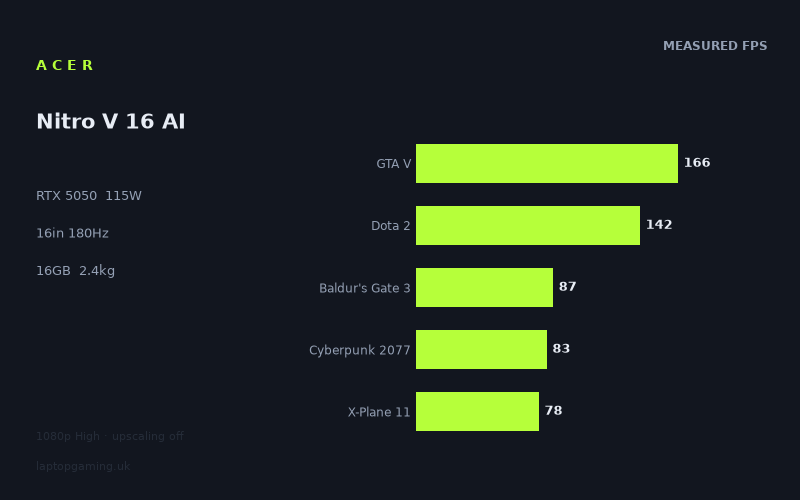
Frame rates
1920×1080, High preset, upscaling off. Averages 111fps across the 5 core benchmark games.
Measured on this machine. Source: Notebookcheck, 2025-11-07.
Not scored: no confirmed UK price
We have the full benchmark suite for this machine, so it ranks on the frame rate leaderboard like any other. What we don't have is a UK listing for this exact configuration - it's sold as a European review unit, or only in specifications that differ from the one tested. Since 30% of our score is value for money, scoring it would mean pretending price is no object, which would flatter it against every laptop you can actually buy. The frame rates below are real and comparable; there is just no buying recommendation to make yet.
How these numbers were produced
Frame rates here are not measured by us, and we label how each one was arrived at. A figure marked measured comes from a published run on that exact machine. A figure marked representative is derived from the GPU and its power limit (TGP) and cross-referenced against published reviews - a sound estimate of what that configuration delivers, but not a measurement of that specific laptop. Unless stated otherwise, numbers are 1920x1080, High preset, upscaling off. Where a laptop ships in several power configurations we use the wattage of the exact SKU listed, because a 140W RTX 5070 and a 115W one are not the same product.
In use
The short version
The Acer Nitro V 16 AI is an entry-level gaming laptop that behaves exactly the way the specification says it should: an RTX 5050 running at a full 115W, paired with a Ryzen 5 240, driving a 16in 1920x1200 180Hz IPS panel. Nothing about the measured results is surprising, and that is meant as a compliment. The GPU is given the power it needs, and across the sixteen games in the benchmark data it lands where a well-fed 5050 should land — comfortably above 60fps in the majority of them at 1080p High with upscaling switched off, and comprehensively beaten by the newest, heaviest ray-traced titles.
The headline the marketing would like you to take from a machine like this is "180Hz gaming". The benchmark data does not support that reading. Of the sixteen games measured, exactly one — Strange Brigade, at 220fps — actually exceeds the panel's refresh rate. GTA V at 166fps and Dota 2 at 142fps get close enough to feel fast. Everything else, including every genuinely modern title on the list, sits well below it. This is a 180Hz panel bought for esports, older competitive shooters and the sense of smoothness you get in menus and desktop use, not for AAA gaming. That is a perfectly reasonable thing for it to be, but it is worth being clear about before you spend money on the basis of the number on the box.
Where the machine is strong: the 115W power limit is the maximum you will see on a mobile RTX 5050, and the numbers show it. The five games in the scoring suite average 111fps, and the spread across those five — 166fps in GTA V down to 78fps in X-Plane 11 — is the normal shape for this class. Against the other RTX 5050 machines in the database it holds its own or wins. Where it is weak: 8GB of VRAM and a 5050-class GPU are simply not enough for 2025's ray-traced flagships at native resolution, and the bottom of the results table shows that in blunt terms — 30fps in Borderlands 4, 28fps in Assassin's Creed Shadows.
One piece of housekeeping. We have not published a score for this machine because we do not have a confirmed UK price for this exact configuration. Value is 30% of our score and it cannot be computed without a price, so the score is absent for that reason and no other. The benchmark suite is complete, the machine ranks normally on the frame rate leaderboard, and everything below is based on the same measured data we use for any other laptop. We are not going to guess at what it costs, because a guess would be worse than nothing.
If you want the one-line buying advice: this is a sensible 1080p machine for someone who plays a broad mix of games, is happy to use DLSS in the heaviest ones, and wants a 16in screen rather than the 15in or 14in the rest of the entry-level market defaults to. If your list of must-play titles is dominated by 2025 ray-traced releases, the 5050 is the wrong tier of GPU and no amount of power budget fixes that.
Performance
Every frame rate in this section comes from Notebookcheck's measurements, taken at 1920x1080, High preset, with upscaling disabled. That last condition matters enormously and we will come back to it, because it makes these numbers a floor rather than a description of how most people will actually play.
What 115W actually buys you
The single most useful number in the specification is not the GPU name, it is the 115W total graphics power. Mobile GPUs are sold under one name across a wide range of power limits, and the same silicon can differ by a substantial margin in real frame rates depending on how much power the chassis is willing to give it and how much heat it can shed. A 5050 constrained to a lower ceiling in a thin chassis is a materially slower product than a 5050 given its full allowance, even though both will appear identically on a spec sheet and in a shop listing.
115W is the top of the range for this GPU. That means the measured results here should be treated as close to the best you can expect from an RTX 5050 in any laptop, and it means that when you see this machine compared against other 5050 machines, the differences you see are largely differences in their power budgets, not this one's. It also sets a hard ceiling on expectations: if 115W is the most a 5050 can be given, and 115W produces the numbers below, then no 5050 laptop is going to run Assassin's Creed Shadows well at native 1080p. The problem is the tier of GPU, not the implementation.
The practical consequence for a buyer is a simplification. You do not need to worry about whether this particular Nitro is a hobbled version of the GPU. It is not. The question becomes purely whether a fully-powered 5050 is enough for what you play, and the sixteen measured results answer that question directly.
The fast tier: where the panel gets a workout
Four games in the list reach 100fps or better. Strange Brigade at 220fps is the outlier and should be read as a synthetic-ish result — it is a well-optimised, older, Vulkan-friendly title that has long been used as a reference point precisely because it scales cleanly and does not stress modern bottlenecks. It tells you the GPU is not being strangled and the cooling is doing its job under a sustained load. It does not tell you anything about how a 2025 release will run.
GTA V at 166fps and Dota 2 at 142fps are the two results that justify the 180Hz panel. Both are old, both are CPU-sensitive, and both are the kind of thing people actually still play in large numbers. If your library is weighted towards competitive multiplayer, older shooters, MOBAs and the long tail of games from the last decade, this is the tier you will spend most of your time in, and the machine is genuinely fast there. You will not consistently saturate 180Hz — only Strange Brigade does that — but frame rates in the 140-170 range on a high refresh panel feel appreciably better than 60, and the input latency benefit is real.
Final Fantasy XV at 100fps rounds out this tier and marks the boundary. It is a 2016-era PC port with a reputation for being heavier than it looks, and hitting a clean 100fps at High is a good result for a 5050. From here down, the list drops away steadily.
The middle: 60-90fps, and this is where most people will live
Six games land between 56 and 87fps, and this band is the honest centre of gravity for the machine. Baldur's Gate 3 at 87fps is comfortable and then some — a turn-based RPG at 87fps is more than anyone needs, and there is headroom to push settings above High if you want to. Cyberpunk 2077 at 83fps is the result that surprises people, because Cyberpunk has a reputation as a punishing benchmark. At High preset with ray tracing off, it is not; the game has been optimised heavily since launch and its rasterised path is efficient. 83fps at High is a strong showing and means Cyberpunk is genuinely enjoyable on this machine, with the caveat that turning on any of the ray tracing presets would collapse that number to a fraction of it. The benchmark data does not include a ray-traced Cyberpunk figure, so we cannot tell you what it would be, only that it would be dramatically lower.
Battlefield 6 at 78fps is the most consequential result in this band for a lot of buyers. A current-generation military shooter running at 78fps at High is a properly playable competitive experience — you would probably want to drop a couple of settings to push towards 100fps for multiplayer, and the game will let you, but 78fps at High means the machine is not embarrassed by the biggest multiplayer release of the year. X-Plane 11 at 78fps sits in the same place numerically but for a different reason: flight simulators are more sensitive to CPU and draw-call throughput than to raw shading power, and 78fps here says as much about the Ryzen 5 240 as it does about the GPU.
Ghost of Tsushima at 68fps, The Outer Worlds 2 at 60fps and Until Dawn at 56fps close out the band. Ghost of Tsushima is a well-behaved PlayStation port and 68fps is fine. The Outer Worlds 2 landing exactly on 60 and Until Dawn just below it are the first signs of strain — these are Unreal Engine 5 titles and UE5's default feature set is expensive on hardware in this class. At 60fps and 56fps you are playing, but you are playing at the settings floor of what feels good, with no margin for a busy scene to dip.
The heavy tier: where a 5050 runs out
Six games measure below 60fps, and the shape of that group is the most informative thing in the entire dataset. Indiana Jones and the Great Circle at 59fps, Doom: The Dark Ages at 49fps, Star Wars Outlaws at 40fps, Borderlands 4 at 30fps and Assassin's Creed Shadows at 28fps are not a random selection of demanding games. They share a specific technical characteristic: they all lean on modern global illumination, and several of them require ray-tracing hardware as a baseline rather than offering it as an option you can switch off.
Indiana Jones and Doom: The Dark Ages both run on id Tech and both mandate hardware ray tracing — there is no rasterised fallback to retreat to. That the Nitro manages 59fps in Indiana Jones is actually a decent result and reflects how well-optimised that engine is; that Doom: The Dark Ages drops to 49fps in the same family of engine shows how much heavier the newer game's lighting workload is. Star Wars Outlaws applies ray-traced global illumination as standard, and 40fps is the consequence. Borderlands 4 and Assassin's Creed Shadows are the two worst results on the list, at 30fps and 28fps, and both are games that have been widely criticised for their PC performance across the entire hardware range, not just at this tier.
The honest framing is this: a 115W RTX 5050 with 8GB of VRAM cannot run 2025's ray-traced flagships at native 1080p High. That is not a fault in this laptop. It would be equally true of any 5050 laptop, because 115W is the ceiling. What it means for a buyer is that your relationship with these games will be mediated by upscaling, by dropping to Medium or Low presets, or by not playing them. All three are legitimate choices; you just need to make them knowingly.
The 8GB VRAM question
Eight gigabytes of video memory is the specification detail most likely to age badly. The pattern in the results is suggestive: the games at the bottom of the table are, broadly, the games with the largest texture budgets and the most memory-hungry lighting systems. Indiana Jones in particular is well known for exposing texture pool settings that will happily consume more than 8GB if you let them, and Assassin's Creed Shadows and Borderlands 4 are both large open-world titles with substantial streaming demands.
We want to be careful here, because we are inferring rather than measuring. The benchmark data gives us frame rates, not VRAM allocation figures, and we cannot tell you from these numbers alone how much of the deficit in those bottom-tier games is raw shading throughput and how much is memory pressure. What we can say is that the two failure modes look different in practice. A GPU that is simply too slow produces a low but stable frame rate. A GPU that is out of VRAM produces stutter, hitching and sudden traversal freezes that an average frame rate figure does not capture at all. If you are buying an 8GB card in 2025 and your library skews towards the newest open-world releases, that second failure mode is the risk you are taking on, and it is one that averages hide.
The mitigation is straightforward and slightly unglamorous: texture settings. Dropping texture quality one notch typically costs very little visually at 1080p on a 16in screen and can substantially relieve memory pressure. On a machine at this tier that is a setting you should expect to touch, not one you should feel aggrieved about touching.
The CPU, and what the results imply about it
We have no separate CPU benchmark data for the Ryzen 5 240 in our fact sheet, so anything we say about it has to be inferred from the game results. Two of those results are informative. Dota 2 at 142fps is the interesting one. Dota 2 is a lightweight game graphically and is almost always constrained by single-thread CPU performance rather than by the GPU; on a fast processor it will run at several hundred frames per second. 142fps is a perfectly playable figure and nobody is going to suffer at it, but it is lower than a high-end mobile CPU would produce, and the gap between it and Strange Brigade's 220fps in the same machine points towards the processor being the limiting factor rather than the graphics card.
X-Plane 11 at 78fps tells a similar story from a different direction — flight sims are notoriously CPU-bound and that result sits in the same band as GPU-limited shooters, which is not what you would see with a top-tier processor driving the same GPU.
Neither observation should worry a buyer much. The Ryzen 5 240 is clearly sufficient to keep a 115W RTX 5050 fed in the games where the GPU is the bottleneck, which is the great majority of them. Where it will show is in CPU-limited genres: strategy games with large late-game states, simulators, heavily-modded titles, and competitive shooters where you are chasing frame rates well above 200. If that describes your library, the processor is a more relevant constraint than the graphics card, and this is not the machine to buy. If you play mostly GPU-bound single-player games, it is a non-issue.
Upscaling changes almost everything below 60fps
The measured figures have upscaling switched off, which is the right methodology for comparing hardware but not how anybody with an RTX card actually plays. Every game in the bottom tier of this list supports DLSS, and several support frame generation as well. The practical effect is that the 40fps in Star Wars Outlaws and the 30fps in Borderlands 4 are not the numbers you would experience — they are the native-resolution baselines from which upscaling starts.
We are not going to invent an uplift figure, because we do not have measured upscaled results for this machine and the gain varies by game, by preset and by internal resolution. What we can say generally is that quality-mode upscaling at 1080p output renders at a meaningfully lower internal resolution and that the frame rate benefit is substantial in GPU-bound titles — which every game in the bottom tier is. A game measured at 40fps native is a candidate for a genuinely comfortable experience with upscaling on. A game measured at 28fps is a harder case, because frame generation needs a reasonable base frame rate to feel good and doubling a low number produces smooth-looking motion with sluggish input response.
There is a caveat that cuts the other way. At 1080p output, upscaling has less source information to work with than at 1440p or 4K, and the artefacts are more visible. On a 16in panel at normal viewing distance this is less objectionable than it sounds, but it is a real trade-off, and it is one that buyers of higher-resolution machines do not have to make in the same way. It is one of the quiet costs of the 1080p-class tier.
Reading the spread properly
The range across the sixteen measured games runs from 220fps down to 28fps — a factor of nearly eight between the fastest and slowest result on identical hardware at the same preset. That spread is the single most useful thing in the dataset, and it is why a single average figure is close to meaningless for a machine at this tier.
The scoring suite averages 111fps across its five games, and that number is accurate but unrepresentative, because the suite deliberately spans a wide range of eras and workloads for consistency across our whole database. Two of its five members are GTA V and Dota 2, both over a decade old. If you took that 111fps figure as a description of what modern gaming looks like on this laptop, you would be badly misled.
A better way to read it: line up all sixteen results in order and the midpoint of the list falls between Ghost of Tsushima's 68fps and the 78fps shared by Battlefield 6 and X-Plane 11. Ten of the sixteen reach 60fps or better. Six do not. Two fall below 40fps. That distribution — a solid majority playable at High, a meaningful minority requiring compromise, and a couple of titles that need serious concessions — is a fair one-sentence summary of what owning this machine is like.
The pattern in which games fall where is entirely predictable by release date and lighting technology, and that is actually reassuring. There are no anomalies in this dataset, no games performing far worse than the hardware should allow, which is what you would expect to see if the cooling were inadequate or the GPU were being power-starved in sustained loads. The machine performs consistently with its specification across the whole suite.
The screen
A 16in 1920x1200 IPS panel at 180Hz. Three things worth separating out.
16:10 is the right choice, but it costs you frames
The move to 16:10 across gaming laptops has been almost universally positive. The extra vertical space is genuinely useful for anything that is not a game — documents, code, spreadsheets, timelines — and in games it gives you slightly more vertical field of view in titles that handle aspect ratio correctly. On a 16in diagonal it also means the usable area is larger than the diagonal alone suggests, since 16:10 packs more area into the same diagonal than 16:9.
The catch is arithmetic. 1920x1200 is 2,304,000 pixels; 1920x1080 is 2,073,600. That is about 11% more pixels than the resolution the benchmarks were run at. Frame rate does not scale linearly with pixel count — CPU-bound titles will barely move, GPU-bound ones will move more than you would like — so we are not going to convert the measured figures into native-resolution estimates. But you should mentally shade every GPU-bound number in this review down somewhat if you intend to run at the panel's native resolution, which you should, because running a non-native resolution on an LCD looks worse than the frames are worth.
This matters most exactly where you would least want it to: at the bottom of the results table. A game measured at 59fps at 1080p is a game that will be under 60 at native. A game measured at 30fps has no margin at all. It reinforces the upscaling point above — at native 1200p, upscaling stops being optional in the heavy titles and becomes the default operating mode.
180Hz is aspirational for most of what you will play
We said this at the top and it bears the detail. One measured game — Strange Brigade at 220fps — exceeds 180Hz. Two more, GTA V at 166fps and Dota 2 at 142fps, get within striking distance. Thirteen of the sixteen are below 100fps.
That is not an argument against the panel. High refresh has benefits below its ceiling: lower persistence blur, lower display latency, and smoother frame delivery when combined with variable refresh. But it does reframe who the panel is for. If you bought this machine to play Valorant, CS2, Rocket League, Overwatch or Apex at high frame rates — none of which are in the benchmark set, so we cannot give you figures for them — the 180Hz panel is a genuine asset, and the GTA V and Dota 2 results suggest the hardware can drive that kind of workload well. If you bought it to play the games at the bottom of the results table, the refresh rate is close to irrelevant and you would have been just as happy on a 120Hz panel.
Our data does not record whether the panel supports variable refresh rate, and that is a meaningful gap. At the frame rates this machine produces in most modern games — anywhere from the high 20s to the high 80s, fluctuating — adaptive sync is worth more to the actual experience than the difference between 144Hz and 180Hz. It is worth checking on the specific SKU you are looking at before you buy.
What we can't tell you
We have the panel type — IPS — and nothing else. No brightness measurement, no contrast ratio, no colour gamut coverage, no response time figure. Those are the numbers that separate a good IPS panel from a poor one, and at this end of the market the variance is large. IPS as a technology gives you reliable viewing angles and decent colour compared to older TN alternatives, but it also means the contrast will be modest by nature and blacks will be grey in a dark room. We are not going to characterise this specific panel's quality from a three-letter acronym. If colour work matters to you, treat the display as an unknown until you have seen measured figures for the exact model.
Build, size and portability
2.448kg, and what that actually means
The weight is the one physical figure we have, and it is a defining one. 2.448kg puts this squarely in the mainstream 16in gaming laptop category — not a desktop replacement, not remotely a thin-and-light. Our fact sheet does not record the chassis dimensions or thickness, so we cannot comment on how it packs into a bag beyond what the screen size implies, and we have not handled the machine.
What 2.448kg means in practice is a laptop you can move but would not choose to carry daily. Add a gaming laptop's power adapter — which is invariably substantial on a machine with a 115W GPU, though we do not have its weight — and you are realistically looking at something over 3kg in a rucksack. That is fine for a student moving between halls and a lecture theatre a few times a week, fine for taking to a friend's house at the weekend, fine for a two-week trip home over the holidays. It is not fine as an everyday commuter machine if you also want to use it on a train.
The 16in screen is the reason to accept the weight. A 16in 16:10 panel is a substantially better place to spend six hours than a 14in one, and if this machine is going to be someone's only computer — desk during the week, sofa at the weekend, occasionally packed into a bag — the extra display area is worth more than the extra few hundred grams. If it were a 16in machine at this weight with a 15.6in-class screen area, the trade would be worse. As it is, the ratio is reasonable for the class.
The 76Wh battery
76Wh is a healthy capacity for a mainstream gaming laptop and larger than several machines in this segment carry. We do not have a measured runtime figure and we are not going to estimate one, because battery life on a gaming laptop depends enormously on display brightness, whether the machine can route the display through the integrated graphics rather than the discrete GPU, and what the workload is — and the difference between the best and worst case on the same laptop can be a factor of five or more.
What is safe to say is structural rather than numerical. Gaming on battery is not something this class of machine does well: a 115W GPU plus a CPU plus a display cannot be sustained from a 76Wh cell for any useful length of time, and manufacturers universally throttle the GPU hard when unplugged, which means unplugged gaming performance bears no relationship to the measured figures above. Treat the battery as being for browsing, video, note-taking and light work away from a socket — the things a 76Wh cell is genuinely good for — and treat gaming as a mains-powered activity. Every gaming laptop works this way; it is not a criticism of this one specifically.
Memory and storage
16GB of RAM is the current floor rather than a comfortable allocation. It is enough for every game in the measured suite and enough for normal multitasking alongside them, but it is the specification most likely to feel tight in two or three years, and a handful of 2025 releases already recommend more. The relevant question for a buyer is whether the machine allows it to be upgraded — mainstream Acer Nitro chassis have historically used replaceable SO-DIMM modules rather than soldered memory, which would make this a cheap fix later, but our fact sheet does not confirm the configuration on this specific model and we have not opened one. Worth verifying before purchase, because an upgradeable 16GB and a soldered 16GB are very different propositions over a four-year ownership period.
There is a second consideration on memory that the frame rate data cannot answer: whether 16GB is supplied as a single module or a matched pair. Discrete-GPU laptops are less sensitive to this than machines relying on integrated graphics, but single-channel memory still costs measurable performance in CPU-bound scenarios — which, as the Dota 2 and X-Plane 11 results hint, this machine already has. Again, one to check on the specific SKU.
1TB of SSD storage is the right amount for a machine at this tier — enough that you are not immediately shuffling installs, not so much that you are paying for capacity you will not use. It will not last forever. A handful of modern AAA installs will consume a large fraction of it, and the games at the heavy end of the measured list are exactly the ones with the largest install footprints. Most machines in this class have a second M.2 slot for expansion; our data does not confirm one here.
How it compares
We have five machines in the database close enough to compare against, and the comparisons are made only on games both machines have run, which is why the number of shared games differs from rival to rival. That is worth holding in mind throughout this section: a comparison across 13 shared games and a comparison across 8 shared games are not directly comparable to each other, because the smaller set may over- or under-represent the heavy modern titles where the gaps are widest. The direction of each result is reliable; the precise magnitudes are not interchangeable.
One thing applies to all five: none of them has a confirmed UK price in our database either. That means this entire section is a comparison of performance, not of value, and the two are not the same. A machine that is a few frames per second slower for meaningfully less money is a better buy, and we are unable to make that judgement for any of these pairings. Everything below tells you which is faster. It does not tell you which to buy.
The other RTX 5050s
The Medion Erazer Scout 17 E1 is the closest thing in the database to a like-for-like alternative — another RTX 5050 machine, and across the 13 games both have run, the Nitro V 16 AI comes out an average of one frame per second behind. That is a tie. One frame per second across thirteen games is well inside the range of run-to-run variance and settings interpretation, and no buyer should choose between these two on performance grounds. The choice is a chassis choice: a 17in machine against a 16in one. The 17in gives you more screen; the 16in will be lighter and easier to move, and the 2.448kg figure here is modest for the class. If both were on sale at the same price, this comes down to whether you want a laptop that mostly lives on a desk or one you will actually pick up.
The Acer Nitro V14 AI is the same family in a smaller shell, and the 16in machine comes out an average of three frames per second ahead across the nine games both have run. Three frames per second is a small but consistent edge and is exactly the shape you would expect: a larger chassis has more room for cooling and can hold higher clocks under sustained load, even at the same nominal power limit. Our fact sheet does not give the 14in model's power limit, so we cannot confirm that is the mechanism, but the direction is unsurprising. More importantly, the performance difference is not the reason to choose between them. The 14in is the portable one and the 16in is the one with the usable screen. Three frames per second should not enter into that decision; the two-inch difference in display size very much should.
The HP Victus 15-fa2160ng is the interesting one. It is also an RTX 5050 machine, and the Nitro V 16 AI beats it by an average of 13 frames per second across the nine games both have run. That is a large gap between two laptops carrying nominally identical graphics hardware, and it is the clearest illustration in this entire review of why the power limit matters more than the GPU name. Our fact sheet does not record the Victus's TGP, so we cannot state the cause with certainty — it could be a lower power limit, a more constrained cooling design, a slower CPU pairing, or some combination. What we can say is that if you are shopping for an RTX 5050 laptop and treating them as interchangeable because the GPU model matches, this comparison is the counter-example. Thirteen frames per second is the difference between a game being comfortable and a game being marginal, and it exists entirely within one GPU tier.
The RTX 5060 machines
Both 5060 comparisons in the database are against machines running the GPU at the same 115W power limit, which makes them unusually clean tests of the tier difference. Same power budget, more GPU.
Against the Lenovo LOQ, the Nitro sits an average of eight frames per second behind across 13 shared games. Against the Lenovo Legion 5 15AHP G10, it is 14 frames per second behind across eight shared games. Both directions are the same; the magnitude differs, and the smaller shared-game set on the Legion comparison is a reason to weight it slightly less heavily. Take the range as roughly the tier difference: somewhere in the region of eight to fourteen frames per second on average, at equal power.
What that means in practice depends entirely on where in the results table you sit. In the fast tier — GTA V, Dota 2, Strange Brigade — an extra ten frames per second on top of 140 or 160 is invisible. In the middle tier, it is the difference between Until Dawn at 56fps and Until Dawn comfortably above 60, or between The Outer Worlds 2 sitting exactly on the line and sitting safely above it. In the heavy tier, it is proportionally the most valuable: ten frames per second on top of 40 is a 25% improvement, and ten on top of 30 is a third more. The 5060 is worth most to the buyer who plays the newest, heaviest games, and worth least to the buyer who plays older ones. That is a useful way to decide whether to spend up, and it is a decision you can make from your Steam library rather than from a spec sheet.
There is a second consideration on the 5060 machines that the frame rate deltas do not capture. Both are current-generation designs at the same power limit, which means they will age at roughly the same rate as this machine thermally, but a faster GPU has more headroom before it drops below the thresholds that matter. A machine measuring 40fps in a demanding 2025 title will be measuring something distinctly worse in a demanding 2027 title. Starting from a higher baseline buys you time. Whether that is worth whatever the price difference turns out to be is exactly the question we cannot answer without prices.
What the comparison set does not include
Every rival here is a 5050 or a 5060 at the same power class, which is the right set for a direct comparison but means we have no data on how this machine stacks up against the tier above, or against last generation's mid-range at a discount. Buyers at this end of the market should be aware that outgoing-generation machines often represent the strongest value on the shelf, and we have no measured comparison to offer on that front for this specific pairing.
Who it's for
The clearest case for this laptop is the person who plays a broad mix of games rather than exclusively the newest ones. Look at the results table again: Cyberpunk 2077 at 83fps, Baldur's Gate 3 at 87fps, Battlefield 6 at 78fps, Ghost of Tsushima at 68fps, GTA V at 166fps, Dota 2 at 142fps. That is a lot of very good gaming, and it covers most of what most people actually have installed. If your list of what you want to play next is drawn from the last five years rather than the last five months, this machine handles it without you having to think about settings much.
It is a good fit for students and anyone who needs one machine to do everything. The 16in 16:10 panel is a real advantage for non-gaming work over the 15.6in and 14in alternatives, the 1TB drive means you are not immediately managing storage, and the 76Wh battery is sizeable enough for a day of note-taking away from a socket. 2.448kg is heavy for a bag but manageable a few times a week. This is a laptop that can plausibly be someone's only computer, which is not true of every gaming machine.
It suits the competitive multiplayer player with older tastes. GTA V at 166fps and Dota 2 at 142fps say the hardware can drive high frame rates in lighter, older engines, and the 180Hz panel is there to show them. If your evenings are spent in CS2, Rocket League or Dota rather than in whatever launched last week, this is well-matched hardware and the display is not wasted on you.
It suits anyone comfortable with DLSS as a normal part of playing. The measured figures are all upscaling-off, which means the bottom of the table is worse than your lived experience will be. If you consider quality-mode upscaling a reasonable default rather than a compromise, the six sub-60fps results are a much smaller problem than they look, and the machine's effective range extends considerably further into modern releases than the raw numbers suggest.
Who should buy something else
Anyone whose must-play list is 2025's ray-traced flagships. Star Wars Outlaws at 40fps, Borderlands 4 at 30fps and Assassin's Creed Shadows at 28fps are the honest picture of what native-resolution modern AAA looks like here, and 115W is the ceiling for this GPU — there is no better-implemented 5050 to go and find. If those specific games are the reason you are buying a laptop, you need at least the tier above, and the 5