Review
Alienware m18 R2 review
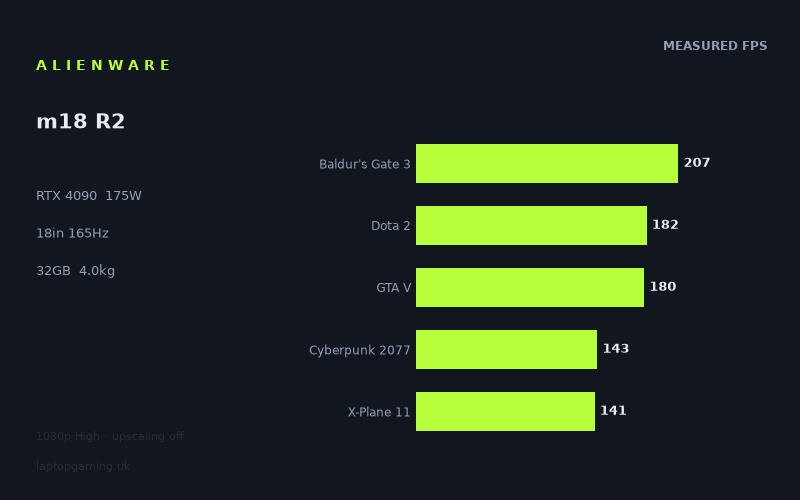
Frame rates
1920×1080, High preset, upscaling off. Averages 170fps across the 5 core benchmark games.
Measured on this machine. Source: Notebookcheck, 2024-03-22.
Not scored: no confirmed UK price
We have the full benchmark suite for this machine, so it ranks on the frame rate leaderboard like any other. What we don't have is a UK listing for this exact configuration - it's sold as a European review unit, or only in specifications that differ from the one tested. Since 30% of our score is value for money, scoring it would mean pretending price is no object, which would flatter it against every laptop you can actually buy. The frame rates below are real and comparable; there is just no buying recommendation to make yet.
How these numbers were produced
Frame rates here are not measured by us, and we label how each one was arrived at. A figure marked measured comes from a published run on that exact machine. A figure marked representative is derived from the GPU and its power limit (TGP) and cross-referenced against published reviews - a sound estimate of what that configuration delivers, but not a measurement of that specific laptop. Unless stated otherwise, numbers are 1920x1080, High preset, upscaling off. Where a laptop ships in several power configurations we use the wattage of the exact SKU listed, because a 140W RTX 5070 and a 115W one are not the same product.
In use
The short version
The Alienware m18 R2 is a machine with no interest in compromise and no pretence about it either. It carries an RTX 4090 configured at 175W, an eighteen-inch screen, a Core i9-14900HX, 32GB of memory and a 97Wh battery, and it weighs 3.955kg before you add the power brick. Those facts are not separate features. They are the same fact stated five different ways. The chassis is that big and that heavy because a 4090 at the top of its power band produces a quantity of heat that a thinner machine simply cannot move, and everything else on the specification follows from the decision to let the GPU run without restraint.
What the benchmark data shows is a laptop that is, at 1920x1080 with the High preset and upscaling switched off, comprehensively unbothered by almost everything put in front of it. Fifteen games were measured by Notebookcheck. The fastest returns 406fps. The slowest returns 77fps, and it is the only title in the entire set that fails to clear a hundred frames a second. Between those two extremes sits a set of results that would embarrass a good desktop from a couple of years earlier, and the practical implication is not that you should play at 1080p on an eighteen-inch 2560x1600 screen — you should not — but that the headroom for running at the panel's native resolution is enormous.
The most useful number in the whole set is the slowest one. Assassin's Creed Shadows at 77fps is what happens when a genuinely modern engine meets even this much hardware, and it is worth more attention than the 406fps at the other end, which mostly tells you that a 2015 game engine cannot find enough work to give a 2024 GPU. A reader deciding whether to spend real money on this machine should be looking at the bottom of the table, not the top, because the bottom is where the next three years of releases will live.
Two things need stating before anything else. The first is that this machine has a complete five-game scoring suite — GTA V, Dota 2, Baldur's Gate 3, Cyberpunk 2077 and X-Plane 11 are all present — so it ranks normally on the frame rate leaderboard rather than sitting outside it like several of its contemporaries. The second is that we have no confirmed UK price for this exact configuration. Value is a large part of how a laptop is judged here, and it cannot be computed without a price, so there is no overall verdict expressed as a figure. That is a gap in what we know about the market, not a criticism of the hardware, and there is no honest way to guess at the number, so this review does not try.
Who it suits, in one line: someone who wants a single machine that plays everything at 1600p without negotiation, who has a desk to put it on and does not intend to move it more than a few times a year, and who understands that they are buying a small, loud, expensive desktop with a screen and a keyboard attached rather than a portable computer.
Performance
What 175W actually means
The RTX 4090 laptop GPU is not a single product with a single level of performance. It is a chip that manufacturers configure across a wide power band, and the difference between the bottom and the top of that band is large enough that two laptops with identical entries on the specification sheet can be separated by a gulf in every game that matters. The m18 R2 sits at 175W, which is the ceiling. There is no thermal budget being withheld here to protect a slim profile or to keep a fan curve polite. The GPU is being given everything the platform allows and the chassis has been sized to carry the consequence away.
The evidence for that is not any single frame rate. It is the shape of the results across the whole set. A power-constrained implementation of a fast GPU produces a compressed set of numbers: the card hits its limit early and stays there, so the light games are slower than they should be, the heavy games are slower still, and the ratio between the fastest and slowest results narrows because the cooling system, not the game, is deciding the outcome. What the measured figures show here is the opposite pattern. The spread runs from 406fps down to 77fps, a ratio of well over five to one across the tested titles, and a spread that wide is the signature of a GPU that is never the bottleneck in the easy work and is being asked genuine questions in the hard work.
That distinction matters more than it sounds. When a benchmark set is compressed, the numbers are telling you about the laptop. When a benchmark set is wide, the numbers are telling you about the games, and the laptop is simply reporting them faithfully. This is the second kind of set. The differences between The Witcher 3 and Assassin's Creed Shadows in these figures are differences between two pieces of software written nine years apart, not differences in how well a cooling system was holding up on a given afternoon.
The top of the table
The Witcher 3 at 406fps and Strange Brigade at 383fps are the two fastest results, and neither is really a GPU test at this level of hardware. Both are well-optimised engines from an earlier era running on a card several generations past what they were designed for. At those frame rates the machine is being limited by draw-call throughput, by the game's own internal ceilings, and by how fast the CPU can prepare work for the GPU. F1 22 at 276fps and Tiny Tina's Wonderlands at 227fps sit just below, and the same broad point applies: these are titles where the graphics card has finished its work and is waiting.
The practical value of these numbers is not that anyone needs 406fps. It is that they establish the platform ceiling. When a machine returns figures like these in light titles, you know that any shortfall further down the list is genuinely the game asking for more, rather than the laptop failing to deliver. That is a useful piece of context for reading everything else, and it is why the wide spread is more informative than a set of results clustered together would be.
The scoring suite, in full
The five games used to rank machines on this site are all present, which is not true of many of the laptops in this comparison group. Baldur's Gate 3 returns 207fps, Dota 2 returns 182fps, GTA V returns 180fps, Cyberpunk 2077 returns 143fps and X-Plane 11 returns 141fps. The mean across those five is 171fps.
Those five are worth reading individually rather than as an average, because they are doing quite different jobs. Dota 2 and GTA V are, in 2024 terms, CPU-bound at 1080p on hardware like this — they are in the suite because they are played by enormous numbers of people, not because they stress a modern graphics card, and their results here are as much a statement about the i9-14900HX as about the 4090. X-Plane 11 at 141fps is the one that always looks anomalous to readers who expect it to scale with the GPU. It does not. It is a simulator with a heavily single-thread-dependent workload, and it lands where it lands because of how it is written, which is why a machine like this can be five times faster than a mid-range laptop in Strange Brigade and nothing like five times faster here.
Cyberpunk 2077 at 143fps is the most honest of the five as a graphics test. It is a modern renderer with a demanding lighting model, and at 1080p High with upscaling off, it is the game in the scoring suite most likely to reflect what the GPU is actually capable of. Baldur's Gate 3 at 207fps sits between the two camps: modern, but built to run well on a very wide range of hardware, and generous with frame rate as a result.
The middle band
Assassin's Creed Mirage at 205fps, Final Fantasy XV at 193fps and Far Cry 5 at 171fps fill out the middle of the table, and none of them is a difficult result to interpret. All three are games that were demanding on release and have been comfortably outgrown by the hardware. Avatar: Frontiers of Pandora at 131fps is a more interesting entry, because it is a recent, visually dense open world running on a modern engine, and it still clears the panel's refresh rate at this resolution with room to spare.
Alan Wake 2 at 117fps is the second most informative number in the set after the floor. It is one of the heaviest renderers of its generation, built around techniques that punish older hardware severely, and a result comfortably above a hundred frames a second at 1080p High tells you something specific: a 4090 at full power in 2024 was not merely adequate for the most demanding software then available, it had headroom in it. That headroom is exactly what you spend when you move up to the panel's native 2560x1600.
The floor, and what it is telling you
Assassin's Creed Shadows at 77fps is the only measured title that fails to clear a hundred frames a second, and it is worth dwelling on because it is the newest game in the set by some margin. On a machine that returns 406fps in The Witcher 3, a result of 77fps is a five-fold collapse, and none of that collapse is the laptop's fault. It is the difference between an engine built for hardware of the mid-2010s and one built to consume everything a current graphics card can offer.
The buying implication is straightforward and slightly uncomfortable. If you are choosing a machine on the basis of the top of the table, you are choosing on the basis of software you have probably already finished playing. The bottom of the table is where the machine's remaining useful life is decided, and 77fps at 1080p High in the newest title measured means that at the panel's native resolution, that game and its successors are going to need either upscaling or a preset drop. That is not a mark against the m18 R2 specifically — nothing in this class does better with that particular workload — but it is the correct way to read a set of numbers that otherwise looks like a clean sweep.
Where the spread comes from
Three separate mechanisms produce the range between 406fps and 77fps, and it is worth separating them because they behave differently as you change settings.
- Engine age. The oldest titles here were designed around graphics hardware with a fraction of this GPU's capability. They cannot generate enough work to occupy it, so they run into limits that have nothing to do with the graphics card at all.
- CPU and draw-call limits. Dota 2, GTA V and X-Plane 11 are all constrained by how quickly the processor can feed the pipeline rather than by shader throughput. Raising the resolution barely moves these results, which is why they are the least useful games in the set for separating one fast GPU from another.
- Renderer complexity. Alan Wake 2, Avatar and Assassin's Creed Shadows are doing genuinely more work per frame — more lighting passes, denser geometry, heavier streaming — and these are the titles whose results scale with the GPU and fall away as you raise the resolution.
Understanding which category a game belongs to is the single most useful skill when reading a table like this one, because it tells you which numbers will follow you to a higher resolution and which will not. Roughly speaking: the results near the top of this table will stay high at 1600p, and the results near the bottom will fall furthest.
The processor's contribution
The Core i9-14900HX is a desktop-derived HX-class part, and it is the correct partner for a GPU running at 175W. That pairing matters most in exactly the places where the graphics card has run out of work to do. In a title returning 406fps, essentially all of the performance is coming from the processor's ability to prepare frames quickly enough; in a title returning 77fps, the processor is largely idle by comparison and the GPU is the whole story.
This is also why a machine like this holds its value as a general-purpose computer better than the GPU tier alone would suggest. Thirty-two gigabytes of memory alongside an HX-class chip is a sensible configuration for compilation, video work, virtual machines and the rest of the workloads that fill a machine's life between gaming sessions. We hold no productivity measurements for this configuration, so this is an argument from specification rather than from data, and it should be read that way — but the specification is coherent, which is not always true in this class.
The screen
The panel is an eighteen-inch IPS running at 2560x1600 and 165Hz. Three things are worth separating there.
The size first. Eighteen inches is a genuinely different experience from sixteen, and not simply a larger version of the same thing. At a normal desk distance an eighteen-inch panel occupies enough of your field of view that a simulator or a strategy game with dense interface elements becomes materially easier to read, and text-heavy work is more comfortable. It is also, at this size, close to the point where a laptop screen stops feeling like a compromise against an external monitor. That is the argument for the whole machine in a sentence: the screen is the reason to accept the weight.
The resolution next. 2560x1600 is roughly twice the pixel count of the 1920x1080 at which all the published figures were taken. That relationship is straightforward arithmetic, but the performance consequence is not, and this is the point at which honesty about the data matters most. Every measured frame rate quoted in this review is at 1920x1080. We hold no measurements at the panel's native resolution. Anything said about native-resolution performance is inference from how games generally scale, not a figure anybody recorded, and it would be straightforwardly dishonest to convert one into the other and print the result.
What can be said responsibly is this. The games in this set that are CPU-bound at 1080p — Dota 2, GTA V, X-Plane 11 — will give up relatively little when the pixel count rises, because the graphics card was not the limiting factor to begin with. The games at the bottom of the table, the ones doing the most work per frame, will give up the most. So the shape of the table at native resolution would be flatter at the top and considerably lower at the bottom than what is printed here, and the sensible conclusion is that this machine is built to run at 1600p in the great majority of what was measured, with the newest and heaviest titles being the ones where you would start reaching for upscaling.
The refresh rate last, and it is the one specification here that is deliberately conservative. 165Hz is a lower ceiling than several rivals in the same class offer, and on a machine with this much graphics performance that looks at first like a mismatch in the wrong direction — a GPU capable of far more frames than the panel can display. In practice the choice is defensible and probably correct for the intended buyer. An eighteen-inch, high-resolution IPS panel is aimed at someone who wants image quality and screen area, not at someone chasing the lowest possible input latency in a competitive shooter. Those two goals pull in opposite directions, and picking one of them clearly is better than splitting the difference badly.
It does mean, though, that a large part of what the GPU produces at 1080p is simply discarded. Eleven of the fifteen measured titles return more frames than the panel can show at that resolution. That is not waste in any meaningful sense — it is headroom you convert into resolution and image quality rather than into refresh rate — but a buyer whose priority genuinely is the highest possible frame rate in competitive titles is buying the wrong screen and should look at a machine with a faster panel and a smaller, lower-resolution one.
One thing we cannot tell you: this is an IPS panel, and beyond that we hold no measurements of its brightness, contrast, colour coverage or response time. Those matter, particularly on a machine whose main argument is its screen, and their absence here is a genuine limitation of this review rather than an implicit judgement in either direction.
Build, size and portability
3.955kg is the number that determines how this machine gets used, and it deserves to be stated plainly rather than softened. That is the weight of the laptop alone. A 175W GPU alongside an HX-class processor requires a power supply substantial enough to feed both under load simultaneously, and while we hold no confirmed figure for the charger's rating or its mass, the practical experience of moving a machine in this class involves carrying two heavy objects rather than one.
What that means in practice is that the m18 R2 is a desktop replacement in the strict, original sense of the phrase. It replaces a desktop. It is not a laptop that happens to be large; it is a computer designed to live on a desk, be plugged into the mains, and be moved perhaps between a home and a second location a handful of times a year. Anybody imagining themselves working from a café with it, or using it on a train, or carrying it through an airport alongside a normal bag of possessions, should recalibrate. It will physically fit on most desks and in some larger rucksacks, and it will be an unpleasant thing to carry for any distance.
For the right buyer, none of that is a criticism. There is a real and underserved category of person who wants exactly one computer, wants it to be quick at everything, has a permanent place to put it, and moves house or office rather than moving daily. For that person the eighteen-inch screen and the full-power GPU are the entire point, and the 3.955kg is simply the price of admission. The mistake is buying a machine like this while telling yourself the weight will not matter, because it will, immediately and permanently.
The battery, and what it is actually for
The 97Wh pack is at the practical ceiling of what a laptop battery is allowed to be for airline cabin carriage, so in absolute terms this is as much energy as a portable computer is permitted to hold. Relative to what the hardware can consume, it is small. A GPU rated at 175W and an HX-class processor together can draw more than this pack holds in a single hour of sustained load, before you account for the screen, the memory or the storage.
We hold no battery runtime measurements for this configuration, so no claim about hours is made here. What can be said from the specification alone is that the battery on a machine like this is best understood as a very large uninterruptible power supply rather than as a source of untethered gaming. It exists so that you can move the machine between rooms without shutting down, so that a power cut does not cost you work, and so that light tasks are possible away from a socket. Serious load away from the mains is not what the design is for, and machines in this class generally reduce power limits substantially on battery in any case.
What we do not know
Three things are missing from what we hold, and it is better to name them than to write around them. We have no temperature measurements, so nothing can be said about surface heat under load or about how close the components run to their limits. We have no noise measurements, which matters a great deal on a machine cooling this much power — a full-power 4090 laptop is not a quiet object, and the specific character and volume of that noise is one of the biggest differentiators between good and bad implementations in this class. And we have no measurements of sustained performance over long sessions, so the frame rates quoted here should be read as what the machine produces in a benchmark run rather than as a guarantee about hour three of a session. None of those absences implies a fault. They are simply gaps, and a machine at this power level is precisely where they matter most.
How it compares
The comparison figures below come from games both machines hold, which means each of them rests on a different number of shared titles, and the number of shared titles matters enormously to how much weight a result deserves. A gap measured across seven games is a finding. A gap measured across three is a hint.
Against an RTX 4050 machine
Set against the MSI Thin GF63, an RTX 4050 laptop, the m18 R2 averages 94fps more across five shared games. That is what a genuine four-tier gap looks like when it is measured across a reasonable spread of titles, and it is the least surprising result in this section. It is also a useful sanity check on everything else here: when the hardware difference is real and the shared list is broad enough, the comparison produces a large, unambiguous number. Keep that in mind when reading the two results that follow, which do not.
There is a second reading of the same comparison that is more useful to a buyer than the raw gap. The GF63 is a machine built to a completely different brief — light, inexpensive, modest — and the m18 R2 is not competing with it for the same customer. What the 94fps average really demonstrates is the size of the ladder in this generation, and therefore how much of what you pay at the top is buying you performance rather than badge.
Against the two RTX 4080 machines
The two nearest rivals in the data are both RTX 4080 laptops, and both land within a couple of frames of the m18 R2 across four shared games — the Lenovo Legion Pro 7 slightly behind, the MSI Raider 18 HX slightly ahead. Neither result should be reported as a shrug, and neither means what a casual reading would suggest.
What is happening is a measurement artefact of the test conditions, not a statement that a 4080 is the equal of a 4090. At 1920x1080 with the High preset, a large proportion of any shared game list is either CPU-bound or engine-limited. Both of these machines pair a fast GPU with a fast HX-class processor, so in the titles where the processor is deciding the frame rate, they produce nearly the same answer by construction — the graphics cards are not being asked to do the differentiating work. Four shared games is not enough for the two or three genuinely GPU-limited titles among them to pull the average apart.
The way to separate these machines is precisely what these figures do not cover: native resolution, ray tracing enabled, and the heaviest modern renderers. Raise the pixel count to 2560x1600 and switch on the lighting features that a 4090 has the shader and memory resources to absorb, and the gap that is invisible at 1080p High reappears. A reader who takes "within a couple of frames" as licence to buy the cheaper machine may well be making a perfectly sensible decision — but they should make it knowing that the comparison which produced that number was run at a resolution neither machine is intended to be used at.
It is also worth noting that the MSI Raider 18 HX sitting a fraction ahead is a comparison between an RTX 4080 at 175W and an RTX 4090 at 175W. Both are at the ceiling of their respective bands. When two machines are configured that way and land two frames apart across four games, the honest summary is that the test could not tell them apart, not that the smaller GPU won.
Against the faster RTX 4090 machine
The Asus ROG Strix Scar 17, another RTX 4090 laptop, averages 31fps more across three shared games. That is a real gap between two machines carrying the same GPU tier, and there are several plausible explanations — a different processor, a different cooling implementation, different memory speeds, a different test date with different drivers — none of which the shared-game averages alone can distinguish between. Three shared games is a thin basis on which to draw a firm conclusion, and the honest reading is that the Scar 17 was faster in the titles both machines hold, without a confident account of why.
What that comparison does establish is that "RTX 4090" is not a single level of performance any more than "RTX 4070" is. Two machines with the same GPU name and, on paper, similar configurations can be separated by a margin that would be significant to a buyer. It is a reminder that the number on the box is the beginning of the question rather than the answer, and it is the reason this site publishes the power limit alongside the GPU name wherever we hold it.
Reading the comparisons together
Put the four rivals side by side and a coherent picture emerges. Against a machine four tiers down, the gap is enormous and measured across a broad list. Against machines one tier down, the gap is invisible at 1080p and measured across a narrow list. Against another machine of the same tier, there is a real difference in the other direction on very few shared games. The conclusion a buyer should draw is not that a 4090 is unnecessary, but that a 1080p High benchmark suite is the wrong instrument for distinguishing between the top two tiers of this generation — and that the m18 R2's case rests on what it does at its own panel's resolution, where we do not hold figures, rather than on what it does at a resolution nobody would use it at.
Why there is no overall verdict expressed as a figure
This machine has a complete scoring suite and ranks normally on frame rate. The reason there is no computed score attached to it is simply that we have no confirmed UK price for this configuration, and value carries substantial weight in how laptops are judged here. A gaming laptop is a price-performance product before it is anything else; without the price, a meaningful part of the argument is missing, and inventing a plausible-sounding figure would be worse than admitting the gap. Prices in this class also move week to week, so a number written into prose would be wrong shortly after publication even if it were right today. Everything above is about what the hardware does. What it is worth is a separate question, and one this review is not in a position to answer.
Who it's for
Buy the m18 R2 if you want one computer that does everything quickly, you have a permanent desk for it, and the eighteen-inch 2560x1600 screen is something you actively want rather than something you are tolerating. It suits the person who plays broad, visually demanding single-player games at high settings and would rather run at native resolution with the detail up than chase frame rates they cannot see. It suits simulator players, for whom screen area is a genuine functional advantage rather than a luxury. It suits people whose machine also has to do real work — the HX-class processor and 32GB of memory make it a competent workstation, and a large screen makes it a comfortable one.
It also suits a specific and slightly unfashionable buyer: the person who has concluded that a desktop plus a cheap laptop is two computers to maintain, two sets of files to keep synchronised and two upgrade paths to fund, and who would rather have one very capable machine. The m18 R2 is a good answer to that question in a way that a thinner, more portable laptop is not, because it does not give up performance to achieve a portability that this buyer was not going to use anyway.
Who should buy something else
Anybody who moves their laptop regularly should not buy this. 3.955kg plus a substantial power supply is not a commuting machine, and no amount of enthusiasm for the specification will change how it feels in a bag on a Tuesday morning. A sixteen-inch machine at two and a half kilograms is a fundamentally different proposition and the right one for most people who describe themselves as needing a portable computer.
Competitive players chasing the lowest possible latency should also look elsewhere. The 165Hz panel is a deliberate choice in favour of resolution and screen area, and it is a good one for the intended buyer, but it means a large share of the frames this GPU produces in light titles are never displayed. A machine with a faster panel and a smaller, lower-resolution screen will serve that player better and will almost certainly cost less.
Anyone who plays predominantly older or lighter games — the sort of titles sitting at the top of this table — is buying far more GPU than their library requires. The measured figures make that case themselves: several of these results are limited by the processor and the game engine rather than by the graphics card, and a machine one or two tiers down would produce numbers a competitive player could not distinguish from these in the same titles. The 4090's advantage is real, but it is concentrated in the newest and heaviest software, and if that is not what you play, you are paying for headroom you will not use.
Finally, anyone unusually sensitive to fan noise should treat this class with caution generally. We hold no acoustic measurements for this configuration, so nothing specific can be said about this machine — but the physics are not in dispute. Removing the heat produced by a 175W GPU and an HX-class processor requires moving a great deal of air, and machines that do this well are still audible. If a quiet room matters more to you than the last tier of performance, that preference should carry real weight in the decision, and a lower-powered machine will serve you better regardless of what the frame rate table says.
The summary judgement
Judged against its own generation, the m18 R2 is close to the most complete expression of what a 2024 gaming laptop could be, provided you accept the terms it sets. The GPU is at the ceiling of its band rather than throttled to fit a thin chassis, the processor is a match for it, the memory configuration is sensible, and the screen is large and sharp enough to justify running games at native resolution rather than treating the panel as decoration. The measured figures back that up: a complete scoring suite, a mean of 171fps across those five games, and only one title in fifteen falling below a hundred frames a second at 1080p High.
The reservations are all about fit rather than execution. It is very heavy, its panel's refresh ceiling is modest for the performance behind it, and the comparison data cannot demonstrate its advantage over the tier below at the resolution it was measured at — which means the case for spending up rests on reasoning about native-resolution and ray-traced workloads rather than on figures we hold. And without a confirmed UK price there is no way to say whether any of that is worth the money. Those are honest limits on the conclusion, not hedges. What the data supports is a clear statement that this is an extremely fast machine that has not been compromised anywhere except in portability, and that the compromise it did make was deliberate, coherent, and central to the design.