Review
Alienware 16 Area-51 review
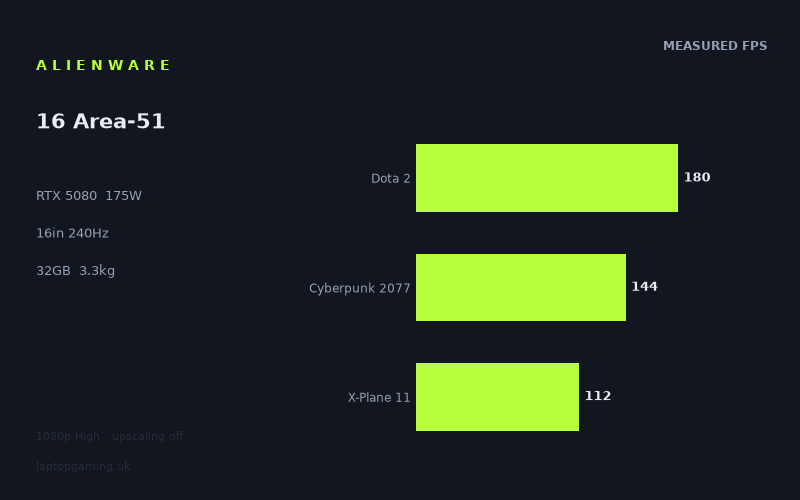
Frame rates
1920×1080, High preset, upscaling off.
Measured on this machine. Source: Notebookcheck, 2025-06-09.
Not scored: incomplete benchmark suite
Every scored laptop on this site is averaged over the same 5 games, and this one is short of Baldur's Gate 3, GTA V. A mean over 3 games is not comparable to a mean over 5, so we publish the figures we have and leave the score blank rather than rank it against machines tested on a different set. The numbers below are real - the suite is just incomplete.
How these numbers were produced
Frame rates here are not measured by us, and we label how each one was arrived at. A figure marked measured comes from a published run on that exact machine. A figure marked representative is derived from the GPU and its power limit (TGP) and cross-referenced against published reviews - a sound estimate of what that configuration delivers, but not a measurement of that specific laptop. Unless stated otherwise, numbers are 1920x1080, High preset, upscaling off. Where a laptop ships in several power configurations we use the wattage of the exact SKU listed, because a 140W RTX 5070 and a 115W one are not the same product.
In use
The short version
The Alienware 16 Area-51 is a high-power gaming laptop built around an RTX 5080 running at a stated 175W GPU power limit, a Core Ultra 9 275HX, 32GB of memory and a 16in 2560x1600 240Hz IPS display. The specification is plainly aimed at buyers who want desktop-style gaming performance from a machine that can still be moved between rooms, taken to events or used as a main computer without buying a separate tower.
The benchmark data supports that positioning, with an important qualification: the published figures are at 1920x1080 using the High preset with upscaling off, while the Alienware’s own panel is a higher-resolution 2560x1600 display. Notebookcheck’s measured figures are strong at the benchmark settings, but they are not evidence that every measured game will run at the panel’s native resolution at the panel’s full refresh rate. That distinction matters more here than it would on a lower-refresh screen.
At 1920x1080 High, the Alienware reaches 190fps in Final Fantasy XV and 180fps in Dota 2. Those are the two results that come closest to making meaningful use of a 240Hz panel, although neither reaches the display’s stated refresh rate in the published data. Cyberpunk 2077 reaches 144fps, Alan Wake 2 reaches 114fps and X-Plane 11 reaches 112fps. Those are still substantial measured results, but they illustrate the gap between owning a 240Hz screen and actually feeding it a comparable frame rate in demanding games.
The three-game scoring-suite mean is 145fps across Dota 2, Cyberpunk 2077 and X-Plane 11. That is useful as a compact summary of this particular set of results, but it should not be treated as a complete performance ranking. There are no published figures here for Baldur’s Gate 3 or GTA V, and the site’s comparable scoring set uses the same five games for every scored laptop. This Alienware therefore cannot honestly be placed into that full ranking from this partial data alone.
The most revealing part of the available comparison data is not that this is an RTX 5080 laptop, but how narrowly it sits alongside several very different rivals in shared-game averages. It averages 1fps ahead of the RTX 5090-equipped Aorus MASTER 16 across five shared games. It also averages 1fps ahead of the RTX 5080 Medion Erazer Beast 18 X1 across four shared games, and 1fps ahead of the RTX 5070 Ti Lenovo Legion 5 Pro across four shared games. Against the Asus ROG Strix G16, another RTX 5080 laptop specified at 175W, the Alienware averages 5fps behind across five shared games. Against the Medion Erazer Major 16 X1 with an RTX 5070 Ti at 140W, it averages 6fps ahead across four shared games.
That is not a set of results that supports paying blindly for the Alienware badge or assuming that the RTX 5080 label alone establishes a clear lead. It does support taking the Area-51 seriously if the exact configuration, display, design and availability suit you. The performance is clearly high-end in the measured games. The problem is value cannot be judged yet because there is no confirmed UK price. Until there is one, the sensible verdict is conditional rather than celebratory.
Buy this machine if you want a 16in laptop with a 175W RTX 5080, 16GB of VRAM, 32GB of memory, a fast 2560x1600 display and benchmark results that are strong enough for demanding games at the published 1920x1080 High settings. It makes most sense as a substantial, mains-powered gaming system that happens to be transportable, not as a light daily carry machine.
Wait if the deciding factor is value. A price has not been confirmed, and the closest comparable machines show that this Alienware is operating in a very tight performance group rather than opening a decisive gap. Also wait if native-resolution results, ray-tracing behaviour, battery runtime, fan noise, temperatures, keyboard quality, ports or storage expandability are central to your purchase. Those details are not in the supplied measurements and specifications, so they should not be guessed at.
Performance
What the published figures show
Notebookcheck’s figures were measured at 1920x1080, using the High preset with upscaling off. That is a valuable test condition because it avoids treating generated or reconstructed frames as though they were equivalent to the game’s directly rendered output. It also gives a cleaner view of how the laptop performs before display scaling and upscaling choices complicate the picture.
The Alienware produces 190fps in Final Fantasy XV. In the context of a 240Hz display, that is the result most likely to make the screen’s high refresh rate feel purposeful. It remains below 240Hz, but it is close enough that the panel’s refresh capacity is not merely theoretical. The data says this game can run at a very high frame rate under the specified settings, and that is the sort of result buyers expect from a machine with an RTX 5080 at 175W.
Dota 2 measures 180fps. That is another very high result and is particularly relevant because it is one of the three games used in the partial scoring suite. It again falls short of the display’s 240Hz refresh rate, but it is substantially nearer to that target than the more demanding titles in the available set. For buyers whose regular games resemble this result more than the heavier single-player games, the 240Hz screen has a clearer practical case.
Cyberpunk 2077 measures 144fps. This is a strong result in isolation and a useful reminder that a high-refresh laptop does not need to run at its maximum refresh rate to feel responsive. At the same time, it is well below the display’s 240Hz capability. The distinction matters because someone buying the Area-51 specifically for a 240Hz gaming experience should not assume that the panel’s refresh figure becomes the expected frame rate in demanding games. The published data does not support that claim.
Alan Wake 2 measures 114fps. This is one of the clearest examples of why frame-rate discussions need to be game-specific. The Area-51 is still delivering a three-figure result at the stated settings, which is substantial, but the result is far removed from 240fps. A buyer concentrating on visually demanding games should read the screen specification as headroom for lighter titles and competitive games, rather than as a promise that every game will operate near the panel limit.
X-Plane 11 measures 112fps. It is close to the Alan Wake 2 result despite being a very different kind of game, and that is useful. It demonstrates that the performance spread cannot be reduced to a simple hierarchy of “old game equals high frame rate” and “new game equals low frame rate”. Different games place different demands on the system. Some lean heavily on graphics processing, some can be affected by processor-side work, simulation complexity or their own engine behaviour. The published numbers show the outcome, but they do not isolate which component is responsible for each limitation. There are no CPU benchmark figures in the supplied data, so it would be wrong to assign the X-Plane 11 result to the Core Ultra 9 275HX with certainty.
Across Dota 2, Cyberpunk 2077 and X-Plane 11, the stated mean is 145fps. That average is a useful description of the three scoring-suite results, but it should not flatten the important spread between them. Dota 2 at 180fps is a different experience from X-Plane 11 at 112fps, even though both contribute to the same mean. For a purchase decision, the individual games matter more than the average if one of them resembles what you actually play.
That is especially true because the two additional measured games sit on opposite sides of the three-game mean. Final Fantasy XV is faster at 190fps, while Alan Wake 2 is slower at 114fps. The overall picture is therefore not “the Alienware is a 145fps laptop”. It is a laptop which, in this set of five benchmarks, ranges from 112fps to 190fps at 1920x1080 High with upscaling off. The range is the useful finding. It tells you that the hardware has substantial capability, while also showing that the game remains the biggest determinant of whether the display’s 240Hz ceiling is relevant.
What the 175W GPU limit means in practice
The RTX 5080 is specified here with a 175W GPU power limit. That is an important configuration detail because laptop GPU names do not tell the whole story on their own. The power limit is part of the machine’s performance specification, and it is more informative than treating all RTX 5080 laptops as automatically equivalent.
What the supplied information does not establish is how that 175W limit is sustained in every workload, how the machine behaves in long sessions, or how its cooling system balances graphics power, processor power, acoustics and temperature. There are no noise figures, temperature figures or sustained-performance measurements in the fact sheet. Any claim that the Alienware is quiet, loud, cool-running, hot-running, or able to maintain a particular behaviour over time would be unsupported.
It is also important not to overstate what 175W proves against the rivals. The Asus ROG Strix G16 is also listed with an RTX 5080 at 175W, yet the Alienware averages 5fps behind it across five shared games. That does not mean the Alienware’s power limit is unimportant. It means a matching stated GPU limit does not guarantee matching game results. Platform tuning, processor behaviour, memory configuration, firmware choices and game-specific behaviour can all matter, but the supplied data does not break down their individual contribution.
The comparison with the Medion Erazer Beast 18 X1 makes the same point from another angle. Both machines use an RTX 5080, and the Alienware averages only 1fps ahead across four shared games. A small shared-game average difference should not be used to claim that one configuration is categorically superior. It says these machines are very close within the overlap of the published results. For a buyer choosing between them, price, panel preferences, size, availability and features not listed here may matter more than that narrow performance separation.
Against the Medion Erazer Major 16 X1, the Alienware averages 6fps ahead across four shared games. The Major uses an RTX 5070 Ti at 140W, so this is the comparison most consistent with the expectation that the Area-51’s higher-tier GPU and higher stated power limit should bring some benefit. But even here, the right conclusion is measured rather than absolute. The Alienware has the better shared-game average, not a universally proven lead in every game, every setting or every resolution.
The Aorus MASTER 16 comparison is the warning against buying by label. The Aorus is listed with an RTX 5090 and costs GBP 6,007, yet the Alienware averages 1fps ahead across five shared games. The only defensible conclusion from that overlap is that the Aorus’s higher GPU designation does not translate into a higher shared-game average in this particular data set. It does not prove that the Alienware is always faster than every RTX 5090 laptop. It does show why shoppers should insist on attributable game figures rather than assuming that the model number settles the question.
The importance of the benchmark settings
All of the available frame rates are 1920x1080 results. The Alienware’s panel is 2560x1600. Those are not interchangeable conditions. The published figures describe performance at the benchmark resolution and preset, not at the laptop’s native resolution.
This matters because the display has more pixels than the benchmark resolution. A buyer who intends to use 2560x1600 should not read 190fps in Final Fantasy XV, 180fps in Dota 2, 144fps in Cyberpunk 2077, 114fps in Alan Wake 2 or 112fps in X-Plane 11 as native-panel frame rates. They are not. We do not have native-resolution measurements for these games in the supplied data.
The absence of upscaling is equally important. Upscaling off means the measured figures do not depend on a particular upscaling mode. That makes them useful baseline figures for comparison, but it also means this review cannot tell you what results the Alienware might produce with upscaling enabled. There are no such figures in the fact sheet. A buyer who plans to use upscaling should treat that as an unmeasured use case here rather than assume a particular outcome.
There are also no ray-tracing measurements listed. Cyberpunk 2077 and Alan Wake 2 are demanding games in the available data, but the figures do not specify a ray-tracing setting. It would be inaccurate to attach one. The only safe description is the one Notebookcheck’s benchmark conditions provide: 1920x1080, High preset and upscaling off.
This may sound cautious, but it is the difference between useful performance reporting and attractive but unreliable extrapolation. The Area-51 has enough measured performance to look like a serious gaming laptop. It does not have enough published data here to promise a particular frame rate at 2560x1600, with upscaling, with ray tracing, or in games beyond the five listed.
How comfortable is the performance?
At the tested settings, every listed game exceeds 100fps. That gives the Alienware a strong baseline in this small selection. It is not a machine whose published results suggest marginal performance at 1920x1080 High. The more useful question is how much margin each game leaves below the display’s 240Hz refresh rate.
Final Fantasy XV at 190fps and Dota 2 at 180fps are the strongest matches for the display. They do not establish 240fps operation, but they are sufficiently high that the 240Hz panel is not wasted in those games. Buyers who prioritise rapid response and spend much of their time in games that perform in this range will get more from the screen specification than buyers whose library is dominated by titles resembling the 112fps and 114fps results.
Cyberpunk 2077 at 144fps occupies a useful middle position. It is far beyond the conventional expectation of a basic 60Hz experience, but it does not approach the maximum refresh rate. For many people, that is still an excellent measured result. The point is not that 144fps is inadequate; it is that the laptop’s 240Hz screen should be chosen for flexibility and high-frame-rate headroom, not because the published data says demanding games will consistently operate at 240fps.
Alan Wake 2 and X-Plane 11, at 114fps and 112fps respectively, are the more grounded results. They show that even this configuration can be limited well below the display ceiling by the game and settings. That is normal for a broad gaming laptop workload, but it has purchasing consequences. If your main aim is to maximise frame rate in the most demanding titles, then you should compare actual game data for the titles you play rather than choose solely on the basis of the panel refresh rate or the RTX 5080 name.
The benchmark spread also argues against a simplistic statement that the Area-51 is either “for esports” or “for cinematic single-player games”. It can clearly produce very high figures in Final Fantasy XV and Dota 2, while also delivering strong three-figure results in Cyberpunk 2077, Alan Wake 2 and X-Plane 11 at the stated benchmark conditions. Its suitability depends on what you demand from it. If your definition of success is any result comfortably beyond 100fps at 1920x1080 High with upscaling off, the published figures are persuasive. If your definition is driving 240Hz in every demanding game, they are not.
The screen
The Alienware 16 Area-51 has a 16in IPS panel with a 2560x1600 resolution and a 240Hz refresh rate. On paper, that is a sensible display specification for a high-end gaming laptop: the resolution gives more workspace than a 1920x1080 panel, while the refresh rate provides room for high frame rates in games that can deliver them.
The key is that this is a display with two different ambitions. Its 2560x1600 resolution is aimed at visual sharpness and desktop space, while its 240Hz refresh rate is aimed at motion clarity and responsiveness. Those two priorities do not always align at the same graphics settings in demanding games. Higher resolution asks more of the graphics hardware; higher refresh rewards higher frame rates. The published benchmarks are only at 1920x1080, so they demonstrate the latter under a lower-resolution test condition rather than proving both at once.
Final Fantasy XV at 190fps and Dota 2 at 180fps show that the Alienware can make substantial use of a 240Hz screen at the published settings. They also show that “240Hz” should not be translated into “240fps”. The panel can refresh at 240Hz, but the measured results remain lower. That does not diminish the point of the screen; it simply sets realistic expectations.
Cyberpunk 2077 at 144fps is also a useful match for a fast display even though it is below 240Hz. A high-refresh panel is not an all-or-nothing feature. The advantage is not limited to exactly matching its maximum refresh figure. However, without measurements for motion behaviour, response times, brightness, contrast, colour coverage or adaptive-sync behaviour, this review cannot make a broader claim about display quality beyond the stated size, resolution, refresh rate and IPS panel type.
The same limitation applies to Alan Wake 2 at 114fps and X-Plane 11 at 112fps. Those numbers do not indicate that the screen is mismatched to the laptop. They indicate that the panel’s maximum refresh rate leaves headroom beyond what these games achieve under the published conditions. In practical terms, that is preferable to a screen with a lower ceiling if you play a mixture of lighter and heavier games, but it is not evidence of a 240fps experience in those titles.
The native 2560x1600 resolution deserves separate attention because it is the resolution you are likely to use for everyday work as well as gaming. The additional vertical space compared with a 1920x1080 benchmark image can be attractive for desktop use, but there are no productivity measurements or panel-quality figures in the supplied data. The basic statement is therefore simple: the Area-51 offers a high-resolution, high-refresh 16in IPS panel, but the available game data does not tell us exactly how the five measured titles perform at that native resolution.
Buyers should also avoid using the 1920x1080 benchmark results as a reason to assume that every game should be run at that resolution on this panel. The data tells us what was measured; it does not prescribe the best setting for every owner. Some people will prioritise native 2560x1600 output. Some will prioritise frame rate. Some will choose settings on a game-by-game basis. The Alienware’s 240Hz panel gives it flexibility, but the fact sheet does not provide enough native-resolution data to say which compromise is best in each title.
The IPS designation is useful but limited. It identifies the panel type, not the quality of a particular implementation. There are no figures for brightness, colour, contrast or response time, and no observations about viewing angles or backlight behaviour. A buyer for whom screen quality matters as much as frame rate should not fill those gaps with assumptions. The display specification is promising, but the available evidence supports a specification-based assessment rather than a full panel verdict.
Build, size and portability
The one firm portability figure available is the Alienware’s 3.297kg weight. That places it firmly in the substantial-laptop category. It is portable in the literal sense that it is a single 16in machine rather than a desktop system, but it is not the sort of weight that disappears into a bag or encourages casual daily travel.
That matters because the Area-51’s performance proposition is built around a 175W RTX 5080 configuration, 32GB of memory, a Core Ultra 9 275HX and a 96Wh battery. This is a high-specification laptop intended to do serious work and gaming in one chassis. The weight is part of the trade-off. A buyer should expect to use it primarily on a desk, table or other stable surface, with travel being an occasional advantage rather than its defining purpose.
There are no chassis dimensions in the supplied information. That means we cannot say how wide, deep or thick it is, and we cannot responsibly compare its footprint with another 16in laptop. The 16in screen size and 3.297kg weight establish that it is not a compact ultraportable, but they do not tell us how easily it fits in a particular bag. If bag compatibility matters, check the manufacturer’s dimensions before buying.
The 96Wh battery is a large-capacity specification in simple numerical terms, but capacity is not runtime. There are no measured battery-life figures here, either for gaming or lighter tasks. The Alienware should not be bought on the assumption of a particular number of hours away from the mains. Gaming performance figures in this review are also not battery-mode figures; Notebookcheck’s published benchmark data is described by resolution, preset and upscaling state, not by battery operation. We do not have evidence for its unplugged gaming performance.
It would also be unsafe to infer charger size, charger weight or total travel load from the laptop weight alone. Those are important practical considerations for a 3.297kg gaming laptop, but they are not in the fact sheet. The same applies to port selection, networking, webcam, speakers, keyboard layout, touchpad size and case materials. None is listed, so none should be invented to make the review feel more complete.
What can be said is that the weight changes the ideal ownership model. The Alienware makes most sense for someone who wants a powerful machine stationed in one main place, perhaps moved periodically between home, work, university accommodation or a gaming setup. It is less appealing for someone who needs to carry a laptop all day, use it comfortably in cramped spaces or travel with minimal bulk.
The screen specification reinforces that conclusion. A 16in 2560x1600 240Hz panel is a strong centrepiece for a desk-oriented gaming machine. Combined with 32GB of memory and 1024GB of SSD storage, it suggests a laptop meant to replace a more static setup for some buyers. But “replace” should not be confused with “match every desktop convenience”. There is no information here about upgrade access, additional storage slots, display outputs or desk connectivity. Those are purchase-critical details for a desktop-replacement role, and they need checking separately.
The 1024GB SSD is a respectable starting capacity, but the supplied data does not say how much of it is available to the user, how many drives the machine can take, or how storage performance behaves. Likewise, 32GB of memory is a substantial configuration, but the fact sheet does not specify its speed, layout or upgradeability. It would be reasonable to regard both as solid headline specifications, while refusing to make claims about expandability or performance characteristics that are not documented here.
There is a broader point here: portability is not just weight. It includes physical size, battery runtime, charging requirements and how the machine behaves away from a desk. We only have a reliable figure for weight and a stated battery capacity. The responsible conclusion is that the Area-51 is heavy for a 16in laptop and should be considered a transportable high-performance machine, while the finer details of day-to-day mobility remain unmeasured in this data set.
How it compares
The closest rivals are more interesting than a simple list of GPU names because the shared-game averages are exceptionally tight. This is exactly where attributable benchmark data matters. Specification labels can suggest large separations that the available overlap does not show.
Aorus MASTER 16
The Aorus MASTER 16 is listed with an RTX 5090 and a UK price of GBP 6,007. Across five shared games, the Alienware averages 1fps ahead. That is a striking comparison because the Aorus has the higher-numbered GPU label, while the Alienware has the better shared-game average in the data provided.
It would be wrong to turn that into a blanket claim that the Alienware is faster than the Aorus in every use case. The average covers five shared games, not every game available. It is also not a native-resolution comparison for the Alienware’s panel, nor does it tell us anything about other settings. What it does show is that the Aorus’s RTX 5090 designation is not enough on its own to establish a performance advantage in this overlap.
The price difference is also impossible to evaluate fully because the Alienware has no confirmed UK price. If its eventual price is far below GBP 6,007, the Aorus comparison could become a powerful argument for the Alienware. If its price is close to that figure, the case would need much more scrutiny. Until an Alienware price is confirmed, the Aorus comparison is evidence about performance, not a final verdict on value.
Medion Erazer Beast 18 X1
The Medion Erazer Beast 18 X1 uses an RTX 5080 and is listed at GBP 2,499. The Alienware averages 1fps ahead across four shared games. That is effectively a near tie in the available comparison, and it is the rival that most directly challenges any assumption that the Alienware’s 175W RTX 5080 automatically makes it a clear leader among RTX 5080 machines.
The comparison should make prospective buyers especially price-sensitive. With only 1fps separating the shared-game averages, a confirmed Alienware price will matter enormously. If the Area-51 costs materially more than the Medion, it will need to justify that difference through aspects not covered here, such as display implementation, design, support, connectivity or other features. Those aspects may matter, but the supplied fact sheet does not document them, so they cannot be used as assumed justification.
Conversely, the Medion’s GBP 2,499 price should not be treated as proof that it is the automatic choice. We have only the stated specification and shared-game average relationship. The two machines may differ in screen, size, battery, memory, storage and other characteristics, but those details are outside the given rival information. The fair conclusion is that the Area-51’s measured gaming lead is too narrow to settle the purchase on performance alone.
Lenovo Legion 5 Pro
The Lenovo Legion 5 Pro is listed with an RTX 5070 Ti and no confirmed UK price. The Alienware averages 1fps ahead across four shared games. This is another unexpectedly close comparison, although it must be read carefully. The data does not say the machines are identical in every game; it says the Alienware has a 1fps shared-game average lead over the games both have been measured in.
The practical implication is that buyers should not assume the Alienware creates a large real-world gap merely because it has an RTX 5080 and a 175W power limit. In the available overlap, it does not. That does not make the Alienware a weak performer. Its individual results of 190fps, 180fps, 144fps, 114fps and 112fps remain strong. It means the Legion is close enough in this limited comparison that price and the wider configuration will be decisive once those details are known.
Because neither laptop has a confirmed UK price in the supplied data, there is no honest value judgement to make between them. This is a comparison to revisit when prices are available, not a reason to declare either machine the better buy today.
Asus ROG Strix G16
The Asus ROG Strix G16 is perhaps the most useful technical rival because it is also listed as an RTX 5080 laptop at 175W. Across five shared games, the Alienware averages 5fps behind it. That is the clearest evidence in this set that matching GPU model and stated power limit do not guarantee identical results.
A 5fps average gap across five shared games is meaningful enough to note, but it should not be exaggerated into a universal hierarchy. We do not have the individual shared-game figures, so we cannot say whether the difference is consistent across every game or concentrated in particular titles. We also do not have confirmed UK pricing for the Asus. The right reading is straightforward: on the available shared-game average, the Asus has the lead, despite the two machines sharing an RTX 5080 at 175W.
For someone choosing specifically between these two, the Alienware needs to win on something other than the limited shared-game average if its price is higher. It may still be the right machine because of the screen, design, memory, storage or other factors, but the fact sheet does not provide the wider Asus specification required to make that case. Performance alone gives the Asus the edge in the overlap.
Medion Erazer Major 16 X1
The Medion Erazer Major 16 X1 is listed with an RTX 5070 Ti at 140W and a UK price of GBP 2,770. The Alienware averages 6fps ahead across four shared games. This is the largest stated lead for the Alienware among the listed rivals, and it is the comparison that most clearly supports the expectation of a benefit from the Area-51’s RTX 5080 at 175W.
Even so, the result should be kept in proportion. The lead is across four shared games, not a full five-game scoring set and not every game a buyer might play. We cannot say how the difference appears in Final Fantasy XV, Dota 2, Cyberpunk 2077, Alan Wake 2 or X-Plane 11 individually unless those games are among the overlap and their individual rival figures are supplied. They are not.
The Major’s GBP 2,770 price gives buyers a concrete reference point, but the lack of an Alienware price again prevents a final value call. If the Area-51 arrives at a substantially higher figure, a 6fps average advantage alone may not be persuasive. If it arrives close to the Medion’s price, the stronger GPU configuration, 16GB of VRAM, 32GB of memory and 240Hz display could make it more attractive on paper. The eventual price is therefore not a footnote; it is central to the Area-51 verdict.
Why the incomplete scoring suite matters
The Alienware has benchmark figures for Dota 2, Cyberpunk 2077 and X-Plane 11 from the scoring suite, producing a stated mean of 145fps. It does not have figures here for Baldur’s Gate 3 or GTA V. Because scored laptops are averaged over the same five games, this partial result cannot be ranked against the complete set.
That restriction is not technical nit-picking. A partial score can distort comparisons because the missing games might favour or disadvantage a particular machine relative to others. It would be tempting to use the 145fps mean as a league-table position, especially since it is based on three standard titles. But that would create a comparison that is not like for like. The honest approach is to discuss the measured games directly and use only the stated shared-game averages for the named rivals.
This also explains why the rival section is deliberately specific. The Aorus comparison covers five shared games. The Medion Beast, Lenovo and Medion Major comparisons cover four shared games. The Asus comparison covers five shared games. Those are valid narrow comparisons because each stated average is based on games both machines have in common. They are not a replacement for a complete ranking, and they should not be presented as one.
Who it’s for
The Alienware 16 Area-51 is for the buyer who wants a serious gaming laptop rather than a light travel computer. At 3.297kg, it is best understood as a powerful machine that can be moved when needed. Its likely home is a desk or a stable gaming space, with the 16in 2560x1600 240Hz display serving as the centre of a self-contained setup.
It is particularly suited to someone who values high frame rates in a varied game library and understands that results differ sharply by title. The measured figures support that: Final Fantasy XV reaches 190fps, Dota 2 reaches 180fps, Cyberpunk 2077 reaches 144fps, Alan Wake 2 reaches 114fps and X-Plane 11 reaches 112fps at the stated benchmark conditions. This is not a laptop that only looks impressive in lighter games. It also produces substantial results in the more demanding titles available here.
It also suits someone who sees 240Hz as useful headroom rather than a guaranteed target. Dota 2 and Final Fantasy XV make good use of the fast panel in the published data. Cyberpunk 2077 remains strong but lower. Alan Wake 2 and X-Plane 11 show that the screen’s maximum refresh rate will not define the experience in every game. Buyers with realistic expectations will appreciate the flexibility; buyers who expect 240fps across demanding games should look for evidence specific to the games and settings they care about.
The 16GB of VRAM, 32GB of memory and 1024GB SSD make this a substantial headline configuration for someone who does not want to begin with a minimal memory or storage specification. However, buyers who need to add storage or memory later should check upgrade information separately. The fact sheet does not specify whether either is accessible or expandable.
The Area-51 is also for buyers willing to wait for a confirmed UK price before committing. That is not hesitation for its own sake. The closest performance rivals make price unusually important. The Medion Erazer Beast 18 X1 is listed at GBP 2,499 and sits only 1fps behind across four shared games. The Medion Erazer Major 16 X1 is listed at GBP 2,770 and is 6fps behind across four shared games. The Aorus MASTER 16 is listed at GBP 6,007 and is 1fps behind across five shared games. Those examples do not tell us what the Alienware should cost, but they demonstrate why its eventual price must be judged against actual alternatives rather than assumed from the specification.
It is not the best fit for the buyer who carries a laptop every day. A 3.297kg machine can be transported, but weight matters before a charger, accessories and a bag are considered. Since the supplied data does not include dimensions, charger details or battery runtime, there is no basis for calling it convenient for frequent commuting or travel.
It is also not the right choice for someone who needs proven battery life. The 96Wh battery capacity is known, but no runtime is supplied. Do not buy it on the expectation of a particular unplugged workday or gaming session. The same caution applies to anyone who needs confirmed quiet operation or low temperatures. There are no measured noise or thermal figures here.
Buy something else, or at least wait for more data, if native 2560x1600 gaming performance is your main requirement. The screen is 2560x1600, but all listed frame rates are measured at 1920x1080 High with upscaling off. That does not make the results less valid; it means they answer a different question. A native-resolution buyer needs native-resolution measurements.
Likewise, choose another machine or seek additional published data if ray-tracing performance, upscaling behaviour or a specific unlisted game is decisive. There are no ray-tracing settings in the provided figures, no upscaling-on figures and no results for games beyond Final Fantasy XV, Dota 2, Cyberpunk 2077, Alan Wake 2 and X-Plane 11. The responsible answer to those questions is not a guess.
The Alienware is not automatically the best choice for someone who simply wants “the fastest RTX 5080”. The Asus ROG Strix G16, also listed with an RTX 5080 at 175W, averages 5fps ahead across five shared games. That makes the Asus the stronger performer in that specific overlap. Conversely, the Alienware averages ahead of the Medion Beast, Lenovo Legion 5 Pro, Medion Major and Aorus MASTER 16 in their stated shared-game comparisons. The point is that this is a tightly grouped field, and the Area-51 should be chosen on evidence from the exact rival you are considering, not broad GPU branding.
The final judgement is therefore favourable but conditional. The Alienware 16 Area-51 has the ingredients and measured 1920x1080 performance of a powerful, high-end gaming laptop. Its results range from 112fps to 190fps in the published games, its RTX 5080 runs at a stated 175W, and its 240Hz 2560x1600 IPS display gives it a strong specification for buyers who want both resolution and refresh headroom. But it is heavy, its UK price is not confirmed, the benchmark suite is incomplete, and the available rival data shows very close competition.
If the confirmed UK price is sensible, this is a compelling option for a desk-first buyer who wants serious gaming performance in a 16in laptop. If it arrives at a premium, the evidence here does not give it enough of a performance cushion to recommend without checking the alternatives closely. The frame rates are good. The buying decision still depends on the price that has not yet been confirmed.