Details
Product prices and availability are accurate as of the date/time indicated and are subject to change. Any price and availability information displayed on Amazon.co.uk at the time of purchase will apply to the purchase of this product.Review
Asus ProArt P16 review
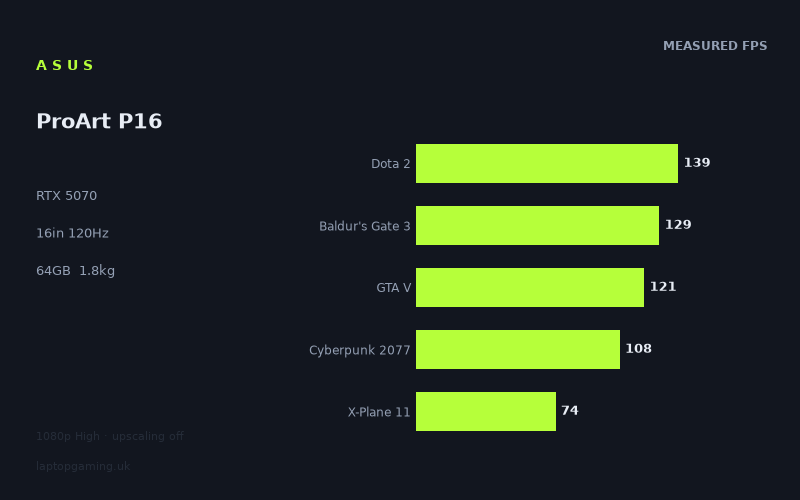
Frame rates
1920×1080, High preset, upscaling off. Averages 114fps across the 5 core benchmark games.
Measured on this machine. Source: Notebookcheck, 2025-05-29.
Not scored: no confirmed UK price
We have the full benchmark suite for this machine, so it ranks on the frame rate leaderboard like any other. What we don't have is a UK listing for this exact configuration - it's sold as a European review unit, or only in specifications that differ from the one tested. Since 30% of our score is value for money, scoring it would mean pretending price is no object, which would flatter it against every laptop you can actually buy. The frame rates below are real and comparable; there is just no buying recommendation to make yet.
How these numbers were produced
Frame rates here are not measured by us, and we label how each one was arrived at. A figure marked measured comes from a published run on that exact machine. A figure marked representative is derived from the GPU and its power limit (TGP) and cross-referenced against published reviews - a sound estimate of what that configuration delivers, but not a measurement of that specific laptop. Unless stated otherwise, numbers are 1920x1080, High preset, upscaling off. Where a laptop ships in several power configurations we use the wattage of the exact SKU listed, because a 140W RTX 5070 and a 115W one are not the same product.
In use
The short version
The ProArt P16 is a creator laptop that happens to have a gaming-class GPU in it, and the measured frame rates read exactly like that sentence suggests. An RTX 5070 sits behind a 16in 2880x1800 OLED panel, backed by 64GB of memory and a 2TB SSD, in a chassis that weighs 1.823kg. Notebookcheck's 1080p High figures put it at 108fps in Cyberpunk 2077, 129fps in Baldur's Gate 3 and 121fps in GTA V, with a mean of 114fps across the five games in our scoring suite. That is a genuinely capable set of numbers. It is also, and this is the part that matters when you are choosing between machines, roughly what 115W RTX 5060 laptops are producing, and a little short of what other RTX 5070 machines are producing.
So the argument for this machine is not the graphics card. It is everything wrapped around the graphics card: a high-resolution OLED display running at 120Hz, 64GB of system memory, 2TB of storage as standard on this configuration, a 90Wh battery, and under 1.9kg for a 16in machine with discrete graphics. If you spend your working day in Premiere, Blender, Lightroom, DaVinci Resolve or a code editor with several containers running, and you also want to play current games in the evening at high frame rates without carrying a second machine, that combination is coherent and unusual. Very few laptops offer it.
The argument against it is equally simple. If the games are the point and the creative work is not, the frame rates below show that you can get the same performance, or slightly better, from cheaper and more conventional gaming laptops. The ASUS TUF Gaming A18 in our database carries an RTX 5070 at 115W for £1,489, and across the nine games both machines have been measured in, the ProArt averages one frame per second behind it. One frame per second is nothing. But the TUF is a plain plastic gaming laptop with a plain gaming laptop screen, and the ProArt is not going to be priced like one.
One piece of housekeeping, stated once and then left alone: we have no confirmed UK price for this exact configuration, so this review carries no score. That is not a judgement on the machine. The benchmark suite is complete, the numbers are all present and it ranks normally on our frame rate leaderboard. Value accounts for 30% of our score and cannot be computed from an unknown price, so we have not computed one. When a UK price for this specification is confirmed, the page will produce a score on its own. We are not going to guess at what it will cost, and you should treat anyone who does with suspicion.
What follows is an analysis of the published measurements and the specification. Everything numerical here comes from Notebookcheck's 29 May 2025 benchmark run at 1920x1080, High preset, upscaling off.
Performance
Start with the shape of the data rather than any individual number, because the shape tells you more. Eleven games were measured. The fastest, Strange Brigade, returns 281fps. The slowest, Assassin's Creed Shadows, returns 61fps. That is a spread of well over four to one, and it is entirely normal — it reflects how differently these engines behave, not any inconsistency in the machine. What you want to know is where the games you play fall inside that range, and whether the pattern of results tells you anything about how this particular implementation of the RTX 5070 behaves.
The top of the range: engines that are not the bottleneck
Strange Brigade at 281fps, F1 24 at 199fps and F1 25 at 161fps are the three fastest results, and they belong to a category of game that stopped being a meaningful test of high-end hardware some time ago. Strange Brigade is a Vulkan-era shooter with an unusually efficient renderer that has been in benchmark suites for years precisely because it scales cleanly and does not fall over; a result of 281fps tells you the GPU is not being throttled into uselessness and the drivers are behaving, and not a great deal more. It does not tell you what the machine will do in a modern open-world title with ray-traced global illumination.
The two F1 titles are more interesting, because they are games people genuinely buy this class of laptop to play, and because they show the year-on-year cost of engine changes clearly. F1 24 runs at 199fps; F1 25 runs at 161fps on the same settings on the same hardware. That is a drop of nearly 20% for one annual iteration, and it is a useful reminder that a frame rate figure has a shelf life. If you are buying this machine to play racing games at high refresh rates, 161fps in the current title is comfortably beyond what the 120Hz panel can display, which is the outcome you want — you have headroom for the next iteration, and the one after that, before you start compromising settings.
The middle: the games that actually decide this
The five games in our scoring suite are the ones that determine where the machine sits on the leaderboard, and four of the five land in a tight, well-behaved band: Dota 2 at 139fps, Baldur's Gate 3 at 129fps, GTA V at 121fps and Cyberpunk 2077 at 108fps. The mean across the suite is 114fps, dragged down by X-Plane 11 at 74fps, which we will come to separately because it is measuring something different.
Cyberpunk 2077 at 108fps is the single most useful number in the whole table. It is a modern, heavy, well-optimised open-world game with a demanding lighting model, and at 1080p High with no upscaling it is close enough to the 120Hz panel's refresh ceiling that in practice you will be filling the panel most of the time with upscaling switched on — and DLSS on this generation of hardware is essentially free quality-wise at Quality preset. It also means you have a real budget to spend elsewhere: turn ray tracing on, or push the resolution up, and you have somewhere to fall back to. A machine that returns 108fps in Cyberpunk at 1080p High is a machine that will run virtually any current game at settings you will be happy with. It is not a machine that will brute-force ray-traced path tracing at native panel resolution, and nothing in this class is.
Baldur's Gate 3 at 129fps and GTA V at 121fps both clear the panel's refresh rate outright. Baldur's Gate 3 is a good proxy for the large category of games that are not chasing photorealism but do have a lot going on — dense scenes, many characters, heavy CPU-side simulation — and 129fps means the machine is not going to stutter its way through a busy Act 3 street. GTA V is an old game on old technology and 121fps says more about the CPU and driver overhead than the GPU; it is close to as fast as any laptop gets in that title, because the engine simply stops scaling.
Dota 2 at 139fps is the one result in the suite that deserves a caveat in the other direction. Dota 2 is a competitive game that people play on 240Hz and 360Hz panels, and 139fps at High is a perfectly good number in absolute terms but it is not the several-hundred-fps figure you would see from a machine built for esports. This is partly a settings question — nobody plays Dota competitively at High — and partly a reflection of a chassis and a display that were never designed around competitive frame rates. If your primary game is a MOBA or a tactical shooter and you care about frame times more than fidelity, the panel here caps you at 120Hz anyway and the whole discussion is moot.
The demanding end, and where the ceiling actually is
Three results sit below 80fps: X-Plane 11 at 74fps, Alan Wake 2 at 71fps and Assassin's Creed Shadows at 61fps. These are the numbers that define the machine's real limit, and they come from three quite different causes.
Alan Wake 2 at 71fps is the honest modern-graphics result. It is one of the most technically aggressive games available, with a renderer that leans hard on mesh shaders and complex lighting, and it punishes every machine that runs it. 71fps at 1080p High with upscaling off is a solid figure — it means the game is comfortably playable at native 1080p before you have touched a single quality lever, and with DLSS on you have room to raise the resolution or add ray tracing. But it also means that at the panel's native 2880x1800 you are going to be relying on upscaling, not choosing to use it. That is the practical ceiling of an RTX 5070 in a thin chassis and there is no configuration of this machine that escapes it.
Assassin's Creed Shadows at 61fps is the lowest result in the set and the one that most clearly marks the boundary. Ubisoft's current open-world engine is expensive in a way that scales badly with settings reductions — the world streaming and the vegetation density cost you regardless — and 61fps at 1080p High is a number that says "this runs well" rather than "this runs with headroom". For a single-player action game at 60fps that is a perfectly enjoyable experience. It is not a figure that leaves you room to also raise the resolution to native panel and keep 60fps without upscaling doing significant work.
X-Plane 11 at 74fps is a different animal and it is worth understanding why, because it drags the scoring-suite mean down and it is easy to misread as a GPU verdict. X-Plane 11 is a flight simulator with an old renderer that is heavily bound by single-thread CPU performance and draw call submission rather than by shader throughput. Fast laptops do not run away with it. A result of 74fps here is not evidence that the graphics card is running out of steam; it is evidence that the game is asking a question the graphics card cannot answer. If you fly simulators, this number is directly relevant to you and you should weight it heavily. If you do not, treat it as a data point about a specific engine rather than about the hardware.
What the power limit means — and what we do not know about it
Here is the analytically important part. Our database records GPU power limits where they are published, and for three of the five closest rivals we have them: the ASUS TUF Gaming A18 runs its RTX 5070 at 115W, the Razer Blade 14 runs its RTX 5070 at 115W, and the Lenovo Legion 5 15AHP runs its RTX 5060 at 115W. We do not have a confirmed power figure for the RTX 5070 in this ProArt configuration, and we are not going to state one we cannot source. What we have instead is the frame rate data, and the frame rate data is suggestive.
Against the Razer Blade 14 — same GPU, 115W, across eleven shared games — the ProArt averages eight frames per second behind. Against the TUF A18 — same GPU, 115W, across nine shared games — it averages one frame per second behind. Against two RTX 5060 machines it averages one and two frames per second ahead, and against a third 5060 machine it averages two behind. Put those together and a picture emerges: this RTX 5070 is performing in the same band as well-fed RTX 5060s, and behind at least one other RTX 5070. The most straightforward explanation is that the GPU here is running at a lower sustained power ceiling than a dedicated gaming chassis allows, which is exactly what you would expect from a 1.823kg 16in machine designed around quiet operation and a creative workload rather than around maximum sustained graphics throughput.
We want to be careful about how firmly we state that, because we are inferring it from output rather than reading it off a spec sheet. Cooling design, chassis airflow, memory configuration and firmware behaviour all contribute, and a single eight-frame average gap against one rival is not proof of a specific wattage. But the direction is consistent across five comparisons, and the practical consequence for a buyer is the same regardless of the mechanism: the "RTX 5070" badge on this machine does not buy you RTX 5070 performance relative to the best implementations of that chip. It buys you performance broadly equivalent to a good RTX 5060 laptop. If you are cross-shopping purely on the GPU model name, that is the single most important sentence in this review.
Eight gigabytes of VRAM, sixty-four gigabytes of memory
The memory configuration on this machine is striking and slightly odd: 64GB of system RAM paired with 8GB of video memory. For the creative workloads this laptop is aimed at, that split makes a certain sense — timeline caching, large photo catalogues, virtual machines, big datasets and heavily-tabbed browsers all live in system memory, and 64GB is genuinely generous. Very few laptops at any price ship with that much, and if your work regularly hits a 32GB wall this configuration solves a real problem for you.
The 8GB of VRAM is the constraint, and it is a constraint that 64GB of system memory cannot relieve. For the games measured here at 1080p High, 8GB is adequate — nothing in the results table shows the kind of catastrophic collapse that indicates a machine spilling texture data over the PCIe bus. But 1080p High is the friendliest case. Raise the texture setting, turn on ray tracing, or push toward the panel's native 2880x1800, and 8GB starts to look thin for a 2025 machine. Several recent releases have texture presets that will exceed it. We do not have per-title VRAM measurements in this data set, so we cannot tell you exactly which of these eleven games would have run faster with more memory, and we are not going to invent that analysis. What we can say is that the trend line in game development points one way, and an 8GB card bought in 2025 is going to feel its limits sooner than the rest of this machine will.
The same constraint applies to the non-gaming workloads. If part of the appeal here is running generative models locally — and the Ryzen AI 9 HX 370's branding is not subtle about the intent — 8GB of VRAM is the number that decides what you can load, not the 64GB of system RAM. Larger models will either not fit or will run at a fraction of the speed. For 3D work, GPU renderers with scenes that exceed VRAM either fall back to slower out-of-core paths or refuse the job. The 64GB is excellent for what it does. It does not substitute for video memory.
The CPU side
The Ryzen AI 9 HX 370 is a high-end mobile processor with a dedicated neural accelerator, and in gaming terms its job in this machine is mostly to stay out of the way. The GTA V and Dota 2 results at 121fps and 139fps are the clearest evidence that it is doing so competently; both are engines where a weak CPU shows up immediately, and neither result looks CPU-starved for this class of hardware. X-Plane 11 at 74fps is the one place where the processor is plainly the limiting factor, but as noted, that engine limits everything.
Where the CPU matters much more is the creative side of the equation, and here we are outside the frame rate data entirely. We do not have application benchmarks in this fact sheet — no export times, no render times, no compile times — so we are not going to characterise its productivity performance with figures we do not have. What we can say from the specification is that this is a current-generation high-core-count mobile part paired with 64GB of memory and fast storage, which is the right shape of machine for timeline scrubbing, multi-stream editing and code compilation. If those workloads are your primary use case, look for application-level testing before you commit; the gaming numbers here do not answer that question.
Storage
2TB is the right amount for this machine and it is worth saying so plainly, because it is one of the places where the ProArt configuration earns its keep against cheaper gaming laptops. Modern games are enormous, video projects are worse, and a 1TB machine that needs an external drive from month three is a machine that is more expensive than it looks. Shipping 2TB as configured removes an upgrade you would otherwise have to budget for and a compromise you would otherwise have to make. It is not exciting, but it is genuinely useful, and combined with the 64GB of memory it is a large part of why this specification exists.
The screen
A 16in OLED panel at 2880x1800 running at 120Hz is, for most of what this machine is for, excellent, and it is the component that most obviously separates the ProArt from a conventional gaming laptop at a similar performance level. OLED gives you per-pixel illumination, which means true black, no backlight bleed and no local-dimming halos, and contrast that an IPS panel simply cannot reach. For colour work — grading, photo editing, anything where you are judging shadow detail — that matters in a way that a spec sheet undersells. For games with a lot of dark scenes it is the single most noticeable image quality upgrade available in a laptop.
The resolution is generous. 2880x1800 across 16in gives a pixel density high enough that individual pixels stop being a consideration for text, which is the point for a machine you will spend working hours in front of. It also carries a performance cost, and this is the tension at the heart of the machine.
Do the arithmetic. 1920x1080 is a little over two million pixels. 2880x1800 is a little over five million. The native panel resolution asks the graphics card for roughly two and a half times as many pixels as the resolution all of these benchmarks were run at. Scaling is never perfectly linear — CPU-bound titles like GTA V and X-Plane 11 will lose proportionally less, and some overheads are fixed regardless of resolution — but the direction is unambiguous and the magnitude is large. We do not have measured native-resolution figures for this machine, so we are not going to convert the numbers for you, and you should not trust anyone who does it with a calculator. What we can tell you is what the 1080p figures imply about the practical situation:
- Games returning 200fps and above at 1080p — Strange Brigade at 281fps, F1 24 at 199fps — have enormous headroom and will run at native resolution without much thought.
- Games in the 120–160fps band at 1080p — F1 25 at 161fps, Dota 2 at 139fps, Baldur's Gate 3 at 129fps, GTA V at 121fps — have real but finite headroom. Native resolution is plausible; filling 120Hz at native resolution is a different and much harder ask.
- Games near 100fps at 1080p — Cyberpunk 2077 at 108fps — will need upscaling to be comfortable at native panel resolution, which is entirely normal and entirely fine.
- Games below 80fps at 1080p — Alan Wake 2 at 71fps, Assassin's Creed Shadows at 61fps — will require upscaling at native resolution as a matter of necessity rather than choice, and you will be setting quality levers deliberately rather than leaving them at High.
None of that is a criticism. High-resolution panels on mid-to-upper-mid GPUs are the normal state of the laptop market, DLSS exists precisely for this situation and it works well. But it does mean you should be clear-eyed about what you are buying: this is a display chosen for productivity and image quality, and the graphics card behind it is not sized to drive it at native resolution in the heaviest games without help.
The 120Hz refresh rate is the sensible compromise for this class of machine and it is worth defending. On a creator laptop, refresh rate above 60Hz is primarily about the smoothness of scrolling, window movement and general interface response, and the difference between 60Hz and 120Hz there is large and immediately obvious. The difference between 120Hz and 240Hz is much smaller and costs you panel options, power and money. For gaming, 120Hz means seven of the eleven measured titles are producing more frames than the panel can display at 1080p — Strange Brigade, both F1 titles, Dota 2, Final Fantasy XV at 132fps, Baldur's Gate 3 and GTA V all clear it. That is a good hit rate and it means the panel is well matched to the hardware for the majority of what people play.
The one group who should look elsewhere on this basis is competitive players. If you are playing a tactical shooter at a level where 240Hz is a meaningful advantage, a 120Hz OLED is the wrong panel, and no amount of colour accuracy compensates. That is not a flaw in this machine; it is a different machine's job.
Two things about OLED we should raise honestly rather than skip. The first is static-element burn-in risk over long ownership, which is a real characteristic of the technology and is worth understanding if you leave the same editing interface on screen for eight hours a day for four years. Panel makers have mitigations and the risk is much lower than it was, but it is not zero and it is a consideration for a work machine specifically. The second is power draw: OLED panels use power proportional to what they display, and a bright, high-resolution OLED is not a low-power component. We have a 90Wh battery in the specification and no measured runtime figures at all, so we cannot tell you what it means in hours — but the combination of a large, high-resolution OLED and a discrete GPU is not one that typically produces class-leading battery life, and 90Wh is capacity rather than endurance.
Build, size and portability
1.823kg for a 16in laptop with discrete graphics is the specification's headline achievement, and it deserves that status. The mainstream 16in gaming laptop sits meaningfully above 2kg, frequently well above it, and the difference between something under 1.9kg and something over 2.5kg is not academic — it is the difference between a machine you take to a client meeting without thinking about it and a machine you decide to leave at home. Combined with a 16in screen, which is genuinely a working display size rather than a compromise, that weight is what makes this a plausible single-machine solution for someone who currently carries a light ultraportable for work and keeps a gaming desktop or a heavier laptop at home.
Two caveats, both stated plainly because we cannot measure them ourselves. First, we do not have confirmed dimensions for this chassis in the fact sheet — no thickness, no footprint — so we cannot tell you how it behaves in a specific bag or on a specific aircraft tray table. Second, and this catches people out constantly, the laptop weight is not the travel weight. A machine with a discrete RTX 5070 needs a substantial power adapter, and adapters for this class of hardware are heavy. We have no figure for this machine's charger, so we are not going to guess at it, but you should assume the real number you carry is noticeably above 1.823kg and check the adapter specification before you make portability the deciding factor.
The thermal implication of a thin 16in chassis is worth restating in this context rather than the performance one, because it connects the two. A slim aluminium body with a 16in footprint has less volume for heatsink mass and less room for fan diameter than a thicker gaming chassis, and that constrains how much heat can be moved quietly and sustainably. That is the most likely explanation for why this RTX 5070 lands where the frame rate comparisons put it — level with good RTX 5060 machines rather than ahead of them. It is a design trade, made deliberately, and it is the correct trade for the machine's intended buyer. It is the wrong trade if your intended use is four-hour gaming sessions at maximum settings.
We should be explicit about the limits of what we can say here. We have not handled this machine. We cannot tell you what the keyboard feels like, how the trackpad behaves, whether the hinge is firm, how loud the fans get under load or how hot the palm rest becomes — we have no noise or temperature measurements in this data set and we are not going to characterise them. Those are real considerations for a machine you will use every day, and they are worth seeking out hands-on impressions for before you buy. What this review can tell you with confidence is what the published measurements say about performance, and what the specification implies about how the machine is meant to be used.
How it compares
Our comparisons are drawn only from games both machines have been measured in, which keeps them honest but means the number of shared titles varies. Here is what the data says, machine by machine.
Razer Blade 14 — RTX 5070 at 115W
This is the most instructive comparison in the set and the one that should influence your thinking most. Same GPU model, a confirmed 115W power limit, eleven shared games — the largest overlap of any rival here — and the ProArt averages eight frames per second behind across them. Eight frames per second on a base in the region of 110–120fps is roughly a 7% deficit, which is not devastating but is well outside measurement noise and well outside the one-and-two-frame margins that separate the ProArt from everything else in this list.
The Blade 14 is a smaller machine — a 14in chassis against a 16in one — which makes the result slightly counterintuitive until you consider that Razer builds that machine specifically around sustaining GPU power in a small volume, and that a 14in gaming laptop makes different acoustic and thermal compromises than a 16in creator laptop does. The practical reading is that the Blade 14 is extracting more from the same silicon. If frame rate per GPU model is your metric, that is the machine to look at.
What it is not is the same product. A 14in panel is a materially smaller working surface than a 16in one, and the ProArt's 2880x1800 OLED with 64GB of memory and 2TB of storage is a different proposition for creative work. We have no confirmed UK price for the Blade 14 in our database either, so we cannot make the value argument in either direction. What we can say is that the eight-frame gap is real, it is consistent across a large shared sample, and it is the clearest evidence in this data that the ProArt's RTX 5070 is not being run as hard as an RTX 5070 can be run.
ASUS TUF Gaming A18 — RTX 5070 at 115W, £1,489
The only rival here with a confirmed UK price, which makes it the most useful reference point you have. Same GPU, 115W, nine shared games, and the ProArt averages one frame per second behind. That is a tie. Within run-to-run variance, these two machines deliver the same gaming performance.
So the question becomes what you get for whatever the ProArt costs above £1,489. On the ProArt's side: an OLED panel at 2880x1800 against the TUF's conventional gaming display, 1.823kg against a large 18in gaming chassis that will be considerably heavier, 64GB of memory, 2TB of storage, and a machine you can plausibly take into a professional environment without it announcing itself. On the TUF's side: a confirmed price, an 18in screen if size is what you want, and the kind of chassis that is designed to be run hard for hours without complaint.
These are not close products despite the identical frame rates, and that is precisely the point. If your requirements are satisfied by the TUF, buy the TUF, because the ProArt will not give you a single extra frame for the difference. If your requirements include colour-accurate display work, portability, or a machine that does not look like a gaming laptop, the TUF cannot meet them at any price and the comparison is irrelevant. Be honest with yourself about which category you are in — this is the comparison where most of the money in this decision is at stake.
Lenovo Legion 5 15AHP G10 — RTX 5060 at 115W
Eleven shared games, and the ProArt averages two frames per second ahead. This is the comparison that most clearly makes the case set out in the performance section: an RTX 5070 in this chassis is delivering, in round terms, the performance of a well-implemented RTX 5060 at 115W. Two frames per second across eleven games is a rounding error, not a class difference.
There is no confirmed UK price for the Legion in our database, so the value comparison cannot be made. But the performance comparison can, and it is unambiguous: if you are choosing between these two on gaming performance alone, the GPU model names are misleading you. They perform the same. Every other consideration — screen, size, memory, storage, build — should decide it, and on those the two machines are aimed at completely different buyers. The Legion 5 is a 15in mainstream gaming laptop. The ProArt is a professional workstation with a games-capable GPU.
Lenovo Yoga Pro 9 16IAH G10 RTX — RTX 5060
Ten shared games, and the ProArt averages one frame per second ahead. Again: a tie. And this is the most direct competitor in the list conceptually, because the Yoga Pro 9 is the other kind of machine that tries to do what the ProArt does — a 16in premium chassis with a high-quality display and a discrete GPU, aimed at people who want one laptop for creative work and games.
With no confirmed UK price for the Yoga in our database we cannot resolve this on value, and the specification comparison would need to go well beyond what we have here — panel measurements, memory and storage configurations, port selection, application performance. What the frame rate data establishes is that the graphics performance is effectively identical, so if you are cross-shopping these two, stop looking at the GPU and start looking at everything else. The ProArt's 64GB of memory and 2TB of storage are a genuinely strong configuration and should be compared like-for-like against whatever Yoga configuration you are considering, because those specifications move prices substantially.
HP Omen 16-ap0091ng — RTX 5060
Eight shared games — the smallest overlap in this group, so treat it with proportionally more caution — and the ProArt averages two frames per second behind. An RTX 5060 machine, ahead by a margin that is small but points the wrong way for a machine carrying a nominally faster GPU.
Across a sample of eight games, a two-frame average could shift with a couple of different titles, so we would not build a purchasing argument on this comparison alone. What it does is reinforce the pattern that the other four comparisons establish. Against three RTX 5060 laptops the ProArt is +1, +2 and -2 frames per second. Against two RTX 5070 laptops it is -1 and -8. There is no reading of that set of numbers in which this machine's graphics card is outperforming its class. It is performing at the top of the RTX 5060 band and the bottom of the RTX 5070 band, and everything in the specification — the thin 16in chassis, the low weight, the creator-first design brief — explains why.
What the comparison set tells you overall
Five rivals, four of them within two frames per second either way, one of them eight frames ahead. The honest summary is that this machine's gaming performance is unremarkable for its GPU model and entirely competitive for its price class — whatever that turns out to be. Nobody should buy this laptop expecting it to beat gaming laptops at gaming. The reason to buy it is that no gaming laptop in this comparison set offers a 2880x1800 OLED, 64GB of memory, 2TB of storage and 1.823kg in one package. That is the product. The frame rates are the evidence that the gaming side of the package is genuinely good rather than a token gesture, and they are good — 108fps in Cyberpunk 2077 and 129fps in Baldur's Gate 3 are not compromises. They are just not an advantage.
Who it's for
Some concrete cases, because "creative professionals" is not a useful buying recommendation.
Buy it if you are one of these people
You edit video or photos professionally and you also play games. This is the core case and the machine is built for it. The OLED panel at 2880x1800 gives you the contrast and resolution for grading and retouching; the 64GB of memory means you are not managing RAM pressure with a browser and a timeline open; 2TB means project files live on the machine rather than on a dongle. And when you close the editor, 108fps in Cyberpunk 2077 and 71fps in Alan Wake 2 at 1080p High mean you have a real gaming laptop rather than a machine that technically runs games. If you would otherwise be buying a MacBook Pro plus a gaming machine, this replaces both.
You are a developer or engineer who needs a lot of memory and a screen you can work on all day. 64GB is the specification that matters here, and it is not commonly available. Multiple containers, a virtual machine or two, a large IDE and a browser with thirty tabs is a workload that pushes 32GB machines into swap and does not push this one. The high-resolution panel means more code on screen at readable sizes, and the 120Hz refresh makes scrolling through large files noticeably less unpleasant than 60Hz. That the same machine plays Baldur's Gate 3 at 129fps is a bonus rather than a justification, but it is a real bonus.
You travel with your work machine and you resent every gram. 1.823kg with a 16in screen is genuinely light for the category, and it is the specification that most clearly distinguishes this from the gaming laptops it competes with on frame rate. Check the power adapter weight before you commit, because the travel figure is what matters, but as a chassis this is a machine designed to be carried rather than relocated.
You want an OLED and you are not willing to compromise on it. Once you have used a good OLED for image work, IPS is difficult to go back to. If black level and contrast are what you judge a display on, and you also want to play games at high frame rates, the intersection of those two requirements is a small set of machines and this is in it.
Buy something else if this describes you
Games are the primary use and the creative work is occasional. Look at the TUF A18 comparison again: same GPU, effectively identical frame rates, £1,489 confirmed. If you do not need the OLED panel, the 64GB of memory or the sub-1.9kg weight, you are paying a substantial premium for components that will not appear in your frame rate counter. Buy the gaming laptop, spend the difference on games or on a better external monitor.
You play competitive shooters and refresh rate is your priority. 120Hz is the ceiling here and it is not negotiable. Machines in this performance band with 240Hz and 300Hz panels exist and cost less. Dota 2 at 139fps at High settings is a fine number for casual play, but nobody buying a machine for competitive frame rates should be looking at a 120Hz creator panel.
You want the best available frame rate for the money and nothing else matters. This is not that machine and does not try to be. Four of five comparable rivals are within two frames per second, one is eight frames ahead, and the ProArt's distinguishing features are all outside the benchmark table. If the leaderboard position is what you are shopping on, the ProArt will not disappoint you exactly — its numbers are perfectly respectable — but it will not reward you either.
Your GPU workload needs more than 8GB of video memory. Large 3D scenes, GPU rendering with heavy texture sets, or running sizeable models locally will hit the 8GB ceiling, and 64GB of system memory does not help. This is the one specification in the machine that is genuinely tight for 2025, and if it is the specification your work depends on, no other strength here compensates. Check the memory footprint of your actual projects before you buy.
You are going to run this at maximum settings for hours at a time. The evidence in the comparison data points to a GPU that is not being run at the limit of what the chip can do, most plausibly because a 1.823kg 16in chassis cannot dissipate what a thicker gaming machine can. We have no thermal or acoustic measurements to confirm how it behaves over long sessions, and we are not going to speculate about them, but the frame rate pattern against 115W rivals is a signal worth taking seriously if sustained load is your use case.
The bottom line
The ProArt P16 is a well-conceived machine that is easy to misjudge if you shop by GPU model. The RTX 5070 in it produces frame rates in the same band as good RTX 5060 laptops and behind at least one other RTX 5070 laptop, and if you buy it expecting a step up in gaming performance over cheaper machines, the measured figures will disappoint you. Buy it instead for what is actually distinctive: a 16in 2880x1800 OLED at 120Hz, 64GB of memory, 2TB of storage and 1.823kg, in a machine that also happens to run Cyberpunk 2077 at 108fps and Baldur's Gate 3 at 129fps at 1080p High. Very few laptops combine those things, and the ones that do are not cheap.
Whether this one is worth its price is a question we cannot answer, because we do not have a confirmed UK price for this configuration. When we do, the page will produce a score of its own and the value component will do its work. Until then, take the frame rates as read — they are complete, they are sourced, and they place the machine solidly in the middle of a competitive field — and judge the rest on whether the screen, the memory and the weight are things you will actually use.