Review
Schenker XMG Core 17 (Early 2021) review
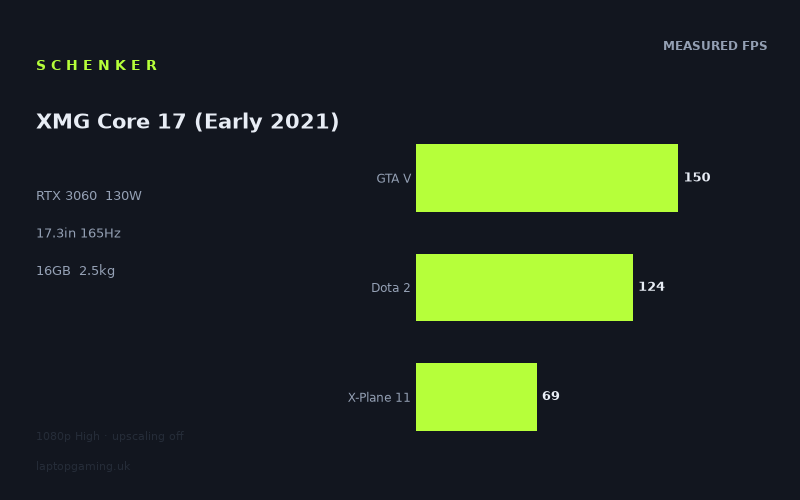
Frame rates
1920×1080, High preset, upscaling off.
Measured on this machine. Source: Notebookcheck, 2021-06-01.
Not scored: incomplete benchmark suite
Every scored laptop on this site is averaged over the same 5 games, and this one is short of Cyberpunk 2077, Baldur's Gate 3. A mean over 5 games is not comparable to a mean over 5, so we publish the figures we have and leave the score blank rather than rank it against machines tested on a different set. The numbers below are real - the suite is just incomplete.
How these numbers were produced
Frame rates here are not measured by us, and we label how each one was arrived at. A figure marked measured comes from a published run on that exact machine. A figure marked representative is derived from the GPU and its power limit (TGP) and cross-referenced against published reviews - a sound estimate of what that configuration delivers, but not a measurement of that specific laptop. Unless stated otherwise, numbers are 1920x1080, High preset, upscaling off. Where a laptop ships in several power configurations we use the wattage of the exact SKU listed, because a 140W RTX 5070 and a 115W one are not the same product.
In use
The short version
The Schenker XMG Core 17 (Early 2021) is a 17.3in gaming laptop built around an RTX 3060 running at a 130W GPU power limit, a Core i7-10870H, 16GB of memory and a 2560x1440 IPS display with a 165Hz refresh rate. Its published gaming results are strong in absolute terms: Notebookcheck’s measured figures range from 69fps in X-Plane 11 to 154fps in Strange Brigade at 1920x1080, High settings and with upscaling disabled. Across the five scoring-suite games, the mean is 115fps.
That makes this a capable machine for someone who wants a large, high-refresh screen but does not expect every demanding game to run at the display’s full 165Hz refresh rate. In lighter or better-scaling titles, the numbers are high enough to make the fast panel genuinely useful. Strange Brigade reaches 154fps, GTA V reaches 150fps, The Witcher 3 reaches 144fps and Dota 2 reaches 124fps. Those are strong results for competitive play, older games, games with modest GPU demands, or players willing to choose settings that prioritise frame rate.
The less flattering side is that this is not a laptop whose RTX 3060 can be treated as a universal 165fps-class GPU. Notebookcheck’s figures fall to 108fps in Far Cry 5, 107fps in Days Gone, 105fps in Yakuza Like a Dragon, 102fps in Shadow of the Tomb Raider, 99fps in Outriders, 89fps in Dirt 5, 80fps in Final Fantasy XV, 71fps in Watch Dogs Legion and 69fps in X-Plane 11. Those results are still playable figures, but they are far below the panel’s maximum refresh rate. The display is therefore best regarded as giving the machine room for fast games and lighter workloads, rather than as a guarantee that modern demanding titles will always run at 165fps.
The 130W GPU power limit looks promising on paper, but the comparison data adds an important qualification. Against the Asus TUF Gaming F17, another RTX 3060 laptop with a 95W GPU power limit, the XMG Core 17 averages +0fps across five shared games. Against the Lenovo Legion S7 15ACH6, also using an RTX 3060 but at 100W, it averages -1fps across five shared games. That does not support a claim that the higher-rated GPU power limit delivers a decisive real-world advantage in this particular shared-game set. At 1920x1080, lighter games can become limited by the processor or other platform factors rather than by the GPU alone, compressing differences between laptops that look more substantial on a specification sheet.
It does, however, hold a much clearer lead over a lower-tier GPU configuration. Against the MSI Prestige 15 with an RTX 3050 Ti at 105W, the XMG Core 17 averages +52fps across four shared games. It is also clearly behind the MSI Raider GE77 HX with an RTX 3080 Ti at 175W, averaging -54fps across five shared games. That is the useful way to position the Core 17: it is far stronger than a machine equipped with the RTX 3050 Ti, but it is not a substitute for a much higher-powered RTX 3080 Ti laptop.
The main practical compromise is size and mobility. At 2.546kg, this is a substantial 17.3in laptop rather than a lightweight machine for frequent carrying. The supplied specifications list a 62Wh battery, but they do not provide a measured battery-life result, so there is no basis here for promising a particular unplugged gaming or work duration. The listed specifications also do not include the chassis dimensions, noise measurements or temperatures, so those are areas where the available data does not support a stronger verdict.
There is no confirmed UK price for this exact configuration. That means no value judgement can be calculated for it, even though the benchmark suite is complete and the machine can be placed normally on the frame-rate leaderboard. The performance case is clear; the buying case depends on a price that is not confirmed.
Performance
What the published figures say
Notebookcheck’s results were measured at 1920x1080 using the High preset, with upscaling turned off. That matters because these are straightforward native-rendering benchmark figures rather than results boosted by an upscaling mode. They show what the RTX 3060, Core i7-10870H and 16GB memory configuration can achieve in a broad selection of games when asked to render a demanding but still sensible laptop-gaming preset.
The overall average across the five scoring-suite titles is 115fps. That is a healthy figure for a laptop of this class, and it immediately rules out the idea that the XMG Core 17 is merely adequate for gaming. It has enough performance to deliver high frame rates in several games and to stay well above the point where modern titles feel sluggish in the more demanding entries. At the same time, the average must not hide the broad spread between games. The difference between 154fps in Strange Brigade and 69fps in X-Plane 11 is substantial. This is a machine whose experience changes meaningfully according to what is being played.
At the fast end, Strange Brigade records 154fps and GTA V records 150fps. Both sit close enough to the 165Hz panel refresh rate that the screen’s high-refresh design has a clear purpose. The Witcher 3 reaches 144fps, which is also a very high result even if it remains below the full 165Hz ceiling. Dota 2 reaches 124fps. These are the games in which the Core 17 most clearly feels like a high-refresh gaming laptop rather than simply a laptop with a high-refresh specification.
There is then a second group of results that remains comfortably above 100fps without getting close to the display maximum. Far Cry 5 records 108fps, Days Gone records 107fps, Yakuza Like a Dragon records 105fps and Shadow of the Tomb Raider records 102fps. In these titles, the Core 17 offers fluid performance at the tested settings, but the 165Hz panel has substantial unused headroom. That is not a criticism of the display. A high-refresh panel can still make sense when a game does not hit its maximum, particularly when performance is above 100fps. It is simply important not to confuse “high-refresh capable” with “able to run every game at the panel maximum”.
Outriders, at 99fps, sits just below that 100fps mark. Dirt 5 records 89fps and Final Fantasy XV records 80fps. These results are still clearly gaming-capable, but they are a reminder that the Core 17’s GPU is not unlimited by virtue of its 130W rating. A buyer who wants to run demanding games at a locked 165fps at High settings should not choose this machine on the basis of the panel specification alone. The benchmark data says that some games will run far below that level before any attempt is made to increase resolution from 1920x1080 to the screen’s native 2560x1440.
The slowest published results are Watch Dogs Legion at 71fps and X-Plane 11 at 69fps. Those are the figures that most clearly define the lower end of the Core 17’s performance range. Neither suggests that the machine is incapable of running these games at the tested settings; both are well above the sort of frame rate that would make a game obviously impractical. But they are also nowhere near the display refresh ceiling. The panel is fast, while the GPU performance in the toughest titles is more conventional. That distinction should shape expectations before purchase.
The 130W GPU power limit in context
The XMG Core 17’s RTX 3060 is listed with a 130W GPU power limit. Within the provided comparison group, that is higher than the 95W RTX 3060 in the Asus TUF Gaming F17 and the 100W RTX 3060 in the Lenovo Legion S7 15ACH6. The temptation would be to assume that this alone guarantees a large lead. The shared-game evidence does not show that.
Against the Asus TUF Gaming F17, the XMG Core 17 averages +0fps across five shared games. Against the Lenovo Legion S7 15ACH6, it averages -1fps across five shared games. These are effectively tied results in the available shared-game sample. The correct conclusion is not that the 130W rating is meaningless, nor that a 95W or 100W configuration is automatically equal in every game. It is that the supplied benchmark data does not show the Core 17 converting its higher power limit into a broad measurable lead at the tested resolution and settings.
That near-zero gap is a real and useful result, not an error to be explained away. At 1920x1080, the lighter titles in the shared set can be CPU-bound and compress genuine GPU differences. Once a game is constrained by the processor or another part of the platform rather than by GPU throughput, giving one laptop’s GPU more available power does not necessarily produce a proportionate frame-rate increase. The Core i7-10870H is therefore part of the performance story, as are the game engines and the benchmark settings.
It also means that TGP should not be used as a shortcut when choosing between specific laptops. The XMG Core 17 proves that a 130W RTX 3060 can deliver strong figures, but the rival data shows that a lower-rated RTX 3060 system can land at the same performance level in a shared 1920x1080 High-preset set. Buyers should use actual comparable measurements rather than assuming that a larger power-limit number must translate directly into a faster laptop in every game.
The clearer effect of GPU tier is visible against the MSI Prestige 15. The XMG Core 17 averages +52fps across four shared games against that RTX 3050 Ti machine. That is a large advantage and it changes the class of experience the laptop can offer. The Core 17 has much more scope for high frame rates in the games represented by the shared data. It is not merely marginally ahead; it is in a different performance position from that RTX 3050 Ti configuration.
At the other end, the MSI Raider GE77 HX demonstrates what more GPU hardware and a 175W RTX 3080 Ti can do in the same broad generation. The XMG Core 17 averages -54fps across five shared games. That is a sizeable deficit. Anyone shopping specifically for the highest possible benchmark numbers, or for the best prospect of driving a 165Hz display in demanding games, should understand that the Core 17 is not competing with that class of machine. Its RTX 3060 is a capable mainstream gaming GPU in this context, not a replacement for the much more powerful RTX 3080 Ti configuration.
How the games divide
The strongest results belong to Strange Brigade, GTA V, The Witcher 3 and Dota 2. Strange Brigade at 154fps and GTA V at 150fps are close enough to the 165Hz display limit to make high-refresh gaming a realistic expectation. The Witcher 3 at 144fps is also fast enough that the difference between the measured result and the panel maximum is relatively small. Dota 2 at 124fps does not reach the same heights, but it remains firmly in high-frame-rate territory.
For a player whose regular games resemble this faster group, the Core 17’s specifications align well. The 17.3in panel, 165Hz refresh rate and measured performance all point in the same direction. The laptop can provide a fast experience in games that permit high frame rates at 1920x1080 High settings without upscaling. It is not necessary to claim that every game will feel identical to recognise that these results are strong.
Far Cry 5, Days Gone, Yakuza Like a Dragon and Shadow of the Tomb Raider form a particularly useful middle group because they cluster tightly between 102fps and 108fps. This consistency matters. It tells a buyer that when a game is more demanding than the fastest titles but not among the toughest entries, the Core 17 tends to provide performance around the low-hundreds rather than collapsing to a much lower range. That is a respectable outcome for High settings with upscaling off.
Outriders at 99fps is close to that middle group, while Dirt 5 at 89fps and Final Fantasy XV at 80fps show the next stage down. These are not alarming results, but they do make the limitations of a 165Hz target clearer. The display can refresh far more often than these games are producing new frames. A buyer primarily interested in visual settings may find this entirely acceptable. A buyer whose priority is consistently filling the 165Hz panel will need to be more selective about games and settings.
Watch Dogs Legion and X-Plane 11 are the clearest warnings against buying on refresh rate alone. At 71fps and 69fps respectively, they show that demanding games can run at less than half of the screen’s 165Hz refresh rate under the published test conditions. The Core 17 can still run them at the tested setting, but it does not turn every game into a high-refresh showcase. This is exactly why per-game figures matter more than a single average.
The performance spread is not a fault in the benchmark data. Different games place different demands on a system, and the published results show that plainly. Rather than treating 115fps as a promise for every title, it is more accurate to see it as a summary of a machine that can be very fast in some games, consistently good in many, and merely moderate relative to a 165Hz panel in the toughest examples.
The screen
A high-spec panel with a performance mismatch in demanding games
The XMG Core 17 has a 17.3in IPS display with a 2560x1440 resolution and a 165Hz refresh rate. On specification alone, that is an attractive gaming panel: it is large, sharper than a 1920x1080 screen, and designed for high frame rates. The difficulty is not the panel itself. It is matching that panel with the level of performance shown by the RTX 3060 in the published figures.
Notebookcheck’s figures are measured at 1920x1080, not at the screen’s native 2560x1440. That distinction is essential. The benchmark data demonstrates what this laptop can do at 1920x1080 High settings with upscaling disabled. It does not provide measured evidence for frame rates at 2560x1440, so no precise native-resolution estimate should be invented. The available numbers cannot support a promise that the Core 17 will deliver a particular frame rate at the panel’s full resolution.
What can be said is that the 1920x1080 figures already show a wide performance range. Strange Brigade reaches 154fps, GTA V reaches 150fps, The Witcher 3 reaches 144fps and Dota 2 reaches 124fps. These are the games where the 165Hz panel is most likely to be used well at the tested resolution. They also show that the RTX 3060 configuration has the potential to make a high-refresh display worthwhile when a title is light enough or scales favourably.
However, Far Cry 5 at 108fps, Days Gone at 107fps, Yakuza Like a Dragon at 105fps and Shadow of the Tomb Raider at 102fps all sit notably below 165fps before moving beyond the tested 1920x1080 resolution. Outriders at 99fps, Dirt 5 at 89fps, Final Fantasy XV at 80fps, Watch Dogs Legion at 71fps and X-Plane 11 at 69fps reinforce the same point. The screen has more refresh capacity than the GPU can use in many demanding games under the supplied benchmark conditions.
That does not make the 165Hz panel excessive. It means the panel offers flexibility. A player can benefit from high refresh in the fastest games, while accepting lower frame rates in demanding games. The mistake would be to buy this laptop expecting the screen specification to define the experience in every title. It does not. The games define the experience, and the published frame rates range from 69fps to 154fps.
Resolution choice needs to be deliberate
The 2560x1440 panel resolution gives the XMG Core 17 the potential to display more detail than a 1920x1080 screen. But the measured frame rates are specifically at 1920x1080. A buyer should therefore distinguish between the screen’s native resolution and the benchmark resolution rather than treating them as interchangeable.
For games in which maximum frame rate matters, the published 1920x1080 data is encouraging. Strange Brigade at 154fps, GTA V at 150fps, The Witcher 3 at 144fps and Dota 2 at 124fps show that the system can make good use of a fast panel at that setting. For demanding titles, the same test conditions produce lower results, and there is no supplied data to show what happens at 2560x1440. That uncertainty should remain explicit.
The practical buying message is straightforward. Choose the Core 17 for its combination of a large 17.3in panel, 165Hz refresh and strong 1920x1080 High-preset results. Do not choose it on an assumption that an RTX 3060 at 130W will automatically turn every modern game into a 2560x1440, 165Hz experience. The measured figures do not support that claim.
What the IPS specification tells us, and what it does not
The panel is listed as IPS. That identifies the display type, but the supplied facts do not include measured brightness, contrast, colour coverage, response-time results, adaptive-sync information or any assessment of backlight behaviour. It would be wrong to infer those qualities from the IPS label alone.
What is known is more limited but still useful: the display is 17.3in, it runs at 2560x1440 and it refreshes at 165Hz. For gaming, those specifications point towards a large-screen, high-refresh design. For image quality beyond resolution and panel type, there is no supporting measurement in the supplied data. Anyone for whom colour accuracy, outdoor visibility or response behaviour is decisive would need evidence that is not included here.
Build, size and portability
A large-screen laptop that is not built around low weight
The XMG Core 17 weighs 2.546kg. For a 17.3in gaming laptop, that figure makes clear that portability is not its primary selling point. It can be moved, but it is not a machine to treat like a light everyday laptop. The combination of a 17.3in display and 2.546kg weight points towards a laptop best used on a desk, around the home, or transported when necessary rather than carried constantly throughout the day.
That is not automatically a negative. A larger gaming laptop makes sense for someone who values screen size and does not need minimal weight. The 17.3in display is one of the most concrete reasons to consider this model over smaller alternatives. But a buyer who regularly travels, commutes, changes workspaces or wants a laptop that disappears into a bag should take the 2.546kg figure seriously. This is a substantial system.
The supplied specifications do not include chassis dimensions. As a result, there is no factual basis for describing the Core 17 as thin, compact, deep or especially large beyond what can be inferred from its 17.3in screen category and listed weight. The weight is enough to establish that it is not a lightweight option; anything more precise about its footprint would be speculation.
Battery capacity is known; runtime is not
The battery is listed at 62Wh. That tells us the battery capacity, but it does not tell us how long the laptop lasts away from mains power. There is no measured battery-life figure in the supplied data, and gaming battery life in particular should not be guessed from capacity alone.
The sensible conclusion is that buyers should not make a battery-life decision from this review. The machine has a 62Wh battery, but no attributable runtime figure is available here. Anyone whose purchase depends on all-day office use, travel endurance or unplugged gaming duration needs published battery testing for this exact configuration rather than an estimate.
Noise, thermals and serviceability are not established here
The 130W GPU power limit is relevant to performance, but the supplied facts do not include fan-noise measurements, surface temperatures, internal temperatures or information about upgrade access. Those details often matter in a gaming laptop, especially a machine intended to sustain high frame rates, but they are not available in this fact sheet.
That absence should not be filled with assumptions. It would be unjustified to call the Core 17 quiet, loud, cool-running or hot-running on the available evidence. Likewise, there is no supported claim to make about opening the chassis, memory slots, storage bays or serviceability. The data supports a performance and portability judgement, not a full physical-use verdict.
How it compares
Against the MSI Prestige 15 with RTX 3050 Ti at 105W
The MSI Prestige 15 is the rival that the XMG Core 17 beats by the largest margin in the supplied comparison set. The Prestige 15 uses an RTX 3050 Ti at 105W, while the Core 17 uses an RTX 3060 at 130W. Across four shared games, the Core 17 averages +52fps.
That is a meaningful lead rather than a small benchmark fluctuation. It supports the view that the Core 17 is the much stronger choice for buyers who prioritise game performance over the Prestige 15’s RTX 3050 Ti configuration. The gap is large enough that it affects how much headroom there is for high refresh, demanding scenes and the games that sit below the Core 17’s fastest results.
The Core 17’s own results explain why. It reaches 154fps in Strange Brigade, 150fps in GTA V, 144fps in The Witcher 3 and 124fps in Dota 2, with a 115fps mean across the scoring suite. A machine that is ahead by 52fps across shared games is not merely offering a slight improvement. It is positioned for a substantially higher frame-rate experience in that overlap.
There is no confirmed UK price for the MSI Prestige 15 configuration in the supplied comparison data, so this is strictly a performance comparison rather than a value comparison. The Core 17 is faster in the shared results; the data does not support a conclusion about which would be the better purchase financially.
Against the Asus TUF Gaming F17 with RTX 3060 at 95W
The Asus TUF Gaming F17 is one of the two closest rivals, and it creates the most important warning against relying on TGP labels alone. It also uses an RTX 3060, but with a listed 95W GPU power limit. The Core 17’s RTX 3060 is listed at 130W. Yet across five shared games, the XMG Core 17 averages +0fps.
That is effectively a tie in the available shared-game evidence. It does not mean every individual result is necessarily identical, because only the shared-game average is supplied. It does mean that there is no demonstrated aggregate lead for the Core 17 despite its higher listed GPU power limit.
The explanation provided with the comparison data is important: at 1920x1080, the lighter titles in the shared set can be CPU-bound and compress genuine GPU gaps. In other words, a benchmark at this resolution may stop being a pure GPU comparison when frame rates become high enough. The processor, game engine and broader system behaviour can limit performance before the GPU power limit becomes the decisive factor.
This is precisely why the XMG Core 17 should not be sold as automatically faster than every lower-TGP RTX 3060 laptop. The published shared-game result does not support that. Its 130W rating remains part of the specification, but the actual comparison average is +0fps. Buyers comparing these particular machines should treat them as performance equals in the supplied shared 1920x1080 High-preset data, not as obviously separated by their GPU power-limit labels.
Neither exact configuration has a confirmed UK price in the supplied facts. As with the other comparisons, there is no basis for saying which represents better value. The performance outcome is known; the financial outcome is not.
Against the Lenovo Legion S7 15ACH6 with RTX 3060 at 100W
The Lenovo Legion S7 15ACH6 is the other very close rival. It uses an RTX 3060 at 100W, while the Core 17 uses an RTX 3060 at 130W. Across five shared games, the Core 17 averages -1fps. In practical terms, that puts the two machines in the same performance bracket in the available data, with the Core 17 fractionally behind rather than ahead.
This is another result that matters more than the specification-sheet expectation. A buyer seeing 130W beside the XMG Core 17 and 100W beside the Legion S7 might predict a clear Core 17 advantage. The shared figures say otherwise. The gap is near zero, and the same 1920x1080 CPU-bound explanation applies: lighter shared games can reduce the visibility of a genuine GPU-performance difference.
The important point is not that the Core 17’s RTX 3060 is weak. Its individual figures remain strong, including 154fps in Strange Brigade, 150fps in GTA V and 144fps in The Witcher 3. The point is that laptop gaming performance depends on more than one specification. In this shared set, the 130W Core 17 does not pull away from the 100W Legion S7.
For a buyer choosing specifically between these two machines, the benchmark evidence offers no reason to expect a noticeable frame-rate advantage from the Core 17. Other factors might decide the choice, but the supplied facts do not include enough information about their screens, weights, batteries, chassis dimensions, prices or physical behaviour to make those comparisons here. On the shared performance data, they are effectively level.
Against the MSI Raider GE77 HX with RTX 3080 Ti at 175W
The MSI Raider GE77 HX represents the higher-performance end of the supplied rival group. It uses an RTX 3080 Ti at 175W, compared with the Core 17’s RTX 3060 at 130W. Across five shared games, the XMG Core 17 averages -54fps.
That deficit is large and should be taken at face value. The Core 17 is not close to the Raider GE77 HX in the available shared-game performance data. A buyer who wants the strongest possible frame rates, the greatest chance of approaching a 165Hz target in demanding games, or the highest benchmark position in this comparison group should look towards the RTX 3080 Ti machine rather than expecting the RTX 3060 Core 17 to bridge that gap.
The Core 17 still has useful performance of its own. It does not become inadequate simply because a 175W RTX 3080 Ti system is faster. Its results from 69fps to 154fps show a broad but credible gaming range. But the -54fps shared-game average establishes the scale of the difference between mainstream RTX 3060 performance and a far more powerful RTX 3080 Ti configuration.
Again, no confirmed UK price is provided for the Raider GE77 HX configuration. That prevents a value comparison. The performance hierarchy is clear: the Raider GE77 HX is well ahead in the shared data, while the Core 17 is the less powerful option.
Who it’s for
Buy it for large-screen gaming with realistic expectations
The Schenker XMG Core 17 suits a buyer who wants a 17.3in gaming laptop and values a 2560x1440 IPS screen with a 165Hz refresh rate, but understands that the published performance figures are measured at 1920x1080. It is a sensible choice for someone who plays a mixture of fast, lighter and moderately demanding games rather than only the toughest releases.
It is especially well suited to players whose regular games resemble the faster end of the benchmark list. Strange Brigade at 154fps, GTA V at 150fps, The Witcher 3 at 144fps and Dota 2 at 124fps show that the Core 17 can produce the high frame rates that make a 165Hz display worthwhile. If these kinds of results match the games someone actually plays, the laptop has a coherent performance-and-screen combination.
It also suits buyers who are happy with strong but not maximum-refresh performance in more demanding titles. Far Cry 5 at 108fps, Days Gone at 107fps, Yakuza Like a Dragon at 105fps and Shadow of the Tomb Raider at 102fps are all convincing results for High settings without upscaling. They may not fill a 165Hz panel, but they are clearly capable figures. Outriders at 99fps, Dirt 5 at 89fps and Final Fantasy XV at 80fps remain credible outcomes for someone who values a balance between image settings and fluidity.
The laptop is also a stronger fit than the MSI Prestige 15 RTX 3050 Ti configuration for buyers who want substantially more gaming performance. The +52fps average across four shared games is the largest lead in the supplied comparison data, and it supports choosing the Core 17 where frame rate is the priority.
Finally, it suits someone who expects a laptop to spend much of its time in a relatively fixed location. At 2.546kg, it is better understood as a transportable large-screen gaming machine than as a lightweight companion for constant travel. The 17.3in panel is an advantage when desk space and screen size matter more than minimum carry weight.
Buy something else if your priority is constant mobility
A buyer who carries a laptop frequently should look carefully at the Core 17’s 2.546kg weight. The supplied dimensions are not available, so its exact physical footprint cannot be assessed here, but a 17.3in machine at that weight is not aimed at people who want the least burdensome laptop possible.
The 62Wh battery capacity also does not provide enough information to recommend it for long periods away from a charger. There is no measured battery-life result in the supplied facts. Anyone who needs a known unplugged runtime should choose based on a machine with attributable battery testing rather than assume what this 62Wh battery will deliver.
Buy something else if 165fps in demanding games is non-negotiable
The Core 17 has a 165Hz panel, but several measured results are far below 165fps at 1920x1080 High settings with upscaling disabled. Watch Dogs Legion reaches 71fps, X-Plane 11 reaches 69fps, Final Fantasy XV reaches 80fps and Dirt 5 reaches 89fps. Those figures do not make the laptop unsuitable for those games, but they do make it unsuitable for someone who insists on using the display’s full refresh rate in every demanding title.
The MSI Raider GE77 HX is the clearer option in this specific comparison group for buyers chasing maximum performance. Its RTX 3080 Ti at 175W puts it ahead of the Core 17 by 54fps across five shared games. No price comparison can be made from the supplied facts, but the performance direction is unambiguous.
A buyer should also look elsewhere if native 2560x1440 performance is the central requirement. The Core 17 has a 2560x1440 display, but the published benchmark figures are at 1920x1080. There is no measured 2560x1440 game data supplied for this configuration. It is reasonable to appreciate the sharper screen specification, but not reasonable to invent native-resolution frame rates.
Do not choose purely on the 130W label
The Core 17’s 130W RTX 3060 is an important specification, but it should not be the sole reason to buy the laptop over other RTX 3060 systems. The shared-game results against the Asus TUF Gaming F17 and Lenovo Legion S7 15ACH6 are effectively tied: +0fps against the 95W Asus and -1fps against the 100W Lenovo. At the tested 1920x1080 setting, lighter shared games can be CPU-bound and hide some of the difference that a GPU power-limit comparison might suggest.
This does not undermine the Core 17’s performance. It simply means that measured results should lead the buying decision. The laptop is clearly ahead of the RTX 3050 Ti rival and clearly behind the RTX 3080 Ti rival, while sitting level with the two other RTX 3060 machines in the supplied shared-game comparisons.
The best reason to choose the Schenker XMG Core 17 is therefore not a promise of universal dominance. It is the specific package shown by the facts: a 17.3in 2560x1440 IPS 165Hz screen, a 2.546kg chassis, a 62Wh battery, an RTX 3060 at 130W, and Notebookcheck figures that range from 69fps to 154fps at 1920x1080 High settings without upscaling. It is a strong large-screen gaming laptop for buyers whose games fall towards the middle or faster end of that range, provided they accept that demanding titles will not consistently reach the panel’s full refresh rate and that no confirmed UK price is available for this exact configuration.