Details
Product prices and availability are accurate as of the date/time indicated and are subject to change. Any price and availability information displayed on Amazon.co.uk at the time of purchase will apply to the purchase of this product.Review
HP Omen 16-xf0376ng review
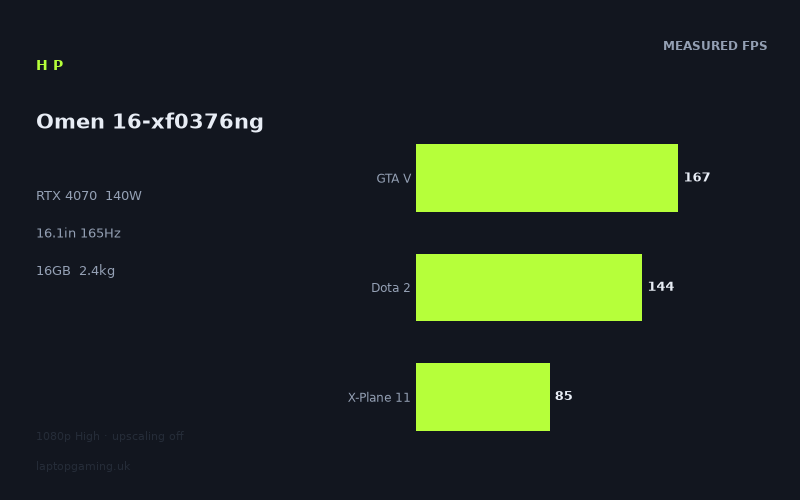
Frame rates
1920×1080, High preset, upscaling off.
Measured on this machine. Source: Notebookcheck, 2023-09-18.
Not scored: incomplete benchmark suite
Every scored laptop on this site is averaged over the same 5 games, and this one is short of Cyberpunk 2077, Baldur's Gate 3. A mean over 3 games is not comparable to a mean over 5, so we publish the figures we have and leave the score blank rather than rank it against machines tested on a different set. The numbers below are real - the suite is just incomplete.
How these numbers were produced
Frame rates here are not measured by us, and we label how each one was arrived at. A figure marked measured comes from a published run on that exact machine. A figure marked representative is derived from the GPU and its power limit (TGP) and cross-referenced against published reviews - a sound estimate of what that configuration delivers, but not a measurement of that specific laptop. Unless stated otherwise, numbers are 1920x1080, High preset, upscaling off. Where a laptop ships in several power configurations we use the wattage of the exact SKU listed, because a 140W RTX 5070 and a 115W one are not the same product.
In use
The short version
The HP Omen 16-xf0376ng is a machine built around one decision, and it is a decision that makes more sense the longer you look at it. HP has taken an RTX 4070 and configured it to run at 140W, which is at the upper end of the range this GPU is shipped in, and then pointed it at a 1920x1080 panel. That combination is unfashionable. The industry spent 2023 moving mid-range gaming laptops to 1600p, and a 16.1in machine with a 4070 inside it would normally arrive with a 2560x1600 screen and a marketing line about how much sharper everything looks. This one did not. It has a full HD panel running at 165Hz, and it has more graphics power behind that panel than the panel strictly needs.
Whether that reads as a compromise or a bargain depends entirely on what you play. The measured figures make the case fairly plainly. Across the ten games in our record, this machine ranges from 221fps in Strange Brigade down to 57fps in Immortals of Aveum — close to a four-to-one spread, which is a useful reminder that "will it run games well" is not a question with one answer. Older and lighter titles are not just comfortable here, they are so far past the panel's refresh ceiling that the extra frames are being thrown away. Heavy 2023 releases with demanding lighting sit in the fifties and high fifties, which is playable but is nowhere near 165Hz, and no amount of GPU power limit would have changed that at native settings with upscaling switched off.
The strong recommendation, then, is narrow but genuine. If you play competitive and mid-weight games — shooters, racers, the enormous back catalogue of titles that are five years old or older, anything where a high frame rate is the point — this is a machine that will hold a very high frame rate for a long time, because it has GPU headroom the display cannot consume. It is also, for the same reason, a sensible machine to plug into an external monitor: the graphics part is not the thing holding it back. If you mainly play the newest, heaviest single-player games and you want the sharpness that a higher-resolution screen brings, the logic inverts, and you should be looking at a 1600p machine even if it carries a lower power limit.
One caveat before any of that: we have no confirmed UK price for this configuration. That matters more than usual here, because the entire argument for a 140W 4070 behind a 1080p panel is a value argument. If it is priced as a mid-range machine, the reasoning above holds comfortably. If it is priced against 1600p machines with the same GPU, it stops making sense very quickly. We would rather say that plainly than pretend we can judge value without the number.
Performance
Every frame rate discussed here was measured by Notebookcheck on 18 September 2023, at 1920x1080, on the High preset, with upscaling turned off. That last condition is worth holding on to, because it is the single biggest reason the numbers at the bottom of the list look the way they do. DLSS exists, this GPU supports it, and in the heaviest games it is the difference between a mediocre frame rate and a good one. The benchmark data deliberately excludes it so that machines can be compared like for like. Read the low numbers as a floor, not a ceiling.
What 140W actually buys
The power limit is the most informative single specification on this machine. GPUs in laptops are not fixed quantities — the same silicon can be configured across a wide band of sustained power, and the difference between a low-power and a high-power configuration of the same part is large enough to swallow an entire tier of the product stack. A 4070 configured conservatively can end up slower than a well-fed part from the tier below it; a 4070 configured aggressively can push into territory that the naming convention suggests belongs to bigger parts.
At 140W, this is at the aggressive end. HP has not shipped a mid-range chassis with a mid-range thermal solution and then quietly clamped the GPU to keep it quiet — the configuration in our record is one that lets the part draw a substantial amount of sustained power. The practical consequence is that this machine's frame rates should hold up under load rather than sagging as a benchmark run progresses, and that in genuinely GPU-limited scenes it is getting close to what this class of GPU can do rather than a throttled fraction of it.
What it does not buy is anything in the games where the graphics part is not the constraint. This is the crucial point for a 1080p machine, and it recurs throughout the comparison section below. When a game is limited by the processor, the driver, or its own engine, adding graphics power changes nothing at all. An aggressively configured 4070 and a conservatively configured one will produce nearly identical numbers in a title that never asks the GPU for everything it has. That is not a flaw in the measurement — it is the actual behaviour you would get on your desk.
The top of the list: past the panel, comfortably
Strange Brigade at 221fps is the headline, and it is the least useful number in the set. It is a well-optimised older title that scales beautifully and does not tax modern hardware, and what it really tells you is the shape of the ceiling: with nothing much in its way, this machine produces frames far faster than a 165Hz display can show them. Roughly a third of them are being discarded.
GTA V at 167fps is more interesting, because it is one of the three scoring-suite games in our record for this machine and because it lands just above the refresh rate rather than miles above it. GTA V is old, and at 1080p on High it is much more a test of the processor and the engine than of the graphics part. The Ryzen 7 7840HS is doing most of the work in that result. Landing above the panel's refresh in this title is close to the expected outcome for any competent modern machine, which is exactly why a result like this cannot separate good machines from great ones.
Dota 2 at 144fps makes the same point more sharply. It is a game that runs on almost anything, and a 4070 at 140W is grotesque overkill for it. That it lands slightly below the panel's refresh ceiling rather than several times above it should tell you immediately that the graphics hardware is not what is being measured. Dota 2's engine and the processor set that number, and a more powerful GPU would not move it meaningfully. The number is nonetheless genuinely useful, because it establishes a baseline: this machine is not going to have trouble with the entire category of games that Dota 2 represents.
The middle: where the panel and the hardware actually meet
The middle of the range is where this machine earns its keep, and it is a healthy middle. Atlas Fallen at 132fps, Armored Core 6 at 109fps and Final Fantasy XV at 109fps are all recent-enough titles running well clear of the frame rates most players would consider a floor for smooth action gameplay, with margin left over.
Armored Core 6 landing at 109fps is a particularly good result to sit with, because it is a fast game where frame rate is not decorative — it affects how the machine feels to control. At that figure you have a comfortable buffer above any threshold that matters, and you are not going to be watching the frame rate anxiously during heavy scenes. Final Fantasy XV at the same figure is a different sort of workload — a heavier, effects-laden older engine — and getting the same result from both is a reasonable indication that the hardware is well balanced rather than good at one narrow thing.
Atlas Fallen at 132fps is the most encouraging of the three, because it is one of the newest titles in the set rather than a back-catalogue name, and it is still comfortably into three figures. That is what a well-fed 4070 at 1080p ought to look like in a modern game that is not built around ray tracing.
Below that, Sons of the Forest at 86fps and X-Plane 11 at 85fps are the pivot point. Both sit at roughly half the panel's refresh, both are perfectly playable, and both come from completely different directions. Sons of the Forest is a genuinely demanding modern engine that is asking the GPU for real work. X-Plane 11 is the opposite: a simulator whose performance is famously bound by processor and draw-call throughput rather than raw graphics power, which is precisely why it is in the scoring suite — it stresses a completely different part of the machine and stops the average being a pure GPU score. Two very similar numbers, two entirely unrelated bottlenecks.
The bottom: the heavy 2023 releases
A Plague Tale Requiem at 59fps and Immortals of Aveum at 57fps are the honest limits of this machine at native resolution. Both are recent releases built for the current console generation with lighting and effects budgets to match, and both were measured with upscaling off. In practical terms these are playable results, but they are results with no headroom — the sort of figure where a heavy scene drops you into territory you can feel, and where the 165Hz panel is entirely irrelevant.
It is worth being clear about what this does and does not indicate. It does not indicate that the machine is underpowered for its class. Those two games would put any mid-range 2023 laptop in similar territory at native 1080p with everything on. What it indicates is that the GPU power limit is not a magic wand: 140W is a strong configuration, and it still lands in the fifties in the heaviest things measured. Anyone buying this machine to play that kind of game should plan on using DLSS, which will change the picture substantially and which the benchmark methodology quite correctly refuses to do on their behalf.
The spread, and what it tells you
From 221fps to 57fps is nearly a four-to-one range across ten games. That spread is not noise, and it is not a sign of an inconsistent machine — it is the actual state of PC gaming performance in 2023, and any laptop measured across a wide enough set of titles will show something similar. What differs between machines is where the middle of that range sits and how quickly the bottom falls away.
Here, the middle sits high and the fall is late. Six of the ten titles clear three figures. Only two land below sixty frames a second. For a machine attached to a 1080p 165Hz panel, that distribution is close to ideal: the majority of what you play will run at or near the panel's capability, and the exceptions are the specific heavyweight releases where nothing in this price class runs at 165Hz anyway.
Why we do not print a ranking for this machine
Every laptop we score is averaged over the same five games, so that the comparison is genuinely like for like. For this machine our record holds three of them — GTA V, Dota 2 and X-Plane 11, averaging 132fps — and we are missing figures for Cyberpunk 2077 and Baldur's Gate 3. That is not a small gap. Those two are the heaviest titles in the suite, and they are the ones that separate machines most effectively, because they are the ones where the GPU is genuinely the constraint. Averaging over the three we do have would flatter this machine relative to laptops averaged over all five, because the three we have are exactly the CPU-limited titles in which everything modern looks similar.
So there is no rank here, and the three-game average above should be treated as a description of this machine's behaviour in those three specific games rather than as a score in disguise. We would rather publish an incomplete set and say so than manufacture a number that looks authoritative and is not.
The screen
A 16.1in 1920x1080 IPS panel at 165Hz. In a 2023 gaming laptop with a 4070 in it, this is the specification most likely to make someone close the tab, and it deserves a fair hearing rather than a reflex.
Resolution: the real argument
The case against is straightforward. At 16.1in, 1080p is not a dense panel. Text and interface elements will look coarser than they would on a 1600p screen of the same size, and if you use the machine for work as well as games — spreadsheets, code, documents, anything with small type — you will notice it every day, not just when gaming. That is a real cost and it is not offset by frame rates.
The case for is that this machine's graphics hardware is aimed squarely at this resolution and has power to spare. Moving to 2560x1600 costs a large fraction of your frame rate for the same settings — you are asking the GPU to draw well over twice as many pixels. Look again at the bottom of the measured list: A Plague Tale Requiem at 59fps and Immortals of Aveum at 57fps, at 1080p, with upscaling off. Those are not numbers with room to give away. On a 1600p panel, the same GPU in the same games would be in genuinely uncomfortable territory at native resolution, and you would be reaching for upscaling not as an option but as a requirement.
So the 1080p panel is not simply a cost saving that leaves the GPU stranded. It is a coherent pairing, and it is the pairing that produces the highest sustained frame rates in the heavy games. What you are trading is image sharpness — everywhere, all the time — for frame rate stability in the specific titles where frame rate is scarce. Whether that is a good trade is a genuine question about how you use a laptop, not a question with an obvious answer.
Refresh rate: can the GPU feed it?
In two of the ten measured games, yes and comfortably: Strange Brigade at 221fps and GTA V at 167fps are both above the 165Hz ceiling, with Strange Brigade far above it. Dota 2 at 144fps is just short, close enough that variable refresh would smooth over the difference entirely.
In the other seven, no. Atlas Fallen at 132fps, Armored Core 6 and Final Fantasy XV at 109fps, Sons of the Forest at 86fps, X-Plane 11 at 85fps, A Plague Tale Requiem at 59fps and Immortals of Aveum at 57fps are all below the panel's capability, several of them by a very wide margin.
This is not a criticism, because a 165Hz panel is not a target to be hit in every game. It is a headroom specification, and its value shows up in three places: competitive titles, where the frame rate genuinely gets that high and the reduced latency is the point; older games, of which there are thousands and most of which will run far past 165fps here; and everyday desktop use, where a high-refresh panel simply feels better to move a cursor around. Judging a 165Hz panel by whether A Plague Tale Requiem hits 165fps is the wrong test. The right test is whether the panel is ever the limiting factor in the games you actually play at high frame rates, and here it sometimes is — Strange Brigade is producing a third more frames than the panel can display.
Panel technology
IPS, which in 2023 is the sensible mainstream choice and the one with the fewest caveats. It means predictable viewing angles and no risk of the burn-in questions that hang over OLED panels used for long sessions with static interface elements — and a gaming laptop displaying the same HUD for hundreds of hours is close to a worst case for that. What you give up against OLED is contrast: blacks will be grey-ish in a dark room, and high-dynamic-range content will not have the punch that an emissive panel delivers.
Our record does not include brightness, contrast ratio, colour gamut coverage or response time for this panel, so we are not going to characterise its quality. IPS panels in gaming laptops range from excellent to mediocre and the label alone does not tell you which this is. If panel quality beyond the basic specification matters to you, that is a gap worth filling from a source that has measured it.
Build, size and portability
2.44kg for a 16.1in machine, with an 83Wh battery.
What the weight means in practice
2.44kg is squarely mid-range for a 16in gaming laptop and it is a weight with clear behavioural consequences. It is not a machine you forget you are carrying, and once you add the power supply — which for a 140W GPU plus a Ryzen 7 will not be a small one — you are realistically looking at something over three kilograms in the bag. That is a manageable daily carry for someone who is used to it and a genuinely tiring one for someone who is not.
The right way to think about it is that this is a machine that moves between places rather than a machine you use on the move. Home to office, house to a friend's, term-time bedroom to holidays — all fine. Working from a different café every day, or carrying it as a secondary machine alongside everything else you already carry, is a different proposition and one this class of laptop has never been good at.
What the weight buys is the cooling that the 140W configuration requires. There is no version of this machine that runs a 4070 at that power level, sustains the frame rates in our record, and weighs appreciably less. Physics does not allow it. When you see a substantially lighter machine with the same GPU on the box, the near-certain explanation is a lower power limit, and the frame rates follow the power. In that sense the 2.44kg is not overhead — it is the mechanism that makes the performance section above true.
Battery
83Wh is a large battery by any laptop standard and close to the practical maximum for a machine you intend to take on an aeroplane. Our record does not include a measured battery life for this machine and we are not going to guess at one, because runtime depends on the panel, the platform's power management and what you are doing far more than it depends on capacity alone.
What can be said with confidence is structural rather than numerical. No gaming laptop runs a 140W GPU from its battery — the power simply is not there, and machines in this class reduce performance substantially when unplugged. The 83Wh cell is there to make the machine usable for non-gaming work away from a socket, and to that end a large cell paired with a Ryzen 7 mobile part is a promising combination on paper. The 1080p panel helps too: fewer pixels to drive is genuinely less power than a higher-resolution screen at the same brightness. Treat gaming away from mains power as a compromised experience on this machine, as on all of them.
What our record does not cover
We have no measurements for surface temperatures, fan noise under load, keyboard quality, port selection or the state of the chassis under pressure. Those are real factors in whether a machine is pleasant to own, and a 140W GPU in a 2.44kg chassis is precisely the configuration where cooling behaviour is worth checking before you buy. Our record is a performance and specification record; it is not a substitute for reading about how loud it gets.
How it compares
The comparisons below use only the games both machines have in our record, preferring the scoring suite where possible. That is a methodologically honest approach and it has one important consequence that you need to hold in mind while reading: the games most machines share are GTA V, Dota 2 and X-Plane 11, and all three are, at 1080p, more limited by the processor than by the graphics part. A comparison built on those three will systematically understate the gap between a fast GPU and a slow one. It does not invent gaps; it compresses real ones.
The evidence that the method still works is at the bottom of this section. When there is a genuine gulf between two machines, it shows up regardless.
MSI Thin GF63 (RTX 4050) — this machine averages 44fps ahead across three shared games
This is the clearest result in the set and the least surprising. A 4050 in a thin, inexpensive chassis against a 4070 configured at 140W is a mismatch in every dimension that matters — the graphics part is two tiers down, and the chassis it sits in is not built to feed it aggressively.
A 44fps average margin across three shared titles is a substantial, unambiguous win, and it is more meaningful than the raw figure suggests precisely because the shared games compress differences. If this machine is 44fps clear across a set of titles designed to make machines look similar, the gap in a genuinely GPU-bound game will be wider still. We do not have a confirmed UK price for the GF63, so we cannot tell you whether it is cheap enough to justify itself. But on performance alone there is no argument here.
Gigabyte Aero 14 OLED BMF (RTX 4050) — level on average across three shared games
This is the result that requires explanation rather than repetition, and it is the most instructive comparison in the set. Another RTX 4050 machine, and this time the average difference across three shared games is nothing at all.
Two 4050 laptops, one of them 44fps behind and one of them level. That is not a contradiction; it is the single most useful thing in this section, and it tells you two separate things.
The first is that the GPU tier on the box is a weak predictor of performance. How much power the GPU is allowed to draw, what processor is feeding it and how well the chassis removes heat matter enormously, and two machines with the same GPU name can land in completely different places. Anyone shopping by tier alone — "I want at least a 4070" — is using a filter that does not do the job they think it does.
The second is about the shared-game problem. Where the games in common are the light, CPU-limited ones, a machine with a strong processor and a modest GPU can match a machine with a strong GPU, because the graphics part is not what is being measured in those titles. That is a real measured result and we are not going to pretend otherwise — but it is a result about those specific games, not a statement that these two machines are equivalent. Look at where this machine actually spends its GPU power: Immortals of Aveum, A Plague Tale Requiem, Sons of the Forest, Atlas Fallen. Those are the titles where a 140W 4070 pulls decisively away from a 4050, and they are not in the shared set. On the evidence we hold, these two are level in games neither of them is really being tested by.
The Aero 14 is also a fundamentally different machine — smaller, with an OLED panel — so even where the frame rates coincide the buying decision does not. If sharpness, contrast and portability are your priorities, the fact that a 14in OLED machine matches this one across three CPU-limited titles is a genuine point in its favour. If you want frame rates in heavy games, it is not the same class of hardware.
Acer Predator Triton Neo 16 (RTX 4070 at 110W, £2,065) — this machine averages one frame per second behind across three shared games
The closest comparison in the set, and the most direct: the same GPU tier, a different power configuration. The Triton Neo 16 runs its 4070 at 110W against this machine's 140W, and across three shared games it comes out fractionally ahead — a difference of about one frame per second, which is well inside the range where nothing meaningful is being measured.
This is exactly the pattern the shared-game caveat predicts. In titles limited by the processor, a gap of tens of watts in the GPU power budget produces no difference in output, because the extra power has nothing to do. The comparison is telling you that the two machines have comparable processors and comparable behaviour in light games, and nothing more than that. It is not telling you that the power limit is irrelevant — it is telling you the shared set cannot see it.
The Triton Neo 16 does have a confirmed UK price, at £2,065, and that is a useful anchor. It puts a figure on what a 4070-class machine from a premium range costs, and it means that if this Omen arrives well below that number, the case for it strengthens considerably — you would be getting a higher GPU power limit for less money, with the panel resolution as the thing you gave up. If it arrives near £2,065, the argument becomes much harder, because at that price the specification of the rest of the machine starts to matter as much as the GPU configuration. Without a confirmed price for the Omen we cannot close that argument, and we are not going to pretend the comparison is resolved when the decisive variable is missing.
Asus ROG Strix Scar 17 (RTX 4090) — this machine averages 67fps behind across three shared games
This is the machine that beats this one by the widest margin in our set, and it is the comparison that validates all the others. An RTX 4090 in a large 17in chassis is two full tiers up and in a different price category entirely, and across three shared games it is 67fps clear.
The importance of that number is not that the 4090 machine is faster — everyone expects that. It is that the 67fps margin appears in the same kind of shared, CPU-limited comparison that showed nothing between this machine and the Aero 14, and only a single frame between this machine and the Triton Neo 16. That is the proof that the method has resolution. When two machines are genuinely far apart, this comparison finds it, comfortably. When it reports nothing, that is a real finding about those games rather than a failure of the instrument.
Our record does not include a confirmed UK price for the Strix Scar 17, and we do not hold a GPU power limit for it either, so we are not going to speculate about its configuration. What the comparison establishes is the shape of the ladder: this machine is far above the cheapest 4050 laptops, level with or a whisker behind other well-configured mid-range machines in light games, and a long way behind flagship hardware. That is a completely coherent position for a 4070 at 140W, and it is roughly what you would predict from the specification before looking at a single frame rate.
Reading the four comparisons together
Take the set as a whole and a clear picture emerges: +44fps, level, one frame behind, 67fps behind. The two extremes are large and the two middle results are effectively zero. That distribution is not evidence of a benchmark that cannot separate machines — it is evidence of a benchmark that separates machines when they are genuinely different and reports honestly when they are not, on the titles it is measuring.
The practical lesson for a buyer is that in the middle of the market, on the games most people actually spend most of their time in, machines that look very different on paper perform almost identically. The differences that justify large price gaps live in the heavy modern titles — the ones this machine runs in the fifties and the ones missing from our scoring suite. If your library is mostly light and mostly older, you are choosing between these machines on screen, chassis, noise and price, because the frame rates will not decide it for you.
Who it's for
Buy it if
You play competitive games and want frames, not pixels. This is the strongest case. A 4070 at 140W feeding a 1080p 165Hz panel is a configuration built to produce high frame rates, and the measured figures at the top of the list — 221fps, 167fps, 144fps — bear that out. In this category the lower resolution is an advantage, not a compromise: it is why the frame rates are high, and competitive players have chosen 1080p deliberately for years.
Your library is broad and includes a lot of older games. Six of the ten measured titles clear three figures. If most of what you play is more than a few years old, this machine will feel enormously fast and you will rarely see the bottom of the range.
You want GPU headroom for the future rather than for now. Buying more graphics power than your panel currently needs is a defensible strategy. Games get heavier; a 140W 4070 that today produces frames the display cannot show will, in two or three years, be producing frames it can. The 1080p panel means this machine will age more gracefully than an equivalently-powered 1600p one, because it starts with a lower pixel load.
You intend to use an external display. If the laptop panel is a secondary consideration because you dock it at a desk, the resolution objection largely disappears and you are left with a well-configured GPU at what may be a lower price than 1600p equivalents. We cannot confirm that price, which is the caveat, but the logic is sound.
Buy something else if
The newest, heaviest single-player games are what you buy a gaming laptop for. A Plague Tale Requiem at 59fps and Immortals of Aveum at 57fps are the relevant numbers, and they are 1080p numbers. This machine can play those games, but it plays them without margin, and you will be turning on upscaling in exactly the titles where you most wanted the visual quality. A machine further up the stack — the sort of hardware the Strix Scar 17 comparison represents — is a real step up in that specific use case, at a real cost.
You care about screen sharpness. This is the honest deal-breaker for a lot of people and it should be. A 16.1in 1080p panel is not sharp, you will look at it for thousands of hours, and no frame rate compensates for that if it bothers you. Buy a 1600p machine, accept the lower frame rates in heavy games, and use upscaling. That is a perfectly rational choice and for many buyers it is the better one.
You need genuine portability. At 2.44kg plus a substantial power supply, this is a machine you carry when you have to. If it is going in a bag most days, look at 14in machines and accept the performance cost.
You need a value judgement today. Without a confirmed UK price, the most important variable in this decision is missing. The specification is coherent and the frame rates are solid, but "is it worth it" is not a question anyone can answer for you here, and the £2,065 attached to the Triton Neo 16 is the only price anchor in this comparison set.
What we do not know
In the interests of being straight about the limits of this analysis: we have no confirmed UK price for this configuration, no figures for Cyberpunk 2077 or Baldur's Gate 3, and therefore no complete scoring set and no ranking against the rest of our database. We have no measured battery life, no thermal or acoustic data, and no measurements of the panel beyond its resolution, refresh rate and type. Everything above is derived from the specification in our record and from Notebookcheck's measurements of 18 September 2023, at 1920x1080 on High with upscaling off.
Within those limits the conclusion is well supported. This is a graphics-heavy, resolution-light machine that will run the majority of what most people play at or beyond its panel's capability, that lands in the fifties in the heaviest 2023 titles at native settings, and that sits exactly where a well-fed 4070 should sit: far ahead of budget hardware, level with its immediate peers in the games that cannot tell them apart, and a long way behind the flagships. Whether it is a good buy depends on a price we do not have and on a screen-versus-frame-rate trade only you can make.