Review
Razer Blade 16 Early 2023 RTX review
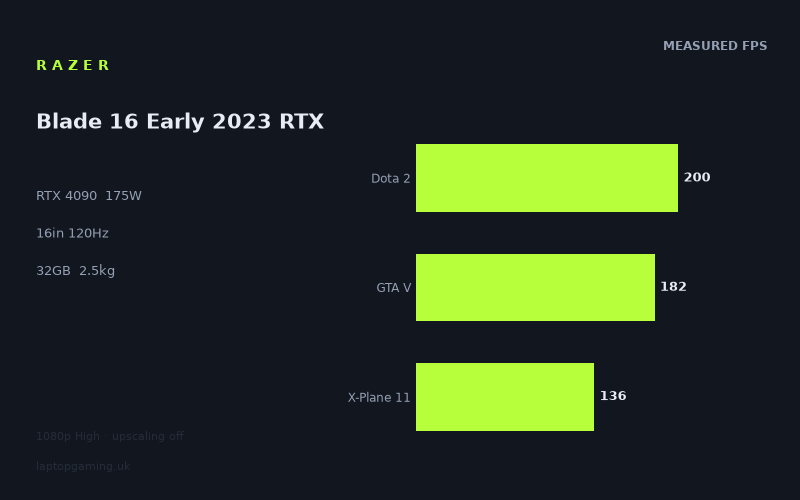
Frame rates
1920×1080, High preset, upscaling off.
Measured on this machine. Source: Notebookcheck, 2023-03-23.
Not scored: incomplete benchmark suite
Every scored laptop on this site is averaged over the same 5 games, and this one is short of Cyberpunk 2077, Baldur's Gate 3. A mean over 3 games is not comparable to a mean over 5, so we publish the figures we have and leave the score blank rather than rank it against machines tested on a different set. The numbers below are real - the suite is just incomplete.
How these numbers were produced
Frame rates here are not measured by us, and we label how each one was arrived at. A figure marked measured comes from a published run on that exact machine. A figure marked representative is derived from the GPU and its power limit (TGP) and cross-referenced against published reviews - a sound estimate of what that configuration delivers, but not a measurement of that specific laptop. Unless stated otherwise, numbers are 1920x1080, High preset, upscaling off. Where a laptop ships in several power configurations we use the wattage of the exact SKU listed, because a 140W RTX 5070 and a 115W one are not the same product.
In use
The short version
The Razer Blade 16 Early 2023 RTX is a high-end gaming laptop built around an RTX 4090 running at a stated 175W GPU power limit, alongside a Core i9-13950HX, 32GB of memory, a 1TB SSD and a 16in 3840x2400 display with a 120Hz refresh rate. On paper, that is the sort of specification expected to sit near the top of its GPU generation. Notebookcheck’s measured figures support that broad conclusion at 1920x1080 using the High preset with upscaling disabled: this is a very fast machine across the games measured.
The important qualification is that the display is much more demanding than the benchmark resolution. The available figures are all at 1920x1080, while the screen has 3840x2400 pixels. The results therefore show what this laptop can do in a deliberately lower-resolution benchmark setting; they do not establish its frame rates at the panel’s native resolution. That distinction matters more here than it does on a laptop with a 1920x1080 screen. A machine capable of 299fps in F1 2021 at the measured settings is plainly fast, but that does not mean it will produce the same result when asked to render far more pixels on its own screen.
At the measured settings, the Blade has no trouble exceeding its display’s 120Hz refresh rate in much of the test list. Strange Brigade reaches 350fps, The Witcher 3 reaches 322fps, F1 2021 reaches 299fps, F1 22 reaches 223fps, Dota 2 reaches 200fps, GTA V reaches 182fps, Far Cry 5 reaches 167fps, The Witcher 3 v4 reaches 138fps, X-Plane 11 reaches 136fps and Final Fantasy XV reaches 122fps. Those are strong figures, and they show a substantial amount of performance headroom in many of the measured games.
The more difficult games tell a more nuanced story. Cyberpunk 2077 1.6 is measured at 98fps. That remains a high frame rate in ordinary terms, but it is below the panel’s 120Hz ceiling even at 1920x1080, High settings and with upscaling off. This is the useful reality check for anyone treating the RTX 4090 badge as a guarantee of maximum-refresh gaming in everything. The Blade has enormous performance, but demanding games can still be demanding, and the 3840x2400 screen asks far more from the GPU than the benchmark resolution does.
The machine’s UK price is not confirmed, so there is no sensible value verdict to make. It would be irresponsible to call it good value, poor value or even merely expensive without a confirmed UK price. The hardware and the measured performance place it in the premium end of the market, but whether that performance is worth paying for depends heavily on the eventual price. The lack of a confirmed price is also shared by several of the named Schenker comparison machines, so this review can judge performance positioning, not pound-for-pound value.
Buy this Blade if the appeal is a 16in 3840x2400, 120Hz screen paired with measured 1080p performance that ranges from 98fps in Cyberpunk 2077 1.6 to 350fps in Strange Brigade, and if a 2.45kg laptop is an acceptable carry. It is particularly compelling for someone who wants substantial headroom in less demanding games, strong performance in conventional high-settings gaming, and a display with more resolution than the benchmark configuration uses. Do not buy it on the assumption that every game will run at 120fps at 3840x2400; the published figures cannot prove that. Do not buy it solely because it has an RTX 4090 either, because the rival data shows that the same nominal GPU can deliver materially different results depending on the laptop around it.
There is also no complete five-game scoring-suite result for this machine. Notebookcheck provides scoring-suite figures for Dota 2, GTA V and X-Plane 11, which average 173fps, but there are no figures here for Cyberpunk 2077 or Baldur’s Gate 3 in that suite. Every scored laptop is averaged across the same five games, so a partial result cannot be ranked fairly against completed results. The 173fps mean is useful as a description of those three measured games; it is not a substitute for a complete ranking.
Performance
What the measured results say
Notebookcheck measured the Razer Blade 16 Early 2023 RTX at 1920x1080, High settings and with upscaling disabled. That is a useful, clean baseline because it avoids attributing performance gained through upscaling to raw rendering performance. It is also a setting where an RTX 4090 at 175W can show both its strengths and the limits imposed by individual game engines, CPUs and the nature of the workload.
The headline results are exceptionally high in the lighter and older titles. Strange Brigade is measured at 350fps. The Witcher 3 reaches 322fps. F1 2021 reaches 299fps. Those figures are far above the screen’s 120Hz refresh rate at the benchmark settings. They show that, in these games, the Blade has enough available performance not merely to reach the panel refresh ceiling but to exceed it by a very large margin.
That excess should not be dismissed as meaningless. A result far beyond 120fps can still matter when settings are increased, when resolution is raised, when a game becomes more demanding in a particular scene, or when a player prefers a lower-resolution mode to pursue the highest possible frame rate. But it must be interpreted correctly. The laptop’s own panel is 120Hz. At the measured settings, 350fps in Strange Brigade, 322fps in The Witcher 3 and 299fps in F1 2021 are not evidence that the built-in display can visibly present every one of those frames as distinct refreshes. They are evidence of considerable performance reserve under the benchmark conditions.
The next group remains comfortably above 120fps. F1 22 is measured at 223fps, Dota 2 at 200fps, GTA V at 182fps, Far Cry 5 at 167fps, The Witcher 3 v4 at 138fps and X-Plane 11 at 136fps. These are not marginally over the display limit. Even the lower two results in this group retain a measured margin over 120fps at 1920x1080, High settings and without upscaling.
Final Fantasy XV reaches 122fps. It is only just above the display’s 120Hz refresh rate, but it still clears it in the published benchmark. This is a more useful result for someone trying to judge the edge of the machine’s 120Hz capability at the stated test settings. A result of 122fps is not the same kind of surplus as 223fps or 350fps. It shows that the Blade can meet the panel refresh target in this benchmark, but not with much headroom remaining under the exact measured conditions.
Cyberpunk 2077 1.6 is the most demanding result in the supplied list, at 98fps. That is a strong frame rate and should not be framed as a failure. It is, however, the clearest example of why the rest of the specification cannot be read as a universal promise of 120fps gaming. The RTX 4090 is running at a stated 175W, the laptop has a Core i9-13950HX and 32GB of memory, and yet Cyberpunk 2077 1.6 remains below 120fps at the published 1920x1080 High setting with upscaling off. Different games put pressure on hardware in different ways. The practical conclusion is simple: expect extremely high performance, but judge the 120Hz target game by game.
The scoring-suite evidence
Three of the published results belong to the scoring suite: Dota 2 at 200fps, GTA V at 182fps and X-Plane 11 at 136fps. Their mean is 173fps. That is a useful snapshot of how the laptop handles these particular titles, which span very different styles of game and produce a noticeable spread even under the same broad benchmark setup.
Dota 2 at 200fps and GTA V at 182fps are both high results. X-Plane 11 is lower at 136fps, though it remains above the screen’s 120Hz refresh rate at the measured settings. The gap within these three games is important. It demonstrates why a single average should never be treated as a promise for all games. An average can conceal the fact that one title has a large frame-rate surplus while another is much closer to a practical target.
The 173fps mean must also be kept in its proper place. The scoring suite is incomplete for this machine because there are no supplied figures for Cyberpunk 2077 or Baldur’s Gate 3. A full score would require the same five games used for every scored laptop. That is not available here. As a result, this Blade should not be placed in a formal ranking against laptops with complete five-game results. The available data supports a performance analysis, but not a complete score comparison.
This is more than a technicality. Cyberpunk 2077 1.6 is measured separately at 98fps in the supplied data, and it is much lower than the 173fps mean from Dota 2, GTA V and X-Plane 11. That does not mean the missing scoring-suite Cyberpunk result would necessarily be identical to the separate result listed here; benchmark suites can involve their own definitions and settings. It does mean there is no basis for pretending that the three-game mean fully captures this laptop’s performance in demanding modern games. It does not.
What the 175W GPU power limit means
The RTX 4090 is not a single fixed performance level across every gaming laptop. The stated GPU power limit matters because it defines the power allowance available to the graphics processor in this machine. Here, the RTX 4090 is listed at 175W. That is the specification attached to the published results, so it is the relevant context for every frame rate discussed in this review.
The practical point is not that 175W automatically guarantees a particular result in every game. The published figures themselves show why that would be wrong. The same laptop, with the same stated GPU power limit, ranges from 350fps in Strange Brigade to 98fps in Cyberpunk 2077 1.6. Game engine behaviour, CPU limits, graphics workload and benchmark settings all affect the outcome. Power limit is important, but it is not the whole performance story.
What 175W does establish is that this is not being presented as a low-power RTX 4090 configuration. The Blade’s measured results are those of a machine with a substantial GPU power allowance. That helps explain why it produces such strong 1920x1080 High-preset figures across the list, particularly in F1 2021, F1 22, Dota 2, GTA V, Far Cry 5 and the earlier version of The Witcher 3.
It is equally important not to convert that observation into unsupported claims about cooling, acoustics or sustained behaviour. No temperatures or noise measurements are supplied here. There is no basis to state whether the laptop is quiet, loud, cool, hot, comfortable or uncomfortable under load. Nor is there enough information to make claims about how its chassis handles long gaming sessions. The available evidence is the 175W stated GPU power limit and Notebookcheck’s published frame rates; those establish performance results, not thermal or acoustic character.
The rival comparison data also reinforces the point that GPU name alone is insufficient. The Schenker Key 17 Pro is another RTX 4090 laptop listed at 175W, and the Blade averages +0fps against it across three shared games. That is the expected kind of result when comparing machines with the same GPU class and stated power limit at 1920x1080 in a limited shared set: there may be no meaningful separation in the available figures.
Yet the Asus ROG Strix Scar 17, also listed with an RTX 4090, is ahead by 26fps on average across three shared games. The supplied data does not provide the Scar 17’s GPU power limit, so it would be speculation to explain the entire gap through power. It does prove something more modest and more useful: an RTX 4090 laptop should be judged by its measured results, not by the badge alone. The Razer is very fast, but it is not automatically the fastest RTX 4090 result in every comparison.
Why the benchmark spread is so wide
The gap between 350fps in Strange Brigade and 98fps in Cyberpunk 2077 1.6 is not a contradiction. It is the normal consequence of testing different games. Some titles are light enough at 1920x1080 that the GPU is no longer the only meaningful limit. Others continue to impose a heavy graphics workload even at that resolution and preset.
The supplied rival notes make this particularly clear. At 1920x1080, lighter titles in the shared set are CPU-bound and compress genuine GPU gaps. That explains why a near-zero comparison result can be real rather than meaningless. If a game is limited by CPU performance or by the game engine rather than by the GPU, a laptop with a more powerful graphics configuration may not pull far ahead. It can have more graphics capability available without being able to convert that capability into a larger benchmark number in that specific workload.
For the Blade, the very high figures in Strange Brigade, The Witcher 3 and F1 2021 should therefore be read partly as evidence of speed and partly as a warning against over-reading 1080p results. They prove that the laptop is not short of performance in those tests. They do not prove that its RTX 4090 will separate dramatically from every lower-tier GPU in every similarly light game, nor do they predict the scaling at 3840x2400.
The revised version of The Witcher 3 provides a useful illustration within a familiar game name. The Witcher 3 is measured at 322fps, while The Witcher 3 v4 is measured at 138fps. Both results are strong, and both are above the panel’s 120Hz refresh rate at the benchmark settings. But the difference between them is substantial. Treating game names as interchangeable can lead to poor buying decisions; version, workload and benchmark conditions matter.
The F1 results tell a similar story. F1 2021 reaches 299fps, while F1 22 reaches 223fps. Both are comfortably above 120fps at 1920x1080 High without upscaling, but they are not interchangeable results. The Blade has enough performance for very high refresh gaming in both of these measured tests, yet the difference shows that even games within the same series can make different demands.
For a buyer, the right approach is to identify the games that matter most and avoid relying on the highest result in the list. If the priority is a game that behaves more like Strange Brigade, F1 2021 or the earlier The Witcher 3 result, the measured performance is enormously reassuring. If the priority is a game more comparable to Cyberpunk 2077 1.6, the 98fps result is the more relevant guide. It still indicates a powerful machine, but it is a different class of result from the 200fps-plus figures elsewhere.
What can and cannot be said about high-refresh play
At the published 1920x1080, High, no-upscaling setting, the Blade reaches or exceeds 120fps in Strange Brigade, The Witcher 3, F1 2021, F1 22, Dota 2, GTA V, Far Cry 5, The Witcher 3 v4, X-Plane 11 and Final Fantasy XV. That is ten of the measured games. Cyberpunk 2077 1.6, at 98fps, is below that threshold.
This makes the machine well suited to someone who values high frame rates in the measured games and is willing to choose settings and resolution according to the title. The screen refresh rate is 120Hz, so the results above 120fps indicate that the system can feed the panel at its maximum refresh under the benchmark configuration in most of the supplied list. The results below 120fps indicate that not every game reaches that point even before moving to the display’s native 3840x2400 resolution.
There is no measured data here for alternative graphics presets, ray tracing settings, frame generation, different power profiles, external displays or native-resolution gameplay. Those omissions should remain omissions. It would be easy to assume that an RTX 4090 can make every setting combination work, but the supplied data does not justify that. The proper conclusion is narrower: at 1920x1080 High with upscaling off, this Blade is excellent in most of the listed games and still strong in Cyberpunk 2077 1.6, though not at 120fps.
The screen
The Razer Blade 16 Early 2023 RTX has a 16in display with a 3840x2400 resolution and a 120Hz refresh rate. Those are the screen facts available here. No panel type, brightness, contrast, colour coverage, response-time measurement or adaptive-sync information is supplied, so none should be assumed. The screen can be assessed in terms of its size, resolution and refresh rate, but not its wider image-quality characteristics.
The 3840x2400 resolution is the central feature of the display specification because it sets a much higher pixel count than the 1920x1080 benchmark resolution. The Notebookcheck frame rates are therefore not native-panel results. They provide a consistent performance reference, but they do not answer the question of how each game will run at 3840x2400.
This is not a minor caveat. The benchmark settings use 1920x1080, while the panel uses 3840x2400. The latter asks the GPU to render far more pixels. It would be wrong to take 350fps in Strange Brigade or 223fps in F1 22 and state that those are the laptop’s native-screen frame rates. It would be equally wrong to take Cyberpunk 2077 1.6 at 98fps and present that as a native-resolution result. None of those claims is supported by the supplied measurement.
What can be said is that the screen’s 120Hz refresh rate is well matched to the measured 1080p performance in much of the list. Strange Brigade at 350fps, The Witcher 3 at 322fps, F1 2021 at 299fps, F1 22 at 223fps, Dota 2 at 200fps and GTA V at 182fps all exceed 120fps by substantial margins. Far Cry 5 at 167fps, The Witcher 3 v4 at 138fps and X-Plane 11 at 136fps also clear the target. Final Fantasy XV at 122fps does so narrowly.
For those games at the measured settings, the panel’s 120Hz ceiling is not the immediate performance limit. The laptop is producing more than 120fps, so the practical decision becomes one of whether to prioritise higher resolution, higher settings, a lower-resolution mode, or simply accept that the internal display cannot refresh more than 120 times per second. The data does not tell us which of those choices will be best for every game, but it does show that the Blade has room to make such choices in many titles.
Cyberpunk 2077 1.6 is again the important exception. At 98fps, it does not reach 120fps at the 1920x1080 High setting with upscaling off. For a buyer focused on that sort of demanding game, the 120Hz panel should be viewed as a ceiling rather than a guaranteed target. The display can refresh at 120Hz; the benchmark result shows that the game, under the published conditions, runs below that rate.
The 16in size also changes the nature of the product. This is not a small-screen gaming laptop in the conventional sense, and the 3840x2400 resolution suggests that the display is intended to offer more workspace and more detail than a basic 1920x1080 panel. That can be attractive for a buyer who wants one machine for both gaming and general high-resolution use. However, no productivity benchmarks or display-quality measurements are supplied, so the claim should stop there. The available evidence supports the statement that it has a high-resolution 16in screen, not a broader judgement about creative work, office work or colour-critical tasks.
The sensible buying position is to regard the Blade’s panel as an asset with a performance trade-off. It gives the machine a 3840x2400, 120Hz display. The GPU has demonstrated extremely strong 1920x1080 High performance. But native-resolution gaming is not measured here, and the higher display resolution will require more graphics performance than the benchmark configuration. Buyers who insist on native-resolution figures before spending should wait for measured native-resolution data rather than infer it from the supplied numbers.
Build, size and portability
The physical information supplied for this Blade is limited, but one number is meaningful: it weighs 2.45kg. No dimensions are provided, so it is not possible to make a precise statement about footprint, thickness or bag fit. No chassis-material information is supplied either, so there is no basis for claims about metal construction, rigidity, finish or feel. This section therefore has to remain focused on what a 2.45kg laptop means in practical terms.
At 2.45kg, the Blade is a portable computer in the literal sense, but it is not a weightless option. A buyer choosing it should expect a substantial 16in gaming laptop rather than something that disappears into a bag. The 16in screen, RTX 4090 at 175W, Core i9-13950HX, 32GB of memory and 1TB SSD place it firmly in a high-performance class, and the weight is consistent with a machine that should be chosen for capability rather than minimal carry burden.
That does not mean it cannot suit travel. It means travel should be part of the buying decision rather than an afterthought. Someone moving between a desk, a different room, a workplace or occasional trips may reasonably accept 2.45kg in exchange for the hardware specification and screen. Someone carrying a laptop for long periods, every day, may reasonably decide that this is more mass than they want. The data cannot tell us whether the charger adds significantly to the travel load because no charger weight is supplied, so that should not be guessed.
There is also no battery-life information. The review cannot say whether the Blade lasts a short time, a long time or anything in between away from mains power. That matters especially because this is a high-performance RTX 4090 laptop with a 3840x2400 display, but the need for an answer does not create the data. Buyers who need all-day battery use should seek a published battery measurement before treating this as a suitable choice.
Similarly, there are no temperature and noise figures. A 175W RTX 4090 configuration may prompt understandable questions about fan noise and heat, but no factual answer is available in this sheet. It would be wrong to label the Blade quiet, loud, hot or cool. Performance is documented; acoustic and thermal behaviour is not.
The practical portability verdict is therefore clear but limited. The Blade’s 2.45kg weight makes it a serious 16in machine that can be moved, not a machine selected primarily for being light. If the priority is a powerful gaming system that is still one integrated laptop rather than a desktop, this weight may be acceptable. If the priority is the easiest possible daily carry, there is not enough information about the rivals’ weights here to identify a better specific alternative, but this is not the model to buy without considering the 2.45kg figure carefully.
How it compares
The available rival set is useful because it is a spread rather than a single hand-picked comparison. It includes lower-tier RTX 4050 and RTX 4070 machines, another RTX 4090 at the same listed 175W power limit, and an RTX 4090 Asus that is ahead in the shared-game comparison. These are not complete product comparisons: prices are unconfirmed for the Schenker models, and only the Asus has a stated UK price. They are, however, useful performance comparisons across games both machines hold, with preference given to the scoring-suite titles where available.
Against the Schenker XMG Apex 15
The Schenker XMG Apex 15 Late 23 uses an RTX 4050 at 140W. The Razer Blade averages 86fps ahead across six shared games. That is the largest positive comparison in the supplied rival list, and it is the clearest evidence that the Blade’s RTX 4090 at 175W occupies a substantially higher performance tier than this RTX 4050 system in the games shared between them.
The 86fps average advantage should not be read as a universal promise that every game will be exactly 86fps faster. It is an average across six shared games. Some games will be closer, while others may show a wider gap. What the average does establish is that the performance difference is not a rounding error and not merely a CPU-bound quirk. Across six shared titles, the Blade is decisively ahead.
For a buyer choosing between these two machines primarily for gaming performance, the Razer has the stronger case on the published data. The GPU class is higher, the stated GPU power limit is higher at 175W rather than 140W, and the shared-game average confirms a large real-world separation in the available benchmarks.
Price cannot settle the decision because the XMG Apex 15 has no confirmed UK price and the Blade’s UK price is also not confirmed. That matters. A large performance lead may be worth paying for, or it may not, depending on the eventual gap in GBP. The data permits a performance verdict but not a value verdict.
Against the Schenker Key 17 Pro
The Schenker Key 17 Pro Early 23 is listed with an RTX 4090 at 175W, matching the Blade’s GPU class and stated power limit. Across three shared games, the Blade averages +0fps. This is a genuine result, not an invitation to invent a winner where the available data does not show one.
At 1920x1080, lighter titles in the shared set can be CPU-bound and compress genuine GPU gaps. That matters particularly in a comparison between two laptops carrying the same RTX 4090 and the same stated 175W limit. If the game is no longer primarily constrained by GPU performance, different laptop designs may converge on similar frame rates. A +0fps average across three shared games therefore means that the available benchmark set does not separate these two machines.
That does not prove the two laptops are identical in every game, at every setting or at every resolution. It proves something narrower: in the three games they share, under the comparison conditions, there is no measured average advantage for the Blade. Anyone trying to choose between them should not pay extra for the Razer on the assumption that its RTX 4090 configuration is demonstrably faster. The available shared-game data does not support that claim.
Neither machine has a confirmed UK price in the supplied information. As with the XMG Apex 15, this rules out a proper value judgement. The sensible conclusion is that the Blade matches the Key 17 Pro in the limited shared performance comparison, while other purchasing factors would require specifications or measurements not supplied here.
Against the Schenker XMG Fusion 15
The Schenker XMG Fusion 15 Early 24 is listed with an RTX 4070 at 140W. Across three shared games, the Blade averages -0fps. In plain terms, the available comparison is effectively level.
This is the most counter-intuitive result in the rival list because the Blade has an RTX 4090 at 175W while the Fusion 15 has an RTX 4070 at 140W. It would be tempting to dismiss the result because the specification gap looks large. That would be a mistake. The supplied benchmark guidance explains why near-zero differences can be real: at 1920x1080, lighter titles in the shared set are CPU-bound and compress genuine GPU gaps.
The right reading is not that an RTX 4070 at 140W is equal to an RTX 4090 at 175W in all gaming. The right reading is that, in these three shared games at the comparison conditions, the Blade’s greater GPU capability does not translate into a measurable average lead. This is exactly why buyers should look beyond the GPU label and ask what games, resolution and settings matter to them.
For a player whose preferred games resemble the shared titles and who intends to play at 1920x1080, this result should make the Fusion 15 worth investigating rather than dismissing. For a player interested in more demanding games or in the Blade’s 3840x2400 display, the three-game near-tie is not enough to establish parity. The Blade’s own Cyberpunk 2077 1.6 result of 98fps, along with its broader list of high measured figures, gives more context than the shared average alone, but it still does not provide a direct Cyberpunk or native-resolution comparison against the Fusion 15.
Again, the XMG Fusion 15 has no confirmed UK price. Without GBP pricing for either machine, there is no way to say whether the near-zero shared result makes the Fusion better value. It merely shows that the Razer’s expensive-looking specification cannot be assumed to deliver a large lead in every 1080p game.
Against the Asus ROG Strix Scar 17
The Asus ROG Strix Scar 17 is the rival that beats the Blade by the largest supplied margin. It has an RTX 4090 and is priced at GBP 4,866. Across three shared games, the Blade averages 26fps behind.
This is a meaningful difference, especially because it appears in a comparison between two RTX 4090 laptops. It shows that the Blade is not the top result in every same-generation RTX 4090 comparison. A buyer focused entirely on extracting the highest measured frame rates from an RTX 4090 laptop should take the Scar 17 seriously.
The data does not provide the Asus GPU power limit, its screen specification, its weight, its CPU, its memory, its storage, temperatures, noise, battery life or the individual shared-game results. As a result, this comparison should not be inflated into claims about why it is faster or whether it is better overall. The only solid conclusion is that it has a 26fps average lead across three shared games and a listed UK price of GBP 4,866.
That price gives some context missing from the Schenker comparisons, but it does not create a direct value calculation because the Razer’s UK price is unconfirmed. If the Blade eventually costs much less than GBP 4,866, being 26fps behind in the shared games may be an acceptable trade-off. If it costs similarly, the Asus performance lead becomes harder to ignore for a buyer who prioritises frame rate above all else. Until the Blade’s UK price is confirmed, both statements remain conditional.
What the rival spread means overall
The Blade’s comparison results form a useful pattern. It is far ahead of the RTX 4050 Schenker XMG Apex 15, level with the RTX 4090 Schenker Key 17 Pro, level with the RTX 4070 Schenker XMG Fusion 15 in a CPU-compressed three-game comparison, and behind the RTX 4090 Asus ROG Strix Scar 17. That is a much more informative picture than simply saying “RTX 4090 equals fastest”.
The Blade is clearly a high-end performer. Its own Notebookcheck results support that, and the 86fps average lead over the RTX 4050 machine confirms it. But the near-zero results against the Key 17 Pro and Fusion 15 demonstrate that 1920x1080 shared-game tests can hide GPU differences when titles are CPU-bound. The 26fps deficit to the Scar 17 demonstrates that even within the RTX 4090 class, measured performance can differ substantially.
For buyers, the lesson is straightforward. If the decision is between the Blade and a lower-tier RTX 4050 laptop, the Razer’s performance case is very strong. If the decision is between the Blade and another high-end laptop, the choice needs to be based on the exact games, screen preferences, weight tolerance and price. The supplied data gives no basis for declaring the Blade universally best, but it gives ample evidence that it is a serious high-performance option.
Who it’s for
The Razer Blade 16 Early 2023 RTX is for the buyer who wants a powerful 16in gaming laptop with an RTX 4090 at 175W, a Core i9-13950HX, 32GB of memory, 1TB of SSD storage and a 3840x2400, 120Hz display. More specifically, it is for someone who values the measured 1920x1080 High-preset results: 350fps in Strange Brigade, 322fps in The Witcher 3, 299fps in F1 2021, 223fps in F1 22, 200fps in Dota 2, 182fps in GTA V and 167fps in Far Cry 5.
It suits a player who wants a laptop capable of feeding its 120Hz display at the benchmark settings in most of the measured games. The Witcher 3 v4 at 138fps, X-Plane 11 at 136fps and Final Fantasy XV at 122fps are especially useful figures here because they show the Blade meeting or narrowly exceeding 120fps outside the very highest results. For conventional high-settings gaming at 1920x1080 without upscaling, this is a machine with clear strength.
It also suits someone who understands the value of headroom. In games where the Blade reaches 200fps, 223fps, 299fps, 322fps or 350fps at the measured settings, there is room for a buyer to make different trade-offs than someone using a less capable machine. The published data does not tell us exactly what will happen when settings or resolution change, but it does show that the system is not operating near its limits in those particular benchmarks.
The 3840x2400 display will appeal to buyers who want more resolution than a 1920x1080 screen provides. The key is to buy it with realistic expectations. The benchmark results are not native 3840x2400 results. A buyer who is happy to tailor game settings and resolution to the title can reasonably see the high-resolution screen as a benefit. A buyer who requires every game to run at the panel’s native resolution and refresh rate needs data that is not available here.
The Blade is also for someone who accepts a 2.45kg laptop as the cost of this performance level and screen size. It is portable enough to be moved and used in more than one place, but the supplied weight does not suggest a machine chosen purely for effortless daily carrying. It is best approached as a capable high-performance laptop that can travel when needed, rather than as a lightweight travel-first computer.
It is not the right choice for someone who needs a complete benchmark score and a formal ranking against every other scored machine. The scoring suite is incomplete. Dota 2, GTA V and X-Plane 11 provide a 173fps mean, but Cyberpunk 2077 and Baldur’s Gate 3 results are missing from the suite. A partial set cannot be fairly ranked against laptops averaged over the full five games.
It is not the right choice for someone who needs confirmed UK pricing before deciding whether the specification is affordable or good value. The UK price is not confirmed. There is no honest way around that. A laptop with this class of hardware may look attractive on performance alone, but the purchase decision changes radically depending on the price in GBP. Wait for a confirmed UK price if value is central to the decision.
It is not the right choice for a buyer whose priority is guaranteed 120fps in every demanding game. Cyberpunk 2077 1.6 reaches 98fps in Notebookcheck’s published 1920x1080 High benchmark with upscaling off. That is still very good performance, but it is below 120fps and it is at a lower resolution than the panel’s 3840x2400 native resolution. Anyone demanding a hard 120fps target in games of that kind should not infer that this laptop will always meet it.
It is not the right choice for someone who wants the absolute fastest result among the named rivals regardless of price or other considerations. The Asus ROG Strix Scar 17 is ahead by 26fps on average across three shared games. The Blade may still be preferable depending on its eventual price, its 16in screen and a buyer’s portability needs, but the published shared-game data does not put it ahead of the Asus.
It may also be the wrong purchase for someone who mostly plays lighter 1920x1080 games and is considering the Schenker XMG Fusion 15. Despite the Blade’s RTX 4090 at 175W and the Fusion’s RTX 4070 at 140W, the shared-game comparison averages -0fps for the Blade across three games. The supplied explanation is that lighter 1080p titles can be CPU-bound, compressing real GPU gaps. That does not make the machines universally equal, but it does mean the Blade’s GPU advantage may be wasted in the specific games and settings some buyers care about.
The final judgement is therefore favourable on performance and carefully conditional everywhere else. Notebookcheck’s measured figures show a very fast RTX 4090 laptop, with a particularly strong showing in most of the 1920x1080 High, no-upscaling tests and enough performance to exceed the 120Hz screen refresh rate in ten of the measured games. Cyberpunk 2077 1.6 at 98fps is the reminder that demanding games remain demanding. The 3840x2400 display is attractive but untested at native resolution in the supplied data. The 2.45kg weight makes it portable in a practical sense, not a lightweight choice. And without a confirmed UK price, the sensible verdict is not whether it is good value, but whether its measured performance and screen specification are the right fit for the buyer’s games and priorities.