Details
Product prices and availability are accurate as of the date/time indicated and are subject to change. Any price and availability information displayed on Amazon.co.uk at the time of purchase will apply to the purchase of this product.Review
Lenovo Yoga Pro 9 16IAH G10 RTX review
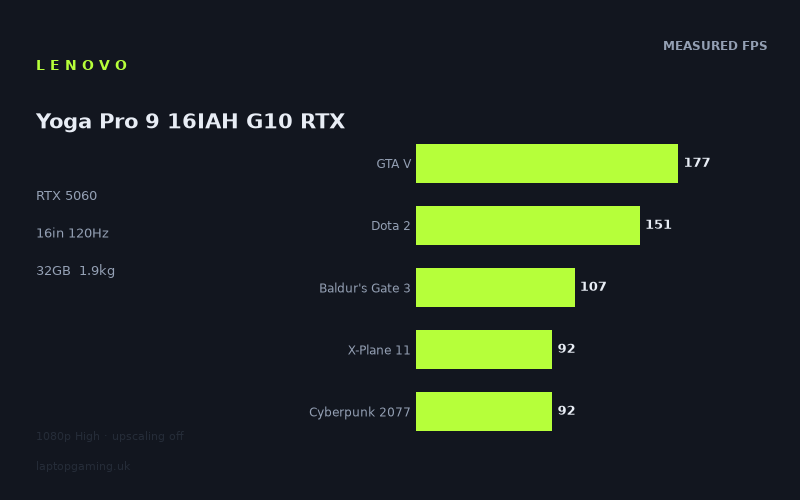
Frame rates
1920×1080, High preset, upscaling off. Averages 123fps across the 5 core benchmark games.
Measured on this machine. Source: Notebookcheck, 2025-07-22.
Not scored: no confirmed UK price
We have the full benchmark suite for this machine, so it ranks on the frame rate leaderboard like any other. What we don't have is a UK listing for this exact configuration - it's sold as a European review unit, or only in specifications that differ from the one tested. Since 30% of our score is value for money, scoring it would mean pretending price is no object, which would flatter it against every laptop you can actually buy. The frame rates below are real and comparable; there is just no buying recommendation to make yet.
How these numbers were produced
Frame rates here are not measured by us, and we label how each one was arrived at. A figure marked measured comes from a published run on that exact machine. A figure marked representative is derived from the GPU and its power limit (TGP) and cross-referenced against published reviews - a sound estimate of what that configuration delivers, but not a measurement of that specific laptop. Unless stated otherwise, numbers are 1920x1080, High preset, upscaling off. Where a laptop ships in several power configurations we use the wattage of the exact SKU listed, because a 140W RTX 5070 and a 115W one are not the same product.
In use
The short version
The Lenovo Yoga Pro 9 16IAH G10 is a 16-inch creative laptop that happens to have an RTX 5060 in it, and the interesting thing about it is that the benchmark data doesn't show it behaving like a compromised one. Across the ten games in the measured set it lands within a couple of frames per second of dedicated gaming machines carrying the same GPU class and, in two cases, of machines carrying a rank higher. That is not what you expect from a 1.929kg chassis with an OLED panel and a workstation-adjacent brief.
The headline figures, all at 1920x1080 on the High preset with upscaling switched off, run from 253fps in Strange Brigade down to 46fps in Assassin's Creed Shadows, with a mean of 124fps across the five games we use for scoring. That spread — better than five to one between the lightest and heaviest title — is the single most useful thing in the dataset, and most of this review is about what causes it and what it means for the games you actually play.
Who should be looking at this machine: someone who wants one laptop for colour-critical work, code, video editing or general professional use, who also plays games in the evening and would rather not own two computers. The 32GB of memory and 1024GB SSD are generous for that dual role. The 2880x1800 OLED is a genuinely good display for the work half of the equation. The RTX 5060 with 8GB of VRAM is a perfectly capable 1080p gaming GPU and a stretched one at anything above that.
Who should not: anyone whose primary use is gaming and who cares about frames per pound. The panel runs at 120Hz, which is low by 2025 gaming-laptop standards, and you are paying — in a way we can't quantify here — for OLED colour accuracy, a slim chassis and a premium build that contribute nothing to frame rates.
One piece of housekeeping. We have no confirmed UK price for this exact configuration, so this machine carries no score. Value is 30% of our scoring formula and there is no honest way to compute it from a price we don't have. Nothing is wrong with the machine and nothing is missing from the benchmark data — the suite is complete, it ranks normally on our frame rate leaderboard, and everything below is based on the same measurements we'd use to score it. We simply won't publish a number built on a guess, and we won't speculate about what it costs.
Performance
All frame rate figures quoted here were measured by Notebookcheck on 22 July 2025 at 1920x1080, High preset, with upscaling disabled. We didn't run them; we analyse them. The no-upscaling condition matters more than people realise — DLSS is available on this GPU and most buyers will use it, so treat these as the floor rather than the ceiling of what you'll see day to day.
The power limit question
The most important number for any laptop RTX 5060 is the graphics power limit, and it is the one number we don't have confirmed for this machine. Three of the five closest rivals in our database run their GPUs at 115W and we know it. For the Yoga Pro 9 we don't, and in a 1.929kg chassis built primarily around thermals for professional workloads rather than sustained gaming loads, the reasonable prior would be that it runs lower.
The benchmark data pushes back on that prior fairly hard. Against the Lenovo Legion 5 15AHP G10 — a gaming laptop with the same GPU at a confirmed 115W — this machine averages +1fps across the ten games both have been measured on. Against the Lenovo LOQ, also RTX 5060 at 115W, it averages +8fps across ten shared games. Whatever power envelope the Yoga Pro 9 is giving its GPU, the result is not a machine that trails its gaming-branded stablemates.
There are two explanations and they are not mutually exclusive. The first is that the Yoga Pro 9's cooling is better than the chassis suggests, and Lenovo has given the GPU a genuinely competitive allocation. The second, and to my mind the more likely dominant factor, is that the mobile RTX 5060 sits fairly high on its own diminishing-returns curve well before 115W. This is a pattern that shows up repeatedly in laptop GPU data: the gap between a mid-power and a maximum-power configuration of the same chip is far smaller than the gap between adjacent chips, and at 1080p — where a decent chunk of the workload is bounded by the CPU, the engine, or the draw-call path rather than by raw shader throughput — it compresses further still.
The practical takeaway for a buyer: don't discount this machine on the assumption that a thin creative laptop must be a slow gaming laptop. On this evidence it isn't. But do hold the caveat that we cannot tell you what happens over a two-hour session, because the measured figures are benchmark runs and we have no sustained-load or thermal-throttling data for this configuration, and we're not going to invent any.
The top of the range: what 253fps is and isn't telling you
Strange Brigade at 253fps and F1 24 at 206fps are the two outliers at the top, and both should be read carefully. Strange Brigade is an exceptionally well-optimised Vulkan title that has been in benchmark suites for years precisely because it scales cleanly and puts almost no pressure on anything except the GPU's raw fill rate. It is a useful control — it tells you the graphics pipeline is working properly and nothing is being throttled into the ground — but it is not predictive of anything you'll play in 2025.
F1 24 at 206fps is more interesting, because racing games are one of the genuine use cases for high frame rates. If you play F1 competitively, input latency and frame pacing matter, and 206fps is comfortably beyond what the 120Hz panel can display. That's a scenario where you'd cap the frame rate to the refresh rate and enjoy a very clean, very consistent presentation with a lot of thermal headroom left over. Uncapped, you're just generating heat and fan noise for frames the display will never show you.
The step down to F1 25 at 153fps in the same franchise a year later is worth pausing on. That's a 53fps drop between consecutive annual releases of the same game on the same engine lineage. It's a reminder that the version of a game matters enormously to these comparisons, and that "F1 runs great" is not a durable statement. Even so, 153fps is above the panel's refresh rate with room to spare, so from a playability standpoint nothing has changed: both are effectively capped experiences on this display.
GTA V at 177fps is in the scoring suite for continuity reasons — it's been measured on virtually every gaming laptop of the last decade — but it's a 2013 game and should be read as a legacy datapoint, not a forecast. It tells you the machine handles older DirectX 11 titles without breaking a sweat, which by 2025 is table stakes for any discrete GPU.
Dota 2 at 151fps is the esports representative, and it's the number that will disappoint anyone coming from a competitive background. On a 240Hz or 300Hz gaming laptop panel, 151fps in Dota 2 would be a story about the GPU holding a title back. Here, with a 120Hz display, it's academic — you have a 31fps margin over the refresh rate, which is comfortable, and the extra frames have nowhere to go. If you're a serious MOBA or shooter player, the constraint on this machine is not the GPU, it's the panel, and we'll come to that.
The middle: where most of your library actually lives
Final Fantasy XV at 121fps, Baldur's Gate 3 at 107fps, Cyberpunk 2077 at 92fps and X-Plane 11 at 92fps form the meaningful middle of this dataset, and if you want a single mental model for what this machine does, it's this: modern single-player games at 1080p High, in the 90 to 120fps band, without upscaling. That is a genuinely good place to be. It means you have headroom to raise settings, raise resolution, or turn on ray tracing selectively and still land somewhere playable.
Baldur's Gate 3 at 107fps is a strong result for a game that is notoriously variable — Act 3 in the city is dramatically heavier than the opening areas, and benchmark runs rarely capture the worst case. Take 107fps as the good-case figure and assume the dense urban sections sit meaningfully below it. Even with a generous allowance for that, it stays well clear of anything that would feel bad in a turn-based RPG, which is about the most forgiving genre there is for frame rate.
Cyberpunk 2077 at 92fps, no upscaling, High preset, is the number I'd point to if someone asked me to justify this GPU. Cyberpunk remains the benchmark most people intuitively understand, and 92fps at native 1080p is a comfortable, high-quality experience. It also means you have real options: switch DLSS on and you're generating frames faster than the panel can display them, which gives you the budget to push ray tracing settings up and see how far you get. We have no measured ray-tracing figures for this machine so I won't put a number on where you'd land, but the shape of the trade is clear — this is a GPU with enough rasterisation headroom at 1080p that the interesting question becomes what you spend it on, not whether you have any.
Final Fantasy XV at 121fps sits almost exactly on the panel's 120Hz refresh rate, which is a neat coincidence and a useful illustration: this is roughly the boundary line for this machine at 1080p High. Games older or lighter than FFXV clear the panel; games newer or heavier don't.
X-Plane 11 and the CPU's fingerprints
X-Plane 11 at 92fps deserves separate treatment because it is not measuring the same thing as the rest of the suite. X-Plane is a simulator with a heavy, largely single-threaded main loop and an enormous draw-call burden, and it has historically been one of the most CPU-bound titles in any benchmark set. When a laptop posts a number here that's identical to its Cyberpunk figure, the two results have completely different causes: Cyberpunk 2077 is asking the GPU for everything it has, while X-Plane 11 is asking the Core Ultra 7 255H to feed the pipeline fast enough.
The consequence for buyers is straightforward and it's one of the more useful things you can extract from this data. If your library skews towards simulation, strategy, or anything with a large unit count and a heavy CPU-side simulation step — flight sims, city builders, grand strategy, factory games, large-scale RTS — then the GPU tier is not the number you should be shopping on. Those games will produce broadly similar results across every machine in this comparison set, because they're all running comparable-class mobile CPUs and none of them are being limited by their graphics chip. A machine with a faster GPU will not make X-Plane faster in any meaningful way.
Conversely, if your library is modern AAA single-player — the Cyberpunk and Assassin's Creed end of the spectrum — the GPU is doing all the work and the tier matters a great deal.
The floor: Assassin's Creed Shadows
46fps in Assassin's Creed Shadows is the single most informative number here, and it's the one I'd want a prospective buyer to sit with. It's the lowest result by a wide margin — the next-slowest titles are at 92fps, so Shadows is running at roughly half the speed of anything else in the suite. That is not a fluke or a bad run. It's what happens when a game's rendering pipeline assumes hardware ray tracing as a baseline rather than an option, layers a very expensive global illumination solution on top of an open world, and targets a console generation with more unified memory than this laptop has VRAM.
At 46fps, Shadows at 1080p High without upscaling is a compromised experience. It's not unplayable — a third-person action game at high-40s is tolerable in a way a shooter wouldn't be — but nobody buying a laptop with an RTX 5060 in it should be planning to play it that way. In practice you'd turn DLSS on, drop the global illumination setting, and land somewhere respectable. We don't have measured figures for that configuration and I'm not going to guess at them, but the mechanism is well understood and the settings sliders exist for exactly this situation.
The broader point is about trajectory. Shadows is not an anomaly, it's a preview. The class of games that treat ray-traced lighting as mandatory rather than optional is growing, and every one of them will land closer to the 46fps end of this spread than the 253fps end. If you're buying this machine as a five-year purchase and you play the biggest new releases on day one, the honest expectation is that you'll be running upscaling and medium-ish settings on those titles fairly soon. If you play a broad mix, mostly a year or two behind release, this GPU has considerably more life in it than that framing suggests.
Reading the spread
The gap between 253fps and 46fps is worth restating, because averages hide it. Five and a half times. Any single number you use to describe this machine's performance — including our own 124fps mean across the scoring suite — is a summary of a distribution that wide, and its usefulness depends entirely on whether your games sit near the middle of it.
What drives the spread, in rough order of impact:
- Ray tracing as a baseline requirement. This is the dominant factor at the bottom of the range. Games that can't be run without RT lighting cost roughly half the frame rate of games that can.
- Engine age and API. The older DirectX 11 and well-tuned Vulkan titles at the top of the list are doing far less work per frame than a modern deferred renderer with volumetrics, screen-space effects and temporal accumulation.
- Where the bottleneck sits. X-Plane 11 and, to a lesser degree, Dota 2 are limited by the CPU and the engine rather than the GPU. Those numbers move very little regardless of what graphics chip you fit.
- Memory pressure. At 1080p, 8GB is mostly enough. It stops being enough as soon as you raise resolution or texture settings, and that's a hard cliff rather than a gradual slope.
The 8GB question
This machine has 8GB of VRAM, and that is the specification I'd flag most strongly to anyone planning to keep it for a long time. At 1920x1080 with High presets — the exact condition all the measured figures were taken under — 8GB is adequate for essentially everything in the suite. The results bear that out; nothing in this dataset shows the collapse pattern you get when a game exceeds its memory budget and starts streaming from system RAM.
The problem is that 1080p is not this laptop's native resolution. The panel is 2880x1800, which is two and a half times as many pixels, and framebuffer, render-target and texture-cache pressure all scale with that. There's no measured data here for the machine running at its native resolution, so I can't tell you where it lands, and I'm not going to model it. What I can tell you with confidence is that memory capacity, not shader throughput, is the more likely first constraint at that resolution — and that this is the argument for using DLSS with an internal render resolution well below native, which both reduces the frame time and keeps the memory footprint sane.
It's also worth noting that 8GB is increasingly a hard limit for things other than games. If you're buying this as a dual-purpose creative machine and your work involves local AI models, large texture sets, or GPU-accelerated video work at high resolutions, the 32GB of system memory is generous but the 8GB of VRAM is the number that will bite you. Check the memory requirements of the specific tools you use before committing.
The mean, and what it's worth
The 124fps mean across the five scoring-suite games — GTA V, Dota 2, Baldur's Gate 3, Cyberpunk 2077 and X-Plane 11 — is the figure that positions this machine on our leaderboard, and it's a solid, unremarkable result for a laptop RTX 5060. It's inflated slightly by GTA V's age and deflated slightly by X-Plane's CPU dependence, which is roughly what a balanced suite should do.
Note that Assassin's Creed Shadows is not in the scoring suite, which is why the mean sits comfortably in triple digits despite the presence of a 46fps result in the wider dataset. Don't read the 124fps figure as a promise about new releases. Read it as a positional number for comparing machines, which is what it's for.
The screen
A 16-inch, 2880x1800, 120Hz OLED panel. For a creative laptop this is close to an ideal specification; for a gaming laptop it's an unusual one, and the tension between those two readings runs through the whole machine.
What 120Hz means against these frame rates
Six of the ten measured titles clear 120fps at 1080p High with no upscaling: Strange Brigade at 253, F1 24 at 206, GTA V at 177, F1 25 at 153, Dota 2 at 151 and Final Fantasy XV at 121. Four don't: Baldur's Gate 3 at 107, Cyberpunk 2077 at 92, X-Plane 11 at 92 and Assassin's Creed Shadows at 46.
That's a favourable split, and it means something specific: for a majority of the measured library the display, not the GPU, is the limiting factor. In those six games you're leaving frames on the table. That's not wasted money exactly — the extra headroom shows up as consistency when the scene gets busy, which is worth more than peak frame rate — but it does mean that a faster GPU would buy you nothing at all in six of ten titles as configured.
Turn it around and you get the more useful conclusion: the RTX 5060 is well matched to a 120Hz panel. This is not a machine where the graphics chip is embarrassing the display or vice versa. On a 240Hz gaming panel, the Cyberpunk and Baldur's Gate 3 numbers would look like a bottleneck; at 120Hz they look like a GPU comfortably delivering most of what the display can show. Pairing decisions like this are one of the few genuinely sensible engineering choices in laptop design, and Lenovo has got it right here — for the person this machine is aimed at.
For the person it isn't aimed at, the same fact reads as a hard ceiling. If you play competitive shooters and you want the input-latency benefit of very high refresh rates, 120Hz is not enough and no amount of GPU headroom will change that. Dota 2 at 151fps on a 120Hz panel is a machine telling you it could do more if you'd bought a different one.
Native resolution and the gap in the data
All the measured figures are at 1920x1080. The panel is 2880x1800. That's the most important caveat in this review and I want it stated plainly: we have no benchmark data for this machine running at its own native resolution, and I won't extrapolate a number.
What I can say is structural. Two and a half times the pixel count is a substantial increase in GPU load, and it hits hardest in exactly the titles that are already struggling — the modern, GPU-bound ones. Cyberpunk 2077 and Assassin's Creed Shadows would take the full hit. X-Plane 11, being CPU-limited, would take much less of one. Dota 2 and the older titles would absorb it more easily than the numbers alone suggest.
The practical answer, and it's a good one, is that DLSS exists and this display is well suited to it. Upscaling from a lower internal resolution to 2880x1800 on a high-density 16-inch panel is one of the more flattering uses of the technology — the pixel density is high enough that reconstruction artefacts are much harder to see than they are on a 1080p 15-inch screen. I'd expect most owners to run games at native panel resolution with DLSS Quality or Balanced and be very happy with the result, and that expectation is consistent with everything in the measured data. But it's an expectation, not a measurement, and I'm flagging it as such.
OLED
OLED brings per-pixel illumination, true blacks and excellent colour, and on a 16-inch 2880x1800 panel that combination is genuinely lovely for both the work and the play halves of this machine's remit. For colour-critical work it's the reason you'd buy this laptop over a cheaper IPS-panelled gaming machine. For games — particularly dark, atmospheric ones, which is a fair description of Cyberpunk 2077 and a good chunk of what people play in the evening — it's a real, visible upgrade over an LCD of similar specification.
The standard OLED caveats apply and you should factor them in honestly. Static interface elements over very long periods carry some risk of image retention, which matters more for a machine that's going to spend eight hours a day showing the same toolbars than for one that only ever runs games. OLED panels also behave differently to LCDs on battery, and power consumption is content-dependent in a way LCD isn't — a bright white document editor draws more than a dark-themed IDE. We don't have measured brightness, colour-gamut or power figures for this specific panel, so treat all of that as general OLED behaviour rather than a claim about this unit.
Build, size and portability
1.929kg for a 16-inch laptop with a discrete RTX 5060 is the number that defines this machine's identity. To put it in context: this is squarely in ultrabook-adjacent territory for a screen this size, and it is dramatically lighter than the gaming laptops it's posting comparable frame rates against. The Legion 5, the LOQ, the Omen 16 and the TUF A18 are all built to a different brief, where a couple of hundred grams either way is a rounding error against the cooling capacity it buys.
What 1.929kg means in practice is that this is a laptop you'd genuinely carry every day. Not a "portable gaming laptop" in the marketing sense, where the machine weighs 2.4kg and the manufacturer calls it slim — an actual daily-carry machine that goes in a normal bag alongside everything else. Add the power supply and you're carrying more, of course, and we don't have a confirmed weight for the charger, so factor that in when you're doing the maths on a full travel kit.
I should be clear about what I can and can't tell you here. We have not handled this machine. I have no basis for describing chassis rigidity, keyboard feel, trackpad quality, hinge behaviour, port placement or how loud the fans get, and I'm not going to make any of it up. What I have is a weight figure and a specification list, and those support conclusions about portability and pairing, not about build quality. If keyboard feel is a deciding factor for you — and for a machine you'd use for work every day it reasonably might be — you need to try one.
The battery
The battery is 84Wh, which is a large capacity in absolute terms and near the top of what's practical in a laptop of this class. What that translates to in hours, we don't know: we have no measured runtime figures for this configuration, and battery life is far too dependent on screen brightness, workload and power profile for a capacity figure alone to predict it.
What I will say structurally is that the combination here — a large battery, an OLED panel whose power draw depends heavily on what's on screen, and an Intel Core Ultra 7 255H with integrated graphics that can handle light work without waking the discrete GPU — is the configuration that gives you the best chance of decent unplugged life in a machine with an RTX 5060 in it. That's a design intent, not a measurement.
For gaming specifically, treat battery capacity as irrelevant. No laptop with a discrete GPU of this class delivers a meaningful gaming session unplugged, and most of them heavily restrict GPU power when running on battery. Every frame rate in this review should be understood as a plugged-in figure.
What we don't have
For completeness, the gaps in our data on this machine: no dimensions beyond the 16-inch screen size, no measured thermals, no measured fan noise, no measured battery runtime, no confirmed GPU power limit, no measured display brightness or colour coverage, and no benchmark data at the panel's native resolution. Some of those matter more than others. The GPU power limit and the native-resolution data are the two I'd most like to have, because they'd let me say something firmer about sustained performance and about how the machine behaves when used as designed rather than at the standardised benchmark resolution.
How it compares
Five machines in our database sit closest to this one on measured performance. Comparisons are made only on games both machines have been measured on, which is why the shared-game counts differ, and the averages below are averages of per-game differences across those shared titles.
Lenovo Legion 5 15AHP G10 — RTX 5060 at 115W
This machine averages +1fps against the Legion 5 across ten shared games. That is a statistical dead heat and should be read as one — a one-frame average across ten titles is well inside the variance you'd get from re-running the same benchmarks on the same hardware.
But a tie is the interesting result here. The Legion 5 is a gaming laptop with a confirmed 115W graphics power limit and a chassis built around cooling it. The Yoga Pro 9 is a 1.929kg creative machine. Getting the same frame rates out of the second as the first tells you either that Lenovo's thermal engineering in the Yoga chassis is better than it has any right to be, or — more likely, as discussed above — that the mobile RTX 5060 is close enough to saturated below 115W that the extra power buys very little at 1080p. Either way, the argument that you must buy the gaming-branded machine to get gaming-grade frame rates doesn't survive contact with this data.
Choosing between them, then, comes down to everything other than performance: panel, weight, keyboard, port selection, and price. The Legion 5 has a 15-inch chassis against this machine's 16, and neither has a confirmed UK price in our database, so the comparison stops short of a value judgement.
Asus ProArt P16 — RTX 5070
This machine averages -1fps against the ProArt P16 across ten shared games, and the ProArt has an RTX 5070. A one-frame deficit to a machine with a GPU one tier higher is a remarkable result and needs explaining rather than celebrating.
The explanation is the one running through this whole dataset: at 1920x1080, a substantial portion of the measured suite isn't GPU-bound. X-Plane 11 is CPU-limited. Dota 2 and the older titles are effectively limited by the engine and the CPU rather than shader throughput. Strange Brigade, F1 24 and GTA V are running at frame rates where the differences between GPU tiers compress. Only Cyberpunk 2077 and Assassin's Creed Shadows are asking hard questions of the graphics chip, and averaging across ten games dilutes the answer to those two questions down to near nothing.
This matters enormously for how you read the comparison. At 1080p, the RTX 5070's advantage over the 5060 is largely invisible. At the panel's native 2880x1800, or with ray tracing on, or in the memory-hungry titles where the 5070's larger frame buffer would come into play, it would not be. The ProArt is also a creative-first 16-inch machine, so it's a direct competitor in intent as well as specification, and if you're planning to run games at native resolution on a high-density panel it's the more future-proof of the two. Neither has a confirmed UK price in our database.
HP Omen 16-ap0091ng — RTX 5060
This machine averages -2fps against the Omen 16 across eight shared games, with the same GPU. Two frames on an eight-game sample is noise, and the smaller shared-game count makes it noisier still — one outlier title has more influence on an eight-game average than on a ten-game one.
The honest reading is that these two machines perform identically and the choice is about everything else. The Omen 16 is a conventional gaming laptop, which means you're likely trading OLED colour accuracy and 1.929kg for cooling capacity, a higher-refresh panel and probably a lower price — though again, without a confirmed UK figure for the Omen in our database, the price half of that trade is an assumption rather than a fact.
ASUS TUF Gaming A18 — RTX 5070 at 115W, £1,489
This machine averages -2fps against the TUF A18 across nine shared games. The TUF has an RTX 5070 at a confirmed 115W and, uniquely in this comparison set, a confirmed UK price of £1,489.
That price makes the A18 the only genuine anchor in the group, and it's a useful one. For £1,489 you get a higher GPU tier at full power in an 18-inch chassis, and the measured result is that it beats the Yoga Pro 9 by an average of two frames per second across nine shared games. Two frames. For a full tier of GPU and 115W of graphics power.
This is the clearest possible demonstration that at 1080p, GPU tier is not the variable that determines your experience — the panel, the chassis and the intended use are. The A18 is an 18-inch desktop-replacement gaming laptop. It is not going in your bag. The Yoga Pro 9 is roughly the same speed at these settings, in a package under 2kg with an OLED display. Those are different products for different people, and the frame rate data barely distinguishes them.
Where the A18 pulls decisively ahead is anywhere the 5070's extra capability actually gets used: higher resolutions, ray-traced workloads, sustained sessions where the larger chassis and 115W limit matter. Where the Yoga Pro 9 wins is every scenario involving carrying it, looking at it for eight hours, or using it for colour work.
Lenovo LOQ — RTX 5060 at 115W
This machine averages +8fps against the LOQ across ten shared games, and this is the only comparison in the set where the gap is large enough to be meaningful rather than statistical noise.
Eight frames across ten titles with the same GPU class is a real difference, and given that the LOQ runs its 5060 at a confirmed 115W, it's not a power-limit story. The most probable explanation is the CPU: the LOQ is Lenovo's budget gaming line and its component choices reflect that, whereas the Core Ultra 7 255H in the Yoga Pro 9 is a considerably more capable part. In a suite containing X-Plane 11, Dota 2 and GTA V — all titles where CPU throughput has a visible effect — a stronger processor moves the average in exactly this way.
The LOQ is the value play in this group and it has no confirmed UK price in our database, so I can't tell you how much you'd save. What I can tell you is that you'd give up eight frames per second on average, an OLED panel, a good chunk of the memory and storage allocation, and around half a kilogram of the weight advantage, in exchange for it.
Reading the comparison set as a whole
Step back and the pattern is unmistakable. Against a 5060 gaming laptop at 115W: +1fps. Against a 5070 creative laptop: -1fps. Against another 5060 gaming laptop: -2fps. Against a 5070 at 115W in an 18-inch chassis: -2fps. Four of the five closest rivals are within two frames per second of this machine, and two of them have a higher-tier GPU.
Two conclusions follow. First, at 1920x1080 with these settings, this entire class of machine performs the same, and choosing between them on frame rate data alone is close to meaningless. The differences you can actually feel are in the panel, the weight, the cooling behaviour, the keyboard and the price. Second, the frame rate leaderboard is doing its job precisely by showing you this: it separates classes cleanly and, within a class, tells you honestly that the differences are small.
The methodological caveat is worth stating. These comparisons run over different shared-game sets — ten games in three cases, nine in one, eight in another — and a difference of a frame or two is well within the range that different game selections, driver versions and benchmark runs will produce. Treat +1, -1 and -2 as "the same". Treat +8 as "genuinely faster".
Who it's for
The Yoga Pro 9 16IAH G10 is for someone who needs one machine to do two jobs and refuses to compromise on the first one. The specification reads as a professional laptop throughout — 16-inch 2880x1800 OLED, 32GB of memory, a 1024GB SSD, a capable Core Ultra 7 255H, an 84Wh battery, 1.929kg — with a gaming-capable GPU dropped into it. That's the right order of priorities for a specific and fairly large group of people.
Concretely, buy this if you're a designer, developer, editor, photographer or student who does colour-sensitive or screen-intensive work all day, carries the machine between locations, and plays games in the evening. The measured data says you'll play them well: mid-90s to low-120s frame rates in modern single-player titles at 1080p High without upscaling, and considerably more headroom than that once you turn DLSS on. The 120Hz panel is well matched to what the GPU delivers, and the OLED will make the games you play look better than an equivalently-specified gaming laptop's LCD would.
Buy it also if portability is a genuine constraint rather than a preference. At 1.929kg with a 16-inch screen, this is one of the few machines that gives you a large, high-quality display and a discrete gaming GPU without asking you to carry 2.5kg. The comparison data shows it giving up essentially nothing in frame rate to substantially larger and heavier gaming laptops.
Who should buy something else
Competitive players. If your hours go into shooters, MOBAs or fighting games where refresh rate and input latency are the point, the 120Hz panel is a hard ceiling and this is the wrong machine. Dota 2 measured at 151fps here — the GPU is ready to feed a much faster display than the one fitted. Buy a gaming laptop with a high-refresh panel and spend the OLED money on that instead.
Anyone shopping purely on frames per pound. Every premium element of this machine — the OLED, the sub-2kg chassis, the high resolution, the memory and storage allocation — costs money and delivers no frames. The Lenovo LOQ in this comparison gives up eight frames per second on average and is positioned as a budget machine; the ASUS TUF A18 at £1,489 is two frames per second faster with a higher-tier GPU. If gaming is the whole use case, machines built for gaming will serve you better per pound spent.
Anyone planning to run new AAA releases at native resolution for the next five years. The 8GB of VRAM is the limiting specification, and 2880x1800 is a demanding target for it. Assassin's Creed Shadows at 46fps at 1080p is the warning shot — that's what a mandatory-ray-tracing pipeline costs on this GPU, and there will be more games like it. You can absolutely play those games on this machine with upscaling and adjusted settings, and most people will be perfectly happy doing so. But if "native resolution, high settings, day one" is your standard, this GPU tier won't hold it.
Simulation and strategy players expecting a GPU upgrade to help. X-Plane 11 at 92fps is a CPU-bound result. If your library is flight sims, large-scale strategy or heavily-simulated games, the graphics tier is not what's determining your frame rate and you should be shopping on processor performance and memory instead. That said, the Core Ultra 7 255H is a reasonable choice for exactly that workload, so this machine isn't a bad option for the category — just don't expect the RTX 5060 to be the reason.
Anyone who needs to know the total cost before deciding. We don't have a confirmed UK price for this configuration, so we can't tell you where it sits against the £1,489 the TUF A18 commands, and we won't guess. Get a firm quote for the exact specification described here — Core Ultra 7 255H, RTX 5060, 32GB, 1024GB, 2880x1800 OLED — before you compare it to anything, because the sub-configurations of laptops like this vary enormously and the wrong one changes the calculation completely.
The bottom line
What the benchmark data actually establishes is this: Lenovo has built a 1.929kg creative laptop that games as fast as the gaming laptops it competes with. That's the achievement, and it's a real one. The RTX 5060 delivers a 124fps mean across our scoring suite, clears the panel's 120Hz refresh in six of ten measured titles, and sits within two frames per second of four of its five closest rivals — two of which carry a higher-tier GPU. The GPU and the display are properly matched to each other, which is more than you can say for a lot of laptops.
The limits are equally clear and equally worth taking seriously. Eight gigabytes of VRAM against a 2880x1800 panel. A 120Hz ceiling that a competitive player will resent. And Assassin's Creed Shadows at 46fps, telling you exactly where the modern-engine wall sits. None of those are defects. They're the boundaries of what this class of hardware does, and this machine sits comfortably inside them for the person it's designed for.