Review
Acer Nitro 16 review
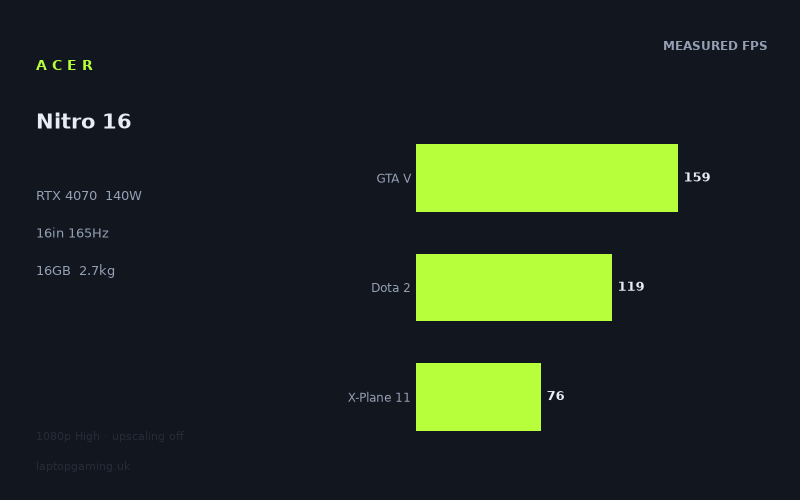
Frame rates
1920×1080, High preset, upscaling off.
Measured on this machine. Source: Notebookcheck, 2023-06-18.
Not scored: incomplete benchmark suite
Every scored laptop on this site is averaged over the same 5 games, and this one is short of Cyberpunk 2077, Baldur's Gate 3. A mean over 3 games is not comparable to a mean over 5, so we publish the figures we have and leave the score blank rather than rank it against machines tested on a different set. The numbers below are real - the suite is just incomplete.
How these numbers were produced
Frame rates here are not measured by us, and we label how each one was arrived at. A figure marked measured comes from a published run on that exact machine. A figure marked representative is derived from the GPU and its power limit (TGP) and cross-referenced against published reviews - a sound estimate of what that configuration delivers, but not a measurement of that specific laptop. Unless stated otherwise, numbers are 1920x1080, High preset, upscaling off. Where a laptop ships in several power configurations we use the wattage of the exact SKU listed, because a 140W RTX 5070 and a 115W one are not the same product.
In use
The short version
The Acer Nitro 16 (AN16-41) is a machine with one genuinely impressive specification and one that quietly caps everything it does. The impressive one is the graphics card: an RTX 4070 configured at a 140W power limit, which is the top of the range that part is offered in. Nothing is being held back on the graphics side. The cap is the processor — a Ryzen 7 7735HS, a competent mainstream mobile chip but not one of the desktop-derived HX-class parts that appear in more expensive gaming laptops — and Notebookcheck's measurements show its fingerprints all over the results.
Those measurements, taken at 1920x1080 on High presets with upscaling switched off, run from 221fps in Strange Brigade down to 76fps in X-Plane 11. That is a wide spread, and the shape of it is more informative than any single number in it. The graphically demanding titles land where a well-fed 4070 should land. The titles that lean on the processor land lower than a well-fed 4070 ought to allow. Both of those facts matter, and which one matters more to you depends entirely on what you play.
The rest of the specification is conventional for a mainstream 16in gaming laptop of its era: 16GB of memory, a 1TB SSD, a 16in 2560x1600 IPS panel at 165Hz, 2.7kg and a 90Wh battery. The storage is the right size, the memory is now the floor rather than a comfortable allocation, and the panel is a more interesting proposition than it first appears — because every frame rate below was measured at 1080p, and the screen is a good deal denser than that.
Buy it if you want a fully-supplied 4070 in a mainstream chassis and your games are graphically demanding rather than simulation-heavy. Buy something else if you play flight simulators, grand strategy, large-scale city builders, MMOs in crowded areas, or anything else where the frame rate is decided by what the game is calculating rather than what it is drawing. The measured data is unusually clear on where this machine's ceiling sits, and it is not in the graphics card.
One point of housekeeping before the analysis. This machine carries no overall score, and the reason is procedural rather than a criticism. Every scored laptop on this site is averaged across the same five games, and for this one we have figures for only three of them — there are no numbers for Cyberpunk 2077 or Baldur's Gate 3. A partial set cannot be ranked honestly against a complete one, so it is not ranked. The three games we do hold average 118fps, and that figure appears below where it is useful, but it is not the same measurement as the five-game average and should not be read as if it were. We also have no confirmed UK price for this configuration, so we are not going to state one or speculate about one.
Performance
What 140W actually means
The power limit is the most consistently underrated number in laptop graphics, and it is the specification manufacturers are least keen to advertise. A mobile GPU is not a fixed product with fixed performance. The same silicon is sold to laptop builders across a broad range of sustained power budgets, and the difference between the bottom and the top of that range is not a rounding error — it is routinely the difference between two machines that share a model name and do not share a performance class.
140W is the maximum configuration for a mobile RTX 4070. There is no higher-power version of this part to buy. Whatever the chip is capable of sustaining, this machine is set up to let it sustain. That is worth stating plainly because a great many laptops carrying the same GPU name are configured well below this, and a buyer comparing model names alone would never know.
The practical consequence is that in any game where the graphics card is the limiting factor, this machine should be at or near the front of the 4070 field. Nothing is being throttled by design. Where it falls behind other 4070 machines — and the comparison section below shows it does, slightly — the explanation cannot be the GPU allocation, because there is nothing left to allocate. It has to be somewhere else in the platform.
There is a second consequence that the benchmark data cannot show us. A 140W graphics card in a 2.7kg 16in chassis is a substantial thermal load, and sustaining it requires a cooling system with real capacity, which in turn generally means fans working hard under load. We have no measured noise or temperature figures for this machine, so we are not going to characterise how loud it gets or how warm it runs. What we can say is that the power budget makes a quiet machine under sustained load unlikely, and anyone who intends to game in a shared room should treat that as a question to ask rather than an assumption to make.
The top of the ladder: 221fps, 213fps, 205fps
Three titles clear the 200-frame mark, and it is worth being clear about what each of them is telling you, because their diagnostic value is not the same.
Strange Brigade at 221fps is the highest figure in the set and the least predictive of anything you will actually experience. It is an older title built around a low-level graphics API, exceptionally well tuned, and it flatters every graphics card put in front of it. Its function in a suite like this is confirmatory: a high number says the GPU is being fed properly and nothing in the system is choking the pipeline. 221fps confirms exactly that, and it corroborates the 140W figure above. Beyond that it will not tell you much about your evening.
The Witcher 3 at 213fps is more interesting. This is a large, dense open-world game with a mature engine, and 213fps at 1080p High with no upscaling is a genuinely strong result — well clear of the panel's 165Hz refresh rate, with enough margin that raising settings or resolution still leaves plenty in hand. It is also a game a great many people still have installed, which makes it more representative than Strange Brigade.
F1 22 at 205fps is the most directly useful number at the top of the ladder for a specific audience. Racing games benefit from high frame rates more immediately than almost any other genre because the input loop is continuous and the feedback is constant. 205fps means this machine runs a modern racing title past the point where additional frames improve anything at 1080p, and comfortably past the panel's refresh ceiling. If sim racing is a significant part of what you play, this figure plus the 165Hz panel is a strong combination.
The upper middle: 162fps and 159fps
Dead Island 2 at 162fps and GTA V at 159fps sit just under the panel's refresh rate, and both are comfortable results.
Dead Island 2 is a modern action game with a heavier renderer than the three titles above it, and 162fps means the 4070 is doing real work at a high pace. This is roughly what a fully-supplied card of this class ought to produce in a well-made contemporary title at 1080p.
GTA V at 159fps is one of the two numbers in this set that tell you about the processor rather than the graphics card. The game is old, its engine leans heavily on single-thread performance, and past a fairly modest graphics threshold the frame rate is decided almost entirely by how fast the CPU can push through its main loop. 159fps is a respectable figure for the Ryzen 7 7735HS. It is not an exceptional one — machines built around desktop-derived processors post considerably higher numbers in this title — but nobody is going to notice a shortfall playing at 159fps on a 165Hz panel.
Dota 2 at 119fps, and why the ordering matters
This is the number that starts to define the machine's character, and the way to read it is by comparison with the one above it.
On most gaming laptops, Dota 2 is faster than GTA V. Its renderer is trivial at 1080p High, and it is the sort of title where a strong processor produces very large numbers indeed. Here it lands 40 frames behind GTA V. Both games are processor-limited rather than graphics-limited, but they load the processor differently: Dota 2 leans on draw call throughput and simulation work across the map, GTA V on raw single-thread speed through a narrower path. When a machine posts a Dota 2 figure well below its GTA V figure, the usual explanation is a processor that runs short of headroom in the more demanding of the two workloads.
That fits the Ryzen 7 7735HS. It is a solid eight-core mainstream mobile part, but it is a mainstream part — not one of the HX-class chips built from desktop silicon that go into larger and more expensive gaming laptops, and not one of the newest architectures either. 119fps in Dota 2 is a perfectly playable frame rate and nobody is going to have a bad time at it. As a hardware measurement, though, it is modest, and it is the first clear signal that the graphics card in this machine is ahead of the processor behind it.
X-Plane 11 at 76fps — the clearest limit in the whole set
This is the single most informative number on the page for anyone whose games are simulation-heavy, and it is the lowest figure in the entire measured set.
X-Plane 11 is close to a pure single-thread processor benchmark wearing a flight simulator's clothes. Past a modest graphics threshold the card stops being the deciding factor and processor throughput takes over completely. A machine that produces 221fps in Strange Brigade and 76fps in X-Plane 11 is making an unambiguous statement about where its balance sits: the graphics card is comfortably ahead of the processor, and in the workloads that depend on the processor there is nothing the graphics card can do to help.
Is 76fps a bad frame rate? In absolute terms, no. Flight simulation is a genre where enthusiasts routinely fly happily at well under that, and where scenery density and system depth matter far more than raw speed. But it establishes a ceiling, and it is a ceiling of a particularly frustrating kind: you cannot raise it by lowering settings. Turning the graphics down in a processor-limited game buys you very little, because the graphics were never what was holding you back. If you fly, or play grand strategy, or build large cities, or run simulation-heavy games where the frame rate collapses in busy scenes because of what the game is thinking rather than what it is drawing, this is the number to plan your purchase around — not the 221fps at the top.
It is also worth noting that 76fps in X-Plane 11 is the lowest number in the set despite X-Plane being nowhere near the most graphically demanding title measured. The Last of Us, which follows, is a vastly heavier graphical load and still finishes ahead of it. That inversion is the whole argument in one line.
The genuine graphics tests: 116fps, 109fps, 95fps, 78fps
Four results in the lower half of the ladder are real tests of the 4070 at 140W, and together they define what this machine is actually for.
Far Cry 5 at 116fps is an older open-world title with a well-understood engine, running comfortably in triple figures. It is a reference point rather than a challenge.
Final Fantasy XV at 109fps is a heavier graphical load with dense post-processing and effects work, and one that has historically punished mid-range cards. Triple figures here means the card is working properly and is not running short of power.
Atomic Heart at 95fps is a modern, visually rich title with an aggressive art direction and a demanding renderer. 95fps at 1080p High with upscaling off is a strong result and leaves genuine headroom — enough to raise settings, or to move up towards the panel's native resolution and still hold a playable frame rate.
The Last of Us at 78fps is the hardest graphical test in the set and the number most worth taking seriously. This is a demanding port with high texture and streaming requirements, and it is also a title that asks a lot of the processor and of system memory. 78fps at 1080p High is a solid result for a 4070 and would be a comfortable playing experience, but it is also the point at which the machine's 16GB of memory becomes a fair question rather than an academic one. We have no measurement isolating memory as a factor here, so this stays a caveat rather than a conclusion — but The Last of Us is exactly the kind of title where the difference between 16GB and more shows up first.
Reading the spread as a whole
The gap between the top and the bottom of this set is 145 frames, from 221fps down to 76fps. That is a very wide spread, and understanding where it comes from is more useful than memorising either end of it.
Roughly speaking, the set divides into three groups. At the top, three older and exceptionally well-tuned titles where the graphics card is barely stretched and the numbers are more diagnostic than practical. In the middle, a band of modern games where the 4070 at full power is doing what a 4070 at full power should do, all comfortably playable and most of them in triple figures. And at the bottom, two processor-limited titles — Dota 2 and X-Plane 11 — that fall further than the graphics results would predict, plus The Last of Us, which is heavy for genuinely graphical reasons.
The important observation is that the lowest two graphics-limited results and the lowest two processor-limited results have completely different implications for a buyer. If The Last of Us at 78fps is too slow for you, you can turn settings down, enable upscaling, and reclaim a lot of it. If X-Plane 11 at 76fps is too slow for you, you largely cannot. One is a knob you can turn and the other is a property of the machine.
The three-game average, and what it is not
The three scoring-suite games we hold — GTA V at 159fps, Dota 2 at 119fps and X-Plane 11 at 76fps — average 118fps. That is a useful shorthand, but it needs a caveat that goes beyond the usual one about averages.
All three of those titles are, to varying degrees, processor-limited at 1080p. None of them is a hard graphics test. So the 118fps figure is not a summary of this machine's graphics performance at all — it is very close to a summary of its processor performance, and the graphics card's full-power configuration barely registers in it. The complete five-game suite includes Cyberpunk 2077 and Baldur's Gate 3, both of which put considerably more weight on the graphics card, and their absence is not neutral for this particular machine. It removes precisely the games where a 140W 4070 would look best.
That is the honest position: we do not have the full set, we are not going to rank a partial set against complete ones, and the partial set we do have happens to be unflattering to this machine's main strength. Read the individual graphics results above alongside it.
The screen
The panel is a 16in IPS running 2560x1600 at 165Hz, and it deserves more thought than the spec line suggests, because there is a mismatch between it and the data we have.
Every frame rate quoted above was measured at 1920x1080. The panel is 2560x1600. That is 4,096,000 pixels against 2,073,600 — almost exactly double the pixel count. Running at the display's native resolution therefore asks roughly twice as much of the graphics card in any workload where the graphics card is the limiting factor. We have no measurements at native resolution, so no specific native-resolution frame rate appears anywhere in this review, and you should be sceptical of anyone who quotes one without a source.
What the arithmetic does allow is a sense of shape. In the processor-limited titles — Dota 2, X-Plane 11, GTA V — raising the resolution costs comparatively little, because the bottleneck is not the pixel count. In the graphics-limited titles — Atomic Heart, The Last of Us, Final Fantasy XV — it costs a great deal. That is an awkward pattern, because it means the games with the most headroom at 1080p are the ones that need it least, and the games that would benefit most from a higher-resolution presentation are the ones least able to afford it.
The practical answer is upscaling, which the 4070 supports and which exists precisely for this situation: render at a lower internal resolution, present at 2560x1600, and recover most of the sharpness the panel offers without paying the full pixel cost. Every number in this review was measured with upscaling off, which is the right way to benchmark and not necessarily the right way to play. Anyone buying this machine for its screen should expect to use upscaling in demanding titles and should not treat that as a compromise — it is how a 2560x1600 panel on a mainstream graphics card is meant to be driven.
165Hz, and which games actually reach it
A high refresh rate is only worth what your frame rate can feed it. Against the 165Hz ceiling, the measured 1080p figures sort cleanly:
- Comfortably clear of 165Hz: Strange Brigade at 221fps, The Witcher 3 at 213fps, F1 22 at 205fps. These titles will keep the panel saturated and then some.
- Close to it: Dead Island 2 at 162fps and GTA V at 159fps — near enough that the panel is being used well.
- Well below it: Dota 2 at 119fps, Far Cry 5 at 116fps, Final Fantasy XV at 109fps, Atomic Heart at 95fps, The Last of Us at 78fps, X-Plane 11 at 76fps.
That is not a criticism — it is the normal state of affairs on any gaming laptop with a fast panel, and a high refresh rate still helps below its ceiling by reducing the latency between a frame being ready and it being shown. But it does mean the 165Hz specification is doing most of its work in older and lighter titles, and almost none of it in the modern graphically demanding ones. If your reason for wanting a fast panel is competitive shooters, this machine will serve you well. If it is because you assumed modern single-player games would run at 165fps, the data says otherwise, and that would be true of most machines in this class.
The panel type is IPS, which in this price bracket means good viewing angles and generally accurate colour, without the per-pixel contrast an OLED offers. We have no measured brightness, contrast or colour coverage figures for this specific panel, so this review will not characterise its image quality beyond the specification. IPS at 2560x1600 and 165Hz is a sensible, unglamorous choice and the resolution is the more consequential half of it.
Build, size and portability
At 2.7kg with a 16in display, this is a machine that moves rather than travels. The distinction matters more than the number.
A 2.7kg laptop goes from your desk to a friend's house, from home to a LAN event, from one room to another, and back into a bag at the end of a university term. It does not go into a rucksack every morning without you noticing, and it is not a machine you casually work from on a train. Add the charger — and a 140W graphics card plus a mainstream processor implies a substantial power brick, though we have no figure for its weight — and the travelling mass is meaningfully higher than the laptop alone.
That is the honest framing for almost every 16in gaming laptop with a fully-configured GPU, and it is not a criticism of this one. The alternative would be a lower power limit and lower frame rates. Acer have made the conventional choice, and given that the 140W allocation is the machine's headline strength, it is the right one.
The 90Wh battery is a good size — close to the practical ceiling for a laptop intended to be carried on aircraft, where 100Wh is the usual limit. We have no measured battery life figures for this machine, so there is no runtime claim here. What can be said from first principles is what applies to every gaming laptop: a 140W graphics card cannot be powered from a battery in any meaningful way, so unplugged gaming will run at sharply reduced performance regardless of the battery's size, and the 90Wh capacity matters for browsing, video and office work rather than for gaming away from a socket.
The 16in form factor at 2560x1600 is, for what it is worth, one of the more sensible shapes in laptops. The 16:10 aspect ratio gives noticeably more vertical space than a 16:9 panel of the same diagonal, which helps in everything that is not a game — documents, code, timelines, spreadsheets. If this machine is going to do double duty as a work laptop, that is a real and daily benefit that never shows up in a frame rate chart.
Memory and storage
16GB of memory was a comfortable allocation when this machine was measured and is now the floor. It is enough for every title in the measured set, and it will remain enough for most games for some time. But it is the specification most likely to become the reason you replace the machine, particularly given the graphics card's strength: a 140W 4070 has enough graphics performance to run demanding modern titles for years, and it would be a shame to be held back by system memory instead. Anyone buying this should check whether the memory is socketed and upgradeable in the specific configuration they are looking at, because on machines of this class it sometimes is and sometimes is not, and we do not have that detail confirmed here.
1TB of storage is the right amount, and it is one of the few areas where this machine is unambiguously well specified for its class. A great many mainstream gaming laptops of this era shipped with 512GB, which in practice means constantly uninstalling things. 1TB does not eliminate that problem — modern game installs are enormous — but it moves it from a weekly annoyance to an occasional one.
How it compares
The comparison set below is drawn from the same graphics card generation, and it deliberately spreads: the two machines closest to this one, the machine it beats by the widest margin, and the machine that beats it by the widest margin. Every comparison uses only games both machines hold, preferring the scoring suite. We have no confirmed UK price for any of them, so these are performance comparisons and nothing more — no value judgement is possible without prices, and none is offered.
MSI Thin GF63 — the machine it beats by most
The GF63 carries an RTX 4050, and across three shared games this machine averages 30fps ahead of it. That is the largest positive margin in the comparison set, and it is exactly the result the specifications predict: a lower-tier graphics card, in a thinner and cheaper chassis, producing lower numbers.
What makes the margin interesting is its size relative to the other comparisons. 30fps is a clear, visible, unambiguous difference — the kind you would notice without a frame counter. And it establishes something important for reading the rest of this section: the shared-game set is capable of separating machines. When two other comparisons come out level, that is not because the benchmark cannot tell them apart. It has just demonstrated that it can.
Acer Swift X — level, and the reason is instructive
This is the comparison that needs the most explanation, because on paper it looks like bad news. The Swift X carries an RTX 4050 — two tiers below the 4070 in this machine — and across three shared games the two are level, with no measurable average difference between them.
That result is real, and it is not a measurement error. But it is not the indictment it looks like, and the explanation is the single most useful thing in this review for anyone comparing laptops by benchmark numbers.
The three shared games are processor-limited at 1080p. In titles like these, past a fairly low graphics threshold, the frame rate is decided by how fast the processor can prepare work, not by how fast the graphics card can execute it. A 4070 at 140W and a 4050 in a thin chassis both clear that threshold easily, and once they have, the extra graphics capacity has nothing to do. It sits idle while the processor sets the pace.
So what this comparison is really measuring is the two machines' processors, and on that basis a level result is unremarkable. It tells you almost nothing about how the two would compare in Atomic Heart, The Last of Us or Cyberpunk 2077 — and the 30fps margin over the GF63, which shares the same graphics card as the Swift X, shows how much the specific games in a comparison set can change the picture. Same card in both rivals; one loses by 30fps and one draws.
The lesson for a buyer is direct: a benchmark comparison is only as meaningful as the games in it, and a set weighted towards lighter or older titles will systematically understate the gap between a strong graphics card and a weak one. If your games look like Dota 2 and GTA V, the Swift X result is genuinely relevant to you. If your games look like The Last of Us, it is not.
MSI Katana A15 AI — the closest match, and a 35-watt puzzle
The Katana A15 AI carries the same RTX 4070, configured at 105W rather than 140W, and across three shared games it finishes a single frame per second ahead of this machine on average.
Taken at face value that is baffling: a 4070 given 35 watts less power should not be faster. Taken in context it is straightforward, and it is the same story as the Swift X comparison. If the shared games are not stretching the graphics card, then a 35-watt difference in graphics power budget produces no visible difference in the results, because the graphics power budget is not what is being measured. The remaining variables — processor, memory configuration, platform — decide the outcome, and a difference of one frame per second across three games is well within the range you would expect from those.
This comparison is genuinely useful in a way the raw number hides. It is direct evidence that in this particular set of games, GPU power limit is not the deciding variable. Which in turn means the 140W figure that makes this machine attractive is not being tested by the numbers we hold, and would only show up in a comparison built around graphically demanding titles. The 140W is not wasted — it is simply invisible in this data, which is a different thing entirely.
Asus ROG Strix Scar 17 — the machine that beats it by most
The Scar 17 is a large, expensive, top-of-the-range machine, and across three shared games it averages 81fps ahead of this one. That is by far the widest gap in the comparison set, in either direction.
The configuration listed for it is an RTX 4090 at 25W, which is worth pausing on, because it makes the result more informative rather than less. A flagship graphics card configured at 25W is a severely restricted card — it is not going to be winning graphics-limited comparisons against a 4070 running at 140W. Yet it is 81fps ahead across these three games.
There is only one place that gap can be coming from, and it is not the graphics card. We do not have the Scar 17's processor listed here so this review will not name it, but the arithmetic forces the conclusion: in a set of processor-limited games, the machine with the faster platform wins by a wide margin regardless of graphics configuration. Large gaming laptops of this class are typically built around desktop-derived processors with substantially higher throughput than mainstream mobile chips, and this is precisely the workload where that difference is worth the most.
The 81fps gap is therefore the strongest single piece of evidence in this review for the argument running through all of it. It is not that this machine's graphics card is inadequate — it is at maximum power and there is nothing more to give it. It is that in these particular games, the graphics card was never the question, and on the question that was actually being asked the Nitro 16 does not have a strong answer.
What the four comparisons say together
Read as a group, the spread is coherent and the message is consistent. Against a machine with a genuinely weaker graphics card in a chassis that also constrains it, this one wins by a clear 30fps. Against two machines with different graphics configurations but comparable or better processors, it draws. Against a machine with a much stronger platform and a deliberately restricted graphics card, it loses by 81fps.
Line those up and the pattern is unmistakable: these comparisons are sorted by processor, not by graphics card. That is a property of the shared games, not a property of the machines, and it is why reading a single average delta without knowing which titles produced it is a good way to buy the wrong laptop.
Who it's for
Buy this if your games are graphically demanding rather than simulation-heavy. The 140W 4070 is the real attraction here and it is a genuine one — a maximum-configuration card in a mainstream chassis, which is not something you can take for granted from the model name alone. In modern action games, shooters, racing titles and single-player blockbusters, this machine will perform at the top of its GPU class. Atomic Heart at 95fps, The Last of Us at 78fps and Final Fantasy XV at 109fps are all comfortable results with room to raise settings or lean on upscaling at the panel's native resolution.
Buy it if you want a 16in 2560x1600 screen for reasons beyond gaming. The 16:10 aspect ratio and the extra resolution make this a materially better machine for work, study and general use than a 1080p 16:9 panel would be, and the 1TB drive supports that dual role properly.
Buy it if 165Hz matters to you in older and competitive titles. Strange Brigade, The Witcher 3 and F1 22 all clear the refresh rate outright, and Dead Island 2 and GTA V come close. For that kind of library the panel and the hardware are well matched.
Do not buy it if you fly, or play grand strategy, or run heavy simulations. This is the clearest recommendation in the review and the data supports it without ambiguity. X-Plane 11 at 76fps is the lowest number in the set, below several titles with vastly heavier graphics demands, and Dota 2 landing 40 frames behind GTA V points the same way. A processor ceiling is not something you can configure around. If your most-played game is one where the frame rate falls apart in busy scenes because of simulation load, this machine's strongest specification cannot help you and you should be shopping for a faster processor instead — which in practice means a larger machine with a desktop-derived chip.
Do not buy it expecting the panel's native resolution to come free. 2560x1600 is double the pixels of the resolution every measurement here was taken at. In graphically demanding titles you will be using upscaling, and you should plan on that rather than discover it.
Be cautious if 16GB of memory has to last you a long time. The graphics card has the longevity to justify keeping this machine for years. The memory allocation may not, and The Last of Us is exactly the kind of title where that starts to show. Check whether the configuration you are looking at can be upgraded.
Do not buy it as a laptop you carry daily. 2.7kg plus a charger sized for a 140W graphics card is a machine that relocates rather than commutes. If genuine portability is a requirement, the compromise you should be making is a smaller chassis with a lower-power GPU, not this.
The bottom line
The Acer Nitro 16 is a well-judged mainstream gaming laptop with one specification that is better than its class usually manages and one that quietly limits everything else. The 140W RTX 4070 is the maximum configuration of that part and it delivers accordingly in the games that actually test it. The Ryzen 7 7735HS is competent and unremarkable, and in processor-limited titles it sets a ceiling that the graphics card cannot lift — a ceiling visible in Dota 2 at 119fps, in X-Plane 11 at 76fps, and in every one of the four rival comparisons.
That combination makes it easy to recommend to one kind of buyer and easy to warn off another. If you play modern graphically demanding games, you are getting the strongest version of this graphics card in a sensible chassis with a good screen and enough storage. If you play anything where the processor decides the outcome, you are buying a machine whose best feature is irrelevant to you, and the measured data says so plainly.
Two things we cannot tell you: what it costs in the UK, because we have no confirmed price, and how it ranks against the fully-scored field, because two of the five scoring-suite games are missing from the data. Both of those are gaps in what we know rather than judgements about the machine, and neither is going to be filled by guessing.