Details
Product prices and availability are accurate as of the date/time indicated and are subject to change. Any price and availability information displayed on Amazon.co.uk at the time of purchase will apply to the purchase of this product.Review
MSI Titan GT77 HX review
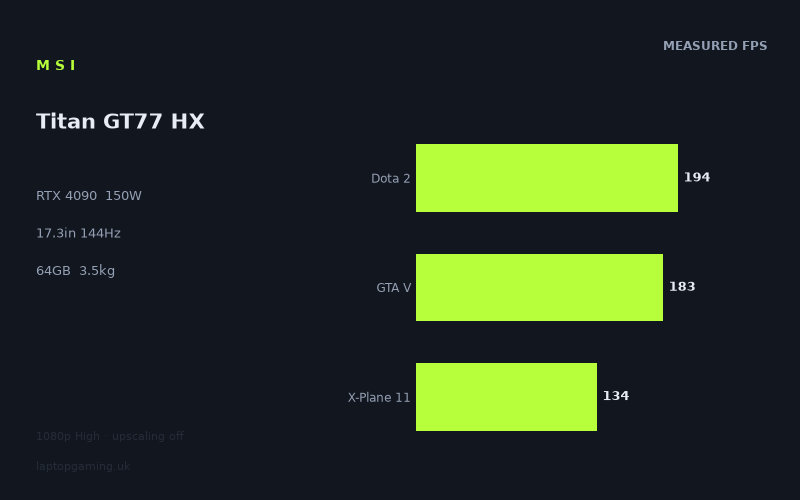
Frame rates
1920×1080, High preset, upscaling off.
Measured on this machine. Source: Notebookcheck, 2023-02-07.
Not scored: incomplete benchmark suite
Every scored laptop on this site is averaged over the same 5 games, and this one is short of Cyberpunk 2077, Baldur's Gate 3. A mean over 3 games is not comparable to a mean over 5, so we publish the figures we have and leave the score blank rather than rank it against machines tested on a different set. The numbers below are real - the suite is just incomplete.
How these numbers were produced
Frame rates here are not measured by us, and we label how each one was arrived at. A figure marked measured comes from a published run on that exact machine. A figure marked representative is derived from the GPU and its power limit (TGP) and cross-referenced against published reviews - a sound estimate of what that configuration delivers, but not a measurement of that specific laptop. Unless stated otherwise, numbers are 1920x1080, High preset, upscaling off. Where a laptop ships in several power configurations we use the wattage of the exact SKU listed, because a 140W RTX 5070 and a 115W one are not the same product.
In use
The short version
The MSI Titan GT77 HX is a specification-heavy RTX 4090 laptop built around a Core i9-13950HX, 64GB of memory, a 4TB SSD and a 17.3in 3840x2160 display with a 144Hz refresh rate. Its measured 1920x1080 High-preset results are emphatically fast, with upscaling disabled throughout, but this is not a simple case of the biggest GPU automatically making the Titan the unquestioned leader in every comparison.
Notebookcheck’s benchmark data shows the Titan delivering extremely high frame rates in many games. The Witcher 3 reaches 422fps, F1 2021 reaches 417fps, Strange Brigade reaches 391fps and Rainbow Six Extraction reaches 346fps. Even considerably heavier games remain very quick at the tested settings: F1 22 records 283fps, Ghostwire Tokyo 234fps, Tiny Tina’s Wonderlands 224fps, Shadow of the Tomb Raider 219fps and GRID Legends 210fps.
That is the appealing part of the Titan’s case. It has the kind of 1920x1080 performance that makes a 144Hz screen easy to fill in a broad spread of games, while the 64GB memory allocation and 4TB SSD remove the obvious compromise often attached to a flagship configuration. There is no indication here of a machine built around an expensive GPU and then paired with meagre memory or storage. On paper, it is configured as a genuinely high-end all-in-one system.
The important qualification is the display resolution. This Titan has a 3840x2160 panel, while every supplied game result was measured at 1920x1080 using the High preset and no upscaling. Those figures are useful, attributable and impressive, but they are not evidence that this laptop will deliver the same frame rates at its screen’s native resolution. A buyer choosing the Titan specifically for 3840x2160 gaming should treat the published data as a very strong indication of 1920x1080 ability, not as a substitute for native-resolution benchmarks.
The 150W GPU power limit also deserves attention. This is an RTX 4090 laptop GPU, but it is specified here at 150W rather than by the GPU name alone. The benchmark results show that it performs at a very high level in isolation. They do not, however, show a clear advantage over every RTX 4080 rival in the limited shared-game comparisons available. Against the MSI Raider 18 HX and Lenovo Legion Pro 7, both RTX 4080 machines, the supplied shared-game average is effectively unchanged. That is not proof that the GPUs are equivalent; it is a warning against judging laptop graphics performance from the badge alone, particularly in lighter 1920x1080 tests where CPU limits can compress the apparent gap.
This is therefore a laptop for somebody who wants maximum-class hardware, huge memory and storage capacity, and extremely high 1920x1080 frame rates from a 17.3in machine. It is not a sensible choice for somebody seeking a light travel laptop, a confirmed low-cost purchase, or a model whose native 3840x2160 gaming performance has been demonstrated by the figures supplied here. The UK price is not confirmed, so there is no honest basis for declaring it good value or poor value in pounds. What can be said is that the hardware proposition is substantial, while the evidence for native-resolution performance and value remains incomplete.
Performance
What the measured figures say
The benchmark data comes from Notebookcheck and was recorded at 1920x1080, using the High preset with upscaling off. That matters. There is no generated-frame result being presented as native performance, and there is no upscaling mode doing part of the work. The numbers are directly useful for judging how quickly the Titan can run the tested games under that specific 1920x1080 High configuration.
At the upper end of the results, the Titan is comfortably beyond the 144Hz refresh rate of its own screen. The Witcher 3 posts 422fps, F1 2021 reaches 417fps, Strange Brigade achieves 391fps and Rainbow Six Extraction delivers 346fps. These are not borderline results where a small variation would change the practical conclusion. They show that, at the benchmark settings, the Titan has ample frame-rate headroom in these titles for the panel’s refresh ceiling.
F1 22 at 283fps continues that pattern, as do Ghostwire Tokyo at 234fps, Tiny Tina’s Wonderlands at 224fps, Shadow of the Tomb Raider at 219fps and GRID Legends at 210fps. A buyer focused on competitive or fast-moving games should not overlook how useful that spread is. High averages are not confined to one favourable title. The results remain above the panel refresh rate across a varied group including racing games, shooters, action games and older benchmark staples.
The next group is still extremely strong. Dota 2 runs at 194fps, while Control and Final Fantasy XV both record 187fps. GTA V reaches 183fps, God of War achieves 180fps, Mafia Definitive Edition posts 179fps, and Dying Light 2 and Forza Horizon 5 both deliver 174fps. Far Cry 5 reaches 173fps, as does The Witcher 3 v4. Every one of these figures remains above 144fps at the measured 1920x1080 High setting.
That middle band is arguably the most useful evidence in the dataset. Very high figures from F1 2021 or Strange Brigade establish the Titan’s ceiling in games that respond well to the platform. Results around the high hundreds in games such as Control, God of War, Dying Light 2 and Forza Horizon 5 are more helpful for someone deciding whether the machine can make regular use of a 144Hz panel. On the evidence available, the answer is yes at 1920x1080 High in these titles, without needing upscaling.
Borderlands 3 reaches 162fps and Metro Exodus records 153fps. Both remain above the screen’s refresh rate in the supplied test configuration. Far Cry 6 reaches 147fps, which is also above 144Hz, though with little margin. That is still a good result, but it should not be talked about in the same terms as 422fps in The Witcher 3 or 346fps in Rainbow Six Extraction. The Titan has much less spare performance in Far Cry 6 than it does in the lighter-running results at the top of the list.
The more demanding end of the supplied results is where the limits of the setup become clearer. Cyberpunk 2077 1.6 reaches 138fps, X-Plane 11 records 134fps, Watch Dogs Legion posts 131fps and Dead Space Remake delivers 130fps. Spider-Man Miles Morales reaches 118fps. These are still strong figures for 1920x1080 High with upscaling off, but they do not meet the 144Hz refresh rate of the built-in display.
That distinction matters because it makes the Titan’s position more realistic. This is not a laptop that can be described as automatically running every listed game at the panel’s refresh rate under the stated benchmark settings. It gets there in much of the list, including several demanding games, but not all of it. Cyberpunk 2077 1.6, X-Plane 11, Watch Dogs Legion, Dead Space Remake and Spider-Man Miles Morales all fall below 144fps in Notebookcheck’s numbers.
None of those results undermine the fact that the Titan is quick. A result of 118fps in Spider-Man Miles Morales is not weak performance. But a buyer paying for a 144Hz screen should be clear about the difference between “very playable” and “consistently matching the refresh rate”. The data supports the former with confidence across the entire list. It supports the latter for many, not every, tested game at 1920x1080 High with upscaling disabled.
The benchmark spread is the story, not just the highest result
The Titan’s 422fps result in The Witcher 3 is attention-grabbing, but it is not the most representative figure in isolation. The supplied results range from 422fps down to 118fps. That is a very wide spread, and it is exactly why a gaming-laptop review should not collapse a benchmark list into a single headline number.
The top end includes The Witcher 3 at 422fps, F1 2021 at 417fps, Strange Brigade at 391fps and Rainbow Six Extraction at 346fps. These titles allow the Titan to show very high throughput at the benchmark settings. At the other end, Spider-Man Miles Morales reaches 118fps, while Dead Space Remake, Watch Dogs Legion and X-Plane 11 sit between 130fps and 134fps. Cyberpunk 2077 1.6 reaches 138fps. All are considerably more demanding in this benchmark context than the titles producing figures far beyond 144fps.
For a prospective owner, that means game choice remains important even at this level of hardware. The RTX 4090 badge and the 150W limit do not turn the performance results into a flat line. Some games run far beyond the screen refresh rate; others sit below it. The Titan has sufficient speed to make 1920x1080 High gaming excellent across the dataset, but it does not erase the underlying differences between game engines and workloads.
The distinction between The Witcher 3 and The Witcher 3 v4 illustrates this neatly. The Witcher 3 reaches 422fps, while The Witcher 3 v4 records 173fps. Both figures are fast enough to exceed 144Hz at the measured settings, but the difference is enormous. It would be misleading to use only the older result as a shorthand for what this machine delivers in every version or rendering path associated with the same game name. The supplied results themselves show why specific benchmark entries matter.
Likewise, F1 2021 reaches 417fps while F1 22 records 283fps. Both results are exceptionally high, and both exceed the panel refresh rate, but they demonstrate different levels of demand. The Titan remains fast in either case, yet the amount of unused headroom differs sharply. A buyer who wants to hold a high refresh rate while changing settings beyond the stated High preset should not assume that the largest frame-rate figures automatically apply to every game.
The same caution applies to the 194fps Dota 2 result and the 183fps GTA V figure. These are among the scoring-suite titles supplied for this machine, along with X-Plane 11 at 134fps. Their mean is 170fps. That mean offers a compact view of the available scoring-suite data, but it is only based on the listed games. It should not be treated as a complete all-game ranking result, because the scoring suite is incomplete for this laptop.
There are no supplied figures for Cyberpunk 2077 or Baldur’s Gate 3 in the scoring suite. Every scored laptop is averaged over the same five games, so this machine cannot be ranked honestly against laptops with complete five-game results. That is a limitation of the available data, not a reason to hide the Titan’s measured performance. The responsible conclusion is straightforward: the three available scoring-suite figures are useful evidence, but they are not enough to produce a directly comparable complete-suite ranking.
This is particularly important because the Titan’s listed performance is so high that it would be tempting to force it into a league-table position. It should not be. The benchmark list demonstrates excellent results, while the incomplete scoring suite prevents an apples-to-apples ranking against machines whose averages include the full set of games. The absence of a complete score is not a verdict on the Titan; it is an honest boundary on what the data can establish.
What the 150W RTX 4090 means in practice
The Titan is specified with an RTX 4090 at a 150W GPU power limit. That power figure should be part of any meaningful reading of the results. “RTX 4090” identifies the GPU class, but the 150W figure is the stated limit for this particular laptop configuration. It is the combination of that GPU, this power limit, the Core i9-13950HX and the rest of the system that produced Notebookcheck’s benchmark results.
On the supplied figures alone, the 150W configuration is clearly capable of very high 1920x1080 High-preset performance. It drives a large part of the game list beyond 144fps without upscaling. It produces 283fps in F1 22, 234fps in Ghostwire Tokyo, 219fps in Shadow of the Tomb Raider, 187fps in Control and 180fps in God of War. It also maintains 138fps in Cyberpunk 2077 1.6 and 118fps in Spider-Man Miles Morales under the same basic test conditions.
What the figures do not support is a simple claim that this 150W RTX 4090 will necessarily outpace every RTX 4080 laptop by a large margin. The supplied rival comparisons make that point unavoidably clear. The MSI Raider 18 HX, equipped with an RTX 4080 at 175W, has an average difference of +0fps for the Titan across the shared games. The Lenovo Legion Pro 7, also with an RTX 4080, likewise has a +0fps average difference across the shared games.
Those comparisons cover only the games held by both machines, and the shared set is limited. They should not be stretched into a claim of universal parity between the Titan and every RTX 4080 laptop. However, they do show that the Titan’s RTX 4090 designation is not enough to guarantee a visible lead in every 1920x1080 comparison. In the shared set, the outcome is effectively level.
The reason given in the available comparison notes is important: at 1920x1080, lighter titles in the shared set can be CPU-bound, which compresses genuine GPU gaps. In plain terms, there are situations where the GPU difference is not the sole deciding factor in the measured frame rate. When the test is limited elsewhere, the larger GPU’s potential advantage may not be expressed clearly in the final number.
That does not make the Titan’s GPU specification irrelevant. It means the benchmark setting matters. A buyer who sees a +0fps average against an RTX 4080 rival should not conclude that the RTX 4090 has no value. Equally, a buyer should not pay for an RTX 4090 on the assumption that every 1920x1080 High-preset result will show a dramatic gap. The published evidence supports a more nuanced conclusion: the Titan is extremely fast, but some shared 1920x1080 results are constrained in ways that make the GPU-class difference less visible.
The comparison with the Asus ROG Strix Scar 17 reinforces the same lesson from the opposite direction. The Scar 17 is also an RTX 4090 laptop, yet the Titan averages 29fps behind it across the shared games. The available data does not identify every reason for that gap, and it would be wrong to invent an explanation from unlisted settings or hardware details. What can be said is that an RTX 4090 label alone does not define a laptop’s final gaming result. The system implementation and the benchmark context matter.
For a buyer, the practical message is not that the Titan is underpowered. Its own results plainly contradict that. The message is that laptop GPU purchasing needs to be evidence-led. The 150W RTX 4090 delivers high results in the published list, but the limited rival data shows it does not always establish a lead over RTX 4080 alternatives and does not automatically match every other RTX 4090 system. This is exactly why attributable frame-rate data is more useful than a GPU name printed in isolation.
High refresh gaming at the tested settings
The 144Hz display creates a useful threshold for interpreting the results. At 1920x1080 High with upscaling off, the Titan exceeds 144fps in The Witcher 3, F1 2021, Strange Brigade, Rainbow Six Extraction, F1 22, Ghostwire Tokyo, Tiny Tina’s Wonderlands, Shadow of the Tomb Raider, GRID Legends, Dota 2, Control, Final Fantasy XV, GTA V, God of War, Mafia Definitive Edition, Dying Light 2, Forza Horizon 5, Far Cry 5, The Witcher 3 v4, Borderlands 3, Metro Exodus and Far Cry 6.
That is a substantial portion of the benchmark list. More importantly, it is not restricted to the oldest or simplest-looking entries. Control at 187fps, God of War at 180fps, Dying Light 2 at 174fps, Forza Horizon 5 at 174fps and Metro Exodus at 153fps show that the Titan can meet the screen refresh rate in demanding games at the supplied settings.
Far Cry 6 at 147fps is the closest listed result above the panel refresh rate. It clears the threshold, but only narrowly. The practical value of that result is still obvious: the Titan reaches the screen’s stated refresh rate at 1920x1080 High with no upscaling. Yet it is a reminder that crossing 144fps is not the same thing as having the huge reserve visible in F1 2021 or Rainbow Six Extraction.
Cyberpunk 2077 1.6 at 138fps, X-Plane 11 at 134fps, Watch Dogs Legion at 131fps, Dead Space Remake at 130fps and Spider-Man Miles Morales at 118fps sit below 144Hz. This is where a buyer needs to set expectations carefully. The Titan has enough performance for very fluid play in all of these results, but Notebookcheck’s numbers do not show a 144fps outcome in these games under the stated test conditions.
There is also no basis here for saying what happens if settings are raised, lowered, or altered in any other way. The published figures are High preset, 1920x1080 and upscaling off. That is the boundary of the evidence. It would be tempting to say that a user could recover the missing frame rate through a different configuration, but the fact sheet does not provide the necessary measurements. For a site built on attributable numbers, the better approach is to leave that claim unmade.
The Titan’s results are most compelling for the buyer who values high-refresh gaming but is prepared to match settings and resolution to the game. In lighter-running titles, it has far more performance than the 144Hz panel can display at the measured settings. In tougher games, it remains quick but can fall short of that refresh rate. This is normal variation within the published list, and it is more informative than a generic claim that the laptop is “ready for esports and AAA gaming”.
The screen
The Titan GT77 HX has a 17.3in 3840x2160 display with a 144Hz refresh rate. Those are ambitious screen specifications. The size and resolution suggest a machine intended to provide a large, detailed desktop-style view, while 144Hz gives it a high-refresh target that the benchmark data can be assessed against.
The key issue is the gap between the screen’s 3840x2160 resolution and the supplied game measurements at 1920x1080. The benchmark results are not native-panel benchmarks. They tell us exactly how the Titan performed at 1920x1080 High with upscaling off, and that is valuable information. They do not tell us the frame rates at 3840x2160.
This matters more here than it would on a laptop with a 1920x1080 display. At 1920x1080, the Titan frequently exceeds 144fps. At 3840x2160, no measured results have been supplied. It would be wrong to take 422fps in The Witcher 3, 283fps in F1 22 or 187fps in Control and present them as evidence of native-resolution performance on this particular panel.
The measured 1920x1080 results do demonstrate that the Titan has a strong foundation for gaming at that resolution. The Witcher 3, F1 2021, Strange Brigade and Rainbow Six Extraction are dramatically above 144fps. F1 22, Ghostwire Tokyo, Tiny Tina’s Wonderlands, Shadow of the Tomb Raider and GRID Legends are also well beyond the refresh rate. A long middle group continues to clear 144fps, including Dota 2, Control, GTA V, God of War, Dying Light 2, Forza Horizon 5 and Metro Exodus.
But the fact that the panel is 3840x2160 changes the buying question. The Titan is not merely a 1920x1080 high-refresh laptop with extra pixels on the specification sheet. Its display is built around a much higher native resolution, and the supplied numbers do not establish how consistently its RTX 4090 at 150W can make full use of that resolution in the listed games.
The sensible interpretation is that this screen offers two distinct attractions: a 17.3in panel with 3840x2160 resolution, and a 144Hz refresh rate. The benchmark data validates excellent 1920x1080 High-preset frame rates against the refresh-rate part of that proposition. It does not validate native 3840x2160 frame rates against the resolution part of it.
Potential buyers should therefore decide which aspect matters more. If the priority is high refresh in the measured games, the 1920x1080 results are encouraging and often outstanding. If the priority is using 3840x2160 in demanding games without reducing the target frame rate, there is insufficient data here to make a confident recommendation. The Titan may be capable in some games and less so in others, but that would be speculation without the corresponding benchmarks.
The panel type is not confirmed in the supplied specifications. There is no attributable information here about brightness, colour coverage, contrast, response behaviour, adaptive-sync support or any other display-quality measure. It would be misleading to infer those characteristics from the laptop’s name, price position or resolution. The screen can be discussed accurately as a 17.3in 3840x2160 144Hz display; beyond that, the fact sheet does not provide enough evidence.
There is a practical tension in pairing 3840x2160 with a 144Hz refresh rate. The refresh rate sets a high goal, while the resolution requires native-resolution measurements before anyone can say how often that goal is met. The Titan’s 1920x1080 results show enough speed to make the 144Hz specification meaningful in a broad range of games. They do not settle the much harder question of 3840x2160 high-refresh gaming.
That is not a criticism of the machine so much as a criticism of unsupported certainty. A proper review should separate what is known from what is attractive in theory. Known: this Titan has a 17.3in 3840x2160 144Hz screen, and Notebookcheck measured extremely high 1920x1080 High-preset results with upscaling off. Unknown from the fact sheet: its game performance at 3840x2160, and the panel characteristics beyond size, resolution and refresh rate.
Build, size and portability
The published weight is 3.468kg. That is the most useful portability figure available, and it places the Titan firmly in the category of laptop that should be chosen for its capability rather than for effortless daily carrying.
A 3.468kg machine can be moved, but it is not the same proposition as a laptop chosen to disappear into a bag and travel unnoticed. The Titan’s hardware list makes its intended role clear: RTX 4090 graphics, a Core i9-13950HX, 64GB of memory, 4TB of SSD storage and a 17.3in 3840x2160 display. This is a large-screen performance system first. Mobility is a feature in the basic sense that it remains a laptop, but the weight makes it a poor match for somebody whose priority is low carrying burden.
That does not mean it has no place away from a permanent desk. A buyer who wants a powerful machine that can be relocated between rooms, taken to a second location, or used as a transportable main system may find the trade-off entirely reasonable. The important point is to buy it with realistic expectations. The specification and the 3.468kg weight point towards a desktop-replacement style of use, not towards an ultraportable one.
The 17.3in screen also affects how the machine should be considered. A large panel is an advantage for someone who wants a more expansive view than a smaller gaming laptop provides. Combined with 3840x2160 resolution, it makes the Titan a more credible candidate for a buyer who wants one system for demanding games and general high-resolution desktop work. The memory and storage configuration support that broad “one machine” idea: 64GB and 4TB are substantial allocations rather than bare-minimum components.
However, the fact sheet does not provide physical dimensions. It would be wrong to describe the Titan as thin, thick, narrow or wide without those figures. Nor are there published facts here about chassis materials, keyboard layout, touchpad quality, ports, speakers, battery life, cooling noise or temperatures. Those are all relevant purchase considerations for a laptop of this kind, but they cannot be filled in with assumptions.
The absence of those figures is especially important for a 3.468kg gaming laptop. Buyers may reasonably care about whether it occupies a large bag, how it fits on a desk, whether its keyboard is comfortable, or how it behaves under sustained load. This review cannot answer those questions because the supplied data does not contain attributable evidence. It is better to acknowledge the gaps than to manufacture a lifestyle impression around the Titan name.
What is safe to conclude is that the Titan is not configured like a compromise machine. The 64GB memory capacity is high, the 4TB SSD capacity is high, and the 17.3in screen is large by gaming-laptop standards without needing unsupported comparison figures. The machine is designed around abundance: substantial graphics hardware, substantial memory, substantial storage and a substantial display resolution. The weight is the corresponding cost in portability.
For some buyers, that is exactly the correct balance. Someone replacing a desktop and wanting a system that can still be physically moved will likely value the Titan’s configuration more than its mass. Someone travelling frequently, commuting with their laptop every day or working in constrained spaces should be more cautious. The performance numbers are compelling, but there is no reason to pretend that 3.468kg is a minor detail. It is a fundamental part of the purchase.
How it compares
The rival data must be read with the same care as the Titan’s own results. These comparisons use only games held by both machines, with preference given to the scoring suite. The shared-game averages are useful indicators, but they are not complete cross-library verdicts. In particular, the Titan does not have a complete five-game scoring-suite result because figures for Cyberpunk 2077 and Baldur’s Gate 3 are absent. It cannot therefore be ranked honestly in the same way as laptops with complete results.
Against the Lenovo Yoga Pro 9 16IMH9 RTX
The clearest performance separation is against the Lenovo Yoga Pro 9 16IMH9 RTX, which uses an RTX 4050 at 100W. Across the shared games, the Titan averages 121fps more. That is a major gap, not a rounding difference or a result that needs elaborate interpretation.
The Titan’s RTX 4090 at 150W, Core i9-13950HX, 64GB memory and 4TB SSD configuration is plainly aimed at a different performance class from a laptop with an RTX 4050 at 100W. The shared-game average reflects that. A buyer whose priority is high frame rate in demanding games should see the Titan as the substantially stronger option between these two machines on the data available.
There is no confirmed UK price for the Lenovo Yoga Pro 9 16IMH9 RTX, and there is no confirmed UK price for the Titan either. That prevents a meaningful price-to-performance conclusion. The Titan is faster by the stated shared-game average, but it cannot be called better value in pounds without confirmed pricing for both machines.
The comparison is still useful because it establishes the lower end of the rival spread. The Titan is not merely marginally ahead of every alternative. Against this RTX 4050 system, it is decisively ahead in the available shared-game data. Buyers moving from that class of GPU towards the Titan should expect a material improvement in frame-rate capability at the benchmark settings.
Against the MSI Raider 18 HX
The MSI Raider 18 HX is a more revealing comparison because it uses an RTX 4080 at 175W and has a listed UK price of £4,730. Across the shared games, the Titan’s average difference is +0fps. In the context of a flagship RTX 4090 machine, that may initially look surprising. The correct response is not to dismiss the result, but to understand its limits.
The comparison covers only the shared games, and the shared set is limited. At 1920x1080, lighter titles in that set can be CPU-bound. Where that happens, genuine GPU differences can be compressed, leaving two very different GPU configurations returning very similar frame rates. The +0fps result therefore does not prove that a 150W RTX 4090 is identical to a 175W RTX 4080 in every game or at every resolution.
It does prove something important, though: at the shared 1920x1080 benchmark settings, the Titan does not establish a measurable average lead over this particular Raider 18 HX. A prospective buyer deciding purely from GPU naming should take notice. The RTX 4090 badge does not automatically buy a visible advantage in every real benchmark comparison.
The Raider’s £4,730 UK price gives some context that is unavailable for the Titan, because the Titan’s UK price is not confirmed. It would be wrong to announce which machine is better value without the Titan’s price. A very high price for the Titan would make the +0fps shared-game result a serious concern. A different price could change the equation. Until the Titan’s price is confirmed, the sensible conclusion is limited to performance: the shared data shows no average advantage for the Titan in this matchup.
For a buyer who primarily plays at 1920x1080 High, this comparison is a reason to shop carefully rather than assume the Titan is automatically the only sensible flagship option. For a buyer interested in the Titan’s 64GB memory, 4TB storage, 17.3in 3840x2160 display or other listed configuration details, the decision is broader than frame rate alone. But the frame-rate evidence should still carry weight, particularly when the alternative’s price is known and the Titan’s is not.
Against the Lenovo Legion Pro 7
The Lenovo Legion Pro 7 is another RTX 4080 rival with no confirmed UK price. Again, the Titan averages +0fps across the shared games. This is a repeat of the pattern seen against the Raider 18 HX: in the limited available shared set, the Titan’s RTX 4090 at 150W does not produce an average lead over the RTX 4080 competitor.
The same explanation applies. At 1920x1080, lighter titles in the shared set can become CPU-bound, compressing genuine GPU differences. A near-zero result is not an error to be explained away. It is a real benchmark outcome, and it tells the buyer that these systems can be effectively tied in some 1920x1080 shared-game conditions.
At the same time, it would be overreach to claim that the Legion Pro 7 is equal to the Titan in every game. The comparison covers only the games both hold, rather than a complete common library. The Titan’s own benchmark list includes results in many games not represented in that small shared average, including 422fps in The Witcher 3, 283fps in F1 22, 187fps in Control and 138fps in Cyberpunk 2077 1.6. Without matching Legion figures for those specific entries, no direct claim should be made.
There is also no confirmed UK price for the Legion Pro 7. This removes the other major part of a purchase decision. The two machines are tied on the supplied shared-game average, but there is no attributable price comparison. The correct advice is to compare the final configurations, display specifications, memory, storage and actual UK prices once confirmed, rather than choosing solely on the assumption that RTX 4090 must be meaningfully faster than RTX 4080 at 1920x1080.
Against the Asus ROG Strix Scar 17
The Asus ROG Strix Scar 17 is the rival that beats the Titan most clearly in the supplied upper-end comparison. It is also an RTX 4090 laptop, but the Titan averages 29fps behind across the shared games.
This result is useful precisely because it rejects simplistic assumptions. Two laptops can both carry RTX 4090 graphics and still produce different benchmark outcomes. The fact sheet does not give enough information to attribute the gap to a particular setting, power limit, cooling arrangement or any other hardware detail, so no such explanation should be invented. The evidence supports only the measured conclusion: in the shared games, the Scar 17 is ahead by the stated average.
The gap also places the Titan’s impressive standalone results in context. The Titan is very fast in Notebookcheck’s game data, including 422fps in The Witcher 3, 417fps in F1 2021 and 283fps in F1 22. Yet the rival comparison shows that “very fast” is not the same as “fastest available”. Buyers chasing the highest measurable frame rate rather than the Titan’s overall configuration should include the Scar 17 in their research.
There is no confirmed UK price for the Scar 17, just as there is no confirmed UK price for the Titan. That means the Scar’s shared-game advantage cannot be converted into a value verdict. It may be the faster machine in the limited comparison, but the price difference is unknown. A small or large price gap could change which one makes more sense for an individual buyer.
Still, performance buyers should take the result seriously. The Titan does not receive a free pass because it is an RTX 4090 system with huge memory and storage. The published shared-game average says the Scar 17 is faster in the available comparison. That does not invalidate the Titan; it simply establishes that there is a stronger RTX 4090 result among the named rivals.
What the rival spread actually tells us
Taken together, the rival comparisons are more informative than a single nearest-neighbour result. The Titan is 121fps ahead of the RTX 4050 Lenovo Yoga Pro 9 16IMH9 RTX across the shared games. It is effectively tied with the RTX 4080 MSI Raider 18 HX and RTX 4080 Lenovo Legion Pro 7 in their shared comparisons. It trails the RTX 4090 Asus ROG Strix Scar 17 by 29fps across the shared games.
That is a broad spread. It shows the Titan sitting in a genuinely high-performance class, far ahead of the RTX 4050 rival, but not holding a guaranteed lead over every RTX 4080 or RTX 4090 machine. The 1920x1080 shared-game conditions matter greatly, particularly where CPU limits compress GPU differences. The best purchase decision will therefore come from looking at the actual games played, the required display resolution, the final configuration and confirmed UK prices rather than treating the GPU name as a complete answer.
The incomplete scoring suite is another reason for caution. Because the Titan lacks scoring-suite figures for Cyberpunk 2077 and Baldur’s Gate 3, it cannot be ranked against fully scored laptops using the standard five-game average. This review should not conceal that limitation by substituting an unofficial ranking or by turning the three-game mean of 170fps into a complete score. The frame-rate evidence is substantial; the ranking evidence is incomplete.
Who it’s for
The MSI Titan GT77 HX is for the buyer who wants a large, high-specification gaming laptop and is willing to accept 3.468kg as part of the deal. Its appeal is not subtle. The RTX 4090 at 150W, Core i9-13950HX, 64GB memory, 4TB SSD and 17.3in 3840x2160 144Hz screen make it a machine for someone who wants a single system with very high gaming capability and unusually generous memory and storage.
It is especially suitable for someone whose games benefit from high frame rates at 1920x1080 High settings. The published results show a long list of games above the panel’s 144Hz refresh rate, with upscaling off. The Witcher 3 at 422fps, F1 2021 at 417fps, Strange Brigade at 391fps, Rainbow Six Extraction at 346fps and F1 22 at 283fps demonstrate exceptional performance headroom. Games such as Control, God of War, Dying Light 2, Forza Horizon 5 and Metro Exodus also clear 144fps in the supplied data.
It also suits someone who values capacity rather than merely peak frame rate. The 64GB memory allocation and 4TB SSD are meaningful parts of the configuration. A buyer who expects to install a substantial game library, work with demanding applications, or keep the laptop as a primary system for an extended period may value those specifications as much as the GPU.
The Titan also makes sense for a buyer who wants a 17.3in 3840x2160 display and understands the distinction between screen specification and benchmark resolution. The laptop has a large, high-resolution panel with a 144Hz refresh rate. Its measured 1920x1080 performance is excellent. A buyer content to assess game settings according to each title, rather than demanding a blanket claim of native 3840x2160 performance, can appreciate what the Titan offers without asking the data to say more than it does.
It is not for the buyer who needs a genuinely portable everyday machine. At 3.468kg, it is a serious piece of hardware to carry. Someone commuting frequently, travelling constantly or prioritising minimum bag weight should look elsewhere. The Titan’s strength is capability and specification depth, not effortless mobility.
It is not automatically for the buyer who wants the strongest possible gaming result regardless of every other feature. The Asus ROG Strix Scar 17 averages 29fps ahead across the shared games. There is no confirmed price for either system, so no value winner can be named, but the Scar’s benchmark advantage is relevant to anyone whose priority is the highest available shared-game result.
It is also not automatically for the buyer who assumes an RTX 4090 must be a major step ahead of RTX 4080 alternatives in every 1920x1080 game. The MSI Raider 18 HX and Lenovo Legion Pro 7 both produce a +0fps average difference for the Titan in their limited shared-game comparisons. The data notes that lighter 1920x1080 titles can be CPU-bound, compressing real GPU differences. Even so, the result should encourage careful comparison rather than automatic spending.
The Raider 18 HX deserves particular attention for price-conscious flagship shoppers because its UK price is listed at £4,730. The Titan’s UK price is not confirmed, so a direct value judgement is impossible. If the Titan is priced substantially differently, that may matter more than its GPU name where shared 1920x1080 performance is effectively tied. Final pricing should be checked before purchase rather than assumed from the product tier.
The Titan is not the right recommendation for someone who specifically requires evidence of 3840x2160 gaming performance. Its screen is 3840x2160, but the supplied benchmarks are all 1920x1080 High with upscaling off. This is a major distinction. The laptop may be attractive for high-resolution use, but no native-resolution frame-rate figures are available here. A buyer who refuses to compromise on native-panel gaming evidence should wait for attributable 3840x2160 benchmarks.
Finally, it is not for someone seeking a simple league-table answer. The scoring suite is incomplete because Cyberpunk 2077 and Baldur’s Gate 3 figures are missing. The available Dota 2, GTA V and X-Plane 11 results produce a mean of 170fps, but that is not a complete five-game score and should not be used to rank the Titan against fully scored laptops.
The strongest case for the Titan is therefore clear but specific. Choose it if you want a heavy, large-screen, exceptionally well-equipped RTX 4090 laptop with very high measured 1920x1080 High-preset performance, 64GB of memory and 4TB of storage. Be more cautious if your priorities are low weight, verified native 3840x2160 gaming frame rates, a confirmed UK price, or an unquestioned lead over every RTX 4080 and RTX 4090 rival. Notebookcheck’s numbers show a formidable machine. They also show why buying the GPU badge alone would be too simple.