Details
Product prices and availability are accurate as of the date/time indicated and are subject to change. Any price and availability information displayed on Amazon.co.uk at the time of purchase will apply to the purchase of this product.Review
Asus ROG Strix Scar 18 review
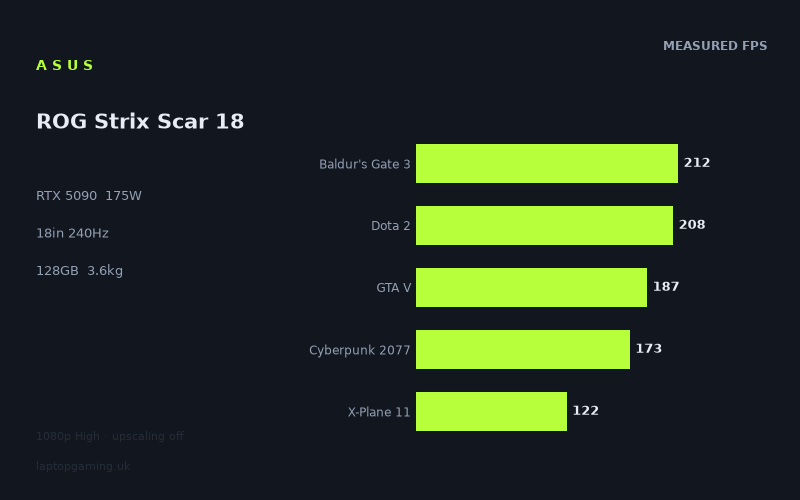
Frame rates
1920×1080, High preset, upscaling off. Averages 180fps across the 5 core benchmark games.
Measured on this machine. Source: Notebookcheck, 2026-07-24.
Not scored: no confirmed UK price
We have the full benchmark suite for this machine, so it ranks on the frame rate leaderboard like any other. What we don't have is a UK listing for this exact configuration - it's sold as a European review unit, or only in specifications that differ from the one tested. Since 30% of our score is value for money, scoring it would mean pretending price is no object, which would flatter it against every laptop you can actually buy. The frame rates below are real and comparable; there is just no buying recommendation to make yet.
How these numbers were produced
Frame rates here are not measured by us, and we label how each one was arrived at. A figure marked measured comes from a published run on that exact machine. A figure marked representative is derived from the GPU and its power limit (TGP) and cross-referenced against published reviews - a sound estimate of what that configuration delivers, but not a measurement of that specific laptop. Unless stated otherwise, numbers are 1920x1080, High preset, upscaling off. Where a laptop ships in several power configurations we use the wattage of the exact SKU listed, because a 140W RTX 5070 and a 115W one are not the same product.
In use
The short version
The Strix Scar 18 in this configuration is the top of Asus's gaming stack and it behaves like it. An RTX 5090 with 24GB of VRAM, a Core Ultra 9 290HX, 128GB of memory, an 8TB SSD and an 18in 3840x2400 Mini LED panel at 240Hz — there is no obvious corner cut anywhere in the specification, and the measured frame rates put it at or near the front of every comparison our database can make for it. Across the five games in our scoring suite it averages 180fps at 1080p on High with upscaling off, and it beats every rival we have data for except one.
That "except one" matters, and so does the shape of the wins. This machine's RTX 5090 runs at a 175W power limit, and against a Lenovo Legion Pro 7i carrying an RTX 5080 at the same 175W, the measured advantage across ten shared games is five frames per second. Five. That is the single most important number in this review, and we will come back to it repeatedly, because it reframes what you are actually buying when you buy the top GPU in the stack. You are not buying a large performance gap over the tier below. You are buying VRAM, memory capacity, storage, a bigger and better panel, and headroom for the specific workloads that need those things.
We have not published a score for this machine, and the reason is administrative rather than technical. We do not have a confirmed UK price for this exact configuration. Value is 30% of our score and cannot be computed without one, so the score is withheld until a price appears. The benchmark suite is complete, the machine ranks normally on our frame rate leaderboard, and nothing about the measurements is in doubt.
Who should be interested: someone who wants an 18in desktop replacement that will not be embarrassed by anything released in the next several years, who has a genuine use for 128GB of RAM and 8TB of local storage — large asset libraries, virtual machines, video work, machine learning experiments, flight sim add-on collections — and who accepts that the machine will live on a desk and travel occasionally rather than daily. Who should not: anyone whose use case is purely gaming, because the Legion Pro 7i comparison suggests the money is better spent elsewhere; anyone who needs to carry a laptop regularly, because 3.605kg plus an 18in footprint plus a charger for hardware of this class is a commitment; and anyone hoping the 4K-plus panel will be driven at 240Hz in modern titles, because the measured figures make clear it will not be.
Performance
Every frame rate below comes from Notebookcheck's measurements, taken at 1920x1080 on the High preset with upscaling switched off, dated 24 July 2026. That test configuration is worth holding in your head throughout, because it defines what the numbers can and cannot tell you. It is a deliberately GPU-favourable resolution for hardware this fast, which means the results say a great deal about how the machine ranks against other machines and rather less about what you will see on its own native panel.
What a 175W power limit actually means
The GPU here is an RTX 5090 configured to a 175W total graphics power. Laptop GPUs are not fixed quantities in the way desktop cards are; the same silicon can be configured across a wide power band by the manufacturer, and the difference between the low and high end of that band is substantial. A 175W configuration is a serious one — it is the same figure the Legion Pro 7i's RTX 5080 runs at, and the same figure the Schenker XMG Neo 16 E25's RTX 5090 runs at — but it is a configuration choice, not the ceiling of what the chip can do.
The practical consequence shows up in two places. First, it explains why the gap to the RTX 5080 machine is so small. When you cap a larger, wider GPU to the same power budget as a smaller one, the larger chip's advantage compresses. It still wins, because more execution units running at lower clocks is more efficient than fewer units running harder, but the win is measured in single-digit percentages rather than the generational leap the model number implies. Five frames per second across ten shared games is exactly the shape of result that a same-power, one-tier-up comparison produces.
Second, it explains the one loss in our comparison set. The Schenker XMG Neo 16 A25, also an RTX 5090, averages nine frames per second ahead of this machine across eleven shared games. We do not have a confirmed power limit for that machine in our data, and we are not going to invent one. What we can say is that when two laptops with the same GPU differ by nine frames per second across a broad suite, the usual explanations are power limit, sustained cooling behaviour, or memory configuration — and that the Neo 16 A25 is a 16in chassis beating an 18in one, which makes the cooling explanation less likely than the power one. Take it as evidence that "RTX 5090" on a spec sheet is not a performance guarantee, and that this particular 5090 is not the fastest 5090 we have data for.
None of which makes the machine slow. Set against the field as a whole, 180fps as a scoring-suite mean at 1080p High is a figure very few laptops reach. It is simply not the maximum the part is capable of, and the price — whenever it appears — will need to be judged against that.
The top of the chart: where the CPU takes over
Four games clear the panel's 240Hz refresh rate at 1080p. Strange Brigade at 494fps is the headline, followed by The Witcher 3 at 404fps, F1 24 at 372fps and F1 25 at 255fps.
These results tell you almost nothing about the GPU and a great deal about the rest of the system. Strange Brigade is a well-optimised Vulkan title with a deliberately efficient renderer; it has been used as a benchmark for years precisely because it scales cleanly and runs fast. At 494fps the GPU is spending most of its time waiting for draw calls. The Witcher 3 at 404fps is the same story from a different direction — a 2015 engine, extremely well understood, with a CPU-side workload that modern processors demolish. The Core Ultra 9 290HX is doing the heavy lifting in both.
The F1 pair is more interesting because it shows the transition happening within a single franchise. F1 24 hits 372fps; F1 25 drops to 255fps. That is a 32% fall between consecutive annual releases of the same racing game, which is not the sort of gap you get from content changes. It is a renderer change — more expensive lighting, more expensive reflections, a heavier per-frame cost — and it is a useful preview of where the whole industry's baseline is heading. If you are looking at these numbers and thinking about longevity, F1 25 is a better guide than F1 24.
Practically: these are the games where the 240Hz panel earns its keep, and where the machine has performance genuinely to spare. If your library is competitive shooters, older RPGs, racing sims and the like, you will hit the refresh ceiling and stay there, and you would hit it on considerably cheaper hardware too.
The broad middle: 160 to 220fps
The bulk of the suite sits here, and this is where the machine's real character shows. Final Fantasy XV at 214fps, Baldur's Gate 3 at 212fps, Dota 2 at 208fps, GTA V at 187fps, Kingdom Come Deliverance 2 at 178fps, Cyberpunk 2077 at 173fps and Indiana Jones and the Great Circle at 164fps.
Four of those seven are in our scoring suite, which is deliberate — the suite is weighted towards games that separate machines rather than games that pin every fast laptop against a CPU wall. Dota 2 at 208fps and GTA V at 187fps are partly CPU-limited results, but Cyberpunk 2077 at 173fps and Baldur's Gate 3 at 212fps are doing real graphical work.
Cyberpunk 2077 at 173fps deserves a moment. This is a game that has served as the industry's stress test since 2020 and still punishes hardware, and 173fps at 1080p High with no upscaling is a comfortable, high-refresh result. It also means something specific for the native panel, which we will get to: a game running at 173fps at 1920x1080 has a substantial pixel budget in hand, but 3840x2400 is roughly 4.7 times the pixel count of 1080p, and no GPU scales linearly against that.
Kingdom Come Deliverance 2 at 178fps and Indiana Jones and the Great Circle at 164fps are the two most useful data points for anyone judging how the machine handles 2024–2025 releases. Both are modern engines with modern lighting workloads, both are running without upscaling, and both are comfortably above 144fps at 1080p. That is the honest picture of this machine's competence in current games: fast, not untouchable.
The floor: where modern renderers bite
Six games land below 140fps, and the pattern is consistent. Alan Wake 2 at 133fps, Anno 117: Pax Romana at 122fps, X-Plane 11 at 122fps, 007 First Light at 112fps, Black Myth: Wukong at 107fps and Assassin's Creed Shadows at 96fps.
Assassin's Creed Shadows at 96fps is the lowest result in the suite and the most informative one. Ubisoft's current Anvil build is genuinely expensive — dense vegetation, a global illumination system that does not come cheap, and a world simulation that keeps the CPU busy at the same time. Ninety-six frames per second at 1080p High from an RTX 5090 is a statement about the game, not a criticism of the laptop. But it is also the number to hold on to when you are imagining what this machine does at native resolution, because it is the worst case in a suite of seventeen titles and the one most likely to be representative of what 2027's releases look like.
Black Myth: Wukong at 107fps is the same category of result: Unreal Engine 5 with its expensive lighting and geometry systems doing exactly what it was designed to do, which is consume every resource available. 007 First Light at 112fps sits alongside it.
Alan Wake 2 at 133fps is the interesting outlier in this group, because Remedy's engine is one of the most technically aggressive in the business and it lands 37fps ahead of Assassin's Creed Shadows. Alan Wake 2's renderer is expensive but exceptionally well optimised, and it scales well with GPU width — which is precisely the kind of workload where a wide GPU at a modest power limit does relatively well.
X-Plane 11 at 122fps is a different beast entirely and belongs in a category of its own. Flight simulators are notoriously CPU- and draw-call-bound, and a result in the low 120s from a machine that can push 494fps in Strange Brigade tells you the bottleneck is nowhere near the graphics card. For anyone buying this machine specifically for flight simulation — and the 128GB of memory and 8TB of storage suggest that is a plausible use case — the relevant conclusion is that the CPU and the memory subsystem are what you are paying for, not the GPU. Anno 117: Pax Romana at 122fps is a related case: strategy games with large simulation loads tend to sit lower than their visual complexity would suggest.
Reading the spread
The full range runs from 494fps down to 96fps — a factor of just over five between the fastest and slowest games measured. That spread is not unusual for a suite this broad, but its shape is informative.
The top end is almost entirely a function of the Core Ultra 9 290HX and the platform around it. When a game is simple enough that the GPU can finish a frame faster than the CPU can prepare the next one, the GPU's specification becomes irrelevant, and this machine sits in that regime for at least four of the seventeen titles measured. That is a genuine argument for the CPU choice — a slower processor would clip the top of this chart noticeably — but it is also an argument against paying for the GPU if these are the games you play.
The middle band, roughly 160–220fps, is where the hardware is actually balanced: the GPU is working, the CPU is keeping up, and small differences between machines show up as small differences in frame rate. This is where our scoring suite mostly lives, and it is why the scoring mean of 180fps is a more honest summary of the machine than either the 494fps peak or the 96fps floor.
The bottom band is where the 175W power limit is most visible, and where the nine-frame deficit to the Schenker XMG Neo 16 A25 will be doing most of its work. In heavily GPU-bound titles, a higher power budget converts almost directly into frames. In CPU-bound titles it converts into nothing at all. That is the mechanism behind most of the gaps in the comparison section below.
What the numbers do not cover
We do not have measured figures for this machine at its native 3840x2400, and we do not have measured figures with upscaling enabled. We also do not have thermal, acoustic or battery runtime measurements for it. We are not going to estimate any of them. What follows in the screen section is reasoning from the 1080p data about what is and is not plausible at native resolution — clearly labelled as reasoning, not measurement.
The screen
An 18in Mini LED panel at 3840x2400 and 240Hz. On specification alone this is among the most ambitious displays fitted to a gaming laptop, and it is genuinely three separate arguments bundled together: a resolution argument, a refresh argument, and a panel technology argument. They do not all point the same way.
The panel technology
Mini LED is the sensible choice for a machine of this class and it is the part of the display specification that is least in tension with everything else. The technology uses a very large number of small LED backlight zones behind an LCD panel, which allows local dimming precise enough to get genuinely deep blacks and very high peak brightness in small highlights, without the burn-in risk that comes with OLED on a machine that is going to spend hundreds of hours displaying a static Windows taskbar and a static game HUD.
For an 18in desktop replacement — a machine that will realistically sit on a desk running productivity applications with fixed interface elements for a large fraction of its life — that trade is the right one. OLED gives you per-pixel black and better off-axis behaviour; Mini LED gives you brightness and durability. We do not have measured brightness, contrast, colour gamut or response time figures for this specific panel, so we cannot tell you how well this implementation executes the idea. Mini LED quality varies enormously with zone count and the sophistication of the local dimming algorithm, and blooming around bright objects on dark backgrounds is the standard failure mode. Treat the technology as promising and the specific implementation as unmeasured.
The resolution and refresh mismatch
Here is the tension. 3840x2400 is 9,216,000 pixels. 1920x1080 is 2,073,600. The native panel asks the GPU for approximately 4.44 times as many pixels as every benchmark result above was produced at.
GPU scaling with resolution is not linear — geometry processing, CPU-side draw call work and various fixed per-frame costs do not multiply with pixel count — so the real-world drop is always less severe than the raw ratio suggests. But it is severe. Applying even a generous assumption to the measured figures, the practical picture at native resolution is:
- The CPU-limited titles at the top of the chart — Strange Brigade, The Witcher 3, F1 24 — have enormous headroom and will remain very fast, though whether any of them still clears 240Hz at native resolution is something we would need measurements to state.
- The broad middle, including Cyberpunk 2077 at 173fps and Kingdom Come Deliverance 2 at 178fps, will land somewhere well short of the panel's refresh rate but plausibly in comfortable high-refresh territory.
- The bottom band — Assassin's Creed Shadows at 96fps, Black Myth: Wukong at 107fps, 007 First Light at 112fps — will not be playing at 240Hz at native resolution without upscaling, and it is unlikely they would be playing at the panel's refresh rate with it either.
We are being deliberately vague there because we do not have the numbers and will not invent them. The directional conclusion is safe, though: the 240Hz refresh rate and the 3840x2400 resolution are two different features aimed at two different use cases, and in modern games you will be choosing between them rather than having both.
That is not a criticism unique to this machine — it is true of every high-resolution, high-refresh laptop panel currently sold, and it is arguably true of every desktop 4K 240Hz monitor too. But it should shape what you expect. The 240Hz is for esports and older titles, where it is genuinely usable and genuinely good. The 3840x2400 is for desktop work, for content creation, for strategy games and simulators where sharpness matters more than frame pacing, and for games where you are happy at 60–120fps. Both are real benefits. They are just not simultaneous benefits.
Upscaling
The measured figures have upscaling switched off, which is the correct methodology for comparing machines — upscaling introduces a variable that differs by title, by vendor implementation and by version, and it would make cross-machine comparison meaningless. But it does mean the benchmark data understates what you will actually see when you play.
In practice, on a panel this dense, upscaling from a lower internal resolution is not a compromise so much as the intended mode of operation. Rendering at a reduced resolution and reconstructing to 3840x2400 on an 18in panel — where the pixel density is high enough that reconstruction artefacts are hard to see at normal viewing distance — is a much better use of the hardware than brute-force native rendering. The RTX 5090's frame generation capabilities push that further still.
We cannot quantify any of it, because we do not have measurements with those features enabled. What we can say is that the gap between the 1080p benchmark numbers and native-resolution reality will be narrowed considerably by features you will almost certainly use, and that anyone reading these figures as a prediction of their in-game experience should factor that in. The 24GB of VRAM is also directly relevant here — frame generation and high-resolution texture streaming both consume memory, and this is a configuration that will not run out.
Build, size and portability
The machine weighs 3.605kg and carries a 90Wh battery in an 18in chassis. We have not handled it and we are not going to describe its hinge feel or its chassis flex. What we can do is reason about what those numbers mean for how it fits into a life.
The weight, in context
3.605kg is a lot for a laptop and not much for what this is. An 18in chassis with cooling adequate for a 175W GPU and a Core Ultra 9 is not going to be light, and 3.605kg is a reasonable outcome for that brief rather than an unusually heavy one. The comparison that matters is not against a 14in ultraportable — it is against the alternative of a small desktop PC and a monitor, which this machine is genuinely competing with.
What it means practically: this is a machine you move, not a machine you carry. Moving it between a desk at home and a desk at an office, taking it to a friend's house for a weekend, packing it for a two-week trip — all of those are entirely reasonable. Carrying it on a daily commute, taking it to lectures, working from a coffee shop for an afternoon — those are all possible and all unpleasant. And the weight figure is the laptop alone. A power adapter capable of feeding a 175W GPU plus a high-end mobile CPU under simultaneous load is not a small object, and it travels with you. We do not have a figure for it and will not guess, but budget for a meaningful addition to the 3.605kg.
The 18in footprint is arguably the bigger constraint. An 18in laptop does not fit in most laptop bags, does not fit comfortably on an economy airline tray table, and does not fit on a lot of desks alongside anything else. Before buying, measure the surfaces it needs to live on and check the bag you own.
Battery
The 90Wh battery is a large one by laptop standards, and short of the 99.9Wh regulatory ceiling for airline carriage. We do not have measured battery runtime figures for this machine, so we are not going to tell you how long it lasts.
What we can say without measurements is structural. A 90Wh cell paired with a GPU configured for 175W and a Core Ultra 9 is a mismatch by design, not by accident. No laptop battery of any plausible size delivers meaningful gaming runtime against that combination — the discharge rate required exceeds what the cell can safely provide, which is why machines of this class throttle heavily on battery and why gaming unplugged is an emergency measure rather than a use case. For light work with the discrete GPU idle the picture is entirely different and potentially quite good, but that is a claim about a different workload and we do not have the numbers for either.
The honest summary: treat this as a machine that needs mains power to do what you bought it for. Anyone who has owned an 18in gaming laptop already knows this; anyone moving up from a thin-and-light should understand it before committing.
The configuration around the GPU
128GB of memory and an 8TB SSD are the specifications that make this configuration unusual, and they are worth taking seriously because they are almost certainly a significant part of whatever the price turns out to be.
For gaming alone, 128GB is pointless. No game benefits from it, no game is close to benefiting from it, and 32GB remains comfortable for everything currently shipping. If your use case is games and only games, this configuration is spending a great deal of money on memory you will never address.
For everything else, it changes the machine's category. 128GB lets you run several substantial virtual machines simultaneously, hold large video timelines in memory, work with large datasets without paging, load enormous scene files in 3D applications, and run local language models of a size that would otherwise require a workstation. Combined with the 24GB of VRAM — which is the other half of that story and the specification that most clearly separates the RTX 5090 from the 5080 tier — this is a genuinely capable mobile workstation that happens to be extremely good at games.
The 8TB SSD follows the same logic. Modern game installs are enormous, and a serious library plus a serious asset collection will fill 2TB without trying. 8TB means never thinking about it, and it means never needing external storage on the road. It is not a performance feature, it is a convenience feature, and it is an expensive one.
The way to think about the whole configuration is this: the GPU is the headline but the memory and storage are what the machine is actually for. If you do not need them, there is a version of this hardware that costs substantially less and games at almost exactly the same speed.
How it compares
All comparisons below are drawn only from games both machines have been measured on, which is why the game counts differ between rivals. This is a like-for-like methodology and it means the averages are directly meaningful, but it also means an eight-game comparison carries slightly less weight than an eleven-game one.
Lenovo Legion Pro 7i 16 Gen 10 — RTX 5080 at 175W, £3,662
This is the comparison that should shape your thinking, and it is not close to flattering.
The Legion Pro 7i carries an RTX 5080 at the same 175W power limit, in a 16in chassis, at a confirmed £3,662. Across ten shared games, the Strix Scar 18 averages five frames per second faster. That is the entire measured gaming benefit of moving from the 5080 tier to the 5090 tier at identical power.
Five frames per second on a base that averages 180fps in our scoring suite is under 3%. It is invisible in play. It is smaller than the variation you would get from a driver update or a Windows background task. As a reason to spend more money, it does not exist.
What you actually get for the difference is everything except frame rate: 24GB of VRAM instead of whatever the 5080 configuration carries, the 128GB memory capacity, the 8TB of storage, the 18in Mini LED panel at 3840x2400 against the Legion's 16in, and a larger chassis with more cooling volume. Those are real things and some buyers genuinely need them. But they need to be worth the difference on their own merits, because the graphics performance argument is not going to carry any of the weight.
Our position is straightforward: if you are buying a machine to play games, the Legion Pro 7i at £3,662 is the better purchase and it is not particularly close. The Strix Scar 18 justifies itself only if the VRAM, the memory, the storage or the display are things you specifically need. That is a narrower group of people than the specification sheet implies.
Medion Erazer Beast 16 X1 Ultimate — RTX 5090, £4,884
The Medion is the only other machine in this comparison set with a confirmed UK price, and at £4,884 it is a useful reference point for what an RTX 5090 laptop currently costs in this country.
Across eight shared games, the Strix Scar 18 averages nine frames per second faster. That is a clear win, if a modest one in percentage terms, and it comes with the 18in panel, the larger chassis, and this configuration's memory and storage advantages on top. On the measured evidence the Asus is the better machine of the two.
The caveat is the one running through this entire review: without a confirmed price for the Asus we cannot tell you whether it is the better purchase. The Medion's £4,884 establishes that machines of this class sit in a particular band. If the Strix Scar 18 lands near that figure, the nine-frame advantage plus the display plus the 128GB and 8TB make it comfortably the stronger option. If it lands well above — which the memory and storage configuration makes entirely plausible — the calculation changes and the Medion becomes the sensible RTX 5090 purchase for anyone whose needs are more modest.
Eight shared games is also the smallest sample in this comparison set, so treat the nine-frame figure as slightly less firm than the eleven-game comparisons below.
Schenker XMG Neo 16 A25 — RTX 5090, no confirmed UK price
This is the loss, and it is instructive. Across eleven shared games — the joint-largest sample here — the Strix Scar 18 averages nine frames per second slower than the XMG Neo 16 A25.
Two RTX 5090 laptops, and the 16in one is faster than the 18in one across a broad suite. We do not have a confirmed power limit for the Neo 16 A25 in our data and we are not going to state one. But the mechanism is not mysterious: an 18in chassis has more cooling volume than a 16in chassis, so thermal capacity is unlikely to be the explanation, which leaves the power limit and the specific GPU configuration as the most probable causes. A 175W RTX 5090 losing to another RTX 5090 by nine frames per second is close to a textbook illustration of why TGP belongs on every spec sheet and why "RTX 5090" alone tells you far less than buyers assume.
The practical implication for a buyer: if raw gaming throughput from an RTX 5090 is your priority and you can find the Schenker at a sensible UK price, it is the faster machine on the measured evidence. What it does not give you is the 18in 3840x2400 Mini LED panel, and we have no data on how its memory and storage configurations compare to the 128GB/8TB fitted here. The Asus is the more complete machine; the Schenker is the faster one.
We do not have a confirmed UK price for the Neo 16 A25 either, so this is a specification and performance comparison rather than a value one.
Schenker XMG Neo 16 E25 RTX 5090 Laptop — RTX 5090 at 175W, no confirmed UK price
The cleanest comparison in the set, and the one that best isolates the chassis. Same GPU, same 175W power limit, eleven shared games — and the Strix Scar 18 averages fourteen frames per second faster.
When two machines run the same GPU at the same power limit and one is consistently fourteen frames ahead, the difference is coming from sustained thermal behaviour and the CPU. The 18in chassis has more room for heatsink mass, more room for fans and more surface area to reject heat, which lets it hold higher sustained clocks under load. That is exactly the advantage a larger chassis is supposed to buy, and the measured data shows it being delivered.
It is also, in a sense, the counterpoint to the Neo 16 A25 result. Compared against a 5090 at a possibly higher power limit, this machine loses by nine. Compared against a 5090 at the same power limit in a smaller chassis, it wins by fourteen. Both results are consistent with the same underlying picture: this is a well-cooled machine running a GPU at a moderate power configuration, and the cooling advantage is real but cannot fully compensate for a power deficit.
Asus ROG Strix Scar 16 — RTX 5090, no confirmed UK price
The most emphatic result in the comparison set and the most internally revealing. Against its own 16in sibling, across ten shared games, the Strix Scar 18 averages twenty-eight frames per second faster.
Same manufacturer, same product line, same GPU model, and a 28fps gap. On a scoring-suite base of 180fps that is comfortably over 15% — a difference you would notice, particularly in the GPU-bound titles at the bottom of the chart where percentage gaps translate into the frames that actually matter. Assassin's Creed Shadows at 96fps and Black Myth: Wukong at 107fps are the results where a 15% deficit stings; nobody notices it in Strange Brigade.
We do not have a confirmed power limit for the Scar 16 in our data. What the result demonstrates unambiguously is that within a single product family, the screen size is a performance specification. Buyers frequently assume the 16in and 18in versions of a laptop line are the same machine at different scales, differing only in panel size, weight and price. The measured data says otherwise. The 18in chassis is materially faster with nominally the same graphics hardware.
That is the strongest argument in favour of the machine reviewed here, and it is worth stating plainly: if you are choosing between the two Strix Scar sizes and have decided you want an RTX 5090, the 18in is the one that delivers what you are paying for. The 16in is more portable, and portability is a legitimate priority — but you are paying a real performance cost for it, not a notional one.
Where that leaves it
Four wins and one loss, and the shape of them is consistent. This is a fast machine, faster than most RTX 5090 laptops we have data for, and it converts its chassis size into sustained performance more effectively than its smaller siblings and rivals. It is not the fastest RTX 5090 laptop we have measured. And its advantage over an RTX 5080 machine at the same power limit — one that has a confirmed UK price of £3,662 — is small enough to call the whole premise of the GPU upgrade into question for anyone whose interest is purely gaming.
Who it's for
The measured data supports some very specific recommendations, and some equally specific warnings.
Buy it if
You need the memory and storage, not just the GPU. This is the single clearest case. 128GB of RAM and 8TB of local storage alongside 24GB of VRAM makes this a genuine mobile workstation — video editing with large timelines, 3D work with heavy scenes, multiple concurrent virtual machines, local machine learning work, large simulator installations with extensive add-on libraries. If that describes your work and you also game, this machine does both without compromise and there are not many alternatives that do.
You want an 18in desktop replacement and understand what that means. The 18in Mini LED panel at 3840x2400 is a genuinely excellent working surface, and an 18in laptop that lives on a desk is a legitimate alternative to a desktop PC plus a monitor for someone who needs to relocate occasionally. The 28fps advantage over the 16in Strix Scar shows the larger chassis is doing real work, not just providing a bigger screen.
You play a mix of esports and modern single-player titles. The 240Hz panel is genuinely usable in the CPU-limited games at the top of the chart — Strange Brigade at 494fps, The Witcher 3 at 404fps, F1 24 at 372fps, F1 25 at 255fps — and the machine remains comfortably above 96fps in the hardest game measured. That is a wide competence range from one machine.
You want headroom you will not need for several years. Assassin's Creed Shadows at 96fps and Black Myth: Wukong at 107fps at 1080p High with no upscaling means the machine has significant margin against the current hardest cases, and 24GB of VRAM means texture budgets will not be the constraint for a long time. Combined with a large chassis that cools well, this is a machine with a long useful life ahead of it.
Buy something else if
You only play games. The Legion Pro 7i comparison is decisive. An RTX 5080 at the same 175W, at a confirmed £3,662, comes within five frames per second across ten shared games. Unless you specifically need the VRAM, the memory, the storage or the panel, the money is better spent — either on the cheaper machine, or on the cheaper machine plus a monitor, plus a chair, plus several years of games.
You want the fastest RTX 5090 laptop available. You do not have it here. The Schenker XMG Neo 16 A25 is nine frames per second faster across eleven shared games, in a smaller chassis. If maximum graphics throughput is the goal and you can source the Schenker in the UK at a sensible price, it is the machine to look at.
You carry a laptop regularly. 3.605kg plus an 18in footprint plus a substantial power adapter is a machine that punishes daily transport. If you commute with a laptop, if you work from cafés, if you travel by air frequently, the 16in class exists for a reason — and the 16in Strix Scar's 28fps deficit is a price worth paying if the alternative is not carrying the machine at all.
You need to work away from mains power. We have no measured runtime figures, but a 90Wh battery against a 175W GPU and a Core Ultra 9 is structurally a mains-tethered configuration for any demanding workload. If unplugged productivity is central to how you work, this is the wrong class of machine entirely.
You are buying primarily for the 3840x2400 240Hz specification. Both halves of that are real, but you will not be using them simultaneously in modern games. The measured 1080p figures — 96fps in Assassin's Creed Shadows, 107fps in Black Myth: Wukong, 173fps in Cyberpunk 2077 — make clear that native-resolution rendering in current titles will land well short of 240Hz even before accounting for the roughly 4.4x pixel increase. Buy the panel for its resolution and its Mini LED contrast, or buy it for its refresh rate in esports titles. Do not buy it expecting both at once.
The price caveat, one final time
We have not scored this machine because we do not have a confirmed UK price for this configuration, and value accounts for 30% of our score. Everything above is a judgement on the hardware and the measured performance, both of which are strong. Whether it is a sensible purchase depends entirely on a number we do not yet have — and given that the Legion Pro 7i delivers 97% of the gaming performance at a known £3,662, that number matters more here than it does for most machines.