Review
MSI Titan 18 HX AI review
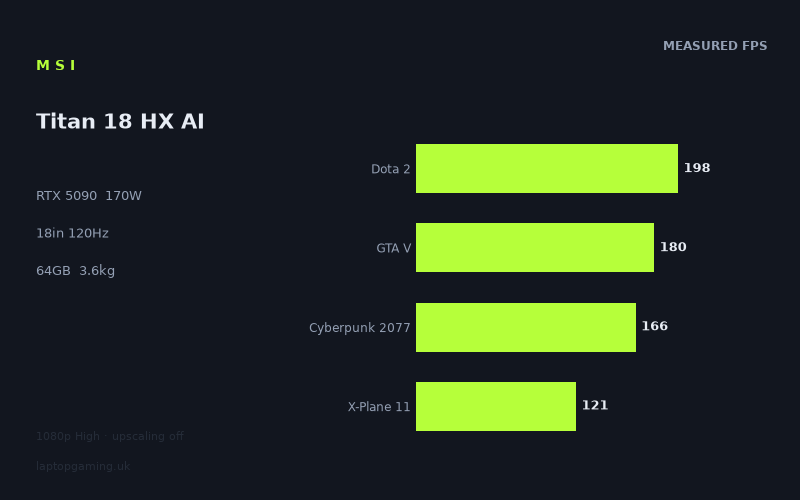
Frame rates
1920×1080, High preset, upscaling off.
Measured on this machine. Source: Notebookcheck, 2025-06-03.
Not scored: incomplete benchmark suite
Every scored laptop on this site is averaged over the same 5 games, and this one is short of Baldur's Gate 3. A mean over 4 games is not comparable to a mean over 5, so we publish the figures we have and leave the score blank rather than rank it against machines tested on a different set. The numbers below are real - the suite is just incomplete.
How these numbers were produced
Frame rates here are not measured by us, and we label how each one was arrived at. A figure marked measured comes from a published run on that exact machine. A figure marked representative is derived from the GPU and its power limit (TGP) and cross-referenced against published reviews - a sound estimate of what that configuration delivers, but not a measurement of that specific laptop. Unless stated otherwise, numbers are 1920x1080, High preset, upscaling off. Where a laptop ships in several power configurations we use the wattage of the exact SKU listed, because a 140W RTX 5070 and a 115W one are not the same product.
In use
The short version
The MSI Titan 18 HX AI is the machine MSI builds when it stops worrying about what anything costs. An RTX 5090 running at a 170W power limit, 24GB of video memory, a Core Ultra 9 285HX, 64GB of system memory, 6TB of solid-state storage and an 18in 3840x2160 panel at 120Hz. It weighs 3.6kg before you add a power supply. There is no confirmed UK price for this configuration at the time of writing, which matters more than usual here, because almost every judgement worth making about a machine like this is a judgement about what you are paying for the last ten per cent.
The published frame rates come from Notebookcheck, dated 3 June 2025, all recorded at 1920x1080 on the High preset with upscaling switched off. Nine titles are covered, running from 473fps in Strange Brigade down to 121fps in X-Plane 11. Across the four games in our scoring suite for which figures exist, the mean is 166fps. Those are strong numbers in absolute terms. They are also, and this is the awkward part, numbers that a considerably cheaper machine can get close to, because a 1080p High benchmark run mostly measures how quickly a platform can feed frames to a graphics card that is not being asked to work hard.
We are not publishing a ranked score for this machine, and we want to be straightforward about why. Our leaderboard averages every laptop over the same five games so that the comparison is like for like. For the Titan 18 HX AI we have no Baldur's Gate 3 figure, so the set is incomplete. Averaging four games and presenting the result alongside machines averaged over five would produce a number that looks precise and is not. We would rather have a gap in the table than a fake entry in it.
What the data does support is a clear shape of an argument. Against the RTX 5050-equipped MSI Cyborg 15 at GBP 984, the Titan is 72fps clear across four shared games, which is the kind of separation that justifies spending more money. Against the Medion Erazer Beast 16 X1 Ultimate at GBP 4,884, another RTX 5090 machine, the two are level across four shared games. Against the MSI Vector A18 HX A9W, which carries only an RTX 5070 Ti, there is no measurable separation across the three games they share. And against the Schenker XMG Neo 16 A25, a third RTX 5090 laptop, the Titan is 28fps behind across four shared games. A flagship that cannot pull away from a 5070 Ti sibling on this test, yet loses to a differently built machine with the same graphics chip, is telling you something specific about the test and something specific about the machine. We will get to both.
Buy it if you want one device that games hard, holds enormous local datasets and never asks you to think about storage or memory again, and if you accept that you are buying it partly on faith in the areas nobody has published measurements for. Buy something else if the appeal is frame rates at 1080p, because that is the one thing this class of machine is least efficiently good at.
Performance
What a 170W power limit actually decides
The single most misunderstood number on any gaming laptop spec sheet is the graphics power limit, and the Titan's is stated plainly: 170W. Nvidia licenses the same silicon to manufacturers across a range of sustained power budgets, and the chassis, cooling design and firmware decide where in that range a given laptop lands. Two machines can both say RTX 5090 on the box and behave like different products under sustained load. So the wattage is worth taking seriously.
What it decides, though, is narrower than most buyers assume. A power limit governs the clock speed the graphics card can hold when it is genuinely saturated: high resolution, heavy shader work, ray tracing, big texture sets, long sessions where the cooling system has stopped being able to bank heat and has to settle at a steady state. It decides very little when the graphics card is idling between frames waiting for the processor to hand it the next one. And that second situation describes a substantial fraction of the measured set here, because every one of these figures was recorded at 1920x1080.
This is the crux of reading the Titan's benchmark data honestly. At 1080p on High, an RTX 5090 is not the constraint in most of these games. The constraint is the rest of the system: single-thread processor throughput, driver overhead, engine design, how well a given title spreads its work across cores. The 170W figure is a real and relevant specification, and it is the figure that would separate this machine from a lower-powered 5090 implementation at native resolution or with ray tracing enabled. It is simply not the figure that is doing the work in the numbers below. Anyone who reads a 1080p benchmark sweep as a verdict on a power limit is reading it wrong.
The top of the table, and why it means less than it looks
Strange Brigade at 473fps is the headline number and the least useful one in the set. It is a well-built, efficient, lightly loaded shooter that has served as a benchmark staple precisely because it scales cleanly and runs fast on everything. At 1080p High it is not asking an RTX 5090 for anything difficult. What a figure like that establishes is that the platform is working correctly: the memory subsystem is not choking, the drivers are behaving, nothing in the power management is doing something odd. It is a diagnostic, not a performance claim. If you buy a machine because it reached 473fps in Strange Brigade, you have bought a machine on the strength of a title you will not play at a frame rate no panel in this class can show.
F1 24 at 357fps sits just below it and belongs in the same category. Racing titles built for consistency tend to be efficient, and this one clearly is. The interesting thing is what happens one year later in the same franchise: F1 25 lands at 252fps, a drop of 105fps between two entries in a series that most people would assume are near-identical workloads. That gap is one of the more instructive things in the whole set. It is not a driver problem and it is not a hardware change, because both figures were recorded on the same machine on the same date. It is a renderer that got heavier.
Take that one step further and you have the strongest argument against trusting any single averaged benchmark figure, including ours. Swap F1 24 into a suite in place of F1 25 and the average moves by twenty-odd frames on this machine alone. The composition of the test set is not a neutral background detail; it is a substantial input to the result. That is exactly why our scoring suite is fixed at the same five games for every laptop, and exactly why we will not rank a machine that only has four of them.
The middle of the table: where the processor takes over
Final Fantasy XV at 212fps, Dota 2 at 198fps and GTA V at 180fps form the middle band, and all three are informative in the same way. These are older engines. Dota 2 is an esports title designed to run on modest hardware and is heavily dependent on single-thread performance. GTA V dates from a generation of games that predates modern multi-core scheduling and is famously processor-limited at low resolutions on fast graphics cards.
Consider what that GTA V figure implies. An RTX 5090 at 170W, paired with a Core Ultra 9 285HX and 64GB of memory, produces 180fps in a title that is over a decade old, at 1080p, on High. Nothing is wrong. That is simply where the platform's ceiling sits when the graphics card has finished its work early and is waiting on everything else. The graphics card could be twice as fast and the number would barely move. This is the single clearest piece of evidence in the whole data set that the 1080p sweep is measuring the platform, not the graphics card in isolation.
Dota 2 at 198fps tells the same story from a different angle. A 5090 rendering Dota 2 at 1080p High is not close to being the bottleneck. And Final Fantasy XV, at 212fps, is a DirectX 11 title with a rendering path from an earlier era of engine design. These are all genuine measurements and they are all worth having, but the thing they measure is the whole computer, weighted heavily towards the processor and the software stack.
The floor: the titles that actually load the graphics card
Cyberpunk 2077 at 166fps, Alan Wake 2 at 125fps and X-Plane 11 at 121fps are the three lowest results, and two of them are the reason the machine exists.
Cyberpunk 2077 remains the most demanding conventional rasterisation workload in wide benchmark use. At 1080p on High with upscaling off, 166fps is a genuinely strong result and one of the few figures here where the graphics card is meaningfully engaged. Note the settings carefully, though: High preset, no upscaling. We have no ray-traced figures for this machine and no path-traced ones, and those are the workloads where an RTX 5090 at a healthy power limit is supposed to earn its money. The absence is a real gap, not a footnote.
Alan Wake 2 at 125fps is the modern engine result that best represents what a current, visually ambitious game asks of hardware. It is the second-lowest number in the set and, on a machine of this specification, one of the more meaningful ones. If you want a rough sense of how a demanding 2025-era release behaves here, this is the figure to hold onto rather than the 473.
X-Plane 11 at 121fps is the lowest result and, paradoxically, the one that is least about the graphics card at all. Flight simulators of that generation lean extraordinarily hard on single-thread processor performance and on the geometry pipeline. A machine reaching 121fps in X-Plane 11 has told you a lot about its processor and its memory latency and almost nothing about whether its graphics card has 16GB or 24GB attached to it. That it sits at the bottom of a list topped by 473fps is a spread of nearly four to one across nine titles measured on the same hardware on the same day, and essentially all of that spread comes from engine architecture rather than from anything you can buy your way out of.
The 166fps average, and the missing fifth game
Our scoring suite covers five titles: Dota 2, GTA V, Cyberpunk 2077, X-Plane 11 and Baldur's Gate 3. For the Titan 18 HX AI we have the first four, averaging 166fps. Baldur's Gate 3 is absent.
It would be easy to shrug at that and publish the four-game mean as though it were comparable to a five-game mean, and it would be wrong. Three of the four games we do have are old and processor-limited. The one modern rasterisation-heavy title in the set, Cyberpunk 2077, lands at 166fps, which happens to sit exactly on the four-game average. Adding a fifth title would move that average by whatever margin that title's engine dictates, and as the F1 24 to F1 25 gap demonstrates in miniature, that margin is not small or predictable. Publishing a partial average next to complete ones would quietly hand this machine a different test from every other machine on the leaderboard.
So there is no score on this page. That is an honest gap in the data rather than a criticism of the laptop, and if a Baldur's Gate 3 figure appears from a source we trust, the machine will be ranked like everything else.
What these numbers cannot tell you
It is worth being explicit about the limits, because on a machine at this tier the unmeasured territory is precisely the territory that justifies the purchase.
- Native resolution. Every figure here is 1920x1080. The panel is 3840x2160, which is four times the pixel count. We have no measurements at native resolution and will not extrapolate to them.
- Ray tracing and path tracing. No ray-traced figures are published in this set. For an RTX 5090 buyer this is the single largest blind spot, because ray-traced performance is a headline reason to choose this tier of graphics card over a cheaper one.
- Upscaling and frame generation. The runs were made with upscaling off. That is the right way to measure raw hardware, but it is not how most people will play, and we have no data on what the machine does with those features enabled.
- Sustained thermal behaviour. A benchmark pass is short. Whether the 170W limit is held through a two-hour session, and what happens to clocks when it is not, is not something a frame-rate table answers.
- Noise. We have no acoustic measurements. On an 18in chassis cooling a 170W graphics card and a Core Ultra 9 285HX, this is not a trivial omission.
None of that makes the published numbers less real. It means they answer one question well and several other questions not at all.
The screen
3840x2160 across 18 inches, at 120Hz
An 18in panel at 3840x2160 is a high pixel density for a display of that size, and at normal viewing distance individual pixels stop being a consideration entirely. For anything involving fine detail held still on screen - photo work, video timelines, code, spreadsheets, dense simulator instrumentation - that is a genuine and immediate benefit, and it is a benefit you get every second the machine is switched on, unlike a frame-rate advantage you only see in a handful of titles.
The refresh rate is 120Hz. Set against a market where 240Hz has become ordinary on 16in gaming machines, that is a deliberate trade: resolution and screen area over refresh headroom. It is not the wrong trade for every buyer, but it is the trade, and it needs stating clearly rather than glossed over. If your priority is the lowest possible motion blur in a competitive shooter, the panel here is the part of the machine that will disappoint you, and no amount of graphics horsepower behind it changes that.
Can the graphics card drive it?
At 1080p, obviously and comprehensively. Seven of the nine measured titles exceed 120fps by a wide margin, and Strange Brigade's 473fps is roughly four times what the panel can display. Even the two lowest results, Alan Wake 2 at 125fps and X-Plane 11 at 121fps, clear the refresh ceiling. On the evidence available, at 1080p this machine is capable of saturating its own display in every game measured.
At the panel's native 3840x2160, we do not know, and we are not going to pretend otherwise. There are no published figures in this set at native resolution. Rendering four times the pixels does not simply divide frame rates by four - the processor-limited titles would fall much less than that, the graphics-limited ones rather more - but the honest position is that the relationship is not something you can derive from a 1080p table with any confidence. Anyone telling you what this machine does in Alan Wake 2 at 4K, based on these numbers, is guessing.
There is a practical consequence worth thinking through. A 120Hz ceiling combined with a native resolution this demanding creates an unusually comfortable target in one specific sense: you do not need 240fps, you need 120, and at 1080p the machine clears that everywhere measured. If the graphics card can hold 120fps at native resolution in the games you care about - which we cannot confirm - the panel and the hardware would be well matched. If it cannot, you are choosing between running below the panel's refresh at native resolution, or running at a non-native resolution on a screen where scaling artefacts are the whole reason you bought the pixel density in the first place. That is a real tension in the design, and buyers should go in aware of it.
What we do not know about the panel
The panel technology is not specified in the information we hold. That is a significant gap and we are not going to fill it with an assumption. Whether a display is IPS, OLED or a mini-LED backlit variant changes contrast, black level, response time, viewing angles, peak brightness behaviour and how it ages - and on a machine in this class it is one of the things you would most want confirmed before committing. If you are shopping this laptop, get the panel type in writing from the retailer for the exact configuration you are buying, because manufacturers do vary it across otherwise identical model numbers.
We also have no brightness, colour gamut or response-time measurements, so nothing here should be read as a claim about colour accuracy or motion clarity. What we can say with confidence is the resolution, the size, the refresh rate, and that the graphics hardware demonstrably outruns 120Hz at 1080p in every title measured.
Build, size and portability
3.6kg is a decision, not a compromise
The laptop weighs 3.6kg, and that is the machine on its own, before the power supply that an RTX 5090 at 170W and a Core Ultra 9 285HX plainly require. We do not have a figure for the adapter's mass, so treat the real travelling weight as meaningfully more than 3.6kg without putting a number on it.
That places the Titan firmly in desktop-replacement territory. This is a machine that moves between rooms, between a desk and a spare-room desk, between home and an office you drive to. It is not a machine you take on a train with a bag of other things and it is not a machine you work on from a café table, and it would be dishonest to present the 18in format as anything other than what it is. The upside is that an 18in chassis has volume for cooling, and cooling is what lets a graphics card hold a 170W budget instead of throttling back to something it can sustain. Large laptops are large for a reason, and buyers who want flagship silicon in a thin shell are usually disappointed by the sustained behaviour they get.
The screen size deserves credit on its own terms too. An 18in display is close to a small desktop monitor, and combined with 3840x2160 it produces a genuinely large amount of usable workspace. For anyone whose day involves multiple windows side by side, or a video timeline, or a simulator cockpit, the extra area is not a luxury - it is the thing that makes a laptop viable as a primary machine.
The battery, and what a 99Wh cell is for
The battery is 99Wh, which is at the upper end of what a laptop can carry and still be permitted in cabin baggage on commercial flights. We have no runtime measurements for this machine, so we will not offer an estimate.
What can be said without measurements is structural. A 170W graphics power limit plus a high-end processor draws substantially more than any 99Wh cell can supply for long, so on battery a machine like this either runs the graphics hardware well below its plugged-in behaviour or drains very quickly. That is not an MSI failing, it is arithmetic that applies to every laptop in the category. The practical reading is that the 99Wh cell exists to cover the gap between mains sockets, not to enable untethered gaming, and anyone planning to play away from power should be looking at a different class of machine entirely.
Memory, video memory and 6TB of storage
Three specifications here go beyond what gaming alone requires, and they are a large part of the case for the machine.
24GB of video memory is the headline. In the games measured, at the resolution measured, it is not the limiting factor and would not be at 16GB either. Where it earns its place is elsewhere: very high resolution texture packs, heavy modded installations, 3D and rendering work with large scenes, video projects at high resolutions, and local machine-learning models, where the size of the memory pool determines flatly whether a given model loads at all. That last case is not a marginal use any more, and it is one of the few areas where the difference between 16GB and 24GB is binary rather than incremental.
64GB of system memory follows the same logic. No game measured here needs it. Virtual machines, large project files, many browser tabs alongside a compile, and simulator add-on ecosystems all do. If your workload is purely gaming, this is capacity you are paying for and will not use. If it is not, it may be the reason you are looking at this machine rather than a cheaper one.
6TB of solid-state storage is the specification that stands out most, because storage of that capacity at solid-state speeds is expensive in its own right and not something you can add cheaply later on every chassis. Modern games routinely occupy a hundred gigabytes or more each; add a capture workflow, a simulator with regional scenery packs, or a video project archive, and multi-terabyte capacity stops being extravagance and becomes the difference between working and constantly deleting things. When you eventually see a price for this configuration, the storage is one of the components that should be mentally subtracted before you compare it with a machine carrying a quarter of the capacity.
How it compares
All four comparisons below use only the games both machines have figures for, preferring our scoring-suite titles, and all are drawn from the same graphics-card generation. The point of choosing a spread rather than the nearest rival is that the extremes reveal what the method can and cannot detect.
MSI Cyborg 15 - RTX 5050, GBP 984
Across four shared games, the Titan averages 72fps more than the Cyborg 15. That is the widest margin in this comparison set and the one that behaves exactly as intuition says it should: a 5090 at 170W against a 5050, and the gap is large and unmistakable even in a test that compresses differences.
The buying argument, though, cuts in a direction the raw number does not. The Cyborg 15 sells for GBP 984. We have no confirmed price for the Titan, but nobody expects a flagship 18in machine with 64GB of memory and 6TB of storage to land anywhere near four figures. So the honest framing is this: the Titan delivers a very large frame-rate advantage over the Cyborg, and it will cost several times as much to do it. If your target is 1080p gaming and nothing else, the Cyborg is doing the same job less well for a fraction of the outlay, and the extra frames above a display's refresh rate are frames you cannot see. The Titan's case has to rest on resolution, memory, storage and the workloads that need them - not on beating a budget machine at 1080p, which it does comfortably and expensively.
Medion Erazer Beast 16 X1 Ultimate - RTX 5090, GBP 4,884
Two RTX 5090 laptops, four shared games, and the result is level - no separation the benchmark can detect. On a test with this much headroom above the interesting range, that is close to what you would expect. Both machines have graphics hardware capable of far more than these titles ask at 1080p, so both settle at whatever their processors and the game engines allow, and the graphics cards are largely spectators.
The Medion carries a confirmed price of GBP 4,884. That is the most useful thing about this comparison, because it establishes the neighbourhood the Titan is competing in and makes clear what the shared-game data can and cannot decide. It cannot decide between these two on frame rates - it has already told you they are indistinguishable on this set. So the decision moves entirely to everything else: screen size and resolution, memory capacity, storage capacity, cooling, keyboard, port selection, warranty. That is not a failure of the test so much as the test correctly reporting that on this particular workload there is nothing to choose between them.
MSI Vector A18 HX A9W - RTX 5070 Ti, no confirmed UK price
This is the uncomfortable one, and it is the comparison a prospective buyer should sit with longest. Across the three games these two share, there is no measurable separation between the Titan's RTX 5090 at 170W and the Vector A18's RTX 5070 Ti. Two rungs of the product stack apart, from the same manufacturer, and the shared-game data cannot tell them apart.
The explanation is the one that runs through this entire review. At 1920x1080 on High with upscaling off, the lighter titles in the shared set - Dota 2, GTA V, X-Plane 11, Final Fantasy XV, Strange Brigade - are substantially processor-limited. When the graphics card finishes each frame before the rest of the system is ready with the next, a faster graphics card produces the same result as a slower one. An average built mostly from titles like these measures the whole platform. Both of these MSI machines run high-end Intel processors with plenty of memory, so both hit similar walls in similar places, and the graphics silicon between them never gets the chance to declare itself. There is a further caveat: this comparison rests on three shared games rather than four, so it is built on a thinner base than the others, and thin bases move around more.
None of that makes the RTX 5090 pointless. It makes the 1080p benchmark the wrong instrument for detecting its value. The 5090's advantages live at native resolution, in ray-traced workloads, in the 24GB memory pool, and in sustained heavy scenes - none of which this shared set touches. But it does mean something concrete for buyers: if the games you play look like the games in this shared set, and you play them at 1080p, the published evidence says a 5070 Ti machine will give you the same experience. That is a real finding and it should not be softened.
Schenker XMG Neo 16 A25 - RTX 5090, no confirmed UK price
And here is the counterweight. Across four shared games, the Titan averages 28fps less than the Schenker XMG Neo 16 A25 - another RTX 5090 machine. Same graphics generation, same tier of graphics card, and a clear, repeatable gap in the Schenker's favour.
That result matters far beyond the two machines involved, because it is the proof that the shared-game method is not simply blind. If the test genuinely could not tell laptops apart, it would return no separation everywhere. Instead the same set of games that finds nothing between the Titan and a 5070 Ti sibling finds 28fps between the Titan and another 5090, and finds 72fps between the Titan and a 5050. The instrument has range. It resolves differences when differences exist in the dimension it measures. When it reports no gap, that is a result about the machines, not a failure of the ruler.
Why is the Schenker ahead? We do not have its graphics power limit, we do not have its processor's sustained behaviour, and we have no thermal or acoustic data for either machine, so we are not going to invent a cause. What can be said is that two implementations of the same graphics chip are producing measurably different platform-level results on identical test conditions, which is exactly the outcome that makes power limits, cooling design and processor pairing worth caring about. It also punctures the idea that the Titan's specification sheet guarantees it the top of any table. It does not. On this set it sits behind another 5090.
What the spread tells you as a whole
Line the four up and the pattern is coherent. A very large gap down to the 5050 machine. Nothing to choose against a 5090 rival and nothing to choose against a 5070 Ti sibling. A clear deficit to another 5090. That is a benchmark that separates crudely across large hardware differences, compresses everything in the upper middle, and can still detect implementation differences at the top when they are substantial enough.
The practical instruction for a buyer is to treat the 1080p shared-game average as a floor test rather than a ranking. It is excellent at answering "will this machine run modern games well" - a resounding yes here. It is poor at answering "is the most expensive graphics card worth it", because the workload never asks the question. To answer that second question you would need native-resolution figures, ray-traced figures, and sustained-load figures, and for this machine we have none of the three. Given the tier it sits in, that is the most important sentence in this review.
Who it's for
The buyer this machine genuinely suits
Someone who wants one computer to do everything, and has the desk to put it on. The combination of an 18in 3840x2160 display, 64GB of memory, 24GB of video memory and 6TB of solid-state storage is not a gaming specification with extras bolted on; it is a workstation specification that also plays games extremely well. If your week involves video editing, 3D work, running local machine-learning models, large simulator installations or virtual machines, and you also want to play demanding titles in the evening without owning a second machine, this configuration is aimed squarely at you and very few laptops are.
It also suits the buyer who wants screen area above all else. Eighteen inches at that resolution is close to a small desktop monitor, and if the alternative is a 16in panel plus an external display you cannot always be near, that has real day-to-day value.
And it suits the buyer who wants a large chassis on purpose. Volume means cooling, cooling means sustained clocks, and if you are going to run a 170W graphics card hard for hours, a machine with room to move air is the sensible way to do it - even though, as the Schenker comparison shows, a large chassis is not by itself a guarantee of leading results.
Who should buy something else
Anyone who moves their laptop daily. At 3.6kg plus a power supply, this is not a machine to carry between lecture halls, on commuter trains or through airports as routine. Portability is not a criticism you can design away in this category; it is the price of the specification, and if you will feel it every day you will resent it.
Anyone whose priority is competitive high-refresh gaming. The panel is 120Hz. The measured 1080p frame rates comfortably exceed that in every game in the set, which means a 240Hz display would have somewhere to put them and this one does not. Buyers chasing the lowest possible motion blur in shooters are buying the wrong screen, however good the hardware behind it.
Anyone gaming at 1080p and nothing more. The evidence here is unusually blunt: on the shared games, this machine is not separable from a 5070 Ti sibling, and it is only 72fps ahead of a GBP 984 Cyborg 15 - frames that a 120Hz panel cannot display in any case. If 1080p is the target, the money is better spent lower down the range and the difference put towards a monitor, a chair or the next machine.
Anyone buying primarily for ray-traced or native-resolution performance who needs to see it proved first. That is the core reason to choose an RTX 5090 with 24GB attached, and it is precisely the area where no published measurements exist for this configuration. If you are spending flagship money on a promise, insist on seeing native-resolution and ray-traced figures for this exact model before you commit, rather than reading a 1080p sweep and hoping it generalises.
And anyone who needs a definitive ranking before deciding. We are not publishing a score for the Titan 18 HX AI because the scoring suite is incomplete without a Baldur's Gate 3 figure, and a four-game average dressed up as a five-game one would be worse than no number at all. The comparisons above are the honest version of what the available data supports: dominant over budget hardware, level with its immediate peers on this test, and beaten by another RTX 5090 machine on the same set of games. Everything that would separate a flagship from a merely very good laptop lives in measurements nobody has published yet.