Details
Product prices and availability are accurate as of the date/time indicated and are subject to change. Any price and availability information displayed on Amazon.co.uk at the time of purchase will apply to the purchase of this product.Review
HP Victus 15-fa1057ng review
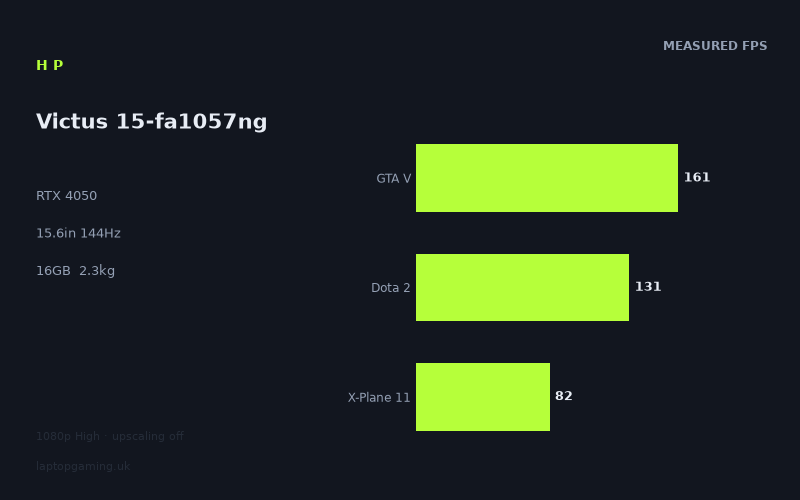
Frame rates
1920×1080, High preset, upscaling off.
Measured on this machine. Source: Notebookcheck, 2024-02-03.
Not scored: incomplete benchmark suite
Every scored laptop on this site is averaged over the same 5 games, and this one is short of Cyberpunk 2077, Baldur's Gate 3. A mean over 3 games is not comparable to a mean over 5, so we publish the figures we have and leave the score blank rather than rank it against machines tested on a different set. The numbers below are real - the suite is just incomplete.
How these numbers were produced
Frame rates here are not measured by us, and we label how each one was arrived at. A figure marked measured comes from a published run on that exact machine. A figure marked representative is derived from the GPU and its power limit (TGP) and cross-referenced against published reviews - a sound estimate of what that configuration delivers, but not a measurement of that specific laptop. Unless stated otherwise, numbers are 1920x1080, High preset, upscaling off. Where a laptop ships in several power configurations we use the wattage of the exact SKU listed, because a 140W RTX 5070 and a 115W one are not the same product.
In use
The short version
The HP Victus 15-fa1057ng is a sensible 1080p gaming laptop on paper, but the published data supports a more qualified verdict than the RTX 4050 badge alone suggests. Notebookcheck’s measured figures show that it can produce very high frame rates in several of the games available here: 350fps in Prince of Persia The Lost Crown, 161fps in GTA V and 159fps in Strange Brigade, all at 1920x1080, High settings and with upscaling switched off. Those results matter because the Victus has a 144Hz screen. In those titles, the machine has enough measured performance to make practical use of the panel’s refresh rate rather than merely advertising it.
The picture is less uniform in the other results. Dota 2 reaches 131fps, which is still high but does not match the display’s full 144Hz refresh rate in this benchmark. X-Plane 11 records 82fps, Final Fantasy XV records 80fps and Palworld records 72fps. None of those figures is a reason to dismiss the laptop outright, but they are an important correction to any expectation that a 144Hz screen means 144fps in every game at the stated settings. It does not. The benchmark spread is substantial, ranging from 72fps to 350fps, and the useful conclusion is that this is a laptop whose performance depends heavily on the game being played.
There is also a crucial limitation to the available gaming data. The normal scoring suite is incomplete: there are no figures here for Cyberpunk 2077 or Baldur’s Gate 3. As every ranked laptop is normally averaged across the same five-game suite, this Victus cannot be fairly placed in that ranking from the partial set. That is not a technicality. Without those missing games, any attempt to turn the available results into a single performance position would imply a degree of certainty the data does not provide.
The best case for the HP is therefore straightforward. It suits someone who wants a 15.6in Full HD gaming laptop with an RTX 4050, 16GB of memory, a 512GB SSD and a 144Hz IPS screen, and whose regular games resemble the titles in which the Victus records the stronger results. GTA V, Strange Brigade and Prince of Persia The Lost Crown all show that the machine can run well beyond ordinary console-like frame rates at the tested settings. Dota 2 also runs at a high measured figure, even though it falls short of the screen’s full refresh rate. If those sorts of results are what matter most, the Victus makes a coherent specification.
The case against it is equally clear. There is no confirmed UK price in the available information, so it is impossible to judge whether this exact configuration is good value. That matters especially because the comparison data is unusual. The Victus is clearly ahead of the MSI Thin GF63 with the same GPU generation, yet it sits almost level with an RTX 4060 Acer Nitro V 16 and an RTX 4070 Asus ProArt PX13 in the limited shared-game comparisons. Those apparently surprising results do not prove that an RTX 4050 is generally equivalent to an RTX 4060 or RTX 4070. The shared games are lighter at 1080p and can be CPU-bound, compressing genuine GPU differences. The Victus should be bought for its confirmed results, not on the assumption that its RTX 4050 will always keep pace with higher-tier graphics hardware.
It is also not possible to make confident claims about the machine’s chassis quality, keyboard, port selection, cooling noise, temperatures, upgrade access, webcam, speakers or battery runtime from this fact sheet. The listed battery capacity is 70Wh, but capacity is not runtime. Likewise, the listed weight is 2.326kg, but the dimensions are not provided, so the Victus can be described as a 2.326kg laptop rather than assigned a particular footprint or travel profile. Buyers who need those details should treat them as open questions rather than filling the gaps with assumptions about the wider Victus range.
Performance
The measured results
All of the frame-rate figures discussed here come from Notebookcheck’s benchmark data, recorded at 1920x1080 using the High preset with upscaling off. That last point is important. These are not figures inflated by an upscaling mode, and they are not a mixture of settings chosen separately for each game. They give a reasonably clear view of what this particular HP Victus 15-fa1057ng achieved at its native screen resolution under one defined test approach.
- Prince of Persia The Lost Crown: 350fps
- GTA V: 161fps
- Strange Brigade: 159fps
- Dota 2: 131fps
- X-Plane 11: 82fps
- Final Fantasy XV: 80fps
- Palworld: 72fps
The measured mean across the available scoring-suite games is 125fps, based on GTA V, Dota 2 and X-Plane 11. That is a useful reference point within this individual laptop’s data, but it is not a complete cross-laptop score and should not be treated as one. The normal suite is missing Cyberpunk 2077 and Baldur’s Gate 3, which means there is no complete five-game average from which to rank the Victus against scored machines. The individual results are more useful than a false sense of precision would be.
The standout result is Prince of Persia The Lost Crown at 350fps. That result sits far above the display’s 144Hz refresh rate. It demonstrates that, in this game and under these settings, the Victus has substantial spare performance relative to its own panel. The practical implication is not that every frame above 144fps is automatically visible on a 144Hz display. The important point is that the laptop is not struggling to feed the screen in this title. The performance headroom is large in the published figure.
GTA V at 161fps and Strange Brigade at 159fps tell a similar, though less extreme, story. Both figures exceed 144fps. For a buyer specifically interested in whether the Victus can drive its own 144Hz display at the tested High preset, these are the clearest positive results in the data. The panel’s refresh rate is not wasted in either game. The frame-rate figures are also close to one another despite the games being different benchmarks, which is a reminder that individual titles should be read as their own evidence rather than folded into a generic claim about “RTX 4050 performance”.
Dota 2 at 131fps is the first result that makes the distinction between “high frame rate” and “full use of a 144Hz display” more useful. A figure of 131fps is still high, and it is much closer to the screen’s refresh rate than the lower results in the set. But the notebook data does not show the Victus reaching 144fps in this benchmark at the stated preset. Someone whose priority is simply high responsiveness may find that result encouraging. Someone who has decided that their requirement is a measured 144fps at High settings should read it as a near miss rather than rounding it up.
The remaining group is materially lower. X-Plane 11 reaches 82fps, Final Fantasy XV reaches 80fps and Palworld reaches 72fps. These are not minor deviations from the fastest results. They show that the Victus’s measured gaming performance is not one flat line. The same laptop that reaches 350fps in one title records 72fps in another. That does not make either figure suspect. It means game workload, engine behaviour and the balance between processor and graphics demand matter more than a simple GPU label can convey.
For prospective buyers, Palworld is particularly useful because it is the lowest measured result available. At 72fps, the benchmark data still shows a frame rate above the sort of low figures associated with obviously limited performance, but it is only half of the display’s 144Hz refresh rate. A buyer choosing this Victus primarily because of its 144Hz panel should understand that the panel is an upper limit, not a promise of a matching frame rate in every game. The screen can refresh at 144Hz; the published data shows that the laptop delivers very different frame rates depending on the title.
X-Plane 11 and Final Fantasy XV are closely grouped at 82fps and 80fps. The closeness of those figures should not be mistaken for proof that all similarly demanding games will behave alike. They simply establish that, under the supplied benchmark conditions, these two titles place the Victus in a noticeably different performance bracket from GTA V and Strange Brigade. The laptop is still producing a usable-looking numerical result, but not one that reaches the advertised refresh ceiling. For these games, the 144Hz panel is providing potential headroom rather than a measured outcome achieved at High settings.
What the spread across games tells us
The important performance story is not just the highest result or the mean. It is the range. The notebook data spans from 72fps in Palworld to 350fps in Prince of Persia The Lost Crown. That is a very broad spread on the same laptop at the same resolution, preset level and with upscaling off. It shows why any review that reduces this Victus to “an RTX 4050 laptop” would be less useful than the actual figures. The GPU name gives a rough product category; the benchmark data shows the real variation.
The fastest titles are capable of taking advantage of the Victus’s 144Hz panel. Prince of Persia The Lost Crown does so emphatically, while GTA V and Strange Brigade also exceed the refresh rate. Dota 2 gets close. The lower results do not. That is the central split in the data: this laptop can be a high-refresh 1080p machine in some games, while in others it is simply a conventional high-settings 1080p machine running below the panel’s maximum refresh rate.
There is no basis in this data to claim that one individual result predicts every future release, every engine or every preset. There are no Cyberpunk 2077 or Baldur’s Gate 3 figures, and there are no alternate-resolution, alternate-preset or upscaling results supplied here. Buyers should therefore resist two opposite mistakes. The first would be to look at 350fps in Prince of Persia The Lost Crown and assume the Victus is always a 144fps-plus laptop. The second would be to look at 72fps in Palworld and assume that the RTX 4050 cannot make use of a high-refresh Full HD screen. Both claims would ignore most of the evidence.
The more defensible reading is that the Victus is highly capable in favourable games and less convincing when the workload is heavier or otherwise less accommodating. That may sound cautious, but it is exactly what the figures say. The laptop reaches or exceeds 144fps in three of the measured titles, comes close in another, and sits well below that level in the remaining three. A buyer can make a better decision by comparing their own game library with those categories than by looking only at the CPU and GPU names.
It is also worth separating average frame rate from the experience of using a laptop. The fact sheet provides average frame-rate figures only. It does not provide minimum frame rates, frame-time consistency, display response measurements or any subjective account of how each game feels. A figure such as 72fps, 80fps or 82fps is useful evidence of overall performance, but it cannot answer every question about consistency. Likewise, a figure above 144fps establishes that the laptop has the average throughput to exceed the panel refresh rate in that benchmark; it does not provide a complete account of every moment during play.
GPU power limit: an important unknown
The HP Victus 15-fa1057ng uses an RTX 4050, but the fact sheet does not provide a GPU power limit. That means it would be wrong to assign this model a wattage, call it a lower-power or higher-power RTX 4050 implementation, or explain its results as the consequence of a specific power setting. Laptop GPU names alone do not supply that missing information.
This absence matters because the power limit is often a meaningful part of how gaming laptops differ even when they use the same GPU name. But it is not acceptable to fill in the blank from another Victus configuration, from a retailer listing for a similarly named machine, or from assumptions about HP’s product range. The only safe conclusion from the supplied information is that Notebookcheck’s published results belong to this exact HP Victus 15-fa1057ng configuration, with its Core i5-13500H, RTX 4050 and 16GB of memory. The specific GPU power limit behind those results has not been provided.
That does not make the benchmark data useless. Quite the opposite: the measured figures are more valuable than guessing from a power number that is not available. They establish how this machine performed in the listed games under the stated conditions. What cannot be established is why its RTX 4050 produced exactly those results relative to every other RTX 4050 laptop. Cooling behaviour, firmware choices, power settings and other platform differences may matter in general, but none of those details is supplied for this Victus and should not be invented.
The same caution applies when comparing the Victus with the Acer Nitro V 16, which uses an RTX 4060 at 85W. The Acer’s power figure is known from the supplied comparison information; the HP’s is not. It would be tempting to use that fact to construct a broad theory about why the two machines are close in the shared data. The available evidence does not support that. All that can be said is that the Victus averages 2fps more across the three shared games, while the Acer has an RTX 4060 at 85W. The small shared-game difference must be read in the context provided: lighter 1080p titles can be CPU-bound and compress genuine GPU differences.
The processor, memory and storage in context
The Victus pairs the RTX 4050 with a Core i5-13500H and 16GB of memory. The benchmark figures show that this combination can produce very high results in some of the tested games. The comparison notes explicitly warn that lighter titles at 1080p can become CPU-bound. That warning is useful here because it explains why the Victus can look unexpectedly close to laptops carrying more powerful graphics chips in some shared benchmarks. When performance is constrained elsewhere, a larger GPU does not necessarily translate into a proportionally larger measured frame-rate lead.
That should not be turned into a claim that the Core i5-13500H makes this Victus universally faster than machines with RTX 4060 or RTX 4070 graphics. There is no such evidence in the fact sheet. Instead, it means the CPU forms part of the explanation for why the shared-game comparisons can be compressed at 1080p. The Victus’s own GTA V, Dota 2 and X-Plane 11 figures show a wide spread, which reinforces the point that different games lean on different parts of the system in different ways.
The 16GB memory allocation is part of the stated configuration, but there is no memory speed, channel arrangement, upgrade information or benchmark comparison in the supplied data. It should therefore be treated as a specification, not as a proven explanation for a particular result. Similarly, the 512GB SSD capacity tells a buyer the size of the fitted storage, but nothing in the fact sheet establishes drive speed, spare slots or how much usable space remains after the operating system and pre-installed software.
For a buyer, the practical message is uncomplicated. This is not a machine to choose purely because “RTX 4050” appears in the specification. It is a machine to choose if its actual published results fit the games that matter to you, and if the eventual UK price makes sense against alternatives. The Core i5-13500H, 16GB memory and 512GB SSD make the configuration easy to identify, but the frame rates remain the better evidence for gaming expectations.
The screen
A Full HD 144Hz IPS panel matched to the available results
The HP Victus 15-fa1057ng has a 15.6in IPS display with a 1920x1080 resolution and a 144Hz refresh rate. For gaming, the key question is not whether 144Hz sounds attractive in isolation. It is whether the laptop’s measured performance can reach it. The answer is title-dependent, but the data gives a clear enough outline.
Prince of Persia The Lost Crown at 350fps is far above 144Hz. GTA V at 161fps and Strange Brigade at 159fps also exceed the panel’s refresh rate. These are the games in which the 144Hz specification is directly supported by the benchmark data. The GPU is not merely capable of rendering the games at the screen’s resolution; it is capable of exceeding the panel’s maximum refresh rate at the stated High preset with upscaling off.
Dota 2 at 131fps is close to 144Hz but remains below it. That is still a strong result in plain terms, but it is not the same as saying that the game reaches the display’s maximum refresh rate in the supplied test. Buyers should avoid treating “close” as “identical”. The difference may or may not matter to an individual player, but the published figure is 131fps and the panel refresh rate is 144Hz.
X-Plane 11, Final Fantasy XV and Palworld are more clearly below the display’s ceiling, at 82fps, 80fps and 72fps respectively. In those games, the screen’s refresh capability exceeds the measured frame-rate output. That is not inherently a flaw in the panel. A 144Hz screen does not force games to run at 144fps, and it can still be the display fitted to a laptop whose performance changes substantially from title to title. But it is a reason not to buy this machine on the assumption of universal high-refresh gaming at High settings.
There is a sensible pairing here between the screen resolution and the tested benchmark setup: Notebookcheck’s figures use the panel’s 1920x1080 resolution. That means the results are directly relevant to the built-in display rather than requiring assumptions about a different resolution. There are no published figures in the fact sheet for a higher-resolution external display, a lower-resolution mode, alternative graphics settings or upscaling. The evidence therefore supports a verdict about Full HD High gaming with upscaling off, not a wider claim about every display configuration a buyer might attach.
What IPS tells us, and what it does not
The panel is specified as IPS. That identifies the display type, but it does not provide measured brightness, contrast, colour coverage, response behaviour, backlight uniformity or outdoor readability. It would be wrong to describe the screen as bright, colour-accurate, slow, fast, vivid or suitable for a particular type of colour-critical work without those measurements.
For gaming buyers, the confirmed display facts are stronger than unsupported adjectives: it is 15.6in, 1920x1080, IPS and 144Hz. Combined with the Notebookcheck results, that tells us where the machine’s display specification is most useful. The 144Hz refresh rate is substantiated in the fastest measured games, approached in Dota 2, and not reached in the slower measured titles. The Full HD resolution is exactly the resolution used in every listed frame-rate result. That is a more valuable buying guide than generic claims about the panel.
There is also no information here about variable refresh support. It should not be assumed. This matters because the Victus’s results vary substantially across the measured games. If a buyer considers display synchronisation behaviour essential, that detail needs confirming from a source that covers this exact model rather than inferred from the 144Hz figure alone.
Build, size and portability
What the weight means
The Victus weighs 2.326kg. That is the firm portability fact available for this configuration. It is not a machine that can be described as weightless, and anyone intending to carry it regularly should include that figure in their decision. At the same time, the available information does not give dimensions, charger weight, chassis materials or structural details. It is therefore better to be precise than theatrical: this is a 2.326kg 15.6in laptop, and the fact sheet does not establish more than that about its physical form.
The 15.6in screen places the Victus in a familiar gaming-laptop format rather than a compact ultraportable class, but its exact width, depth and thickness have not been supplied. That prevents meaningful claims about whether it will fit a particular bag, how much desk space it occupies or whether it is thinner than a named rival. Buyers who travel frequently should not make a purchase decision based on the weight alone. The weight is meaningful, but it is not the entire carry experience.
What can be said is that the Victus combines its 2.326kg weight with a 70Wh battery. The battery capacity is useful specification context, but there is no measured battery life. A 70Wh capacity does not tell us how long the laptop lasts in web use, video playback, gaming or any other workload. It also does not tell us how performance behaves away from mains power. Any claim about all-day use, gaming endurance, charging speed or unplugged frame rates would go beyond the facts provided.
Unknowns buyers should treat seriously
There is no supplied information about keyboard layout, keyboard lighting, trackpad quality, ports, networking, speakers, camera, fan noise or temperatures. Those omissions do not necessarily mean the Victus performs badly in any of these areas. They simply mean this review cannot present a conclusion. A buyer looking for a laptop primarily for shared accommodation, lecture halls, commuting, video calls, external-display use or peripheral-heavy desk use should confirm those practical details elsewhere before treating the gaming results as the whole purchasing case.
The same applies to cooling. The benchmark figures show what Notebookcheck measured in the listed games, but they do not provide a temperature or noise figure in this fact sheet. It would be irresponsible to describe the laptop as quiet, loud, cool-running or hot-running. Performance and acoustics are often connected in gaming laptops, but the available data allows analysis of the former only.
That uncertainty is especially relevant because the GPU power limit is also not provided. Buyers sometimes try to infer cooling quality, chassis thickness or power configuration from a product name or a weight figure. There is no basis for doing so here. The sensible approach is to treat the Victus’s portability case as partly known: 2.326kg, 15.6in, 70Wh. Everything beyond that needs confirmation.
How it compares
Against the MSI Thin GF63 with RTX 4050
Across three shared games, the HP Victus averages 37fps ahead of the MSI Thin GF63, another RTX 4050 machine. This is the most decisive positive comparison in the supplied rival set. It matters because it shows that an RTX 4050 label does not guarantee one fixed level of performance. Two laptops from the same GPU generation can differ materially in the games where both have data.
The comparison does not provide the individual shared-game figures, so it would be wrong to claim that the Victus wins by a particular amount in GTA V, Dota 2 or X-Plane 11 separately. It also does not provide a confirmed UK price for the MSI. What it does show is that, on the available shared-game average, the Victus has a substantial measured advantage. If both machines were being considered at similar confirmed prices, the HP’s benchmark position would be much easier to defend.
Price remains essential. Neither machine has a confirmed UK price in the supplied data, so this cannot become a value verdict. The Victus is the stronger performer in the shared measurements; whether it is the better purchase depends on a price that is currently not available here, as well as practical factors such as ports, display quality, noise and battery runtime that are also not supplied.
Against the Acer Nitro V 16 with RTX 4060 at 85W
The Acer Nitro V 16 uses an RTX 4060 at 85W, yet the Victus averages 2fps ahead across the three shared games. Taken at face value, that is close enough to be treated as effectively level in this limited comparison. It is not evidence that the RTX 4050 is generally the equal of an RTX 4060. The comparison notes explain why: at 1080p, lighter titles in the shared set can be CPU-bound and compress genuine GPU gaps.
This is a useful example of why benchmark context matters. A buyer who sees RTX 4060 and assumes an automatic, large lead over the RTX 4050 would not see that assumption reflected in these particular shared figures. But a buyer who sees the near-zero difference and concludes that GPU tier never matters would be making the opposite error. The result is specific to the shared games, at the benchmark conditions available, and the fact sheet explicitly warns that CPU limits can conceal GPU separation in lighter 1080p workloads.
There is no confirmed UK price for the Acer Nitro V 16. That prevents a direct value judgement. The Victus’s slight lead in the shared data is interesting, but not enough by itself to determine which laptop is the smarter purchase. A buyer deciding between them should look for broader game coverage, particularly more demanding titles, alongside confirmed UK pricing. The incomplete suite for the Victus makes that especially important.
Against the Asus ProArt PX13 with RTX 4070
The Asus ProArt PX13 has an RTX 4070 and costs £2,300, yet the Victus averages the same frame rate across the three shared games. This is the most striking result in the comparison list, and it needs careful interpretation. It does not make the HP Victus a general substitute for an RTX 4070 laptop. It shows that in this restricted shared-game set, at 1080p, the higher-tier GPU does not establish an average lead.
The supplied explanation is again the relevant one: lighter 1080p games can be CPU-bound and can compress genuine GPU gaps. This is exactly why laptop buyers should be wary of drawing sweeping conclusions from a small number of high-frame-rate benchmarks. Once a game is limited by something other than raw GPU throughput, moving to a more powerful graphics processor may not produce a proportionate increase in the reported average.
For the Victus, the useful conclusion is modest but favourable. It has published evidence of being competitive with a much more expensive £2,300 RTX 4070 laptop in the limited shared tests. That is a strong reminder to compare actual game results rather than shopping only by GPU name. It is not a reason to claim that the Victus delivers RTX 4070-class gaming generally, because the broader evidence required to support that statement is absent.
The absence of a confirmed UK price for the Victus is especially frustrating in this comparison. If the HP were available at a substantially lower confirmed price than £2,300, the shared-game result would be an attractive talking point. If its eventual price were unexpectedly high, the same point would carry less weight. Until the price is confirmed, the Victus cannot be labelled either a bargain or poor value against the ProArt.
Against the Asus ROG Strix Scar 17 with RTX 4090
The Asus ROG Strix Scar 17 uses an RTX 4090, costs £4,864 and averages 74fps ahead of the Victus across three shared games. This is the clearest performance defeat in the supplied rival group, and it provides useful scale. The Victus can be close to higher-tier machines in lighter 1080p shared tests, but it does not erase the advantage of the much more powerful RTX 4090 system.
The gap is substantial in the shared-game comparison. Unlike the near-zero results against the Acer and ProArt, this is not a case where the benchmark data compresses the difference until there is little practical separation in the average. The Scar 17 is measurably ahead. Its £4,864 price also places it in a completely different spending category from a laptop whose UK price is not confirmed, so this is more a comparison of performance scale than a direct shopping recommendation.
For a buyer considering the Victus, the Scar 17 result should not be alarming. These are not machines aimed at the same confirmed price point, because no Victus price is available. What it does demonstrate is that the Victus has limits, despite its excellent results in some individual games. The RTX 4090 machine retains a pronounced advantage in the shared data, and the Victus should not be positioned as an alternative for someone shopping specifically for the highest available laptop frame rates.
The comparison picture as a whole
The four rival comparisons give a more useful picture than any one of them alone. The Victus is well ahead of the MSI Thin GF63 with RTX 4050. It is effectively level in the limited shared data with the RTX 4060 Acer Nitro V 16 and the RTX 4070 Asus ProArt PX13. It is clearly behind the RTX 4090 Asus ROG Strix Scar 17. That spread makes sense only when the testing context is kept in view.
The Victus’s strongest comparisons are not proof that all GPU tiers perform the same. The Scar 17 comparison proves the opposite in the shared data. The near-equality with the Acer and ProArt is a real result, but it is a compressed result in lighter 1080p games where CPU limits can matter. The MSI comparison then shows that even laptops with the same RTX 4050 designation can be separated by a large margin. The practical lesson is simple: performance labels are useful starting points, while attributable frame-rate data is the better evidence.
Who it’s for
Buy the Victus if these are your priorities
The HP Victus 15-fa1057ng makes the most sense for a buyer who specifically wants a 15.6in Full HD gaming laptop and values strong measured performance in games such as GTA V, Strange Brigade and Prince of Persia The Lost Crown. In all three, Notebookcheck’s figures exceed the laptop’s 144Hz screen refresh rate at High settings with upscaling off. That is the clearest reason to consider the machine.
It also suits someone whose expectations are realistic rather than GPU-brand-driven. The RTX 4050 does not produce one universal result, but the Victus has enough published performance to be compelling in the right games. Dota 2 at 131fps is high and close to the panel limit. X-Plane 11, Final Fantasy XV and Palworld show lower but still clearly usable-looking average figures. A buyer who plays a mixed library and understands that some titles will not run at the screen’s full refresh rate has a solid factual basis for considering it.
The Victus is also worth attention from buyers comparing it with the MSI Thin GF63. The HP’s average lead of 37fps across three shared games is large enough to matter. If confirmed UK prices eventually place the two machines close together, that published advantage would be a serious point in the Victus’s favour. For now, it is a performance recommendation rather than a value recommendation, because neither price is confirmed.
Finally, it may suit someone who has seen more expensive RTX 4060 or RTX 4070 laptops and wants a reminder that real 1080p results can be closer than component labels suggest. The Victus matching the ProArt PX13 across the limited shared games, and edging the Nitro V 16 by 2fps, is evidence that should not be ignored. It does not settle every comparison, but it supports looking beyond the GPU name.
Buy something else if these are your priorities
Choose something else if you need proof of performance in Cyberpunk 2077 or Baldur’s Gate 3. Those figures are not available for the Victus, and the scoring suite is incomplete. Anyone whose buying decision depends on performance in those games should seek data that covers them rather than using the partial mean as a substitute.
Choose something else if your requirement is a measured 144fps at High settings in every game. The Victus does achieve or exceed 144fps in Prince of Persia The Lost Crown, GTA V and Strange Brigade, but Dota 2 is below that level and X-Plane 11, Final Fantasy XV and Palworld are further below. The 144Hz panel is meaningful, but the results do not support a universal 144fps claim.
Choose something else if you are shopping for the highest available gaming performance regardless of cost. The ROG Strix Scar 17 with RTX 4090 is 74fps ahead across three shared games. It costs £4,864, so it is not a like-for-like spending comparison, but the performance hierarchy is clear in the available data.
Choose something else, or at least wait, if value is the deciding factor. The UK price for the HP Victus 15-fa1057ng is not confirmed. Without it, there is no responsible way to call it cheap, expensive, good value or poor value. The frame-rate data is useful, the specification is clear, and the rival spread is interesting, but value requires a price.
Buyers who need confirmed battery life, low fan noise, known temperatures, detailed dimensions, port information, keyboard details or display-quality measurements should also pause before choosing this exact model. The fact sheet does not contain those answers. The Victus can be judged on its published gaming results, 15.6in 1920x1080 144Hz IPS screen, 2.326kg weight, 70Wh battery capacity, Core i5-13500H, RTX 4050, 16GB memory and 512GB SSD. Beyond that, certainty would need to come from additional attributable information.
The final judgement is therefore conditional but positive on performance. The HP Victus 15-fa1057ng is a capable Full HD gaming laptop with evidence of excellent results in several measured games and much more ordinary results in others. Its 144Hz screen is genuinely useful in the titles where the benchmark data exceeds 144fps, rather than being a decorative specification. Its incomplete scoring suite and unconfirmed UK price stop short of a blanket recommendation. If the games you care about align with its stronger results and the eventual price is sensible, it deserves serious consideration. If your priority is guaranteed performance in unmeasured demanding games, complete benchmark coverage and a confirmed value case, there is not enough evidence here to make that purchase with confidence.