Review
Acer Nitro 14 review
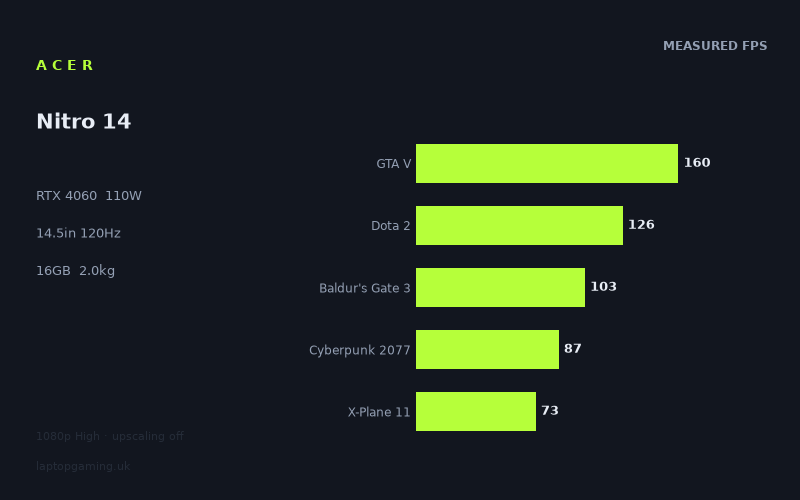
Frame rates
1920×1080, High preset, upscaling off. Averages 109fps across the 5 core benchmark games.
Measured on this machine. Source: Notebookcheck, 2024-09-04.
Not scored: no confirmed UK price
We have the full benchmark suite for this machine, so it ranks on the frame rate leaderboard like any other. What we don't have is a UK listing for this exact configuration - it's sold as a European review unit, or only in specifications that differ from the one tested. Since 30% of our score is value for money, scoring it would mean pretending price is no object, which would flatter it against every laptop you can actually buy. The frame rates below are real and comparable; there is just no buying recommendation to make yet.
How these numbers were produced
Frame rates here are not measured by us, and we label how each one was arrived at. A figure marked measured comes from a published run on that exact machine. A figure marked representative is derived from the GPU and its power limit (TGP) and cross-referenced against published reviews - a sound estimate of what that configuration delivers, but not a measurement of that specific laptop. Unless stated otherwise, numbers are 1920x1080, High preset, upscaling off. Where a laptop ships in several power configurations we use the wattage of the exact SKU listed, because a 140W RTX 5070 and a 115W one are not the same product.
In use
The short version
The Acer Nitro 14 (AN14-41-R3MX) is a mainstream gaming laptop that has done something slightly unusual: it has shrunk. Most machines with an RTX 4060 are 15.6in or 16in and weigh well over two kilograms. This one is 14.5in and 1.983kg, which puts it in a category that barely existed a few years ago — a gaming laptop light enough to carry every day without planning around it.
The specification that matters most is not the GPU model but the number attached to it. This is an RTX 4060 running at a 110W power limit, and that figure does more to determine the machine's performance than the model name does. Notebookcheck's measurements, taken at 1920x1080 on High presets with upscaling off, run from 222fps in Strange Brigade down to 48fps in Black Myth: Wukong, with the five games in our scoring suite averaging 110fps. Those are solid mainstream numbers, and the 110W allocation is why.
The compromises are elsewhere, and they are the sort that show up in daily use rather than in a benchmark chart. 16GB of memory is now the floor rather than a comfortable amount. 512GB of storage is genuinely small for a gaming machine in 2026, and it is the specification most likely to annoy you every week. And the Ryzen 5 8645HS is a mid-tier processor whose limits are visible in the measured data, most obviously in X-Plane 11.
Buy it if portability is a real requirement rather than a nice-to-have, if you play at 1080p or with upscaling at the panel's native resolution, and if you are prepared to either live with a small drive or add storage. Buy something else if your games are heavy on the processor, if you need a large game library resident, or if the machine will live on a desk anyway — in which case a larger chassis will give you more for the same money.
We have no confirmed UK price for this exact configuration, so it carries no overall score. Nothing is wrong with the machine — the benchmark suite is complete and it ranks normally on our frame rate leaderboard. Value is 30% of our score, we cannot compute it without a verified price, and we are not going to speculate about what it costs.
Performance
What 110W actually means
Start here, because the power limit is the most underrated specification in laptop graphics and this is one of the few machines where we have the figure.
A mobile GPU is not a fixed product. The same silicon can be configured across a wide range of sustained power, and the difference between the bottom and the top of that range is not marginal — it is the difference between two products that share a name. A card given very little power runs at low clock speeds under sustained load and delivers a fraction of what the same chip does when it is allowed to stretch. Manufacturers rarely put the number on the box, which is why two laptops with identical GPU names can differ by a large margin in the same game.
110W is a generous allocation for an RTX 4060. It is near the top of the range the part is offered in, and in a 14.5in chassis it is a notably aggressive choice, because smaller machines usually configure their GPUs conservatively to keep thermals manageable. Acer have gone the other way, and the measured results reflect it: this laptop performs like a well-fed 4060 rather than a strangled one.
You can see how much this matters by looking at the comparison list further down. The MSI GS76 Stealth on that list carries an RTX 3080 at 95W — a flagship chip of its generation, restricted — and averages level with this machine across six shared games. That is the clearest possible demonstration that the tier on the sticker means less than the watts behind it. A restricted flagship and a well-supplied mid-range card end up in the same place.
The top: 222fps, 172fps, 160fps
Strange Brigade at 222fps is the highest figure and the least useful for predicting real-world experience. It is an old, extremely well-optimised title with a low-level API path that flatters every graphics card it touches. Its function in a benchmark suite is diagnostic: 222fps says the GPU is being given adequate power and nothing in the system is choking it. That is worth knowing, and it confirms the 110W point above, but it will not affect your Tuesday evening.
F1 24 at 172fps is the most immediately practical number at the top of the ladder. Racing games benefit from high frame rates more directly than almost any other genre, because your input is continuous and your feedback loop is tight. 172fps at 1080p High with no upscaling means this machine runs a modern racing title well past the point where more frames improve the experience. If sim racing is a significant part of what you play, this figure and the 120Hz panel are the two facts to weigh.
GTA V at 160fps is a strong result for an old, single-thread-dependent engine, and it is one of the two numbers that tell you about the processor rather than the graphics card.
Dota 2 at 126fps — and the ordering that tells you something
Dota 2 at 126fps is worth examining because of where it sits relative to GTA V. On most gaming laptops, Dota 2 is comfortably the faster of the two: its renderer is trivial at 1080p High and machines with strong processors post very large numbers in it. Here it lands 34fps behind GTA V.
Both titles are limited by the processor rather than the graphics card, but they stress it differently — Dota 2 leans on draw call throughput and simulation, GTA V on raw single-thread speed in a narrower path. When a machine's Dota 2 figure falls below its GTA V figure, it usually indicates a processor that runs out of headroom in the more demanding of the two workloads.
That fits the Ryzen 5 8645HS: a mid-tier mainstream mobile chip, not one of the HX-class parts derived from desktop silicon that appear in larger gaming laptops. 126fps in Dota 2 is a perfectly usable frame rate — you will not notice a problem playing it — but as a hardware measurement it is modest, and it is the first hint of a pattern that the next number confirms.
X-Plane 11 at 73fps — the clearest limit in the set
This is the most informative single number on the page for anyone whose games depend on the processor. X-Plane 11 at 73fps is the second-lowest result in the entire set, beaten to the bottom only by a game with vastly heavier graphics demands.
X-Plane is close to a pure single-thread CPU benchmark dressed as a flight simulator. Past a modest threshold the graphics card stops being the deciding factor and processor throughput takes over completely. A machine that produces 222fps in Strange Brigade and 73fps in X-Plane is telling you, unambiguously, that its graphics card is comfortably ahead of its processor.
Is 73fps bad? In absolute terms, no — it is a comfortable frame rate for flight simulation, a genre where enthusiasts routinely fly happily at half that and where scenery detail matters more than speed. But it establishes a ceiling, and ceilings set by the processor cannot be raised by lowering settings. If you fly, or play grand strategy, or build large cities, or run anything where the frame rate collapses because of what the game is thinking rather than what it is drawing, this is the number to plan around.
The graphics-limited middle: 111fps, 106fps, 103fps, 87fps
Four results in the middle of the ladder are genuine tests of the 4060 at 110W, and collectively they define what this machine is for.
Far Cry 5 at 111fps is an older open-world title with a mature engine, running comfortably clear of the panel's refresh rate.
Final Fantasy XV at 106fps is a heavier graphical load with dense post-processing and effects work. Triple-digit performance means the card is doing real work at a comfortable pace.
Baldur's Gate 3 at 103fps is probably the most representative figure in the whole set, because it is a game an enormous number of people actually have installed. It mixes a moderate renderer with a demanding simulation in its busiest areas, and 103fps means neither half of the machine is under strain.
Cyberpunk 2077 at 87fps is the industry's default yardstick and a good result for this class of hardware. The High preset is a rasterised load without the ray tracing modes that flatten mid-range cards, and 87fps at 1080p means real headroom: enough to raise settings, move towards native resolution, or hold a stable 60fps with a substantial buffer.
Taken together, these four say the same thing: for established modern games at 1080p, this machine is comfortably capable. Anything with a comparable rendering cost will land in the same territory, and the 110W power allocation is why these numbers are where they are rather than fifteen per cent lower.
Black Myth: Wukong at 48fps — the modern reality check
From 87fps in Cyberpunk to 48fps in Black Myth: Wukong is a drop of nearly half, and it is the most important figure in this data set for anyone deciding whether to buy.
Wukong is built on a current-generation engine with expensive lighting, dense geometry and effects work that assumes considerably more hardware than a 2023-era mid-range laptop card. At 1080p High with no upscaling, 48fps is below the threshold most people consider comfortable. It runs, and you could finish the game, but it is not a smooth experience by the standards the rest of this list sets.
The reason to take this seriously is not the game itself — you may have no interest in it — but what it represents. It is the newest heavy title in the measured set and it produces the worst result by a wide margin. That ordering is not a coincidence. The cost of rendering a frame has risen sharply in the last two years, driven by more ray tracing work, larger texture pools and engines that assume more graphics memory than mid-range cards carry. Every game that follows that direction will land closer to 48fps than to 87fps on this machine.
There is a genuine mitigation and it should be stated fairly: these figures are measured with upscaling off, which is correct methodology for comparing hardware and is not how most people play. Enabling upscaling would lift that 48fps substantially, and in a fast-moving action game the reconstruction artefacts are less objectionable than they would be in a slower-paced title. Upscaling is the standard answer at this hardware tier and it is a legitimate one. It is just worth understanding that you will be using it, rather than discovering that you have to.
Where the spread comes from
222fps down to 48fps across ten games sorts almost perfectly by what limits each frame. At the very top are old, cheap-to-render titles where nothing is in the way. In the upper-middle are older engines limited partly by the processor. In the middle are conventional rasterised modern loads, where a 4060 at 110W is a solid card and behaves like one. At the bottom, separated by a large gap, is the one genuinely current heavy release.
And running through the whole thing, visible in X-Plane 11 and Dota 2, is a processor that is adequate rather than strong. If you can locate your own five most-played games on that ladder, you already know what this machine will do for you.
16GB and 512GB — the specifications that will actually bother you
Neither of these appears in a frame rate chart and both will affect your ownership more than a five-frame difference in Cyberpunk would.
16GB of system memory is now the floor rather than a comfortable allocation. Modern games that reserve a large share of it leave little for the operating system, background applications and whatever else you have open. It works, and it is what the overwhelming majority of mainstream gaming laptops ship with, but it is not a configuration with room to spare, and it is worth checking whether this chassis allows an upgrade before you buy if that matters to you.
512GB of storage is the more serious constraint, and it is the one to think hardest about. A single large modern installation can consume a substantial fraction of that drive. Two or three of them, plus the operating system and the usual accumulation of applications, and you are managing space constantly — uninstalling one game to play another, re-downloading it a fortnight later. That cycle is genuinely tiresome and it is the single most likely source of daily irritation with this machine.
It is also, usually, the cheapest thing to fix. Gaming laptops commonly have an accessible drive slot and adding capacity is far less expensive than buying a higher configuration outright. We cannot confirm the internal layout of this specific model from the data we have, so treat that as a question to answer before purchase rather than an assumption — but if the answer is yes, this constraint becomes a minor one, and if it is no, it is a significant mark against the machine.
The screen
14.5in, 2560x1600, 120Hz, IPS
This is a well-matched panel for the hardware, and the restraint is worth noting because it is rarer than it should be.
14.5in at 16:10 is a small screen by gaming laptop standards, and that is the whole point of this machine. The 16:10 aspect ratio recovers some of the vertical space that a 14in 16:9 panel would lose, which helps meaningfully with anything that has a user interface — strategy games, RPG inventories, documents, code. It is still a small display, and if this laptop is going to sit on a desk permanently, you will want an external monitor.
2560x1600 on a 14.5in panel is a high pixel density, and that has a specific and underappreciated benefit here: upscaling looks better on dense displays. The reconstruction artefacts that are visible on a large, low-density screen are much harder to see when the pixels are small. Given that this machine will be running modern games with upscaling enabled, the panel choice works in its favour rather than against it.
120Hz is an honest refresh rate rather than a spec-sheet number. Compare it against what the machine produces: Strange Brigade at 222fps, F1 24 at 172fps, GTA V at 160fps and Dota 2 at 126fps exceed it. Far Cry 5 at 111fps, Final Fantasy XV at 106fps, Baldur's Gate 3 at 103fps, Cyberpunk 2077 at 87fps, X-Plane 11 at 73fps and Black Myth: Wukong at 48fps do not.
Four of ten above, six below, is a sensible balance. Manufacturers routinely fit 165Hz or 240Hz panels to machines that never approach those figures in anything you would actually play; specifying 120Hz here means the money went into the resolution and the chassis instead. For a portable machine at this GPU tier, that is the right call.
Native resolution versus the measured resolution
Every frame rate above was measured at 1920x1080. The panel is 2560x1600, which is just under twice as many pixels. That gap has very different consequences depending on which result you are looking at.
In the processor-limited titles — X-Plane 11, Dota 2, GTA V — moving to native resolution costs relatively little, because pixel count was never what held them back. In the graphics-limited titles — Cyberpunk 2077, Final Fantasy XV, Black Myth: Wukong — it costs a great deal, and it costs most in the game that was already slowest.
We have no measured native-resolution figures and we are not going to invent any. The practical conclusion does not need them: this is a laptop you will run with upscaling enabled at native resolution in anything demanding. That is not a flaw specific to this machine; it is the standard arrangement at this GPU tier and it is what the technology exists for. The high pixel density mentioned above means it will hold up well. But if you object to upscaling on principle, you want a stronger graphics card, and a stronger graphics card is not available in a 1.983kg chassis at this level of the market.
IPS, and what is not measured
The panel is IPS rather than OLED, which means good viewing angles and no risk of permanent image retention from static interface elements over years of ownership, at the cost of contrast and true blacks. On a machine at this price point that is both the sensible and the safe choice — OLED costs money that has gone into the GPU power allocation and the chassis instead.
We have no measured figures for this specific panel's brightness, colour gamut, contrast ratio or response time, so we will not characterise them. Brightness in particular is worth checking from a source that has measured it, because a genuinely portable laptop gets used in variable lighting far more than a desk machine does.
Build, size and portability
1.983kg is the number that defines this laptop, and getting under two kilograms with a 110W GPU allocation is a genuine achievement rather than a marketing rounding. Most machines with this class of graphics card sit comfortably above 2.2kg, and 17in configurations are heavier again. Two kilograms is a real psychological and practical threshold: below it, a laptop is something you put in a bag without thinking; above it, it is something you plan a journey around.
Combined with the 14.5in footprint, this is a machine that fits in bags a 16in laptop does not, works on the fold-down table of a train, and can plausibly be a daily-carry computer that also plays games. That is a genuinely different proposition from most gaming laptops, and it is the main reason to choose this one.
The qualification is the power supply. A laptop feeding a 110W GPU under load needs a substantial charger, and the realistic travelling weight is higher than 1.983kg. For the common pattern — carry it out for work, plug it in at home to game — that is manageable. For gaming away from a desk regularly, you carry both, and the portability advantage narrows.
76Wh, and why it looks promising here
A 76Wh battery is a good capacity for a machine of this size, and more importantly it is paired with an efficiency-oriented mainstream processor rather than a power-hungry HX-class part. That combination is the most favourable in its class for time away from a socket, and it is one of the few places where the Ryzen 5 8645HS is an advantage rather than a compromise: a faster processor would post better numbers in X-Plane 11 and Dota 2, and would give you less unplugged time.
We have no measured runtime figures for this machine and we are not going to put a number on it. What holds generally is that gaming on battery is a compromised experience on any laptop of this type, because the GPU is power-limited when unplugged and every frame rate above is a mains-powered figure. The useful battery question for a portable gaming laptop is about light use — browsing, documents, lectures, video — and 76Wh with an efficient processor is the right shape of answer to it. If unplugged runtime is central to your purchase, find a source that has measured it directly.
Thermals and noise: not measured, but worth thinking about
We have no temperature or noise data for this laptop and we will not estimate any. The structural observation is straightforward and cuts against the machine: 110W is an aggressive GPU power allocation for a 14.5in chassis. A smaller body has less internal volume for heatsinks, less surface area to shed heat, and less room for large fans that can move air quietly. Getting rid of that much heat from a body this size requires either very good engineering or fans that work hard.
Which of those Acer have delivered, we cannot say from this data. But it is the single specification combination most likely to produce an unpleasant surprise, and if fan noise matters to you, it is worth seeking out measured acoustic figures before buying rather than after.
How it compares
Our comparisons only use games both machines have actually been measured in. All five rivals here come out level with this machine. That is not a coincidence and it is not a claim that all five laptops are identical — it is a consequence of which games they share, and the pattern is worth unpacking because it contains one genuinely useful finding.
MSI GS76 Stealth (RTX 3080 at 95W) — level across 6 shared games
Read this row first, because it teaches the most.
The RTX 3080 was the top of its generation's mobile stack — a flagship part in the machines that carried it properly. In the GS76 Stealth it is allocated 95W, which is a restrictive figure for a chip of that class, chosen to fit a thin 17in chassis. Across six shared games it averages level with this machine's 4060 at 110W.
That is the whole argument about power limits in one line. A flagship GPU held to 95W and a mid-range GPU given 110W end up in the same place. If you take one thing from this review into your next laptop purchase, make it this: the GPU model on the box tells you less than the sustained power behind it, and a manufacturer that publishes the wattage is doing you a favour.
The GS76 Stealth has no confirmed UK price in our database, so there is no value comparison available.
Acer Nitro V 16 AI (RTX 5050 at 115W) — level across 7 shared games
The broadest shared set on the list, at seven games, and a dead heat against a current-generation entry-level card running at 115W.
This comparison is useful in a different way: it puts a number on generational progress at the bottom of the stack. A current-generation entry card at 115W does what a previous-generation mid-range card at 110W does. That is roughly what you would expect — each generation, the tier below inherits the previous tier's performance — and it is a helpful sanity check when you are looking at a new machine with a 5050 and wondering whether it is enough.
For a buyer choosing between these two Acer machines specifically, the frame rates will not decide it. Screen size, weight, storage, memory and price will. The Nitro V 16 AI is the larger machine with the bigger display; this is the one you can carry.
Medion Erazer Scout 17 E1 (RTX 5050) — level across 7 shared games
The second seven-game comparison, against another current-generation entry card, with the same result. We do not have a stated power limit for the Medion's GPU, which is exactly the gap the GS76 comparison above shows to be important.
The Scout 17 is a 17in machine, which makes it a fundamentally different object — a desk laptop with a big screen rather than something you carry. If the two are producing the same frame rates, the choice between them is entirely about form factor, and that is a much easier decision to make than a performance one.
Gigabyte G5 KE (RTX 3060 at 95W) — level across 6 shared games
A two-generation-old mid-range card at 95W, level across six shared games. This is the row that most clearly demonstrates the limitation of shared-game comparisons: those six titles are weighted towards the older end of the ladder, where neither machine's graphics card is working hard.
Do not read this as evidence that a 3060 machine is as good as this one. Look instead at Black Myth: Wukong at 48fps and ask what a 95W 3060 would produce there. The older titles do not separate these machines; the newer ones would.
Acer Nitro 16 (RTX 4070 at 140W) — level across 6 shared games
The most surprising row and the one that deserves the most scepticism. A machine from the same family, one GPU tier up, with a 140W power allocation — 30W more than this one — and it averages level across six shared games.
A 4070 at 140W should be clearly faster than a 4060 at 110W in any genuinely GPU-bound test. That it is not, here, tells you those six games are not GPU-bound. They are limited by the processor, by engine caps, or simply by being old enough that both cards finish early and wait.
For someone choosing within Acer's own range, this is genuinely useful information with an important asterisk. In established titles at 1080p, the Nitro 16's stronger GPU buys you nothing measurable, and you should choose on size, screen, storage and price. In heavier modern games — the Wukong end of this machine's ladder — the extra tier and the extra 30W would matter, and this comparison is not measuring it.
Reading the table honestly
Five rivals, five dead heats, spanning an RTX 3060, an RTX 3080, two RTX 5050s and an RTX 4070, at power limits from 95W to 140W. Nobody should conclude that all of these machines perform identically. The correct conclusion is that the games these laptops share are established titles that do not separate mid-range hardware at 1080p.
Where the comparison does earn its keep is in the power-limit lesson. Three of the five rows include a stated wattage, and the pattern across them — a restricted flagship level with a well-fed mid-ranger, a tier-up card at 140W showing no advantage — is a far more useful guide to how laptop GPUs actually behave than any tier ranking.
Who it's for
The person who genuinely needs to carry it. This is the clearest fit and the machine's real reason to exist. 1.983kg and a 14.5in footprint means a gaming laptop that goes to lectures, offices, trains and hotel rooms without being a burden. If the laptop is going to move most days, this is a category that very few machines with this much GPU power compete in.
The 1080p player with a broad, established library. Cyberpunk 2077 at 87fps, Baldur's Gate 3 at 103fps and Final Fantasy XV at 106fps set a comfortable floor for modern rasterised games. If your backlog is a few years deep, this machine clears it with room to spare.
The racing and action player. F1 24 at 172fps is a genuinely strong result, and the 120Hz panel is well matched to it. Fast-paced games with moderate rendering costs are where this configuration is at its best.
Someone who values a well-configured GPU over a bigger badge. 110W in a 14.5in chassis is Acer choosing performance over conservatism, and the comparison table shows what that is worth. If you have been burned before by a laptop whose GPU name promised more than it delivered, this is the opposite situation.
Who should buy something else
Anyone whose games lean on the processor. X-Plane 11 at 73fps and Dota 2 at 126fps are the two clearest signals in the data, and both point the same way: the Ryzen 5 8645HS is the weaker half of this machine. Flight simulation, grand strategy, large-scale city building, factory games and high-refresh competitive shooters all have their frame rates set by the CPU, and no settings change will lift them. If that describes your library, look at a machine with an HX-class processor even if it costs you portability.
Anyone buying for current heavy releases. Black Myth: Wukong at 48fps at 1080p High is the warning, and it is the newest heavy game in the set. Games built on current engines cost far more per frame than the older titles that dominate this benchmark list, and a previous-generation mid-range card is not where you want to be if that is your priority. You will be using upscaling constantly, and in the heaviest titles that will still not be enough for a high frame rate.
Anyone who is not going to carry it. If the laptop lives on a desk, the 14.5in screen and 1.983kg are costs you are paying for nothing. A 16in machine at the same price will typically give you a larger display, more storage, better cooling headroom and often a stronger configuration. Portability is this laptop's whole argument, and if you do not need it, the argument does not apply to you.
Anyone who needs a large game library installed. 512GB is genuinely small in 2026 and will require active management from the first month. If the drive can be upgraded, this becomes a minor and cheap fix; confirm that before buying. If it cannot, this is a significant limitation on a machine you intend to keep for years.
Anyone sensitive to fan noise. We have no measured acoustic data, but a 110W GPU allocation in a 14.5in body is the specification combination most likely to produce a loud machine. That is not a finding, it is a risk, and it is worth checking against a source that has measured it before you commit.
The verdict, restated
The Nitro 14 is a machine built around one decision — put a properly powered GPU in a body small enough to carry — and it delivers on it. The 110W allocation is why the middle of this benchmark ladder looks as good as it does, and the sub-two-kilogram weight is why the machine exists at all. Those two facts together define a genuinely useful product for a specific person.
The compromises are all elsewhere, and they are consistent with a machine built to a price: a mid-tier processor whose limits show in the CPU-bound titles, 16GB of memory that is the current floor rather than comfortable, and 512GB of storage that will need managing or upgrading. None of those is hidden and none is unusual at this level of the market, but together they mean this is a laptop you buy for what it enables — portability — rather than for what it maximises.
Whether it is good value we cannot tell you, because we have no confirmed UK price for this configuration. In a market segment where machines are separated more by price than by frame rates, that is the most important missing piece, and we would rather say so than fill it with a guess.