Details
Product prices and availability are accurate as of the date/time indicated and are subject to change. Any price and availability information displayed on Amazon.co.uk at the time of purchase will apply to the purchase of this product.Review
Maingear ML-16 MK2 review
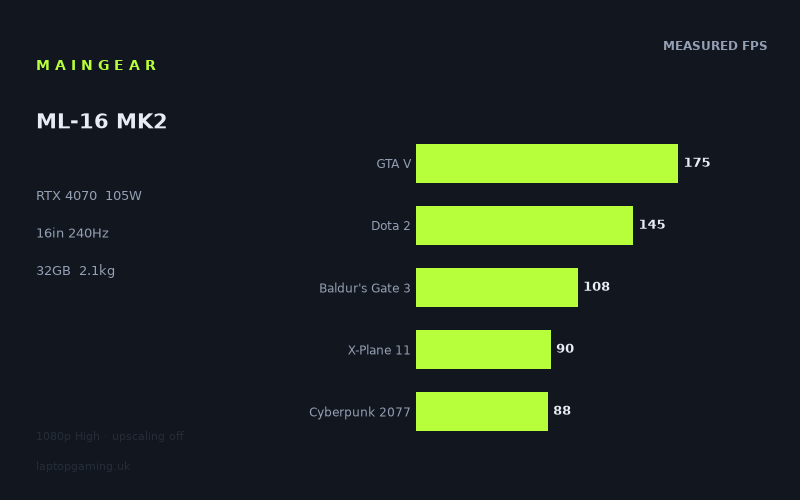
Frame rates
1920×1080, High preset, upscaling off. Averages 121fps across the 5 core benchmark games.
Measured on this machine. Source: Notebookcheck, 2024-09-19.
Not scored: no confirmed UK price
We have the full benchmark suite for this machine, so it ranks on the frame rate leaderboard like any other. What we don't have is a UK listing for this exact configuration - it's sold as a European review unit, or only in specifications that differ from the one tested. Since 30% of our score is value for money, scoring it would mean pretending price is no object, which would flatter it against every laptop you can actually buy. The frame rates below are real and comparable; there is just no buying recommendation to make yet.
How these numbers were produced
Frame rates here are not measured by us, and we label how each one was arrived at. A figure marked measured comes from a published run on that exact machine. A figure marked representative is derived from the GPU and its power limit (TGP) and cross-referenced against published reviews - a sound estimate of what that configuration delivers, but not a measurement of that specific laptop. Unless stated otherwise, numbers are 1920x1080, High preset, upscaling off. Where a laptop ships in several power configurations we use the wattage of the exact SKU listed, because a 140W RTX 5070 and a 115W one are not the same product.
In use
The short version
The Maingear ML-16 MK2 is a performance-led 16in gaming laptop built around an RTX 4070 running at a 105W GPU power limit, a Core Ultra 7 155H processor and 32GB of memory. The published Notebookcheck benchmark data shows a machine that is fast in a broad range of games at 1920x1080 using High settings with upscaling disabled, but its results also make clear that a 240Hz screen is more aspirational than consistently usable in demanding modern games.
That does not make the screen a mistake. A 240Hz panel still has a purpose when playing games such as Strange Brigade, F1 22 and GTA V, where the measured figures reach 224fps, 206fps and 175fps respectively. It also gives the laptop room for lighter games, older games and competitive titles that are not represented in the supplied benchmark list. But buyers should not read “RTX 4070” and “240Hz” as a promise of 240fps in every game. Notebookcheck’s numbers show that the ML-16 MK2 is nowhere near that figure in Cyberpunk 2077 at High settings, where it records 88fps, nor in X-Plane 11 at 90fps.
The most useful way to view this laptop is as a strong all-round gaming system with enough performance for high-refresh play in favourable titles and a much more conventional high-settings experience in heavier games. Across the five-game scoring-suite sample, the mean result is 121fps. That is a good level of performance for a laptop intended to play current games smoothly, but it is not the same as a machine that can saturate a 240Hz panel in everything. The spread from 224fps in Strange Brigade to 88fps in Cyberpunk 2077 is too wide for a single number to describe the experience properly.
The ML-16 MK2 is particularly interesting for buyers who want an RTX 4070 laptop without stepping into the weight class of some very large desktop-replacement machines. At 2.109kg, it is not an ultra-light 16in laptop, but neither is it defined solely by being stationary. Its 80Wh battery is a substantial specification on paper, although there is no measured battery-life figure in the supplied data and no useful claim should be made about how long it lasts away from mains power.
The key uncertainty is UK pricing. There is no confirmed UK price for this exact configuration, so an overall rating cannot be calculated. That is a pricing-data limitation rather than a benchmark limitation: the benchmark suite is complete and the ML-16 MK2 has normal placement on the frame-rate leaderboard. It does mean that buyers should judge the machine first on its measured performance and specifications, then compare the actual retailer price carefully when one is available.
Buy the ML-16 MK2 if you want a 16in laptop with a fast IPS display, 32GB of memory, an RTX 4070 and measured game performance that is usually well beyond 60fps at 1080p High without upscaling. It is a sensible fit for someone whose games range from very fast competitive or older titles through to modern single-player releases, provided they understand that those categories place very different demands on the hardware.
Do not choose it purely because the display is rated at 240Hz. The published numbers support the panel’s refresh rate in a few games, approach it in others, and fall well short in the most demanding results here. Nor is this the laptop to buy on the assumption that an RTX 4070 badge guarantees a fixed level of performance irrespective of power limit. The ML-16 MK2’s 105W setting is part of its identity. It is a real RTX 4070 configuration, but laptop GPU names do not tell the whole story without the power limit and benchmark data alongside them.
Performance
The benchmark picture is broad, not uniform
Notebookcheck measured the Maingear ML-16 MK2 at 1920x1080, using High presets and with upscaling disabled. That test method matters. These are native-rendering results rather than figures boosted by an upscaling mode, and High settings are demanding enough to show meaningful differences between games. They should not be treated as a prediction of performance at the laptop’s native 2560x1600 resolution, which has substantially more pixels to render than 1920x1080.
At the fast end of the results, Strange Brigade reaches 224fps and F1 22 reaches 206fps. These are the only two measured games that get close to the 240Hz display’s maximum refresh rate. Neither quite reaches 240fps, but both are close enough that the 240Hz panel is relevant rather than merely decorative. In these games, the ML-16 MK2 is delivering the sort of very high frame rate buyers expect from a gaming laptop with a high-refresh display.
GTA V follows at 175fps. That is clearly below 240fps, yet it is still a very high result and gives the screen considerable scope to show more motion updates than a conventional 60Hz display. It is also a reminder that a screen does not need to be fully saturated to be useful. A 175fps result does not become poor simply because the panel can refresh at 240Hz. The more important point is that the laptop has enough performance in GTA V to operate well into high-refresh territory.
Dota 2 records 145fps. Again, this is far short of 240fps, but it remains a strong figure. The distinction is important because buyers looking at a 240Hz laptop often have two different expectations. One is that games will run smoothly, which 145fps readily supports. The other is that every game will match the panel’s maximum refresh rate, which this result does not support. The ML-16 MK2 can offer a fast experience in Dota 2 without necessarily turning the 240Hz specification into a constant 240fps reality.
Far Cry 5 reaches 125fps, while Tiny Tina’s Wonderlands reaches 119fps. These are close enough to one another to form a useful middle band for the ML-16 MK2. At 1080p High without upscaling, this is the part of the benchmark list that most closely reflects the machine’s five-game mean of 121fps. It is performance that suits a high-refresh screen in the broad sense: frame rates are well above 60fps and noticeably below the screen’s ceiling.
Final Fantasy XV is measured at 111fps and Baldur’s Gate 3 at 108fps. These are still three-figure results, and they reinforce the impression of the ML-16 MK2 as a laptop that can maintain high frame rates across varied game types. But they also show why the “240Hz RTX 4070 laptop” shorthand is not enough. A buyer who wants a stable 240fps target in every game would need to look beyond the headline screen specification and focus on game-by-game evidence. In these two titles, the laptop is much closer to a 100fps-class machine than a 240fps-class one.
X-Plane 11 at 90fps and Cyberpunk 2077 at 88fps sit at the bottom of the supplied results. Neither figure is alarming in isolation. Both remain above 60fps at the stated settings, and both are published at High settings without upscaling. What they do show is the limit of trying to describe performance with one broad label. The same ML-16 MK2 that reaches 224fps in Strange Brigade records 88fps in Cyberpunk 2077. That gap is not evidence that the laptop is inconsistent or defective. It is evidence that games have very different demands and that a GPU’s practical value changes with the title being played.
The measured range runs from 88fps to 224fps. That is a difference of 136fps between the slowest and fastest result in the list. The laptop’s mean of 121fps across the five scoring-suite games is useful as a shorthand, but it cannot tell a buyer whether their own preferred game sits nearer 88fps, 121fps or 224fps. The individual game results are therefore more useful than the average when deciding whether the ML-16 MK2 suits a particular library.
What the 105W RTX 4070 means in practice
The RTX 4070 name matters, but the 105W GPU power limit matters too. Laptop GPUs are not defined solely by the product name printed on the specification sheet. Power limits are part of the configuration, and the ML-16 MK2’s measured results should be read as evidence for this particular RTX 4070 at 105W, paired with the Core Ultra 7 155H and 32GB of memory.
The practical lesson is simple: do not compare this laptop with every other RTX 4070 laptop as if they are guaranteed to perform identically. The direct comparison data supplied here demonstrates why. Against the HP Omen 17-db0079ng, another RTX 4070 machine from the same generation, the ML-16 MK2 averages only 1fps ahead across four shared games. That is effectively a tie in the available shared-game data. It tells us that, in that limited comparison, the two machines deliver very similar results rather than establishing one as meaningfully faster.
Equally, the ML-16 MK2 is only 1fps ahead of the Gigabyte G5 KF5 across five shared games, despite the Gigabyte carrying an RTX 4060 at 75W. That near-zero difference is a real result, but it should not be misunderstood as proof that an RTX 4060 at 75W is generally equivalent to every RTX 4070 configuration. The supplied comparison explains the likely reason for the compressed gap: at 1080p, lighter titles in the shared set can become CPU-bound and reduce the visible separation between GPUs. Once the processor or another part of the system becomes the limiting factor, extra GPU capability does not necessarily translate into a proportionate frame-rate lead.
This is exactly why the ML-16 MK2 should be assessed by its own measured figures rather than by GPU branding alone. Its 105W RTX 4070 produces 224fps in Strange Brigade, 206fps in F1 22 and 175fps in GTA V, but it produces 90fps in X-Plane 11 and 88fps in Cyberpunk 2077. In other words, the GPU power limit is important, but it is not the only determinant of a game’s final frame rate. The title, settings, resolution and wider system demands all matter.
The Core Ultra 7 155H and 32GB of memory provide the rest of the named performance platform. The benchmark data does not isolate the processor or memory contribution, so it would be wrong to assign a specific portion of the results to either part. What can be said is that the published figures are from this complete configuration: Core Ultra 7 155H, 32GB memory and RTX 4070 at 105W. Buyers should avoid treating the GPU result as something that can be detached from the rest of the machine.
Comfortable performance versus panel-limited performance
There are several distinct performance tiers in the data.
- Near the display ceiling: Strange Brigade at 224fps and F1 22 at 206fps are close to the 240Hz panel’s refresh rate.
- Clearly high-refresh: GTA V at 175fps and Dota 2 at 145fps give the panel meaningful use without reaching 240fps.
- Strong three-figure gaming: Far Cry 5 at 125fps, Tiny Tina’s Wonderlands at 119fps, Final Fantasy XV at 111fps and Baldur’s Gate 3 at 108fps all sit above 100fps.
- Smooth but not high-refresh-maximising: X-Plane 11 at 90fps and Cyberpunk 2077 at 88fps remain above 60fps, but are much further from 240fps.
That division is more valuable than simply calling the ML-16 MK2 “fast”. It tells a prospective owner what sort of expectations to bring to each kind of game. In Strange Brigade and F1 22, the screen’s maximum refresh rate is close enough to the measured frame rate to be part of the experience. In Cyberpunk 2077 and X-Plane 11, the screen is still a high-quality specification in principle, but the measured performance does not come close to exploiting its full refresh range.
The middle group is arguably the most representative of what the ML-16 MK2 offers. A result around 108fps to 125fps is excellent for gaming, but it is not a reason to expect the display to operate at its 240Hz maximum. That is not a criticism of the laptop so much as a warning against buying on the wrong metric. If your priority is playing at High settings with upscaling disabled and getting well beyond 60fps in a varied library, the data is encouraging. If your priority is seeing 240fps in demanding games because the panel is 240Hz, the data is much less encouraging.
It is also worth separating a display’s maximum refresh rate from a performance target. A 240Hz panel does not require every game to reach 240fps to be worthwhile. It provides a high ceiling. The question for this laptop is how often the hardware gets close enough to that ceiling for it to matter. On the available figures, the answer is: in the lightest and fastest-performing games in the list, yes; across the middle of the list, partially; and in the heaviest results, no.
Why the results vary so much by game
The benchmark spread is the central performance story. The ML-16 MK2 does not have one frame rate; it has a set of results shaped by the workload. Strange Brigade, F1 22 and GTA V are the games in which it reaches 175fps or more. Dota 2 is lower at 145fps but still firmly in high-refresh territory. The remainder of the list falls in stages through 125fps, 119fps, 111fps, 108fps, 90fps and 88fps.
This is why a buyer should not make a decision solely from the five-game mean of 121fps. The average is useful because it provides a broad comparison point against other machines tested in overlapping games, but the individual titles show the range of likely outcomes. Someone mainly interested in games that behave more like Strange Brigade and F1 22 will have a very different experience from someone focused on games that behave more like Cyberpunk 2077 and X-Plane 11.
The supplied rival data also demonstrates another source of variation: 1080p results can become compressed in lighter shared games when the processor rather than the GPU limits frame rate. This matters because the ML-16 MK2’s 1fps lead over the Gigabyte G5 KF5 is not a meaningful sign that the machines have identical graphics capability. It is a sign that the shared set, at the stated resolution and settings, does not always expose a wide GPU difference. Buyers should be wary of reading any single comparison as a universal ranking.
At the same time, the ML-16 MK2’s 45fps average advantage over the RTX 4050-equipped MSI Thin GF63 across five shared games is large enough that the performance separation is unmistakable in the supplied data. The difference between the ML-16 MK2 and the Asus ROG Strix Scar 17 with RTX 4090 is also clear in the opposite direction: the Maingear averages 62fps behind across three shared games. These wider gaps frame the ML-16 MK2 accurately. It is substantially ahead of the lower-tier RTX 4050 rival in the shared data, while remaining well behind the RTX 4090 machine.
The screen
The ML-16 MK2 has a 16in IPS display with a 2560x1600 resolution and a 240Hz refresh rate. On specification alone, that is an appealing combination for someone who wants both a sharper-than-1080p workspace and a very high refresh ceiling for gaming. The 16in format sits between smaller portable gaming laptops and larger 17in systems, while the 2560x1600 resolution offers more desktop space than 1920x1080.
The limitation is not the display itself; it is the relationship between its native resolution and the benchmark data. Notebookcheck’s measured game figures are at 1920x1080, not 2560x1600. That means the supplied frame rates cannot be presented as native-resolution performance. There is no measured 2560x1600 result in the fact sheet, so no responsible review should invent one, estimate a percentage drop or promise a particular experience at the panel’s full resolution.
This is an especially important point for the ML-16 MK2 because its display is not a 1080p panel. A buyer considering the laptop for native-resolution gaming should understand that the 224fps Strange Brigade result, the 206fps F1 22 result and the 88fps Cyberpunk 2077 result were all measured at 1920x1080. They show what the system can do in the stated benchmark mode, not what it will necessarily do at 2560x1600.
There are two sensible ways to interpret the screen specification alongside the data. The first is as a high-refresh panel that can be particularly well matched to games where the ML-16 MK2 already produces very high frame rates at 1080p. Strange Brigade at 224fps and F1 22 at 206fps are clearly relevant to a 240Hz display. GTA V at 175fps is also high enough that a fast panel is not wasted.
The second is as a higher-resolution 16in panel that gives the owner flexibility, rather than a guarantee that every demanding game should be played at maximum refresh and full native resolution. The fact sheet does not provide any native-resolution game measurements, so the exact trade-off between resolution, settings and frame rate is unknown here. What the data does prove is that the system has a strong 1080p High baseline without upscaling.
The IPS panel type is another positive specification for buyers who do not want a gaming laptop display defined only by refresh rate. However, the supplied information does not include measured brightness, contrast, colour coverage, response-time data or any assessment of panel quality beyond its IPS type, resolution and refresh rate. Those are important display characteristics, but they are not available here. The safe conclusion is that the ML-16 MK2 has a high-resolution, high-refresh IPS panel; anything more specific would go beyond the provided facts.
For competitive players, the 240Hz figure should be treated as headroom. The ML-16 MK2 reaches close to that headroom in two of the listed games, runs substantially below it in many others, and falls much further behind in the two slowest results. For players who value smoothness over chasing a fixed 240fps number, the screen still makes sense because much of the benchmark list is above 100fps. For players whose sole aim is native 2560x1600 gaming at the panel’s maximum refresh rate in demanding titles, there is no supporting measurement in the supplied data.
Build, size and portability
The Maingear ML-16 MK2 weighs 2.109kg. That figure places it firmly in gaming-laptop territory rather than making it an unusually light 16in machine. It is still a specification worth considering for someone who expects to move the laptop between rooms, take it to work or study locations, or carry it on regular trips. A 2.109kg laptop can be transported, but buyers should be realistic about what that means alongside any charger and other accessories.
The more important point is that portability is not solely a weight question. The supplied fact sheet does not include the ML-16 MK2’s dimensions, thickness, charger size or measured battery life. There is therefore no basis for calling it slim, compact, bulky, travel-friendly or difficult to carry. The only defensible physical conclusion is that it is a 16in laptop weighing 2.109kg.
Its 80Wh battery is a notable part of the specification, but capacity is not the same thing as battery-life evidence. There is no published battery-life result in the supplied information, and the gaming benchmark figures do not tell us how long the laptop runs away from mains power. Buyers who need dependable all-day unplugged use should seek measured battery data before treating the 80Wh figure as a guarantee of endurance.
The same caution applies to build quality, keyboard quality, trackpad quality, port selection, acoustics and temperatures. None of those subjects is covered by the supplied facts. A review should not fill that gap with assumptions based on the brand, the weight, the GPU or the screen. The ML-16 MK2 may be judged here on its stated size class, weight, battery capacity and performance configuration, but not on unmeasured ownership impressions.
For practical buying purposes, the 2.109kg weight means the ML-16 MK2 is likely to suit someone who wants a single machine for a desk and occasional transport better than someone shopping specifically for the lightest possible laptop. The 16in screen and RTX 4070 configuration point towards a machine intended to do serious gaming work, while the weight stops it being automatically categorised as a stationary 17in-style desktop replacement. That is a balanced position, but buyers should not confuse “possible to carry” with “weightless to carry”.
How it compares
Against the MSI Thin GF63: a substantial lead over the RTX 4050 rival
Against the MSI Thin GF63 with RTX 4050 graphics, the ML-16 MK2 averages 45fps ahead across five shared games. That is the largest positive gap in the supplied rival set, and it is substantial enough to support a clear conclusion: in the available shared-game evidence, the Maingear is in a significantly higher performance class than the MSI.
The MSI has no confirmed UK price in the supplied data, so this cannot become a value comparison. There is no responsible basis for saying whether the Maingear is worth paying more for, because there is no confirmed price for either exact configuration. But if performance is the priority and the shared games resemble the buyer’s own library, the ML-16 MK2’s advantage is meaningful.
This comparison also helps put the RTX 4070 configuration into context. The Maingear’s 105W RTX 4070 is not merely producing a small uplift over the RTX 4050 machine. A 45fps average lead across five shared games is large enough to affect the type of frame-rate target a buyer can pursue. It is the difference between two laptops that should not be treated as interchangeable just because both belong to the same GPU generation.
Against the HP Omen 17-db0079ng: effectively level in the shared data
The ML-16 MK2 averages 1fps ahead of the HP Omen 17-db0079ng across four shared games. This is not a useful performance lead in practical terms. It is best understood as a tie within the available comparison rather than as evidence that the Maingear is materially faster.
That conclusion is useful because both machines use RTX 4070 graphics. The comparable result suggests that, in the four games they share, neither laptop establishes a meaningful gaming advantage. It does not prove that every setting, every resolution or every game will produce identical results. It simply says that the available shared-game data is essentially level.
The HP also has no confirmed UK price in the fact sheet, so price cannot break the tie. Buyers comparing these two machines would need to look beyond the supplied frame-rate difference and examine the actual configuration, availability and retailer pricing when known. On published performance alone, there is no compelling reason to choose one over the other based on a 1fps average gap.
Against the Gigabyte G5 KF5: a near-zero gap that needs context
The Gigabyte G5 KF5 uses an RTX 4060 at 75W, yet the ML-16 MK2 averages only 1fps ahead across five shared games. Taken at face value, that is another effective tie. It is also the comparison most likely to be misread if the explanation is ignored.
The supplied comparison notes that, at 1080p, lighter titles in the shared set can be CPU-bound and compress genuine GPU gaps. That means the near-zero result should not be used to claim that the ML-16 MK2’s RTX 4070 at 105W offers no advantage over the Gigabyte’s RTX 4060 at 75W. It means that these particular shared games, at this particular test resolution and in this comparison, do not show a wide average separation.
This is valuable evidence rather than inconvenient evidence. It demonstrates why buyers should not shop only by GPU tier or only by one average comparison. In lighter games, the graphics processor may not be the factor holding frame rate back. Under those conditions, extra GPU capability can remain underused, and the benchmark gap narrows. A laptop that looks clearly superior on one specification line can appear almost identical in a shared 1080p game sample.
The practical implication is that the Maingear’s own game list remains more useful than the 1fps comparison alone. It records 224fps in Strange Brigade, 206fps in F1 22, 175fps in GTA V and 145fps in Dota 2. Those figures show the kind of high-frame-rate performance the system can reach. The Gigabyte comparison says that the shared sample does not always separate the two GPUs clearly; it does not erase the ML-16 MK2’s wider benchmark record.
Against the Asus ROG Strix Scar 17: clearly behind the RTX 4090 machine
The Asus ROG Strix Scar 17 with RTX 4090 graphics is the machine that beats the ML-16 MK2 by the largest margin in the supplied comparison set. The Maingear averages 62fps behind across three shared games. Unlike the 1fps differences against the HP and Gigabyte, this is a clear and meaningful separation.
The Scar 17 is listed at £4,864. That is the only confirmed rival price supplied, but it should not be turned into a direct value verdict because the Maingear ML-16 MK2 has no confirmed UK price. Without a confirmed Maingear price, it is impossible to say whether its lower performance is accompanied by a proportionately lower cost.
What can be said is that the RTX 4090 Scar 17 is in a higher performance tier in the three games shared with the Maingear. A 62fps average deficit is large enough that buyers pursuing the highest possible frame rates should not expect the ML-16 MK2 to compete directly with it. The Maingear’s role is different: it offers an RTX 4070 at 105W in a 2.109kg 16in format, rather than matching the performance level demonstrated by the RTX 4090 rival.
This comparison gives useful perspective to the ML-16 MK2’s 121fps five-game mean. That is a strong result for a broadly capable gaming laptop, but the Asus comparison confirms that there remains a substantial performance ceiling above it. Buyers should decide whether their priority is the highest attainable frame rate or a more moderate 16in form factor with the measured performance shown here.
Who it’s for
The Maingear ML-16 MK2 is for buyers who want a well-specified 16in gaming laptop and who judge performance from published game data rather than GPU branding alone. The Core Ultra 7 155H, 32GB of memory, RTX 4070 at 105W, 2560x1600 IPS display and 240Hz refresh rate make it a serious configuration on paper. More importantly, Notebookcheck’s numbers show that it can deliver anything from 88fps to 224fps across the supplied 1080p High benchmarks without upscaling.
It is especially suitable for someone who plays a mix of games rather than only the most demanding releases. In Strange Brigade, F1 22, GTA V and Dota 2, the ML-16 MK2 produces high frame rates that make real use of the 240Hz screen’s capability. In Far Cry 5, Tiny Tina’s Wonderlands, Final Fantasy XV and Baldur’s Gate 3, it remains above 100fps. Those are strong results for a buyer whose goal is smooth high-settings gaming rather than a rigid requirement to reach 240fps in every title.
It also suits a buyer who wants 32GB of memory as part of the standard configuration. The fact sheet does not provide workload-specific memory testing, so no particular productivity claim should be attached to that capacity. Still, buyers who prefer not to start with a lower memory figure may see the supplied 32GB configuration as a practical advantage.
The ML-16 MK2 is a better fit for someone comfortable using the measured 1080p High results as a performance reference point. The data is complete for that benchmark mode and shows a convincing range of outcomes. It is not the right machine to buy on the assumption that those exact figures apply at 2560x1600, because they do not measure the laptop’s native screen resolution.
Buy something else if your primary target is 240fps in demanding games. The ML-16 MK2 gets near the panel limit in Strange Brigade and F1 22, but it does not reach that level in GTA V, Dota 2, Far Cry 5, Tiny Tina’s Wonderlands, Final Fantasy XV, Baldur’s Gate 3, X-Plane 11 or Cyberpunk 2077. Cyberpunk 2077 at 88fps and X-Plane 11 at 90fps are particularly clear evidence that demanding games can sit far below the display’s maximum refresh rate.
Buy something else if you want the highest performance among the listed machines and are prepared to consider the RTX 4090 class. The Asus ROG Strix Scar 17 is ahead by 62fps on average across three shared games. Its £4,864 price is confirmed, but the Maingear’s price is not, so this is a performance conclusion rather than a buying-value conclusion.
Buy something else if low weight is the overriding priority. At 2.109kg, the ML-16 MK2 is not an extreme portability-focused machine. It may be suitable for regular transport, but there is no dimensions, charger-weight or battery-life evidence here to support a stronger portability claim. Buyers who need the lightest possible laptop should compare physical specifications beyond the information available for this model.
Finally, wait for confirmed UK pricing before making a final purchase decision. The ML-16 MK2 has enough measured performance to be taken seriously, and its benchmark record is not in doubt. But without a confirmed UK price for this exact configuration, there is no way to make a proper value judgement. The right conclusion is not that the laptop is poor value or good value; it is that value remains unproven until the actual price is known.