Details
Product prices and availability are accurate as of the date/time indicated and are subject to change. Any price and availability information displayed on Amazon.co.uk at the time of purchase will apply to the purchase of this product.Review
Lenovo Legion 7 16 IRX G9 review
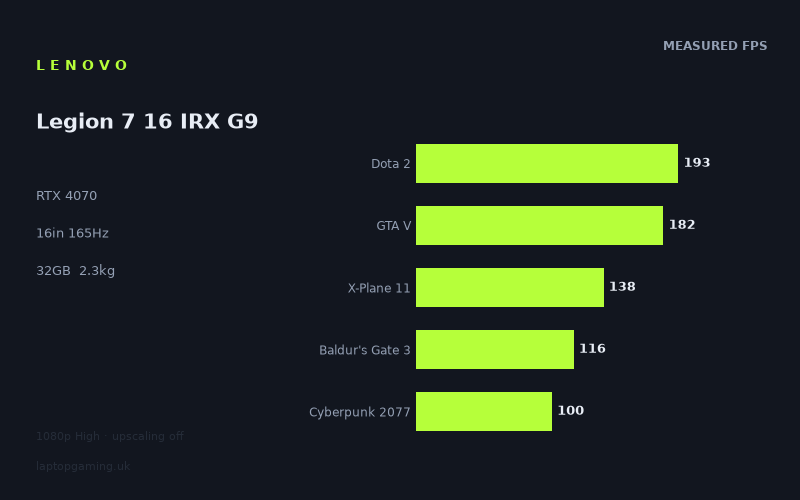
Frame rates
1920×1080, High preset, upscaling off. Averages 145fps across the 5 core benchmark games.
Measured on this machine. Source: Notebookcheck, 2024-04-16.
Not scored: no confirmed UK price
We have the full benchmark suite for this machine, so it ranks on the frame rate leaderboard like any other. What we don't have is a UK listing for this exact configuration - it's sold as a European review unit, or only in specifications that differ from the one tested. Since 30% of our score is value for money, scoring it would mean pretending price is no object, which would flatter it against every laptop you can actually buy. The frame rates below are real and comparable; there is just no buying recommendation to make yet.
How these numbers were produced
Frame rates here are not measured by us, and we label how each one was arrived at. A figure marked measured comes from a published run on that exact machine. A figure marked representative is derived from the GPU and its power limit (TGP) and cross-referenced against published reviews - a sound estimate of what that configuration delivers, but not a measurement of that specific laptop. Unless stated otherwise, numbers are 1920x1080, High preset, upscaling off. Where a laptop ships in several power configurations we use the wattage of the exact SKU listed, because a 140W RTX 5070 and a 115W one are not the same product.
In use
The short version
The Lenovo Legion 7 16 IRX G9 is a serious gaming laptop built around an RTX 4070, a Core i9-14900HX, 32GB of memory and a 16in 3200x2000 IPS display running at 165Hz. Notebookcheck’s measured results show that it is extremely fast in a wide range of games at 1920x1080 on the High preset with upscaling disabled. It is not merely capable of playing older or lighter games at high frame rates: it reaches well beyond 165fps in several titles, including Strange Brigade, The Witcher 3, F1 23, Dota 2 and GTA V.
That does not mean every game will fill the panel’s 165Hz refresh rate. The more demanding games in the results are a reminder that an RTX 4070 remains a mid-to-upper-tier GPU rather than an unlimited-performance part. Cyberpunk 2077 reaches 100fps in the published test, Horizon Forbidden West reaches 73fps, and Baldur’s Gate 3 reaches 116fps. Those are still strong results at the stated settings, but they are nowhere near the frame rates seen in lighter titles. Buyers should therefore think of this as a machine with enough performance for high-refresh competitive gaming and very good performance in demanding single-player games, rather than one that guarantees 165fps in every new blockbuster.
The important caveat is the screen. The measured figures are at 1920x1080, while the Legion’s screen is 3200x2000. The supplied benchmark data does not include native-resolution results, so it would be wrong to assume that the published frame rates carry over unchanged to the panel’s full resolution. They will not. A 3200x2000 display asks the GPU to render substantially more pixels than a 1920x1080 test, and the most demanding games will need sensible graphics settings, upscaling, a lower rendering resolution, or some combination of those choices if smooth performance is the priority.
This is not a criticism of the display. A 3200x2000, 165Hz IPS panel is a more ambitious screen than the GPU can fully exploit in every game at native resolution. That is normal for a laptop designed to do more than chase one benchmark setting. The extra resolution has obvious appeal for desktop work, media, image-heavy applications and games where detail matters more than extremely high frame rates. But someone buying primarily for native-resolution gaming in the toughest releases should set expectations accordingly: the published 1080p data is excellent, while native 3200x2000 performance has not been provided.
The other limitation is price. There is no confirmed UK price for this exact configuration, so its value cannot be judged responsibly. The benchmark suite is complete and the machine ranks normally on frame-rate performance, but value depends heavily on what Lenovo or retailers charge for this particular RTX 4070 configuration. There is no basis here for calling it a bargain, overpriced, or fairly priced.
Buy it if the appeal is a powerful 16in laptop with a high-resolution IPS screen, 32GB of memory, a 1TB SSD, a Core i9-14900HX and measured 1080p gaming performance that ranges from very strong to exceptional depending on the title. It looks particularly well suited to somebody who plays a mixture of competitive games, older AAA titles, strategy games, RPGs and demanding modern releases, and who is willing to adjust settings according to the game rather than expecting a single fixed preset to suit everything.
Do not buy it purely because the panel is 165Hz if your expectation is to see 165fps in every demanding game at its native 3200x2000 resolution. The available numbers do not support that claim. Nor is this the obvious choice for someone who wants the lightest possible machine: at 2.253kg, it is portable in the sense that it can travel, but it is not a casual carry-everywhere laptop.
Performance
What Notebookcheck’s figures show
Notebookcheck measured the Lenovo Legion 7 16 IRX G9 at 1920x1080, using the High preset with upscaling disabled. That matters. The results are useful because they show conventional rendering performance rather than a mixture of native performance and game-specific upscaling behaviour. They are also not direct evidence of what every game will do at 3200x2000, Ultra settings, ray tracing settings, or any other configuration not included in the fact sheet.
Across the five scoring-suite games, the Legion records a mean of 146fps. The individual results make that average more meaningful than the average alone. Dota 2 runs at 193fps, GTA V at 182fps, X-Plane 11 at 138fps, Baldur’s Gate 3 at 116fps and Cyberpunk 2077 at 100fps. This is a broad spread, from a game that substantially exceeds the screen refresh rate at the test resolution to one that remains smooth but does not fully utilise a 165Hz display.
Outside that scoring suite, the results remain impressive. Strange Brigade reaches 250fps, The Witcher 3 reaches 246fps, F1 23 reaches 222fps, Far Cry 5 reaches 157fps and Final Fantasy XV reaches 120fps. Horizon Forbidden West is the outlier at 73fps. That is not a bad result in isolation, but it is a very clear example of why a single average never tells the whole story. The Legion is not delivering one uniform level of performance. It is delivering extremely high frame rates in some games, strong high-refresh performance in others, and more conventional high-end laptop performance in the most demanding title listed.
For a buyer, that variation is more useful than a simplistic verdict such as “fast” or “slow”. In Strange Brigade, The Witcher 3 and F1 23, this configuration has enough headroom at the measured settings to make a 165Hz screen meaningful. In Dota 2 and GTA V, it also exceeds 165fps, although those figures should not be treated as proof that every competitive title will do the same. In Far Cry 5, the 157fps result sits just below the screen refresh rate but is still close enough that the overall experience should suit a high-refresh panel well at the stated 1080p High setting.
Final Fantasy XV at 120fps and Baldur’s Gate 3 at 116fps are different cases. Both are comfortably above a conventional 60Hz target and both make good use of a high-refresh display, but neither reaches 165fps in the published result. There is no reason to force a game into chasing the panel maximum simply because the panel can refresh at that rate. A stable, responsive result around the published level can still be excellent. What matters is that the buyer understands the difference between having a 165Hz display and achieving 165fps in a particular game.
Cyberpunk 2077 at 100fps is one of the key figures here. It demonstrates that the Legion’s RTX 4070 can produce strong frame rates in a demanding modern game at 1920x1080 High with upscaling switched off. At the same time, it shows the point at which the laptop stops being an effortless 165fps machine. The 100fps result is strong enough to support a smooth, responsive experience, but it is not close to the panel maximum. A buyer interested mainly in demanding games of this type should prioritise the quality of the 100fps figure rather than becoming distracted by the 250fps result in Strange Brigade.
Horizon Forbidden West, at 73fps, is the most important reality check in the set. It remains above 60fps at the published settings, which is useful, but it is a long way from the results in lighter titles. The Legion is therefore not a laptop where “RTX 4070” can be translated into one fixed expectation. Game engine, graphics workload and CPU demands all matter. The measured spread runs from 73fps to 250fps, and any review that focused only on the top result or only on the most demanding result would misrepresent the machine.
Which games suit the 165Hz panel?
At the measured 1920x1080 High setting, Strange Brigade at 250fps is well beyond the 165Hz panel refresh rate. The Witcher 3 at 246fps is in the same position, as is F1 23 at 222fps. Dota 2 at 193fps and GTA V at 182fps also exceed 165fps. These are the titles in which the Legion has the clearest potential to make the most of the display’s refresh capability, assuming the game is configured in a way that allows the panel to run at its full refresh rate.
Far Cry 5 at 157fps is close to the panel limit. That result is still excellent, and the difference between 157fps and 165Hz should not be treated as a major practical failure. It simply means the published data does not show the game reaching the full refresh ceiling at that setting. It is also a useful reminder that the screen’s maximum refresh rate is not a target that every game has to meet. Frame pacing, consistency and responsiveness matter, but the supplied data reports average frame rates rather than a detailed consistency analysis, so claims beyond the measured result would be speculative.
X-Plane 11 at 138fps is another strong result that falls below 165fps. Simulation games often place demands in different places from conventional action games, and the number should be read on its own terms. The fact that it reaches 138fps in the test is evidence of very good performance, not evidence that it is somehow underperforming because the panel can refresh faster. It gives the Legion plenty of room above 60fps and should make a high-refresh screen feel worthwhile even without a full 165fps average.
Final Fantasy XV, Baldur’s Gate 3 and Cyberpunk 2077 sit in the 120fps, 116fps and 100fps range respectively. This is still a desirable performance tier for a laptop display with a 165Hz maximum refresh rate. The panel does not become wasted simply because a game is not hitting its ceiling. A screen with headroom can still present high frame rates cleanly where the game produces them, while also serving as a high-resolution workspace display outside games.
Horizon Forbidden West at 73fps is the clearest example of a game where the 165Hz panel is better understood as a quality display with high-refresh potential rather than something that will be saturated by raw frame rate. The published figure is more than adequate for many players, but buyers focused on this class of demanding game need to be comfortable with making decisions about settings. The benchmark uses High and no upscaling; reducing settings, enabling upscaling, or using a lower rendering resolution may be appropriate depending on the player’s priorities. No resulting figures are provided, so no numerical claims should be attached to those changes.
The panel resolution changes the interpretation
The performance data is all at 1920x1080. The Legion’s built-in screen is 3200x2000. This is not a small difference in resolution and it cannot be ignored when judging whether the laptop can “drive” the display.
At the test resolution, several games exceed 165fps and others land in a strong range below it. At native 3200x2000, the GPU must process far more pixels. The expected outcome is lower frame rates, but the fact sheet does not supply the actual native-resolution figures and therefore does not support a precise estimate. This is an area where a buyer should resist the temptation to extrapolate from a single 1080p result.
There are several sensible ways to use a screen like this. For competitive or fast-paced games, 1920x1080 or another reduced rendering resolution can make sense when frame rate is the priority. For slower games, strategy titles, RPGs, cinematic games or desktop work, the extra resolution may be more valuable than chasing the highest possible frame rate. Upscaling may also be useful in supported games, but it was disabled in the supplied benchmark setup, and there are no measured upscaling figures here.
The key point is that the Legion’s screen and its GPU are not mismatched; they simply serve different priorities depending on the game. A lower-resolution 165Hz display would make it easier to chase panel-filling frame rates in demanding titles. The 3200x2000 screen offers more desktop space and potentially sharper native-resolution output, but asks more of the GPU. Buyers who want the latter should expect to make trade-offs in the most demanding games.
GPU power limit: what is known and what is not
The fact sheet identifies the Legion as using an RTX 4070, but it does not provide the GPU power limit for this specific configuration. That omission matters because laptop RTX 4070 implementations can vary in power allocation and cooling design, and those factors can affect sustained performance. It would be misleading to describe this machine as a particular-watt RTX 4070 when the supplied information does not confirm that figure.
The benchmark results are therefore the evidence to use. They show that this Legion produces 250fps in Strange Brigade, 246fps in The Witcher 3, 222fps in F1 23, 193fps in Dota 2, 182fps in GTA V, 157fps in Far Cry 5, 138fps in X-Plane 11, 120fps in Final Fantasy XV, 116fps in Baldur’s Gate 3, 100fps in Cyberpunk 2077 and 73fps in Horizon Forbidden West, all at the stated 1920x1080 High setting with upscaling off.
Those figures are more useful than an assumed power number. They establish how this machine performs in the games tested, rather than inviting buyers to infer performance from branding alone. They also show why GPU power is not the only explanation for the frame-rate spread. The Legion can produce very high results in some titles yet much lower results in others. Some games become limited by processor performance, game engine behaviour or other system factors at 1080p, while others remain heavily graphics-demanding. The available numbers show the outcome, but not enough system telemetry to attribute every difference to one component.
The Core i9-14900HX and the 1080p results
The Core i9-14900HX is a high-end laptop processor, and it is paired here with 32GB of memory. The benchmark data does not provide component-level utilisation, clock data or detailed CPU measurements, so there is no basis for making specific claims about processor bottlenecks in individual games. But the pattern of the results is consistent with what buyers should expect from a fast CPU paired with an RTX 4070 at 1920x1080: lighter games can reach extremely high frame rates, while demanding graphics workloads pull results lower.
The closest rival comparisons reinforce this point. The Legion averages exactly the same as both an Aorus 17X AZF with an RTX 4090 at 175W across three shared games and a Schenker XMG Fusion 15 with an RTX 4070 at 140W across five shared games. That does not mean the RTX 4070 is inherently identical to an RTX 4090, nor does it mean the Legion’s GPU power limit can be inferred from those comparisons. The supplied explanation is that lighter titles in the shared 1080p set are CPU-bound and compress genuine GPU gaps. In other words, when a game is no longer chiefly constrained by graphics processing, a more powerful GPU does not necessarily produce a proportionally higher average frame rate.
This is exactly why buyers should look beyond one headline average. In games where the system is already delivering well over 165fps, an extra GPU advantage may have less practical significance than it would in a demanding game at a higher resolution. Conversely, the Legion’s 73fps result in Horizon Forbidden West is the kind of result where graphics settings, resolution and GPU capability matter much more directly.
The screen
3200x2000 IPS at 165Hz
The Legion 7 16 IRX G9 has a 16in IPS display with a 3200x2000 resolution and a 165Hz refresh rate. On paper, this is a versatile combination. The 165Hz refresh rate is suitable for games that can produce high frame rates, while the 3200x2000 resolution gives the laptop a more workspace-oriented screen than a conventional 1920x1080 gaming panel.
The IPS panel type is relevant because it positions the machine as something broader than a narrowly focused esports laptop. The fact sheet does not include measurements for brightness, contrast, colour coverage, response times, HDR behaviour or adaptive-sync support, so no claims should be made in those areas. There is enough information to say that it is an IPS panel with a high resolution and high refresh rate; there is not enough information to declare it exceptionally colour-accurate, especially bright, unusually fast in pixel response, or ideal for a particular professional colour workflow.
The resolution is arguably the more important feature for many buyers. A 3200x2000 screen provides substantially more desktop area than the 1920x1080 benchmark resolution. That can be useful for productivity, programming, media work, multitasking and any task where more visible content reduces the need to scroll or switch windows. The supplied data does not include measurements for those workloads, but the resolution itself is a straightforward practical advantage.
Gaming at native resolution requires realistic expectations
The 165Hz refresh rate should not be confused with a promise of 165fps at the panel’s native 3200x2000 resolution. Notebookcheck’s figures were measured at 1920x1080 High with upscaling off. The Legion exceeds 165fps in several games at that resolution, but no native-resolution performance data is supplied.
For games such as Strange Brigade, The Witcher 3, F1 23, Dota 2 and GTA V, the strong 1080p results indicate that the system has a healthy starting point. Whether any of them reaches 165fps at 3200x2000 is not established by the fact sheet. For Far Cry 5, X-Plane 11, Final Fantasy XV, Baldur’s Gate 3 and Cyberpunk 2077, the 1080p results already sit below or around the panel maximum, which makes it especially unsafe to suggest that native resolution will fully exploit 165Hz.
Horizon Forbidden West deserves the most caution. At 73fps in the published 1080p High test, it demonstrates that the Legion can run the game at a respectable frame rate without upscaling, but it also signals that native 3200x2000 gaming will demand compromises if high frame rate is the aim. The best compromise will vary by player. Some will prefer native resolution and lower settings, some will prefer a lower resolution and higher frame rate, and some will use upscaling where available. This review cannot quantify those choices because the relevant measured data has not been supplied.
A screen for mixed use, not just one benchmark target
The screen specification makes most sense for someone who wants one laptop for several kinds of use. The 165Hz refresh rate has obvious value in Dota 2, GTA V, F1 23 and other titles where the published figures are high. The 3200x2000 resolution has value outside gaming and in games where visual detail matters more than reaching the highest possible refresh rate.
If the sole aim is the highest possible frame rate in every game, a lower-resolution screen can be the more direct match for an RTX 4070. It reduces the rendering burden and can make it easier to turn the GPU’s performance into very high frame rates. That is not automatically better. The Legion’s display is a more premium and flexible specification, but it asks the buyer to be more deliberate about game settings.
Build, size and portability
The Lenovo Legion 7 16 IRX G9 weighs 2.253kg. That makes it a substantial laptop rather than an ultraportable. It is not an unreasonable weight for a 16in gaming system carrying a Core i9-14900HX, RTX 4070, 32GB of memory and a 1TB SSD, but buyers should not pretend that it disappears into a bag.
At 2.253kg, the Legion is realistic for transport between home, work, university, a second residence or occasional LAN-style gaming sessions. It is less convincing for somebody who carries a laptop throughout every day and values minimum weight above all else. The screen size and performance hardware point towards a machine that is likely to spend much of its time on a desk, then travel when necessary, rather than a machine chosen because it is effortless to carry.
No dimensions are supplied, so its footprint and thickness cannot be assessed here. Likewise, there are no published figures in the fact sheet for charger size, battery life, temperatures, fan noise, keyboard layout, trackpad quality, port selection, webcam quality, upgrade access or chassis materials. Those omissions matter for a purchase decision, particularly with a performance laptop. A buyer considering this model should seek confirmation of those practical details from a reliable specification source before treating it as a replacement for a lighter daily-use laptop.
What can be said is that the internal specification is not compromised in the way some portable gaming laptops are. The 32GB memory allocation is generous for a gaming machine, and the 1TB SSD is a sensible starting point for a library containing large modern games. There is no information about memory speed, storage performance, expansion options or the number of storage slots, so it would be wrong to go further than that.
The weight also helps define the right buyer. Someone moving it occasionally will likely see 2.253kg as a fair trade for the processor, graphics hardware and 16in high-resolution screen. Someone commuting with it constantly may find that the performance proposition is appealing but the physical proposition is less so. This is a laptop to choose for capability first and mobility second, not because it is immobile, but because its listed weight puts it outside the lightweight class.
How it compares
Against the MSI Thin GF63 with RTX 4050
Against the MSI Thin GF63 with an RTX 4050, the Legion averages 69fps more across five shared games. That is the largest positive gap among the listed comparisons and it is the clearest evidence that the Legion belongs in a higher performance category than an entry-level RTX 4050 gaming laptop.
A 69fps shared-game advantage is not a marginal difference that only appears in a spreadsheet. It can change which settings make sense, how much headroom is available for demanding scenes, and how useful a high-refresh display becomes. The exact individual shared-game results are not supplied, so it would be wrong to assign that advantage to particular titles. But across the five-game comparison, the Legion’s lead is substantial.
This does not settle the buying decision by itself because there is no confirmed UK price for the MSI Thin GF63 and none for this exact Legion configuration. It does settle the performance hierarchy in the shared data. A buyer choosing between them because they want greater frame-rate headroom should favour the Legion. A buyer considering the MSI would need another reason, such as a different physical design or a lower real-world price, neither of which can be evaluated from the supplied facts.
Against the Schenker XMG Fusion 15 with RTX 4070 at 140W
Against the Schenker XMG Fusion 15 in its Early 24 configuration, which uses an RTX 4070 at 140W, the Legion averages exactly the same across five shared games. This is a meaningful result, but it needs careful interpretation.
The result does not prove that the Lenovo has the same GPU power limit as the Schenker. The Legion’s GPU power limit is not given. Nor does it prove that every game will perform identically. It says only that, in the five shared games used for the comparison, the average difference is 0fps.
A zero average can occur for several reasons. The supplied comparison note specifically warns that lighter titles in the shared 1080p set can become CPU-bound and compress genuine GPU gaps. At 1920x1080, once games are producing very high frame rates, system performance may be constrained less by raw graphics power than by processor performance or game-engine limits. This is why a same-generation GPU comparison should not be treated as a direct wattage test.
For a prospective buyer, the practical conclusion is modest but useful: the Legion is competitive with this RTX 4070 at 140W in the shared-game data. It is not shown to be slower, nor is it shown to be faster, on the available average. The deciding factors between these machines would therefore need to come from price, display preferences, weight, connectivity, thermals, noise, keyboard design, warranty or other factors for which comparable information is not included here.
Against the Aorus 17X AZF with RTX 4090 at 175W
The Aorus 17X AZF is listed with an RTX 4090 at 175W, yet the Legion averages 0fps difference across three shared games. This is the comparison most likely to be misunderstood.
The sensible reading is not that an RTX 4070 and an RTX 4090 are broadly equal. They are not being compared here across a broad enough range of demanding workloads to support such a conclusion, and the GPU specifications are plainly different. The supplied explanation is that the lighter titles in the shared 1080p set are CPU-bound and therefore compress genuine GPU gaps. When the shared games are already limited elsewhere, the extra graphics capability of the RTX 4090 may not translate into a higher average at that particular resolution and those particular settings.
This is why notebook buyers should be sceptical of claims built from one narrow benchmark comparison. At 1920x1080 High, a fast CPU can become increasingly important as frame rates rise. In a heavier game, a higher resolution, or a different graphics configuration, the relationship could look different. The fact sheet does not provide the necessary shared results to quantify that difference.
The useful conclusion is that the Legion does not give up ground in this specific three-game, shared-title comparison. That is a good result for the Lenovo. It shows that the system has enough overall performance to remain competitive where the test conditions reduce the importance of raw GPU advantage. It should not be used as evidence that buyers who need maximum performance in demanding native-resolution games should treat an RTX 4070 system as interchangeable with a 175W RTX 4090 system.
Against the Asus ROG Strix Scar 17 with RTX 4090
Against the Asus ROG Strix Scar 17 with an RTX 4090, the Legion averages 28fps less across three shared games. Unlike the Aorus comparison, this produces a clear numerical separation in favour of the RTX 4090 laptop.
The gap is meaningful, but its scope needs to be kept precise. It is an average across three shared games, not a claim about every game or every setting. The individual shared-game figures are not supplied, and there is no evidence here to say whether the advantage is concentrated in one title or distributed evenly. What the data does establish is that, in this comparison, the Scar 17 is faster.
The Scar 17 has a listed UK price of £4,866. That gives context to the comparison but does not resolve it, because there is no confirmed UK price for this exact Legion. Without that missing price, it is impossible to say whether the Legion represents better value, worse value, or a similar proposition. The performance data alone says that the Scar 17 has more frame-rate performance in the shared results; the purchasing decision requires the Lenovo’s actual price.
For someone who prioritises the highest available frame rates in demanding games and is prepared to pay for a more powerful GPU tier, the Scar 17 is the faster listed alternative. For someone whose needs are met by the Legion’s measured results, especially the high figures in lighter games and the strong 100fps Cyberpunk 2077 result, the Lenovo may be sufficient. Price is the missing factor that prevents a stronger conclusion.
What the rival spread actually tells us
The rival set is useful because it includes a weaker RTX 4050 machine, another RTX 4070 machine, and RTX 4090 machines. The Legion is far ahead of the RTX 4050 MSI Thin GF63, level with the RTX 4070 Schenker across the shared games, level with the RTX 4090 Aorus in a narrower shared set affected by CPU-bound behaviour, and behind the RTX 4090 Asus by 28fps across another three-game shared set.
That is a believable and informative position for the Lenovo. It is clearly not an entry-level gaming laptop. It also is not the performance leader against every more expensive GPU tier. The near-zero comparisons show why context matters: at 1080p, lighter titles can flatten differences that would matter more in demanding games or at the Legion’s native screen resolution. The Scar comparison shows that a faster RTX 4090 system can still establish a meaningful lead when the shared results expose it.
Buyers should not use the Aorus zero difference to dismiss the benefit of higher-end hardware in every circumstance. Equally, they should not use the Scar’s lead to assume that an RTX 4090 automatically transforms every game. The Legion already reaches 250fps, 246fps, 222fps, 193fps and 182fps in several listed titles. Once performance is already that high, there are diminishing practical returns from extra frames for many players. The value of more GPU performance becomes greater in titles closer to 73fps or 100fps, and at resolutions above the published 1920x1080 test.
Who it’s for
Buy the Legion 7 16 IRX G9 if performance range matters
This Lenovo makes sense for a buyer who plays varied games rather than one narrow genre. The results span extremely high frame rates in Strange Brigade, The Witcher 3, F1 23, Dota 2 and GTA V; strong results in Far Cry 5, X-Plane 11, Final Fantasy XV and Baldur’s Gate 3; and still respectable results in Cyberpunk 2077 and Horizon Forbidden West. That breadth is the machine’s strongest case.
It is especially suitable for someone who plays competitive or fast-moving games but also wants a laptop capable of handling demanding single-player releases. Dota 2 at 193fps and F1 23 at 222fps show that the 165Hz panel is not decorative at the stated test resolution. Cyberpunk 2077 at 100fps and Horizon Forbidden West at 73fps show that the machine can also handle more demanding visual workloads, provided the buyer accepts that frame rates vary by game and that native 3200x2000 gaming will require more care than the 1080p figures alone suggest.
The 32GB memory and 1TB SSD make it a sensible fit for someone who does not want to buy a powerful gaming laptop with a bare-minimum supporting specification. The fact sheet does not provide upgrade information, so buyers should not assume that memory or storage can be expanded. But as supplied, the configuration has enough memory for a broad gaming and multitasking role, and the storage capacity is a sensible starting point for modern game installations.
The high-resolution 16in IPS display also suits someone who uses the laptop away from games. A buyer who wants a sharper, roomier screen for general computing as well as gaming may prefer this approach to a simpler 1920x1080 panel. The trade-off is straightforward: use the extra resolution where it is valuable, and be prepared to choose settings according to the game where frame rate matters more.
Do not buy it if native-resolution performance is your only priority
The Legion is not the right purchase for someone who insists on native 3200x2000 gaming at maximum settings while expecting the panel’s 165Hz refresh rate to be filled in every demanding game. The data does not show that. It only shows 1920x1080 High performance with upscaling disabled.
The listed results already demonstrate that demanding games behave very differently. Horizon Forbidden West reaches 73fps at the benchmark settings. Cyberpunk 2077 reaches 100fps. Those are good 1080p results, but they should push a buyer towards realistic expectations at the much higher native screen resolution. If the purchase requirement is maximum native-resolution frame rate in the hardest games, a laptop with more graphics performance may be the safer category to investigate.
The Asus ROG Strix Scar 17 is the listed example that beats the Legion by the largest amount, with a 28fps average advantage over three shared games. Its RTX 4090 places it in a more powerful performance class in that comparison. It also has a listed UK price of £4,866, while the Legion’s UK price is unconfirmed. Whether that additional performance is worth paying for cannot be judged until the Lenovo’s actual price is known.
Do not buy it if low weight is essential
At 2.253kg, the Legion is not a machine for buyers whose first requirement is minimum carrying weight. It can be moved, and many owners will reasonably take it between locations, but its listed weight makes it more appropriate for occasional travel than all-day portability.
Someone who needs a laptop for constant commuting, regular hand luggage travel or frequent use in cramped spaces should look closely at lighter alternatives. There are no dimensions or charger details in the fact sheet, so the full travel burden cannot be assessed, but the laptop weight alone is enough to say that portability is not this machine’s defining advantage.
Do not buy blind without a confirmed price
The Legion’s performance case is clear. Its value case is not, because the UK price for this exact configuration is not confirmed. That does not indicate any fault with the machine or its benchmark coverage. It simply means the most important commercial part of the verdict cannot be completed responsibly.
A buyer should therefore treat this as a shortlist machine rather than an automatic purchase. If its confirmed UK price places it sensibly against RTX 4070 rivals, its measured performance, 32GB memory, 1TB SSD and 3200x2000 165Hz IPS display make it a compelling all-round specification. If the price approaches substantially more powerful RTX 4090 alternatives, the comparison becomes much harder, particularly for buyers who care most about demanding games at high resolution.
Final buying advice
The Lenovo Legion 7 16 IRX G9 is best understood as a powerful, high-resolution gaming laptop with enough measured 1080p performance to satisfy demanding players, but not as a one-setting-fits-all route to 165fps at 3200x2000. Notebookcheck’s figures show excellent results in lighter and older titles, strong high-refresh performance in several mainstream games, and credible results in demanding releases.
Its strongest argument is flexibility. The screen offers 3200x2000 resolution for work and visually rich games, while the RTX 4070 and Core i9-14900HX deliver 250fps in Strange Brigade, 246fps in The Witcher 3, 222fps in F1 23, 193fps in Dota 2 and 182fps in GTA V under the published test conditions. It remains capable in harder games too, with 100fps in Cyberpunk 2077 and 73fps in Horizon Forbidden West, but those figures define the limits of the high-refresh story.
For the right buyer, that is a sensible and attractive balance. For the buyer chasing maximum native-resolution performance in the most demanding games, a stronger GPU tier is likely to matter more. For the buyer chasing minimum carry weight, 2.253kg will be too much. And for every buyer, the missing confirmed UK price means waiting for that detail before making a value judgement.