Review
MSI Raider GE66 review
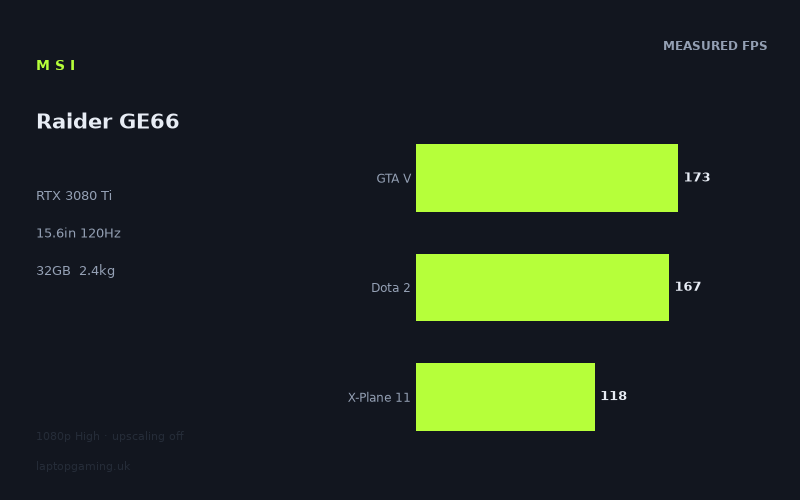
Frame rates
1920×1080, High preset, upscaling off.
Measured on this machine. Source: Notebookcheck, 2022-06-08.
Not scored: incomplete benchmark suite
Every scored laptop on this site is averaged over the same 5 games, and this one is short of Cyberpunk 2077, Baldur's Gate 3. A mean over 5 games is not comparable to a mean over 5, so we publish the figures we have and leave the score blank rather than rank it against machines tested on a different set. The numbers below are real - the suite is just incomplete.
How these numbers were produced
Frame rates here are not measured by us, and we label how each one was arrived at. A figure marked measured comes from a published run on that exact machine. A figure marked representative is derived from the GPU and its power limit (TGP) and cross-referenced against published reviews - a sound estimate of what that configuration delivers, but not a measurement of that specific laptop. Unless stated otherwise, numbers are 1920x1080, High preset, upscaling off. Where a laptop ships in several power configurations we use the wattage of the exact SKU listed, because a 140W RTX 5070 and a 115W one are not the same product.
In use
The short version
The MSI Raider GE66 (12UHS) is a very fast gaming laptop on the evidence available. Its Core i9-12900HK, RTX 3080 Ti, 32GB of memory and 2TB SSD place it firmly in the high-end category, while Notebookcheck’s measured figures show that it has no trouble producing very high frame rates at 1920x1080 on the High preset with upscaling disabled. The important qualification is that its display is a 3840x2160, 120Hz IPS panel, whereas the supplied benchmark data is at 1920x1080. It is therefore easy to establish that this is quick at Full HD, but not possible from these figures alone to promise the same result at the panel’s native resolution.
At the measured settings, the Raider is comfortably beyond 120fps in F1 2021, F1 2020, Strange Brigade, The Witcher 3, GTA V, Dota 2, Far Cry 5, Cyberpunk 2077 1.6 and Far Cry 6. Final Fantasy XV sits exactly at the display’s 120Hz ceiling in the benchmark result, while X-Plane 11 is very close. Assassin’s Creed Valhalla is the exception among the listed games: 100fps is still good gaming performance, but it is below the panel refresh rate. That spread matters. This is not a laptop that makes every demanding game behave identically, and buyers should not confuse a very high result in F1 2021 with a guarantee of equally high performance in every large, visually dense open-world title.
The mean across the scoring-suite games is 160fps, which is a strong Full HD result. It says the machine has substantial performance available for a 120Hz display when the game and settings allow it. It also shows why the Raider makes sense for someone who values high-refresh competitive play, fast simulation and racing games, or simply wants to run demanding games at high settings without leaning on upscaling. The RTX 3080 Ti is not being asked to rescue poor baseline performance here: Cyberpunk 2077 1.6 reaches 146fps in the supplied test, Far Cry 6 reaches 126fps and Assassin’s Creed Valhalla reaches 100fps.
There is one major missing practical detail: the fact sheet does not state the RTX 3080 Ti’s GPU power limit. That means it would be wrong to claim a particular wattage, to call this a full-power implementation, or to attribute its results to a named power target. What the benchmark figures do establish is the performance delivered by this particular Raider configuration under Notebookcheck’s stated test conditions. The measured result matters more than a guessed specification, especially because laptop GPU names alone do not explain how different chassis perform.
The Raider is not presented as a light travel machine. At 2.436kg, it is a substantial 15.6in laptop, and the 99Wh battery is a large capacity on paper, but there is no battery-life measurement in the supplied material. It should be approached as a portable desktop-style gaming system rather than bought on an assumption of all-day untethered use. The 2TB SSD and 32GB of memory are useful signs of a configuration intended for large game libraries and demanding multitasking, but neither changes the basic question: can you accept a 2.436kg machine in your bag?
There is no confirmed UK price for this exact configuration. As a result, no value score can be computed, because value is part of the rating and cannot be judged responsibly without a price. That is a limitation of the available retail information, not a criticism of the laptop’s benchmark performance.
Buy the Raider GE66 if the appeal is a fast 15.6in system with a 3840x2160 120Hz display, a 32GB and 2TB specification, and Full HD benchmark results that are consistently strong across both lighter and more demanding games. Do not buy it merely because it says RTX 3080 Ti. The comparison data shows that an RTX 3070 Ti laptop can be extremely close in shared Full HD tests, while a higher-performing RTX 3080 Ti implementation can also pull ahead. The name on the GPU is only part of the story; the measured figures are the more useful guide.
Performance
What Notebookcheck’s numbers actually show
The benchmark data is clear about its conditions: 1920x1080, High preset and upscaling off. Those details are essential. The Raider’s 3840x2160 panel may be the screen built into the laptop, but the published frame rates are not native-resolution results. They are Full HD results designed to show the underlying gaming performance without help from upscaling. This makes them useful for comparing the Raider with other systems tested in the same way, and for understanding the laptop’s headroom in games that can be played below native resolution. It does not make them a direct promise of the same frame rate at 3840x2160.
At those measured settings, the Raider delivers 292fps in F1 2021 and 270fps in F1 2020. Those are huge figures relative to a 120Hz display. The significance is not that the screen can show every one of those frames simultaneously; its refresh rate remains 120Hz. The significance is that the laptop has a large performance margin in these games at Full HD High. That margin can be useful if settings are increased, if a player wants to prioritise stable responsiveness, or if future game updates make the workload heavier. It also demonstrates that the CPU and GPU combination is not struggling with the benchmark workload in these racing titles.
Strange Brigade reaches 224fps, while The Witcher 3 reaches 223fps. Again, both are comfortably above the panel refresh rate in the supplied Full HD test. These results are especially useful because they show that the Raider’s high numbers are not restricted to the F1 games. Strange Brigade is part of the scoring suite, and its result contributes to the stated 160fps scoring-suite mean. The Witcher 3 is not labelled as part of that suite here, but its 223fps result supports the same broad conclusion: where the game is not especially restrictive at these settings, the Raider can produce far more frames than its own 120Hz screen can display.
GTA V records 173fps and Dota 2 records 167fps. Both are scoring-suite results and both are well above 120fps. Dota 2 in particular is relevant to buyers interested in competitive games, where high and consistent frame delivery matters more than simply chasing a large headline number. The benchmark result does not provide frame-time data, minimum frame rates, latency figures or display response measurements, so it would be wrong to promise a particular competitive experience beyond the reported average-style result. Still, 167fps at the supplied setting is strong evidence that the Raider has ample Full HD performance for this game.
Far Cry 5 reaches 153fps, while Cyberpunk 2077 1.6 reaches 146fps. These are among the most revealing results in the list because they sit closer to, but remain above, the 120Hz refresh target. Far Cry 5 has enough headroom above 120fps at the benchmark settings that the Raider should not be viewed as merely scraping past the panel refresh rate. Cyberpunk 2077 1.6 is more significant because it is a game buyers will reasonably use as a demanding reference point. At 146fps in this High, Full HD, no-upscaling test, the Raider is clearly not underpowered for the benchmark configuration. But this should not be turned into a claim about every Cyberpunk setting combination or about native 3840x2160 play. The supplied number is strong precisely because it is specific.
Far Cry 6 is measured at 126fps. That is still above the panel’s 120Hz refresh rate, but only just. It is a useful reminder that the Raider’s headline results vary substantially by game. A machine that reaches 292fps in F1 2021 can still land near the display refresh limit in another title under the same broad test format. Buyers planning to target 120fps in demanding games should treat Far Cry 6 as a more relevant indication than the lighter F1 results. At the stated Full HD High setting, it gets there. At native 3840x2160, no equivalent measured figure is provided, so certainty stops there.
Final Fantasy XV lands at 120fps, exactly matching the panel refresh rate in the benchmark result. This is a good outcome, but it should be described accurately. It is not spare performance in the way F1 2021’s 292fps is spare performance. It is a result that aligns neatly with the display’s maximum refresh at the tested setting. If the target is a Full HD High experience built around the 120Hz screen, the number is reassuring. If the target is native 3840x2160 with the same settings, the benchmark does not provide the evidence required to make the same claim.
X-Plane 11 reaches 118fps. That is close to 120Hz but below it. For flight simulation players, this is more useful than pretending that every game is either “above 120fps” or “below 120fps” in a simple binary way. A result of 118fps is already very high, and it is close enough to the screen’s refresh ceiling that the difference is unlikely to define whether the game is playable. Yet it also shows that a 120Hz target can be missed by a small amount even on this hardware. The Raider is powerful, but it is not magical, and simulation workloads can expose limits that are hidden by lighter benchmark titles.
Assassin’s Creed Valhalla is the slowest listed result at 100fps. That is still strong gaming performance and far from a poor outcome, but it is below 120Hz. It is the clearest evidence in the supplied data that buyers should separate “high frame rate” from “always matches the display refresh rate”. A 100fps result can look excellent in isolation. Against a 120Hz panel, it means the Raider is not filling the refresh rate in this particular Full HD High test. Anyone whose expectation is that an RTX 3080 Ti guarantees 120fps in every demanding game should recalibrate that expectation around this result.
The benchmark spread is the point, not an inconvenience
The Raider’s results span from 100fps in Assassin’s Creed Valhalla to 292fps in F1 2021. That is not a contradiction. It is what a useful gaming benchmark set should reveal: different engines and different game designs put pressure on different parts of a laptop. Some titles can be limited more by CPU behaviour at Full HD, some place a heavier burden on the GPU, and others respond differently to the balance of processor, graphics hardware and memory. The fact sheet does not provide per-game CPU or GPU utilisation, clock data, temperatures or power readings, so no precise cause can be assigned to every gap. The sensible conclusion is simply that the Raider is not equally unconstrained in every title.
The Core i9-12900HK is important context here. In lighter Full HD workloads, a fast processor can help the laptop achieve the very high F1 2021, F1 2020, GTA V and Dota 2 figures shown. It would be careless, however, to say that the CPU alone caused any particular result without supporting measurements. The data supports a narrower and more useful claim: the i9-12900HK and RTX 3080 Ti combination produces excellent Full HD benchmark numbers in the lighter and older games listed, while more demanding titles such as Far Cry 6, Final Fantasy XV, X-Plane 11 and Assassin’s Creed Valhalla place the result closer to the 120Hz target.
The scoring-suite mean is 160fps across Strange Brigade, GTA V, Dota 2, Final Fantasy XV and X-Plane 11. Means are helpful as a broad comparison tool, but they can conceal the experience of individual games. Here, the mean sits well above the display refresh rate, but it is supported by a mix that includes 224fps in Strange Brigade, 173fps in GTA V and 167fps in Dota 2, alongside 120fps in Final Fantasy XV and 118fps in X-Plane 11. In other words, the average is high because the Raider is extremely quick in some suite games, not because every game is held at the same frame rate.
This distinction matters when choosing settings. A buyer primarily playing F1 2021, F1 2020, Strange Brigade, GTA V or Dota 2 has evidence of considerable Full HD headroom at High settings with upscaling disabled. That buyer can reasonably expect the 120Hz panel to be the limiting part of the visible output more often than the GPU in these tests. A buyer primarily playing Assassin’s Creed Valhalla, Far Cry 6, X-Plane 11 or Final Fantasy XV should see a different picture: the Raider remains fast, but the 120Hz target is closer or, in the cases of X-Plane 11 and Assassin’s Creed Valhalla, not met by the reported result.
There is also a broader reason not to over-read the fastest numbers. At 1920x1080, lighter titles can become CPU-bound, meaning that a more powerful GPU does not necessarily translate into proportionally higher frame rates. The rival results illustrate this directly. The Raider’s RTX 3080 Ti is only marginally separated from RTX 3070 Ti machines in the shared Full HD set, despite the apparent hierarchy suggested by the GPU names. That does not make the RTX 3080 Ti irrelevant. It means the selected resolution and games can compress real graphics-performance differences where the CPU or the game engine becomes the limiting factor.
What the GPU power limit means here
The fact sheet does not provide a GPU power limit for this Raider GE66. That is an important omission because mobile RTX GPUs are not defined solely by their name. A laptop’s cooling design, power allocation and firmware behaviour can all affect how much performance a GPU delivers. Without the stated limit, there is no basis for claiming that this RTX 3080 Ti runs at a particular power level, nor for declaring it stronger or weaker on paper than another RTX 3080 Ti implementation.
Fortunately, the benchmark figures offer a more practical answer than a guessed wattage would. This Raider produces 292fps in F1 2021, 270fps in F1 2020, 224fps in Strange Brigade, 223fps in The Witcher 3 and 173fps in GTA V under the stated test conditions. It also produces 146fps in Cyberpunk 2077 1.6, 126fps in Far Cry 6 and 100fps in Assassin’s Creed Valhalla. That is the performance level a buyer is actually buying, subject to the specific benchmark setup. It is enough to establish the laptop as fast at Full HD High, even if the power-limit figure itself is unavailable.
The comparison with the MSI Raider GE77 HX is especially relevant. That machine also has an RTX 3080 Ti, but the supplied rival information identifies it as a 175W implementation. Across the shared games, the GE66 averages 9fps behind the GE77 HX. This is not a massive gulf in the shared Full HD sample, but it is a real lead for the larger Raider. It demonstrates why the GPU label should not be treated as the whole specification. The GE77 HX has the same named GPU family and a stated 175W figure, yet its shared-game average is ahead.
At the same time, the GE66’s results against RTX 3070 Ti rivals show why buyers should not assume that a GPU tier label automatically creates a large Full HD advantage. The MSI GE67 HX, equipped with an RTX 3070 Ti at 150W, sits only 1fps behind the Raider on average across the shared games. The MSI Vector GP66, also equipped with an RTX 3070 Ti at 150W, is 2fps ahead on average across its shared set. At Full HD, lighter titles can be CPU-bound and therefore compress genuine GPU gaps. These near ties should not be dismissed as errors or treated as proof that all the GPUs are interchangeable. They are a reminder to compare actual game results at the resolution and settings you plan to use.
For a buyer intending to use the Raider’s 3840x2160 panel at native resolution, GPU power behaviour becomes even more important. Higher resolution generally asks more of the GPU, and the CPU-bound compression seen in lighter Full HD titles may become less relevant. But the fact sheet does not supply native 3840x2160 benchmark figures, so it cannot establish how this specific RTX 3080 Ti behaves there relative to the RTX 3070 Ti machines or the 175W RTX 3080 Ti GE77 HX. The honest conclusion is that the Full HD data is excellent, while the native-resolution question remains open.
Memory and storage in the context of this specification
The Raider includes 32GB of memory and a 2TB SSD. These are sensible capacities for a machine positioned around a Core i9-12900HK and RTX 3080 Ti. Large modern games, background applications, browser tabs, capture software and creative workloads can all make a basic memory configuration feel restrictive over time. The listed 32GB gives this model a more appropriate platform for demanding use than a minimal gaming configuration would.
It is important not to claim performance gains that the benchmark data does not isolate. The fact sheet does not compare different memory capacities, memory speeds or SSD models, and it does not provide game loading times. Therefore, the safe conclusion is not that the 32GB or 2TB SSD produced a certain frame rate. The safe conclusion is that the specification is suitably generous for someone buying a high-end gaming laptop and wanting substantial room for game installations and general multitasking.
The screen
A 3840x2160 panel changes the conversation
The Raider GE66 has a 15.6in IPS display with a 3840x2160 resolution and a 120Hz refresh rate. This is an ambitious display specification for a 15.6in gaming laptop. The resolution offers far more desktop space and pixel density than the 1920x1080 benchmark setting, while the 120Hz refresh rate is more gaming-focused than a basic 60Hz panel. On paper, it gives the Raider two different strengths: a sharp screen for productivity or media work, and a refresh rate capable of showing high frame rates in games.
The compromise is that the display’s native resolution is much more demanding than the benchmark resolution. Notebookcheck’s frame-rate numbers are explicitly measured at 1920x1080, High preset and with upscaling off. The Raider’s impressive 292fps in F1 2021, 224fps in Strange Brigade, 173fps in GTA V and 146fps in Cyberpunk 2077 1.6 are therefore not native 3840x2160 results. The laptop has shown that it can drive games quickly at Full HD, but the evidence does not show what it delivers at the screen’s full resolution.
This does not make the screen a bad match for the hardware. It means buyers should think about how they intend to use it. If the goal is high frame rates in the listed games, running at 1920x1080 is supported by the available results. In that mode, the Raider is often above the panel’s 120Hz refresh rate. If the goal is to use the full 3840x2160 resolution in every game, the supplied data does not establish whether the same titles will remain at 120fps, or even how far they will fall from their Full HD results. A buyer who sees “RTX 3080 Ti” and assumes native-resolution certainty is making a leap beyond the published evidence.
Where the measured figures fit a 120Hz display
At 1920x1080 High, the Raider is comfortably above 120fps in F1 2021 at 292fps, F1 2020 at 270fps, Strange Brigade at 224fps, The Witcher 3 at 223fps, GTA V at 173fps, Dota 2 at 167fps, Far Cry 5 at 153fps, Cyberpunk 2077 1.6 at 146fps and Far Cry 6 at 126fps. This is a long list, and it establishes that the 120Hz panel is not an unrealistic target for the laptop at Full HD under the published conditions.
Final Fantasy XV at 120fps is the cleanest match for the display refresh rate. X-Plane 11 at 118fps is close enough to show that the laptop can approach the panel ceiling in a simulation title, though it does not reach it in the stated result. Assassin’s Creed Valhalla at 100fps is lower again, showing that not every demanding game will fully use the 120Hz refresh rate even at the benchmark resolution and preset. This is why a 120Hz display is a sensible pairing rather than an excessive one. The panel has room for the Raider’s fastest games, while demanding games can still benefit from refresh above a basic display standard even when they do not reach 120fps.
The fact sheet identifies the panel as IPS. That is all that can safely be said about its display technology from the supplied information. There are no brightness measurements, contrast figures, colour-coverage results, response-time measurements, adaptive-sync details or HDR data provided here. It would be wrong to claim excellent outdoor visibility, creator-grade colour accuracy, exceptional motion clarity or a particular HDR experience without those measurements. Buyers for whom those characteristics matter should seek panel-specific testing rather than infer them from the IPS label alone.
Resolution versus refresh rate
The screen specification asks the owner to choose between two valuable qualities depending on the task. At 3840x2160, the 15.6in panel should offer the appeal of a high-resolution workspace. At 120Hz, it is also designed to show smoother motion than a standard lower-refresh display when the game can supply enough frames. The laptop’s Full HD benchmark results strongly support the refresh-rate side of that equation. They do not fully answer the native-resolution side.
For games such as F1 2021, F1 2020, Strange Brigade, The Witcher 3, GTA V and Dota 2, the Full HD figures are so far above 120fps that a buyer has evidence of meaningful performance reserve at the tested preset. For Far Cry 5 and Cyberpunk 2077 1.6, the Full HD figures remain clearly above 120fps. For Far Cry 6, Final Fantasy XV, X-Plane 11 and Assassin’s Creed Valhalla, the results are at or closer to the display’s ceiling, which leaves less room for more demanding settings or resolution changes.
The practical lesson is straightforward. Treat the 3840x2160 panel as a flexible display rather than assume that native resolution and maximum refresh will always be achieved together. The facts support high-refresh Full HD gaming. They support a high-resolution screen for non-benchmark uses. They do not supply the native-resolution gaming numbers needed to declare the Raider a guaranteed 3840x2160, 120Hz machine across this game list.
Build, size and portability
The Raider GE66 is a 15.6in laptop weighing 2.436kg. That is the key portability figure available, and it places the machine in a category where portability means it can be moved between places rather than carried unnoticed. It is possible to take a 2.436kg laptop to work, university, a friend’s house or a LAN event, but it is not the kind of weight that disappears into a bag. Buyers who commute daily on foot or who want a machine to use casually away from a desk should take that figure seriously.
No chassis dimensions are provided in the fact sheet. It would therefore be wrong to describe the Raider as thin, deep, compact, bag-friendly or desk-hungry on the basis of the available information. The 15.6in screen and 2.436kg weight give a broad sense of its class, but they do not tell us its precise footprint or thickness. A buyer with a tight backpack compartment or a limited desk should check the manufacturer’s dimensions before committing.
The 99Wh battery is a large stated capacity, but battery capacity is not battery life. The supplied information does not include web-use endurance, video playback time, idle time or gaming battery measurements. Gaming laptops can also behave very differently away from mains power, and no claim should be made here about how the Raider performs while unplugged. The correct reading is simply that the laptop has a 99Wh battery and that no measured endurance figure is available.
That matters because this is a machine whose performance proposition is based on a Core i9-12900HK and RTX 3080 Ti. Buyers should expect to use a system of this type primarily with access to power when gaming, but the fact sheet does not provide charger details, charging behaviour or unplugged benchmark figures. It should not be sold as a travel-first laptop on the strength of battery capacity alone.
The internal specification is more aligned with a desktop-replacement role than with a stripped-back portable. The 32GB memory allocation supports substantial multitasking, while the 2TB SSD gives more practical room for a large game library than a smaller drive would. That is valuable because the benchmark results point towards someone likely to install demanding games rather than rely on a very narrow competitive-game rotation. The Raider’s storage and memory specification makes sense alongside its weight: this is a system intended to do a lot, not merely a light machine with a powerful GPU badge.
There are no supplied measurements for temperatures, fan noise or surface heat. Those are major practical factors in a high-performance gaming laptop, but they cannot be invented from its component list or weight. A buyer who is particularly sensitive to fan noise, who plans to game in a quiet shared space, or who needs long sustained workloads should look for measured acoustic and thermal reporting before deciding. The published frame rates show what the Raider can achieve in the stated benchmarks; they do not tell us how quietly or coolly it does so.
How it compares
Against the MSI Prestige 15
The MSI Prestige 15 is the clearest example of the difference between the Raider’s class of hardware and a less powerful RTX 3050 Ti configuration. The Prestige 15 has an RTX 3050 Ti at 105W, and the Raider averages 91fps ahead across their shared games. That is a substantial advantage. It is not a marginal refresh-rate difference or an argument over a single unusually favourable title. On the shared sample, the Raider is in a distinctly higher performance tier.
For the buyer deciding between these two, the Raider’s advantage is easiest to understand in terms of target experience. The Raider’s measured Full HD High figures repeatedly sit around or beyond its 120Hz panel’s refresh rate. A system that trails by 91fps on average across shared games is not offering the same margin for high-refresh play in the same test conditions. The Raider is the choice for someone whose priority is gaming throughput. The Prestige 15 may have different strengths outside the data provided, but this comparison is specifically about measured shared-game performance, and the Raider is decisively ahead there.
Against the MSI GE67 HX
The MSI GE67 HX is much closer. It uses an RTX 3070 Ti at 150W, yet the Raider averages only 1fps ahead across the shared games. That is effectively a tie in practical terms within this particular Full HD shared-game comparison. The correct interpretation is not that the Raider’s RTX 3080 Ti is meaningless, nor that the GE67 HX has somehow become an RTX 3080 Ti equivalent in every workload. The supplied context explains the compression: at 1920x1080, lighter titles in the shared set can be CPU-bound, reducing the visible separation between GPUs.
This is exactly why a buyer should resist shopping by GPU tier alone. If the intended use is the same sort of Full HD gaming represented by the shared benchmark selection, the GE66 does not show a meaningful average lead over the GE67 HX. If the intended use is more GPU-limited gaming, higher resolutions or different settings, this data cannot tell us how the comparison changes. The Raider’s 3840x2160 panel makes that uncertainty especially relevant, because the published comparison is not a native-resolution comparison.
The Raider still has its own specification appeal: RTX 3080 Ti, Core i9-12900HK, 32GB memory, 2TB SSD and a 3840x2160 120Hz IPS display. But on frame rates alone in the stated shared Full HD sample, the GE67 HX is not meaningfully behind. Anyone choosing between them should therefore use confirmed pricing, screen preference, physical design, ports, battery testing and other verified details where available rather than expect the GPU name to settle the decision.
Against the MSI Vector GP66
The MSI Vector GP66 makes the same point from the opposite direction. It has an RTX 3070 Ti at 150W, and the Raider averages 2fps behind it across the shared games. That is also a near tie rather than a dramatic defeat. The Raider’s result should not be framed as disappointing merely because a nominally lower GPU tier is fractionally ahead in this particular shared set. At Full HD, lighter titles can be CPU-bound, and the resulting frame rates can compress differences that might matter more when the GPU is under greater pressure.
For a buyer using the Raider at 1920x1080 High in games comparable to the shared selection, the Vector GP66 result is a warning against paying for a GPU label rather than verified performance. The Raider is not clearly faster in the shared sample. For a buyer focused on the Raider’s 3840x2160 panel, the comparison does not provide enough evidence to decide which machine would be better at native resolution. No native-resolution shared frame-rate figures are supplied.
The useful conclusion is that the Raider is fast, but not uniquely fast merely because it has RTX 3080 Ti branding. The actual performance advantage over a well-configured RTX 3070 Ti laptop can be very small at Full HD in a mixed game set. That is not a weakness of benchmark data; it is the value of having attributable measurements rather than relying on product positioning.
Against the MSI Raider GE77 HX
The MSI Raider GE77 HX is the rival that beats the GE66 by the most in the supplied comparison group. It also uses an RTX 3080 Ti, identified here at 175W, and it averages 9fps ahead across the shared games. This is a meaningful but not overwhelming lead. It does not transform the GE66 into a slow machine: the GE66 still records a 160fps scoring-suite mean and reaches high frame rates in most of the listed Full HD games. It does show that the GE77 HX has the stronger shared-game result.
The comparison is useful because it keeps the discussion within the same GPU generation and same broad GPU tier. Two laptops can both say RTX 3080 Ti and still differ in delivered frame rate. The GE77 HX’s stated 175W GPU figure is one clear specification difference supplied here, while the GE66’s GPU power limit is not stated. It would be too simplistic to assign every bit of the 9fps difference to wattage alone, because the fact sheet does not provide comparable CPU, cooling, firmware or per-game details for a full causal explanation. But the result reinforces the wider lesson: implementation matters.
For someone who simply wants the highest shared-game frame-rate average among these listed rivals, the GE77 HX is ahead. For someone who wants a 15.6in machine and prefers the GE66’s screen size, the 9fps shared average difference is a trade-off rather than an automatic reason to reject the GE66. The right decision would depend heavily on confirmed pricing and on verified practical differences not supplied here. Since there is no confirmed UK price for these configurations in the comparison data, it would be irresponsible to claim which is better value.
Who it’s for
Buy it if your priority is high-end Full HD gaming with a high-resolution screen
The Raider GE66 suits the buyer who wants one machine to cover fast Full HD gaming and high-resolution general use. Its 3840x2160 120Hz IPS display is not a conventional low-resolution esports panel, and its benchmark results are not those of a machine that needs to reduce every setting to achieve good frame rates. At 1920x1080 High with upscaling disabled, Notebookcheck records 292fps in F1 2021, 270fps in F1 2020, 224fps in Strange Brigade, 223fps in The Witcher 3 and 173fps in GTA V. Those figures provide a convincing case for players who value high-refresh gaming in lighter, racing, older or well-optimised titles.
It is also suitable for someone who plays demanding games but has realistic expectations. Cyberpunk 2077 1.6 at 146fps, Far Cry 6 at 126fps and Assassin’s Creed Valhalla at 100fps show that the laptop remains strong when the workload becomes more difficult. The difference is that these games do not all offer the huge margin seen in F1 2021. A buyer willing to adjust resolution or settings according to the game will get more from the 3840x2160, 120Hz panel than one who insists on a single native-resolution, maximum-refresh target for everything.
The 32GB memory and 2TB SSD also make it a sensible fit for a buyer who keeps a sizeable local game library, runs demanding applications alongside games, or wants a system that does not immediately feel cramped in storage or memory terms. No game-loading or productivity measurements are provided, so this should not be turned into a performance claim. It is simply a configuration that matches the expectations created by the CPU and GPU.
It makes sense for players who understand the display compromise
The right Raider GE66 buyer sees the 3840x2160 panel as an option, not a demand. The screen can be valuable for desktop work, media and games where visual detail matters, while the Full HD benchmark data shows that the laptop can take strong advantage of 120Hz in many titles. The key is accepting that the available gaming evidence is at 1920x1080. There is no published figure here saying that Cyberpunk 2077 1.6, Far Cry 6 or Assassin’s Creed Valhalla will run at 120fps at 3840x2160 High with upscaling disabled.
That is not an unusual compromise for a high-resolution gaming screen, but it should be a conscious one. Buyers who are happy to select settings per game can use the Raider’s performance intelligently. Buyers who want every game at native resolution without compromise need native-resolution benchmark data before they can judge whether this configuration is suitable.
Buy something else if weight and untethered use matter more than performance
At 2.436kg, the Raider is not the obvious choice for someone who wants the lightest possible laptop for daily travel. It remains portable in the literal sense, but it is a substantial item to carry regularly. The fact sheet provides no dimensions, so its exact bag fit cannot be assessed here, but the weight alone is enough to say that it belongs closer to the portable-desktop end of gaming laptops than the ultralight end.
Buy something else if long battery life is the deciding requirement. The Raider has a 99Wh battery, but there are no measured battery-life figures in the supplied information. Capacity is not a substitute for endurance testing, especially with high-performance components and a 3840x2160 display. Anyone who needs reliable long use away from mains power should seek a machine with published battery measurements rather than assume this one will meet that need.
Buy something else if quiet operation is essential and you cannot find verified acoustic testing. No noise figures, temperature figures or sustained-performance thermal measurements are supplied. A powerful 15.6in laptop can be excellent in frame-rate terms and still be unsuitable for a noise-sensitive environment; the available data cannot resolve that question.
Buy something else if you are shopping only by GPU badge
The rival comparisons are the strongest reason to avoid simplistic GPU shopping. The Raider is vastly ahead of the RTX 3050 Ti MSI Prestige 15, averaging 91fps more across shared games. That is the kind of gap expected between different performance classes. Against the RTX 3070 Ti MSI GE67 HX, however, it is only 1fps ahead on average across shared games. Against the RTX 3070 Ti MSI Vector GP66, it is 2fps behind. Against the RTX 3080 Ti MSI Raider GE77 HX, it is 9fps behind.
Those results do not undermine the GE66. They make its position clearer. It is a high-performance laptop with excellent Full HD results, but it is not automatically the fastest choice in every comparison simply because it has an RTX 3080 Ti. At 1920x1080, lighter shared games can be CPU-bound and compress GPU differences. At other settings and resolutions the gaps could look different, but the supplied data does not show that. Buyers should therefore choose the Raider for its confirmed benchmark performance, display specification, memory and storage configuration, and acceptable weight, rather than for a presumed hierarchy based on the graphics label.
In short, the MSI Raider GE66 is compelling for a buyer who wants high frame rates at Full HD High settings, a 120Hz screen, generous memory and storage, and a sharp 3840x2160 panel for work or less frame-rate-driven use. It is less compelling for someone demanding proof of native 3840x2160 gaming performance, low weight, tested battery endurance, quiet running or a clearly superior result over every RTX 3070 Ti rival. The published measurements make the strengths clear. They also make the limits of the evidence clear, and a sensible purchase decision should respect both.