Details
Product prices and availability are accurate as of the date/time indicated and are subject to change. Any price and availability information displayed on Amazon.co.uk at the time of purchase will apply to the purchase of this product.Review
Lenovo Legion Pro 5 16ARX8 (R5 7645HX, RTX 4050) review
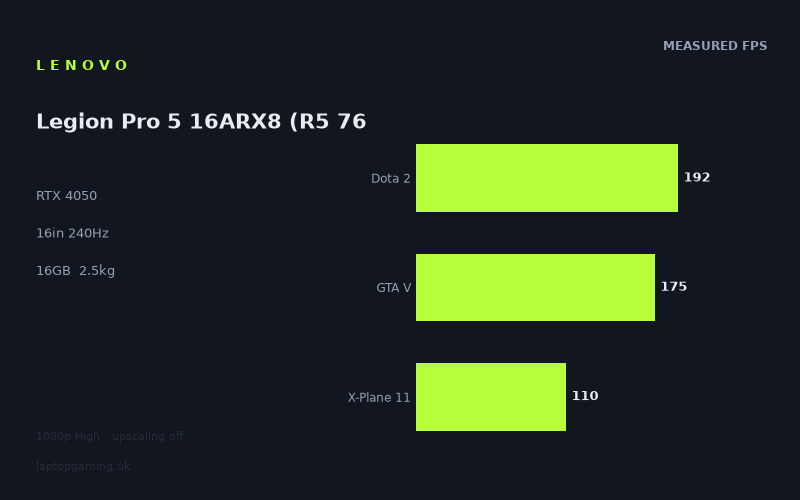
Frame rates
1920×1080, High preset, upscaling off.
Measured on this machine. Source: Notebookcheck, 2023-08-03.
Not scored: incomplete benchmark suite
Every scored laptop on this site is averaged over the same 5 games, and this one is short of Cyberpunk 2077, Baldur's Gate 3. A mean over 3 games is not comparable to a mean over 5, so we publish the figures we have and leave the score blank rather than rank it against machines tested on a different set. The numbers below are real - the suite is just incomplete.
How these numbers were produced
Frame rates here are not measured by us, and we label how each one was arrived at. A figure marked measured comes from a published run on that exact machine. A figure marked representative is derived from the GPU and its power limit (TGP) and cross-referenced against published reviews - a sound estimate of what that configuration delivers, but not a measurement of that specific laptop. Unless stated otherwise, numbers are 1920x1080, High preset, upscaling off. Where a laptop ships in several power configurations we use the wattage of the exact SKU listed, because a 140W RTX 5070 and a 115W one are not the same product.
In use
The short version
The Lenovo Legion Pro 5 16ARX8 is a difficult laptop to reduce to a simple recommendation because the published benchmark data is simultaneously encouraging and incomplete. At 1920x1080 on the High preset with upscaling off, Notebookcheck measured very strong results in several lighter and older games: Dota 2 reached 192fps, The Witcher 3 reached 177fps, GTA V reached 175fps, Strange Brigade reached 175fps and F1 23 reached 165fps. Those are substantial frame rates, and they show that the combination of the Ryzen 5 7645HX and RTX 4050 can deliver very responsive performance in games that are not especially punishing at this setting.
The other half of the data matters just as much. Final Fantasy XV reached 86fps, Sons of the Forest reached 76fps, Hogwarts Legacy reached 64fps and Star Wars Jedi Survivor reached 60fps. Those figures are still playable, but they are a long way from using the full potential of the fitted 240Hz display. The Legion Pro 5 can be a high-refresh laptop in selected games, but the benchmark results do not support the idea that it will hold extremely high frame rates in every demanding modern release.
That distinction is the central buying point. This is not a machine to buy on the assumption that an RTX 4050 badge and a 240Hz screen automatically mean 240fps gaming. The screen is capable of refreshing at 240Hz, but the GPU can only supply frames at the rate a particular game, setting and resolution allow. The published results show a very wide spread between games. In the better-performing titles, the laptop is close enough to the panel’s limit to make high-refresh play meaningful. In the heavier titles, it is operating in a much more conventional performance range.
There is also no confirmed UK price for this configuration. That prevents a proper value judgement. A laptop can make sense at one price and be poor value at another, especially when it combines a relatively modest RTX 4050 with a 16in 2560x1600, 240Hz IPS screen and a 2.47kg chassis. Without a confirmed price, the sensible conclusion is not that the Legion Pro 5 is good value or bad value. It is that the buyer needs to judge its eventual price against what the measured frame rates actually show, rather than against the display specification alone.
For the right buyer, there is a clear case. Choose this Legion Pro 5 if your priority is a 16in IPS display with a 2560x1600 resolution and a 240Hz refresh rate, if much of your gaming is in titles such as Dota 2, GTA V, Strange Brigade, F1 23 and The Witcher 3, and if you are comfortable treating demanding newer games as settings-management titles rather than expecting the panel’s full refresh rate. The benchmark data supports that use well.
Do not buy it simply because you want the strongest possible performance in demanding games such as Hogwarts Legacy or Star Wars Jedi Survivor. The available figures show those games at 64fps and 60fps respectively under the published 1920x1080 High, upscaling-off test conditions. That is not a failure, but it is a different proposition from the 165fps to 192fps results seen in the lighter titles. Buyers who mainly play the more demanding end of the library should be realistic: this Legion is capable, but it is not consistently a 240fps machine.
The benchmark suite is also incomplete for scoring purposes. We do not have figures for Cyberpunk 2077 or Baldur’s Gate 3. Every scored laptop is averaged over the same five games, so a partial set cannot be ranked fairly against machines with a complete set. The published three-game scoring-suite mean is 159fps, based on Dota 2, GTA V and X-Plane 11, but it must not be treated as a complete cross-laptop ranking. It is useful as a description of the available results, not as a substitute for the missing benchmark data.
Performance
What the measured figures show
Notebookcheck measured the Lenovo Legion Pro 5 16ARX8 at 1920x1080, using the High preset with upscaling off. That test method matters. It gives a clean view of performance without an upscaling mode changing the result, but it is not the same as running games at the laptop’s native 2560x1600 screen resolution. The figures below should therefore be read as 1080p High results, not promises of native-resolution performance.
- Dota 2: 192fps
- The Witcher 3: 177fps
- GTA V: 175fps
- Strange Brigade: 175fps
- F1 23: 165fps
- Far Cry 5: 131fps
- X-Plane 11: 110fps
- Final Fantasy XV: 86fps
- Sons of the Forest: 76fps
- Hogwarts Legacy: 64fps
- Star Wars Jedi Survivor: 60fps
The first thing to notice is that this is not a narrowly clustered result. The top measured result is Dota 2 at 192fps, while the lowest is Star Wars Jedi Survivor at 60fps. That gap is more useful than a single average because it describes the experience a buyer is likely to have across a mixed game library. The Legion Pro 5 can look extremely fast in one title and merely adequate in another without either result contradicting the other.
Dota 2 at 192fps is a particularly strong result for anyone whose gaming includes competitive or response-sensitive titles. It does not reach the screen’s 240Hz maximum, but it is close enough that the 240Hz panel is not wasted. The display can show up to 240 updates per second, while the game result shows the system delivering 192 frames per second in Notebookcheck’s test. That is a substantial rate of motion and input responsiveness, even though the panel still has refresh-rate headroom.
GTA V at 175fps, The Witcher 3 at 177fps and Strange Brigade at 175fps tell a similarly positive story. These are all well above 120fps and well into the territory where a high-refresh display is useful rather than merely decorative. F1 23 at 165fps belongs in the same broad category. A buyer concentrating on these games is not looking at a laptop that merely clears a basic playability line. The published data shows enough performance to make high-refresh gaming a central part of the experience.
Far Cry 5 at 131fps is still a good result, but it also marks the point where the display’s 240Hz specification becomes less directly relevant. At 131fps, the system is producing a high frame rate, but not one that comes close to filling every possible 240Hz refresh cycle. This is not a criticism of the result. It is a reminder that “high refresh” is not a binary label. There is a real difference between 131fps and 192fps, and another difference between either of those results and 240fps.
X-Plane 11 reached 110fps. That remains comfortably above a conventional 60fps target, but it is less obviously aligned with a 240Hz screen. The Legion Pro 5’s display remains useful at this frame rate, but the published number shows that the machine’s performance is shaped heavily by the game being run. The laptop is not delivering one fixed class of performance. It moves from near-200fps in Dota 2 to 110fps in X-Plane 11 under the same broad 1920x1080 High, upscaling-off test method.
Final Fantasy XV at 86fps and Sons of the Forest at 76fps form the middle of the range. These are not poor figures in isolation. They offer a level of performance above 60fps, and the benchmark data does not suggest that either game is unplayable on this hardware. However, they also make the 240Hz specification less important in practical terms. A panel capable of 240Hz does not force a game to run at 240fps, and these results sit much closer to a conventional smooth gaming experience than to the very high-refresh results seen in Dota 2 or F1 23.
Hogwarts Legacy at 64fps and Star Wars Jedi Survivor at 60fps are the figures that should guide buyers who mainly play demanding recent releases. At these published settings, the Legion Pro 5 is delivering playable performance rather than exceptional frame-rate headroom. Neither result supports an expectation of approaching 240fps. Neither result should be used to imply that a 240Hz screen makes these games run differently from the frame rate the GPU can produce. The screen can display the output, but the benchmark data shows that the GPU is the limiting part of the experience here.
The 159fps partial mean needs careful reading
The three scoring-suite games available for this laptop are Dota 2, GTA V and X-Plane 11. Their stated mean is 159fps. That is a strong figure for the available subset, but it is important not to overstate it. Dota 2 and GTA V are among the faster results in the list, while X-Plane 11 is lower at 110fps. The mean describes those three games only. It does not include the results from the more demanding games in the wider list, and it does not include Cyberpunk 2077 or Baldur’s Gate 3 because those figures are not available.
This matters because a partial average can create a false impression of overall performance. A buyer seeing 159fps might assume that most games will sit close to that level. Notebookcheck’s full list does not support that interpretation. Several games are indeed near or above that range, but several are much lower. The measured spread from 60fps to 192fps is the more honest summary of what the machine can do across the games for which data is available.
It would also be wrong to rank this Legion Pro 5 against scored laptops using the incomplete suite. Every scored machine is averaged over the same five games. This Legion has results for only three of those five. Without Cyberpunk 2077 and Baldur’s Gate 3, there is no like-for-like complete-suite comparison. The absence of that ranking is not a weakness in the laptop; it is a limitation of the available data. The sensible approach is to use the individual frame rates and the stated shared-game rival comparisons instead.
GPU power limit: what is known and what is not
The supplied specification identifies the GPU as an RTX 4050, but it does not provide a GPU power limit for this Lenovo Legion Pro 5 configuration. That means there is no basis for claiming a specific wattage, or for attributing a particular frame-rate result to a stated GPU power setting. The measured figures show what this laptop achieved in Notebookcheck’s benchmarks. They do not, from the information available here, reveal the power limit Lenovo has configured for the RTX 4050.
This is worth stating plainly because laptop GPU names alone do not explain every result. The useful evidence in this case is the benchmark data itself. The Legion Pro 5 produced 192fps in Dota 2, 177fps in The Witcher 3, 175fps in GTA V and Strange Brigade, and 165fps in F1 23. It also produced 64fps in Hogwarts Legacy and 60fps in Star Wars Jedi Survivor. Those are the results a buyer can rely on. A claimed power figure not supplied in the specifications would add false precision rather than useful analysis.
In practice, the published data says more than an unsupported discussion of wattage would. It shows that the laptop has enough performance for very high frame rates in a group of titles that includes Dota 2, GTA V, Strange Brigade and F1 23. It also shows that the same laptop has much less headroom in Hogwarts Legacy and Star Wars Jedi Survivor. The hardware is not being asked to do the same work in each game, so the performance result changes substantially.
The comparison data adds another important clue. Against the MSI Thin GF63 with an RTX 4050, this Legion averages 71fps ahead across three shared games. That is a very large published gap between two laptops carrying the same GPU name. It reinforces the point that buyers should not shop by GPU label alone. The benchmark results are more useful than the badge. In this case, the Legion Pro 5’s shared-game lead over the MSI is large enough to matter far more than any assumption based on both machines being described as RTX 4050 laptops.
At the opposite extreme, the Legion’s shared-game average is effectively level with a Schenker XMG Pro 16 Studio with an RTX 4070 at 140W, and effectively level with an HP Omen 16 from 2024 with an RTX 4080 at 145W. That does not mean an RTX 4050 is generally interchangeable with an RTX 4070 or RTX 4080. The supplied comparison notes explain why the apparent tie exists: at 1080p, the lighter titles in the shared set are CPU-bound and compress genuine GPU gaps. The result is real for those shared games and settings, but it should not be stretched into a general statement about every game or every resolution.
Why the game-by-game spread matters
The measured range is not an inconvenience in the data. It is the key to understanding this machine. If every game landed close together, a buyer could make a simple judgement: this is a 90fps laptop, or this is a 150fps laptop. The Legion Pro 5 does not behave that way in the published results. It is a machine whose appeal depends strongly on the games you actually play.
For a Dota 2 player, 192fps makes the Legion Pro 5 look like a genuinely fast high-refresh system. For someone spending most of their time in F1 23, 165fps gives a similarly convincing result. For GTA V, The Witcher 3 and Strange Brigade, the results at 175fps, 177fps and 175fps respectively remain close enough to the panel’s maximum refresh rate that the display specification has practical value.
For someone whose main games are Hogwarts Legacy and Star Wars Jedi Survivor, the same laptop looks different. The measured 64fps and 60fps results are still usable, but the experience is not defined by 240Hz. It is defined by the fact that demanding games can pull performance down sharply even at 1920x1080 on High with upscaling disabled. In that part of the library, the buyer should care more about whether the observed frame rate meets their personal expectations than about the number printed next to the screen’s refresh rate.
The sensible conclusion is not that the Legion Pro 5 is inconsistent in a bad way. Games vary in their demands, and the supplied results document that variation. The conclusion is that buyers should match the laptop to their own library. A person playing the games that sit between 165fps and 192fps in the benchmark list is buying into a very different practical experience from someone playing the games measured between 60fps and 76fps.
The screen
A 16in 2560x1600 IPS display with 240Hz refresh
The Legion Pro 5 has a 16in IPS display with a 2560x1600 resolution and a 240Hz refresh rate. On paper, that is a notably ambitious screen specification for a laptop with an RTX 4050. The resolution is above the 1920x1080 benchmark setting, while the refresh rate is higher than every published game result. The screen gives the machine substantial visual and refresh-rate capability, but the performance data shows that the GPU will not use all of that capability in every game.
The IPS panel type is part of the specification, but the supplied information does not include measurements for brightness, contrast, colour coverage, response times, backlight behaviour or viewing angles. It would be wrong to present assumptions about those areas as measured conclusions. What can be said is that the panel is IPS, measures 16in, runs at 2560x1600 and refreshes at up to 240Hz. Those facts make it a high-spec display on paper; they do not establish its image quality beyond the details provided.
The 240Hz refresh rate is most relevant when the laptop can produce frame rates that approach it. Dota 2 at 192fps is the closest measured result. That leaves the panel with unused headroom, but it still places the Legion well into high-refresh territory. The Witcher 3 at 177fps, GTA V and Strange Brigade at 175fps, and F1 23 at 165fps also make a strong case for a 240Hz panel. None hits 240fps in the published measurements, but all are high enough that a lower-refresh display would be less well matched to the system’s output.
Far Cry 5 at 131fps is still a high-frame-rate result, but the relationship changes. At that rate, the panel can refresh more often than the game produces new frames. The display is not a problem; it simply has more capacity than this benchmark result uses. The same applies more clearly to X-Plane 11 at 110fps, Final Fantasy XV at 86fps, Sons of the Forest at 76fps, Hogwarts Legacy at 64fps and Star Wars Jedi Survivor at 60fps.
Native resolution performance is not provided
The most important screen-performance caveat is straightforward: the benchmark results were measured at 1920x1080, while the fitted display is 2560x1600. There are no supplied frame rates for gaming at the panel’s native resolution. It would therefore be inaccurate to state that Dota 2 runs at 192fps at 2560x1600, or that Hogwarts Legacy runs at 64fps at 2560x1600. Those numbers belong only to the stated 1920x1080 High, upscaling-off test.
This is a major practical point for anyone buying the laptop because the display’s native resolution is likely to be the resolution a buyer wants to use. The benchmark data establishes a strong 1080p High baseline, but it does not establish how close the machine will come to the same frame rates at 2560x1600. Buyers should not silently transfer 1080p numbers to the native panel. The screen has a higher resolution than the benchmark mode, and no native-resolution measurements are available here.
That uncertainty affects the high-refresh story most of all. At 1920x1080, five listed games reach between 165fps and 192fps. At 2560x1600, no figures are provided. It may still make sense to choose the 240Hz panel because the machine demonstrably produces high frame rates in several games at the tested setting, but the published data does not justify promising comparable frame rates at the display’s full resolution.
The screen is therefore best understood as a flexible specification rather than a guarantee of one particular gaming outcome. The 2560x1600 resolution gives the laptop a higher-resolution panel than the benchmark test used. The 240Hz refresh rate gives it more refresh capacity than any measured game result reaches. Whether that combination is ideal depends on the buyer’s priorities. Someone happy to tune game settings and resolution choices around performance may see it as a useful combination. Someone who wants native-resolution performance at or near 240fps in demanding games does not have supporting evidence from the published figures.
When the 240Hz panel is a real benefit
There is a tendency to treat a very high refresh-rate display as either essential or irrelevant. The Legion Pro 5’s results show a more useful middle position. The 240Hz panel is clearly meaningful for the games where Notebookcheck measured 165fps, 175fps, 177fps or 192fps. The GPU is not reaching the panel’s ceiling, but it is producing enough frames that the difference between an ordinary display and a high-refresh display is not academic.
It is less decisive for the titles measured at 60fps, 64fps, 76fps or 86fps. In those games, the screen can still display the output cleanly, but its 240Hz limit is not the constraint. The measured game performance is. This does not make the screen excessive in a negative sense; it makes the panel a feature that pays off unevenly across different games.
A buyer should therefore avoid judging the display only by its maximum number. The useful question is whether the games they play resemble Dota 2, GTA V, Strange Brigade and F1 23, or whether they resemble Hogwarts Legacy and Star Wars Jedi Survivor. The first group makes far better use of the screen’s refresh rate in the published results. The second group makes more modest use of it.
Build, size and portability
Weight is known; dimensions are not
The Lenovo Legion Pro 5 16ARX8 weighs 2.47kg. That is the most useful supplied portability figure, and it places the machine firmly in the category of a substantial 16in gaming laptop rather than a lightweight carry-everywhere system. A 2.47kg laptop can certainly be moved between home, work, university or another regular location, but the specification does not suggest a machine chosen primarily for minimal carrying weight.
The supplied information does not include the laptop’s dimensions. That means there is no basis here for claims about how thin it is, how deep it is, how it fits in a bag, or how much desk area it needs. Weight and dimensions affect portability differently, and only one of those facts is provided. The responsible conclusion is limited: at 2.47kg, this is not a particularly light laptop, while its physical footprint cannot be assessed from the available specification.
The 16in display also shapes the likely use case. A larger screen gives more visual area than a small gaming laptop display, and the 2560x1600 resolution adds to the appeal for buyers who value screen space. But the combination of a 16in panel and a 2.47kg weight points more naturally towards a machine that spends meaningful time on a desk, table or other fixed surface than one intended to disappear into a bag every day.
This is not automatically a drawback. Many gaming-laptop buyers would rather accept extra mass in exchange for a larger panel and stronger sustained gaming focus. The important thing is to set expectations correctly. The Legion Pro 5 is portable in the literal sense that it is a laptop, but the published weight does not support describing it as especially travel-friendly or light.
Battery capacity is not battery-life evidence
The battery is rated at 80Wh. That tells us the capacity, but it does not tell us battery life. No measured runtime is supplied for web use, video playback, office work, gaming or any other workload. It would be wrong to turn 80Wh into a claimed number of hours, or to imply that battery life is strong or weak without published runtime data.
For a prospective buyer, the practical message is simple. The Legion Pro 5 has an 80Wh battery, but its endurance is unknown from the information available. Buyers who need reliable battery performance away from a socket should seek measured battery-life data before deciding. The presence of an 80Wh battery is relevant, but capacity alone is not enough to establish how long this specific laptop will last in real use.
The same caution applies to gaming away from mains power. The benchmark figures are Notebookcheck measurements at 1920x1080 on High with upscaling off, but the supplied information does not say whether those results were obtained in a battery-powered mode or provide any separate battery gaming results. There is no factual basis for promising the listed frame rates on battery.
What is not known about the chassis
No temperature figures are supplied. No fan-noise figures are supplied. No information is provided about keyboard feel, port selection, upgrade access, storage configuration, webcam quality, speakers, charger size or chassis materials. Those are all areas where buyers often want firm advice, but they cannot be responsibly filled in with assumptions.
That leaves a narrower but still useful judgement. The Legion Pro 5 has a 16in 2560x1600, 240Hz IPS display, 16GB of memory, an 80Wh battery and a 2.47kg weight. It is clearly specified as a substantial gaming laptop rather than a tiny ultraportable machine. Beyond that, the available facts do not support claims about acoustics, thermals, ergonomics or physical build quality.
How it compares
Against the MSI Thin GF63 with RTX 4050
The clearest comparison is with the MSI Thin GF63, another RTX 4050 laptop with no confirmed UK price. Across three shared games, the Lenovo Legion Pro 5 averages 71fps ahead. That is a decisive difference. It is not a marginal result, and it is especially valuable because both machines are described with the same RTX 4050 GPU name.
The lesson is not merely that the Legion is faster than this MSI. The lesson is that GPU labels do not settle the buying decision. The Legion’s published shared-game advantage is large enough that a buyer comparing these machines should focus on the measured results rather than assuming that RTX 4050 versus RTX 4050 means broadly identical gaming performance.
Because neither machine has a confirmed UK price in the supplied information, value cannot be settled between them. If the MSI were much cheaper, that could matter. If the prices were close, a 71fps average shared-game deficit would be much harder to accept. The benchmark data establishes the performance gap; the missing price prevents a full purchase recommendation between the two.
Against the Schenker XMG Pro 16 Studio with RTX 4070 at 140W
The Lenovo is effectively level across three shared games with the Schenker XMG Pro 16 Studio, which has an RTX 4070 at 140W. The stated average difference is +0fps for the Legion. At first glance, that looks surprising. It should not be read as evidence that the RTX 4050 is generally equivalent to an RTX 4070 at 140W.
The supplied comparison note explains the result: at 1080p, lighter titles in the shared set are CPU-bound and compress genuine GPU gaps. In other words, the shared test conditions and games do not always expose the full difference between graphics hardware. A near-zero average is still a real published result, but it is a result for three shared games at the stated settings, not a universal hierarchy between the two machines.
This is exactly why individual benchmark context matters. The Legion’s high results in Dota 2 and GTA V are useful, but they can also make a limited shared-game average look closer than buyers might expect from the GPU names alone. A buyer interested in games like those should take the tie seriously. A buyer trying to predict demanding native-resolution gaming should not assume that the same relationship necessarily applies, because no matching evidence is provided.
There is no confirmed UK price for the Schenker either. That means the comparison remains performance-focused. In the supplied shared results, the Lenovo does not give up ground. But price, display configuration, weight and other differences would all matter in a real purchase decision, and the available facts do not provide enough information to judge them.
Against the HP Omen 16 from 2024 with RTX 4080 at 145W
The HP Omen 16 from 2024 carries an RTX 4080 at 145W, yet the supplied three-game shared comparison puts the Legion effectively level, with a stated difference of -0fps. Again, this is not a reason to claim that the Legion’s RTX 4050 is generally as fast as an RTX 4080 at 145W. The comparison note gives the relevant explanation: lighter titles at 1080p can be CPU-bound, which compresses GPU performance differences.
This is a valuable warning against simplistic comparison charts. A buyer might see the RTX 4080 label and assume that every benchmark must show a large lead. The shared figures do not. But the opposite overreaction would be equally wrong. The near-zero shared average does not erase the difference in GPU class; it shows that the selected shared games and 1080p settings are not always the right conditions for showing that difference.
The Legion’s result is still meaningful. It demonstrates that in the shared set, at the tested setting, it can keep pace. That is useful for buyers whose games resemble the shared titles. It is less useful for buyers who want evidence about heavier games, higher resolutions or native 2560x1600 performance, because the supplied comparison does not provide that evidence.
There is no confirmed UK price for the HP Omen 16 in the available facts. As with the Schenker, that stops short of a value recommendation. The comparison is a useful illustration of CPU-bound 1080p performance, not a complete argument that the Lenovo is the better buy regardless of cost or workload.
Against the Asus ROG Strix Scar 17 with RTX 4090
The Asus ROG Strix Scar 17 is the machine that beats the Legion Pro 5 by the largest stated shared-game margin. Across three shared games, the Lenovo averages 40fps behind. The Asus is listed with an RTX 4090 and a UK price of £4,866. That is a substantial performance lead in the supplied comparison, but it also sits alongside a very different purchase proposition because the Asus has a stated price while the Lenovo does not.
The 40fps deficit gives useful context to the Legion’s position. It is not competing at the absolute top end of the available rival list. The ROG Strix Scar 17 has a clear shared-game advantage. At the same time, the Lenovo’s existence in this comparison is a reminder that the raw GPU hierarchy does not translate into identical gaps in every 1080p shared test. The Legion is not level with the Asus, but the supplied gap is far smaller than the dramatic 71fps advantage the Legion holds over the MSI Thin GF63.
For a buyer considering the Asus, the important question is not whether the ROG is faster. The published shared figures say that it is. The question is whether its £4,866 price is acceptable for the buyer’s needs. Since the Lenovo has no confirmed UK price, no direct value calculation is possible. What can be said is that the Legion offers benchmark results ranging from 60fps to 192fps, while the Asus holds a stated 40fps shared-game average advantage. The buyer must decide whether that advantage is worth the cost once the Lenovo’s actual UK price is known.
What the rival spread says about the Legion
The four supplied rival comparisons are more revealing as a group than any one matchup. The Legion is 71fps ahead of another RTX 4050 laptop, effectively level with an RTX 4070 laptop at 140W and effectively level with an RTX 4080 laptop at 145W in the limited shared 1080p data, then 40fps behind an RTX 4090 laptop. That is not a neat GPU-name ranking. It is a demonstration that game selection, resolution and potential CPU limits can change what a comparison means.
The practical takeaway is that the Legion Pro 5 should be bought for its measured performance in the games closest to your own library, not because it appears to sit at a particular place in a simplistic RTX 4050 hierarchy. It clearly outperforms the MSI Thin GF63 in the shared data. It can look unexpectedly close to stronger-GPU systems in lighter 1080p shared games. It remains behind the RTX 4090 Asus. Those are all true at once.
Who it’s for
Buy it if your gaming library matches the strong results
The best buyer for the Lenovo Legion Pro 5 16ARX8 is someone whose regular games resemble the titles where Notebookcheck measured high frame rates. Dota 2 at 192fps, GTA V at 175fps, Strange Brigade at 175fps, The Witcher 3 at 177fps and F1 23 at 165fps are the foundation of the case for this machine. If those kinds of games occupy a large part of your time, the laptop’s 240Hz display is not just a specification-sheet extra. The measured performance gives it a practical purpose.
It also suits the buyer who wants a 16in IPS screen with a 2560x1600 resolution, but understands that the published performance figures are for 1920x1080 rather than native resolution. This is an important kind of buyer: someone willing to choose settings and resolution according to the game, rather than expecting every game to run at one fixed standard. The benchmark data rewards that flexibility. Some titles show exceptionally high frame rates, while others sit much closer to 60fps.
The Legion also makes sense for buyers who prioritise observed performance over GPU branding. The 71fps shared-game advantage over the MSI Thin GF63 demonstrates why that matters. Two RTX 4050 laptops can produce very different results. A buyer who is comparing actual frame rates rather than assuming a GPU label tells the whole story is likely to see the Legion Pro 5 in a favourable light.
The 2.47kg weight makes it more suitable for someone who expects to move the laptop occasionally or regularly between fixed locations than for someone who wants the lightest possible daily carry. If the machine will mostly live at a desk and travel when needed, the weight may be acceptable. If it will be carried all day, every day, the specification does not make a compelling case for portability.
Buy something else if you need native-resolution certainty
Buy something else, or at least wait for native-resolution benchmark data, if your priority is knowing how games perform at 2560x1600. The Legion’s screen runs at that resolution, but every supplied frame-rate result was measured at 1920x1080. There are no figures here for Dota 2, Hogwarts Legacy, Star Wars Jedi Survivor or any other listed game at the panel’s native resolution.
This matters especially if you are buying specifically for the combination of 2560x1600 and 240Hz. The screen offers both, but the benchmark data does not show the RTX 4050 driving games at those two targets simultaneously. At 1920x1080, even the best measured result is 192fps rather than 240fps. At native resolution, no measured figures are available. A buyer who expects native-resolution gaming close to the panel’s maximum refresh rate needs more evidence than this fact sheet provides.
Also look elsewhere if the main purpose is demanding games where the published numbers are nearer 60fps than 200fps. Hogwarts Legacy at 64fps and Star Wars Jedi Survivor at 60fps show that the Legion is not a machine with unlimited performance margin. It can run those games under the tested conditions, but the available numbers do not support a high-refresh expectation in them. Buyers who want much more headroom in that category should not let the 240Hz panel distract from the measured results.
Not ideal for buyers who need low weight or proven battery life
A buyer whose first requirement is low carry weight should consider something else. At 2.47kg, the Legion Pro 5 is substantial. The machine may be perfectly manageable for occasional travel, but its weight is not the profile of a laptop chosen mainly for mobility.
A buyer who needs a known level of battery endurance should also wait for more information. The battery capacity is 80Wh, but no measured runtime is supplied. There is no evidence here for all-day use, short battery life, gaming runtime or any other battery-life conclusion. Anyone who frequently works or plays away from mains power should not buy on the basis of the battery capacity alone.
The same applies to buyers who are sensitive to fan noise or who need confirmed thermal information. Neither noise nor temperature measurements are supplied. The frame rates are useful, but they do not answer every ownership question. A careful buyer should not fill those gaps with assumptions.
The final buying judgement
The Lenovo Legion Pro 5 16ARX8 is best viewed as a strong 1080p High gaming laptop with a more ambitious display than the benchmark mode directly tests. Notebookcheck’s figures show genuinely high performance in Dota 2, The Witcher 3, GTA V, Strange Brigade and F1 23. They also show a clear drop in the more demanding games, ending at 64fps in Hogwarts Legacy and 60fps in Star Wars Jedi Survivor.
That is enough information to make a firm performance judgement, even if it is not enough for a complete score or a value verdict. The Legion is not universally a 240fps machine. It is a laptop that can make good use of a 240Hz screen in selected games, while requiring more modest expectations in demanding titles. It is much faster than the MSI Thin GF63 in the supplied shared-game data, can appear level with stronger-GPU machines in lighter CPU-bound 1080p comparisons, and remains behind the RTX 4090 Asus ROG Strix Scar 17.
Its eventual UK price will decide whether that performance makes it a sensible purchase. Until that price is confirmed, the best advice is conditional. Buy it if you want the 16in 2560x1600 IPS panel, accept the 2.47kg weight, mostly play games that resemble the higher-scoring benchmark results, and are prepared to judge demanding games by the published 60fps to 76fps range rather than by the 240Hz label. Look elsewhere if you need proven native-resolution performance, reliable battery-life data, a lighter machine, or far more performance headroom in the demanding games that sit at the bottom of the benchmark list.