Details
Product prices and availability are accurate as of the date/time indicated and are subject to change. Any price and availability information displayed on Amazon.co.uk at the time of purchase will apply to the purchase of this product.Review
Lenovo LOQ review
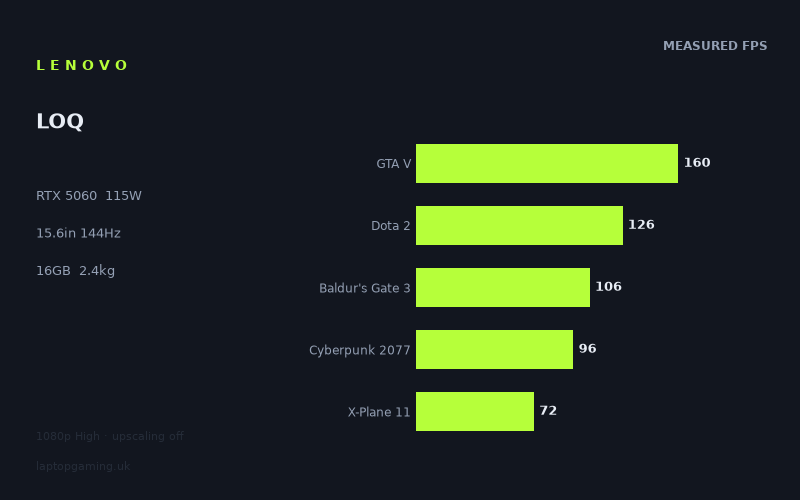
Frame rates
1920×1080, High preset, upscaling off. Averages 112fps across the 5 core benchmark games.
Measured on this machine. Source: Notebookcheck, 2025-07-04.
Not scored: no confirmed UK price
We have the full benchmark suite for this machine, so it ranks on the frame rate leaderboard like any other. What we don't have is a UK listing for this exact configuration - it's sold as a European review unit, or only in specifications that differ from the one tested. Since 30% of our score is value for money, scoring it would mean pretending price is no object, which would flatter it against every laptop you can actually buy. The frame rates below are real and comparable; there is just no buying recommendation to make yet.
How these numbers were produced
Frame rates here are not measured by us, and we label how each one was arrived at. A figure marked measured comes from a published run on that exact machine. A figure marked representative is derived from the GPU and its power limit (TGP) and cross-referenced against published reviews - a sound estimate of what that configuration delivers, but not a measurement of that specific laptop. Unless stated otherwise, numbers are 1920x1080, High preset, upscaling off. Where a laptop ships in several power configurations we use the wattage of the exact SKU listed, because a 140W RTX 5070 and a 115W one are not the same product.
In use
The short version
The Lenovo LOQ 15AHP10 is a mainstream 15.6in gaming laptop built around an RTX 5060 running at a 115W total graphics power limit, paired with a Ryzen 7 250, 16GB of memory, a 1TB SSD and a 1920x1080 IPS panel at 144Hz. That is a coherent set of choices rather than a bag of compromises, and the benchmark data backs it up: across the five games in our scoring suite, the measured average is 112fps, and across the full 22-game set Notebookcheck ran at 1080p on High with upscaling switched off, 15 titles land at 66fps or better.
What that means in practice is straightforward. This is a machine that plays esports and competitive titles at or beyond what the panel can display, plays the broad middle of the modern catalogue comfortably above 60fps, and plays the heaviest current releases in the 40s. Nothing in the measured set is unplayable. Several things in the measured set are a long way from the 144Hz the screen is capable of showing.
The 115W power limit is the single most important number on the spec sheet after the GPU name itself, and it is a good one. RTX 5060 laptop parts ship at a range of power limits depending on the chassis they are dropped into, and a low-power implementation of the same GPU produces materially different frame rates. 115W is at the healthy end for a 15in machine, and the measured figures reflect a GPU that is being allowed to work rather than one being throttled to fit a thin lid.
The constraint that should shape your thinking is 8GB of VRAM. It is enough for everything in the measured set at 1080p High, which is exactly the resolution and preset this laptop is designed for. It is also the specification most likely to become the reason you replace this machine rather than the GPU core running out of speed. If you buy a 1080p laptop and use it as a 1080p laptop, that is a manageable trade. If you were planning to hang a 1440p monitor off it in two years and turn textures up, think harder.
We have not assigned this machine a score. That is not a criticism of the laptop — the benchmark suite is complete, the numbers are sourced, and it ranks normally on our frame rate leaderboard. It is because we have no confirmed UK price for this exact configuration, and value accounts for 30% of the score in our model. Without a price there is no value component, and a score computed from the remaining 70% would be a different measurement dressed up as the same one. We will not guess at what it costs.
Buy it if you want a 1080p gaming laptop that will hold 60fps in the majority of what you play and is not pretending to be a thin-and-light. Look elsewhere if you need long unplugged battery life, if you want to drive anything above 1080p, or if the heavy end of the release calendar — the path-traced, huge-texture, open-world tier — is what you actually spend your evenings on.
Performance
The measured data here is unusually complete: 22 games, all at 1920x1080, all on the High preset, all with upscaling off, all from the same source and the same test date. That last point matters more than people assume. A benchmark set assembled from different reviewers over eighteen months tells you very little about the spread between titles, because driver versions and game patches move underneath you. A single-session 22-game run tells you a great deal, because the differences between games are real differences in what those games demand rather than artefacts of when they were measured.
What 115W actually buys
Modern laptop GPUs are not a single product. The RTX 5060 in this machine and the RTX 5060 in a thinner, quieter chassis share a name and share silicon, and can be some distance apart on the frame rate leaderboard because of how much power the manufacturer allows the chip to draw. Lenovo has specified 115W here, which for a 15.6in gaming chassis is a serious allocation rather than a token one.
The evidence that it is being used is in the shape of the results rather than any single number. When a GPU is power-starved, the pattern you see is compression: the light games come down towards the heavy ones, because even the undemanding titles cannot reach the clocks they should. That is not what the measured data shows. The spread here runs from 248fps in Strange Brigade to 41fps in Senua's Saga: Hellblade 2 — a factor of six between the top and bottom of the list. That is the signature of a GPU that is free to run fast when the workload is light and is genuinely being asked for everything it has when the workload is heavy. The bottleneck moves around with the game, which is what you want.
The practical consequence is that the LOQ's frame rates are determined by what you play, not by a thermal ceiling that flattens everything. That is a better position to be in than the raw averages suggest, because you have real control: dropping a preset or enabling upscaling in the heavy titles moves you up a curve rather than pressing against a wall.
The top of the table: comfortably past the panel
Five of the 22 measured titles exceed the panel's 144Hz refresh rate. Strange Brigade at 248fps and F1 24 at 195fps are both well-optimised engines that have been used as benchmarks for years, and at this settings level they are not stressing the hardware. GTA V at 160fps is a decade-old game running on a modern mid-range GPU and behaves accordingly. Civilization 7 at 149fps and F1 25 at 146fps sit just above the refresh ceiling.
For these games the screen is the limit, not the laptop, and that is a comfortable place to be. If you are playing racing sims or older titles, you will be seeing every frame the panel can show and the GPU will have headroom left over — which in turn means lower power draw and, by inference rather than measurement, a quieter machine. We do not have measured noise figures for this laptop, so treat that as a reasonable expectation rather than a claim.
The immediate next tier — Dota 2 at 126fps and Final Fantasy XV at 118fps — sits below 144 but well above the threshold where anyone notices a problem. Dota 2 is worth pausing on. It is a game that rarely stresses a modern GPU, and 126fps at High is not a graphics-limited result; it is a result shaped substantially by the CPU and by how the engine schedules work. The Ryzen 7 250 is a mainstream mobile part, not a flagship, and titles like Dota 2 are where a mainstream CPU shows up in the numbers. If you are a competitive Dota player buying specifically for maximum frame rate, this is the figure to weigh, and it is the one least likely to improve if you turn settings down.
The middle: the actual buying case
Baldur's Gate 3 at 106fps, Cyberpunk 2077 at 96fps and Kingdom Come: Deliverance 2 at 86fps are the results that define this laptop. All three are demanding, current, visually serious games, and all three are comfortably clear of 60fps at High with no upscaling assistance. Cyberpunk in particular is the reference point most buyers carry in their heads, and 96fps at 1080p High is a genuinely good number for a mid-range mobile GPU. It also means there is room to spend that headroom elsewhere — on higher settings, or on some ray tracing, though we do not have measured ray-traced figures for this machine and will not estimate them.
Below that sits a substantial band in the 60s and low 70s: Ghost of Tsushima at 73fps, X-Plane 11 at 72fps, Indiana Jones and the Great Circle at 68fps, Space Marine 2 at 66fps, Until Dawn at 66fps. These are all playable, all above the 60fps line that most people treat as the threshold for a smooth experience, and none of them have much margin. A busier scene than the benchmark run, a heavier area of the map, or a settings preset above High and you are into the 50s. That is the honest reading: this band is fine, but it is fine rather than generous.
X-Plane 11 deserves its own note because it is the entry most likely to be misread. It is not a graphically spectacular title and 72fps looks low against Ghost of Tsushima's 73fps. Flight simulators are draw-call and CPU heavy in a way that modern console-derived engines are not, and the LOQ's result there is telling you about the whole platform rather than about the GPU. If you fly sims, this number matters more to you than the Cyberpunk figure does, and it is one of the weaker results in the set relative to what the GPU can do elsewhere.
The bottom: where you will be turning things down
Seven titles land below 60fps. Horizon Forbidden West at 59fps and Doom: The Dark Ages at 58fps are effectively at the line — close enough that most people would call them smooth and few would complain. Then there is a clear step down to the bottom five: Stalker 2 at 48fps, The Elder Scrolls IV: Oblivion Remastered at 48fps, Assassin's Creed Shadows at 46fps, Star Wars Outlaws at 44fps and Senua's Saga: Hellblade 2 at 41fps.
These are the games that define the ceiling of a 115W RTX 5060 in 2025. They are also, not coincidentally, a fairly consistent group: large open worlds with heavy streaming, Unreal Engine 5 titles with expensive global illumination, and remasters built on top of engines doing more work than their visual results suggest. Hellblade 2 at 41fps is the hardest single result in the set and is a game that punishes every mid-range GPU it meets.
Two things need saying about these numbers, and they pull in opposite directions.
The first is that the measurements are with upscaling off. Every game in that bottom group ships with DLSS or an equivalent, and every one of them is designed on the assumption that most players will use it. Turning it on at 1080p will raise these figures — but we do not have measured upscaled figures for this laptop, so we are not going to tell you by how much. What we can say with confidence is that the sub-50fps entries in this list are a worst case rather than a realistic description of how you would actually play them, and that the gap between the measured number and your experience will be larger in these titles than anywhere else on the list.
The second is that these results are where the 8GB VRAM question lives. The measured set does not include per-title memory usage, so we cannot demonstrate that the frame buffer is the limiting factor in any specific game here, and we are not going to claim it is. What we can say is that the bottom five are drawn from precisely the category of games that have been pushing 8GB cards hardest — large streamed worlds with high-resolution texture sets — and that 8GB at 1080p High is comfortable today in a way that 8GB at higher resolutions or higher texture presets is not. This is the specification that will age first. If you keep laptops for four or five years and expect to keep raising settings, that is the number to be uneasy about, not the GPU core.
Reading the scoring-suite average correctly
Our scoring suite uses five games — GTA V at 160fps, Dota 2 at 126fps, Baldur's Gate 3 at 106fps, Cyberpunk 2077 at 96fps and X-Plane 11 at 72fps — for a mean of 112fps. That average is what puts the LOQ where it sits on our frame rate leaderboard, and it is a fair comparative measure because every machine in the database is measured the same way on the same games.
It is not, however, a prediction of what you will see in the next thing you install. The median across all 22 measured titles is around 72fps, a good 40fps below the suite mean, because the suite deliberately includes older and lighter titles for continuity across years of testing. Neither figure is wrong; they answer different questions. The suite mean answers "how does this laptop rank against other laptops". The full 22-game spread answers "what will this laptop do with my library". Use the first to compare and the second to plan.
If you want a single practical rule from the data, it is this: assume around 60 to 70fps at 1080p High in a current, demanding, single-player game with no upscaling, with well-optimised titles landing well above that and the heaviest handful landing in the 40s. That is a defensible expectation, and it is derived from the measurements rather than from marketing.
Where the CPU shows up
The Ryzen 7 250 is a mainstream mobile processor and this is a laptop where the GPU does the heavy lifting. The measured game results largely reflect that — the spread tracks graphical load closely, which is what you expect when the GPU is the bottleneck in most titles.
The exceptions are informative. Dota 2, Civilization 7 and X-Plane 11 are the three titles in this set where the CPU has the most influence over the result, and all three land below where a purely GPU-limited reading of the list would put them. Civilization 7 at 149fps is comfortably fine. Dota 2 at 126fps is fine but unremarkable. X-Plane 11 at 72fps is the one that would concern a simulation player.
We do not have productivity or synthetic CPU benchmark figures for this machine to quantify that further, so this is an inference from the game results rather than a measured claim about the processor. But the pattern is consistent enough to be worth acting on: if your usage is dominated by simulation, strategy or heavily CPU-bound competitive titles, this configuration is not where its strengths are. If your usage is dominated by modern GPU-limited single-player games, the CPU choice is close to irrelevant to your frame rates.
What we do not have
In the interest of not overselling what the data supports: we have no measured surface or component temperatures for this machine, no measured fan noise figures, no measured battery runtime, and no measured performance figures for it running on battery rather than mains. Gaming laptops routinely lose substantial performance when unplugged, and this one may or may not — we do not know, and we are not going to assume. If those are decisive factors for you, wait for numbers rather than trusting a review, this one included, that fills the gap with plausible-sounding prose.
The screen
A 15.6in 1920x1080 IPS panel at 144Hz is the most conventional specification in this class, and in this machine it is also the correct one. The question worth asking of any gaming laptop screen is whether the GPU behind it can actually feed it, and the answer here is: sometimes, in the way that matters.
Five of the 22 measured games exceed 144fps and are therefore capped by the panel rather than the hardware. Two more sit above 100fps. That accounts for the competitive and older-title end of the library, which is precisely the segment where high refresh rates deliver the most obvious benefit. If you play Dota 2, or racing sims, or anything a few years old, the 144Hz panel is doing real work and you are getting what you paid for.
For the modern single-player catalogue the picture is different. Cyberpunk at 96fps, Baldur's Gate 3 at 106fps and Kingdom Come: Deliverance 2 at 86fps are all above 60 and all well short of 144. That is not a mismatch, it is normal — a 144Hz panel is not a promise that everything will run at 144fps, it is a removal of a limit. The frames you get above 60 are frames you would not have seen on a 60Hz screen, and in the 86–126fps band the difference in smoothness against a 60Hz panel is genuinely noticeable. Below 60fps, in the bottom seven titles, the panel's refresh rate stops contributing anything and you are relying on adaptive sync, if the panel supports it — we do not have confirmation of variable refresh support for this specific model in our data, so do not treat it as given.
The choice of 1920x1080 is the right one for this GPU and it is worth defending, because higher-resolution panels are often sold as an upgrade when for a mid-range machine they are the opposite. At 1080p, the RTX 5060 at 115W with 8GB of VRAM is a well-matched combination: enough GPU throughput to clear 60fps in most things, and a frame buffer that is adequate at this resolution and preset. Push the same hardware to 1440p and both halves of that statement weaken at once — the GPU has substantially more pixels to render and the 8GB frame buffer has substantially more to hold. Lenovo has specified a panel the hardware can serve rather than one that flatters the spec sheet.
The panel technology is IPS, which in 2025 means predictable rather than exciting. IPS gives you viewing angles and colour behaviour that are broadly consistent, and it does not give you the contrast of an OLED. We do not have measured brightness, colour gamut coverage, contrast ratio or response time figures for this specific panel, and panel quality varies significantly between units bearing the same basic specification, so we are not going to characterise it beyond the technology and the refresh rate. If colour accuracy for creative work is part of your requirement, that is a gap you need filled by measurement before you buy, not by an assumption that IPS is good enough.
The one place the screen specification interacts badly with the rest of the machine is external display use. Driving a 1440p or 4K external monitor with this GPU pushes you back into the resolution territory the 8GB frame buffer and the 115W power budget are least suited to. This is a laptop that is at its best used as designed: on its own panel, at its own resolution.
Build, size and portability
At 2.446kg, the LOQ is a 15.6in gaming laptop that weighs what a 15.6in gaming laptop weighs. There is no thin-and-light claim being made here and none should be inferred. For context on what that number means in daily use: it is roughly double a mainstream 14in ultraportable, and it is a weight you notice in a bag on a commute but do not struggle with. Add the power adapter for a machine feeding a 115W GPU and a mainstream CPU — we do not have a measured figure for the charger's weight, but it will not be small — and the practical carrying load is meaningfully more than the laptop alone.
The way to think about this is not "can I carry it" but "how often will I want to". A 2.446kg 15.6in machine is a laptop you move between rooms daily, between home and a friend's house weekly, and onto a train reluctantly. It is a desktop replacement that happens to fold. If your requirement is a machine that lives on a desk and occasionally travels, that is a fine fit and the weight buys you something real: physical room for a cooling system that can support a 115W GPU sustainably. Thin gaming laptops exist and they generally achieve their thinness by running the same GPUs at lower power limits. The LOQ's weight is part of why its frame rates look the way they do.
We do not have measured dimensions, chassis materials, keyboard travel, trackpad size, port selection or build-quality assessments for this machine in our data, and we have not handled one. We are analysing published measurements and specifications, so we are not going to tell you how the lid flexes or how the keyboard feels. Those are real considerations and you should read a hands-on assessment before committing, particularly if you type a lot.
The battery is the honest weak point
60Wh is a modest capacity for a gaming laptop, and it is the specification that most clearly signals what this machine is for. We do not have a measured runtime figure, so we will not invent one, and we are not going to convert a watt-hour rating into hours of use as though that were a measurement — it isn't, and the conversion depends entirely on screen brightness, workload and power settings.
What we can say from the specification alone is structural. A 60Wh cell paired with a GPU permitted to draw 115W means gaming unplugged will drain the battery quickly and, on most machines of this type, at reduced performance, because the power delivery system cannot supply the GPU and CPU at full tilt from the battery alone. That is a general property of the category rather than a measured finding about this laptop, and we flag it as such. But the practical implication is safe to state: this is a machine to game on while plugged in. If it is also your only laptop and you need it to survive a day of lectures or meetings on battery, 60Wh with a discrete GPU in the chassis is not a promising starting point, and you should look for measured runtime figures before you rely on it.
Storage at 1024GB is adequate and no more. Modern game installs have grown to the point where a 1TB drive holds perhaps a handful of large titles alongside an operating system. That is enough for most people's active rotation and not enough to keep a library resident. Whether it can be expanded, and how easily, is not something we have confirmed for this model, so factor an external drive or a rotation habit into your plans rather than assuming an upgrade path exists.
The 16GB of memory is the current sensible minimum for gaming and is fine for the measured workload here. It is not generous. Some games in the heavier part of the measured set benefit from more, and if this configuration allows a memory upgrade — again, not something we have confirmed — that would be a more valuable spend than most.
How it compares
Our comparison method is deliberately narrow: for each rival, we compare only on games both machines have measured results for, and we report the average difference across that shared set. That avoids the common error of comparing averages computed over different game lists, which can invert a result entirely. It does mean the size of the shared set varies, and a comparison over 20 shared games is more robust than one over 10.
Against the Medion Erazer Scout 17 E1 (RTX 5050)
Across 20 shared games — the largest overlap of any comparison here, and therefore the most trustworthy — the LOQ averages 6fps faster. That is a real advantage and a smaller one than the GPU tier gap suggests it should be.
This is the comparison that should make you think hardest about what the step from an RTX 5050 to an RTX 5060 is worth. Six frames per second averaged across twenty titles is, in most of them, the difference between one comfortable result and a slightly more comfortable one. It is not the difference between playable and unplayable. Where it will matter is at the bottom of the list — in the titles already running in the 40s, a few frames represents a larger proportional gain, and the LOQ's advantage there is more valuable than the raw average implies.
We have no confirmed UK price for the Medion either, so we cannot tell you which is the better buy. What we can tell you is that on frame rates alone, over the broadest shared set we have, the gap is modest. If a 5050 machine were significantly cheaper, that gap would not be enough to justify a large premium. The Erazer is also a 17in machine, which is a different proposition entirely for portability — bigger screen, and by the ordinary logic of the category, more mass to carry. We do not have its measured weight to hand, so treat that as a category expectation rather than a comparison.
Against the Acer Nitro V 16 AI (RTX 5050 at 115W)
Across 13 shared games, the LOQ averages 8fps faster. This is the cleaner of the two 5050 comparisons because the Acer runs its GPU at the same 115W power limit, which isolates the GPU tier as the variable rather than mixing it with power budget differences.
Eight frames per second at matched power limits is roughly what you would expect from one tier of GPU separation, and it is a useful sanity check on the LOQ's results — it confirms that the 5060 here is behaving like a properly fed 5060 rather than an underpowered one. If it were being throttled, the gap against a full-power 5050 would compress towards nothing.
The Nitro V is a 16in machine against this 15.6in one, which is a genuine difference in screen area and, again by category logic rather than measurement, in bulk. Neither has a confirmed UK price in our database, so the choice between them comes down to what you can actually find them for and whether you want the larger panel. On performance alone, the LOQ is ahead, consistently, across a reasonable shared set.
Against the ASUS TUF Gaming A18 (RTX 5070 at 115W, £1,489)
This is the most interesting comparison in the set. Across 10 shared games, the LOQ averages 7fps slower than a machine with an RTX 5070 — one full GPU tier up — running at the same 115W power limit.
Seven frames per second is not much for a tier of GPU. There is a real lesson in that, and it is about power limits rather than GPU names. A 5070 constrained to 115W is not being allowed to demonstrate what a 5070 can do; it is being run at a power budget that a 5060 also occupies comfortably. The result is that the gap between them narrows to something close to noise in many titles. If you are shopping by GPU name and assuming a 5070 is decisively faster, this comparison is the correction: the power limit is at least as important as the tier, and a well-fed lower-tier part can get uncomfortably close to a starved higher-tier one.
The caveat is the shared set size. Ten games is half the overlap we have with the Medion, and a 7fps average across ten titles is more sensitive to which ten they are. If the overlap skews towards lighter, high-frame-rate games, a 7fps gap understates the difference in the heavy titles where it would matter most. We do not have the breakdown, so we flag the uncertainty rather than papering over it.
The A18 has a confirmed UK price of £1,489. The LOQ does not, so a direct value comparison is impossible and we are not going to construct one. What we can say is that the A18 is an 18in machine and this is a 15.6in one — those are not competing for the same buyer in any practical sense. The A18 is a desktop replacement in the literal sense; the LOQ is a laptop you might actually carry. If portability has any weight in your decision, the 7fps is not the deciding factor.
Against the Lenovo Legion 5 15AHP G10 (RTX 5060 at 115W)
This is the comparison that should give a prospective LOQ buyer the most pause. Across 10 shared games, the LOQ averages 8fps slower than the Legion 5 — a machine with the same GPU at the same 115W power limit, from the same manufacturer, in the same 15in class, with the same platform suffix in its model name.
Identical GPU, identical power limit, and yet a consistent gap. The measurements do not tell us why, and we are not going to pretend otherwise. The plausible explanations are cooling capacity allowing higher sustained clocks in the Legion, differences in memory configuration or speed, or differences in how the two chassis balance CPU and GPU power under combined load. Any of those would produce exactly this pattern. Which one it is, we cannot say from frame rates alone.
What this comparison does establish is that the LOQ is Lenovo's more mainstream line and the Legion is the enthusiast one, and that positioning shows up in measured results rather than just in badging. If both are available and the price gap is small, the Legion is the better-performing machine on this evidence. Neither has a confirmed UK price in our database, so we cannot tell you whether the gap is small. This is a comparison worth chasing prices on yourself before you commit, because it is the clearest like-for-like in the set and the LOQ loses it.
Against the Lenovo Yoga Pro 9 16IAH G10 RTX (RTX 5060)
Across 10 shared games, the LOQ averages 8fps slower. We do not have a confirmed power limit for the Yoga Pro's RTX 5060, which limits how much can be read into this — a higher power allocation would explain the gap entirely and would not tell you anything about either machine's design competence.
More importantly, this is not a like-for-like shopping comparison. The Yoga Pro 9 is a 16in premium creator machine rather than a gaming laptop, and it will be sold, specified and priced accordingly. That it is faster in games than a mainstream gaming laptop is a fact worth knowing if you happen to be choosing between the two — some people genuinely are, if their work needs a colour-accurate display and their evenings need a GPU — but for most buyers looking at the LOQ, the Yoga Pro is in a different bracket. Without confirmed pricing on either we cannot say by how much.
What the comparison set adds up to
Taken together, the five comparisons place the LOQ precisely where its specification suggests it should sit: clearly ahead of RTX 5050 machines, clearly behind better-implemented RTX 5060 machines, and closer than expected to a power-limited RTX 5070. There are no surprises in either direction and no evidence of a machine punching above or below its weight.
The two comparisons that should shape a purchase decision are the Acer Nitro V — because it tells you what the step up from a 5050 buys, at matched power limits, and the answer is a solid but not transformative 8fps — and the Legion 5, because it tells you that Lenovo has a faster machine with the same GPU and the same power limit sitting one line up the range. Everything else in the set is either a different form factor or a different market segment.
Who it's for
The LOQ 15AHP10 suits a specific and reasonably large group of people, and the measured data lets us describe them precisely rather than in generalities.
Buy it if
- You play at 1080p and intend to keep playing at 1080p. This is the resolution the entire configuration is optimised for — the panel, the 8GB frame buffer and the 115W GPU are matched to it. At 1080p High, 15 of the 22 measured titles clear 66fps and the scoring-suite average is 112fps. That is a well-balanced machine doing what it was designed for.
- Your library skews towards competitive, older or well-optimised titles. Strange Brigade at 248fps, F1 24 at 195fps, GTA V at 160fps and Civilization 7 at 149fps all exceed what the 144Hz panel can display. If this is the shape of your playing, the LOQ delivers more frames than you can see and will do so without working hard.
- You want a gaming laptop that is a laptop, not a portable desktop. At 2.446kg in a 15.6in chassis, it moves around a house or a campus without ceremony. The 18in ASUS in the comparison set does not, and the 17in Medion is a different proposition again.
- You accept mains-powered gaming. If the machine lives near a socket, the 60Wh battery is a non-issue and the 115W GPU is an asset. This is the trade the LOQ makes and it is a coherent one.
- You are comfortable using upscaling in heavy titles. The measured figures are with upscaling off, which is the right way to benchmark and not the way most people play. The bottom of the results table looks worse than your actual experience will be, provided you are willing to turn DLSS on.
Buy something else if
- You want to drive a 1440p display, now or later. The combination of a mid-range GPU and 8GB of VRAM is comfortable at 1080p and progressively less so above it. This is not a machine to buy with an external high-resolution monitor in your plans.
- The heaviest current releases are the point. Hellblade 2 at 41fps, Star Wars Outlaws at 44fps, Assassin's Creed Shadows at 46fps and Stalker 2 at 48fps are all in the same territory, and if that category is where you spend your time, you are buying a machine that will spend its life on reduced settings with upscaling on. That is a legitimate way to play, but be clear-eyed that it is the arrangement you are signing up for rather than an occasional compromise.
- You fly simulators or play heavily CPU-bound strategy. X-Plane 11 at 72fps and Dota 2 at 126fps are the weakest results relative to what the GPU manages elsewhere, and they are the ones least improved by lowering graphics settings. A configuration with a stronger CPU would serve you better.
- Unplugged runtime is a real requirement. 60Wh alongside a discrete GPU is not a promising specification for all-day use, and we have no measured runtime figure to reassure you otherwise. If this needs to be a study or work laptop first and a gaming laptop second, look for a machine with either a larger battery or measured battery figures you can check.
- You can find a Lenovo Legion 5 15AHP G10 for a similar price. Same GPU, same power limit, 8fps faster across the shared games. That is the single most actionable finding in this review. We have no confirmed price for either machine, so we cannot tell you whether the Legion is worth the difference — but it is the first thing to check.
- You keep laptops for five years and expect to keep raising settings. The 8GB frame buffer is the component most likely to make that plan uncomfortable. The GPU core will still be adequate for 1080p in three years. Whether 8GB will be is a less confident bet.
The bottom line
The Lenovo LOQ 15AHP10 is a competently specified mainstream gaming laptop that does the fundamental thing right: it gives its GPU enough power to work with. The 115W limit on the RTX 5060 is what separates the measured results here from those of thinner machines carrying the same GPU name, and the six-fold spread between the fastest and slowest measured titles shows a chip responding to workload rather than pressing against a ceiling.
Its limitations are the ordinary ones for the class and are all visible in the data rather than hidden by it. The heaviest games run in the 40s without upscaling. The frame buffer is the specification most likely to date. The battery is small. And Lenovo's own Legion 5, with identical GPU hardware at an identical power limit, is measurably faster.
We have not scored it, because we have no confirmed UK price for this configuration and value is 30% of our score. The benchmark data is complete and it takes its normal place on our frame rate leaderboard, so if what you need is a comparison of what the machine can do, that is available and reliable. What we cannot yet tell you is whether it is worth what it costs. When we have a confirmed price, we will.