Details
Product prices and availability are accurate as of the date/time indicated and are subject to change. Any price and availability information displayed on Amazon.co.uk at the time of purchase will apply to the purchase of this product.Review
Schenker XMG Core 16 M25 review
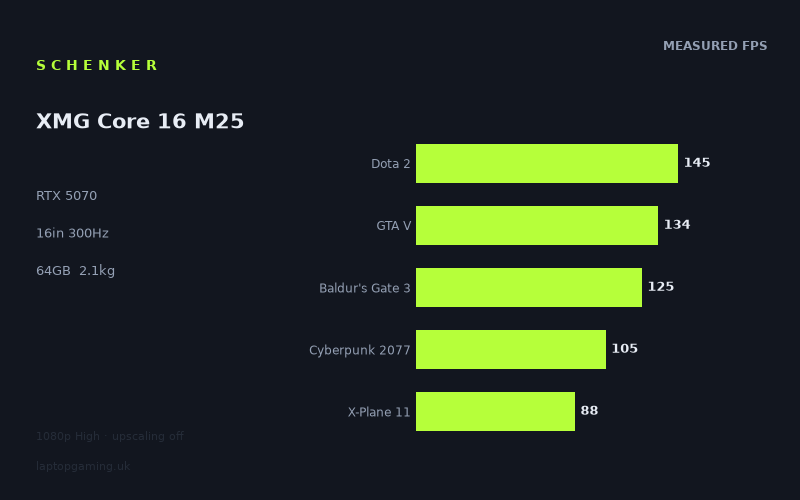
Frame rates
1920×1080, High preset, upscaling off. Averages 119fps across the 5 core benchmark games.
Measured on this machine. Source: Notebookcheck, 2025-10-07.
Not scored: no confirmed UK price
We have the full benchmark suite for this machine, so it ranks on the frame rate leaderboard like any other. What we don't have is a UK listing for this exact configuration - it's sold as a European review unit, or only in specifications that differ from the one tested. Since 30% of our score is value for money, scoring it would mean pretending price is no object, which would flatter it against every laptop you can actually buy. The frame rates below are real and comparable; there is just no buying recommendation to make yet.
How these numbers were produced
Frame rates here are not measured by us, and we label how each one was arrived at. A figure marked measured comes from a published run on that exact machine. A figure marked representative is derived from the GPU and its power limit (TGP) and cross-referenced against published reviews - a sound estimate of what that configuration delivers, but not a measurement of that specific laptop. Unless stated otherwise, numbers are 1920x1080, High preset, upscaling off. Where a laptop ships in several power configurations we use the wattage of the exact SKU listed, because a 140W RTX 5070 and a 115W one are not the same product.
In use
The short version
The Schenker XMG Core 16 M25 is a powerful-looking 16-inch gaming laptop configuration built around an RTX 5070, a Ryzen AI 9 HX 370, 64GB of memory and a 2048GB SSD. Its published gaming results are strong, with Notebookcheck measuring a mean of 119fps across the five-game scoring suite at 1920x1080 on the High preset with upscaling disabled. That is enough performance for high-refresh gaming in a broad range of titles, although it is not enough to make the fitted 300Hz panel fully meaningful in every game.
The important qualification is that the supplied gaming numbers were recorded at 1920x1080, while the laptop’s IPS screen is a 2560x1600 panel. That distinction matters. The benchmark data shows that the XMG can produce excellent frame rates at 1080p High, but it does not establish how it performs at the screen’s native resolution. Anyone buying this machine specifically to play demanding modern games at 2560x1600 should treat the published figures as a useful performance baseline rather than proof of native-resolution results.
There is also no confirmed UK price for this exact configuration. That means its value cannot be judged properly, and no overall value-based assessment can be made until there is a real UK selling price to compare with its performance and specification. That is not a criticism of the machine itself; the benchmark suite is complete and the laptop has a normal place on the frame-rate leaderboard. It simply means that a sensible buying recommendation has to focus on capability rather than value.
On capability, the XMG Core 16 M25 is most convincing for someone who wants a substantial specification rather than the bare minimum needed for gaming. The 64GB memory allocation and 2048GB SSD make it a high-capacity configuration on paper, while the RTX 5070 delivers measured results ranging from 88fps in X-Plane 11 to 291fps in Strange Brigade. That is a wide spread, but it is also a realistic one: a gaming laptop should be judged by how it handles difficult titles as well as by its best-case results in lighter workloads.
The machine looks particularly suitable for buyers who play a mixture of competitive games, older or lighter PC games, large RPGs and technically demanding modern releases, and who also want plenty of installed memory and storage without immediately planning upgrades. It is less obviously the right choice for someone whose priority is maximum native-resolution performance on the 2560x1600 display, someone who wants a clearly established UK bargain, or someone who needs a very light travel machine. At 2.149kg before considering the charger, this is portable in the practical sense of moving between home, work, university or occasional travel, but it is not an ultralight 14-inch-class laptop disguised as a gaming system.
Performance
What the measured results say
Notebookcheck measured the Schenker XMG Core 16 M25 at 1920x1080 using the High preset with upscaling turned off. Those settings are useful because they show conventional rasterised performance without relying on image-upscaling modes to raise the final frame-rate figure. They are not native-resolution tests for this machine’s 2560x1600 screen, but they are a clean way to compare the laptop with other systems measured under the same conditions.
Across the five scoring-suite games, the XMG Core 16 M25 records a mean of 119fps. That is a healthy gaming result, but the mean should not be mistaken for a promise that every game will run around that figure. The individual results range from 88fps to 145fps within that suite, and the broader published list runs from 88fps to 291fps. The average is helpful for placing the laptop overall; the individual games are more useful for deciding whether it suits the games a buyer actually plays.
- Strange Brigade: 291fps
- F1 24: 231fps
- Dota 2: 145fps
- Final Fantasy XV: 140fps
- GTA V: 134fps
- Baldur’s Gate 3: 125fps
- Cyberpunk 2077: 105fps
- X-Plane 11: 88fps
The strongest result is Strange Brigade at 291fps. That is extremely close to the screen’s 300Hz refresh rate, although it does not quite reach it in the published test. F1 24 at 231fps is also very fast and makes meaningful use of a high-refresh display, even though it remains below the panel’s maximum refresh. Dota 2, Final Fantasy XV, GTA V and Baldur’s Gate 3 all sit between 125fps and 145fps. Those figures are comfortably beyond a conventional 60Hz target and clearly support high-refresh play, but they do not make a 300Hz panel fully utilised in the benchmark conditions.
Cyberpunk 2077 at 105fps and X-Plane 11 at 88fps are the more grounding figures. Both remain above 60fps in this benchmark setup, which is a good result, but they illustrate why a buyer should not look only at the 291fps Strange Brigade result and assume that every demanding game will approach the panel’s ceiling. The XMG Core 16 M25 has the performance for fast gaming, but its 300Hz display is an upper limit rather than a level the GPU reaches across the catalogue.
The benchmark spread matters more than the headline average
A 119fps mean is useful shorthand, but it conceals the practical differences between games. The 203fps gap between the published top and bottom results is substantial. It tells us that the laptop can look dramatically different depending on workload, engine behaviour, graphical demands and the balance between CPU and GPU load. That is normal for a gaming laptop, but it matters especially on a machine with a 300Hz screen because buyers may be tempted to think of it primarily as an esports system.
In the lighter end of the tested selection, there is genuine scope for very high refresh rates. Strange Brigade at 291fps is the clearest example, and F1 24 at 231fps is also well above the level where high-refresh motion can be relevant. These are the results that justify fitting a 300Hz panel more than the slower games do. A buyer who spends most of their time in titles that behave like these benchmark results will get considerably more from the display’s refresh ceiling than someone who primarily plays heavier games.
The middle group is arguably the most representative of the laptop’s general gaming character. Dota 2 at 145fps, Final Fantasy XV at 140fps, GTA V at 134fps and Baldur’s Gate 3 at 125fps show a machine that is comfortably beyond basic 60fps gaming. These are strong figures for smooth play, and they leave some headroom for users who prefer higher refresh over the highest possible visual settings. However, they are still far from 300fps. In this kind of workload, the display is better understood as a high-quality high-refresh panel with capacity for easier games rather than a screen that the laptop will saturate as standard.
The lower end is just as important. Cyberpunk 2077 at 105fps is still a good result at the stated 1080p High settings with upscaling off, but it demonstrates that demanding games have a different relationship with the hardware. The machine has enough performance to stay above 100fps in this particular benchmark, yet that is only around one-third of the display’s stated maximum refresh. X-Plane 11 at 88fps makes the same broader point from another direction: the display can refresh far more frequently than the benchmark result can deliver, but 88fps remains a credible frame rate for a demanding gaming laptop workload.
This is why the XMG Core 16 M25 should be bought for strong broad gaming performance rather than for a simple “300Hz gaming” promise. The panel is capable of 300Hz. The measured GPU performance is capable of getting close in Strange Brigade and delivering more than 200fps in F1 24. But the rest of the data says that the more common expectation should be somewhere below that ceiling, varying significantly by game.
What the RTX 5070 configuration does and does not tell us
The laptop uses an RTX 5070 with 8GB of VRAM. That gives the XMG Core 16 M25 a modern upper-mid-range gaming GPU specification, but the RTX 5070 name alone does not tell the whole performance story. Laptop graphics performance depends heavily on the GPU power limit, cooling implementation and system tuning. The supplied fact sheet does not state the XMG Core 16 M25’s GPU power limit, so it would be wrong to infer one from the chassis, the processor or the benchmark results.
That missing power-limit figure is particularly important because the closest rival list includes a Razer Blade 14 with an RTX 5070 specified at 115W. The XMG averages +0fps against that Razer across eight shared games. In practical terms, that means the available shared-game data shows no average frame-rate advantage for either machine. It does not prove that the two laptops use the same GPU power limit, nor does it prove that they behave identically in every game. It only establishes that, in the overlapping benchmark selection, their average result is level.
The XMG’s numbers should therefore be read as measured output rather than as a theoretical statement about what every RTX 5070 laptop should achieve. It is a recurring problem in gaming-laptop shopping that two systems can carry the same GPU label but have meaningfully different power behaviour. In this case, Notebookcheck’s figures provide the more useful answer: this particular XMG configuration produces 291fps in Strange Brigade, 231fps in F1 24, 145fps in Dota 2, 140fps in Final Fantasy XV, 134fps in GTA V, 125fps in Baldur’s Gate 3, 105fps in Cyberpunk 2077 and 88fps in X-Plane 11 under the stated test conditions.
That is also why it would be unhelpful to claim that the XMG is either a low-power or high-power RTX 5070 design without an explicit GPU power figure. The benchmark results show that it is competitive with the systems listed in the rival data, but a precise explanation of the power configuration is not available here. Buyers who consider GPU power limits essential to their purchase should seek confirmation from Schenker or a detailed specification listing before ordering.
CPU, memory and storage context
The Ryzen AI 9 HX 370 is paired with 64GB of memory and a 2048GB SSD. The fact sheet does not provide application benchmarks, memory speed, storage performance figures or upgrade information, so there is no basis for making claims about workstation performance, SSD throughput or internal expansion. Still, the configuration is plainly generous in capacity terms. A 64GB memory allocation is more than a minimal gaming setup, and a 2048GB SSD provides considerably more installed storage than a small single-game-library drive.
For gaming, the practical relevance of the CPU and memory specification is that some workloads are not governed by GPU performance alone. The contrast between games in the published results is not simply a ranking of graphical beauty or age; different games place different demands on processors, memory systems and graphics hardware. The XMG Core 16 M25’s performance spread should therefore be treated as a system result. It is not sensible to attribute every difference between 291fps in Strange Brigade and 88fps in X-Plane 11 solely to the RTX 5070.
The 64GB memory allocation is likely to matter most to buyers who use the laptop for more than a narrow gaming workload, such as keeping many applications open alongside games or working with large projects. However, no measured multitasking, creator or productivity data has been supplied, so it should not be presented as evidence that the machine is faster than a lower-memory rival in any particular application. It is a specification advantage in capacity, not a benchmark-proven performance claim.
How to interpret the figures at the actual screen resolution
The measured gaming figures are at 1920x1080. The installed display is 2560x1600. The native screen has more pixels to render than the benchmark resolution, so these figures should not be described as native-resolution results. No 2560x1600 frame rates have been supplied, and it would be wrong to calculate or guess them from the 1080p data.
This is not a minor technical footnote. It shapes how the machine should be bought and configured. At 1920x1080 High with upscaling disabled, the XMG reaches 291fps in Strange Brigade and 231fps in F1 24. At the screen’s native resolution, the GPU has a larger rendering task, but the fact sheet does not show by how much that affects any of these titles. Buyers who are happy to adjust resolution or settings according to the game have more flexibility. Buyers who insist on 2560x1600 in every title should not assume the published 1080p result will carry over unchanged.
The same point applies to the 300Hz panel. At 1080p High, the machine is already below 300fps in every supplied game, though Strange Brigade is close at 291fps. There is no evidence here that any measured game reaches 300fps at 2560x1600. The display’s maximum refresh is still useful as headroom, but the data does not support treating 300fps native-resolution gaming as the standard experience.
The screen
2560x1600, IPS and 300Hz
The XMG Core 16 M25 has a 16-inch IPS screen with a 2560x1600 resolution and a 300Hz refresh rate. On paper, this is a notably ambitious display specification for a laptop using an RTX 5070. The resolution provides a taller 16:10-style pixel layout than a conventional 1920x1080 gaming panel, while the refresh rate is positioned well beyond the 120Hz, 144Hz or 165Hz levels commonly associated with general high-refresh gaming.
The fact sheet identifies the panel as IPS, but it does not include brightness, contrast, colour coverage, response-time, adaptive-sync or outdoor-visibility measurements. Those omissions matter. IPS describes the panel technology, but it does not establish whether this particular display is especially bright, especially colour-accurate, especially fast in pixel transitions or especially well suited to use outside. The appropriate conclusion is limited: this is a 16-inch IPS display with a 2560x1600 resolution and a 300Hz refresh rate. Anything beyond that needs display measurements that are not present here.
The resolution and refresh pairing makes sense for a buyer who wants one machine to cover several kinds of PC use. The 2560x1600 panel gives more desktop area than a 1920x1080 display, while 300Hz gives a very high refresh ceiling for games that can reach it. The compromise is that these two strengths do not automatically align in demanding games. Higher resolution asks more of the GPU, and the benchmark data is available only at 1920x1080.
Can the GPU drive 300Hz?
The measured answer is: sometimes it gets close, often it does not, and there is no supplied native-resolution evidence. Strange Brigade reaches 291fps, which is close to the 300Hz panel limit. F1 24 reaches 231fps, making substantial use of the high-refresh screen. These are the titles in the supplied data where the 300Hz specification looks most directly relevant.
At 145fps in Dota 2, 140fps in Final Fantasy XV, 134fps in GTA V and 125fps in Baldur’s Gate 3, the XMG is still delivering fast output. These results are well above a basic 60fps level and give the screen a clear advantage over a standard 60Hz display. But they do not come close to filling every one of the panel’s 300 refresh opportunities. That is not a fault in isolation; a 300Hz panel is a maximum capability, not a requirement that every game must hit. It does mean that a buyer should value the screen for its flexibility rather than assume a constant 300fps experience.
Cyberpunk 2077 at 105fps and X-Plane 11 at 88fps are further from the panel’s ceiling. These numbers still support smooth gaming under the stated benchmark conditions, but they underline the mismatch between a very high refresh display and the realities of demanding PC games. In heavier titles, the value of the 300Hz specification is less about reaching 300fps and more about ensuring that the display itself is not the bottleneck if the user lowers settings, uses a lower resolution or plays a less demanding game.
Because upscaling was disabled for the supplied measurements, the figures are also useful as a conventional baseline. However, no upscaling-on numbers are provided. It would therefore be wrong to say how much closer any game might get to 300fps with upscaling enabled, or how native 2560x1600 performance might respond to different graphics settings. The laptop has options in principle because it is a Windows gaming laptop with an RTX GPU, but this review should not turn general platform possibilities into claimed measured results.
The sensible way to use this display
The most sensible interpretation is that the panel gives the XMG Core 16 M25 room to adapt to the game. In lighter or highly optimised titles, the laptop can deliver very high frame rates at the benchmark settings, as shown by the 291fps Strange Brigade and 231fps F1 24 results. In the middle of the benchmark range, it can produce high-refresh gaming without approaching the full 300Hz ceiling. In more demanding workloads, the screen’s resolution becomes more relevant than its maximum refresh because the available figures are already below 120fps at 1080p High.
A buyer focused on competitive games may appreciate the 300Hz panel most, provided their preferred titles behave more like the faster end of this benchmark list. A buyer focused on visually demanding single-player games may value the 2560x1600 resolution and IPS format more, but should be prepared to make game-by-game decisions about settings and resolution. The fact sheet gives no basis for claiming that native 2560x1600 High settings will be comfortable in every current game.
This is a better screen specification for flexibility than for a single fixed expectation. It has enough refresh headroom for exceptionally high frame rates, and it has enough resolution to offer a more spacious desktop and sharper-looking native output than 1080p. The trade-off is that the published benchmark results do not show the GPU fully exploiting both strengths simultaneously.
Build, size and portability
What the 2.149kg weight means
The Schenker XMG Core 16 M25 weighs 2.149kg. That places it in a practical middle ground for a 16-inch gaming laptop. It is not so heavy that it must stay permanently on a desk, but it is substantial enough that portability should be considered in realistic terms. A machine of this weight can be carried between locations, taken to work or university, or used as a transportable main computer. It is less naturally suited to someone who wants to carry a laptop continuously throughout the day with minimal burden.
The weight figure is only part of the travel picture. The supplied fact sheet does not include the laptop’s dimensions, charger weight, battery capacity or measured battery life. It would therefore be wrong to describe it as slim, bulky, compact, all-day portable or short-lived away from mains power. Those are all judgements that need more information than the 2.149kg chassis figure provides.
Still, 2.149kg is enough to establish that this is not a featherweight design. The hardware specification helps explain why: this is a 16-inch machine with a 300Hz 2560x1600 IPS panel, an RTX 5070, a Ryzen AI 9 HX 370, 64GB of memory and a 2048GB SSD. That is a substantial component set. The result is likely to make most sense for someone who wants a laptop that can move, rather than someone who values minimum carry weight above all else.
A desktop replacement that can travel
The XMG Core 16 M25 is best thought of as a portable performance computer rather than a minimalist travel laptop. Its installed memory and storage capacity reinforce that impression. A 64GB and 2048GB configuration is aimed at a buyer who wants room for a sizeable game library and broader use without immediately compromising on installed capacity.
That does not mean it should automatically be labelled a full desktop replacement. The fact sheet does not state its port selection, external-display support, keyboard quality, cooling behaviour, fan noise, upgrade access or battery behaviour. Those factors are central to whether a laptop genuinely replaces a desktop setup. The safer conclusion is that the specification has the capacity and gaming performance expected of a main machine, while the 2.149kg weight keeps relocation realistic.
For a buyer who mainly plays at a desk but occasionally needs to take their system elsewhere, this balance is likely to be attractive. For a buyer who works from cafés, commutes daily or spends long periods travelling without access to mains power, the missing battery and charger information becomes important. In that use case, weight alone does not answer the question.
How it compares
Razer Blade 14: level gaming output, different format questions
The closest listed rival is the Razer Blade 14 with an RTX 5070 specified at 115W. Across eight shared games, the XMG Core 16 M25 averages +0fps against it. That is a dead level result in the shared-game comparison. It is meaningful because it shows that the XMG’s published performance is not obviously ahead of or behind this RTX 5070 rival in average gaming output.
The Razer is a 14-inch machine while the Schenker is a 16-inch machine, so the decision between them cannot be reduced to the shared-game average. The XMG has a 16-inch 2560x1600 300Hz IPS screen and weighs 2.149kg. The fact sheet does not provide the Razer’s weight, screen specification or memory and storage configuration, so a fuller portability or display comparison cannot be made here. What can be said is that the XMG does not gain a frame-rate advantage over the Blade 14 in the eight games both machines have been measured in.
Neither machine has a confirmed UK price in the supplied data. That means this is a performance and format comparison, not a value comparison. Buyers deciding between them should treat the XMG’s larger screen and known 64GB/2048GB configuration as concrete strengths, while recognising that the shared gaming data is level.
Gigabyte Gaming A16 Pro GA6DH: no average gap despite the RTX 5070 Ti label
The Gigabyte Gaming A16 Pro GA6DH uses a Core 7 240H and an RTX 5070 Ti. Across seven games shared with the XMG Core 16 M25, the Schenker averages -0fps. In practice, that means the average difference is again level in the published shared-game data.
This is a useful reminder that GPU naming alone is not enough to settle a laptop comparison. The Gigabyte has an RTX 5070 Ti on the fact sheet, while the Schenker has an RTX 5070, yet the available overlap produces no average frame-rate separation. That does not prove the GPUs are equivalent in all games, nor does it establish anything about their respective power limits. It simply means the shared benchmark evidence does not show a meaningful average advantage for either machine.
There is no confirmed UK price for the Gigabyte listed here either. As with the Razer comparison, the absence of price prevents a serious value judgement. Buyers should not pay more simply because one product name contains “Ti” when the available shared-game frame-rate data is level. They should compare the full configurations, screens, portability details, support arrangements and confirmed selling prices when those are available.
Lenovo Legion 5 15IRX10: close enough that price and configuration matter
The Lenovo Legion 5 15IRX10 is listed with an RTX 5070 and a UK price of £2,359. Across eight shared games, the XMG Core 16 M25 averages -2fps against it. That is a small average deficit for the Schenker in the overlap, not a decisive performance gap.
The Lenovo’s £2,359 price is useful context only for the Lenovo. It must not be used to estimate the likely price of the Schenker because the XMG Core 16 M25’s UK price is unconfirmed. Without a confirmed Schenker price, there is no honest way to determine whether being 2fps behind on average is irrelevant, acceptable or poor value. A lower priced XMG could be attractive despite the small deficit; a much higher priced XMG would need other clear advantages to justify itself. The supplied data does not allow either conclusion.
The XMG does have a known 16-inch 2560x1600 300Hz IPS display, 64GB of memory and 2048GB SSD. The supplied rival entry does not give the Lenovo’s screen, memory or storage details, so those cannot be compared directly. The correct reading is straightforward: the Lenovo is marginally ahead in the shared gaming average, the difference is small, and the XMG needs a confirmed UK price before a buying recommendation between the two can be made.
HP Omen 16-ap0091ng: a small advantage over an RTX 5060 rival
The HP Omen 16-ap0091ng is listed with an RTX 5060. Against it, the XMG Core 16 M25 averages +3fps across seven shared games. That is a modest average lead for the Schenker. It supports the expectation that the XMG is a strong gaming laptop, but it is not a large enough gap to settle a purchase on frame rates alone.
The HP has no confirmed UK price in the supplied data. Therefore, there is no basis for calling the XMG better value or the HP better value. The Schenker’s 64GB memory and 2048GB SSD are known, while no corresponding HP capacity figures are supplied in the rival list. Buyers should not assume the RTX 5060 system is necessarily a lower-cost alternative, nor should they assume the 3fps average lead translates into a major real-world distinction in every game.
The comparison does, however, place the XMG sensibly within its market area. It is ahead of this RTX 5060 rival in the shared results, but only slightly. That makes the eventual UK price especially important. If the XMG arrives at a price that reflects its larger memory and storage allocation as well as its gaming performance, it may be compelling. If it is priced far above systems with similar shared-game output, the case becomes harder. No conclusion can be drawn until that price exists.
Asus ROG Zephyrus G14 2025: small deficit against a much more expensive listed rival
The Asus ROG Zephyrus G14 2025 is listed with an RTX 5080 at 120W and a UK price of £3,811. Across eight shared games, the XMG Core 16 M25 averages -6fps against it. The Asus is ahead in the shared-game comparison, but the difference is still much smaller than a casual reading of RTX 5080 versus RTX 5070 might lead some buyers to expect.
That does not mean the two machines are interchangeable. The Asus has a different GPU specification and a stated 120W figure, while the XMG’s GPU power limit is not supplied. The Schenker also has a 16-inch screen, while the Asus model name identifies it as a G14. The fact sheet does not provide enough detail to compare panel quality, chassis size, weight, cooling or broader configuration directly.
The £3,811 Asus price shows why confirmed pricing matters so much. The XMG has no confirmed UK price, so it cannot be presented as a cheaper alternative even though the Asus figure is known. Still, a 6fps shared-game deficit against that system suggests that the XMG is not being left behind in the benchmark overlap. Buyers considering the Asus should ask whether its specific form factor, RTX 5080 configuration and other features justify its confirmed price. Buyers considering the XMG should wait for its real UK price before treating it as a cost-saving substitute.
Who it’s for
Buy it if the configuration suits your use
The Schenker XMG Core 16 M25 makes the most sense for a buyer who wants a 16-inch gaming laptop with a very high-refresh screen, strong measured 1080p High performance, unusually generous installed memory and a large SSD. The 64GB memory and 2048GB SSD are concrete specification strengths. For someone who wants to install a substantial game library and keep a system for wider use rather than just play a few titles, that configuration is more appealing than a basic gaming-laptop build.
It is also a good fit for someone who plays a mixture of games rather than one narrow category. The measured results show it can get close to the panel’s maximum refresh in Strange Brigade, exceed 200fps in F1 24, deliver between 125fps and 145fps in several other titles, and remain above 100fps in Cyberpunk 2077 under the stated benchmark conditions. That is broad capability rather than a machine that only looks good in one carefully selected title.
Buyers who want a transportable main machine rather than a tiny travel laptop should also consider it. At 2.149kg, it is realistic to move between locations. The 16-inch display and large installed memory and storage capacities make more sense in that role than in an ultra-light carry-everywhere role. It is a laptop for people who want desktop-like capacity in a system that can still be packed away and moved.
Buy something else if price certainty is essential
The biggest reason to wait or look elsewhere is the missing UK price. The XMG Core 16 M25 cannot be assessed for value until its exact configuration is sold at a confirmed GBP figure. That is especially relevant because the closest competitor list includes machines with no confirmed UK price as well as a Lenovo at £2,359 and an Asus at £3,811. Without the Schenker’s price, there is no responsible way to say whether its benchmark performance is excellent value, merely fair or too expensive.
If you are choosing between laptops immediately and have a fixed budget, a machine with a transparent UK price is easier to judge. The XMG may ultimately be competitively priced, but that is not information available here. Waiting for a confirmed price is not indecision; it is the only sensible response when value is a major part of the purchase.
Buy something else if native 2560x1600 gaming is your non-negotiable priority
The display is 2560x1600, but the supplied frame rates are all from 1920x1080 High testing with upscaling disabled. If your priority is playing every demanding game at the screen’s native resolution with high settings and high frame rates, the data is incomplete for that decision. The XMG may perform well in that scenario, but no native-resolution figures have been supplied, so it cannot be claimed.
This matters most for buyers who do not want to adjust settings, use different resolutions between games or accept that demanding titles will run well below the 300Hz ceiling. At the benchmark resolution, Cyberpunk 2077 reaches 105fps and X-Plane 11 reaches 88fps. Those are good figures, but they already show that the laptop’s gaming experience varies by title before moving to the higher-resolution native panel.
A buyer who values the screen’s resolution more than its refresh rate should seek 2560x1600 benchmarks before committing. A buyer who values flexibility and is comfortable choosing settings on a game-by-game basis will find the existing data more reassuring.
Buy something else if minimal carry weight or battery evidence is the priority
At 2.149kg, the XMG Core 16 M25 is portable but not especially light. Buyers who travel constantly, carry a laptop all day or want the smallest possible gaming system should compare it with lighter alternatives. The rival list includes 14-inch models, but the supplied facts do not provide enough weight or dimension information to make a direct portability ranking.
Battery life is also unknown from the available data. There is no battery capacity, no measured runtime and no charger weight. Anyone who needs long unplugged use should not buy on assumption. They should wait for battery measurements or seek a laptop with documented battery performance.
The XMG Core 16 M25 is best judged as a capable 16-inch performance laptop with strong published 1080p gaming results, a 300Hz 2560x1600 IPS panel and a generous 64GB/2048GB configuration. Its main unknown is not performance: Notebookcheck’s figures provide a clear picture there. Its main unknown is value, because there is no confirmed UK price. Until that changes, the sensible verdict is positive on capability, cautious on buying urgency, and clear about the limits of the available evidence.