Details
Product prices and availability are accurate as of the date/time indicated and are subject to change. Any price and availability information displayed on Amazon.co.uk at the time of purchase will apply to the purchase of this product.Review
Gigabyte Aero 14 OLED BMF review
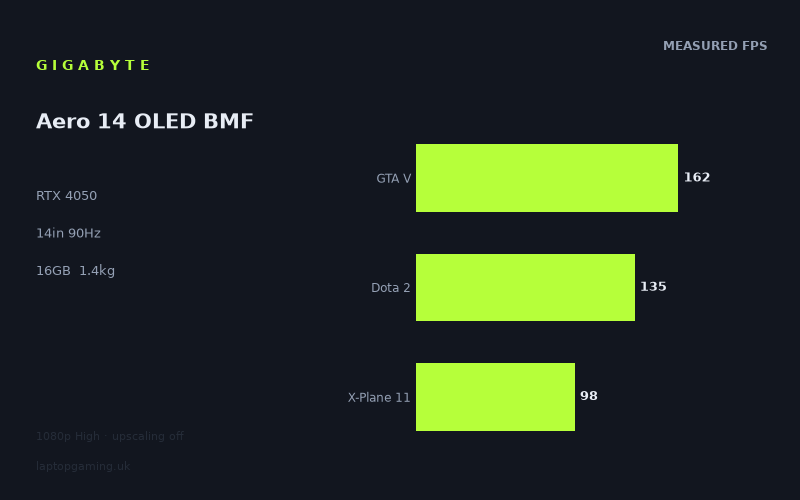
Frame rates
1920×1080, High preset, upscaling off.
Measured on this machine. Source: Notebookcheck, 2023-05-06.
Not scored: incomplete benchmark suite
Every scored laptop on this site is averaged over the same 5 games, and this one is short of Cyberpunk 2077, Baldur's Gate 3. A mean over 3 games is not comparable to a mean over 5, so we publish the figures we have and leave the score blank rather than rank it against machines tested on a different set. The numbers below are real - the suite is just incomplete.
How these numbers were produced
Frame rates here are not measured by us, and we label how each one was arrived at. A figure marked measured comes from a published run on that exact machine. A figure marked representative is derived from the GPU and its power limit (TGP) and cross-referenced against published reviews - a sound estimate of what that configuration delivers, but not a measurement of that specific laptop. Unless stated otherwise, numbers are 1920x1080, High preset, upscaling off. Where a laptop ships in several power configurations we use the wattage of the exact SKU listed, because a 140W RTX 5070 and a 115W one are not the same product.
In use
The short version
The Gigabyte Aero 14 OLED BMF is a 14in machine that weighs 1.408kg and carries an RTX 4050 alongside a Core i7-13700H, 16GB of memory, a 63Wh battery and a 2880x1800 OLED panel running at 90Hz. Notebookcheck's measured figures, dated 6 May 2023, cover nine titles at 1920x1080 on the High preset with upscaling switched off. They run from 162fps in GTA V down to 45fps in The Last of Us.
That spread — a factor of more than three and a half between the fastest and slowest result in the same measured set, on the same machine, at the same resolution and preset — is the story of this laptop. It is not a machine with a single performance level. It is a machine that behaves like two different products depending on what you load, and the dividing line falls almost exactly where the current generation of graphically ambitious releases begins.
Five of the nine measured titles clear the panel's 90Hz refresh rate outright: GTA V at 162fps, Dota 2 at 135fps, Strange Brigade at 117fps, F1 22 at 101fps and X-Plane 11 at 98fps. The Witcher 3 lands at 87fps, three frames short of the refresh ceiling and effectively level with it in practice. Then the floor drops away. Final Fantasy XV manages 58fps, Hogwarts Legacy 49fps and The Last of Us 45fps. Those last three are the heaviest workloads in the set and they are the ones that define what this machine is not.
The most instructive comparison in the record is not with a faster laptop but with a slower one carrying the identical graphics chip. Against an MSI Thin GF63, also an RTX 4050, the Aero 14 averages 44 frames per second more across three shared games. Same GPU model, same benchmark resolution, same preset, and a gap that would look respectable between two adjacent tiers of the product stack. That result matters more than anything else on this page, and the comparison section works through why.
There is no score on this page. Our scoring suite is five games, identical for every laptop we rank, and we hold three of them for this machine: GTA V at 162fps, Dota 2 at 135fps and X-Plane 11 at 98fps, averaging 132fps across those three. We have no figure for Cyberpunk 2077 and none for Baldur's Gate 3. A partial suite cannot be ranked against a complete one — the two missing titles are both heavier than any of the three we hold, so averaging what we have would flatter this laptop against every machine whose full set includes them. We would rather publish nothing than publish a number we know is biased in one direction.
We also hold no confirmed UK price for this configuration, which independently removes any value judgement. A 1.4kg 14in OLED machine with a gaming GPU is a specific proposition and its merit depends almost entirely on what it costs against a 2kg alternative with the same silicon and more room to run it. Without a price we can tell you what it does, not whether it is worth doing.
Buy it if you want a genuinely portable machine that plays older and lighter titles at high frame rates on an exceptional display, and you have made peace with turning settings down — or dropping resolution, or enabling upscaling — for anything released in the last couple of years. Look elsewhere if the games you actually play are the ones sitting at 45 to 58fps in the measured set, because nothing about this chassis suggests those numbers improve.
Performance
The power limit our record does not hold
Every performance discussion on this site starts with the same number, because in this GPU generation it is the single most predictive figure available: the power limit the manufacturer has chosen for the graphics chip. Nvidia sells the same silicon to every laptop maker with a configurable ceiling, and each maker picks a point inside that band according to how much heat the chassis can move, how much fan noise they are willing to ship and what price bracket the machine is aimed at. The result is a product stack where the gap between a generously configured GPU and a conservatively configured one of the same model routinely exceeds the gap between adjacent model numbers. A well-fed RTX 4060 beating a starved RTX 4070 is not an oddity in this generation. It is the normal behaviour of the range.
Our record does not hold a power limit for this machine's RTX 4050. That is a genuine gap, it removes the most useful single predictor we have, and we are not going to invent a figure to fill it. Nothing below should be read as implying a number we do not hold.
What we can do is reason from the parts of the record that are solid. The chassis is 14in and the whole machine weighs 1.408kg. That is light — not merely light for a gaming laptop, but light in absolute terms, in the territory occupied by thin-and-light productivity notebooks with integrated graphics. A chassis of that mass has a strictly limited volume of metal, a strictly limited fan and heatsink assembly, and strictly limited surface area from which to shed heat into the room. It is also carrying a Core i7-13700H, which is a full mobile H-class processor with its own substantial appetite, sharing whatever thermal headroom exists.
The physics here are not negotiable. A 1.4kg chassis cannot dissipate what a 2.5kg chassis can, and the only ways to build a 14in machine at this weight with a discrete GPU inside are to cap the GPU's power draw, accept high fan speeds, or both. This does not mean the Aero 14's RTX 4050 is badly configured — we have no figure and cannot say — but it does mean that anyone expecting it to behave like the same chip in a thicker 16in machine is expecting something the chassis is not built to deliver. Where the measured figures below look modest against what an RTX 4050 can do in a larger body, the chassis is the first place to look for the explanation, and in a machine this size a reduced power ceiling is the ordinary engineering answer rather than a defect.
The top of the range: 162fps, 135fps and what they actually prove
GTA V at 162fps and Dota 2 at 135fps are the two highest results in the set, and they are worth handling carefully because they are the easiest numbers on this page to over-read.
Both titles are old, both are comparatively light on the graphics card at 1920x1080, and at these frame rates both are substantially limited by the processor rather than the GPU. That is not a criticism of the measurement — it is a description of what the measurement contains. When a game runs at 162fps at 1080p, the graphics card is finishing each frame quickly enough that the bottleneck moves upstream to the CPU preparing draw calls and running game logic. What you are largely reading in that number is the Core i7-13700H, with the RTX 4050 comfortably keeping up.
This has a practical consequence that runs through the whole of the comparison section below. Any two laptops with reasonably similar processors will produce reasonably similar numbers in GTA V and Dota 2 at 1080p, regardless of how different their graphics cards are. The lighter titles genuinely compress GPU differences. They are still real results — a buyer who plays Dota 2 cares very much that this machine delivers 135fps in it — but they are poor instruments for separating one graphics configuration from another.
Read the right way, though, they tell you something valuable. 162fps and 135fps establish that the processor in this machine is not a bottleneck at any frame rate the panel can display, and that the CPU-and-memory side of the platform is not what limits it. Whatever holds the Aero 14 back in the heavier titles, it is not the i7-13700H running out of headroom. That is worth knowing, because it means the machine's ceiling in older and esports-style games is set by the display rather than the hardware, and it means the weak results further down the list have a single identifiable cause rather than a diffuse one.
Strange Brigade at 117fps sits just below these two and belongs in the same conversation. It is a well-optimised title that has historically produced high numbers on modest hardware, and 117fps at native 1080p with no upscaling is a comfortable result rather than a remarkable one.
The middle: F1 22, X-Plane 11 and The Witcher 3
The three results between 87 and 101fps are the most useful part of the measured set for judging everyday behaviour, because these are the titles where the graphics card starts to do real work without yet being overwhelmed.
F1 22 at 101fps is a strong showing. It is a modern racing title with a demanding lighting model, and clearing 100fps at native 1080p on High means a racing player gets a genuinely fluid experience with frame-time headroom to spare. Racing is one of the genres where high frame rates matter most for control feel rather than just for smoothness, and this is one of the results that plays to the machine's strengths.
X-Plane 11 at 98fps is the third of our scoring-suite titles and behaves quite differently from the other two. Flight simulation loads the processor heavily with world streaming and physics, and it tends to reward a strong CPU as much as a strong GPU. 98fps here is consistent with the picture the GTA V and Dota 2 numbers paint: this is a platform with a capable processor and a graphics card that is adequate rather than abundant.
The Witcher 3 at 87fps is the single most interesting number in the middle band, and it sits three frames below the panel's 90Hz refresh rate. In practice that is a wash — a machine averaging 87fps against a 90Hz display is delivering an essentially locked, essentially smooth experience, with dips below the refresh in heavy scenes and no perceptible benefit lost at the top end. It is a comfortable result and one of the clearest illustrations of a broader point about this laptop: the 90Hz panel is a well-matched ceiling for what the GPU can do in the titles it handles well, which is a more sensible piece of product design than fitting a 165Hz panel the graphics card could only feed in Dota 2.
What the middle band collectively establishes is that the RTX 4050 in this chassis is a competent 1080p card for games up to roughly the graphical ambition of The Witcher 3. That covers an enormous amount of what people actually play. It is not a small achievement in a 1.4kg machine.
The floor: 58fps, 49fps and 45fps
Then the measured set falls off a cliff, and this is where a prospective buyer needs to pay attention.
Final Fantasy XV at 58fps, Hogwarts Legacy at 49fps and The Last of Us at 45fps are the three heaviest workloads in the record and they land in a band where the experience changes in kind, not just in degree. 45fps at native 1080p on High is playable in the literal sense — it is above the 30fps floor that console releases have normalised — but it is nowhere near the 90Hz the panel is capable of showing, and on a display running at 90Hz an inconsistent 45fps produces visible judder that a 60Hz panel would partly disguise.
The important thing to understand is the shape of the drop. Between The Witcher 3 at 87fps and Final Fantasy XV at 58fps there is a 29fps step. Between Final Fantasy XV and The Last of Us there is a further 13fps. The measured set does not degrade smoothly across increasing graphical load; it holds up well and then collapses, which is the signature of a graphics card running into a hard limit rather than gradually running short of headroom. In a chassis of this weight, the two candidate explanations are the same ones we identified above: the amount of power the GPU is allowed to draw, and the amount of heat the machine can move while it draws it. We do not hold a power figure and will not pretend otherwise, but the pattern in the data is exactly what a power-constrained graphics card produces when the workload stops being CPU-limited and starts being genuinely GPU-limited.
Hogwarts Legacy at 49fps deserves a specific note because of how it is built. It is a title with heavy streaming demands and a well-documented appetite for graphics memory, and an RTX 4050 is the most memory-constrained card in this generation's laptop range. Where a heavier title needs more video memory than the card holds, the consequence is not a proportionate slowdown but stutter and frame-time spikes that an average frame rate does not capture. We have an average of 49fps and nothing about frame-time consistency, so we are not going to characterise how it feels — but a buyer whose main interest is that class of open-world release should treat 49fps as the optimistic reading rather than the pessimistic one.
The Last of Us at 45fps is the lowest result in the set and represents the practical floor of what this configuration does at native resolution. Anyone buying this machine to play current-generation console ports will be turning settings down, dropping below 1080p, or enabling upscaling. All three are entirely legitimate — DLSS in particular exists precisely for this situation and an RTX 4050 supports it — but the measured figures on this page are with upscaling off, and it would be dishonest to quote 45fps and then quietly assume a buyer will recover the difference in software. What we can say with confidence is that the native-resolution, no-upscaling number for the heaviest titles in the record starts with a four.
Why there is no score
Our scoring suite is five games and every laptop we rank is averaged across the same five. For this machine we hold three of them: GTA V at 162fps, Dota 2 at 135fps and X-Plane 11 at 98fps, for a mean of 132fps across the three.
We are not going to publish that as a score, and it is worth being explicit about why rather than hiding behind methodology. The two games we are missing — Cyberpunk 2077 and Baldur's Gate 3 — are both substantially heavier than any of the three we hold. Look at what happens to this machine when the workload gets heavy: 87fps in The Witcher 3, 58fps in Final Fantasy XV, 45fps in The Last of Us. A five-game average that included two demanding titles would land a long way below 132fps. Ranking this laptop on its three lightest available results, against machines averaged across all five, would systematically flatter it — and it would flatter it most against exactly the competitors that would beat it hardest in the missing games.
A partial average is not a conservative estimate here. It is a biased one, and we know which direction the bias runs. That is why the page shows no number.
The screen
The display is the most distinctive component in the machine and the one most likely to be the reason someone buys it. It is a 14in OLED panel at 2880x1800, running at 90Hz.
2880x1800 on 14in, against a 1080p benchmark
Start with the arithmetic, because it changes how every frame rate on this page should be read. 2880x1800 is 5.18 million pixels. 1920x1080 — the resolution at which all the measured figures were taken — is 2.07 million. The panel therefore has two and a half times the pixel count of the benchmark resolution.
That is not a footnote. Every number in the performance section describes the machine rendering at a resolution well below its own display's native one. Games do not scale linearly with pixel count, and the relationship depends heavily on where each title's bottleneck sits, so we are not going to construct estimates for native-resolution performance out of 1080p measurements — that would be inventing figures we do not hold. But the direction of travel is not in doubt. If The Last of Us measures 45fps at 1080p, it is not running at 45fps at 2880x1800.
There is a second wrinkle specific to this panel. 2880x1800 does not divide evenly into 1920x1080 — the two are not an integer multiple of each other, and they do not even share an aspect ratio, 2880x1800 being 16:10 against 1080p's 16:9. Running a game at 1080p on this display therefore means either non-integer scaling across the full panel, with the softness that implies, or letterboxing. Neither is a disaster, and modern GPU scaling is competent, but on a 14in panel at this pixel density the difference between a natively-rendered image and an upscaled one is visible if you look for it.
The practical resolution strategy for this machine is therefore more interesting than the raw specification suggests. For light and older titles that measure well above 90fps at 1080p, there is real headroom to push the render resolution up towards native and spend the surplus frames on sharpness. For the heavy titles at the bottom of the set, the sensible approach runs the other way: keep the render resolution modest, use DLSS to reconstruct towards the panel, and accept the trade. The panel is genuinely good enough to reward the effort, which is more than can be said for a lot of high-resolution displays fitted to machines that cannot feed them.
90Hz, and what the measured figures do against it
90Hz is an unusual refresh rate for anything marketed with a gaming GPU inside, and it is worth defending, because the instinct of anyone comparing spec sheets is to treat it as a shortfall against the 144Hz and 165Hz panels that dominate this category.
Set the measured figures against it and the picture is more sensible than the number suggests. Five of the nine measured titles clear 90fps: GTA V at 162fps, Dota 2 at 135fps, Strange Brigade at 117fps, F1 22 at 101fps and X-Plane 11 at 98fps. In those games the display, not the graphics card, is the limiting factor — which is a comfortable position to be in and means the panel is being properly fed. The Witcher 3 at 87fps is close enough to the ceiling to be treated as level with it. The remaining three sit far below.
So the panel's refresh rate is well matched to the hardware behind it across most of the measured set. A 165Hz panel on this machine would spend most of its time displaying frame rates that could not fill it, and the additional refresh headroom would be wasted in every title except the two lightest. Gigabyte has fitted a display whose ceiling the GPU can actually reach in the games this GPU handles well, and paid for the pixel density and panel technology instead. Given the same budget, that is the more useful allocation.
The counter-argument is genuine and applies to a specific buyer. In competitive shooters — a category the measured set does not cover at all — high refresh rates deliver a real advantage that has nothing to do with whether the average frame rate looks smooth. Someone whose main use is competitive first-person play, where the difference between 90Hz and 240Hz is felt in aim rather than admired in motion, should not buy this machine on the strength of its display. We hold no measurements for that genre and would not extrapolate into it, but the refresh rate alone rules the machine out for that buyer regardless of what the frame rates would say.
OLED
The panel technology is OLED, which on a 14in machine at this pixel density is the specification most likely to make an in-person comparison against a rival feel one-sided. Per-pixel illumination gives true black, effectively infinite static contrast and no backlight bleed, and the difference against a conventional IPS panel is obvious to anyone at any level of expertise — it does not require a trained eye or a test pattern.
Our record holds the panel type, resolution and refresh rate and does not hold brightness, colour gamut coverage, colour accuracy or response-time measurements, so we are not going to characterise those. What we can say is that the combination on paper — OLED, 2880x1800, 14in — describes a display specification aimed at people who care what an image looks like when they are not gaming, which is a rather different customer from the one most gaming laptops are chasing. For photo and video work, for reading, for watching things on a train, this is a far better panel than the category norm.
It is also the component most likely to justify the machine's existence. Strip the display back to a 14in 1920x1200 IPS panel and the Aero 14 becomes a fairly ordinary RTX 4050 laptop in an unusually light shell. With this panel it is a specific product for a specific person, and that is worth more than another point of frame rate.
Build, size and portability
1.408kg is the number that separates this machine from almost everything else it competes with on performance, and it deserves to be understood in context rather than admired in isolation.
Gaming laptops with discrete graphics have historically started around 2kg for a 15in or 16in machine and climbed steeply from there; plenty of the machines that beat the Aero 14 on frame rates weigh two kilos or more. At 1.408kg, this sits in the weight class of mainstream ultraportables — the sort of machine bought on the basis that you stop noticing it in a bag. It is not merely a light gaming laptop. It is a light laptop that happens to have a gaming GPU in it, and the distinction matters because it determines how the machine gets used.
A 2.4kg machine is a device you take somewhere and set up. A 1.4kg machine is a device you carry by default, because the cost of bringing it is low enough that you stop weighing the decision. That changes the useful definition of the product: this is not primarily a gaming laptop that happens to travel well, it is a portable computer that will play games when you get there. If your pattern of use involves the machine living on a desk and moving occasionally, the weight advantage is nearly worthless to you and you would be better served by a heavier chassis with more thermal headroom. If you are moving daily, it is the whole point.
The trade-off is the one identified at the top of the performance section, and it is unavoidable rather than a design failure. Every gram removed from a chassis is heat-moving capacity removed with it. The Aero 14 is asking a very small body to cool a full H-class processor and a discrete graphics card simultaneously, and the shape of the measured results — strong up to The Witcher 3, sharply weaker beyond it — is the shape that constraint produces. You are not being short-changed. You are being sold the specific trade that this weight requires, and the frame rates further up this page are what that trade costs.
The battery is 63Wh. That is a reasonable capacity for a 14in machine and modest in absolute terms against the 80Wh and 99Wh packs common in larger gaming laptops. Our record holds no measured battery life for this configuration and we are not going to estimate one, because runtime depends on panel brightness behaviour, platform power management and workload in ways that capacity alone does not predict — and an OLED panel's power draw in particular varies enormously with what is on screen. What is safe to say is structural: 63Wh is not a large battery, an H-class processor is not a frugal one, and no gaming laptop plays games away from mains power for long. Whatever this machine's unplugged endurance is, it is a productivity figure rather than a gaming one.
The memory configuration is 16GB. That is the sensible baseline for a machine of this class today and adequate for the games in the measured set. It is not generous. Buyers who intend to keep the machine for several years, or who run memory-hungry creative applications alongside games, should establish whether this configuration can be upgraded before committing — our record does not say whether the memory is socketed or soldered, and on 14in machines at this weight it is frequently the latter.
How it compares
The four machines below all carry graphics cards from this same generation. They are not a list of the nearest competitors — they are deliberately spread, taking the two closest results, the machine this one beats by the widest margin, and the machine that beats it by the widest. Each comparison is built only on games both machines hold, drawing preferentially on our scoring-suite titles, which means the shallower comparisons lean on exactly the lighter, CPU-limited games discussed above. That is a limitation worth carrying into every figure that follows.
MSI Thin GF63 — the same GPU, and 44 frames per second
The MSI Thin GF63 carries an RTX 4050, the same graphics chip as the Aero 14. We hold no confirmed UK price for it. Across three shared games, the Aero 14 averages 44 frames per second more.
This is the most important comparison on the page and it is worth sitting with. Two laptops, the same graphics silicon, the same benchmark resolution, the same preset, the same source, and a 44fps average gap. If the model number on the graphics card determined performance, this result could not exist.
What produces it? We hold no power limit for either machine, so we cannot attribute the gap to a specific wattage difference and will not pretend to. But the candidates are limited and well understood: how much power each maker allows the GPU to draw, how effectively each chassis removes the resulting heat, how the processor pairing differs, and how memory configuration and speed differ. In practice those factors compound rather than trade off — a maker who configures a GPU conservatively usually does so because the cooling cannot support more, and the same constraint shapes the CPU's behaviour too.
The consequence for a buyer is direct and applies well beyond these two machines. Buying by GPU model number does not work in this generation. Two RTX 4050 laptops can differ by 44fps across a shared benchmark set, which is a larger gap than many buyers would expect between an RTX 4050 and an RTX 4060. The specification sticker on the palm rest tells you which silicon is inside and almost nothing about what it will do. Measured figures are the only way through, which is why this site exists.
It also puts the Aero 14's other results in a more generous light. A machine this light might reasonably be expected to sit at the bottom of the RTX 4050 range, its power ceiling compromised by the chassis. Against the Thin GF63, it is emphatically not at the bottom.
HP Omen 16-xf0376ng — an RTX 4070 at 140W, and a gap of nothing
The HP Omen 16-xf0376ng carries an RTX 4070 at 140W — two tiers up the product stack, and configured generously rather than conservatively. We hold no confirmed UK price for it. Across three shared games, the Aero 14 averages level with it: the difference rounds to zero.
Taken at face value this is an extraordinary result, and taken at face value it would be wrong. A 140W RTX 4070 is a substantially more capable graphics card than an RTX 4050 in a 1.4kg chassis, and any reading of this comparison that concludes otherwise has misunderstood what is being measured.
The explanation is the one set out in the performance section, and this comparison is its clearest demonstration. The shared games are drawn preferentially from our scoring suite, and at 1920x1080 those titles are substantially processor-limited on hardware of this class. When a game runs at 162fps because the CPU cannot feed frames faster, a more powerful graphics card has nothing to contribute — it finishes its work early and waits. Both machines have capable H-class processors. Both therefore produce similar numbers. The RTX 4070's advantage is entirely real and entirely invisible in this particular measurement, because the measurement is not asking the graphics card the question that would reveal it.
You can see the buried advantage by looking at where this laptop's own results collapse. The Aero 14 does not fall to 45fps in The Last of Us because its processor ran out of headroom — GTA V at 162fps rules that out. It falls there because the graphics card does. That is precisely the workload class where a 140W RTX 4070 would pull decisively ahead, and it is precisely the class this three-game comparison does not reach.
The honest summary: on light and older titles at 1080p, these two machines deliver comparable frame rates, and someone who plays only that kind of game genuinely would not notice a difference. On anything demanding, expect the Omen to be well ahead, and read the near-zero delta as a fact about the benchmark overlap rather than a fact about the hardware. And note the other axis entirely — the Omen is a 16in machine and this is a 1.408kg 14in one. Getting comparable numbers in light titles at that weight is the achievement here, not parity in general.
Acer Predator Triton Neo 16 — an RTX 4070 at 110W, £2,065
The Acer Predator Triton Neo 16 carries an RTX 4070 at 110W and costs £2,065. Across three shared games, the Aero 14 averages one frame per second behind it.
Everything said about the Omen applies here, with one addition: the Triton Neo's RTX 4070 is configured 30W lower than the Omen's, and the two machines nonetheless produce almost identical results against the Aero 14 in these shared games. That consistency is itself evidence for the CPU-bound reading. If these three titles were genuinely stressing the graphics cards, a 140W RTX 4070 and a 110W RTX 4070 would not land within a frame of each other relative to the same reference machine. They do, because in these titles at this resolution neither card is the constraint.
This comparison is the one that carries a price, and that makes it the most useful practical data point on the page even though we cannot complete the sum. £2,065 buys a 16in machine with a more capable graphics card that will pull away in demanding titles — the very titles where the Aero 14 drops to 45 and 49fps. It will also weigh substantially more, though our record does not hold its weight. Whether the Aero 14 is the better buy depends entirely on its own price, which we do not have, and on how much a buyer values 1.408kg. Those are the two variables, and we can only supply one of them.
What we can say is that a buyer choosing between these two should not be swayed by the near-level shared-game figures. They describe three titles in which neither machine is being pushed. Choose on the basis of the weight difference and the heavy-title gap, both of which are real.
Alienware x16 R2 — an RTX 4080, £3,146, and 94 frames per second
The Alienware x16 R2 carries an RTX 4080 and costs £3,146. Across six shared games, the Aero 14 averages 94 frames per second behind it.
Note the overlap first: six games, double the depth of the three comparisons above. That is what makes this the most informative comparison in the set. Six shared titles necessarily reach past the light, CPU-limited end of the record and into the games where the graphics card determines the outcome. And the moment the comparison reaches that far, the margin explodes — from roughly nothing to 94 frames per second.
This is the answer to anyone who reads the near-zero deltas above and concludes that the benchmark cannot distinguish between machines. It plainly can. Against the RTX 4080, on a deeper set of shared titles, it produces one of the widest margins in our entire record. The compression in the three-game comparisons is not a defect in the measurement — it is a real property of what those specific games ask of the hardware at 1080p. Widen the set and the separation appears immediately.
The 94fps gap is also a fair description of the hardware. An RTX 4080 in a 16in chassis is several tiers above an RTX 4050 in a 1.4kg one, and it costs £3,146. The Aero 14's price is not confirmed, but it is not a £3,146 machine. This comparison is not a criticism of the Aero 14 so much as a calibration: it establishes the scale of the performance range this generation covers, and it locates the Aero 14 near the bottom of it — which is exactly where a 1.4kg 14in machine with the entry-level GPU of the generation ought to sit.
What the four comparisons say together
Read as a set, these four results describe the Aero 14's position with more precision than any one of them does alone.
Against the same graphics chip in a different chassis, it is 44fps ahead. Against two RTX 4070 machines it is level and one frame behind on light titles, with a real deficit hidden by the shared-game selection. Against an RTX 4080 on a deeper six-game overlap it is 94fps behind.
The pattern is coherent. This is a well-configured example of the entry-level GPU in this generation — clearly better than a poor implementation of the same chip, competitive with much more powerful machines in the specific titles where nothing is asking the GPU for much, and comprehensively outclassed by genuinely faster hardware once the workload is heavy enough to matter. It achieves all of that at 1.408kg, which is the part of the specification none of the three faster machines can match.
The two zero-margin results are worth one final warning. If you take nothing else from this section, take this: a near-level comparison between machines with visibly different graphics cards is telling you about the games in the overlap, not about the hardware. The Alienware result on six games proves the point by contradiction. Where the data can separate machines, it does so emphatically.
Who it's for
This machine has a clear buyer and it is worth describing them precisely, because the specification list is unusual enough that a lot of people will look at it for the wrong reasons.
Buy it if portability is the constraint you are actually solving for. 1.408kg with a discrete graphics card and a 2880x1800 OLED panel is a genuinely rare combination. If your machine moves every day — between offices, between home and university, through airports — the weight difference against a 2.2kg gaming laptop is felt every single time, and the frame-rate difference is felt only in the heavier games. If you are travelling with it constantly and gaming with it occasionally, this is the correct trade and most of this page's caveats do not apply to you.
Buy it if the display is the point. An OLED panel at this pixel density on a 14in machine is a serious display, and if you spend most of your time in creative applications, in documents, or watching things, and want a machine that will also play games in the evening, the panel justifies a great deal. The measured figures show that the GPU can drive it comfortably in a wide range of titles, and DLSS covers a fair amount of the rest.
Buy it if your library is older or lighter. The five titles clearing the panel's refresh rate — GTA V, Dota 2, Strange Brigade, F1 22, X-Plane 11 — are not a small slice of what people play. Dota 2 at 135fps and GTA V at 162fps describe a machine that handles the long tail of established games without difficulty, and The Witcher 3 at 87fps extends that comfortably into the mid-weight category.
Do not buy it to play current-generation releases at native resolution. The Last of Us at 45fps and Hogwarts Legacy at 49fps are the measured facts, at 1080p, with upscaling off, on a panel with two and a half times that many pixels. Upscaling helps and the card supports it, but if the games you are buying a machine for are the ones at the bottom of that list, this is the wrong machine and no amount of admiring the chassis changes it.
Do not buy it for competitive shooters. A 90Hz panel is the wrong display for that use regardless of frame rates, and we hold no measurements in that genre to reason from anyway. The buyer who wants 240Hz should look at machines built around that requirement.
Do not buy it if the machine lives on a desk. This is the most common mistake available here. If the laptop rarely moves, you are paying for 1.408kg you will never benefit from and accepting the thermal constraints that weight imposes. A 16in machine with a better-fed graphics card will play everything faster, run quieter under the same load, and cost you nothing you actually use. The Triton Neo 16 comparison at £2,065 is the shape of that alternative, and if the Aero 14 turns out to be priced anywhere near it, the deskbound buyer should take the bigger machine.
Be careful about the missing information. We hold no confirmed UK price, which means we cannot tell you whether this is good value — and for a machine whose central proposition is a trade between portability and performance, price is the variable that decides whether the trade is worth making. We also hold no power limit for the GPU, no battery runtime, no noise or temperature measurements, and no figures for two of the five games we rank on. That is a substantial amount of not-knowing, and we would rather say so than fill the gaps with plausible-sounding numbers. What we do hold is nine measured frame rates from a single source on a single date, and they tell a consistent, useful story: a light machine that plays a lot of games well, and the newest and heaviest ones only with compromises.