Review
Acer Predator Triton 300 SE review
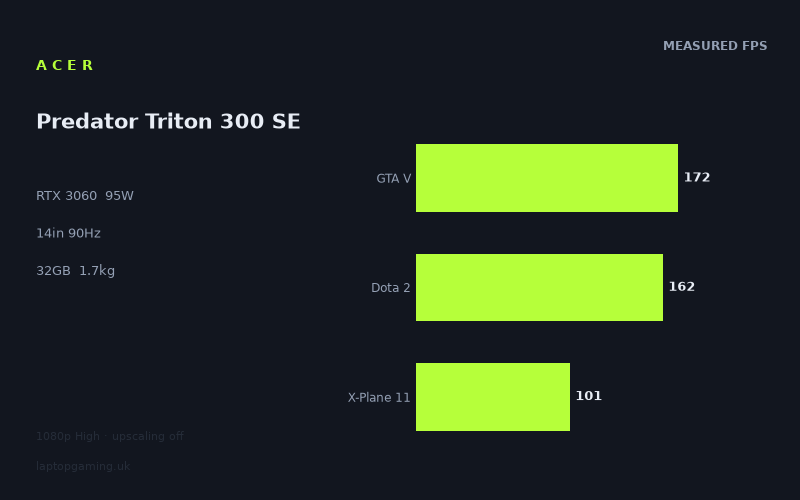
Frame rates
1920×1080, High preset, upscaling off.
Measured on this machine. Source: Notebookcheck, 2022-11-02.
Not scored: incomplete benchmark suite
Every scored laptop on this site is averaged over the same 5 games, and this one is short of Cyberpunk 2077, Baldur's Gate 3. A mean over 5 games is not comparable to a mean over 5, so we publish the figures we have and leave the score blank rather than rank it against machines tested on a different set. The numbers below are real - the suite is just incomplete.
How these numbers were produced
Frame rates here are not measured by us, and we label how each one was arrived at. A figure marked measured comes from a published run on that exact machine. A figure marked representative is derived from the GPU and its power limit (TGP) and cross-referenced against published reviews - a sound estimate of what that configuration delivers, but not a measurement of that specific laptop. Unless stated otherwise, numbers are 1920x1080, High preset, upscaling off. Where a laptop ships in several power configurations we use the wattage of the exact SKU listed, because a 140W RTX 5070 and a 115W one are not the same product.
In use
The short version
The Acer Predator Triton 300 SE is an unusually compact-looking proposition on paper: a 1.734kg gaming laptop with a 14in 2880x1800 OLED display, a Core i9-12900H, 32GB of memory and an RTX 3060 running at a 95W GPU power limit. The important qualification is that its gaming results need to be read as results from a 95W RTX 3060 machine, not as a general statement about every laptop carrying the same GPU name. The measured figures are strong in lighter and older games, mixed in the more demanding titles, and clearly aimed more at sensible settings than at chasing the native resolution of the display.
Notebookcheck’s 1920x1080 High-preset figures with upscaling disabled show 172fps in GTA V, 162fps in Dota 2, 158fps in Strange Brigade, 146fps in The Witcher 3, 101fps in X-Plane 11, 79fps in Final Fantasy XV and 70fps in Cyberpunk 2077 1.6. Across the five scoring-suite games, the mean is 134fps. That is enough performance to make the laptop feel quick in a broad range of games at 1080p, and it is particularly well suited to people who mainly play games such as Dota 2, GTA V and Strange Brigade alongside less demanding titles that are not represented in the benchmark list.
It is less convincing as a machine for someone expecting its 2880x1800 panel to mean native-resolution High-settings gaming as a default. The published benchmark data is at 1920x1080, not at the screen’s native resolution. There is no basis here for claiming what frame rate it will achieve at 2880x1800. What can be said is that even at the lower benchmark resolution, Final Fantasy XV is below the panel’s 90Hz refresh rate and Cyberpunk 2077 1.6 is further below it. Those games already require a more considered approach to settings if the aim is a stable, high-refresh experience. Moving to the native display resolution would not be a sensible assumption for those titles without additional benchmark data.
The best buyer is someone who values the combination of low weight, a 14in OLED panel, 32GB of memory and credible 1080p gaming performance more than they value maximum GPU throughput. It should appeal to a player who wants one machine for work, media and gaming, does not need a large screen, and is prepared to treat the panel’s native resolution as a display feature rather than a gaming target in every demanding release. The Core i9-12900H and 32GB memory specification also make it a notably well-equipped configuration around the gaming hardware, although the available data does not include application benchmarks and therefore cannot quantify non-gaming performance.
There is no confirmed UK price for this exact configuration, so a value assessment cannot be calculated. That is a pricing-data limitation rather than a problem with the benchmark suite: the machine has a complete frame-rate record and ranks normally on the performance leaderboard.
The central buying decision is therefore straightforward. If the Triton 300 SE is being considered as a portable laptop that can play a wide range of games well at 1920x1080 High settings, the numbers support it. If it is being considered as a small laptop that will regularly turn its 2880x1800 OLED screen into a native-resolution, high-refresh gaming display in demanding games, the available frame rates do not support making that assumption. Its appeal is balance, not brute-force graphics performance.
Performance
A 95W RTX 3060 is the relevant specification
The RTX 3060 label does not tell the whole story in a gaming laptop. The Triton 300 SE’s GPU power limit is 95W, and that limit matters when comparing it with machines using higher-power versions of the same GPU generation. Laptop GPU names are not enough on their own to predict results: power limits, cooling design, processor choice and the game being run can all change the outcome. Here, the useful evidence is the actual published frame-rate set rather than an expectation based on the RTX 3060 name.
Notebookcheck measured the Triton 300 SE at 1920x1080 using the High preset with upscaling turned off. This is a useful test condition because it avoids treating an upscaled result as if it were direct rendering performance. It also gives a clear view of what the machine can do in a common gaming resolution. However, it is not the same as testing the laptop at its native 2880x1800 display resolution, and it should not be presented as such.
The five-game scoring-suite mean is 134fps. A mean is useful for placing the machine broadly, but it is not the frame rate a buyer will experience in every game. The spread is substantial. The best listed result is 172fps in GTA V, while the lowest is 70fps in Cyberpunk 2077 1.6. Those are not small variations around one typical number; they describe very different classes of workload. A prospective owner should plan around the individual game figures, not simply the mean.
The 95W limit does not make the Triton 300 SE slow. The 172fps, 162fps and 158fps results show that it can deliver very high frame rates when the game is not asking for the same level of graphics throughput as Cyberpunk 2077 1.6. But neither does the limit disappear because a game is light enough to run quickly. In the more demanding titles, the laptop’s results settle much closer to or below the display’s 90Hz refresh ceiling. That is where the practical distinction between a portable RTX 3060 configuration and a higher-power gaming laptop becomes more relevant.
The games that comfortably exceed 90Hz
GTA V runs at 172fps in the measured test. That is far above the screen’s 90Hz refresh rate. The panel can refresh 90 times per second, so it cannot show 172 distinct refreshes in a second in the same way that a display with a higher refresh rate could. Nevertheless, the result matters. It shows substantial performance headroom at 1920x1080 High with upscaling off, and it means that GTA V is not close to being a problem case for this laptop under the published conditions.
Dota 2 reaches 162fps, again well above 90Hz. For a game where smoothness and responsiveness are often priorities, this is the kind of result that makes the Triton 300 SE’s 90Hz panel a more natural fit. The machine has enough measured headroom at the benchmark settings that the display refresh rate, rather than raw average frame rate, becomes the obvious limit on what can be visibly presented. That is not a criticism of the laptop’s gaming performance; it is simply the consequence of pairing a 90Hz screen with a result well beyond 90fps.
Strange Brigade records 158fps. This is another result that sits comfortably above the panel refresh rate at 1920x1080 High. Alongside GTA V and Dota 2, it establishes that the Triton 300 SE is not merely capable of reaching 90fps occasionally. In several games from the measured set it has a considerable margin over that level. For a buyer whose library is weighted towards games of similar demand, the laptop’s RTX 3060 at 95W is a sensible match for a 90Hz screen when gaming at the benchmark resolution.
The Witcher 3 reaches 146fps. This is lower than GTA V, Dota 2 and Strange Brigade, but it remains substantially above 90fps. It is an important result because it demonstrates that the laptop can still clear the panel’s refresh rate in a game that sits below the very lightest entries in this group. The difference between 146fps and 172fps also illustrates why broad claims based on one title are unhelpful. The Triton 300 SE is fast in both games, but the amount of spare performance is not identical.
These four results are the strongest evidence for the machine’s 1080p gaming case. At 172fps, 162fps, 158fps and 146fps, GTA V, Dota 2, Strange Brigade and The Witcher 3 all exceed 90fps by a clear margin. In those titles, the hardware is capable of feeding a 90Hz display at the measured settings. Buyers who play mainly these games, or games with broadly comparable graphics demands, have a strong reason to consider the Triton 300 SE’s portable format rather than assuming they need a much larger, heavier machine solely for gaming.
The games around or below the panel refresh rate
X-Plane 11 produces 101fps. That is above 90fps, but only by a limited margin compared with the four games above. The distinction matters. A result of 101fps is still enough to exceed the refresh rate under the exact published conditions, but it offers less room for changes in a game scene, a different setting choice, or a move away from the benchmark resolution. The figure should therefore be read as a positive result, but not as the same kind of surplus performance seen in GTA V or Dota 2.
Final Fantasy XV returns 79fps. This is below the 90Hz refresh rate, though it remains well above the point where gaming would automatically be considered unplayable. The more useful conclusion is that the Triton 300 SE cannot be assumed to maintain 90fps at 1920x1080 High in every demanding game. A buyer for whom matching the display refresh rate is non-negotiable will need to accept settings adjustments in titles of this kind, or choose hardware with more graphics headroom. The fact sheet does not provide alternative-setting results, so it would be wrong to promise a particular result after changing options.
Cyberpunk 2077 1.6 is the hardest listed game, at 70fps. This is the clearest warning against interpreting the 134fps mean as a universal expectation. At the same 1920x1080 High settings with upscaling disabled, the laptop delivers less than half its GTA V result in Cyberpunk 2077 1.6. That is not an inconsistency in the testing; it is precisely why a suite contains games with different demands. The machine can be very quick in some games and much more constrained in others.
Seventy frames per second in Cyberpunk 2077 1.6 is still a credible result for a 1.734kg laptop with a 95W RTX 3060, but it is not a result that fills a 90Hz screen. It also leaves no evidence-based room to claim that the Triton 300 SE should be used at the panel’s native 2880x1800 resolution in this game. The sensible reading is that the laptop can run Cyberpunk 2077 1.6 at the published 1080p High setting, while users who want a higher frame rate or a higher rendering resolution should expect to make choices rather than receive both automatically.
Why the spread matters more than a single average
The results range from 70fps in Cyberpunk 2077 1.6 to 172fps in GTA V. The difference is large enough that the average alone cannot describe the ownership experience. Someone buying mainly for Dota 2 will see a machine with 162fps of measured performance. Someone buying mainly for Cyberpunk 2077 1.6 will see 70fps under the same benchmark conditions. Both statements are true, but they point towards different conclusions about whether the 90Hz panel is being fully used.
The benchmark spread is also useful for deciding how much importance to attach to the screen resolution. In games producing 146fps, 158fps, 162fps or 172fps at 1920x1080, there is plainly more performance headroom than in games producing 70fps or 79fps. That does not permit a numerical prediction for 2880x1800, because no native-resolution results have been supplied. It does mean the measured figures provide a clear hierarchy: the fastest games are the ones where a buyer has more latitude, while the slower games are the ones where the benchmark resolution and High preset should be treated as meaningful limits rather than casual starting points.
The same applies to the 90Hz screen. It would be misleading to say that the display is wasted because several results exceed 90fps. It would be equally misleading to say that every game will exploit 90Hz because Final Fantasy XV and Cyberpunk 2077 1.6 do not reach 90fps in the measured data. The practical reality is more useful: the panel is a good fit for a significant portion of the tested library at 1080p High, while the more demanding games expose the boundaries of this 95W RTX 3060 configuration.
CPU-bound results and what they do not prove
The closest rival comparisons are particularly instructive. The Triton 300 SE averages the same shared-game result as both the Schenker XMG Fusion 15 (Mid 22), which has an RTX 3070 at 145W, and the MSI GS76 Stealth, which has an RTX 3080 at 95W. On paper, those GPU labels might lead a buyer to expect a straightforward gap. In the shared 1080p game set, there is no average difference.
That near-zero difference is a real result, not a reason to assume that the RTX 3060 at 95W is generally equivalent to every RTX 3070 or RTX 3080 laptop. At 1080p, lighter titles in the shared set are CPU-bound and can compress genuine GPU gaps. In other words, where the processor or the game engine is the limiting factor, adding graphics capability does not necessarily translate into a proportionally higher measured frame rate. The comparison tells us that the Triton 300 SE is competitive in that specific shared-game, 1080p context. It does not establish that GPU power is irrelevant in more demanding games, higher resolutions or different settings.
This distinction is central to interpreting the Triton 300 SE fairly. Its 134fps scoring-suite mean is useful evidence of strong 1080p performance, but it should not be used to dismiss the potential benefit of higher-power GPUs. The MSI Raider GE77 HX, with an RTX 3080 Ti at 175W, averages 35fps more across five shared games. That result shows that the performance hierarchy becomes clearer when the comparison includes a machine with much more graphics power available. The Triton 300 SE’s compact package has a real performance ceiling, even if some lighter 1080p games do not reveal it.
The screen
A high-resolution OLED panel with a 90Hz ceiling
The Predator Triton 300 SE has a 14in OLED screen with a 2880x1800 resolution and a 90Hz refresh rate. Those are attractive specifications for a laptop intended to do more than one job. The 14in size and high resolution suggest a display designed to prioritise detail and compactness, while the OLED panel type differentiates it from a basic gaming-panel specification. The refresh rate is also higher than a conventional 60Hz display, though it is not an ultra-high-refresh panel intended to display the sort of frame rates reached by dedicated competitive gaming machines.
The most important point is that the display specification and the benchmark specification are different. The screen is 2880x1800, while every supplied game result is measured at 1920x1080 High with upscaling off. These figures should not be blurred together. A laptop can have a high-resolution display and still be best used at a lower render resolution in demanding games. Nothing about the display’s native resolution changes the RTX 3060’s measured frame rates at the benchmark settings.
At 1920x1080 High, the Triton 300 SE exceeds 90fps in GTA V, Dota 2, Strange Brigade, The Witcher 3 and X-Plane 11. It falls below 90fps in Final Fantasy XV and Cyberpunk 2077 1.6. That provides a practical answer to whether the GPU can drive the screen’s refresh rate: it can in much of the measured set, but not universally. It is a good match for the panel’s 90Hz capability in the faster titles, and a less complete match in the most demanding ones.
For GTA V at 172fps, Dota 2 at 162fps, Strange Brigade at 158fps and The Witcher 3 at 146fps, the GPU has more than enough measured output to meet the 90Hz refresh rate at 1080p High. For X-Plane 11 at 101fps, it still clears 90fps, though without the same margin. For Final Fantasy XV at 79fps and Cyberpunk 2077 1.6 at 70fps, the display refresh rate is not fully supplied by the measured frame rate. The panel does not make those results bad; it simply makes the gap visible in the specification.
Native resolution is not the same thing as the right gaming resolution
A 2880x1800 display can tempt buyers into assuming that games should always be rendered at 2880x1800. That is not a safe conclusion from this data. The notebook was benchmarked at 1920x1080, and there are no figures for 2880x1800. Rendering at the panel’s native resolution involves more pixels than the benchmark condition, but the fact sheet does not provide measured scaling behaviour or native-resolution results. It would therefore be irresponsible to attach an estimated frame rate to the display’s full resolution.
What the results do show is the relative starting point. In the titles already running at 70fps or 79fps at 1920x1080 High, native-resolution gaming is not something to assume will preserve the same level of performance. In the titles running from 146fps to 172fps, there is more measured performance available at 1080p, but there is still no direct evidence that they will reach a particular target at 2880x1800. The right approach is to see the native resolution as an option whose suitability changes by game, not as a blanket prescription.
This makes the Triton 300 SE a better fit for buyers who are comfortable making settings choices than for buyers who want one fixed configuration for every game. The laptop has a premium-looking display specification, but the gaming evidence points towards varied use: high frame rates at 1080p in lighter games, more modest results in demanding games, and no published basis for promising native-resolution High performance across the board.
90Hz is useful, but it sets a clear target
The 90Hz refresh rate is an important part of the machine’s identity. It creates a sensible target that the Triton 300 SE can meet or exceed in five of the seven listed games at 1080p High. That is a better outcome than a configuration that regularly sits far below its display refresh rate. It also means the panel is not needlessly ambitious for the machine’s graphics performance in the faster games.
At the same time, the 90Hz figure gives an honest way to identify the limits. Final Fantasy XV at 79fps and Cyberpunk 2077 1.6 at 70fps are below that target. Buyers focused on games in this part of the performance range should not buy the Triton 300 SE expecting the screen’s full refresh rate as a guaranteed baseline. It is capable of good performance in those games according to Notebookcheck’s numbers, but “good” and “matching 90Hz” are not the same claim.
The 14in size also changes the buying calculation. A 14in panel is fundamentally a compact format, not a large-screen gaming replacement. The supplied specification does not provide physical dimensions, so there is no basis for claiming exactly how small the chassis is in a bag or on a desk. But the combination of a 14in display and 1.734kg weight clearly places it in a different category from a large desktop-replacement gaming laptop. That is likely to matter at least as much as the difference between 90fps and a higher refresh target for buyers who travel regularly.
Build, size and portability
Portable by gaming-laptop standards, with limits to what can be claimed
The Triton 300 SE weighs 1.734kg. For a laptop carrying a Core i9-12900H, 32GB of memory, an RTX 3060 at 95W and a 14in OLED panel, that is a significant part of its appeal. The specification points towards a machine designed to remain practical away from a permanent desk rather than a larger system built chiefly around maximum GPU power.
Weight is not the whole portability story. Dimensions are not supplied in the fact sheet, so it is not possible to state its thickness, footprint or exact bag suitability. Neither is there any supplied information on charger weight. Those omissions matter because a light laptop can still be less convenient to carry than its chassis weight alone suggests once its power equipment is included. The correct conclusion from the available data is narrower: 1.734kg is the confirmed laptop weight, and it is lower than many larger gaming-laptop formats, but the full carrying experience cannot be quantified here.
The 14in screen reinforces that portability focus. A 14in display usually asks the buyer to accept a smaller viewing area than a larger gaming laptop in return for a more compact machine. Whether that is a good trade depends on use. Someone spending most of their time at a desk with an external display may value the lower laptop weight. Someone who wants the laptop screen itself to be their primary gaming display for long sessions may prefer a larger panel, even if it means giving up some portability. The fact sheet gives no information about external display support, ports or connectivity, so those aspects should not be assumed.
The 76Wh battery is capacity, not runtime evidence
The battery capacity is 76Wh. That is a useful specification, but it is not a battery-life result. No measured runtime is provided for web use, video playback, productivity or gaming, and the review should not turn watt-hours into a claimed number of hours. Battery life depends on workload, display settings, power mode and many other variables not included here.
The gaming specifications also make it particularly important not to overstate battery expectations. The machine contains a Core i9-12900H and an RTX 3060 operating at a 95W GPU power limit, but there is no published battery-gaming measurement in the fact sheet. Buyers who need long unplugged gaming sessions should seek specific runtime data rather than infer it from the 76Wh capacity. The capacity tells us something about the battery’s size; it does not tell us how long a particular game will run.
For the right owner, the 76Wh figure is best treated as one part of a mobile design rather than the deciding reason to buy. The stronger confirmed portability evidence is the 1.734kg weight and 14in screen. The stronger confirmed performance evidence is the 1080p benchmark set. Neither should be stretched into claims about all-day battery use, travel convenience in a specific bag, or unplugged gaming performance.
What the compact format means for the performance choice
The Triton 300 SE’s form factor helps explain why its performance profile should be judged on its own terms. A 1.734kg laptop with a 14in screen is not trying to be the same type of machine as a larger gaming system with a 175W RTX 3080 Ti. The MSI Raider GE77 HX comparison makes that point clearly: the Raider averages 35fps more across five shared games, and it also carries an RTX 3080 Ti at 175W. The Acer cannot match that result in the shared data, but it is also built around a materially different balance of components and mobility.
That does not excuse weak performance, but the measured results are not weak. A 134fps mean across the five-game suite, plus results of 172fps, 162fps, 158fps and 146fps in four of the listed games, make a convincing case that the machine can deliver serious gaming performance in a lighter format. The compromise emerges in the demanding titles and in the native display resolution question, not in an inability to game at all.
The right way to buy this laptop is therefore to start with its physical priorities. If low weight and a 14in screen are essential, then 70fps in Cyberpunk 2077 1.6 and 79fps in Final Fantasy XV at 1080p High may be an acceptable trade for a 1.734kg system. If the priority is to maximise frame rate in demanding games, the comparison evidence points towards more powerful alternatives. Trying to make the Triton 300 SE serve both priorities equally is where disappointment is most likely.
How it compares
Against the MSI Prestige 15: a substantial lead
The MSI Prestige 15 is the rival that the Triton 300 SE beats by the largest margin in the supplied comparison group. The Prestige 15 uses an RTX 3050 Ti at 105W, while the Acer uses an RTX 3060 at 95W. Across four shared games, the Triton 300 SE averages 75fps more.
That is a large enough difference to be meaningful in practical gaming terms. It is not a small fluctuation caused by one game or a rounding effect. The Acer’s advantage suggests a fundamentally different level of gaming headroom across the shared set. The fact that the Prestige 15’s RTX 3050 Ti has a 105W limit while the Acer’s RTX 3060 is limited to 95W also demonstrates why GPU naming alone is not the whole story, but neither is power limit alone. The RTX 3060-based Acer is decisively ahead in the published shared-game comparison.
For someone choosing between these two machines principally for gaming, the Triton 300 SE is the clearer option on performance. Its 75fps shared-game advantage is substantial, while it also has the 14in 2880x1800 OLED display, 32GB of memory and Core i9-12900H listed in this configuration. The comparison does not provide screen, weight, processor or battery details for the Prestige 15, so no claim should be made that the Acer is superior in every respect. On the frame-rate evidence, however, the gap is decisive.
Against the Schenker XMG Fusion 15: the zero gap needs context
The Schenker XMG Fusion 15 (Mid 22) has an RTX 3070 with a 145W power limit. That sounds like a much stronger graphics specification than the Acer’s RTX 3060 at 95W, and in GPU-heavy situations it may well offer more potential. Yet across five shared games, the published average difference is +0fps for the Triton 300 SE. In the shared set, neither machine has an average advantage.
This should not be read as evidence that a 95W RTX 3060 is generally interchangeable with a 145W RTX 3070. The supplied comparison explains why the gap is compressed: at 1080p, lighter titles in the shared set are CPU-bound. When a game is limited more by the CPU or game engine than by the GPU, the extra available GPU power cannot necessarily turn into higher frame rates. The shared results are still valid, but their lesson is specific. For these games at this resolution, the Acer keeps pace on average.
For a buyer, this makes the Triton 300 SE more competitive than a basic specification comparison might suggest. If the intended games resemble the lighter shared titles and the target is 1080p, the Acer’s performance can be effectively level with the more powerful XMG configuration in the benchmark record. If the intended use is more demanding games or higher resolutions, the zero shared-game average should not be used as a guarantee. The available data does not show how the two separate once the GPU becomes more consistently limiting.
Against the MSI GS76 Stealth: another equal shared result
The MSI GS76 Stealth has an RTX 3080 at 95W. Again, the GPU badge is higher than the Triton 300 SE’s RTX 3060, yet the shared five-game average difference is +0fps. The two machines are level in the published comparison.
As with the XMG Fusion 15, the explanation is not that the GPU hierarchy has ceased to exist. At 1080p, lighter games in the shared set are CPU-bound, compressing genuine GPU gaps. This is exactly the kind of result that makes attributable frame-rate data more useful than buying by model name. A buyer who saw RTX 3080 and assumed an automatic, visible lead in every game would not find that assumption supported by these five shared results.
The Acer’s advantage is not that it beats the GS76 Stealth outright. It does not; the average difference is zero. Its advantage is that it delivers the same shared-game average in this specific data set while using an RTX 3060 at 95W and weighing 1.734kg with a 14in display. The GS76 Stealth’s weight, screen and other specifications are not supplied here, so there is no basis for extending that observation into a complete portability comparison. But the gaming result alone is a reminder that a higher GPU tier does not guarantee a lead in every 1080p game.
Against the MSI Raider GE77 HX: more GPU power produces a clear lead
The MSI Raider GE77 HX is the rival that beats the Triton 300 SE by the largest supplied margin. It has an RTX 3080 Ti at 175W and averages 35fps more across five shared games. This is the comparison that most clearly reveals the performance cost of choosing the Acer’s more compact 95W RTX 3060 configuration over a much more powerful gaming-oriented setup.
Thirty-five frames per second is not a trivial difference. It can be the difference between sitting below a display’s refresh target and exceeding it, or between having room for higher settings and having to prioritise frame rate. The exact per-game differences are not supplied, so it would be wrong to attribute the entire lead to any one title. But the five-game average is enough to establish that the Raider is the stronger gaming machine in this comparison group.
The choice between these two is therefore not difficult if graphics performance is the overriding priority: the Raider GE77 HX is ahead in the shared data. The more relevant question is whether that advantage is worth giving up the Acer’s 1.734kg, 14in direction. The fact sheet does not provide the Raider’s weight, dimensions or screen specification, so no direct physical comparison can be made. What can be said is that the Acer is not the answer for buyers who want the greatest measured gaming throughput among these rivals. It is the answer for buyers who place more weight on its own compact specification and can accept the lower ceiling shown by the shared-game deficit.
What the rival set says overall
The rival group gives the Triton 300 SE a more nuanced position than its RTX 3060 name suggests. It is far ahead of the RTX 3050 Ti-based MSI Prestige 15 by 75fps across four shared games. It is level with the RTX 3070 145W Schenker XMG Fusion 15 and RTX 3080 95W MSI GS76 Stealth across five shared games, because lighter 1080p titles can be CPU-bound and hide some GPU differences. It is then 35fps behind the RTX 3080 Ti 175W MSI Raider GE77 HX across five shared games.
That is a coherent pattern. The Triton 300 SE is not a low-performance thin-and-light that happens to have a gaming GPU. It has enough performance to match stronger-labelled rivals in certain 1080p shared-game circumstances, while still being clearly outpaced by a much higher-power RTX 3080 Ti system. Buyers should take both parts seriously. The equal results prevent the Acer from being dismissed too quickly; the Raider deficit prevents it from being oversold as a substitute for a high-power gaming laptop.
Who it’s for
Buy it for portable 1080p gaming with a premium display specification
The strongest case for the Acer Predator Triton 300 SE is a buyer who wants a relatively light gaming laptop without reducing gaming to an afterthought. At 1.734kg, with a 14in 2880x1800 90Hz OLED display, a Core i9-12900H, 32GB of memory and an RTX 3060 at 95W, it is aimed at someone who needs one machine to cover several roles. The benchmarks show that this is not merely a specification-sheet ambition. At 1920x1080 High with upscaling off, it reaches 172fps in GTA V, 162fps in Dota 2, 158fps in Strange Brigade, 146fps in The Witcher 3 and 101fps in X-Plane 11.
It is particularly suitable for players whose regular games sit closer to the GTA V, Dota 2, Strange Brigade and The Witcher 3 end of the measured range. In those games, the laptop can exceed its 90Hz refresh rate at the published settings. That makes the display a sensible gaming panel rather than an aspirational one that the GPU cannot support. The 134fps mean across the five scoring-suite games reinforces the point, provided it is treated as a broad summary rather than a guarantee for every title.
It also makes sense for someone who values 32GB of memory and the Core i9-12900H configuration but does not need application-benchmark proof before buying. The specifications suggest substantial resources beyond gaming, but only the game measurements are provided here. A buyer whose workload is highly dependent on a specific creative, engineering or professional application should seek application-specific evidence rather than assuming performance from the processor name alone.
The OLED screen will also appeal to buyers who care about the display type as well as the refresh figure. No colour, brightness, response-time or calibration measurements are included in the fact sheet, so those qualities cannot be assessed here. But the combination of OLED, 2880x1800 and 14in is distinct from a conventional large, low-resolution gaming display and will be meaningful to buyers who use the machine for more than games.
Buy something else if native-resolution demanding gaming is the priority
The Triton 300 SE is not the obvious choice for someone who wants to run demanding modern games at 2880x1800 High settings and expects the panel’s 90Hz refresh rate to be met as standard. There are no native-resolution benchmarks, so that expectation cannot be verified. More importantly, the 1080p High results already show Final Fantasy XV at 79fps and Cyberpunk 2077 1.6 at 70fps. Those figures are useful warnings that the laptop’s graphics performance is finite and varies greatly with game demand.
Buyers who regard 90fps as a minimum target in demanding games should look towards more powerful hardware. The MSI Raider GE77 HX provides the clearest example in the supplied rival list: its RTX 3080 Ti at 175W averages 35fps more than the Acer across five shared games. The Acer’s compact direction may still be preferable for portability, but it is not the right compromise for someone who wants maximum frame-rate margin.
It is also not the ideal purchase for a player whose main priority is the highest possible refresh rate in lighter competitive games. Dota 2 runs at 162fps in the benchmark, which is excellent performance, but the laptop screen refreshes at 90Hz. A buyer specifically pursuing frame rates far beyond 90fps as a display target may prefer a machine with a higher-refresh screen, even if the underlying performance is already available here. The Triton’s display is better understood as a 90Hz panel that the GPU can often satisfy, not as a panel designed to expose every frame generated in its fastest games.
Buy something else if a larger primary gaming screen matters more than weight
A 14in display is a deliberate choice. It supports the Triton 300 SE’s compact, 1.734kg character, but it is not automatically ideal for every player. Buyers who use only the built-in screen and want a larger viewing area for games may be happier with a bigger laptop. The fact sheet does not list larger alternatives’ display sizes or weights, so no direct recommendation can be quantified here. The principle is still clear: portability and screen area are competing priorities, and the Acer is firmly on the portable side.
The same applies to desk-bound buyers. If the laptop will rarely be moved, the 1.734kg weight has less value than it does for a commuter or traveller. In that case, it makes more sense to prioritise the graphics-performance advantage shown by a machine such as the MSI Raider GE77 HX rather than paying for a compact design whose main benefit will not be used. Conversely, someone moving the laptop frequently may reasonably decide that the Acer’s weight and 14in format are worth accepting lower performance in the heaviest games.
The final recommendation
The Acer Predator Triton 300 SE is a strong fit for portable gaming at 1920x1080 High settings, especially in games where Notebookcheck’s measurements exceed the screen’s 90Hz refresh rate by a healthy margin. GTA V at 172fps, Dota 2 at 162fps, Strange Brigade at 158fps and The Witcher 3 at 146fps show a machine with real gaming ability, not a thin laptop making vague claims. X-Plane 11 at 101fps remains above the panel refresh target, while Final Fantasy XV at 79fps and Cyberpunk 2077 1.6 at 70fps show exactly where the compromise begins.
The 95W RTX 3060 should be judged as a balanced mobile GPU configuration, not as a route to maximum performance. It can equal an RTX 3070 at 145W and an RTX 3080 at 95W in the supplied shared 1080p comparisons because lighter games can be CPU-bound, but it cannot match the MSI Raider GE77 HX and its RTX 3080 Ti at 175W, which holds a 35fps shared-game advantage. That is the honest position: impressive competitiveness in the right conditions, clear limits when more graphics power matters.
Choose the Triton 300 SE if a 1.734kg laptop with a 14in 2880x1800 90Hz OLED display, 32GB of memory and strong 1080p gaming is the balance you want. Choose a more powerful gaming laptop if demanding games, higher-resolution rendering and greater frame-rate headroom matter more than compactness. The benchmark data supports both conclusions; the right one depends on which compromise you are actually willing to make.