Details
Product prices and availability are accurate as of the date/time indicated and are subject to change. Any price and availability information displayed on Amazon.co.uk at the time of purchase will apply to the purchase of this product.Review
Razer Blade 14 RTX review
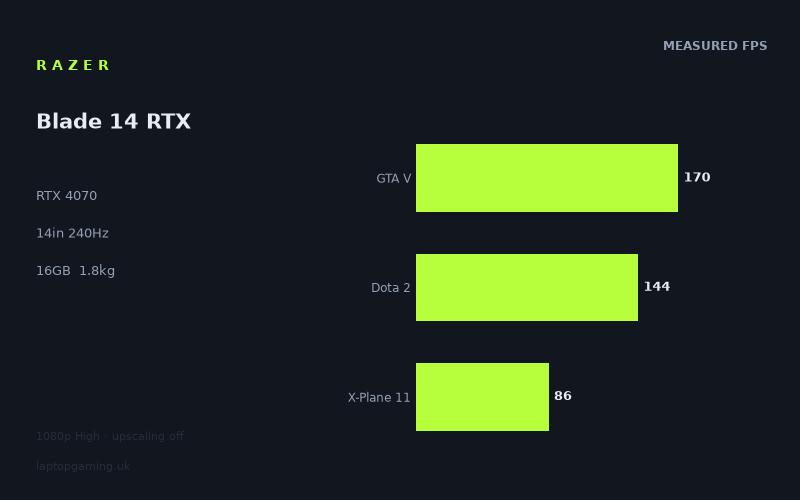
Frame rates
1920×1080, High preset, upscaling off.
Measured on this machine. Source: Notebookcheck, 2023-06-20.
Not scored: incomplete benchmark suite
Every scored laptop on this site is averaged over the same 5 games, and this one is short of Cyberpunk 2077, Baldur's Gate 3. A mean over 3 games is not comparable to a mean over 5, so we publish the figures we have and leave the score blank rather than rank it against machines tested on a different set. The numbers below are real - the suite is just incomplete.
How these numbers were produced
Frame rates here are not measured by us, and we label how each one was arrived at. A figure marked measured comes from a published run on that exact machine. A figure marked representative is derived from the GPU and its power limit (TGP) and cross-referenced against published reviews - a sound estimate of what that configuration delivers, but not a measurement of that specific laptop. Unless stated otherwise, numbers are 1920x1080, High preset, upscaling off. Where a laptop ships in several power configurations we use the wattage of the exact SKU listed, because a 140W RTX 5070 and a 115W one are not the same product.
In use
The short version
The Razer Blade 14 RTX is a powerful small-format gaming laptop built around an RTX 4070, a Ryzen 9 7940HS, 16GB of memory and a 14in 2560x1600 IPS display with a 240Hz refresh rate. Notebookcheck’s measured figures show that it is very capable at 1920x1080 using the High preset with upscaling disabled. It can reach extremely high frame rates in lighter and older games, remains comfortably above 100fps in several demanding titles, and still delivers playable results in the heaviest games listed.
The important qualification is that this is not a review where a single average tells the whole story. The measured result ranges from 235fps in Strange Brigade to 81fps in Returnal. That is a large spread, and it matters more than a headline GPU name. In games that are light enough to run at very high frame rates, the Blade 14 can make meaningful use of its 240Hz panel. In heavier modern releases, it cannot consistently fill that refresh rate at the benchmark settings, even at 1920x1080. Its native 2560x1600 panel asks more of the GPU again, so the published 1080p figures should be treated as a useful performance baseline rather than a promise of identical native-resolution results.
The Blade’s measured mean across the available scoring-suite games is 133fps, taken from GTA V, Dota 2 and X-Plane 11. That is strong performance for a 14in machine, but it cannot be turned into a complete site ranking because figures are missing for Cyberpunk 2077 and Baldur’s Gate 3 in the full scoring suite. Every fully ranked laptop is averaged across the same five games, and using a partial set here would create a misleading comparison. The sensible conclusion is narrower: on the games that are available, this is a fast RTX 4070 laptop, particularly for a machine weighing 1.845kg.
The Blade 14’s unknown UK price is a major limitation when it comes to a buying recommendation. It is not possible to call it good value, poor value or fairly priced without a confirmed price. That matters especially because it sits in a class where RTX 4070 laptops can vary enormously in cost depending on size, display, power limits and premium build positioning. Performance alone says the Blade 14 is desirable for someone who genuinely wants a 14in gaming laptop with strong 1080p High-preset results. Value cannot be judged until there is a real UK price attached to it.
Buy this model if the appeal is a relatively light 14in gaming laptop that can run esports-style and older games at very high frame rates while also handling demanding single-player games well at the tested settings. It is also a reasonable fit for someone who values the 240Hz display but understands that the panel’s maximum refresh rate is an opportunity in selected games, not a level of performance the RTX 4070 will deliver in every modern title.
Look elsewhere if the priority is guaranteed high-frame-rate gaming at the panel’s native 2560x1600 resolution in the latest demanding games, or if the aim is to maximise performance per pound. The former requires more evidence than the published 1080p results provide; the latter is impossible to assess without a confirmed UK price. Buyers who want the highest available frame rates in heavy games should also note the large deficit to the RTX 4090-equipped Asus ROG Strix Scar 17 in the shared data, although that machine belongs to a very different price and size category.
Performance
What the Notebookcheck figures show
The published frame rates are from Notebookcheck, measured on 2023-06-20 at 1920x1080, using the High preset with upscaling switched off. That test method is useful because it avoids disguising the GPU’s output behind an upscaling mode, but it also means the results must be read carefully. The Blade 14 has a 2560x1600 screen, not a 1920x1080 screen. The benchmark data therefore shows what the laptop can do at the test resolution and settings, rather than establishing a native-resolution result for every game.
At those settings, Strange Brigade reaches 235fps. That is the closest result to the display’s 240Hz refresh rate, and it shows that the Blade 14 has enough performance for exceptionally fluid play in games that are comparatively easy for modern hardware to run. It is still just below the panel’s stated refresh rate, so even this strongest result does not quite establish a sustained 240fps outcome. The practical message is not that the 240Hz panel is wasted; it is that the display’s ceiling is most relevant in light games, older games and titles with settings that can be reduced from the High preset if a player prioritises frame rate over image quality.
The Witcher 3 follows at 218fps. That is also an excellent result and close enough to the screen’s refresh rate for the 240Hz panel to be doing useful work. It does not mean every moment of a real playthrough will sit at that figure, because the fact sheet gives a benchmark result rather than a full performance trace. But 218fps at the stated benchmark settings is plainly high enough to support very smooth motion and low input latency in the tested scenario.
F1 22 records 189fps. That is below the display’s maximum refresh rate but remains firmly in high-refresh territory. Racing games benefit from high frame rates because rapid motion, steering response and visual clarity all become more immediate as frame delivery improves. The Blade 14 cannot be described as fully saturating a 240Hz panel in F1 22 at the measured settings, but 189fps is still a strong match for a fast display. It is far beyond the level where a buyer needs to worry about basic smoothness.
GTA V produces 170fps. This is one of the three available scoring-suite games and therefore forms part of the Blade 14’s measured 133fps mean across GTA V, Dota 2 and X-Plane 11. It is another result that makes good use of a high-refresh screen without reaching the full 240Hz limit. At 170fps, the laptop has substantial headroom above conventional gaming targets, while the remaining gap to 240Hz reminds buyers that a high-refresh panel does not make the GPU faster by itself.
Dota 2 reaches 144fps. That is still fast, but it is notable because Dota 2 is one of the titles in the scoring suite and because the difference between 144fps and the results in Strange Brigade, The Witcher 3, F1 22 and GTA V shows just how game-dependent performance can be. A buyer should not assume that a game regarded as visually less demanding will always produce the highest frame rate. At 1920x1080, lighter titles can become CPU-bound, which compresses genuine GPU gaps and makes results depend more heavily on the processor, game engine and benchmark scene. The Ryzen 9 7940HS is paired with the RTX 4070 here, but the available evidence does not permit a title-by-title separation of CPU and GPU limitation. What can be said is that the benchmark spread does not follow a simple rule in which every less demanding game always runs faster.
Shadow of the Tomb Raider comes in at 137fps. This sits very close to Dota 2’s 144fps and supports the same broader conclusion: the Blade 14 is comfortably capable of high-refresh gaming in a large range of titles, but the 240Hz panel is not automatically matched by a 240fps result. A measured figure of 137fps is still strong for a High-preset run without upscaling, and it gives the display enough frames to look substantially smoother than a basic 60Hz panel. Yet it also reinforces the need to distinguish between “high refresh capable” and “able to max out a 240Hz panel”. They are not the same claim.
Tiny Tina’s Wonderlands records 132fps. That is almost identical to the Blade 14’s 133fps mean across the available scoring-suite games, although Tiny Tina’s Wonderlands is not one of those three scoring titles. It provides a useful point in the wider results list because it shows the laptop holding above 100fps in another modern game rather than relying solely on lighter or older titles for its strongest figures.
Final Fantasy XV reaches 114fps, while Cyberpunk 2077 1.6 records 112fps. These two results are close enough to belong to the same broad performance tier: both are comfortably above 100fps at the stated 1920x1080 High-preset settings, but neither approaches the panel’s 240Hz limit. This is where the Blade 14’s RTX 4070 looks like a strong gaming GPU rather than an unlimited one. The laptop can produce smooth high-frame-rate gameplay in these measured scenarios, but it cannot be described as delivering the kind of extreme frame-rate surplus that makes the display’s refresh ceiling irrelevant.
Cyberpunk 2077 1.6 is particularly useful context because it is one of the games missing from the full scoring suite for this machine. The notebook has a measured 112fps result in the listed benchmark configuration, but that number cannot be inserted into the site’s complete comparison calculation when the full set is incomplete. It remains valuable performance evidence, just not evidence that supports a complete ranking against laptops measured across all five scoring games.
X-Plane 11 reaches 86fps. As the third available scoring-suite title, it is important because it pulls the Blade 14’s three-game mean down from the much higher GTA V and Dota 2 results. It is also the clearest demonstration that average performance can conceal a substantial difference in experience from one game to another. Someone mainly interested in GTA V will see 170fps; someone buying the machine primarily for X-Plane 11 sees 86fps at the same test resolution and preset methodology. Both are valid descriptions of the same laptop, and neither should be replaced by a vague claim that the machine is simply “fast”.
Returnal is the lowest result in the list at 81fps. That remains playable by the standards of the benchmark data, but it is far removed from the 235fps result in Strange Brigade. The difference between those two figures is not a minor variation. It demonstrates why the RTX 4070 name alone does not define the experience a buyer will get. Game engines, rendering load, the benchmark scene and potential CPU limits all matter. The Blade 14 is capable of excellent results, but it is not a laptop that will turn every demanding game into a 240fps experience at High settings with upscaling disabled.
The performance range matters more than the average
The full list of published figures is more useful than the three-game mean on its own. The 133fps mean across GTA V, Dota 2 and X-Plane 11 is a fair summary of those three titles, but the broader data ranges from 81fps in Returnal to 235fps in Strange Brigade. A buyer deciding whether the Blade 14 suits their library should start with the individual games closest to their own habits, not with an average that blends together very different workloads.
There are effectively several performance bands in the available data. Strange Brigade at 235fps and The Witcher 3 at 218fps sit near the top, close to the panel’s 240Hz refresh limit. F1 22 at 189fps and GTA V at 170fps remain clearly high-refresh results. Dota 2 at 144fps, Shadow of the Tomb Raider at 137fps and Tiny Tina’s Wonderlands at 132fps form a middle group where the display remains a meaningful advantage but is not being fully driven. Final Fantasy XV at 114fps and Cyberpunk 2077 1.6 at 112fps show the system staying above 100fps in demanding material. X-Plane 11 at 86fps and Returnal at 81fps are lower again, still playable but much further from what the 240Hz screen can display.
This distribution is exactly why a buyer should resist both extremes of interpretation. It would be wrong to dismiss the screen because the laptop does not reach 240fps in every game. It would be equally wrong to buy the machine expecting the RTX 4070 to make 240fps routine in demanding releases. The panel gives the system room to show the performance it has in lighter titles, and it gives visible benefit at 170fps, 144fps, 137fps, 132fps, 114fps and 112fps as well. But the benchmark data does not support calling the Blade 14 a universal 240fps gaming machine.
The absence of upscaling is also important. The published numbers describe conventional rendered performance at the selected resolution and High preset. There are no upscaled frame-rate figures in the fact sheet, so there is no basis for claiming what the laptop would achieve with any upscaling mode enabled. Buyers who expect to use such modes may see different outcomes, but those outcomes are not documented here and should not be assumed.
What the GPU power limit means here
The fact sheet identifies the RTX 4070 GPU but does not provide a GPU power limit for the Razer Blade 14. That omission matters. Laptop GPUs with the same RTX 4070 name can be configured differently, and power configuration can influence sustained performance. It would be inaccurate to assign the Blade 14 a wattage, to imply that it runs at the same limit as another RTX 4070 laptop, or to claim that it is restricted in a particular way without a published figure.
What the measured data does establish is the result of the complete machine in Notebookcheck’s benchmark configuration. The Blade 14 delivers 235fps in Strange Brigade, 218fps in The Witcher 3, 189fps in F1 22, 170fps in GTA V, 144fps in Dota 2, 137fps in Shadow of the Tomb Raider, 132fps in Tiny Tina’s Wonderlands, 114fps in Final Fantasy XV, 112fps in Cyberpunk 2077 1.6, 86fps in X-Plane 11 and 81fps in Returnal. Those figures are more useful to a buyer than an unsupported guess about wattage would be.
The rival data adds another important warning against simplistic power-limit conclusions. The Acer Predator Triton Neo 16 has an RTX 4070 at 110W, while the MSI Stealth 16 Mercedes-AMG Motorsport has an RTX 4070 at 105W. The Blade 14 averages +0fps against each across three shared games. That does not prove that all three laptops are identical in every title, nor does it establish the Blade 14’s own power limit. It does show that, in this particular shared 1080p dataset, the Blade 14 is not measurably behind those listed RTX 4070 rivals.
The supplied comparison guidance explains why such near-zero differences can be real rather than suspicious: at 1080p, lighter titles in the shared set can be CPU-bound and compress genuine GPU gaps. This is a crucial limitation. A +0fps average in three shared games should not be read as proof that the machines will remain tied at every resolution, preset or game. It says something narrower and still useful: in the available shared benchmarks, the Blade 14 keeps pace with the listed 110W and 105W RTX 4070 systems.
The screen
A fast 14in IPS panel, with a demanding native resolution
The Blade 14 uses a 14in IPS panel with a 2560x1600 resolution and a 240Hz refresh rate. On paper, that combination is appealing for a gaming laptop that also needs to remain relatively easy to carry. The 2560x1600 resolution provides more pixels than the 1920x1080 benchmark resolution, while the 240Hz refresh rate provides substantial headroom for games capable of high frame rates.
The key practical point is that the published gaming figures were not measured at the panel’s native 2560x1600 resolution. They were measured at 1920x1080. A buyer should not take 235fps in Strange Brigade, 218fps in The Witcher 3 or 189fps in F1 22 and assume those exact results will carry over to native resolution. Rendering at 2560x1600 requires more work than rendering at 1920x1080, and the fact sheet contains no native-resolution benchmark figures. The responsible conclusion is simply that native-resolution gaming performance is not confirmed by the available data.
That does not make the 1080p benchmark data irrelevant. It tells us that the Blade 14 has strong performance at a widely used test resolution with High settings and no upscaling. It also indicates which games leave the GPU enough headroom to approach the display’s refresh ceiling. Strange Brigade at 235fps is almost perfectly aligned with a 240Hz panel. The Witcher 3 at 218fps is close. F1 22 at 189fps and GTA V at 170fps remain strong high-refresh matches. These are the games in which the display’s refresh rate is most likely to feel like a meaningful part of the package under the tested conditions.
The lower part of the list puts the 240Hz specification in perspective. Dota 2 at 144fps, Shadow of the Tomb Raider at 137fps and Tiny Tina’s Wonderlands at 132fps are all well below 240fps, though still far above basic frame-rate targets. Final Fantasy XV at 114fps and Cyberpunk 2077 1.6 at 112fps are further away. X-Plane 11 at 86fps and Returnal at 81fps demonstrate that a high-refresh screen cannot overcome a game’s rendering demands. The panel can display up to 240Hz, but the game still needs the system to provide frames at that rate.
For a buyer choosing between a 240Hz screen and a lower-refresh alternative, the Blade 14’s data supports a balanced view. The 240Hz panel is justified if the gaming library includes titles such as Strange Brigade, The Witcher 3, F1 22 or GTA V at the tested settings, and if responsiveness in games with high frame rates matters. It is also useful whenever a game runs between 100fps and 200fps, because the display is not imposing a low refresh ceiling. But the screen should not be bought on the assumption that demanding games such as Returnal will run at 240fps under the benchmark conditions.
IPS is known; wider panel qualities are not
The panel type is IPS. Beyond that, the fact sheet does not provide brightness, contrast, colour coverage, response times, adaptive-sync support or any measured display-quality data. Those omissions matter because a 240Hz number alone does not describe how a display looks or behaves in every situation. It would be inappropriate to claim that the Blade 14 has a particularly bright screen, exceptional colour accuracy, deep contrast or especially fast pixel response without figures.
What is known is enough to define the gaming proposition. This is a 14in IPS display with a 2560x1600 resolution and a 240Hz refresh rate. It has more than enough refresh capacity for the Blade 14’s strongest 1080p results, while demanding enough native resolution that buyers should seek native-resolution evidence if that is how they plan to play most games.
Build, size and portability
The Blade 14 weighs 1.845kg. For a gaming laptop with an RTX 4070, Ryzen 9 7940HS, 16GB of memory and a 14in screen, that figure is central to its appeal. The machine is not weightless, but it is clearly positioned differently from larger gaming laptops that prioritise screen size, cooling volume and maximum component power over portability.
Weight is only one part of portability, and the fact sheet does not provide the laptop’s dimensions. There is therefore no basis for making claims about its thickness, footprint, bag compatibility or how much desk space it needs. The 14in display size suggests a small-screen class, but the exact physical size of the chassis is not confirmed here. Buyers for whom compact dimensions are more important than mass should check the manufacturer’s published dimensions before deciding.
The 1.845kg weight does, however, make the Blade 14 easier to understand as a product category. This is a machine for someone who wants substantial gaming performance without moving to a larger-screen laptop. The Notebookcheck figures support that positioning. Results such as 235fps in Strange Brigade, 218fps in The Witcher 3, 189fps in F1 22 and 170fps in GTA V are impressive outputs from a laptop in this weight class. Equally, X-Plane 11 at 86fps and Returnal at 81fps show the trade-off: a relatively light RTX 4070 machine can be very fast, but it is not automatically equivalent to a much larger performance-first laptop in every demanding game.
The battery capacity is 68Wh. That tells us the size of the battery, not the battery life. The fact sheet includes no runtime measurements for web browsing, video playback, office work, idle use or gaming away from mains power. It would be misleading to turn 68Wh into a claim about how long the Blade 14 lasts. Buyers who need a laptop for long periods away from a charger should treat battery endurance as unconfirmed rather than assuming that a 14in model will necessarily last longer than a larger gaming laptop.
There is also no supplied information about chassis materials, keyboard layout, trackpad quality, webcam, ports, upgrade access, storage capacity, cooling noise or temperatures. Those are meaningful buying factors, particularly in a 14in gaming laptop where thermal design and port selection can shape day-to-day usability. They should not be guessed at. The available evidence supports a judgement about weight, screen specification and measured gaming performance, not a full physical-quality assessment.
How it compares
Against the MSI Thin GF63 RTX 4050
Across three shared games, the Razer Blade 14 averages 46fps ahead of the MSI Thin GF63 with an RTX 4050. That is the largest positive margin among the listed comparison machines. It gives the Blade 14 a clear performance advantage over the RTX 4050 rival in the shared data.
The MSI Thin GF63 has no confirmed UK price in the fact sheet, so this cannot become a clean value judgement. If the MSI is much cheaper, its lower gaming performance may still be acceptable for a buyer with a limited budget. If the price difference is narrow, the Blade 14’s 46fps shared-game advantage becomes much more persuasive. Without those prices, the proper conclusion is performance-only: the Blade 14 is meaningfully faster in the available direct comparison.
This is the comparison most likely to matter for buyers deciding whether an RTX 4050 laptop is enough. The Blade 14’s figures show it has enough performance to reach 235fps in Strange Brigade, 218fps in The Witcher 3 and 189fps in F1 22 at the stated benchmark settings. The direct shared-game margin over the RTX 4050 MSI indicates that the step up is not merely a specification-sheet change. In the available games, it produces a tangible frame-rate lead.
Against the Acer Predator Triton Neo 16 RTX 4070
The Acer Predator Triton Neo 16 uses an RTX 4070 configured at 110W and is listed at £2,058. Against that machine, the Blade 14 averages +0fps across three shared games. That is a genuine result, not an error to be rounded into a narrative about one machine being obviously faster.
It would nevertheless be a mistake to say that the Blade 14 and Acer are universally identical. The comparison is based on three shared games, and the supplied guidance notes that lighter titles at 1080p can be CPU-bound. When a game is CPU-bound, extra GPU capability or a different GPU power configuration may not translate into a visible frame-rate lead. The shared results therefore show parity in that limited test set, not proof of equal performance in every game or at the Blade 14’s native 2560x1600 resolution.
The Acer’s confirmed £2,058 price is useful context, but the Blade 14 has no confirmed UK price. That means there is no responsible way to say which is better value. The Blade 14 has a 14in 2560x1600 240Hz IPS display and weighs 1.845kg; the Acer’s physical specifications are not supplied here, so no broader portability comparison should be made. The data supports one strong conclusion: buyers should not assume that the Acer’s stated 110W RTX 4070 configuration guarantees a lead over the Blade 14 in the shared 1080p games.
Against the MSI Stealth 16 Mercedes-AMG Motorsport RTX 4070
The MSI Stealth 16 Mercedes-AMG Motorsport has an RTX 4070 at 105W. The Blade 14 averages +0fps against it across three shared games, exactly matching the result against the Acer RTX 4070 system. Again, this is useful evidence of parity in the selected data, but not evidence that the machines have identical performance in every condition.
The MSI has no confirmed UK price in the fact sheet, so a value comparison is not possible. The important technical lesson is that GPU labels and stated wattage figures should not be treated as universal performance rankings. The Blade 14’s GPU power limit is not provided, while the MSI’s is 105W, yet the shared 1080p data produces no average difference. The likely reason, as supplied with the comparison data, is that lighter games in the shared set can be CPU-bound at 1080p, reducing the effect of genuine GPU differences.
For a buyer choosing between these two machines, the benchmark data does not provide a performance reason to assume that the MSI is ahead. Other factors could still decide the purchase, but the necessary information is not present here. There are no details in the fact sheet about the MSI’s display, weight, battery, dimensions, ports or price. The honest answer is that the published shared-game performance is tied, while the wider buying decision remains unresolved.
Against the Asus ROG Strix Scar 17 RTX 4090
The Asus ROG Strix Scar 17, equipped with an RTX 4090, averages 66fps ahead of the Blade 14 across three shared games. It is the listed machine that beats the Blade 14 by the largest margin. This is the comparison that establishes the Blade 14’s ceiling most clearly: it is a very capable RTX 4070 laptop, but it does not compete with the RTX 4090 Scar 17 when the shared data is averaged.
The Asus is listed at £4,866, which places it in a radically different spending category from many gaming laptops. The Blade 14’s UK price is not confirmed, so the size of the actual price gap cannot be calculated. Still, the Scar 17’s listed price makes the basic buying trade-off easy to understand. The Asus is the machine for a buyer prepared to pay a very high price for substantially higher shared-game performance. The Blade 14 is the machine for a buyer who values a 14in format and 1.845kg weight but accepts a 66fps shared-game deficit to the RTX 4090 rival.
This is not a case where the lower-performing machine has failed. The Blade 14’s own results remain strong: 112fps in Cyberpunk 2077 1.6, 114fps in Final Fantasy XV, 132fps in Tiny Tina’s Wonderlands and 137fps in Shadow of the Tomb Raider are all substantial figures at the stated settings. But the Scar 17 comparison is a reminder that the RTX 4070 class has limits. Buyers who want the highest possible performance in demanding games should not expect a relatively light 14in RTX 4070 laptop to match an RTX 4090 machine that costs £4,866.
Why the equal RTX 4070 results should not be overread
The Blade 14’s +0fps average against both the 110W Acer Predator Triton Neo 16 and the 105W MSI Stealth 16 Mercedes-AMG Motorsport is one of the most interesting parts of the comparison data. It means that, in the three shared games, there is no average frame-rate separation to report. That is useful for a buyer because it challenges the assumption that a named wattage figure automatically predicts a winner.
However, the same data explains its own limit. The shared set is affected by CPU-bound behaviour in lighter 1080p titles, and CPU limits compress GPU differences. When that happens, a faster or higher-powered GPU may be waiting for the processor or game engine rather than determining the final frame rate. The comparison therefore cannot settle questions about performance at 2560x1600, performance in heavier GPU-limited games, or performance at different quality presets.
The Blade 14 should receive credit for matching those rivals where they overlap. But buyers should treat that as evidence of competitive real-world benchmark results in a specific set, not as a blanket claim that every RTX 4070 laptop performs the same. The fact sheet does not contain enough information to make that broader statement.
Who it’s for
Buy it for high-performance gaming in a 14in format
The strongest case for the Razer Blade 14 RTX is for a buyer who specifically wants an RTX 4070 gaming laptop in a 14in format and cares about keeping weight to 1.845kg. The specification combines a Ryzen 9 7940HS, 16GB of memory, RTX 4070 graphics and a 2560x1600 240Hz IPS screen. More importantly, the benchmark data shows that this is not a small laptop relying on modest performance to achieve its size.
It is particularly well suited to players whose regular games resemble the upper part of the measured list. Strange Brigade at 235fps, The Witcher 3 at 218fps, F1 22 at 189fps and GTA V at 170fps all make a compelling case for the fast display. In those games, the Blade 14 can produce the sort of frame rates that justify paying attention to 240Hz rather than treating it as a decorative specification.
It also suits someone who plays a mixture of high-frame-rate games and more demanding single-player releases. Cyberpunk 2077 1.6 at 112fps, Final Fantasy XV at 114fps and Tiny Tina’s Wonderlands at 132fps show that the laptop does not collapse once the workload becomes heavier. The GPU has enough capability to remain comfortably above 100fps in those measured cases at 1920x1080 High settings with upscaling off.
The Blade 14 is also a sensible choice for a buyer who understands the difference between measured evidence and assumptions. Its battery is 68Wh, but battery life is unconfirmed. Its display is 2560x1600, but the available game figures are 1920x1080 results. Its RTX 4070 power limit is not stated, but it matches the listed 110W and 105W RTX 4070 rivals across three shared games. A careful buyer can make a sound decision from that evidence without pretending it answers every question.
Do not buy it solely for native-resolution 240Hz gaming
The Blade 14 is not the right purchase for someone who expects the RTX 4070 to drive every modern game at 2560x1600 and 240fps. The published figures do not support that expectation. The benchmarks were taken at 1920x1080, not at the screen’s native resolution, and even at the tested resolution the results range down to 86fps in X-Plane 11 and 81fps in Returnal.
The 240Hz panel is best understood as a high ceiling rather than a fixed performance guarantee. It is close to being fully used in Strange Brigade at 235fps and strongly used in The Witcher 3 at 218fps. It is less fully utilised in F1 22 at 189fps, GTA V at 170fps, Dota 2 at 144fps and Shadow of the Tomb Raider at 137fps. It has still more unused headroom in Cyberpunk 2077 1.6 at 112fps, X-Plane 11 at 86fps and Returnal at 81fps. None of those lower figures make the laptop poor; they simply define the limits of the available performance data.
Do not buy it without checking the price
The Blade 14’s UK price is not confirmed. That prevents any serious value judgement. A premium 14in RTX 4070 laptop can make sense at one price and look difficult to recommend at another, even if the benchmark results remain identical. The machine’s performance is established; its value is not.
Buyers comparing it with the Acer Predator Triton Neo 16 should note that the Acer is listed at £2,058 and matches the Blade 14 on average across three shared games. That does not tell us which is the better deal because the Razer’s price is absent. Buyers comparing it with the Asus ROG Strix Scar 17 should note the Asus price of £4,866 and its 66fps shared-game advantage, but should also recognise that the two machines target different levels of performance and likely different priorities. The Razer’s 14in screen and 1.845kg weight are part of what a buyer is selecting.
Choose a different machine if maximum performance is the whole point
The Asus ROG Strix Scar 17 is the obvious alternative from the listed rivals for a buyer who wants the greatest shared-game performance and is willing to consider a machine priced at £4,866. Its RTX 4090 produces an average advantage of 66fps over the Blade 14 in the three shared games. The Blade 14 cannot answer that performance lead with its own data.
Conversely, a buyer focused on reducing initial spend may consider the MSI Thin GF63 with an RTX 4050, accepting that the Blade 14 is 46fps ahead on average across three shared games. The MSI’s price is not confirmed, so whether that trade-off is worthwhile remains unknown. The decision is not difficult in performance terms: the Blade 14 is clearly faster. It becomes difficult only when a real price difference enters the calculation.
For buyers deciding between the Blade 14 and the listed RTX 4070 Acer or MSI systems, the shared figures offer no average performance advantage either way. That makes non-performance details especially important, but those details are not sufficiently available in this fact sheet. The Blade 14 should be chosen for its known 14in format, 1.845kg weight, 2560x1600 240Hz IPS panel and competitive shared-game results, rather than on an unsupported assumption about cooling, power limits, battery life or build quality.
The final judgement is straightforward. The Razer Blade 14 RTX is a fast 14in gaming laptop with genuinely strong Notebookcheck results at 1920x1080 High settings and no upscaling. It is at its best in games where it can approach the 240Hz panel’s refresh rate, and it remains capable in heavier titles where frame rates settle closer to 100fps or below. It matches the listed RTX 4070 rivals in the available shared 1080p data, comfortably outpaces the RTX 4050 MSI, and trails the RTX 4090 Asus by a substantial margin. The missing UK price prevents a full purchase verdict on value, but the performance case is clear: this is a serious portable gaming machine, not merely a compact one.