Details
Product prices and availability are accurate as of the date/time indicated and are subject to change. Any price and availability information displayed on Amazon.co.uk at the time of purchase will apply to the purchase of this product.Review
MSI Crosshair A16 HX review
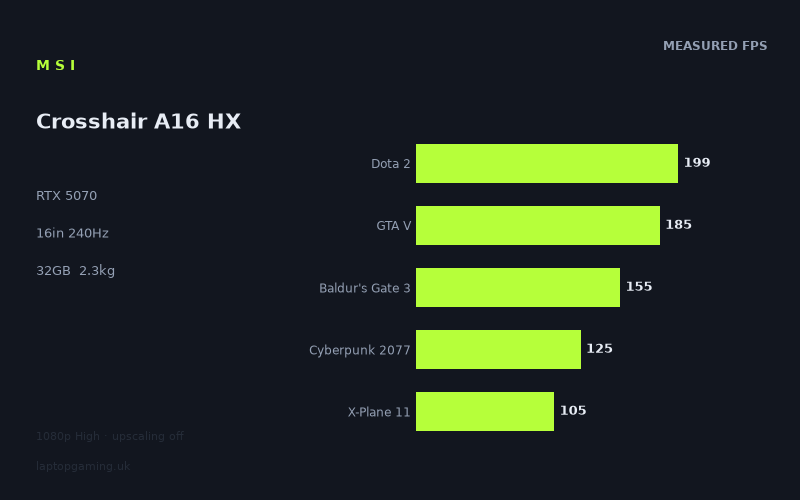
Frame rates
1920×1080, High preset, upscaling off. Averages 153fps across the 5 core benchmark games.
Measured on this machine. Source: Notebookcheck, 2026-07-03.
Not scored: no confirmed UK price
We have the full benchmark suite for this machine, so it ranks on the frame rate leaderboard like any other. What we don't have is a UK listing for this exact configuration - it's sold as a European review unit, or only in specifications that differ from the one tested. Since 30% of our score is value for money, scoring it would mean pretending price is no object, which would flatter it against every laptop you can actually buy. The frame rates below are real and comparable; there is just no buying recommendation to make yet.
How these numbers were produced
Frame rates here are not measured by us, and we label how each one was arrived at. A figure marked measured comes from a published run on that exact machine. A figure marked representative is derived from the GPU and its power limit (TGP) and cross-referenced against published reviews - a sound estimate of what that configuration delivers, but not a measurement of that specific laptop. Unless stated otherwise, numbers are 1920x1080, High preset, upscaling off. Where a laptop ships in several power configurations we use the wattage of the exact SKU listed, because a 140W RTX 5070 and a 115W one are not the same product.
In use
The short version
The MSI Crosshair A16 HX is a difficult machine to judge in the usual value-for-money terms because there is no confirmed UK price for this exact configuration. That means there is no overall score: the benchmark suite is complete and the laptop ranks normally for frame-rate performance, but value cannot be calculated without a price. That is not a warning about the laptop itself; it is simply an important buying limitation. Until a UK retailer lists this exact MSI Crosshair A16 HX (E8WGK) configuration at a confirmed price, there is no reliable way to say whether it is a sensible deal or an overpriced one.
On performance alone, though, this is a capable RTX 5070 laptop with a strong Ryzen 9 8940HX processor, 32GB of memory and a 1024GB SSD. Notebookcheck’s measured figures at 1920x1080 using High settings with upscaling disabled show a machine that is very comfortable in lighter and older games, broadly strong in demanding modern titles, and not consistently able to make full use of its 240Hz display in the heavier games. That is an important distinction. A 240Hz panel is a high ceiling, but the graphics hardware only reaches that ceiling in selected titles rather than across the board.
The measured average across the scoring-suite games is 154fps. That is enough performance for genuinely smooth high-refresh gaming at 1080p, especially in games that are less graphically punishing than Cyberpunk 2077 or X-Plane 11. It is also enough headroom to make a 1600p screen plausible for less demanding games, although the supplied figures are at 1920x1080 rather than the panel’s native 2560x1600 resolution. Buyers should not assume that the same frame rates will carry over unchanged at native resolution. They will not.
The headline performance results tell a sensible story. Strange Brigade reaches 305fps, F1 24 manages 269fps, Dota 2 delivers 199fps and GTA V records 185fps. Those are the games in which the 240Hz screen has a real chance to matter, although even there only Strange Brigade and F1 24 exceed the full refresh rate in the supplied data. Baldur’s Gate 3 at 155fps still feels like a strong result for a turn-based RPG that can become CPU-heavy in certain areas. Cyberpunk 2077 at 125fps is also a solid frame rate for a demanding modern game at High settings without upscaling, but it is well short of 240fps. X-Plane 11 at 105fps is lower again, showing why a fast display should not be confused with a guarantee of ultra-high frame rates in simulation workloads.
The Crosshair A16 HX therefore makes the most sense for someone who wants a machine that can handle a broad range of games at high settings, who values a high-refresh display for competitive or lighter titles, and who is realistic about the difference between 1080p benchmark figures and native-resolution play on a 2560x1600 panel. It is not a machine to buy solely because the display says 240Hz. The benchmark data says that refresh rate is an opportunity rather than a constant reality.
There is also an unusually revealing comparison point in the rival data. Against the MSI Vector 16 HX AI with an RTX 5070 Ti, the Crosshair averages no frame-rate deficit across the shared games. Against the Asus ROG Zephyrus Duo with an RTX 5090 at 150W, it is ahead by 1fps across the shared games. Against two Alienware 16X Aurora configurations, including one with an RTX 5070 Ti, it is effectively level. That does not mean the Crosshair A16 HX turns an RTX 5070 into the same thing as an RTX 5070 Ti or RTX 5090. It means the shared benchmark results are close enough that the GPU name alone is not a useful guide to these particular machines’ observed performance.
The caveat is equally important: averages across shared games can conceal meaningful differences from one title to another, and the rival comparisons do not give a complete picture of screen quality, cooling behaviour, battery life, keyboard quality, ports, upgrade access or build materials. The available data supports a strong performance case for the Crosshair A16 HX. It does not support broad claims that it is automatically superior to every apparently more powerful rival.
Performance
Strong 1080p results, with a wide spread between games
Notebookcheck’s benchmark data was recorded at 1920x1080, using High settings with upscaling disabled. That is a useful baseline because it avoids treating frame-generation or upscaling modes as if they were direct native-rendering performance. The figures show what the laptop produced under a consistent, demanding but not maximum-detail setup.
The highest figure is 305fps in Strange Brigade. That is comfortably above the 240Hz refresh rate of the display, so this is one game where the panel’s maximum refresh can be meaningfully used at the tested settings and resolution. There is more rendering performance here than the display can show in a single refresh cycle. For players who care about input response and motion clarity in fast games, that kind of headroom is useful, even if the screen cannot display more than 240 frames each second.
F1 24 follows at 269fps. Again, that exceeds the panel’s refresh rate in the supplied test. It is another example of the Crosshair A16 HX being able to drive the display at its full refresh capability in the right game. The difference between 269fps and 305fps is not especially important in practical display terms on a 240Hz panel because both results are above the screen’s ceiling. The more useful conclusion is that the laptop has enough performance in these titles to avoid being display-limited by the GPU at the tested settings.
Dota 2 records 199fps. That is lower than the panel’s 240Hz maximum, but it remains a high frame rate. It should be viewed as a good result for a game where consistently high responsiveness is often more important than visual ambition. The gap between 199fps and 240fps matters if a buyer’s sole aim is to keep the display fully refreshed in every moment, but the benchmark figure still places Dota 2 in the category of games where the Crosshair A16 HX is making proper use of a fast panel. It is not merely clearing a basic smoothness threshold; it is running substantially above conventional 60Hz and 120Hz display targets.
GTA V reaches 185fps. That remains a high result, though it is another case where the laptop does not meet the full 240Hz refresh rate. A figure like 185fps is more than enough to make a high-refresh screen worthwhile, but it does not make 240Hz automatic. Buyers should resist the lazy conclusion that a 240Hz panel means every game will run at 240fps. The supplied figures show a more nuanced reality: the laptop can exceed 240fps in some games, sit near 200fps in others, and fall much lower in more demanding workloads.
Baldur’s Gate 3 records 155fps. This is close to the 154fps mean across the scoring-suite games and provides a useful indication of the Crosshair’s broader level. It is still well above 120fps and should be considered a strong result at the tested settings, particularly because game performance is not determined solely by GPU load. CPU demand, game-engine behaviour, scene complexity and other workload characteristics can all influence a result. The Ryzen 9 8940HX and 32GB memory configuration appear well matched to the RTX 5070 in this benchmark context, but the provided data does not isolate CPU performance, so it would be wrong to claim exactly how much of the result is CPU-led or GPU-led.
Final Fantasy XV records 140fps. That is another result that supports the central point: this is a strong high-frame-rate laptop, but not a universal 240fps laptop. At 140fps, the display is still offering more refresh capacity than the game result can fully use. That does not make the 240Hz panel pointless. It means the panel is providing headroom and can still display a 140fps output cleanly, while also being ready for less demanding games that run faster. But buyers choosing the Crosshair primarily for the promise of a permanently saturated 240Hz display should take the measured figures seriously.
Cyberpunk 2077 produces 125fps. This is one of the most useful numbers in the entire set because it is a demanding modern game and the test was run without upscaling. A result of 125fps at 1920x1080 and High settings suggests that the Crosshair A16 HX is not dependent on upscaling simply to reach a playable frame rate in this particular benchmark. It also underlines the gap between smooth performance and refresh-rate saturation. Cyberpunk 2077 is running well above 60fps and above 120fps, but it is only just above 120fps and far from 240fps. This is the sort of title where the laptop’s screen refresh rate is a luxury ceiling rather than a performance target the hardware reaches at the tested settings.
X-Plane 11 is the lowest measured result at 105fps. It is still above 100fps, which is not poor performance, but it makes the same point even more clearly. A simulation workload can behave very differently from a conventional graphics-heavy game. The GPU may not be the only limiting factor, and a fast display cannot manufacture extra performance where the game engine or processor demand becomes the constraint. The Crosshair A16 HX remains capable here, but the figure is less suited to someone who expects a 240Hz panel to be filled in complex simulation gaming.
The benchmark mean matters, but it is not the whole story
The mean across the scoring-suite games is 154fps. That is a useful summary number because it gives a broad indication of where the laptop sits across multiple game types. It says that the Crosshair A16 HX is firmly in high-frame-rate territory at 1920x1080, High settings and no upscaling. It does not say that every game will run at 154fps, and the individual figures show why averages need context.
The spread runs from 105fps in X-Plane 11 to 199fps in Dota 2 among the scoring-suite games, with Baldur’s Gate 3 at 155fps, GTA V at 185fps and Cyberpunk 2077 at 125fps. That is a substantial range. It is exactly why a buyer should look beyond a single average when choosing a gaming laptop. A machine can have a respectable overall mean while delivering very different experiences depending on whether the buyer mostly plays simulations, esports titles, open-world games, RPGs or heavily GPU-bound action games.
The broader set makes the range more obvious. Strange Brigade reaches 305fps and F1 24 reaches 269fps, while X-Plane 11 remains at 105fps. The Crosshair A16 HX is not inconsistent in a worrying sense; rather, it is being asked to run games with very different graphics engines and performance demands. The correct interpretation is not that one result is right and another is wrong. The correct interpretation is that the laptop’s performance ceiling depends heavily on the game.
That matters for buying decisions. Someone whose main library resembles Strange Brigade, F1 24, Dota 2 and GTA V can reasonably expect the 240Hz display to provide tangible benefit at 1080p High settings. Someone whose main library is closer to Cyberpunk 2077, Baldur’s Gate 3 and X-Plane 11 should view the display as a high-quality performance reserve rather than a target that will always be reached. The machine has enough speed to offer smooth gaming in all the supplied results, but the level of refresh-rate utilisation varies sharply.
What the GPU power limit does, and does not, tell us here
The fact sheet identifies this laptop as using an RTX 5070, but it does not provide a GPU power limit for the MSI Crosshair A16 HX itself. That means it is not possible to state a specific wattage for this machine or to attribute its benchmark results to a particular GPU power setting. Any review that assigned a power limit without a supplied source would be guessing.
This matters because laptop GPU names are not enough on their own. A mobile RTX 5070 can appear in different chassis designs, with different cooling capacity, different power limits and different processor pairings. Those factors can affect observed performance. The rival data illustrates this neatly. The MSI Crosshair A17 HX is listed with an RTX 5070 at 115W, while the Asus ROG Zephyrus Duo is listed with an RTX 5090 at 150W. Yet the Crosshair A16 HX is ahead of the A17 by 4fps across their shared games and ahead of the Zephyrus Duo by 1fps across their shared games.
That does not prove that the Crosshair A16 HX uses more power than the MSI Crosshair A17 HX, nor does it prove that it is somehow a more powerful machine than the RTX 5090-equipped Asus. The shared-game averages are too limited to justify those claims, and the A16’s own GPU limit is not supplied. What they do prove is that observed laptop gaming performance is a system-level outcome. GPU class matters, but so do the specific machine, the game selection and the conditions under which the figures were measured.
For a buyer, the practical takeaway is straightforward: do not assume that an RTX 5070 Ti badge necessarily guarantees a major lead over this RTX 5070 configuration, and do not assume that an RTX 5090 badge guarantees a major lead either. Look at measured game data. In the supplied rival comparisons, the Crosshair A16 HX is effectively tied with several machines carrying nominally higher-tier GPUs. That is valuable evidence, but it remains evidence about the listed shared games rather than every game a buyer may own.
What the processor, memory and storage configuration mean
The Ryzen 9 8940HX is paired with 32GB of memory and a 1024GB SSD. On paper, that is an appropriately serious supporting specification for an RTX 5070 gaming laptop. The 32GB memory allocation is particularly welcome in a machine aimed at high-refresh gaming, because the laptop is not positioned as a bare-minimum configuration that relies on a small memory allocation to keep headline pricing low. The supplied benchmark results do not isolate memory usage or processor scaling, but there is no obvious evidence in the figures of the laptop being held back into low frame-rate territory by an underpowered overall platform.
The storage capacity is also substantial enough that buyers are not beginning with a token SSD allocation. That does not tell us anything about SSD speed, second-slot availability, upgrade access or thermals, because none of those details are provided. It does mean the machine arrives with 1024GB rather than a much smaller capacity, which is useful for a gaming system where modern game libraries can occupy significant space.
The processor should not be treated as an automatic guarantee of high frame rates in every CPU-sensitive game. X-Plane 11 at 105fps is a reminder that complex workloads can still sit well below a display’s maximum refresh rate, even in a machine with a high-end Ryzen 9 processor. The sensible conclusion is that this is a well-specified platform with strong measured gaming output, not that it abolishes game-engine limits.
The screen
A high-resolution, high-refresh IPS display with demanding expectations
The MSI Crosshair A16 HX has a 16in IPS display with a 2560x1600 resolution and a 240Hz refresh rate. That is an appealing combination for a gaming laptop because it brings together a relatively sharp 16in panel and a refresh rate well beyond conventional 60Hz or 120Hz displays. The IPS panel type also tells us the screen uses IPS technology, but the fact sheet does not include brightness, contrast, colour coverage, response-time or backlight measurements. It would therefore be wrong to make claims about image quality, outdoor visibility, colour-critical work or motion handling beyond the stated resolution, panel type and refresh rate.
The key issue is whether the RTX 5070 can actually drive this panel effectively. The answer depends on what is meant by “drive”. If the question is whether the laptop can produce smooth, high frame rates in the supplied games, the answer is clearly yes. Every measured game is above 100fps at 1920x1080 High settings without upscaling. If the question is whether it can reach the screen’s full 240Hz refresh rate in every game, the answer is clearly no. The figures do not support that expectation.
At the tested 1920x1080 resolution, Strange Brigade at 305fps and F1 24 at 269fps exceed 240fps. Those are the clearest examples of the panel being fully utilised. Dota 2 at 199fps and GTA V at 185fps do not reach 240fps, but they still sit in the range where a high-refresh display is meaningful. Baldur’s Gate 3 at 155fps, Final Fantasy XV at 140fps, Cyberpunk 2077 at 125fps and X-Plane 11 at 105fps are all smoother than a conventional 60fps experience, yet none can fill a 240Hz panel under the benchmark conditions.
Native resolution changes the calculation. The panel is 2560x1600, while Notebookcheck’s listed figures are at 1920x1080. The native display has more pixels than the benchmark resolution, so buyers should expect native-resolution gaming to demand more from the GPU. The fact sheet does not provide native-resolution frame rates, so there is no honest basis for quoting what any of these games will achieve at 2560x1600. The appropriate conclusion is simply that the 1080p results should not be read as 1600p results.
The 240Hz figure should be treated as headroom
The best way to think about the display is as a panel with generous performance headroom rather than a promise of fixed 240fps gaming. In games where the Crosshair A16 HX can exceed 240fps at the tested settings, the display is capable of showing that level of output. In games around 185fps, 199fps or 155fps, the panel still has value because it can display those high frame rates without being limited to 60Hz or 120Hz. In games around 125fps or 105fps, the display’s maximum refresh rate is not being fully used, but the result is still far from slow.
This distinction is particularly relevant for buyers who play a mixture of games. A laptop with a 240Hz panel does not need to hit 240fps in everything to make sense. It can be excellent for fast multiplayer titles and still be useful for visually demanding single-player games that run lower. The weakness comes only if a buyer pays a premium specifically because they believe the machine will deliver 240fps universally. The benchmark data does not support that belief.
The 16in size and 2560x1600 resolution also make the screen more than a pure esports display. It has a taller aspect ratio than a 1920x1080 panel, which can be useful outside games, but the supplied facts do not provide productivity testing, text clarity comparisons or application-specific experience. For gaming, the higher native resolution gives buyers a sharper-screen option, while the 1080p benchmark figures show the performance available when prioritising frame rate. There is a natural trade-off between those aims, and this machine gives the buyer both a high-resolution panel and strong 1080p results rather than pretending those goals are identical.
Build, size and portability
The available physical information is limited, but the supplied weight of 2.259kg is enough to place the Crosshair A16 HX in the category of substantial portable gaming laptops rather than lightweight travel-first machines. It is not a machine that should be judged by ultraportable standards. A 16in gaming laptop with a Ryzen 9 processor, RTX 5070 graphics, 32GB memory, 1024GB SSD, 80Wh battery and 240Hz display is built around performance capability, and the 2.259kg weight reflects that class of product.
That does not make it immobile. A laptop at 2.259kg can still be moved between rooms, taken to university, carried to an office or transported for travel. But the buyer should be realistic about how often they want to carry it and what else they carry with it. The machine itself is 2.259kg before accounting for any charger, peripherals or bag. The fact sheet does not provide charger weight, chassis dimensions or thickness, so there is no basis for calculating a full travel load or claiming that it fits a particular bag size.
The 80Wh battery is a meaningful specification, but it is not a battery-life result. No battery runtime figures are supplied, so there is no evidence for claims about working-day endurance, video playback, gaming away from the mains or how long the laptop lasts in any specific use case. Gaming laptops can vary greatly depending on display settings, workload, power profile and graphics mode. The sensible reading is simply that the Crosshair has an 80Wh battery, not that it delivers a particular number of hours.
For likely use, the Crosshair A16 HX looks best suited to someone who mainly uses it at a desk but wants the freedom to move the system occasionally. Its performance specification and display are stronger arguments for a semi-portable gaming setup than for constant commuting. A buyer who wants the lightest possible 16in laptop should not treat 2.259kg as inconsequential. A buyer who wants a desktop-replacement-style gaming laptop that can still leave the house without becoming a full tower-PC exercise may find the weight reasonable.
The fact sheet does not include information about chassis materials, keyboard layout, trackpad quality, port selection, webcam, speakers, cooling-system design, fan noise, surface temperatures or upgradeability. Those omissions matter. It is possible to assess the Crosshair’s published gaming performance and core specification, but not to declare it well built, quiet, cool-running, easy to upgrade or especially pleasant to type on. Buyers for whom those details are decisive should wait for reliable published measurements or specifications rather than filling the gaps with assumptions.
How it compares
MSI Vector 16 HX AI with RTX 5070 Ti
The closest listed comparison is the MSI Vector 16 HX AI, which has an RTX 5070 Ti and a UK price of £1,592. Across the games both machines have in common, the MSI Crosshair A16 HX averages no frame-rate deficit. That is the most striking comparison in the rival list because the Vector carries a higher-tier GPU name, yet the shared benchmark data does not show it pulling ahead on average.
That result should not be exaggerated into a claim that the Crosshair’s RTX 5070 is always equivalent to an RTX 5070 Ti. The comparison covers shared games only, and averages can hide game-by-game variation. It also does not tell us whether the Vector has a better display, different GPU power behaviour, different cooling, different battery performance or other advantages. But for a buyer comparing published frame-rate results, the Crosshair has a strong case: the supplied shared-game data says it matches the Vector rather than trailing it.
The important practical difference is that the Vector’s UK price is known while the Crosshair’s is not. That prevents a direct value verdict. If the Crosshair appears at a substantially different price, the buying case could change quickly. The performance data makes it competitive; the unconfirmed price means the value conclusion must wait.
Asus ROG Zephyrus Duo with RTX 5090 at 150W
The Asus ROG Zephyrus Duo is listed with an RTX 5090 at 150W and no confirmed UK price. Across the shared games, the MSI Crosshair A16 HX averages 1fps ahead. This is another comparison that demonstrates why buyers should not shop using GPU labels alone. On the supplied shared-game figures, the Crosshair is not being outperformed by the higher-tier Asus configuration.
There are several reasons to remain cautious. The Zephyrus Duo has a different GPU class and a stated 150W limit, while no GPU power limit is provided for the Crosshair A16 HX. The machines may have different display configurations, processor behaviour, thermal approaches and benchmark coverage. A 1fps average difference is also extremely small in the context of the Crosshair’s measured results, which range from 105fps to 305fps across the listed games. The useful conclusion is not that the Crosshair categorically beats an RTX 5090 laptop. It is that, in these shared tests, it is effectively tied and marginally ahead on the average.
That is still useful information for buyers. It suggests the Crosshair’s measured performance should be taken seriously rather than dismissed because of its RTX 5070 label. It also reinforces the need for price confirmation. A laptop that performs near expensive-looking rivals can be excellent value or poor value depending entirely on its actual selling price.
Alienware 16X Aurora Core Ultra 9 290HX Plus with RTX 5070 Ti
The Alienware 16X Aurora Core Ultra 9 290HX Plus uses an RTX 5070 Ti and is listed at £2,569. Across the shared games, the Crosshair A16 HX averages 1fps behind. This is functionally a tie in the supplied data. The Alienware has the nominal GPU advantage and a very small average lead, but the figures do not indicate a meaningful performance gulf between the two machines in the games they share.
Again, that does not mean the machines are interchangeable. The data does not provide enough information to compare their screens, chassis designs, battery behaviour, connectivity, cooling or input devices. But if gaming performance is the main concern, the Crosshair is close enough to make price especially important. With no confirmed UK price for the Crosshair, there is no honest way to say whether it undercuts the Alienware, matches it or costs more. The performance result alone says buyers should not assume the Alienware’s RTX 5070 Ti gives it a decisive frame-rate advantage.
Alienware 16X Aurora with RTX 5070
The other Alienware 16X Aurora comparison uses an RTX 5070 and is also listed at £2,569. The Crosshair A16 HX averages 2fps ahead across the shared games. This is a slightly clearer lead than the 1fps differences against the Zephyrus Duo and the RTX 5070 Ti Alienware, but it is still a small average margin. The main value of this comparison is that it places the Crosshair in the same performance neighbourhood as another RTX 5070 machine at a known UK price.
The Crosshair’s 32GB memory and 1024GB SSD specification is strong, and its 240Hz 2560x1600 IPS panel is clearly a high-spec display on paper. However, because the Crosshair price is not confirmed and the Alienware’s detailed configuration is not fully supplied here, the comparison cannot become a final buying recommendation. The benchmark data supports saying that the MSI is marginally ahead across the shared games. It does not support saying that it is a better overall purchase without the missing context.
MSI Crosshair A17 HX with RTX 5070 at 115W
The MSI Crosshair A17 HX is perhaps the most directly relevant sibling comparison. It uses an RTX 5070 at 115W and has no confirmed UK price. The Crosshair A16 HX averages 4fps ahead across the shared games. That is the largest average advantage the A16 holds in the listed rival data, though it remains an average across a limited shared-game set rather than a complete performance verdict.
The result is useful because it shows that the A16 should not be assumed to be slower merely because it is the smaller 16in model. In the listed shared games, it comes out ahead. But the fact sheet does not provide the A16’s GPU power limit, so it is not possible to explain the difference by claiming a higher wattage. It may reflect multiple factors, including the specific systems and benchmark conditions. The only defensible statement is that the measured shared-game average favours the A16 by 4fps.
For a buyer choosing between the two Crosshair models, display size and physical preference may matter as much as the small performance difference. The A16 has a 16in 2560x1600 IPS display at 240Hz and weighs 2.259kg. The fact sheet does not provide equivalent physical or screen details for the A17, so a fuller portability or display comparison cannot be made here. What the evidence does show is that the A16 is not giving away performance to the listed A17 configuration.
Who it’s for
Buy it if the price becomes sensible and your priorities match the data
The MSI Crosshair A16 HX is for buyers who want strong measured gaming performance without relying on upscaling in the listed 1080p High benchmarks. It is particularly suitable for players with mixed libraries: lighter games and racing games that can push toward or beyond the 240Hz panel limit, alongside more demanding titles that still run at high frame rates but do not fully saturate the display.
It is a credible choice for someone who plays Dota 2, GTA V, F1 24 or Strange Brigade and wants a display that can make high frame rates worthwhile. The supplied figures of 199fps in Dota 2, 185fps in GTA V, 269fps in F1 24 and 305fps in Strange Brigade show a machine that is not simply aiming for basic playability. In the right games, it can provide the sort of high-frame-rate output that makes a 240Hz panel relevant.
It is also suitable for someone who plays demanding games but does not insist on a fixed 240fps target. Cyberpunk 2077 at 125fps, Baldur’s Gate 3 at 155fps, Final Fantasy XV at 140fps and X-Plane 11 at 105fps are all meaningful results at the tested settings. They show that the Crosshair can provide strong performance even when the game does not allow it to fully exploit the screen’s maximum refresh rate.
The 32GB memory and 1024GB SSD make this more attractive to buyers who do not want a cut-down configuration. The Ryzen 9 8940HX, RTX 5070, 32GB memory and 1024GB SSD combination is appropriately balanced for a gaming laptop of this class. The 80Wh battery and 2.259kg weight also make it a plausible occasional-travel machine, provided the buyer understands that there are no supplied runtime figures and that it is not a lightweight ultraportable.
Most importantly, it is for a buyer willing to wait for a confirmed UK price and compare that price against the MSI Vector 16 HX AI at £1,592 and the Alienware 16X Aurora models at £2,569. The Crosshair’s performance is competitive with all of them in the supplied shared-game data. Whether that becomes a compelling purchase depends on where MSI and UK retailers actually place it.
Buy something else if you need certainty in the missing areas
Buy something else if you need a laptop with a confirmed UK price now. The Crosshair A16 HX cannot be assessed properly for value until this exact configuration has a confirmed UK price. Performance alone is not enough for a purchasing decision when competing machines have known prices and the Crosshair does not.
Buy something else if you want verified native-resolution gaming figures for the 2560x1600 display. The available benchmarks are at 1920x1080, not at the panel’s native resolution. It is reasonable to expect native 2560x1600 gaming to be more demanding, but there is no provided evidence for exact native-resolution frame rates. Buyers who plan to run every game at the screen’s full resolution should seek benchmark data at that resolution rather than treating the 1080p figures as a substitute.
Buy something else if your main aim is guaranteed 240fps gaming in demanding titles. The data does not support that use case. Strange Brigade and F1 24 exceed 240fps, while Dota 2, GTA V, Baldur’s Gate 3, Final Fantasy XV, Cyberpunk 2077 and X-Plane 11 do not. The Crosshair has a 240Hz screen, but it is not a universal 240fps machine in the supplied tests.
Buy something else if battery life is central to your decision. An 80Wh battery is specified, but no battery-life measurements are supplied. There is no reliable basis for saying how long the laptop lasts during gaming, web use, video playback or office work. Buyers who need long unplugged use should choose based on published runtime evidence rather than battery capacity alone.
Buy something else if quiet operation, low surface temperatures, premium materials, a particular keyboard feel, a specific port selection or easy upgrades are non-negotiable. None of those areas is covered by the available fact sheet. The Crosshair may or may not satisfy those requirements, but the evidence supplied here does not allow a credible recommendation on them.
The final judgement is straightforward. The MSI Crosshair A16 HX has strong published 1080p High-performance results, a serious core specification and a display that is capable of rewarding high frame rates in the right games. It performs surprisingly close to, or slightly ahead of, several listed rivals with RTX 5070 Ti and RTX 5090 graphics when comparing the shared benchmark data. Its weakness is not proven gaming performance. Its weakness is uncertainty: no confirmed UK price, no stated GPU power limit for this configuration, no native-resolution benchmark figures and no published battery, thermal or noise results in the supplied data.
If the UK price is sensible, this could be a very competitive RTX 5070 gaming laptop. Until that price is confirmed, the right conclusion is not to overstate it. The frame rates make the Crosshair A16 HX worth watching; the missing price means it is not yet possible to call it a bargain.