Details
Product prices and availability are accurate as of the date/time indicated and are subject to change. Any price and availability information displayed on Amazon.co.uk at the time of purchase will apply to the purchase of this product.Review
Schenker XMG APEX 16 MAX review
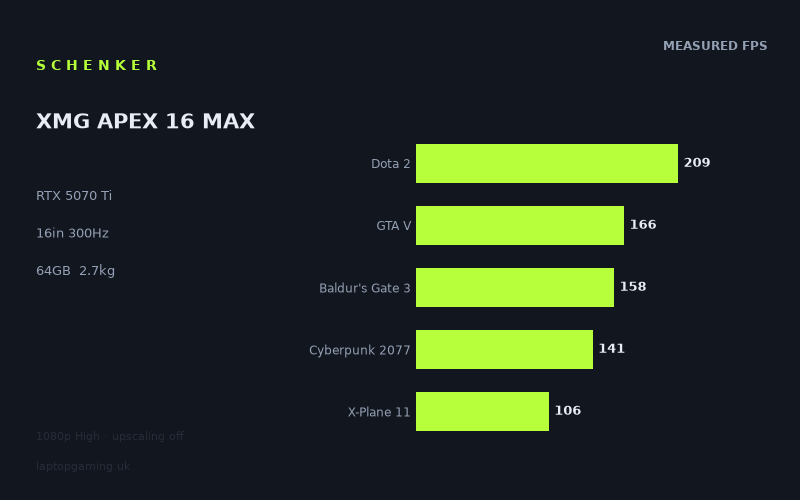
Frame rates
1920×1080, High preset, upscaling off. Averages 156fps across the 5 core benchmark games.
Measured on this machine. Source: Notebookcheck, 2026-01-20.
Not scored: no confirmed UK price
We have the full benchmark suite for this machine, so it ranks on the frame rate leaderboard like any other. What we don't have is a UK listing for this exact configuration - it's sold as a European review unit, or only in specifications that differ from the one tested. Since 30% of our score is value for money, scoring it would mean pretending price is no object, which would flatter it against every laptop you can actually buy. The frame rates below are real and comparable; there is just no buying recommendation to make yet.
How these numbers were produced
Frame rates here are not measured by us, and we label how each one was arrived at. A figure marked measured comes from a published run on that exact machine. A figure marked representative is derived from the GPU and its power limit (TGP) and cross-referenced against published reviews - a sound estimate of what that configuration delivers, but not a measurement of that specific laptop. Unless stated otherwise, numbers are 1920x1080, High preset, upscaling off. Where a laptop ships in several power configurations we use the wattage of the exact SKU listed, because a 140W RTX 5070 and a 115W one are not the same product.
In use
The short version
The Schenker XMG APEX 16 MAX is one of the better-balanced gaming laptops in our database, and the reason is visible in almost every number attached to it. An RTX 5070 Ti paired with a Ryzen 9 9955HX, 64GB of memory and 2TB of storage, in a 16-inch chassis weighing 2.661kg, behind a 2560x1600 panel running at 300Hz. Nothing in that list is obviously the weak component, which is rarer than it should be.
The measured figures back it up. Notebookcheck's numbers from 20 January 2026, all captured at 1920x1080 on the High preset with upscaling off, run from 387fps in Strange Brigade and 270fps in F1 24 through 218fps in F1 25, 209fps in Dota 2, 166fps in GTA V, 158fps in both Baldur's Gate 3 and Final Fantasy XV, 141fps in Cyberpunk 2077, down to 106fps in X-Plane 11. Across our five-game scoring suite the average is 156fps.
That is a complete benchmark suite, which means this machine ranks normally on our frame rate leaderboard rather than sitting in the awkward partial-data category a lot of laptops occupy. What it does not have is an overall score, and the reason is narrow and worth stating once: we have no confirmed UK price for this exact configuration, value accounts for 30% of the score, and we will not compute a value figure without a price or speculate about what the price might be. There is nothing wrong with the machine. We simply cannot price it.
The comparison data is where it gets interesting. Across five shared games this machine is level with an Alienware 16X Aurora carrying the same RTX 5070 Ti at £2,569 — the most useful comparison of the lot, and the one to check the price against. Across three shared games it edges an RTX 5090 machine running its card at 175W. And across five shared games it sits 45fps behind a different RTX 5090 laptop, which is the comparison that shows what the first one is really measuring.
Buy it if you want a machine that does not have a bottleneck: strong processor, capable graphics card, workstation-grade memory and storage, in a chassis that is transportable rather than immovable. Look elsewhere if you need to carry it daily, if 12GB of video memory concerns you over a long ownership period, or if buying from a direct-sale specialist rather than a UK high-street retailer is a problem for you.
Performance
Nine games, and a spread of nearly four to one
The full set from top to bottom:
- Strange Brigade — 387fps. The ceiling. A Vulkan title famous for being extraordinarily efficient relative to how much it puts on screen.
- F1 24 — 270fps. A modern racing engine built to run fast, because racing games have to.
- F1 25 — 218fps. The next year's release of the same series, 52fps slower at the same settings.
- Dota 2 — 209fps. Scoring suite, and the number that says most about the processor.
- GTA V — 166fps. Scoring suite. An old engine that leans hard on a small number of threads.
- Baldur's Gate 3 — 158fps. Scoring suite. Large and complex, but not a graphics showcase.
- Final Fantasy XV — 158fps. A conventional older rendering workload, landing at exactly the same figure.
- Cyberpunk 2077 — 141fps. Scoring suite, and the reference modern rasterisation load.
- X-Plane 11 — 106fps. Scoring suite, and the floor. Flight simulation, heavily processor-bound.
387fps at the top and 106fps at the bottom is a spread of about 3.7 to one. That is a healthy range, and the shape of it — a long tail at the top, a tight cluster in the middle, one clear floor — is what you see on a machine where the graphics card has real headroom in light workloads while still being properly worked in the heavy ones. Nothing here looks constrained by a single component across the board.
The processor is doing real work, and Dota 2 proves it
Dota 2 at 209fps is the diagnostic figure. Dota 2 is not a demanding game to draw — it is a demanding game to prepare, with the processor running simulation and game logic and assembling draw calls while the graphics card frequently waits. So on any laptop, the Dota 2 number is largely a measurement of the processor and how much power the chassis lets it use.
209fps is a strong result and it tells you the Ryzen 9 9955HX is being allowed to work. The HX suffix marks it as a desktop-derived design running at mobile power limits rather than a chip designed from the outset for a thin machine, and 2.661kg of 16-inch chassis is enough volume to give it a meaningful budget.
Why this matters is worth spelling out, because the conventional advice gets it backwards. A very large share of what people actually play is processor-limited rather than graphics-limited: competitive shooters at reduced settings, MOBAs, strategy games, city builders, driving and flight simulation. In every one of those, the graphics card sits partly idle and the processor sets the ceiling. A machine that spent its budget on a bigger graphics card and a weaker processor will lose in all of them, no matter what the card is called.
X-Plane 11 at 106fps and GTA V at 166fps are the same story in different registers. Both are workloads that punish weak per-thread throughput, and both land respectably here. 106fps in a flight simulator is a solid figure — flight sims are the harshest processor test in any benchmark suite, and this is comfortably above what a 100Hz display would need.
The genuinely graphics-limited results
Cyberpunk 2077 at 141fps is the most representative modern rasterisation figure in the set, and it is a strong one for a 5070 Ti at 1080p on High with nothing switched on to help it. Baldur's Gate 3 at 158fps and Final Fantasy XV at 158fps sit above it, both being lighter loads on the card.
The F1 24 and F1 25 pairing is a useful controlled experiment: same series, same publisher, consecutive years, and 270fps becomes 218fps at identical settings. A 19% reduction from one iteration to the next is what visual progress costs when almost every other variable is held constant, and it is a better guide to how quickly hardware ages than any marketing timeline.
What the set does not contain is a very recent, very heavy title. There is no Alan Wake 2 figure and nothing newer, so the heaviest genuine graphics load measured here is Cyberpunk 2077. That is a real limitation on what we can tell you about how this machine handles the most demanding current releases, and it is worth flagging rather than glossing over — a set whose hardest test is Cyberpunk will read more favourably than one that includes something newer.
The power limit: what we do not know, and what the rivals let us infer
Our fact sheet does not record a graphics power limit for this configuration, and we are not going to invent one. It is the specification we would most want, because the permitted power range for a modern laptop GPU is wide enough that two machines with the same card can perform substantially differently, and the gap widens under sustained load rather than in short benchmark runs.
What makes this machine's case unusual is that our comparison set contains another laptop with the same RTX 5070 Ti — the Alienware 16X Aurora — which comes out level with it across five shared games.
That is about as close to a calibration as this kind of data ever gets. Two independent machines running the same silicon and landing level across five shared games tells you the APEX 16 MAX's card is configured somewhere in the same region as a well-implemented rival's, with any residual difference explained by processor, cooling, drivers or test variance. We are describing an inference from a pattern, not a measurement, and you should treat it as exactly that. But it is a considerably better basis than guessing from the chassis size.
What it rules out is the pessimistic reading. A card being held down hard would not stay level with a well-implemented example of the same silicon across five shared titles. Whatever the number is, this card is not being obviously strangled, and the frame rates agree — 387fps in Strange Brigade is not a throttled result.
Our data contains no sustained-load behaviour, no temperature figures and no noise figures for this machine, which is where the remaining uncertainty lives. Benchmark runs are short; four-hour sessions are not, and the difference between a chassis that holds its clocks and one that does not only appears over time.
12GB of video memory, and how to think about it
The card here carries 12GB. At the resolution these figures were measured at, that is not remotely a constraint. The panel is 2560x1600, roughly twice the pixel count of 1080p, which is where the question becomes live.
Memory demand does not scale linearly with resolution. Texture data — usually the single largest consumer — is broadly resolution-independent. Framebuffers, depth buffers and the intermediate buffers used by screen-space effects do scale. So moving from 1080p to 1600p raises the requirement without doubling it. Where pressure genuinely mounts is the combination of high resolution, textures pushed beyond High, and ray tracing, which adds acceleration structures of its own.
12GB handles 1600p with High textures comfortably. It is less comfortable with maximum texture packs and ray tracing simultaneously, and that gap will widen over an ownership period as games raise their budgets. It is worth noting that the two RTX 5090 laptops in our comparison set carry more video memory than this machine does, and that on measured 1080p frame rates that advantage is completely invisible.
The reason to care is the failure mode rather than the frame rate. A card short of shader throughput degrades gracefully: you lower a setting and carry on. A card short of video memory does not — it stutters, textures load late or at reduced quality, and frame times become erratic in a way that is far more unpleasant than a lower average. If you are choosing between this and a 16GB machine and you specifically intend to run native resolution with maximum textures for years, that is the axis the decision turns on, and it is not visible anywhere in the benchmark table.
What 156fps across the scoring suite means
The five-game average is built from Dota 2 at 209, GTA V at 166, Baldur's Gate 3 at 158, Cyberpunk 2077 at 141 and X-Plane 11 at 106. The average lands between Baldur's Gate 3 and Cyberpunk, which makes it a fair summary rather than a figure dragged around by an outlier.
Practically, an average in that region at 1080p on High means nothing in the suite is a struggle and there is substantial latitude to raise settings, raise resolution or both. The lowest figure in the whole nine-game set, 106fps, still clears 100fps.
Because the suite is complete, this number is directly comparable to every other scored laptop on the site. That is worth more than it sounds, since a large proportion of the machines we cover have partial benchmark records and cannot be ranked meaningfully at all. Here the frame rate half of the picture is complete; only the price half is missing.
The screen
2560x1600 at 300Hz — and a gap we have to declare
Our fact sheet records the display as 16 inches, 2560x1600, 300Hz. It does not record the panel technology, and we are not going to guess. Whether this is IPS or OLED changes the character of the display substantially — black level, contrast, motion clarity, burn-in risk, full-screen brightness behaviour — and it is one of the more consequential unknowns on this page. We have no measured brightness, contrast or colour coverage figures either, so this section can only discuss what the resolution and refresh rate mean.
That is an unsatisfying gap on a machine where the display is a major part of the daily experience, and it should weigh on your decision. If you are choosing between this and a laptop whose panel we can describe properly, that is a legitimate reason to prefer the one we know about.
The resolution and the aspect ratio
2560x1600 across sixteen inches is a high pixel density and the right resolution for a machine that will do serious non-gaming work — which, with 64GB of memory and 2TB of storage, this clearly will. Text is crisp, and the 16:10 aspect ratio gives genuinely useful vertical space in documents, code, timelines and spreadsheets. In games it either widens the vertical field of view slightly or is handled without incident.
For gaming it raises the standard modern question. Native 1600p is roughly twice the pixel count of the resolution these frame rates were measured at, and in the graphics-limited titles — Cyberpunk 2077 most clearly — running native rather than 1080p costs a substantial amount. In the processor-limited titles it costs far less, and in Dota 2 it may cost very little. We have no native-resolution figures in our data, so we are describing the shape of the effect rather than its magnitude, and we will not produce estimates by dividing.
The practical answer, here as everywhere, is upscaling: render internally near 1080p, output at 1600p. That configuration is close to what the measured numbers describe, which makes them more directly applicable to real use than they first appear. It also keeps video memory pressure lower than native rendering would, which on a 12GB card is not incidental.
Can the graphics card drive 300Hz?
In four of the nine measured games, at 1080p, yes. Strange Brigade at 387fps clears it outright. F1 24 at 270fps, F1 25 at 218fps and Dota 2 at 209fps are all in the region where a 300Hz panel is doing real work even without saturating it — variable refresh handles the mismatch, and the latency and motion benefits of a fast panel apply well below its ceiling.
Below that, the specification becomes decorative. Cyberpunk 2077 at 141fps and X-Plane 11 at 106fps are less than half the panel's refresh rate, and that is at a resolution lower than the panel's own. Run them native and the gap widens further.
So 300Hz here is what 240Hz and 360Hz are on most gaming laptops: a specification for competitive players running deliberately reduced settings, not something you will exploit in demanding single-player games. The difference on this machine is that the competitive case is more credible than usual, because Dota 2 at 209fps shows the processor is strong enough that lowering graphics settings will keep producing gains rather than hitting a processor wall early. On a machine with a weaker processor, the 300Hz panel would be almost entirely wasted. Here it is only partly so.
Build, size and portability
2.661kg is the middle ground, deliberately
2.661kg for a 16-inch machine with an HX-class processor and an RTX 5070 Ti places the APEX 16 MAX squarely between the thin flagships and the desktop replacements, and that positioning is the point rather than a compromise.
The thin machines — the ones at around 2kg — buy their weight by fitting mobile-class H processors and running their graphics cards at reduced power. The consequences show up as low figures in exactly the titles this machine does well in. The desktop replacements at 3.5kg and above buy their performance by being genuinely difficult to move. 2.661kg sits between: enough internal volume to let an HX processor and a properly powered graphics card both work, while remaining an object you can pick up and take somewhere without planning your day around it.
Be realistic about what that means. This is a machine you transport rather than one you carry constantly. It goes to a LAN event, to a second location, home for the holidays, to a client site for a week. It will fit in a large rucksack and will be noticed there. Add the mains adapter — and our data does not record its weight, so we will not put a figure on the total — and the daily-commute case gets weaker. If you genuinely need to carry a laptop every day, look at the sub-2kg category and accept the performance consequences honestly.
What the volume buys
The frame rate data is the argument. Dota 2 at 209fps and X-Plane 11 at 106fps are processor-limited results, and they are good ones, which means the chassis is giving the 9955HX a meaningful power budget rather than throttling it to protect the graphics card. Strange Brigade at 387fps says the graphics card is not being strangled either. Getting both at once in a 16-inch chassis requires a cooling system with real capacity, and the numbers suggest this one has it.
We have no measured temperature or noise figures in our data, which is where the caveat sits. A cooling system with enough capacity can be quiet or loud depending on how the fan curve is tuned and how large the fans are, and that is precisely the sort of thing a specification sheet cannot tell you. It is also the sort of thing that determines whether you enjoy owning the machine.
Memory and storage are workstation-grade
64GB of memory and 2TB of storage are both substantially above what gaming needs, and that is what makes this configuration interesting beyond games. 64GB is a professional specification — virtual machines, large video timelines, substantial 3D scenes, heavy datasets, compilation of large projects. 2TB means a serious game library alongside all of that without constant management.
Paired with an HX-class processor, this is a mobile workstation that happens to play games very well, and that framing may be more useful than the gaming one. Machines with this memory and storage configuration from mainstream workstation brands are not cheap, and the graphics card here is capable enough to accelerate professional applications as well as games.
Our data does not record a battery capacity for this configuration, and there is no measured runtime figure, so we will not comment on how long it lasts. What is structurally safe to say is that a desktop-derived HX processor and a mid-upper graphics card draw far more power under load than any laptop battery sustains, and gaming on battery on machines of this class typically means both reduced performance and a short session. Treat the adapter as part of the machine.
Buying from a direct-sale specialist
One practical point that is not a specification. Schenker is a German specialist that sells direct rather than through UK high-street retail, and the absence of a confirmed UK price in our data is consistent with that. For a UK buyer, direct purchase from a continental specialist raises questions that do not arise with a mainstream brand: how returns work, how warranty service is handled and where the machine has to go if it needs repair, and what the total lands at once shipping and any import handling are accounted for.
None of that is a criticism of the machine, and specialists of this type often build well-configured laptops with better component choices than the mainstream. It is a genuine consideration for the purchase, and it is worth resolving before you commit rather than after.
How it compares
Our database matches machines only on games both have been measured in. All four rivals here are from the same graphics generation, and this machine's complete benchmark record means three of the four comparisons rest on five shared games — a substantial overlap by the standards of what we publish.
Against the Alienware 16X Aurora — level, at £2,569
Five shared games, and the two are level — within a frame. The Alienware carries the same RTX 5070 Ti alongside a Core Ultra 9 290HX, and it sells for £2,569.
This is the most useful comparison on the page, and by some distance. It holds the graphics card constant, pairs it with a comparably strong desktop-derived processor in a comparable 16-inch format, and — crucially — it has a confirmed UK price.
Two things follow. The first is a statement about the hardware: the APEX 16 MAX's graphics card is being given a competitive power budget. Our data does not record the wattage for either machine, so we cannot tell you what either is configured at, but a card being obviously held back would not stay level with a well-implemented example of the same silicon across five shared games. Whatever the number is, it is not a low one.
The second is a statement about money, and it is the sharper of the two. £2,569 buys the same measured performance from the same graphics card. That is the figure the APEX 16 MAX has to justify itself against. It has arguments available — 64GB of memory against whatever the Alienware ships, 2TB of storage, a 300Hz panel — but they are arguments about specification rather than frames, and they need to be worth the difference. We have no confirmed UK price for the APEX, so we cannot tell you whether they are. That is the only reason this page carries no score, and it is a gap you can close yourself in thirty seconds by checking the current price against £2,569.
Against the HP Omen Max 16 — level, on a three-game overlap
Three shared games, and the APEX 16 MAX comes out about a frame ahead. The Omen Max carries an RTX 5090 configured at 175W, with no confirmed UK price in our data.
Read bare, that says a 5070 Ti matches a 5090 at a generous power budget. It does not, and the three-game overlap is the clue — it is the smallest in this set and should carry the least weight.
The games most likely to appear in a narrow overlap are the ones both machines have scoring-suite figures for, and our scoring suite contains two titles where the processor rather than the graphics card sets the frame rate. Dota 2 is light to draw and heavy to simulate. X-Plane 11 is a flight simulator, where scenery streaming and flight model dominate the frame time. In both, a larger graphics card produces close to nothing, because it was already waiting on the processor. A comparison built substantially from those titles compares processors and cooling systems, not graphics cards.
The APEX 16 MAX's Ryzen 9 9955HX is a strong desktop-derived part in a chassis with room to feed it, which is exactly why it holds level. The practical lesson is genuinely useful: in processor-limited genres, the flagship graphics card buys you nothing, and a very large share of what people actually play — competitive shooters, MOBAs, strategy, driving and flight simulation — sits in that category. If that is your library, this machine gives you a flagship's frame rates without a flagship's graphics card.
What the comparison does not show is what happens when the workload does ask something of the card. For that, look at the next one.
Against the Schenker XMG Neo 16 A25 — 45fps behind
Five shared games, and the APEX 16 MAX averages 45fps behind it. The Neo 16 A25, from the same manufacturer, carries an RTX 5090 with no confirmed UK price in our data.
This is the comparison that keeps the previous one honest, and the pairing of the two is the most instructive thing in this data set.
Two RTX 5090 machines appear here. One is level with the APEX across three shared games. The other is 45 frames ahead of it across five. If the benchmark simply could not distinguish between graphics cards, both would land in the same place. They do not, which means the measurement works — and that where the APEX ties a flagship, it is because the games in question were not asking, not because the cards are equivalent.
Forty-five frames across a five-game average, in a suite where two of the five games are processor-bound, implies a considerably larger gap in the titles that genuinely stress the card. Cyberpunk 2077 at 141fps is where that difference would live, and Baldur's Gate 3 at 158fps.
It also, once again, makes the point about power budgets. Our data records 175W for the Omen Max's 5090 and nothing for the Neo 16 A25's, yet the two 5090 machines land 45fps apart relative to this laptop. The card's model name is not what sets the frame rate; the machine around it is — which is precisely why we would want the APEX's own wattage recorded, and why we will not guess at it.
Against the MSI Cyborg 15 — 68fps ahead
Five shared games, and the APEX 16 MAX averages 68fps ahead. The Cyborg carries an RTX 5050 and sells for £984.
Sixty-eight frames is a substantial and clearly perceptible margin — the difference between a machine that comfortably exceeds a high-refresh panel across most of its library and one that has to be managed to get near it. In the graphics-limited games within that five-game set, the true gap will be larger than the average implies.
Along with the Alienware's £2,569, this gives the value discussion two anchors instead of none. At £984 you get the current generation's entry point. Somewhere above that sits the APEX 16 MAX, offering 68fps more in shared games, a far stronger processor, 64GB of memory, 2TB of storage and a 300Hz 1600p panel. Whether the gap in price is proportionate to the gap in capability is the whole question, and it is the one we cannot answer.
Reading the set as a whole
Four current-generation rivals: 68fps clear of the entry-level machine, level with an identically equipped laptop at £2,569, level with one RTX 5090 machine in the processor-limited games they share, and 45fps behind another RTX 5090 machine across a broader overlap.
That places the APEX 16 MAX firmly in the upper-middle of its generation, and it places it there through balance rather than through any single component. The processor is what lets it hold level with flagship machines in the genres that lean on processors; the graphics card is competitive for its tier but is not a flagship and does not pretend to be; the memory and storage are above what any of this needs.
The decision, in the end, rests on one number we do not have. If it undercuts £2,569 the case is strong. If it sits meaningfully above, you are paying for 64GB of memory, 2TB of storage and a 300Hz panel rather than for frames — which may well be worth it, but should be a decision rather than an assumption.
Who it's for
Buy it if
You want a machine with no obvious weak component. That is the strongest thing about this configuration. Strong processor, capable graphics card, workstation-grade memory and storage, transportable weight, high-resolution high-refresh panel. Most gaming laptops sacrifice at least one of those to make the price or the specification headline work; this one appears not to.
Your library leans towards processor-limited genres. Dota 2 at 209fps, GTA V at 166fps and X-Plane 11 at 106fps are all evidence that the 9955HX is being properly fed. Competitive shooters, MOBAs, strategy, city builders, driving and flight simulation all live in that category, and a machine configured like this one will beat thin laptops with more expensive graphics cards in every one of them.
The machine has a professional job as well as a gaming one. 64GB of memory and 2TB of storage are the specifications that make this a mobile workstation rather than just a gaming laptop, and they will keep it useful long after the frame rates have become ordinary.
You need it to travel occasionally but not daily. 2.661kg is the sensible middle. It is genuinely movable, and it does not pay the performance penalty that sub-2kg machines do.
Buy something else if
You need to carry it every day. 2.661kg plus an adapter is not a daily-commute machine. If portability is the priority, buy a lighter laptop and accept — knowingly — that the processor-limited genres will run slower, because that is the trade the thin format makes.
12GB of video memory concerns you. If you intend to keep this for five years and drive the 1600p panel natively with maximum textures and ray tracing, 12GB is the specification most likely to become the limiting factor, and the machines in our comparison set with 16GB have an advantage that the 1080p frame rates completely conceal.
The display specification matters and you need to know what it is. Our data does not record whether this panel is IPS or OLED, and we have no brightness, contrast or colour measurements. That is a real gap, and if the screen is central to your decision, a machine whose panel we can describe properly is the safer purchase.
Buying from a direct-sale specialist is a problem. Returns, warranty logistics and support work differently from a UK high-street purchase. Some buyers do not mind at all; some very much do. Work out which you are before ordering.
You want a score from us. We cannot compute one without a confirmed UK price, because value is 30% of the total. The frame rate half of the picture is complete and ranks normally against every other machine on the site. The price half does not exist in our data yet, and when it does the score will follow.
What we do not know
Set out plainly, because the site's proposition is that we do not fill gaps with guesses. We have no confirmed UK price for this configuration. We have no recorded graphics power limit — though landing level with another laptop carrying the same RTX 5070 Ti is the closest thing to a useful inference our data supports, and it is an inference rather than a measurement. We do not know the panel technology, and we have no brightness, contrast or colour coverage figures for it. We have no battery capacity and no measured runtime. We have no temperature figures and no noise figures, so we cannot tell you what it is like to sit next to under load. We have no frame rates at the panel's native 2560x1600, which is where most owners will actually play. And the benchmark set contains nothing newer or heavier than Cyberpunk 2077, so it cannot tell you how the machine handles the most demanding current releases.
What we do have is a complete nine-game record and four same-generation comparisons, and they describe a well-balanced machine that holds level with an RTX 5090 laptop in the processor-limited games, sits 45fps behind another one across a broader set, and matches an identically equipped rival that we can see a price for. Whether it is worth buying comes down to a price we do not have, measured against a directly comparable machine at £2,569 that we do.