Details
Product prices and availability are accurate as of the date/time indicated and are subject to change. Any price and availability information displayed on Amazon.co.uk at the time of purchase will apply to the purchase of this product.Review
Alienware 16 Area-51 Core Ultra 9 290HX Plus review
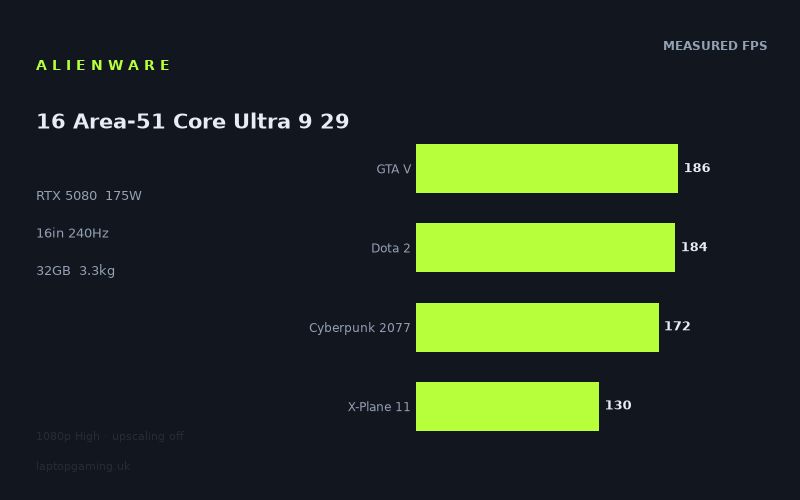
Frame rates
1920×1080, High preset, upscaling off.
Measured on this machine. Source: Notebookcheck, 2026-04-22.
Not scored: incomplete benchmark suite
Every scored laptop on this site is averaged over the same 5 games, and this one is short of Baldur's Gate 3. A mean over 4 games is not comparable to a mean over 5, so we publish the figures we have and leave the score blank rather than rank it against machines tested on a different set. The numbers below are real - the suite is just incomplete.
How these numbers were produced
Frame rates here are not measured by us, and we label how each one was arrived at. A figure marked measured comes from a published run on that exact machine. A figure marked representative is derived from the GPU and its power limit (TGP) and cross-referenced against published reviews - a sound estimate of what that configuration delivers, but not a measurement of that specific laptop. Unless stated otherwise, numbers are 1920x1080, High preset, upscaling off. Where a laptop ships in several power configurations we use the wattage of the exact SKU listed, because a 140W RTX 5070 and a 115W one are not the same product.
In use
The short version
The Alienware 16 Area-51 Core Ultra 9 290HX Plus is a very high-end gaming laptop built around an RTX 5080 running at a 175W GPU power limit, 16GB of VRAM, 32GB of memory and a 16in 2560x1600 OLED display with a 240Hz refresh rate. On paper, that is a specification aimed at buyers who want desktop-class gaming performance in a large 16in machine and are prepared to accept a 3.303kg chassis in return.
The published benchmark data is strong, but it needs reading carefully rather than being reduced to a single headline figure. Notebookcheck measured 448fps in Strange Brigade and 351fps in F1 24 at 1920x1080, High preset, with upscaling off. Those are genuinely high results and comfortably exceed the screen’s 240Hz refresh rate. The same settings produced 201fps in Final Fantasy XV, 186fps in GTA V, 184fps in Dota 2, 172fps in Cyberpunk 2077 and 130fps in X-Plane 11. That is still powerful performance, but it shows that the Area-51 is not a machine that can be assumed to deliver 240fps in every demanding game simply because it has a 240Hz panel.
The important limitation is that every published frame rate here is from 1920x1080 rather than the laptop’s native 2560x1600 resolution. The benchmark figures tell us a great deal about the laptop’s performance at the tested settings, but they do not prove that the same games will run at the same rates on the built-in panel at native resolution. Buyers looking for the highest possible frame rates will have to make sensible choices between native-resolution image detail, graphical settings and refresh-rate targets. There are no published native-resolution figures in this fact sheet, so it would be wrong to promise a particular result at 2560x1600.
The Area-51’s position against close database rivals is also more interesting than the RTX 5080 badge might suggest. Across shared games, it is ahead of the Medion Erazer Beast 16 X1 Ultimate with an RTX 5090 by 1fps on average, ahead of the Schenker XMG Neo 16 E25 RTX 5090 Laptop by 3fps on average, behind the MSI Raider 16 Max HX with an RTX 5090 by 5fps on average, behind the Lenovo Legion 9 18IAX10 RTX with an RTX 5090 by 9fps on average, and behind the Lenovo Legion Pro 7i 16 Gen 10 with another 175W RTX 5080 by 11fps on average. Those are not results that support any simplistic claim that this is automatically faster or slower than every similarly specified laptop. They show that the implementation matters, the game list matters, and individual laptop results should be read in context.
There is no confirmed UK price for this Alienware configuration. That prevents a proper value judgement. It may be compelling if it arrives at a sensible UK price relative to machines such as the £4,884 Medion, but it could also become difficult to justify if its asking price approaches or exceeds more consistently faster alternatives. Until a confirmed UK price is available, the sensible verdict is performance-led rather than value-led: this is a serious 1080p High-preset gaming laptop with a premium screen specification, but its real buying case depends heavily on what Alienware asks for it.
Buy it if the appeal is a large, heavy, high-performance 16in OLED laptop and the published game results match the games and settings that matter to you. Be more cautious if your main requirement is verified 2560x1600 performance, if you want a lighter machine for frequent travel, or if your purchasing decision depends on knowing exactly how it compares on price with specific rivals. The missing UK price and the absence of native-resolution benchmark data are not small details on a laptop in this class.
Performance
What the published figures actually show
Notebookcheck’s measurements were taken at 1920x1080, High preset, with upscaling off. That test method matters. It gives a clean view of conventional rasterised performance at a widely useful setting, without frame-rate assistance from upscaling. It does not describe every possible mode available in each game, and it does not establish performance at the Alienware’s 2560x1600 native resolution. It is nevertheless a useful starting point because every published figure is directly attributable to the same named source and the same stated test conditions.
Strange Brigade is the standout result at 448fps. F1 24 follows at 351fps. Both figures are above the laptop screen’s 240Hz refresh rate, so these are the two measured games where the laptop has enough performance at the tested settings to exceed the display’s maximum refresh. That does not mean every frame above 240fps is equally useful in every situation, nor does it mean the same outcome should be expected at 2560x1600. It does mean that at 1920x1080 High without upscaling, this machine has substantial headroom in these particular titles.
Final Fantasy XV at 201fps sits in a different category. It is very fast, but below 240fps. GTA V at 186fps and Dota 2 at 184fps are also well above the frame rates normally associated with merely adequate gaming performance, yet neither reaches the panel’s full 240Hz refresh at the tested settings. Cyberpunk 2077 at 172fps remains a strong result, especially given that upscaling was off, but it again demonstrates that a 240Hz screen should be treated as an upper capability rather than a guarantee that every game will be rendered at 240fps.
X-Plane 11 is the slowest of the published results at 130fps. That is still a high frame rate in isolation, but it is much further from the 240Hz ceiling than Strange Brigade or F1 24. It is also a useful reminder that buyers should not shop for a high-refresh gaming laptop on the basis of one favourable benchmark. The Area-51 delivers very different results depending on the game. The published spread runs from 130fps to 448fps, which is substantial even though every result comes from the same 1920x1080 High-preset, no-upscaling test approach.
The four scoring-suite games measured here are GTA V, Dota 2, Cyberpunk 2077 and X-Plane 11. Their stated mean is 168fps. That is a useful summary of those four titles only. It should not be treated as a universal performance number for the laptop, because it excludes Strange Brigade, F1 24 and Final Fantasy XV, all of which are also published here. More importantly, it is not a complete scoring-suite result: there is no Baldur’s Gate 3 figure. Every fully scored laptop is averaged across the same five games, and this Alienware cannot be ranked fairly against them without the missing result. The partial average should inform the discussion, not be turned into a false league-table position.
What a 175W RTX 5080 means in this machine
The RTX 5080 in this Alienware has a stated 175W GPU power limit. That is the relevant specification to use when comparing it with laptops carrying the same GPU designation, because “RTX 5080” alone does not tell a buyer everything about the configuration. The Area-51 is not presented here as a reduced-power RTX 5080 design. It is configured with a 175W limit, alongside 16GB of VRAM and 32GB of system memory.
That specification is consistent with the level of performance shown in the published 1920x1080 results. It is particularly notable that the Area-51 can produce 448fps in Strange Brigade and 351fps in F1 24 without upscaling, while maintaining 172fps in Cyberpunk 2077 and 130fps in X-Plane 11 at the same general test conditions. The data supports describing this as a high-performance RTX 5080 implementation. It does not support claiming that the GPU runs at a particular clock speed, that it sustains a particular power draw during a specific game, or that it behaves identically in every workload. Those details are not in the fact sheet.
The 175W figure also provides useful context for the comparison with the Schenker XMG Neo 16 E25 RTX 5090 Laptop and MSI Raider 16 Max HX. Both are listed with RTX 5090 GPUs at 175W. Against the Schenker, the Alienware averages 3fps ahead across the seven shared games. Against the MSI, it averages 5fps behind across the seven shared games. The practical lesson is not that an RTX 5080 is always equivalent to an RTX 5090, or that one GPU label can be ignored. It is that laptop gaming performance is demonstrated by measured results rather than assumed from the GPU name alone.
That is especially relevant at the upper end of the market, where buyers are likely to be comparing expensive models with broadly similar premium specifications. The difference between a result that leads by 3fps across shared games and one that trails by 5fps across shared games may matter less than the games included, the screen a buyer wants, the laptop’s mass, the price when available and whether the machine’s performance is delivered in the titles they actually play. The fact sheet provides enough evidence to say that the Alienware is competitive with these close rivals. It does not provide enough evidence to claim clear overall dominance.
240Hz is available, but it is not the default outcome in every game
The Area-51’s 240Hz display is best understood as a capability that some measured games can exploit at 1920x1080 High without upscaling. Strange Brigade at 448fps and F1 24 at 351fps are above the display refresh rate. In those games, the laptop has enough measured performance to keep the panel supplied with more frames than it can refresh at the tested resolution and preset.
Final Fantasy XV at 201fps comes close to 240fps without reaching it. GTA V at 186fps, Dota 2 at 184fps and Cyberpunk 2077 at 172fps sit further below. These are not disappointing figures in their own right. They simply show why a buyer should avoid treating “240Hz” as synonymous with “240fps”. The display can refresh at up to 240Hz; whether a game reaches that ceiling depends on the game and the selected settings.
X-Plane 11 at 130fps is the clearest example of the distinction. The machine is still delivering a three-figure result, but it is nowhere near the panel’s maximum refresh under the published conditions. If X-Plane 11 is a priority title, the useful conclusion is that the laptop has demonstrated 130fps at 1920x1080 High with upscaling off. It is not useful to turn that into a promise of 240fps, nor to assume a native-resolution outcome that has not been measured.
The difference between the individual games also means that the 168fps mean across the four measured scoring-suite titles should not be used as a substitute for the individual results. A mean is useful for showing the broad level of performance in a fixed collection of games, but it conceals the gap between Cyberpunk 2077 at 172fps and X-Plane 11 at 130fps, as well as the much higher results seen in titles outside that partial suite. Buyers should start with the games they play, then use the mean as supporting context rather than the entire verdict.
Why the benchmark spread matters more than a single average
The published results make the Area-51 look less like a laptop with one fixed level of performance and more like what it is: a high-end machine whose output changes substantially between games. Strange Brigade, F1 24, Final Fantasy XV, GTA V, Dota 2, Cyberpunk 2077 and X-Plane 11 do not ask exactly the same things of a gaming laptop. The fact sheet does not contain enough evidence to assign the differences to a particular component or rendering limitation in each title, and it would be speculation to do so.
What can be said from the measurements is that the same laptop, under the stated 1920x1080 High-preset and no-upscaling conditions, reaches 448fps in one title and 130fps in another. A prospective buyer who spends most of their time in F1 24 has a very different practical outlook from one who spends most of their time in X-Plane 11. Both are looking at the same chassis, same RTX 5080, same 175W power limit and same 240Hz OLED panel, but the measurable result is not the same.
This is why the most useful way to assess the Alienware is not “can it game?” It plainly can. The better question is whether the measured games closest to your own library land in the part of the spread you find acceptable. For players of Strange Brigade or F1 24, the published data indicates far more performance than the 240Hz panel can display at the test settings. For players focused on Cyberpunk 2077, the evidence is still strong at 172fps, but the gap to 240Hz is meaningful. For X-Plane 11, the measured 130fps is the relevant number, not the headline from another game.
There is also a resolution issue. The 1920x1080 results are lower-resolution measurements than the laptop’s 2560x1600 display. The fact sheet does not provide a conversion from one to the other, and none should be invented. It is reasonable to say that the published figures demonstrate excellent 1920x1080 High-preset performance in several games. It is not reasonable to state a native 2560x1600 frame rate for any of them without measured data.
The screen
The Alienware uses a 16in OLED panel with a 2560x1600 resolution and a 240Hz refresh rate. That is a premium display specification, pairing a high-resolution 16in format with a refresh rate intended for very fast gaming. It is also a screen whose potential cannot be summarised by a single frame-rate result, because the laptop’s published measurements were made at 1920x1080 rather than 2560x1600.
The 240Hz refresh rate is clearly useful in the two fastest published results. Strange Brigade at 448fps and F1 24 at 351fps exceed 240fps at the tested settings. In these games, at 1920x1080 High with upscaling off, the laptop has measured performance beyond the screen’s refresh ceiling. Final Fantasy XV at 201fps is below that ceiling but still close enough to show why a high-refresh panel makes sense for this class of machine.
The more demanding results place the screen specification in context. GTA V at 186fps, Dota 2 at 184fps, Cyberpunk 2077 at 172fps and X-Plane 11 at 130fps do not reach 240fps under the published test conditions. The panel’s refresh rate is not wasted in those games; it remains the maximum capability of the display. But the measured data does not support presenting 240fps as the normal result across the test list. The laptop can exceed 240fps in some games, approach it in another, and fall substantially below it in others.
The native 2560x1600 resolution is the larger unknown. It is the resolution buyers will naturally want to use on a built-in display of this specification, yet there are no published 2560x1600 frame rates in the fact sheet. That means there is no attributable evidence for exactly where Strange Brigade, F1 24, Final Fantasy XV, GTA V, Dota 2, Cyberpunk 2077 or X-Plane 11 will land at native resolution with the same High preset and upscaling disabled.
This is not a reason to dismiss the display. It is a reason to set expectations properly. The Area-51 offers a 2560x1600 240Hz OLED panel, and the published 1080p figures show that its RTX 5080 has plenty of performance in several games. But buyers specifically seeking native-resolution, high-refresh evidence should wait for or find measurements that actually use 2560x1600. The available benchmark data is strong, but it does not answer that particular question.
The OLED designation is part of the display specification, but this fact sheet does not include measurements for brightness, colour coverage, response behaviour, HDR performance, screen uniformity or any other panel characteristic. It would be inappropriate to make claims about those areas from the word “OLED” alone. The evidence available here supports the resolution, size, refresh rate and panel type; it does not support a full picture-quality assessment.
There is also no published information here on whether the display offers any particular adaptive refresh technology, how it behaves at lower frame rates, or how its 240Hz mode is configured. Buyers for whom those details matter should treat them as open questions rather than assumptions. The display specification is attractive, but the fact sheet is not a panel review.
Build, size and portability
At 3.303kg, the Alienware 16 Area-51 Core Ultra 9 290HX Plus is firmly a substantial gaming laptop. The weight is consistent with the role suggested by its hardware: a 16in machine with an RTX 5080 at a 175W GPU power limit, 32GB of memory, 1TB of SSD storage and a 96Wh battery. This is not the specification of a machine aimed primarily at low-burden daily carrying.
That does not mean it cannot be moved. A laptop remains more transportable than a desktop setup. But 3.303kg is a figure buyers should take seriously if the laptop will frequently be carried between home, university, work, events or other locations. The Area-51 makes most sense for someone who wants a system that can be relocated when necessary, then used as a main gaming machine once it is on a desk. It makes less sense for someone whose first priority is minimal bag weight.
No physical dimensions are provided in the fact sheet, so there is no basis for claiming how much desk depth, bag space or sleeve space the Area-51 requires. Likewise, there are no published figures here for temperatures, fan noise, chassis materials, keyboard layout, port selection, webcam quality or upgrade access. Those are important buying considerations in a laptop of this size and class, but they are not known from the supplied evidence.
The 96Wh battery is a sizeable stated capacity, but battery capacity is not battery life. There are no measured runtimes in this fact sheet for web use, video playback, office work or gaming. There is also no attributable evidence for how the laptop behaves away from mains power. Buyers should not infer a particular endurance figure from the 96Wh specification alone.
The practical interpretation is straightforward. This is a heavy 16in performance machine with a large battery capacity on paper, not a documented long-endurance travel laptop. Its strengths are most likely to be relevant when it is used where its performance can be prioritised. Anyone choosing between this and a lighter system should decide whether the RTX 5080 at 175W, the 16in OLED screen and the 240Hz refresh rate are worth accepting a 3.303kg laptop for. For a desk-first buyer, that trade may be entirely sensible. For a commuter-first buyer, it may not be.
How it compares
The Area-51’s closest database rivals show why measured comparisons are more useful than specification labels alone. These comparisons are based only on games both machines have in common. They are not complete all-game verdicts, and the number of shared games differs between rivals. That detail matters because an average across five shared games is not directly identical in scope to an average across seven or six shared games.
Against the Medion Erazer Beast 16 X1 Ultimate
The Medion Erazer Beast 16 X1 Ultimate carries an RTX 5090 and has a UK price of £4,884. Across five shared games, the Alienware averages 1fps ahead. That is effectively an extremely close result within the available shared-game comparison. The useful conclusion is not that the Alienware has decisively beaten an RTX 5090 laptop. A 1fps average difference across five shared games is too narrow to justify that sort of sweeping claim.
What it does show is that the Alienware’s RTX 5080 at 175W is competitive in the shared titles. It also makes the missing Alienware UK price more important. The Medion’s £4,884 price is known, while the Area-51’s is not confirmed. If the Alienware arrives substantially below that figure, its near-identical shared-game result could make it a very interesting alternative. If it appears at a similar or higher price, the Medion’s RTX 5090 may carry more appeal for buyers who place value on that specification. Without the Alienware price, neither value conclusion can be stated responsibly.
Against the Schenker XMG Neo 16 E25 RTX 5090 Laptop
The Schenker XMG Neo 16 E25 RTX 5090 Laptop is listed with an RTX 5090 at 175W and no confirmed UK price. Across seven shared games, the Alienware averages 3fps ahead. This is a more extensive shared-game comparison than the Medion result, though it is still not a full universal comparison of every game a buyer may play.
The significant point is that the Alienware’s measured shared-game performance is ahead despite the Schenker carrying the RTX 5090 label and the same stated 175W GPU power limit. That does not establish that the Alienware will beat the Schenker in every title, at every resolution or under every preset. It does establish that buyers should not assume the GPU name alone settles the comparison. The measured shared-game average favours the Alienware here.
There is no confirmed UK price for either machine in the supplied data. That makes this a performance comparison rather than a purchase-value verdict. If both become available, pricing may be decisive because the shared-game performance difference is modest. For now, the Alienware can claim a small measured edge across the available seven-game overlap, but not a complete win in every meaningful category.
Against the MSI Raider 16 Max HX
The MSI Raider 16 Max HX is another RTX 5090 laptop with a 175W GPU power limit and no confirmed UK price. Across seven shared games, the Alienware averages 5fps behind. This is a clearer deficit than the 1fps difference against the Medion or the 3fps lead over the Schenker, though it remains a shared-game average rather than a complete benchmark catalogue.
The MSI result is important because it demonstrates the other side of the same point. The Alienware’s RTX 5080 at 175W can be ahead of one 175W RTX 5090 machine across seven shared games, while trailing another 175W RTX 5090 machine across seven shared games. Buyers expecting a simple ordering based on GPU designation will not get it from the actual data. The MSI has the measured advantage in this particular shared-game comparison.
Again, price is unknown for both laptops. That prevents an informed statement about which is the better buy. A 5fps shared-game advantage may matter a great deal if pricing is close, but much less if the MSI costs substantially more. The fact sheet does not provide the numbers needed to settle that question.
Against the Lenovo Legion 9 18IAX10 RTX
The Lenovo Legion 9 18IAX10 RTX is listed with an RTX 5090 and no confirmed UK price. Across six shared games, the Alienware averages 9fps behind. Of the RTX 5090 comparisons listed here, this is the largest stated deficit for the Alienware.
A 9fps average deficit across six shared games gives the Lenovo a meaningful performance advantage in that overlap. It should not be described as proof that the Lenovo is faster in every game, because the comparison only includes the six titles shared by both machines. It is, however, enough evidence to say that the Alienware is not the fastest result among the close database rivals presented here.
The distinction matters for buyers who simply want the strongest measured performance available from the named alternatives. The Lenovo has the better shared-game average against the Alienware. Buyers who value the Alienware’s 16in OLED screen, 240Hz refresh rate, or other listed specification may still prefer it, but the performance comparison itself favours the Lenovo in the available six-game overlap. There is no confirmed UK price for either system, so value remains unresolved.
Against the Lenovo Legion Pro 7i 16 Gen 10
The Lenovo Legion Pro 7i 16 Gen 10 is the most revealing same-GPU comparison in the supplied list. It uses an RTX 5080 at 175W, matching the Alienware’s stated GPU and GPU power limit. It is priced at £3,661. Across five shared games, the Alienware averages 11fps behind.
That result is particularly relevant because it removes the temptation to explain every gap through the RTX 5080 versus RTX 5090 distinction. Here, two laptops with the same stated RTX 5080 and the same stated 175W GPU power limit do not produce the same shared-game average. The Legion Pro 7i 16 Gen 10 has the advantage across the five games both machines have been measured in.
The 11fps deficit does not tell us why the two systems differ. The fact sheet does not provide the detailed settings, component behaviour, cooling data, memory configuration beyond the Alienware’s 32GB figure, or any other evidence needed to attribute the gap. It does tell prospective buyers that this Alienware should not be assumed to be the best-performing 175W RTX 5080 laptop simply because it carries premium Area-51 branding.
The Lenovo’s confirmed £3,661 price also creates a useful reference point, even though the Alienware’s UK price is unconfirmed. If the Area-51 is priced well above £3,661, it will need to justify that premium through the features a buyer values, such as its 16in 2560x1600 OLED display and 240Hz refresh rate, because the shared-game comparison does not favour it. If it arrives below or close to that price, the judgement becomes more complicated. Until then, the Legion is the stronger documented reference for buyers prioritising shared-game performance from a 175W RTX 5080.
Do not turn the rival data into a false ranking
The rival results are useful precisely because they are specific. The Alienware is ahead of the Medion by 1fps across five shared games, ahead of the Schenker by 3fps across seven shared games, behind the MSI by 5fps across seven shared games, behind the Legion 9 by 9fps across six shared games, and behind the Legion Pro 7i by 11fps across five shared games.
Those are five separate comparisons, not a complete ranking. The game overlaps are different, the number of shared games varies, and several prices are not confirmed. It would be misleading to combine them into a single universal order or to suggest that the Area-51 has a fully established position against every competing premium gaming laptop.
The same caution applies to the Area-51’s own incomplete scoring suite. There is no Baldur’s Gate 3 measurement, so the machine cannot receive a fair comparable score against laptops averaged over the full five-game suite. The right approach is to use the published game-by-game evidence and the explicitly stated shared-game rival comparisons. That gives a buyer useful information without pretending the missing data does not matter.
Who it’s for
The Alienware 16 Area-51 Core Ultra 9 290HX Plus is for the buyer who wants a large, uncompromising 16in gaming laptop and is comfortable with a 3.303kg system. Its core appeal is clear: RTX 5080 graphics at a 175W power limit, 16GB of VRAM, 32GB of memory, 1TB of SSD storage, a 16in 2560x1600 OLED display and a 240Hz refresh rate. The published frame rates support the idea that this hardware is capable of extremely high performance at 1920x1080 High with upscaling off.
It is particularly well suited to someone whose games resemble the faster end of the published test list. Strange Brigade at 448fps and F1 24 at 351fps show that the laptop can exceed its 240Hz refresh rate at the tested settings. Final Fantasy XV at 201fps also demonstrates very fast performance, even if it does not quite reach the panel ceiling. A buyer who wants a high-refresh gaming experience in titles capable of running at these levels has real evidence to support the purchase.
It also suits a buyer who understands that a premium screen and a powerful GPU are not the same thing as a universal 240fps guarantee. The Area-51 has a 240Hz panel, but the measured results range from 130fps in X-Plane 11 to 448fps in Strange Brigade. Buyers who are happy to assess gaming performance title by title, rather than demand one headline number for every game, will get the most sensible view of what this machine offers.
The machine is also a plausible choice for someone who wants a laptop that will usually live in one location but can be moved when needed. At 3.303kg, it is substantial, yet it retains the fundamental convenience of being a single integrated system with its own 16in display, 96Wh battery, 32GB of memory and 1TB SSD. That is a different proposition from a light portable laptop, and it should be bought with that use pattern in mind.
It is not the obvious choice for a buyer who needs verified native-resolution performance before spending. The screen is 2560x1600, while the published measurements are 1920x1080. There is no 2560x1600 benchmark result in the fact sheet. Anyone who intends to run every game at native resolution and wants to know whether 240fps, 201fps, 172fps or 130fps is realistic there does not yet have the necessary evidence.
It is also not the obvious choice for someone who travels with their laptop every day and regards weight as a major buying criterion. A 3.303kg machine can be transported, but it is not a lightweight option. The fact sheet gives no dimensions, so exact bag fit cannot be assessed, but the stated weight alone makes the intended use clear enough: this is more desk-first than commute-first.
Buyers who want the strongest shared-game result among the named rivals should look closely at the Lenovo Legion 9 18IAX10 RTX, which is 9fps ahead across six shared games, and the Lenovo Legion Pro 7i 16 Gen 10, which is 11fps ahead across five shared games. The latter deserves particular attention because it is also an RTX 5080 at 175W and has a confirmed UK price of £3,661. The Alienware may still appeal on screen specification or other preferences, but the supplied shared-game performance evidence favours the Legion Pro 7i.
Buyers looking at RTX 5090 alternatives should not dismiss the Alienware automatically. It is 1fps ahead of the Medion Erazer Beast 16 X1 Ultimate across five shared games and 3fps ahead of the Schenker XMG Neo 16 E25 RTX 5090 Laptop across seven shared games. Those results make it a credible performance alternative rather than a clearly lower tier of machine. But the MSI Raider 16 Max HX and Lenovo Legion 9 comparisons show that some RTX 5090 rivals are ahead, so the Alienware should be chosen on the evidence for the specific alternatives being considered, not on broad branding assumptions.
The final purchasing judgement must wait for a confirmed UK price. This is the central unresolved issue. The Area-51 has enough measured performance to justify serious consideration, and its 16in 2560x1600 240Hz OLED display is a strong specification. But premium gaming laptops are bought on the combination of performance, screen, portability and cost. With no confirmed price, it is impossible to say whether Alienware has created a good deal, an expensive indulgence, or something in between.
For now, the best conclusion is measured rather than absolute. The Alienware 16 Area-51 Core Ultra 9 290HX Plus is a powerful, heavy, high-refresh 16in gaming laptop with excellent published 1080p High-preset results in several games, including frame rates above 240fps in Strange Brigade and F1 24. It is competitive with close RTX 5090 rivals in shared-game data, but not consistently ahead of them, and it trails the listed Lenovo Legion Pro 7i 16 Gen 10 despite matching its RTX 5080 and 175W GPU power limit. It has the hardware to interest serious buyers; it does not yet have the price or complete benchmark set needed for an uncomplicated recommendation.