Review
Gigabyte Aero 16 YE5 review
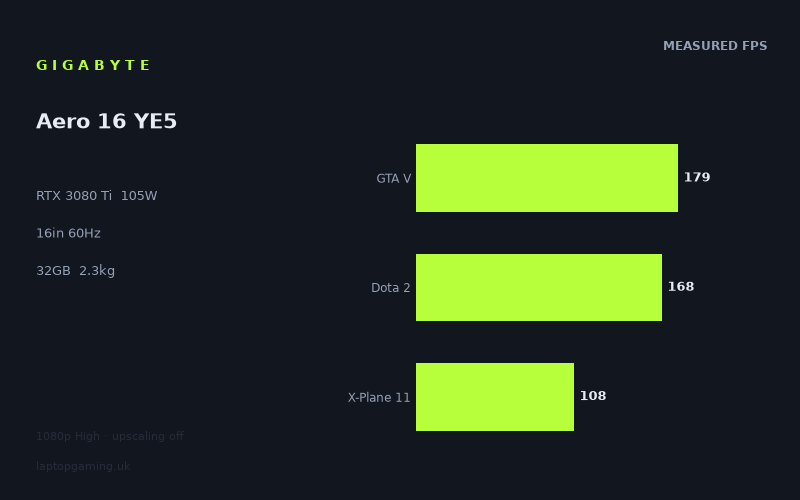
Frame rates
1920×1080, High preset, upscaling off.
Measured on this machine. Source: Notebookcheck, 2022-03-25.
Not scored: incomplete benchmark suite
Every scored laptop on this site is averaged over the same 5 games, and this one is short of Cyberpunk 2077, Baldur's Gate 3. A mean over 5 games is not comparable to a mean over 5, so we publish the figures we have and leave the score blank rather than rank it against machines tested on a different set. The numbers below are real - the suite is just incomplete.
How these numbers were produced
Frame rates here are not measured by us, and we label how each one was arrived at. A figure marked measured comes from a published run on that exact machine. A figure marked representative is derived from the GPU and its power limit (TGP) and cross-referenced against published reviews - a sound estimate of what that configuration delivers, but not a measurement of that specific laptop. Unless stated otherwise, numbers are 1920x1080, High preset, upscaling off. Where a laptop ships in several power configurations we use the wattage of the exact SKU listed, because a 140W RTX 5070 and a 115W one are not the same product.
In use
The short version
The Gigabyte Aero 16 YE5 is a powerful but unusually focused RTX 3080 Ti laptop. Its Core i9-12900HK, 32GB of memory, 1TB SSD and RTX 3080 Ti make it a serious specification on paper, while the 16in 3840x2400 OLED panel and 99Wh battery clearly place it in a premium creator-laptop mould rather than a conventional high-refresh gaming-laptop mould. The important qualification is the GPU power limit: this RTX 3080 Ti is configured at 105W, not at the higher limits available in larger gaming machines.
That does not make it slow. Notebookcheck’s 1920x1080 High-preset measurements show genuinely strong frame rates across the tested games. F1 2021 reaches 196fps, GTA V manages 179fps, Dota 2 and Strange Brigade both reach 168fps, Rainbow Six Extraction reaches 157fps, and The Witcher 3 reaches 144fps. Even the more demanding end of the test list remains playable at this setting, with Cyberpunk 2077 1.6 at 72fps and Dying Light 2 at 69fps.
The problem is not whether the Aero 16 YE5 can play games well at 1920x1080. It plainly can. The problem is matching that performance to the machine’s actual display. This is a 3840x2400, 60Hz OLED laptop. Notebookcheck’s figures supplied here are at 1920x1080, with the High preset and upscaling disabled. There is no measured gaming data in the fact sheet for the panel’s native resolution, so it would be wrong to promise native-resolution performance from these results alone. A 60Hz screen also means that the very high results in lighter games do not translate into a higher-refresh on-panel gaming experience in the way they would on a 144Hz or faster gaming display.
That makes the Aero 16 YE5 best understood as a machine for someone who values the OLED screen, high-resolution workspace, 32GB memory and 1TB SSD alongside strong 1080p gaming capability. It is not the obvious choice for a buyer whose main aim is extracting the maximum possible gaming performance from an RTX 3080 Ti. The MSI Raider GE77 HX, also equipped with an RTX 3080 Ti but configured at 175W, is ahead by 27fps on average across the shared games. The Aero’s 105W GPU configuration is therefore a real compromise, not a technicality buried in a specification table.
It is also not a laptop that can be judged for value here. The UK price for this exact configuration is not confirmed. That means there is no value assessment for the machine, because price is essential to judging whether this combination of screen, weight, GPU power limit and gaming output makes sense. Nothing is implied about the machine’s quality by the absence of a value assessment; there simply is no confirmed UK price to assess.
For the right buyer, the Aero 16 YE5 has a coherent appeal. It offers a 16in OLED panel, 3840x2400 resolution, 2.29kg weight, 99Wh battery, Core i9-12900HK, 32GB memory and an RTX 3080 Ti that produces very capable 1080p results. For the buyer who sees “RTX 3080 Ti” and expects this laptop to behave like the highest-powered gaming models carrying that GPU, it is less convincing. The measured data says this is a capable performance laptop with a restrained GPU configuration, not a no-compromise gaming chassis.
Performance
What the benchmark data says
The most useful starting point is the measured mean across the scoring-suite games: 142fps. That is based on GTA V, Dota 2, Strange Brigade, X-Plane 11 and Final Fantasy XV, all tested at 1920x1080 on the High preset with upscaling off. A 142fps mean is a strong result in isolation, but means need context. The five games do not impose the same demands on the CPU and GPU, and the individual results span from 179fps in GTA V to 86fps in Final Fantasy XV.
That spread matters because it shows why an average cannot tell the whole story of the Aero 16 YE5. In games that are relatively light at 1920x1080 High, the laptop is operating well beyond the limits of its 60Hz panel. GTA V reaches 179fps, Dota 2 reaches 168fps and Strange Brigade reaches 168fps. F1 2021 is higher still at 196fps, while Rainbow Six Extraction reaches 157fps and The Witcher 3 reaches 144fps. These are large frame-rate numbers, and they establish that the Core i9-12900HK and RTX 3080 Ti combination has ample performance for fast 1080p gaming in many of the games measured.
But the figures become more revealing as the games become more demanding. GRID Legends runs at 139fps, Far Cry 5 at 130fps, Forza Horizon 5 at 116fps, X-Plane 11 at 108fps and Riders Republic at 101fps. Those are still strong 1920x1080 High-preset results, and every one of them is above the panel’s 60Hz refresh rate. Yet the headroom is no longer as extravagant. The machine can clearly supply more than 60fps in these titles under the measured conditions, but it is no longer in the territory where a 144Hz or faster panel would necessarily be fully exploited at the same quality setting.
The lower end of the table is where the 105W RTX 3080 Ti configuration needs to be viewed realistically. Final Fantasy XV records 86fps, Elex 2 records 76fps, Cyberpunk 2077 1.6 records 72fps and Dying Light 2 records 69fps. Those are not poor results. They remain above 60fps at 1920x1080 High with upscaling disabled. However, they are close enough to the panel refresh rate that there is little surplus performance to assume for a move to the laptop’s 3840x2400 native resolution. The supplied data does not include native-resolution figures, so the sensible conclusion is not that these games will or will not hold 60fps at 3840x2400. It is that the 1080p figures do not leave enough evidence to make that promise.
That distinction is particularly important for a laptop with this screen. A 1920x1080 result is useful for comparing the Aero 16 YE5 with other laptops tested under the same conditions. It is not automatically a recommendation to run every game at 1920x1080 on a 3840x2400 display, nor is it evidence that 3840x2400 High gaming will be comfortable. The benchmark data describes a specific test condition: 1920x1080, High preset, upscaling off. It is an excellent comparative baseline, but it is still a baseline rather than a substitute for measurements at every resolution and quality combination.
The 105W RTX 3080 Ti matters
The headline GPU name carries a great deal of expectation. RTX 3080 Ti is associated with high-end laptop gaming, but laptop GPU names alone do not establish performance. The power limit is part of the performance specification. Here, the RTX 3080 Ti has a 105W TGP. The MSI Raider GE77 HX in the comparison group also uses an RTX 3080 Ti, but has a 175W TGP and is 27fps ahead on average across the shared games.
That comparison is the clearest evidence in the supplied data that the Aero 16 YE5 is not trying to be an all-out performance implementation of this GPU. The GPU is still fast enough to generate 196fps in F1 2021, 179fps in GTA V and 168fps in both Dota 2 and Strange Brigade. But when there is a direct comparison with a higher-power RTX 3080 Ti laptop, the extra power budget has a visible effect across the shared games.
It would be too simplistic to say that every 175W RTX 3080 Ti will always be ahead by the same margin in every game and every setting. The supplied information gives an average across the shared titles, not each individual game result for the rival. What can be said firmly is that the Aero trails the MSI Raider GE77 HX by 27fps on average in the shared-game comparison. That is substantial enough that buyers looking specifically for maximum gaming output should treat the Aero’s 105W TGP as a meaningful limitation.
Equally, the 105W limit does not make the Aero 16 YE5 a weak machine. It is easy to overreact to a lower power figure when the measured frame rates remain high. In the tested 1080p High configuration, the Aero exceeds 100fps in F1 2021, GTA V, Dota 2, Strange Brigade, Rainbow Six Extraction, The Witcher 3, GRID Legends, Far Cry 5, Forza Horizon 5, X-Plane 11 and Riders Republic. That is a long list of games in which the system produces more than enough measured performance for its 60Hz panel under the benchmark conditions.
The more accurate view is that the Aero’s GPU configuration is appropriate to the laptop’s broader premium OLED and mobile-workstation character, but less appropriate to a buyer who wants a thick, aggressive gaming machine with a high-refresh panel and the highest possible GPU power limit. Gigabyte has paired a high-resolution 60Hz OLED display with a 105W RTX 3080 Ti. The performance data suggests that this is a balanced premium configuration, but not a specification designed around chasing the very highest frame rates available from the GPU name.
Games that comfortably clear 60fps
At the measured 1920x1080 High setting, every game listed exceeds 60fps. That is an important result, because it means the Aero 16 YE5 has no obvious weak point within this specific benchmark list at this specific resolution and quality preset. Dying Light 2 is the lowest result at 69fps, followed by Cyberpunk 2077 1.6 at 72fps and Elex 2 at 76fps. Those are still above the 60Hz refresh ceiling of the built-in panel.
For games such as F1 2021 at 196fps, GTA V at 179fps, Dota 2 at 168fps, Strange Brigade at 168fps and Rainbow Six Extraction at 157fps, the issue is not basic smoothness. The measured performance substantially exceeds what the internal 60Hz display can show as distinct refreshes. A 60Hz panel can still benefit from having frame-rate headroom in some situations, but the display itself cannot present gaming at 144Hz, 157Hz, 168Hz, 179Hz or 196Hz. Buyers who chiefly play these faster-running titles should recognise that the Aero’s panel specification, not the GPU, is the limiting part of the experience.
The Witcher 3 at 144fps is another result that makes this contrast clear. The laptop has the measured performance for a high-refresh gaming screen in that game at 1920x1080 High, but its own OLED panel is specified at 60Hz. GRID Legends at 139fps and Far Cry 5 at 130fps similarly sit well above the display refresh rate. There is a great deal of 1080p performance available here, but the internal screen is not configured to display the sort of high-refresh gaming experience normally associated with those numbers.
Forza Horizon 5 at 116fps, X-Plane 11 at 108fps and Riders Republic at 101fps are still convincingly above 60fps. In these games, the measured data indicates enough performance for the internal display at 1920x1080 High without relying on upscaling. That is a positive. The caveat is again the native resolution. Since the display has 3840x2400 pixels and the benchmark uses 1920x1080, the figures should not be treated as direct proof of equivalent results at the panel’s native setting.
The demanding group is still respectable. Final Fantasy XV at 86fps gives a useful amount of margin over 60fps at the measured setting. Elex 2 at 76fps, Cyberpunk 2077 1.6 at 72fps and Dying Light 2 at 69fps are closer to the line. For someone gaming at 1920x1080 High with upscaling off, the numbers suggest playable performance across the list. For someone buying this machine specifically to run these demanding games at 3840x2400 High, the fact sheet does not provide the measurements needed to make a recommendation with confidence.
Why the results vary so much
The difference between 196fps in F1 2021 and 69fps in Dying Light 2 is not evidence of inconsistent hardware. It reflects that games place very different demands on a laptop. Some of the titles in the list allow the Core i9-12900HK and RTX 3080 Ti to run far ahead at 1920x1080 High. Others are more demanding and bring the result closer to the 60fps level. The Aero is not delivering a fixed “RTX 3080 Ti frame rate”; it is delivering game-specific results under a common test setting.
The lower resolution used for the benchmark also affects comparisons between machines. At 1920x1080, lighter titles in a shared set can become CPU-bound. When that happens, a genuine difference in GPU capability may be compressed because the GPU is not the only meaningful constraint. This matters particularly when considering the Aero against the Razer Blade 15 OLED and Lenovo Legion 7 16ACHg6, where the shared-game averages are effectively level.
The Aero averages +0fps against the Razer Blade 15 OLED across five shared games, despite the Razer using an RTX 3070 Ti at 110W. It averages -0fps against the Lenovo Legion 7 16ACHg6 across five shared games, despite the Lenovo using an RTX 3080 at 120W. Those near-zero results should not be read as proof that the GPUs are interchangeable in every scenario. They show that in the shared 1080p game set, the measured outcomes are compressed enough that neither machine establishes a meaningful average advantage over the Aero.
That is exactly the sort of situation where CPU limits in lighter 1080p titles can hide part of the underlying GPU gap. It does not erase the Aero’s 105W power limit, and it does not contradict the much clearer 27fps deficit against the 175W RTX 3080 Ti MSI Raider GE77 HX. It simply means that benchmark interpretation needs to be specific. A comparison involving games that are not fully GPU-limited at 1920x1080 can produce close averages even where GPU specifications differ.
The practical lesson for buyers is to pay attention to the games they actually play. If your gaming is mainly built around titles that look more like F1 2021, GTA V, Dota 2, Strange Brigade, Rainbow Six Extraction and The Witcher 3 in the supplied results, the Aero offers more measured 1080p performance than its 60Hz display can fully show. If your priorities look more like Cyberpunk 2077 1.6 and Dying Light 2, the laptop remains capable at the tested settings, but the available headroom is much smaller and there is no native-resolution result here to fill in the gap.
The screen
A premium panel with a gaming compromise
The Aero 16 YE5 has a 16in OLED panel with a 3840x2400 resolution and a 60Hz refresh rate. This is a distinctive screen specification in a laptop carrying a Core i9-12900HK and RTX 3080 Ti. The resolution is much higher than the 1920x1080 test setting used for the gaming results. The OLED panel type is also a premium feature that helps explain why this is not simply another conventional high-refresh gaming laptop.
For non-gaming use, the 3840x2400 resolution and 16in format point towards a workspace-oriented machine. The fact sheet does not include colour measurements, brightness measurements, response-time measurements or panel calibration data, so no claims should be made about those areas. What can be said is that the display combines a high resolution with OLED technology, and that combination will be a major part of the attraction for buyers who want a laptop that is not solely for games.
For gaming, the key limitation is refresh rate. The display refreshes at 60Hz. Notebookcheck’s 1080p High figures exceed 60fps in every game supplied, with results ranging from 69fps in Dying Light 2 to 196fps in F1 2021. In a substantial part of the list, therefore, the GPU is capable of rendering frames faster than the internal panel can refresh.
That does not make the screen bad for games. A 60Hz OLED panel can still be a perfectly valid choice for someone who prioritises image quality, high resolution and a laptop that is also suited to other work. But it does mean the Aero does not make full use of its strongest 1080p frame-rate results. If fast competitive gaming is central to the purchase, a 60Hz internal panel is a poor match for measured results such as 196fps, 179fps, 168fps, 168fps and 157fps.
Can it drive the native resolution?
There is no measured frame-rate data in the fact sheet for 3840x2400 gaming. The supplied figures are all taken at 1920x1080, High preset, with upscaling off. That is the only defensible basis for discussing gaming performance here.
This is not a trivial caveat. The panel has 3840x2400 resolution, while the benchmark results are at 1920x1080. Buyers should not assume that a result of 116fps in Forza Horizon 5, 86fps in Final Fantasy XV, 72fps in Cyberpunk 2077 1.6 or 69fps in Dying Light 2 will remain above 60fps at the native panel resolution. Nor should they assume the opposite. The evidence is simply not present in the supplied measurements.
The frame-rate pattern does allow a cautious practical judgement. The fastest titles have a large amount of measured 1080p headroom, while the most demanding titles sit much closer to 60fps even before moving away from the benchmark resolution. That makes it sensible to regard native-resolution gaming in the harder titles as an open question rather than a safe expectation. A buyer who requires verified 3840x2400 gaming performance should seek measurements at that exact resolution rather than relying on the 1080p data.
The lack of upscaling in the benchmark is useful because it keeps the comparison clean. The numbers show what the Aero achieves at 1920x1080 High without that additional variable. However, it also means the results cannot tell us how any upscaling mode might affect frame rate or image quality at the panel’s native resolution. There is no basis in the fact sheet for claims in either direction.
The 60Hz ceiling changes what “fast enough” means
On a laptop with a 60Hz panel, 60fps is the most obvious performance target for gaming on the internal screen. The Aero meets that target in every supplied game at 1920x1080 High. The closer results are Dying Light 2 at 69fps, Cyberpunk 2077 1.6 at 72fps and Elex 2 at 76fps. The larger-margin results include Riders Republic at 101fps, X-Plane 11 at 108fps, Forza Horizon 5 at 116fps, Far Cry 5 at 130fps and GRID Legends at 139fps.
Above that, there is a tier of games where the 60Hz panel becomes the obvious limiting factor. The Witcher 3 reaches 144fps, Rainbow Six Extraction reaches 157fps, Dota 2 and Strange Brigade each reach 168fps, GTA V reaches 179fps and F1 2021 reaches 196fps. Those figures would be particularly attractive on a high-refresh display. On the Aero’s own panel, they demonstrate performance capacity rather than a corresponding high-refresh viewing experience.
This makes the screen decision straightforward. Buy the Aero 16 YE5 for its 16in OLED panel and 3840x2400 resolution if those qualities matter more than high-refresh gaming. Do not buy it on the assumption that its RTX 3080 Ti will be paired with a gaming display that reflects the highest measured frame rates. The screen is designed around a different set of priorities.
Build, size and portability
The Aero 16 YE5 weighs 2.29kg. That places it in a category where portability is possible, but it should not be confused with a lightweight machine. It is a 16in laptop carrying a Core i9-12900HK, 32GB of memory, 1TB SSD, 99Wh battery, OLED display and RTX 3080 Ti, and the 2.29kg weight is best interpreted in that context: substantial enough to be a capable all-in-one system, but not so heavy that it has to be treated as a permanently desk-bound replacement for a desktop.
The supplied fact sheet does not include dimensions, so there is no basis for claiming that it is thin, compact, narrow or especially easy to fit into a particular bag. Weight is the only portability measurement provided. At 2.29kg, it is likely to be more manageable for regular transport than a very large performance chassis, but it remains a serious piece of equipment rather than an effortless carry-everywhere laptop.
The 99Wh battery is a significant specification for a machine of this type, but the fact sheet does not include measured battery-life results. It would therefore be wrong to promise a number of hours for work, video playback, browsing or gaming. Battery capacity tells us that Gigabyte has fitted a 99Wh battery; it does not tell us how long this exact Core i9-12900HK, OLED and RTX 3080 Ti configuration lasts in a specific workload.
That distinction is especially important because gaming laptops can behave very differently depending on the task. A 99Wh battery may appeal to someone who needs capacity for mobile work, but there is no evidence here to quantify practical endurance. Likewise, there are no temperature or noise figures in the fact sheet. The 105W GPU power limit may suggest a different chassis and cooling balance from a 175W gaming laptop, but that cannot be turned into claims about fan noise, surface temperature or sustained behaviour without measurements.
The useful conclusion is that the Aero 16 YE5 is a 2.29kg premium-performance laptop with a 99Wh battery, rather than a lightweight ultraportable or an explicitly desktop-only gaming tower in laptop form. It offers a specification that can suit someone moving between a desk, meetings, study space or travel, but the actual battery-life and acoustic experience are not documented in the supplied data.
The 16in size is also relevant to the screen choice. A 3840x2400 OLED panel in this format is clearly intended to make the laptop more than a gaming device. The high resolution is potentially valuable for workspace use, while the 60Hz refresh rate shows that gaming speed was not the sole priority. The machine’s weight, battery capacity, display and reduced 105W GPU configuration all point in the same direction: it is designed as a premium portable performance system, not purely as a maximum-power gaming chassis.
How it compares
Against the MSI Prestige 15
The MSI Prestige 15 is the clearest lower-performance comparison in the supplied rival group. It uses an RTX 3050 Ti at 105W, while the Aero 16 YE5 uses an RTX 3080 Ti at the same 105W TGP. Across four shared games, the Aero averages 82fps ahead.
That is a very large gap. It shows that the Aero’s reduced RTX 3080 Ti power limit should be understood relative to other RTX 3080 Ti implementations, not relative to every other laptop GPU. Even at 105W, the Aero is operating in a very different performance class from the RTX 3050 Ti Prestige 15 in the shared data.
There is no confirmed UK price for either exact configuration in the supplied information, so this cannot be converted into a value comparison. The performance conclusion is still clear: buyers choosing between these two machines for gaming should expect the Aero to have a major advantage in the shared titles.
Against the Razer Blade 15 OLED
The Razer Blade 15 OLED, Early 2022, uses an RTX 3070 Ti at 110W. Across five shared games, the Aero 16 YE5 averages +0fps. In practical terms, that is a level result in the shared benchmark set.
The near-zero average is meaningful, but it should not be oversimplified. It does not prove that a 105W RTX 3080 Ti and 110W RTX 3070 Ti will always perform identically. The comparison is limited to the shared games at the common benchmark conditions. At 1920x1080, lighter games can become CPU-bound and compress genuine GPU differences, making hardware with different GPU specifications look closer than it may in more GPU-limited workloads.
For a buyer comparing the available data rather than GPU names, the important point is that the Aero does not establish a measurable shared-game advantage over this Razer. That is useful evidence against paying extra for the Aero purely on the assumption that RTX 3080 Ti branding guarantees a clear gaming lead. The rest of the specification becomes more important: the Aero’s 16in 3840x2400 OLED panel, 60Hz refresh rate, 2.29kg weight, 99Wh battery, Core i9-12900HK, 32GB memory and 1TB SSD are the characteristics that distinguish its proposition.
Against the Lenovo Legion 7 16ACHg6
The Lenovo Legion 7 16ACHg6 uses an RTX 3080 at 120W. Across five shared games, the Aero averages -0fps. Again, that is effectively a draw in the supplied shared-game data.
This is another case where the benchmark context matters. The Aero has an RTX 3080 Ti at 105W, while the Lenovo has an RTX 3080 at 120W. A buyer might expect the names and power limits to create a simple ordering, but the shared 1920x1080 results do not produce one. The average is effectively level.
The likely explanation supplied with the comparison data is important: at 1080p, lighter shared titles can be CPU-bound, compressing genuine GPU gaps. That means the result should be treated as a real finding for these shared benchmarks rather than a universal statement about every resolution, setting or game. It says the Aero and Lenovo are essentially inseparable on average in the shared test set. It does not say there can never be a difference elsewhere.
For the Aero, this is a favourable result. A 105W RTX 3080 Ti system holding level with a 120W RTX 3080 system in the shared games confirms that the laptop remains highly competitive at the tested 1080p settings. It also reinforces the point that the Aero’s limitations are most obvious when it is placed against a substantially higher-powered implementation of the same GPU class, rather than against every machine in the generation.
Against the MSI Raider GE77 HX
The MSI Raider GE77 HX is the comparison that most clearly exposes the consequence of the Aero’s 105W GPU power limit. Both laptops use RTX 3080 Ti graphics, but the MSI is configured at 175W. Across five shared games, the Aero averages 27fps behind.
This is the rival that performance-first buyers should focus on. The gap is not a rounding artefact or a near-zero outcome from a CPU-limited 1080p set. It is a meaningful average deficit. The higher-power RTX 3080 Ti implementation delivers clearly more gaming performance in the shared games.
That does not automatically make the MSI the better laptop for every person. The Aero has a 16in 3840x2400 OLED panel, 60Hz refresh rate, 2.29kg weight and 99Wh battery, while the supplied information does not provide equivalent display, weight or battery details for the MSI in this comparison. No claim should be made beyond the facts available. But for someone whose main criterion is gaming performance from the GPU, the MSI’s 27fps shared-game advantage is hard to ignore.
The contrast also explains the Aero’s positioning. Its RTX 3080 Ti gives it enough performance to exceed 60fps in every supplied 1080p High test, but its 105W configuration does not allow it to match the output of a 175W RTX 3080 Ti gaming laptop. The Aero is therefore better viewed as a premium OLED performance laptop with strong gaming capability than as a direct substitute for the highest-power gaming machines.
Who it’s for
Buy it if the screen and all-round specification matter as much as gaming
The Aero 16 YE5 makes sense for a buyer who wants a 16in OLED display with 3840x2400 resolution, but also wants real gaming capability rather than an integrated-graphics or entry-level discrete-GPU experience. Its 105W RTX 3080 Ti is still capable of excellent 1920x1080 High-preset results. The figures of 196fps in F1 2021, 179fps in GTA V, 168fps in Dota 2, 168fps in Strange Brigade, 157fps in Rainbow Six Extraction and 144fps in The Witcher 3 show that it has considerable performance for many games.
It also suits someone who wants the security of 32GB memory and a 1TB SSD in a laptop that weighs 2.29kg. The fact sheet does not include upgradeability information, so no judgement can be made about future memory or storage changes. But as specified, the laptop already arrives with a substantial memory and storage allocation.
The machine is particularly suitable for someone who plays games that run well at 1920x1080 High and does not require a high-refresh internal display. In the supplied measurements, every title clears 60fps. Even the more demanding games remain above that level: Final Fantasy XV at 86fps, Elex 2 at 76fps, Cyberpunk 2077 1.6 at 72fps and Dying Light 2 at 69fps. For a buyer content with 60Hz gaming and attracted by the OLED panel, this is a credible balance.
It also suits a buyer who needs a laptop rather than a permanently fixed gaming system. At 2.29kg, it is not lightweight, but it is a more portable proposition than treating maximum GPU power as the only design priority. The 99Wh battery is also substantial in capacity, although the absence of measured battery-life figures means practical endurance should not be assumed.
Buy something else if high-refresh gaming is the priority
The Aero 16 YE5 is not the best fit for a buyer whose main aim is competitive, high-refresh gaming on the internal screen. The 60Hz OLED panel cannot display the full benefit of results such as 196fps in F1 2021, 179fps in GTA V, 168fps in Dota 2, 168fps in Strange Brigade or 157fps in Rainbow Six Extraction. The GPU can produce those frame rates under the measured conditions, but the built-in display does not refresh at those rates.
It is also not the obvious choice for someone shopping specifically for the fastest available RTX 3080 Ti performance. The MSI Raider GE77 HX has the same GPU name but a 175W TGP, compared with 105W here, and it is ahead by 27fps on average across the five shared games. Buyers who prioritise frame rate above display resolution, OLED technology, weight and battery capacity should take that result seriously.
Anyone requiring verified gaming performance at 3840x2400 should also look elsewhere for evidence before buying. The Aero’s panel runs at 3840x2400, but the available measurements are at 1920x1080 High with upscaling off. There is no native-resolution benchmark data in the fact sheet. The machine may be capable of different results depending on game and settings, but that cannot be established from the evidence available here.
Finally, buyers who need a clear purchase decision based on value should wait for a confirmed UK price for this exact configuration. The performance story is well documented, and the benchmark suite is complete, but value cannot be calculated without a price. The Aero 16 YE5 should therefore be chosen on its known strengths—its 16in 3840x2400 OLED display, Core i9-12900HK, 32GB memory, 1TB SSD, 99Wh battery, 2.29kg weight and strong 1080p gaming results—rather than on any unsupported assumption that it is cheap, expensive or competitively priced.
In short, the Aero 16 YE5 is for the buyer who wants a premium high-resolution OLED laptop that happens to be very capable at 1080p gaming. It is not for the buyer who wants the highest-power interpretation of RTX 3080 Ti graphics, the highest internal refresh rate, or confirmed native-resolution gaming results. Its specification is coherent, and Notebookcheck’s figures confirm that it is fast. The decisive question is whether its particular balance of 105W GPU power, 60Hz OLED display and 3840x2400 resolution matches the way you actually intend to use it.