Details
Product prices and availability are accurate as of the date/time indicated and are subject to change. Any price and availability information displayed on Amazon.co.uk at the time of purchase will apply to the purchase of this product.Review
HP Victus 15-fa2160ng review
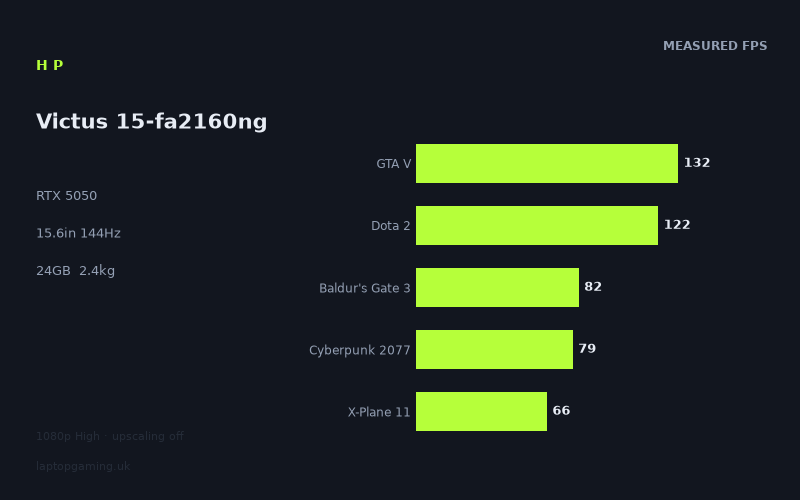
Frame rates
1920×1080, High preset, upscaling off. Averages 96fps across the 5 core benchmark games.
Measured on this machine. Source: Notebookcheck, 2025-10-27.
Not scored: no confirmed UK price
We have the full benchmark suite for this machine, so it ranks on the frame rate leaderboard like any other. What we don't have is a UK listing for this exact configuration - it's sold as a European review unit, or only in specifications that differ from the one tested. Since 30% of our score is value for money, scoring it would mean pretending price is no object, which would flatter it against every laptop you can actually buy. The frame rates below are real and comparable; there is just no buying recommendation to make yet.
How these numbers were produced
Frame rates here are not measured by us, and we label how each one was arrived at. A figure marked measured comes from a published run on that exact machine. A figure marked representative is derived from the GPU and its power limit (TGP) and cross-referenced against published reviews - a sound estimate of what that configuration delivers, but not a measurement of that specific laptop. Unless stated otherwise, numbers are 1920x1080, High preset, upscaling off. Where a laptop ships in several power configurations we use the wattage of the exact SKU listed, because a 140W RTX 5070 and a 115W one are not the same product.
In use
The short version
The HP Victus 15-fa2160ng is a mainstream 15.6in gaming laptop built around Nvidia's RTX 5050 with 8GB of VRAM, an entry-tier Intel Core i5-13420H, 24GB of memory and a 1920x1080 144Hz IPS panel. On the numbers published by Notebookcheck, it is a competent but unremarkable member of the RTX 5050 class: it clears 60fps in ten of the sixteen games measured, sits at 96fps averaged across our five scoring-suite titles, and falls apart — predictably, and in the same places every RTX 5050 laptop falls apart — in the current crop of heavyweight releases.
The important detail is not the headline average but where this machine lands within its own class. Against four other RTX 5050 laptops in our database it is behind three of them and ahead of one. The gaps are not enormous, but they are consistent, and the largest comparison set — fourteen shared games against the Medion Erazer Scout 17 E1 — has this Victus trailing by 15fps. That is not a rounding error. It is the signature of a chassis that is running the same silicon at a more conservative power ceiling than its rivals, paired with a CPU that is the weakest part of the specification sheet.
None of that makes it a bad laptop. It makes it a laptop whose case rests entirely on price, and price is exactly what we do not have. We have no confirmed UK price for this specific configuration, so this review carries no score. Value is 30% of our scoring model and cannot be computed from nothing. The benchmark suite is complete, the machine ranks normally on our frame rate leaderboard, and there is nothing wrong with it — we simply will not print a number we cannot stand behind. When a UK price appears, the page will score it automatically.
Who should be interested: someone who plays esports and older or well-optimised titles at high refresh, who wants a 1080p machine that will hold 60fps in most mainstream single-player games, and who finds this Victus meaningfully cheaper than the alternatives below. Who should look elsewhere: anyone who intends to play the newest, heaviest releases at High settings, anyone who needs storage headroom out of the box, and anyone who can find an RTX 5060 machine such as the Lenovo LOQ for similar money — the measured gap there is large enough to be worth real money.
Performance
The RTX 5050 is Nvidia's entry point into the Blackwell mobile line, and it occupies an awkward position: fast enough to make 1080p High a reasonable default, not fast enough to make it a guarantee. The measured figures for this Victus illustrate that tension better than most, because the spread across the sixteen games Notebookcheck ran is enormous. The fastest result is 192fps. The slowest is 30fps. That is a factor of more than six between the top and bottom of the same list, on the same hardware, at the same resolution and the same preset.
That spread is the single most useful thing in the data set, and it is worth working through carefully, because the average — 96fps across the five scoring-suite titles — tells you almost nothing about whether the specific game you care about will run well.
The power limit question, and what the numbers imply
We do not have a confirmed graphics power figure for this particular Victus configuration, and we are not going to invent one. What we do have is comparative evidence, and it points in a consistent direction.
Two of the rivals in our database have their GPU power ceilings confirmed: the Acer Nitro V 16 AI runs its RTX 5050 at 115W, and the Lenovo LOQ runs an RTX 5060 at the same 115W. Against the Nitro V 16 AI — same GPU, confirmed higher power headroom — this Victus averages 13fps slower across nine shared games. Against the Medion Erazer Scout 17 E1, a physically larger 17in chassis with correspondingly more room for heatsink and fan, it averages 15fps slower across fourteen shared games.
Those two results agree with each other, they are drawn from large comparison sets, and they are exactly what you would expect if this 15.6in Victus is running its RTX 5050 nearer the bottom of Nvidia's configurable range than the top. Mobile GPUs are not fixed quantities. The same chip can be specified across a wide power band, and the difference between the conservative end and the aggressive end of that band routinely shows up as a double-digit frame rate gap in GPU-bound titles. That appears to be precisely what is happening here.
The practical consequence is straightforward. If you are choosing between RTX 5050 laptops on the assumption that the GPU name tells you what you are getting, the benchmark data says otherwise. It is the same silicon in all five machines compared here, and the fastest of them is comfortably quicker than the slowest. A 15fps gap in a game running at 55fps is the difference between playable and pleasant; a 15fps gap in a game running at 34fps is the difference between marginal and unusable.
The second consequence is about expectations for the machine's behaviour under load. A more conservative power ceiling generally buys quieter operation and lower surface temperatures — that is the trade being made. We have no measured noise or temperature figures for this Victus, so we cannot confirm that the trade has actually paid off in this chassis, and we will not pretend otherwise. What the frame rate data establishes is the cost side of the trade. Whether the benefit materialised is not something the numbers we hold can answer.
Where the 144Hz panel is genuinely fed
Only one game in the entire measured list clears the panel's 144Hz refresh rate: Strange Brigade at 192fps. That result is not representative of anything except Strange Brigade, which is a Vulkan title with an unusually efficient renderer and has functioned as a best-case benchmark on modest hardware for years. It is useful as an upper bound — it tells you what the GPU can do when nothing is in its way — and useless as a purchasing guide.
Below it, GTA V at 132fps and Dota 2 at 122fps are the only other results in three figures. Both are close enough to the panel's ceiling that the experience will be genuinely high-refresh: the frame pacing on a 144Hz panel at 120-130fps is smooth in a way that 60fps is not, and if competitive play is what you bought the machine for, these two results are the encouraging ones.
But note what they are. GTA V is a game from a previous console generation. Dota 2 is a MOBA with modest per-frame rendering cost. Neither is a demonstration of the RTX 5050's rendering throughput; both are, at these frame rates, substantially limited by how fast the CPU can feed the GPU. More on that below, because the Dota 2 figure in particular is doing something interesting.
The honest summary of the panel-versus-GPU relationship is this: three of sixteen measured games run above 100fps, and one of sixteen runs above 144fps. The 144Hz panel is not decorative — it will make esports titles and older games meaningfully smoother, and it reduces input latency even when frame rates are below refresh — but you should not buy this machine expecting to fill it in modern single-player games. You will not.
The 60-100fps band: where most of the library lives
This is the middle of the distribution and it is where the machine spends most of its time. F1 25 at 93fps, Final Fantasy XV at 86fps, Baldur's Gate 3 at 82fps, Cyberpunk 2077 at 79fps, Battlefield 6 at 74fps, Kingdom Come: Deliverance 2 at 68fps and X-Plane 11 at 66fps form a tight cluster of seven results between 66 and 93fps.
These are the numbers that define the machine for most buyers. A racing game at 93fps is comfortable and responsive. Cyberpunk 2077 at 79fps at High, with upscaling switched off, is a genuinely creditable result for entry-tier Blackwell silicon — this is a game that has spent five years being used as a stick to beat budget hardware with, and 79fps native at 1080p High is more than enough headroom to turn a few settings up rather than down. Battlefield 6 at 74fps is above the threshold where a competitive shooter starts to feel sluggish, though it is well short of what a 144Hz panel could show you, and in a multiplayer title the measured average will not reflect the worst moments in a crowded objective.
Kingdom Come: Deliverance 2 at 68fps is the one in this group worth flagging as fragile. Sixty-eight is above 60, but it is not far above it, and open-world RPGs with dense settlement geometry produce frame rate valleys well below their averages. The measured figure suggests the game is playable at High; it does not promise the game will hold 60fps everywhere in it. If you want a locked 60, you will be turning something down.
Baldur's Gate 3 at 82fps deserves a note in the other direction. It is a slow-paced game where the frame rate matters far less than in a shooter, and it sits comfortably above the threshold where anyone would notice a problem. It is also one of our five scoring-suite titles, which means it carries weight in how the machine ranks — a useful reminder that a scoring average built from a fixed suite of games is a comparison tool between laptops, not a prediction about your particular library.
The bottom of the chart, and what it costs you
Six of the sixteen measured games fall below 60fps, and the last four fall below 46fps. This is the part of the data that decides whether the machine suits you.
Horizon Forbidden West at 55fps and Space Marine 2 at 54fps are the mild cases. Both are close enough to 60 that a single settings notch or a modest upscaling setting would recover the difference, and both are the kind of game where 55fps with a controller is perfectly tolerable. If your reaction to a 55fps average is "fine", these are not a problem.
The Elder Scrolls IV: Oblivion Remastered at 45fps is the point where the compromise stops being cosmetic. Forty-five is playable, in the sense that the game runs and responds, but it is below the threshold where motion looks smooth on a high-refresh panel, and the mismatch between a 144Hz display and a 45fps output is visible. You would drop the preset here, not adjust it.
Stalker 2 at 39fps, Senua's Saga: Hellblade II at 34fps and Borderlands 4 at 30fps are, at High and without upscaling, not viable. That is not a criticism of this Victus specifically — these three are the current generation's most punishing releases and they humble far more expensive hardware — but it is the practical reality. Borderlands 4 at 30fps is not a target anyone should accept on a machine with a 144Hz panel.
The important context: all sixteen of these figures were measured with upscaling switched off, at the High preset. That is the correct methodology for comparing machines, because it removes a large and inconsistent variable, but it is not how anyone plays these games. Every title in the bottom four supports DLSS, and the RTX 5050 supports the current DLSS feature set including frame generation. Turning that on would improve every one of those numbers, in some cases substantially. We do not have measured upscaled figures, so we are not going to guess at what they would be — but you should read the sub-40fps results as "needs upscaling and a preset drop" rather than "will not run".
What the bottom of the chart really tells you is about longevity. If the heaviest games of late 2025 already require upscaling plus a preset reduction to reach 60fps at 1080p, the heaviest games of 2027 will require more than that. This is a machine with a defined and fairly short window as a High-preset gaming laptop for new releases. It has a much longer window as a Medium-preset machine, and a very long one for the enormous back catalogue of games that a 5050 flattens.
The CPU's fingerprints in the data
The Core i5-13420H is the weakest component in this specification. It sits at the bottom rung of Intel's 13th-generation H-series ladder, below the i5-13500H and well below the i7 parts that typically accompany this GPU tier, with fewer performance cores and lower clocks than its siblings. In a gaming laptop, a modest CPU usually costs you nothing — most of the time the GPU is the bottleneck and the processor has cycles to spare. But there are specific places where it does cost you, and two of them are visible in this data.
The first is Dota 2 at 122fps. Dota 2 is not a demanding game to render. On systems with stronger processors it routinely runs well beyond this on hardware no faster than an RTX 5050, because the limiting factor is single-thread throughput and draw call submission, not shading. A result of 122fps is respectable in absolute terms and above what the 144Hz panel needs to feel smooth — but it is a figure that says more about the i5 than about the GPU. If you are buying primarily for MOBA and esports play at the highest possible frame rates, the CPU here is the thing holding you back, and no amount of GPU shopping will fix it.
The second is X-Plane 11 at 66fps. Flight simulators are the canonical CPU-bound workload: enormous scenery databases, heavy per-frame simulation logic, and a rendering path that leans hard on one or two threads. Sixty-six frames per second is a perfectly usable result for a simulator, and it is one of our five scoring-suite games so it feeds directly into where the machine ranks. But it is a result where a stronger processor would show a clear benefit and a stronger GPU would show very little. If simulation is your primary use case, the CPU is the specification line to shop on, not the graphics chip.
You can also see the CPU's shadow in GTA V at 132fps. A decade-old game on modern entry-tier graphics hardware should be limited by something other than the GPU, and it is.
Everywhere else — Cyberpunk, Stalker 2, Hellblade II, Borderlands 4, Horizon Forbidden West — the CPU is comfortably out of the way and the RTX 5050 is doing all the work. That is the normal case, and it is why an i5-13420H paired with a 5050 is not an irrational combination: it is matched to the GPU in the games where the GPU is the constraint, and only exposed in the games where it is not. But it does mean this is not a machine to buy with an eye on dropping in a faster GPU later, because there isn't one, and it does mean the esports ceiling is lower than the panel implies.
Memory: 24GB is unusual, and worth understanding
The 24GB memory configuration is the specification's oddity. It is a generous total for a machine at this GPU tier — most rivals ship 16GB — and for anything other than gaming it is straightforwardly good. Browser tabs, virtual machines, large project files, running a game while streaming: 24GB gives you meaningful headroom over the 16GB standard, and it is more memory than the games in this benchmark list will ever ask for.
The caveat is how those 24GB are arranged, and we do not have that detail confirmed. A 24GB total in a laptop typically arrives one of two ways: as a mismatched pair of modules, or as a single larger module. Those two arrangements do not perform identically in games. A mismatched pair still gives you dual-channel bandwidth across most of the capacity; a single module gives you single-channel bandwidth across all of it, which in GPU-bound gaming costs relatively little but in CPU-bound gaming can cost a noticeable amount.
We flag this because it is a plausible partial explanation for why this Victus trails its RTX 5050 peers by the margins it does, and because it interacts with the CPU-bound results discussed above. It is a hypothesis, not a finding — the measured frame rates cannot separate a memory bandwidth effect from a GPU power effect from a CPU effect, and we are not going to pretend they can. What we can say is that if you buy this machine and find a single memory module inside it, adding a second matched module is likely to be the cheapest performance upgrade available to you, and it is worth checking before assuming the configuration is optimal.
The 8GB VRAM question
Eight gigabytes of video memory is the class standard at this tier and it is increasingly the class's weak point. At 1920x1080 with the High preset — the exact conditions these figures were measured under — 8GB is adequate for the overwhelming majority of the list. Cyberpunk 2077 at 79fps, Battlefield 6 at 74fps and Baldur's Gate 3 at 82fps are all comfortably within budget.
The games at the bottom of the chart are a different matter. Modern releases with high-resolution texture sets and heavy streaming systems are exactly the titles where 8GB starts to bite, and the four slowest results here — Oblivion Remastered, Stalker 2, Hellblade II and Borderlands 4 — are all in that category. It would be convenient to attribute their poor showing to VRAM exhaustion, and it would also be unsupported: these games are genuinely heavy on shading throughput as well, and an RTX 5050 would struggle with them at High even with twice the memory. The measured averages cannot distinguish between the two causes. What VRAM pressure typically produces, and what an average frame rate hides, is stuttering and texture pop-in rather than a lower mean — and we have no frame-time data to check for that.
The forward-looking point stands regardless of which cause dominates today. Eight gigabytes is the amount of video memory that is currently constraining new releases at 1080p High, and the trend does not reverse. It is a reason to expect this machine's useful High-preset life to be shorter than its raw rendering performance alone would suggest, and it is not something you can upgrade.
The screen
A 15.6in 1920x1080 IPS panel running at 144Hz. This is the default specification for the entire mainstream gaming laptop category, and for this GPU it is the correct choice.
The resolution question first: 1080p is the right target for an RTX 5050. Every figure discussed above was measured at this resolution, and six of sixteen games still fall below 60fps. Stepping up to a 1440p panel would push several of the mid-table results below 60 and turn the bottom of the chart into a slideshow. HP has matched panel to GPU sensibly here — a higher-resolution display on this hardware would be a specification sheet win and a real-world loss. At 15.6in, 1080p also produces a pixel density that is perfectly acceptable for gaming, if not luxurious for text work.
The refresh rate is where the assessment gets more nuanced. A 144Hz panel is worth having even when you cannot fill it: higher refresh reduces the display's contribution to input latency regardless of frame rate, and it means that when you do run something fast — Dota 2 at 122fps, GTA V at 132fps, Strange Brigade at 192fps — you get the benefit rather than being capped at 60. If your library skews towards esports, older titles and well-optimised games, this panel will be genuinely fed a good proportion of the time.
But be clear-eyed about the arithmetic. Ten of the sixteen measured games run between 30 and 93fps. For those ten, the panel's headroom is unused. That is not a fault — a 60Hz panel would be strictly worse — but it does mean the "144Hz" on the specification sheet is a capability the GPU only intermittently exercises. Anyone choosing between this and a similar machine with a faster panel should understand that a 165Hz or 180Hz display attached to an RTX 5050 would be even further from being filled, and is not worth paying for at this tier.
IPS is the right panel technology for the money. It gives you viewing angles and colour consistency that TN cannot, at a price OLED cannot. What we cannot tell you is how good this specific IPS panel is. We have no measured brightness figure, no colour gamut coverage, no contrast ratio and no response time measurement for this configuration, and panel quality within the IPS category varies enormously — the difference between a dim, narrow-gamut budget panel and a bright, sRGB-complete one is the difference between a display you tolerate and one you enjoy. Gaming laptops at this tier frequently ship the former. We are not going to assume either way, and if panel quality matters to you, this is a specification you should try to verify before buying rather than infer from "IPS, 144Hz".
One practical note that does follow from the frame rate data: with results ranging from 30 to 192fps across the library, variable refresh support matters more on this machine than it would on faster hardware. A GPU that spends much of its time below its panel's refresh rate benefits substantially from adaptive sync, which eliminates the tearing and judder that come from a mismatch. We do not have confirmation of what this panel supports, but it is worth checking, because on a machine with this frame rate profile it is not a luxury feature.
Build, size and portability
At 2.356kg, this is a middleweight 15.6in laptop — not one of the slim, aluminium-shelled machines that have made 15in gaming laptops travel-friendly, and not one of the genuinely heavy 17in desktop replacements either. It is the standard mass for a plastic-chassis 15.6in gaming machine with a discrete GPU and a cooling system sized for it.
What that weight means in practice is that this is a laptop you move, not one you carry. It will go from desk to sofa without complaint, and it will go into a rucksack for a commute or a trip home from university, but you will know it is there. Add the power adapter — and gaming laptops of this class ship substantial ones, though we have no confirmed weight for this machine's — and the practical travelling mass is meaningfully more than the figure on the specification sheet. Anyone weighing this against a thin-and-light for daily carry should treat it as a fundamentally different category of device.
The 15.6in footprint is the sensible middle ground for a machine of this kind. It gives you a full-size keyboard with a number pad in most designs, a screen large enough to game on properly, and a chassis with genuine internal volume for heatsinks and fans — which matters, because as discussed above, cooling capacity is very likely part of why this machine sits where it does against its rivals. Notably, the 17in Medion Erazer Scout 17 E1 in our comparison set is 15fps faster across fourteen shared games on the same GPU. Larger chassis, more thermal room, more sustained power. That is the trade you are making by choosing the smaller form factor, and it is a real one.
Storage: 512GB is the specification's genuine weakness
A 512GB SSD in a gaming laptop in 2025 is not enough, and this is not a matter of opinion. Windows and its updates take a meaningful bite before you install anything. The games in this very benchmark list are among the largest currently shipping — a modern open-world release with high-resolution texture packs is a substantial fraction of a 512GB drive on its own. You will fit a handful of the titles measured here and then you will be managing installations.
This is the single specification line most likely to irritate an owner in the first month. It is also, mercifully, usually the cheapest to fix: gaming laptops in this class generally offer at least one accessible M.2 slot, and adding or replacing a drive is among the least demanding upgrades a user can perform. We have not opened this machine and cannot confirm its internal layout, the number of slots, or how accessible they are — that is not something we will claim from a specification sheet. But it is worth investigating before purchase, and it is worth budgeting for a drive on top of whatever the machine itself costs.
The 24GB of memory partly offsets the mean-spiritedness of the storage allocation. It is unusual to see a configuration this generous on RAM and this tight on SSD capacity, and if you had the choice you would probably prefer 16GB of memory and 1TB of storage. You do not have that choice, but you can add storage and you cannot easily add a bigger GPU.
Battery
The 70Wh battery is a reasonable capacity for a 15.6in gaming laptop — larger than the 50-something-watt-hour packs that some budget machines make do with, smaller than the 80Wh-plus units in premium designs. What it will actually deliver in hours, we do not know: we have no measured battery runtime figure for this configuration and we are not going to estimate one from capacity alone, because runtime depends on panel efficiency, platform power draw and firmware behaviour in ways that a watt-hour number cannot predict.
What can be said with confidence, because it is true of every laptop of this type, is that gaming on battery is not a realistic proposition. Discrete GPUs draw more power than any laptop battery can sustain for long, and machines in this class typically throttle graphics performance heavily when unplugged — meaning the frame rates above should be understood as mains-powered figures. Treat the battery as sufficient for browsing, documents and video between power outlets, and plan to game plugged in.
How it compares
Our database holds five close rivals, four of which use the same RTX 5050 and one of which steps up to an RTX 5060. Comparisons below are drawn only from games both machines have measured, which is why the sample sizes differ.
MSI Cyborg 15 — the one this machine beats
The Cyborg 15 is the only rival in this group with a confirmed UK price, at £984, and it is the only one this Victus is faster than: +6fps across six shared games.
Six frames per second across six games is a modest but real advantage. It is the difference between a game sitting at 55fps and sitting at 61 — which, at the specific thresholds that matter, is occasionally the difference between acceptable and not. The comparison set is the smallest here, which makes the result less robust than the larger ones, but the direction is clear enough.
This is the useful anchor for anyone trying to work out what this Victus is worth. The Cyborg is a comparable machine, the same GPU tier, the same target buyer, and it is slower. Whether the Victus is the better purchase therefore turns almost entirely on where its price lands relative to £984 — which is exactly the calculation we cannot complete for you, and exactly why this review has no score. If and when a UK price appears, this is the first comparison to run.
Acer Nitro V14 AI — narrowly ahead, and smaller
The Nitro V14 AI is 5fps faster across eight shared games, on the same RTX 5050. We have no confirmed UK price for it.
Five frames per second across eight games is close to noise for practical purposes. In no realistic scenario does that gap change whether a game is playable. What makes the Nitro V14 AI interesting is not the frame rate but the form factor — it is a 14in machine, meaningfully more portable than a 15.6in one, and achieving parity-or-better performance in a smaller chassis is a genuine engineering result. If portability matters to you at all, a 14in machine that matches a 15.6in one on frame rates is worth investigating.
The counter-argument is screen size: a 14in panel is a real reduction in gaming display area, and 15.6in remains the more comfortable size for a machine that mostly lives on a desk. Neither is wrong. But on performance alone, this Victus does not have a case against the Nitro V14 AI — it is simply behind, if only slightly.
Acer Nitro V 16 AI — the 115W comparison
The Nitro V 16 AI runs its RTX 5050 at a confirmed 115W and is 13fps faster across nine shared games. No confirmed UK price.
This is the comparison that most clearly demonstrates the power limit argument. Identical GPU, identical VRAM allocation, larger chassis, confirmed higher power ceiling, thirteen frames per second of advantage across a nine-game sample. That is not a marginal difference. In the mid-table cluster where most of the library sits, 13fps takes a 68fps result to the low 80s. At the bottom of the chart, it takes 45fps to nearly 60. It is the sort of gap that changes which settings preset you can use.
It also costs you something: a 16in machine is larger and, in all likelihood, heavier, though we have no confirmed weight for the Acer. The trade is legible — more chassis, more cooling, more sustained power, more frames. If you are buying an RTX 5050 laptop that will spend its life on a desk, that trade is straightforwardly worth making, and this Victus does not have an answer to it on performance grounds. Its answer, if it has one, will be price.
Medion Erazer Scout 17 E1 — the largest sample, and the clearest verdict
Fourteen shared games, and the Medion is 15fps faster on the same RTX 5050. No confirmed UK price.
This is the most statistically meaningful comparison in the set, simply because fourteen games is a large enough sample that individual quirks wash out. A 15fps average deficit across fourteen titles is a consistent, systemic performance gap, not a handful of favourable results for the Medion.
The explanation is almost certainly the chassis. Seventeen inches of laptop provides substantially more room for heatsink area and fan volume than fifteen and a half, and it allows a sustained GPU power level that a smaller machine cannot hold. That extra performance comes attached to a 17in machine's obvious drawbacks: it is bigger, it will be heavier, it wants a larger bag, and it is not a laptop anyone would call portable.
The recommendation follows the use case rather than the numbers. If the machine lives on a desk and never moves, the Medion is the better performer by a margin that matters and the size penalty costs you nothing. If it needs to travel — to a lecture theatre, to a friend's house, between home and halls — a 17in chassis is a genuine daily inconvenience and this Victus's smaller footprint has real value that no frame rate comparison will capture.
Lenovo LOQ — the RTX 5060 problem
The LOQ steps up to an RTX 5060 at 115W and is 20fps faster across fourteen shared games. No confirmed UK price.
This is the comparison that should give any prospective buyer pause. Twenty frames per second, averaged across fourteen games, is a full performance tier. Applied to the mid-table results here, it turns 68fps into 88 and 74fps into 94 — comfortable margins instead of marginal ones. Applied to the bottom of the chart, it turns 55fps into 75 and 45fps into 65, moving two more games from "compromised" to "fine". Applied to the very bottom, it does not save Borderlands 4 at High, but it moves it considerably closer to viable with upscaling.
It also comes with a step up in VRAM, which matters for exactly the heavyweight titles where the 5050's 8GB is under most pressure, and it addresses the longevity concern more directly than any amount of settings tweaking will.
The caveat is the one we keep running into: we have no confirmed UK price for the LOQ either, so we cannot tell you what that 20fps costs. What we can tell you is the shape of the decision. If an RTX 5060 machine is available for a modest premium over this Victus, take it — a full tier of performance for a small proportion of the total price is the single best upgrade available in a gaming laptop budget, and it extends the machine's useful life at High settings by a meaningful margin. If the premium is large, the calculation gets harder, and the RTX 5050 remains a competent 1080p part.
Reading the comparison set as a whole
Step back and the picture is consistent. Against four RTX 5050 machines, this Victus is behind three and ahead of one, with the deficits ranging from 5 to 15fps and the single advantage at 6fps. Its position within its own GPU class is lower-middle. It is not an outlier in either direction — it is not a broken implementation of an RTX 5050, and it is not a particularly strong one.
What that means for a buyer is simple and slightly unsatisfying: this is a machine that has to win on price, because it will not win on frame rates. Every argument in its favour runs through the sentence "and it costs less than", and we cannot complete that sentence. When we can, the machine will be scored on the same basis as everything else on the site.
Who it's for
Enough of the data points in one direction to make concrete recommendations.
Buy it if
You play esports, MOBAs and older titles primarily. Dota 2 at 122fps and GTA V at 132fps on a 144Hz panel is a genuinely good experience, and the enormous back catalogue of games from the last decade will run far beyond the panel's refresh rate on this hardware. Strange Brigade at 192fps is the demonstration of what the GPU does when nothing gets in its way. If your library is weighted this way, everything below 60fps in the measured list is irrelevant to you.
You play mainstream single-player games and are content at or around 60fps. Cyberpunk 2077 at 79fps native, Baldur's Gate 3 at 82fps, F1 25 at 93fps and Final Fantasy XV at 86fps are all comfortable results. Ten of the sixteen games measured clear 60. This is a perfectly capable 1080p machine for the games most people actually play.
You need the memory for non-gaming work. Twenty-four gigabytes is unusually generous at this tier and genuinely useful if you compile, edit, run VMs or simply keep a lot of things open. Most rivals at this GPU level ship 16GB. If your machine has to be a work tool as well as a games machine, this is a real point in its favour.
It undercuts the alternatives clearly. The Victus is faster than the £984 MSI Cyborg 15 by 6fps across six shared games. If it lands below that figure, the performance argument against it largely evaporates and it becomes a straightforward recommendation for a buyer on a budget.
Look elsewhere if
You want to play the newest heavyweight releases at High settings. Borderlands 4 at 30fps, Hellblade II at 34fps and Stalker 2 at 39fps are not results you can argue with. Upscaling will help substantially and a preset drop will help more, but if playing new AAA releases at high settings on release day is what you want from a gaming laptop, this is not the tier to buy into. The Lenovo LOQ's RTX 5060 is 20fps faster across fourteen shared games, and that gap is exactly where it matters.
You are chasing high frame rates in competitive shooters. Battlefield 6 at 74fps is playable but a long way from filling a 144Hz panel, and in multiplayer the measured average will overstate the worst moments. If you want a shooter to run at 120fps-plus, you need more GPU than this and more CPU than the i5-13420H.
The machine will never leave a desk. If portability is not part of your requirement, the larger-chassis rivals — the Acer Nitro V 16 AI at 13fps faster across nine games, the Medion Erazer Scout 17 E1 at 15fps faster across fourteen — are better performers on the same GPU, and their only real cost is size. Paying a 15.6in machine's thermal penalty for portability you do not use is a bad trade.
Flight simulation is your primary use. X-Plane 11 at 66fps is usable, but it is a CPU-limited result, and the i5-13420H is the constraint. A machine with a stronger processor and the same GPU would serve you better than a machine with a stronger GPU and the same processor.
You install a lot of games and will not upgrade the drive.How it compares