Review
Aorus 17X XES review
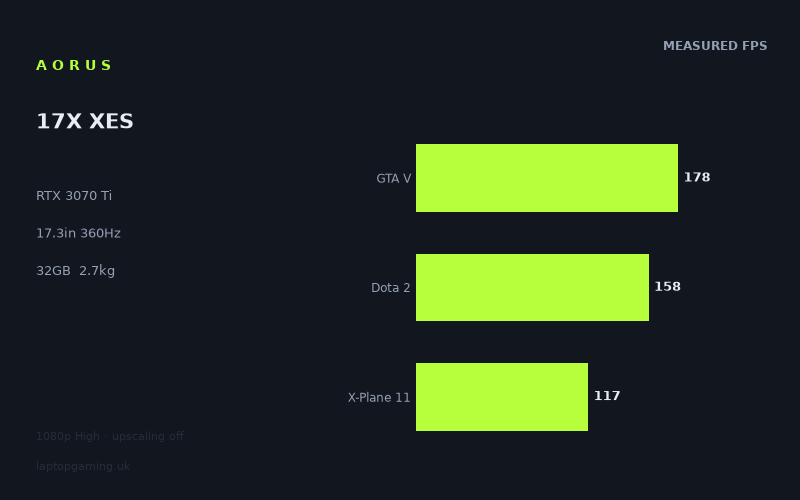
Frame rates
1920×1080, High preset, upscaling off.
Measured on this machine. Source: Notebookcheck, 2022-08-17.
Not scored: incomplete benchmark suite
Every scored laptop on this site is averaged over the same 5 games, and this one is short of Cyberpunk 2077, Baldur's Gate 3. A mean over 5 games is not comparable to a mean over 5, so we publish the figures we have and leave the score blank rather than rank it against machines tested on a different set. The numbers below are real - the suite is just incomplete.
How these numbers were produced
Frame rates here are not measured by us, and we label how each one was arrived at. A figure marked measured comes from a published run on that exact machine. A figure marked representative is derived from the GPU and its power limit (TGP) and cross-referenced against published reviews - a sound estimate of what that configuration delivers, but not a measurement of that specific laptop. Unless stated otherwise, numbers are 1920x1080, High preset, upscaling off. Where a laptop ships in several power configurations we use the wattage of the exact SKU listed, because a 140W RTX 5070 and a 115W one are not the same product.
In use
The short version
The Aorus 17X XES is a large-format gaming laptop built around an RTX 3070 Ti, a Core i9-12900HX, 32GB of memory, a 1TB SSD and a 17.3in Full HD IPS display with a 360Hz refresh rate. The specification is clearly aimed at high-frame-rate gaming rather than pixel-count chasing: this is a 1920x1080 machine with a very fast panel, not a higher-resolution laptop trying to make an RTX 3070 Ti serve two masters.
Notebookcheck’s measured figures show that it is a quick 1080p gaming system. Across the scoring-suite games, it averages 147fps at the High preset with upscaling off. That is enough performance to make a 360Hz panel feel like an intentional choice in lighter and competitive games, even if the benchmark data also makes clear that modern demanding titles will not generally run at the display’s full refresh rate at these settings.
Its strongest figures come in Strange Brigade at 185fps, GTA V at 178fps and Dota 2 at 158fps. Those are the games where the Aorus can make particularly good use of a fast Full HD panel. The picture changes in heavier games. Final Fantasy XV runs at 95fps, God of War at 92fps and Elex 2 at 83fps. Those are still substantial frame rates for a laptop, but they are a long way from 360fps. The panel is therefore best viewed as headroom for less demanding games, competitive titles and lower settings, rather than a promise that every game will operate at 360Hz.
The important buying caveat is not performance but price. There is no confirmed UK price for this exact configuration, so its value cannot be judged properly. That is not a criticism of the laptop itself: the benchmark suite is complete and the machine ranks normally on frame-rate performance. Price is simply an essential part of a real buying recommendation, and without it there is no responsible way to say whether the Aorus 17X XES is a sensible deal, merely an expensive one, or unusually good value.
Buy this model if the appeal is a 17.3in 1080p machine with a 360Hz IPS screen, 32GB of memory and proven strong frame rates in a broad spread of games. It is especially coherent for someone who plays a mixture of multiplayer games and demanding single-player titles, wants high performance without relying on upscaling, and is happy with a laptop weighing 2.74kg.
Do not buy it purely because the panel says 360Hz. Notebookcheck’s figures show that the RTX 3070 Ti can produce very high frame rates in selected games, but even the best measured result here is 185fps. The screen offers useful capacity above that result, but the available benchmark data does not show a game reaching the panel’s full refresh rate at the stated High preset and with upscaling disabled.
Performance
What the measured figures say
The benchmark data was measured by Notebookcheck at 1920x1080 using the High preset with upscaling off. That last detail matters. These are native-resolution, conventional rendering results rather than figures lifted by DLSS or another upscaling mode. They are useful for judging the baseline performance of the Aorus 17X XES, because they show what the laptop can deliver before adjusting image quality, enabling upscaling or targeting a lower frame-rate cap.
Notebookcheck’s five-game scoring-suite mean is 147fps. That is a strong average for a laptop using an RTX 3070 Ti, but an average alone can hide important differences between games. The spread here is wide enough that buyers should look beyond the mean before deciding whether the machine matches their own library.
- Strange Brigade: 185fps
- GTA V: 178fps
- Dota 2: 158fps
- The Witcher 3: 158fps
- Far Cry 5: 144fps
- Forza Horizon 5: 130fps
- X-Plane 11: 117fps
- Final Fantasy XV: 95fps
- God of War: 92fps
- Elex 2: 83fps
At the top end, Strange Brigade at 185fps and GTA V at 178fps demonstrate why a fast Full HD display makes sense on this class of hardware. These are not marginal results. They provide enough frame-rate headroom for a responsive presentation on the Aorus’s 360Hz panel, even though neither result reaches 360fps at the stated settings. Dota 2 and The Witcher 3 both reach 158fps, while Far Cry 5 remains close behind at 144fps. For players whose regular games look more like this part of the data set than the bottom of it, the Aorus should feel distinctly fast.
The middle of the results is represented by Forza Horizon 5 at 130fps and X-Plane 11 at 117fps. These are still high frame rates by laptop standards, and they support the argument that the Aorus is designed for fluid 1080p gaming rather than merely acceptable performance. They also show the difference between having a 360Hz screen and being able to saturate it. A measured 130fps or 117fps can make use of a high-refresh display, but it does not mean the panel is being driven at its maximum refresh rate.
The lower end of the results is just as important. Final Fantasy XV reaches 95fps, God of War reaches 92fps and Elex 2 reaches 83fps. None of those outcomes suggests that the Aorus has a problem. They show what happens when the GPU faces more demanding rendering workloads at High settings without upscaling. This is where the laptop looks like what it is: a high-performance RTX 3070 Ti machine, not a device that can make every modern demanding game behave like a lightweight competitive title.
That distinction should guide expectations. The Aorus 17X XES has enough performance to produce a high-refresh experience in many games, but the 360Hz number on the display should not be read as an all-games performance target. The measured figures make the position very clear. Some games run comfortably above 150fps. Others sit around 100fps. The most demanding result in this set is 83fps. The laptop has real breadth, but not uniform frame rates across every kind of game.
Fast games and demanding games are not the same workload
The performance spread is not a flaw in the figures; it is the point of having a varied benchmark list. A laptop can look exceptional when judged only by a lighter game and much less exceptional when judged only by a demanding one. Here, the Aorus moves from 185fps in Strange Brigade to 83fps in Elex 2 under the same broad test conditions. That is the practical reason not to shop from a single headline frame rate.
For a buyer who spends most of their gaming time in Dota 2, GTA V or Strange Brigade, the Aorus’s measured performance is aligned well with the 360Hz display. Even without reaching the full 360Hz ceiling in these results, frame rates of 158fps, 178fps and 185fps create a markedly different proposition from a machine whose results cluster around 80fps or 90fps. There is meaningful room for high-refresh gaming here.
For a buyer focused on games closer to God of War, Final Fantasy XV or Elex 2, the message is more restrained. The measured 92fps, 95fps and 83fps results are still well above the sort of performance that would make a game feel constrained to basic 60Hz play, but they are not a reason to pay extra for 360Hz alone. In these titles, the panel’s refresh ceiling is mostly unused at the quoted High setting with upscaling disabled.
Forza Horizon 5 is a useful middle case. At 130fps, it is neither a title that exposes the full 360Hz panel nor one that undermines the laptop’s high-refresh ambition. It is a result that supports smooth 1080p play and leaves room for a player to make their own trade-off between image quality and frame rate. The fact sheet does not include results at other presets, so no specific gain from lowering settings should be assumed. What can be said is that 130fps at High without upscaling is a solid native-resolution starting point.
X-Plane 11 at 117fps makes a similar point from a different genre. A 360Hz panel is not only useful when a laptop produces 360fps; it also gives the screen enough refresh capacity not to be the obvious limit at 117fps. But the benchmark figure remains the relevant one. Buyers should look at 117fps as the measured expectation for this title under the stated conditions, not at the screen specification and assume substantially more.
The RTX 3070 Ti and GPU power limit question
The Aorus 17X XES uses an RTX 3070 Ti, but the supplied specification does not state this laptop’s GPU power limit. That means it would be wrong to attach a wattage figure to the Aorus, or to claim that it runs the RTX 3070 Ti at a particular power setting. The benchmark data is more useful than pretending otherwise: Notebookcheck’s figures show the actual performance outcome for this specific machine in the listed games.
GPU power limits matter because the RTX 3070 Ti name by itself does not fully describe how a laptop will perform. However, this review does not have an Aorus 17X XES wattage figure in the available information. The responsible conclusion is therefore limited but practical: judge this configuration by its measured results, not by assumptions based on the GPU badge alone.
Those measured results put the Aorus in a strong position for 1080p High gaming without upscaling. A scoring-suite average of 147fps is substantial, and results such as 185fps in Strange Brigade, 178fps in GTA V and 158fps in Dota 2 show that the laptop can deliver the sort of frame rates that justify a very fast screen. The lower figures in God of War, Final Fantasy XV and Elex 2 also prevent the review from overstating the result. The GPU is quick, but game demands still matter.
The same caution applies when comparing GPU labels across rival laptops. The rival list includes RTX 3050 Ti and RTX 3080 Ti machines, but the Aorus cannot be positioned simply by putting RTX 3070 Ti between those names. Shared-game results are the better evidence, and they produce some outcomes that would look surprising if the GPU name were the only thing considered. The comparison section below is consequently based on the stated shared-game averages rather than marketing hierarchy.
The role of the Core i9-12900HX
The Aorus pairs its RTX 3070 Ti with a Core i9-12900HX. The available figures do not isolate CPU performance, so it is not possible to assign a numerical gaming contribution to the processor. What the results do show is that the overall platform is capable of very high frame rates in several games at 1080p. That matters because high-refresh gaming can expose limits beyond the graphics chip when frame rates rise.
The rival comparison notes that, at 1080p, lighter titles in the shared set are CPU-bound and can compress genuine GPU gaps. That is important context for the apparently level results against some RTX 3080 Ti systems. In a lighter 1080p workload, the graphics hardware may not be the only meaningful limit. A faster GPU cannot necessarily turn every shared-game result into a visibly larger number if the game is already constrained elsewhere.
For the Aorus buyer, the practical lesson is straightforward. The Core i9-12900HX is part of a platform targeted at high frame rates, and the measured results support that aim. But buyers looking at individual results should not expect GPU tier alone to predict every comparison. The data is particularly clear on this point when the Aorus draws level with RTX 3080 Ti rivals across the stated shared-game samples.
Memory and storage
The configuration includes 32GB of memory and a 1TB SSD. For a gaming laptop positioned around a Core i9-12900HX and RTX 3070 Ti, 32GB is a sensible amount of memory to have in the stated configuration. It avoids the awkward situation where a high-end processor and graphics chip are paired with an obviously cut-down memory specification.
The 1TB SSD is likewise a sensible capacity on paper, but the supplied information does not include storage benchmark data, drive configuration details or upgrade information. It would therefore be wrong to make claims about loading performance, drive speed or internal expansion. The reliable point is simply that the model is specified with a 1TB SSD, not that it has been demonstrated to be faster than another laptop’s storage arrangement.
The screen
A 17.3in Full HD IPS panel at 360Hz
The Aorus 17X XES has a 17.3in IPS display with a 1920x1080 resolution and a 360Hz refresh rate. This is a strongly gaming-led screen specification. The Full HD resolution keeps the rendering target manageable for the RTX 3070 Ti, while the 360Hz refresh rate provides a very high ceiling for games capable of producing extreme frame rates.
The IPS panel type is part of the supplied specification, but there are no measurements here for brightness, contrast, colour coverage, response time or panel uniformity. It would be inaccurate to claim that the display is particularly bright, colour-accurate, fast in pixel response or suitable for a particular kind of colour-critical work. The safe conclusion is narrower: it is an IPS Full HD panel with a 360Hz refresh rate, and the gaming benchmark data shows the degree to which the system can use that refresh rate.
At 1920x1080, the Aorus produces 185fps in Strange Brigade, 178fps in GTA V, 158fps in Dota 2 and 158fps in The Witcher 3. These are the figures that make the 360Hz panel feel purposeful. A display with this refresh rate has ample room for those outputs, and the machine is clearly not limited to basic 60Hz or 120Hz-class performance in its best cases.
However, none of the listed measured results reaches 360fps at High settings with upscaling off. That matters more than the panel specification when setting expectations. A 360Hz display can refresh up to 360 times per second, but the game frame rate has to be there for a game to use that maximum capacity. The Aorus has not demonstrated 360fps in the available data, so prospective buyers should not interpret the screen as evidence of 360fps gaming in the measured titles.
Where the screen is well matched to the GPU
The pairing is most convincing in the games at the top of the benchmark list. Strange Brigade at 185fps, GTA V at 178fps, Dota 2 at 158fps and The Witcher 3 at 158fps all show performance far above the conventional baseline that many laptop buyers associate with smooth gaming. In these games, the Aorus can exploit the broad advantage of a high-refresh display: there is room for a visibly fluid output without needing to claim that the panel is fully saturated.
Far Cry 5 at 144fps is also a good fit for this kind of screen. It does not approach 360fps, but it sits in the high-frame-rate range where a fast display remains relevant. The same is true of Forza Horizon 5 at 130fps and X-Plane 11 at 117fps. Buyers should not reduce the question to whether the laptop reaches the headline refresh rate. A 360Hz panel can still be a sensible partner for games that run below 360fps, provided the buyer values the high-refresh capability and understands that the benchmark figures are below the maximum.
The fit is less direct in the demanding games at the bottom of the list. Final Fantasy XV at 95fps, God of War at 92fps and Elex 2 at 83fps are all results where the Aorus’s performance is appreciably below 360fps. In this part of the library, the GPU rather than the display ceiling is the obvious factor in the measured outcome. A buyer primarily interested in demanding single-player games should see the screen as generous headroom rather than as the reason to expect extreme frame rates.
Full HD is the performance-focused choice
The 1920x1080 resolution is central to the Aorus’s character. This laptop is not trying to combine a high-resolution panel with a very high refresh rate and then leave the GPU struggling to deliver either sharpness or speed. Instead, it uses a resolution that supports the measured frame rates seen here. The scoring-suite mean of 147fps is easier to understand in the context of a Full HD display: the machine is configured around speed.
That approach will suit some buyers much better than others. Competitive and high-refresh players may prefer the emphasis on frame rate, especially when the measured figures in lighter games rise into the 158fps to 185fps range. Players who place resolution above refresh rate may not find 1920x1080 on a 17.3in screen as appealing, regardless of the strong frame-rate data. The fact sheet does not include a higher-resolution option for this configuration, so the decision is simple: this is a large Full HD gaming laptop, not a compromise-free machine for every display preference.
The panel should therefore be considered a targeted feature. It is excellent on paper for players who value fast motion and high frame-rate headroom. It is less persuasive as a universal feature for buyers who mainly play the heaviest games at High settings, because the measured figures in those games do not come close to 360fps. The screen is not wasted, but its greatest strengths are more likely to appear in the lighter and faster-running side of a gaming library.
Build, size and portability
The Aorus 17X XES weighs 2.74kg and uses a 17.3in display. Those two facts are enough to define its role: this is a large gaming laptop intended to prioritise screen size and performance hardware over easy portability. It is not the sort of machine to choose if the main requirement is minimal carrying weight.
A 2.74kg laptop is transportable, but it should not be mistaken for a lightweight device. The Aorus will make most sense for someone who wants a system that can be moved when necessary, perhaps between rooms, homes, workspaces or occasional destinations, rather than somebody who expects to carry it all day without noticing it. The 17.3in screen reinforces that point. The appeal is desktop-like screen area in a laptop format, not compactness.
The available specification does not include dimensions, chassis materials, port selection, keyboard details, trackpad details, webcam information, speaker measurements or cooling figures. It would be wrong to claim that the Aorus is thin, thick, compact, well-built, loud, quiet, cool-running or particularly easy to travel with beyond what its 2.74kg weight and 17.3in screen imply. There is also no measured noise or temperature data in the fact sheet.
The laptop includes a 99Wh battery. That is the stated battery capacity, but there is no battery-life measurement available here. Capacity is not runtime. Screen refresh behaviour, workload, power settings and other factors can affect endurance, and none of those outcomes has been supplied. Buyers who need a machine for extended unplugged use should not treat the 99Wh figure as proof of any particular number of hours.
For gaming use, the machine’s physical proposition is clear even without dimensions. A 17.3in screen, 2.74kg weight, Core i9-12900HX and RTX 3070 Ti describe a laptop that belongs on a desk or a regular gaming setup more naturally than in a small everyday bag. Its mobility is an advantage over a desktop, but its design priorities are firmly on the performance side of the portable-performance balance.
How it compares
Against the MSI Prestige 15 with RTX 3050 Ti
The Aorus 17X XES averages 83fps ahead of the MSI Prestige 15 with an RTX 3050 Ti at 105W across four shared games. This is the clearest separation among the listed comparisons, and it matches the Aorus’s purpose as a high-frame-rate 17.3in gaming machine.
An 83fps average advantage is not a minor result. It indicates that the Aorus is operating in a fundamentally higher performance class across the shared-game sample. This is the comparison for buyers deciding whether a more portable-looking system with lower-tier graphics is enough for their needs. If the priority is strong 1080p High gaming and a display capable of taking advantage of high frame rates, the Aorus has a substantial measured lead.
That does not make the Prestige 15 automatically unsuitable for every buyer. The supplied comparison only establishes the Aorus’s gaming advantage across the shared games. There is no confirmed UK price for either exact configuration, and no portability, battery-life or display comparison data has been supplied. The reliable conclusion is confined to gaming performance: the Aorus is decisively faster in this shared sample.
Against the Schenker XMG Neo 15 E22 with RTX 3080 Ti
Against the Schenker XMG Neo 15 E22 Early 2022 with an RTX 3080 Ti at 175W, the Aorus averages +0fps across three shared games. That near-zero difference is a real result, but it should not be misread as proof that the RTX 3070 Ti and RTX 3080 Ti are universally interchangeable.
The comparison guidance explains why results can compress at 1080p: lighter titles in the shared set can be CPU-bound, reducing the visible gap between graphics chips. In other words, the shared games are not necessarily exposing a pure GPU advantage in every case. At these settings and in this limited common sample, the Aorus matches the Schenker on average. That is impressive for the Aorus, but it is not a licence to ignore workload differences.
The small shared-game sample matters too. The Aorus has a stated average advantage of +0fps across three shared games, not across the entire benchmark list. Buyers should take the result seriously because it is measured, but should not expand it into a broader claim that has not been demonstrated by the supplied data.
Against the Medion Erazer Beast X30 with RTX 3080 Ti
The Aorus also averages +0fps against the Medion Erazer Beast X30 with an RTX 3080 Ti at 175W, this time across five shared games. The same explanation applies: at 1080p, lighter shared titles can become CPU-bound and genuine GPU differences can be compressed.
This result is especially useful because the shared-game sample is broader than the Schenker comparison. Across those five games, the Aorus is level on average with an RTX 3080 Ti rival. That is a notable outcome for this RTX 3070 Ti configuration and supports the view that its measured 1080p performance is strong.
But “level on average” is the correct phrase, not “identical in every game” and not “always as fast as an RTX 3080 Ti”. The fact sheet provides an average shared-game difference, not every individual comparison result. It also explicitly warns that lighter 1080p titles can hide wider GPU differences. The Aorus deserves credit for matching the Medion on the stated data, while the buyer should remain aware of the context behind that match.
Against the MSI Raider GE77 HX with RTX 3080 Ti
The MSI Raider GE77 HX with an RTX 3080 Ti at 175W is the listed rival that beats the Aorus by the greatest amount. The Aorus averages 23fps behind it across five shared games. This is the comparison that prevents the Aorus’s level results against the Schenker and Medion from becoming an overconfident story about GPU badges no longer mattering.
A 23fps average deficit is meaningful. It does not erase the Aorus’s strong performance, but it shows that there are workloads in the shared set where the RTX 3080 Ti Raider has a clear advantage. For buyers who want the highest possible frame-rate output in this generation and are comparing these specific systems, the Raider’s shared-game lead is real evidence in its favour.
The Aorus remains a capable option because its own figures are high, but the Raider comparison gives useful perspective. The Aorus can match some RTX 3080 Ti laptops across certain shared 1080p sets, yet it does not match every RTX 3080 Ti machine. That is exactly why attributable benchmark data is more useful than simply assuming one result from the GPU name.
What the rival spread means
The four comparisons form a useful range. The Aorus is far ahead of the RTX 3050 Ti MSI Prestige 15, level with the listed Schenker and Medion RTX 3080 Ti systems in their shared games, and behind the RTX 3080 Ti MSI Raider GE77 HX. The result is not contradictory. It reflects the fact that laptop gaming performance depends on the tested games and settings, while lighter 1080p workloads can compress GPU gaps.
For a potential buyer, the right conclusion is not that every RTX 3080 Ti laptop is equal to this Aorus, nor that every RTX 3050 Ti laptop is unusably slow. The correct conclusion is specific. The Aorus has a large shared-game advantage over the MSI Prestige 15. It is level on average with the named Schenker and Medion systems in their stated shared samples. It trails the named MSI Raider in its shared sample. Those are the defensible comparisons.
There is no confirmed UK price for any of these exact rival configurations in the supplied information. That means there is no basis for a value ranking between them. A 23fps lead can be compelling or poor value depending on price; an 83fps deficit can be acceptable or unacceptable depending on the buyer’s budget and priorities. Without confirmed prices, performance is the only responsible comparison axis here.
Who it’s for
Buy it if you want high-refresh 1080p gaming on a large screen
The Aorus 17X XES is best suited to buyers who want a 17.3in Full HD gaming laptop and place a high priority on frame rate. Its 360Hz IPS panel is ambitious, and the RTX 3070 Ti delivers enough measured performance to make that ambition credible in lighter and faster-running games. Strange Brigade at 185fps, GTA V at 178fps, Dota 2 at 158fps and The Witcher 3 at 158fps are the results to focus on if your library overlaps with this kind of workload.
It also makes sense for a buyer who wants one machine to cover both higher-frame-rate games and more demanding single-player releases. The benchmark data shows that it can do both, provided expectations are adjusted by title. In Forza Horizon 5, X-Plane 11, Final Fantasy XV, God of War and Elex 2, it still produces measured results from 130fps down to 83fps. That is not uniform performance, but it is broad performance.
The 32GB memory and 1TB SSD make the configuration look appropriately provisioned for its class. Again, there is no storage testing or upgrade information in the supplied facts, so those elements should not be overpraised. But they avoid an obvious imbalance in the headline specification.
The Aorus is also for someone who accepts that 2.74kg is the price of a larger gaming laptop format. If the system will mostly live on a desk and occasionally move elsewhere, the weight is less of a concern than it would be for a daily commuter. The 17.3in display is likely to matter more than compactness to this kind of buyer.
Buy something else if portability is the priority
If low weight is the main requirement, this is not the obvious choice. At 2.74kg with a 17.3in display, the Aorus is a substantial laptop. It can be transported, but the specification does not point towards an ultraportable use case. Buyers who regularly carry a laptop for long periods should put weight and screen size ahead of raw frame-rate performance in their shortlist.
The fact sheet does not provide dimensions, so there is no basis for saying exactly how much bag space the Aorus requires. It also does not provide battery-life figures, so the 99Wh battery should not be treated as evidence of all-day use. A buyer needing proven unplugged endurance or a compact chassis needs additional information before choosing this model.
Buy something else if you expect 360fps in demanding games
The 360Hz screen is a feature, not a guarantee. None of Notebookcheck’s listed results reaches 360fps at High settings with upscaling off. The best figure is 185fps in Strange Brigade, followed by 178fps in GTA V. Those are excellent results, but they are still below the panel’s full refresh rate.
Buyers whose sole aim is to run every game as close as possible to 360fps should not rely on this benchmark list to support that expectation. The demanding games demonstrate the limit clearly: Final Fantasy XV at 95fps, God of War at 92fps and Elex 2 at 83fps. The Aorus is fast, but it is not a universal 360fps machine under the stated test conditions.
Buy something else if value is the deciding factor
There is no confirmed UK price for this exact Aorus 17X XES configuration. That makes a value judgement impossible. It would be irresponsible to call it good value, poor value, expensive or a bargain without the price that a UK buyer would actually pay.
This matters especially because the rival list includes machines both slower and faster than the Aorus. The Aorus has an 83fps average advantage over the MSI Prestige 15 across four shared games, matches the named Schenker and Medion RTX 3080 Ti systems on average in their shared samples, and trails the MSI Raider GE77 HX by 23fps across five shared games. Those are useful performance facts, but value depends on the missing price information.
The sensible conclusion
The Aorus 17X XES is a convincing performance-focused 17.3in gaming laptop on the evidence available. Its Full HD 360Hz IPS display is matched with frame rates that are genuinely high in several games, while its lower results remain respectable for demanding titles at High settings without upscaling. The machine’s strength is not that it delivers the same number everywhere. Its strength is that the overall benchmark set remains strong while also showing clearly where the 360Hz screen is most useful.
The main caution is simply that prospective buyers need a confirmed UK price before deciding whether to purchase it. Performance is established. Value is not. If the eventual price is acceptable for a 2.74kg, 17.3in RTX 3070 Ti laptop with a Core i9-12900HX, 32GB of memory, a 1TB SSD and the measured frame rates above, the Aorus 17X XES has a coherent gaming-first specification. If portability, proven battery life, a higher-resolution display or guaranteed extreme frame rates in demanding games matter more, a different type of laptop will be a better fit.