Review
Acer Predator Helios Neo 14 (2024) review
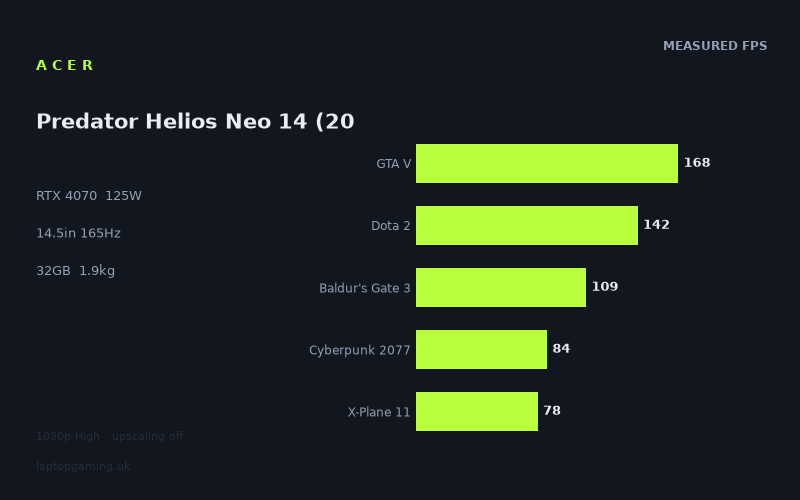
Frame rates
1920×1080, High preset, upscaling off. Averages 116fps across the 5 core benchmark games.
Measured on this machine. Source: Notebookcheck, 2024-08-15.
Not scored: no confirmed UK price
We have the full benchmark suite for this machine, so it ranks on the frame rate leaderboard like any other. What we don't have is a UK listing for this exact configuration - it's sold as a European review unit, or only in specifications that differ from the one tested. Since 30% of our score is value for money, scoring it would mean pretending price is no object, which would flatter it against every laptop you can actually buy. The frame rates below are real and comparable; there is just no buying recommendation to make yet.
How these numbers were produced
Frame rates here are not measured by us, and we label how each one was arrived at. A figure marked measured comes from a published run on that exact machine. A figure marked representative is derived from the GPU and its power limit (TGP) and cross-referenced against published reviews - a sound estimate of what that configuration delivers, but not a measurement of that specific laptop. Unless stated otherwise, numbers are 1920x1080, High preset, upscaling off. Where a laptop ships in several power configurations we use the wattage of the exact SKU listed, because a 140W RTX 5070 and a 115W one are not the same product.
In use
The short version
The Acer Predator Helios Neo 14 is a 2024 attempt at a specific and difficult idea: put a 125W RTX 4070 into a 14.5in chassis that weighs 1.946kg, and do it without the GPU spending its life apologising for the size of the machine it lives in. The power limit is the number that matters most on the spec sheet, because the RTX 4070 laptop chip is sold across a wide configurable band and the same badge appears in thin machines running at a fraction of this figure. One of the rivals in this comparison set runs the tier below it at 60W. That is less than half the budget this machine gives its card, and the difference between those two ends of the market is not a marketing distinction — it is the difference between a GPU that holds its clocks and one that negotiates with its cooling system from the first minute of a session.
The published results suggest Acer got most of the way there. Notebookcheck measured eleven games at 1920x1080 on the High preset with upscaling switched off, and the outcome runs from 211fps at the top down to 62fps at the bottom. That is a ratio of roughly three and a half to one across an identical resolution and an identical preset, and a spread that wide is the signature of a GPU that is being allowed to run. When a thin machine is quietly throttling, the benchmark results bunch up: the fast games come in slower than they should and the heavy games come in slower still, because everything is meeting the same artificial ceiling. Nothing like that is happening here. The differences between these eleven results are differences between the games, not between one thermal state and another.
The complication is the panel. This is a 14.5in IPS display running 3072x1920 at 165Hz, which is an unusually high native resolution to hang off a mid-range GPU, and every frame rate in the data set was measured at 1920x1080. That gap has to be stated without hedging: there is no measurement in this data of what the machine does at its own native resolution. Everything said below about 3072x1920 is inference from the shape of the 1080p results, and it is labelled as such wherever it appears.
The other thing to get out of the way early is the score, or rather the absence of one. There is no confirmed UK price for this configuration, so no value judgement is possible here — not a good-value verdict, not a poor one. A gaming laptop is a price-performance product before it is anything else, and without the price the largest single input to a verdict is missing. The benchmark suite for this machine is complete and it sits on the frame rate leaderboard normally. The gap is commercial, not technical, and this review does not guess at what the machine costs.
Who it suits, in one line: someone who genuinely carries a laptop, who wants desk-class frame rates from something under 2kg, who is comfortable running the native panel with upscaling in demanding games, and who understands that a 14.5in chassis pulling this much power is a set of trade-offs rather than a free lunch.
Performance
What 125W means when the chassis is this small
Power limits on laptop GPUs are only half a specification. The other half is the volume of chassis available to shed the heat that power produces, and that is where a 14.5in machine at 1.946kg differs fundamentally from the 16in and 17in laptops that usually carry this class of card. A large chassis with a 125W GPU has cooling capacity in reserve. A sub-2kg chassis with a 125W GPU has a cooling system working close to its design limit whenever a game is running, and it has to share that limit with a Core Ultra 9 processor sitting on the same heat pipes.
That is why the shape of the benchmark data matters more than any individual result. A machine that advertises a high power limit it cannot sustain produces a very particular fingerprint: results that cluster, because the constraint is the cooler rather than the workload. Instead, Notebookcheck's numbers run from 211fps in Strange Brigade to 62fps in Dragon's Dogma 2, at a fixed resolution and a fixed preset, which is a spread far wider than a thermally constrained machine would be capable of producing. Strange Brigade at 211fps is a card with almost nothing standing in its way. Dragon's Dogma 2 at 62fps is a game that is genuinely hard to run for reasons of its own. Between those two extremes the results distribute themselves in a way that tracks how demanding each title is, which is exactly what a properly fed GPU looks like.
None of that means the machine runs cool or quietly. There are no temperature figures and no fan-noise measurements in this data, and it would be irresponsible to infer them from the frame rates. A chassis this size dissipating this much heat has to move air quickly to do it, and how pleasant that is to sit next to is a genuinely open question that these numbers cannot answer. It is also the question most likely to determine whether someone enjoys owning the machine, which is a reason to insist on acoustic data from somewhere before buying rather than assuming the benchmark results settle it.
What can be said is that the performance the specification promises appears to be present in the published results. A 125W configuration of this chip is near the upper end of what the part is sold at, and machines that carry it in far larger bodies do not produce a fundamentally different class of result at 1080p. The engineering achievement here, if the data is representative, is that the smaller chassis has not cost the card its character.
The top of the set: three games that clear the panel
Three of the eleven measured titles exceed the display's 165Hz refresh rate outright at 1080p High.
- Strange Brigade — 211fps. Strange Brigade appears in almost every laptop benchmark suite precisely because it is a low-overhead, well-optimised renderer that acts as a ceiling test. It tells you what the hardware does when the software is doing nothing to get in the way. 211fps is a high ceiling for a machine this size.
- F1 24 — 179fps. Racing engines are consistently well behaved. The scenes are predictable, the frame budget is tight by design, and the genre lives or dies on frame consistency, so the studios optimise hard. 179fps means the panel is the limiting factor in this title rather than the graphics card.
- GTA V — 168fps. One of the five scoring-suite games. GTA V is an old title with a CPU-sensitive engine, and a result like this says more about the processor and the game's threading behaviour than about the RTX 4070 behind it. It clears the refresh rate by a small margin, which in practice means it is running at the panel's ceiling most of the time.
For all three, the practical conclusion is that at 1080p you are refresh-limited rather than GPU-limited, and the sensible response is to spend the surplus on image quality. On this machine that is not a hypothetical: the native panel is sitting there waiting to be driven, and these are the titles with the largest budget available to pay for the extra pixels. How far that budget actually stretches at 3072x1920 is not in the data and will not be invented here, but the direction is unambiguous.
The middle band: comfortable, unspectacular, and mostly not GPU-limited
Three more titles land between the panel's refresh rate and the 100fps mark, and this is where the machine's real day-to-day character sits.
- Dota 2 — 142fps. A scoring-suite game, and the clearest CPU signal in the whole set. Dota 2 is not a graphically demanding title in any modern sense. A 125W RTX 4070 is not being troubled by it in rendering terms at all. When a MOBA lands at 142fps rather than somewhere far higher, the frame time is being set by the game's own simulation and draw-call pattern and by the single-thread throughput available to service them. Turning the settings down in this title would buy almost nothing.
- Baldur's Gate 3 — 109fps. Another scoring-suite entry, and a game with a mixed constitution. Larian's engine is capable of heavy graphical work but is also well known for leaning hard on the processor in dense, populated areas. 109fps at High with no upscaling is a comfortable result for a title that is played at a considered pace rather than a competitive one.
- Final Fantasy XV — 105fps. An expensive renderer with elaborate post-processing, and a title that behaves like a genuinely GPU-bound workload. This is roughly where a card of this class ought to land in a game of that kind, and it is one of the more honest indicators in the set of what the silicon is doing rather than what the CPU is permitting.
The distinction between those three is worth holding on to. Dota 2 and Final Fantasy XV are separated by less than 40fps, but they are limited by entirely different things and respond to entirely different interventions. Raising the resolution on the Dota 2 result costs relatively little, because the pixel pipeline was never the constraint. Raising the resolution on the Final Fantasy XV result costs a great deal, because it was. For a buyer trying to work out whether this machine is fast enough for a specific library, that difference matters far more than the raw ordering of the table.
The GPU-bound group: three modern titles in the eighties
Three results cluster tightly between 82fps and 87fps, and they are the most informative numbers in the set because they are the ones where the graphics card is unambiguously the thing doing the work.
- The First Descendant — 87fps. A recent free-to-play shooter built on a modern Unreal pipeline, with the heavy lighting and material work that implies.
- Cyberpunk 2077 — 84fps. The scoring-suite game most people will look for first, and still the standard reference for an expensive modern renderer even years after release. 84fps at 1080p High with upscaling off is a strong result for a 14.5in laptop.
- Ghost of Tsushima — 82fps. A large, dense open world in a well-regarded port, and a title with a reputation for scaling cleanly rather than falling over.
Three modern, GPU-heavy games landing within five frames of one another is a meaningful pattern rather than a coincidence. It says the card is running into its own capability rather than into a thermal wall or a CPU limit, and it says that capability is consistent across quite different engines. It also establishes the practical floor for what someone should expect from current single-player releases on this machine at 1080p: comfortably above 60fps, comfortably below the panel's refresh rate, and with real headroom available from upscaling in every one of the three, since all support it.
This group is also the right place to think about ray tracing, which does not appear anywhere in the measured set. Every figure here is with the standard High preset, and Cyberpunk 2077 in particular is a substantially different workload with its ray-traced modes enabled. There are no measurements of that here, so this review will not put a number on it. What the 84fps baseline tells you is only that there is some room to give away before the experience becomes unpleasant — not how much.
The floor: two games that are slow for reasons the GPU cannot fix
The two slowest results in the set are the most interesting, because neither of them is really about the graphics card.
X-Plane 11 — 78fps. A scoring-suite game and a well-understood outlier. X-Plane 11 uses an older-generation renderer that issues an enormous number of individual draw calls per frame, all of which have to be prepared by the processor before the GPU sees any of them. It is a textbook draw-call-bound, CPU-bound workload. A faster graphics card does very little for it; faster single-thread performance does a great deal. It sitting near the bottom of a list that also contains Cyberpunk 2077 is not a contradiction, because the two are slow for opposite reasons — one because the GPU is saturated, the other because the GPU is waiting.
Dragon's Dogma 2 — 62fps. The slowest result in the set, and a title with a well-documented appetite for processor time in its densely populated areas, where the engine's simulation of individual characters becomes the limiting factor regardless of what the graphics card is doing. That reputation is qualitative and this review is not going to attach a share of the blame to the CPU that the data does not support. But the fact that the two lowest results in an eleven-game set are the two titles most associated with processor constraints, rather than the two most visually expensive titles, is the single most telling detail in the data.
Read together, those two results reframe the whole table. If the GPU were the weak link in this machine — if 125W in a small chassis were an unsustainable claim — the floor of the set would be occupied by the heaviest renderers. Instead the heaviest renderers sit comfortably in the eighties, and the floor belongs to the two games that stress the processor. The graphics card is holding up its end.
The Core Ultra 9 185H, and where it shows up
The processor is a Core Ultra 9 185H, Intel's top H-class Meteor Lake part for 2024, and it is a specific choice with specific consequences. Meteor Lake was Intel's move to a disaggregated, tile-based design, and its strengths are efficiency, integrated graphics capability that this machine will never use, and a strong showing in mixed productivity work. Its weaknesses, in gaming specifically, are the ones that follow from that architecture: latency between tiles is a real cost, and per-core throughput in games sits below what Intel's desktop-derived HX-class mobile chips deliver in larger machines.
In the GPU-bound part of the table — the three modern titles in the eighties, and Final Fantasy XV above them — that difference is close to invisible, because the processor is not what sets the pace. In the CPU-bound part of the table it is exactly what sets the pace. Dota 2 at 142fps, X-Plane 11 at 78fps, GTA V at 168fps and Dragon's Dogma 2 at 62fps are the four results in this set that are least about the RTX 4070 and most about what is feeding it. An identical GPU configuration paired with an HX-class processor would be expected to pull ahead in precisely those titles and essentially nowhere else. There is no comparative CPU data here to put a size on that gap, so it stays a directional argument rather than a measured one — but it is the right lens for reading the bottom of the table.
There is a further consideration that is easy to miss. In a chassis this small, the CPU and the GPU are not independent. They share a cooling budget, and every watt the processor draws is a watt the cooling system has to remove before it can remove one from the graphics card. Choosing a top-bin H-class part rather than something more modest is a decision that looks good on a specification sheet and is at least partly constrained in practice by the thermal envelope it has to live inside. Where an H-class chip does earn its place is away from games: this configuration has 32GB of memory and a top-tier mobile processor, which makes it a genuinely capable work machine, and that is a real part of the case for a 14.5in gaming laptop in the first place.
The buying implication is direct. If a library is dominated by simulators, strategy titles, competitive shooters, MOBAs and the newer engines that lean on CPU simulation, this machine's GPU is partly going to waste, and the constraint is on the other side of the board. If a library is weighted towards modern single-player releases with expensive renderers, the 125W card is precisely where the money should have gone.
The spread, and what a single average hides
The mean across the five scoring-suite games is 116fps. That figure is useful for ranking this machine against others measured the same way, and it is close to useless as a description of what owning it feels like, because no game in the set behaves like the average. The suite contains GTA V at 168fps and X-Plane 11 at 78fps, and the average of those two describes neither.
Across all eleven titles the picture is starker still: 211fps at the top, 62fps at the bottom, with the results distributed fairly evenly in between rather than clustering at either end. That distribution is a property of the games, not an inconsistency in the machine. Every one of those figures was produced under the same conditions on the same hardware. What varies is what each engine asks for.
Two consequences follow. The first is that a headline frame rate for this laptop would be misleading whichever number was chosen. The second, and more useful, is that the games someone actually plays determine what they get to a degree that swamps the differences between comparable machines — which is also why several of the rival comparisons later in this review come out much flatter than the specification sheets would suggest.
What the measured set deliberately leaves out
Four things about the conditions change how these figures should be read.
Upscaling is off. Every number above is native rendering with no assistance. An RTX 4070 has DLSS available in the great majority of the titles here, and in the heavier ones the uplift is substantial. The measured set is therefore a floor for a real session rather than a ceiling. Switching upscaling off is the correct way to benchmark, because it isolates the hardware and makes cross-machine comparison valid, but it means practical experience in supported games sits above these figures rather than at them. On a machine with a native resolution this high, that distinction is more important than usual.
The preset is High, not the maximum. High is a sensible, widely used setting and it is applied identically across every machine measured this way, which is what makes the comparisons meaningful. It is not the top preset in most of these games. Anyone who habitually runs everything maxed should subtract accordingly, and by how much is not something the data can say.
These are averages. There are no 1% low figures and no frame-time consistency data here. Average frame rate is the crudest of the useful metrics, and two machines with identical averages can feel quite different if one of them stutters. In a thin chassis with a high power limit, frame-time consistency under sustained load is exactly the thing a buyer would want to know about, and it is exactly the thing this data does not contain.
The figures are a snapshot. They were measured on 15 August 2024. Games get patched, drivers get updated, and a result from a specific date is a point in time rather than a permanent property of the hardware. The relative picture — which titles are fast, which are slow, and where the constraints live — is durable. The exact digits are less so.
The screen
3072x1920 is the panel; 1920x1080 is the data
The display is a 14.5in IPS panel at 3072x1920 running at 165Hz, in a 16:10 aspect ratio. That is a striking specification for a machine of this size and it is the most aggressive part of the whole design, because 3072x1920 works out at 5,898,240 pixels against 1920x1080's 2,073,600 — very nearly three times as many. Every frame rate quoted in this review was measured at the lower of those two figures.
That has to be stated plainly: there is no measurement here of what this laptop does at its own native resolution. Not one. Anything said about 3072x1920 gaming performance in this review is reasoning from the shape of the 1080p results, and reasoning is not measurement.
What the reasoning supports is a shape rather than a set of numbers. Frame rates do not divide neatly by pixel count, because the proportion of each frame's time spent on pixel work varies enormously between engines. In the CPU-bound titles — X-Plane 11, Dota 2, GTA V, and by reputation Dragon's Dogma 2 — raising the resolution costs relatively little, because the bottleneck was never in the pixel pipeline. In the GPU-bound group — Cyberpunk 2077, Ghost of Tsushima, The First Descendant, Final Fantasy XV — it costs a great deal, and those are the titles already sitting lowest among the GPU-limited results with the least to give away.
The practical route to native resolution on this machine is therefore upscaling, and that is not a criticism so much as a description of what the hardware pairing was designed around. A quality-oriented DLSS mode renders internally at a fraction of the output resolution and reconstructs the rest, which is precisely the tool for a situation where the panel is nearly three times the pixel count the GPU has been measured at. On a 14.5in display, pixel density is high enough that reconstruction artefacts are considerably less visible than they would be on a larger screen at the same resolution, which works in this machine's favour. Preset reductions are the other lever, and in the heaviest titles a buyer should expect to use both.
What would be dishonest is to convert any of that into frame rates. There is a real temptation to divide the 1080p numbers by some factor and present the result as a native-resolution expectation. That calculation would be wrong in both directions depending on the title, and no version of it appears in this review.
165Hz, and what actually reaches it
Of the eleven measured games, three exceed 165fps at 1080p: Strange Brigade at 211, F1 24 at 179 and GTA V at 168. Nothing else in the set comes close — the next result down is Dota 2 at 142fps, and after that the list descends steadily. So at the resolution the data covers, roughly a quarter of the measured titles saturate the panel and three-quarters do not.
At native resolution, the inference is that the number saturating the panel drops towards none of them without upscaling doing heavy lifting. That is not a failure of the design. A 165Hz refresh rate on a display like this is specified for the games where high frame rates matter — competitive titles, older engines, anything running well inside the hardware's capability — rather than as a promise about every game. In the heavy modern releases the machine is producing figures in the eighties at 1080p, and a variable-refresh display running at that rate is still noticeably smoother than a fixed 60Hz panel receiving the same frames, because it is not fighting the display's cadence. Whether variable refresh is present on this specific panel is not confirmed in the data, which is worth checking before buying.
Where the refresh rate genuinely earns itself is in the gap between the two groups. A panel that tops out at 165Hz, driven by a GPU producing 211fps in one title and 62fps in another, never becomes the bottleneck and never wastes frames it is given. On a 60Hz display, the great majority of the results in this set would simply be discarded.
IPS, and the panel figures that are missing
The panel type is IPS, which brings wide and stable viewing angles and generally sensible colour behaviour, at the cost of the contrast an OLED would deliver. On a machine likely to be used for work as well as games — 32GB of memory and a Core Ultra 9 rather point that way — the viewing-angle stability is worth more than it would be on a pure gaming machine that lives at one desk.
Beyond the resolution, refresh rate and panel technology, there are no measured figures for this display here. No brightness, no colour-gamut coverage, no contrast ratio, no response-time measurement. Panel quality varies substantially between configurations of the same model and it is one of the areas where a laptop can be quietly compromised without it showing on a specification sheet. For anyone doing colour-critical work, or needing a screen that holds up in a bright room, those are open questions to resolve rather than assumptions to make.
What can be said is that the pairing is ambitious rather than lazy. A 125W RTX 4070 behind a 1080p panel would be badly over-specified for the display; the same card behind a 4K 60Hz panel would be mismatched in the other direction. 3072x1920 at 165Hz asks more of the GPU than it can comfortably deliver natively in demanding games, and the honest description is that this is a display specified for the desktop experience and for work as much as for games, with upscaling expected to bridge the difference when a modern title is running.
Build, size and portability
There are no dimensions or thickness figures in this data set, so this section reasons from the three numbers there are: 14.5in of screen, 1.946kg of machine, and a 76Wh battery, feeding a 125W graphics card.
Sub-2kg is the number that changes the buying case. A conventional 16in gaming laptop is something that moves between rooms; it goes in a bag under protest and it is noticed for the whole journey. Just under 2kg with a 14.5in screen is a different category of object — it is genuinely a machine that can be carried daily, that fits on a train tray table, and that does not force a choice between the work laptop and the gaming laptop. That is the entire proposition of this design, and everything else about it is downstream of that decision.
The cost of the decision is thermal volume. A 125W GPU alongside a top-bin H-class processor produces a quantity of heat that does not care how thin the machine carrying it is, and the smaller the body, the harder the cooling system has to work and the faster the air has to move. There are no noise or temperature measurements here to say how that turned out in practice, and it would be a mistake to assume that a good set of frame rates implies a comfortable machine to sit next to. Those are separate properties. The benchmark data speaks to sustained performance, which appears healthy given the spread; it says nothing at all about how loud the fans were while producing it.
The travelling weight is also not 1.946kg. A machine configured to draw this much power under load needs a mains adapter sized to match, and adapters for this class of hardware are substantial objects in their own right. No wattage for the charger appears in this data and none will be guessed at here, but the arithmetic of the situation is not subtle: whatever the brick weighs, it has to be added to the laptop for any journey where gaming is the point. For a machine whose entire argument is portability, that is a real caveat rather than a footnote — although it is worth noting that a modern H-class processor with 32GB of memory is perfectly capable of a day's office work from a smaller USB-C supply, which is not something a bigger gaming laptop can usually claim.
The 76Wh battery deserves a similar reading. For a 14.5in chassis it is a reasonable cell — it is the sort of capacity that reflects a manufacturer taking as much space as the design allows rather than fitting the minimum. There is no measured battery-life figure here, in gaming or in light use, so how long it lasts is not something this review can tell you. What is a general truth about the hardware class rather than a measurement is that a 125W graphics card cannot be fed from a laptop battery at all. No machine of this power class runs at full performance unplugged, because the cell cannot supply the current and the firmware will not attempt it. Gaming away from a socket means a sharply reduced power budget and correspondingly reduced frame rates. The 76Wh cell exists for browsing, work and video, and for a machine that is genuinely portable that is exactly the right job for it to do.
Memory and storage are 32GB and 1TB. 32GB is generous rather than standard for 2024 and it is the specification most likely to keep this machine feeling current over a long ownership period, particularly given that recent releases have grown their system-memory appetite as sharply as their video-memory appetite. It also makes the machine credible for the work half of its life. Whether that memory is upgradeable is not confirmed here, and in a chassis this thin it is a fair question to ask before buying — thin designs frequently solder some or all of it. 1TB is the sensible modern minimum given install sizes, and it being standard rather than a paid upgrade is worth something.
One last structural point. The 16:10 aspect ratio that comes with 3072x1920 gives meaningfully more vertical space than a 16:9 display of the same width. On a 14.5in screen, where vertical space is genuinely scarce, that matters more than it does on a 16in panel. It is worth having in anything with an interface — strategy games, simulators, documents, code — and it costs nothing in games that do not care about aspect ratio.
How it compares
Four machines from the same GPU generation share enough measured games with the Helios Neo 14 for a like-for-like comparison. The results span the full range: one clear win, two near-identical outcomes that need explaining rather than reporting, and one substantial defeat. Each comparison uses only the games both machines have been measured in, preferring the scoring suite, which means each one covers a different and sometimes small subset of titles. That is the honest way to compare, and it is also a genuine limitation — a comparison across three shared games is a comparison of those three games, not of the two machines in general.
MSI Thin GF63 — the comparison where the GPU asserts itself
The Thin GF63 runs an RTX 4050, and across the five games the two machines share, the Helios Neo 14 averages +40fps. That is the widest margin in this set and the only comparison here where the hardware gap is large enough, and the shared game list long enough, for the graphics card to be the clear author of the result.
A 40fps average across five titles is not a tuning difference or a driver difference. It is a tier of hardware. The RTX 4050 is a materially smaller chip with less memory bandwidth behind it, and the Thin GF63 is a machine built to a price rather than to a performance target. Five shared games is also the longest overlap in this comparison set, which makes the result more robust than the others: it is harder for a single CPU-bound title to distort an average across five games than across three.
No confirmed UK price exists for the GF63 either, so this cannot be resolved into a value argument in either direction. What it does establish is that the Helios Neo 14's GPU is doing real work, and that the machine sits a proper step above the entry level of its own generation rather than merely claiming to.
Lenovo Legion Slim 5 — an RTX 4060 at 60W, and a one-frame deficit
Across the three games these two share, the Helios Neo 14 averages -1fps against the Legion Slim 5, which runs the tier below at a 60W power limit.
Taken at face value that looks like a serious problem: a 125W RTX 4070 failing to beat a 60W RTX 4060, on less than half the power budget and a smaller chip. The explanation is in the shared game list rather than in the silicon. Three games is a narrow overlap, and at 1920x1080 with a High preset the lighter titles that tend to appear in every benchmark suite are the ones most likely to be CPU-bound. When a game's frame rate is being set by the processor and the engine rather than by the graphics card, both machines meet the same ceiling and the GPU difference between them simply does not appear in the result. Averaging three such games produces a number that describes the test conditions accurately and the hardware gap not at all.
The place where a 125W card and a 60W card genuinely separate is the GPU-bound end of the table — the Cyberpunk 2077s and Ghost of Tsushimas, and above all at higher resolutions where the pixel workload rises sharply and the processor's contribution shrinks. That comparison is not available across these two machines, so it stays an expectation rather than a finding. But a one-frame deficit across three titles should not be read as evidence that the power limit is doing nothing. It is evidence that these three games were not asking for it.
Dell G15 5530 with the i5-13450HX — a different explanation for the same result
The G15 5530 in this configuration pairs an RTX 4050 with an i5-13450HX, and across four shared games the Helios Neo 14 averages -1fps against it. On the surface that mirrors the Legion result, but the underlying story is not the same one, and it is arguably the most instructive comparison in this review.
Here the rival has a distinctly weaker graphics card — the same tier as the MSI machine that lost by 40fps — but a desktop-derived HX-class processor rather than a thin-and-light H-class one. If a meaningful share of the four shared titles is CPU-constrained, then the Dell's processor advantage and the Acer's GPU advantage are pulling in opposite directions and landing close to cancelling out. That is a much more specific and more useful reading than "effectively level", and it fits everything else in this data set: the Helios Neo 14's slowest results are its CPU-limited ones, and the Core Ultra 9 185H is exactly the sort of chip that gives ground to an HX part in that scenario.
It also carries a buying lesson that generalises well beyond these two machines. The GPU badge on the box is not the whole specification, and in the games where the processor sets the pace, a cheaper machine with a beefier CPU can hold its own against a considerably more expensive GPU configuration. That is not an argument for buying the Dell — it is an argument for knowing which half of the machine your own library actually stresses.
The Asus ROG Strix Scar 17 — a different class of machine
Across the three games these two share, the Helios Neo 14 averages -70fps against an RTX 4090 laptop in a 17in Asus chassis. This is the one comparison in the set with no subtlety in it at all.
A 70fps average deficit across three titles is not a methodological artefact or a shared-list quirk. It is a top-tier mobile GPU in a large chassis with the cooling capacity to feed it, against a mid-range GPU in a machine less than a third of its screen area away from being an ultraportable. The Strix Scar 17 is a bigger, heavier, hotter and more expensive category of product, and the frame rates reflect that faithfully. The interesting thing is not that it wins but that the margin is large enough to survive even in a three-game overlap that would ordinarily compress differences.
The comparison is worth including precisely because it sets the ceiling. Anyone weighing the Helios Neo 14 should understand that a 125W RTX 4070 in a sub-2kg body is a very good result for the constraints, and it is not the fastest thing available from its own generation, nor close to it. What it offers instead is most of the useful performance in a fraction of the physical presence. If raw frame rate is the only criterion, this is not the machine, and the -70fps figure is the number that says so.
What the four comparisons say together
Placed side by side, the pattern is coherent. Against a genuinely weaker machine with a long shared game list, this laptop wins comprehensively. Against two machines with a narrow shared list and complementary strengths, it lands within a frame either way, for two different reasons — one about CPU-bound benchmark titles compressing GPU gaps, the other about a rival's stronger processor offsetting its weaker card. Against a flagship of its own generation, it loses heavily and predictably.
The lesson is about method as much as about hardware. Shared-game averages are the only honest way to compare machines measured on different suites, but their reliability rises sharply with the number of games in the overlap and falls sharply when those games are the lighter, more CPU-bound ones. A five-game overlap producing 40fps is a strong result. A three-game overlap producing one frame is a weak signal, and treating it as proof that a 125W card is no better than a 60W one would be a misreading of what the number is capable of saying.
Why there is no score here
This review carries no score, and the reason is worth stating precisely so it is not mistaken for a criticism of the machine. The benchmark suite is complete — all five scoring-suite games are present, at 168fps, 142fps, 109fps, 84fps and 78fps, averaging 116fps — and the laptop ranks normally on frame rate against every other machine measured the same way. Nothing is missing on the performance side.
What is missing is the price. Value is a large part of any score worth publishing, and it cannot be computed without a confirmed figure to compute it from. There is none for this configuration, so the score is withheld rather than estimated. This review also will not speculate about what the machine might cost, because a guess dressed up as analysis is worse than an absence, and prices in this market move week to week in any case.
The practical consequence for a reader is simple. Everything below and above concerns what the hardware does, not what it is worth. Anyone who needs the value question answered will have to supply the price themselves and weigh it against the frame rates, which is a reasonable thing to do — the numbers in this review are exactly the input for it.
Who it's for
Someone who genuinely carries a laptop. This is the case for the machine and it is a strong one. Just under 2kg with a 14.5in screen is a size that goes into a bag daily without complaint, and getting a 125W RTX 4070 into that envelope while still producing 84fps in Cyberpunk 2077 and 82fps in Ghost of Tsushima at 1080p High is the whole point of the design. Anyone whose laptop actually travels should weigh that far more heavily than a leaderboard position.
Someone who wants one machine for work and games. 32GB of memory, a 1TB drive, a top-bin H-class processor and a 3072x1920 16:10 IPS panel is a serious work specification that happens to have a gaming GPU attached. Machines that do both halves properly are rarer than they should be, and the extra vertical space on a 16:10 display is worth real money to anyone who spends their days in documents, spreadsheets or code.
The modern single-player player who is comfortable with upscaling. The three GPU-bound results in the eighties are a solid native-rendering floor, and every one of those titles supports DLSS. Running the native panel with a quality upscaling mode in demanding games and native rendering in lighter ones is the intended way to use this machine, and the measured figures make that a reasonable plan rather than a hopeful one.
Someone who wants the full-power version of a mid-range GPU rather than the throttled one. This distinction is underappreciated and it is worth money. Two laptops both advertising an RTX 4070 can be separated by a wide margin depending on what the chassis allows the card to draw, and 125W is near the top of the band this chip is sold in. The wide benchmark spread here — 211fps down to 62fps — is the evidence that the power limit is being delivered rather than merely printed.
Who should buy something else
Anyone who wants the fastest thing available. The -70fps average against the RTX 4090 laptop is unambiguous. If frame rate is the criterion and portability is not, the money belongs in a larger chassis with a bigger GPU, and no amount of clever engineering in a 14.5in body closes that gap.
Anyone whose library is CPU-bound. Look hard at Dragon's Dogma 2 at 62fps, X-Plane 11 at 78fps and Dota 2 at 142fps before committing. Those results are not set by the graphics card, and buying a bigger graphics card will not raise them. Simulators, strategy titles, MOBAs and the newer engines built around dense NPC simulation are exactly where an HX-class processor earns its keep, and the near-identical result against the Dell G15 and its i5-13450HX demonstrates that directly rather than as theory.
Anyone who insists on native 3072x1920 at maximum settings with upscaling off. The data to say whether this machine delivers that does not exist, and it will not be invented here. What is known is that the panel carries nearly three times the pixels of the resolution every measurement was taken at, and that the heaviest titles already sit in the eighties before any of those pixels are added. If native rendering at maximum settings is a hard requirement rather than a preference, measurements at that resolution are needed before buying, from this machine or any other.
Anyone for whom fan noise is a deciding factor. A 125W GPU and a Core Ultra 9 sharing the cooling budget of a sub-2kg chassis is the configuration most likely to produce an audible machine under load, and there are no acoustic measurements here in either direction. Anyone who plays in a shared room, records audio, or simply cannot tolerate fan noise should treat this as the most important unresolved question about the machine — more important than any frame rate in this review.
Anyone who needs a value verdict today. With no confirmed UK price, that judgement cannot be made here. Machines with confirmed pricing are the ones to compare if cost is the deciding factor.
The bottom line
Stripped of everything that cannot be verified from the data, this is what the Helios Neo 14 is. A 125W RTX 4070 paired with a Core Ultra 9 185H, 32GB of memory and a 1TB drive, behind a 14.5in 3072x1920 IPS panel at 165Hz, in a 1.946kg chassis with a 76Wh battery.
Across eleven games measured by Notebookcheck on 15 August 2024 at 1920x1080 and High with upscaling off, it produced results from 211fps in Strange Brigade down to 62fps in Dragon's Dogma 2, with a five-game scoring-suite mean of 116fps. Three titles clear the panel's refresh rate. Three modern, GPU-heavy releases cluster tightly in the eighties. The two slowest results in the set are both titles associated with processor limits rather than graphical ones, which is the clearest evidence available that the graphics card is being properly fed by a chassis small enough to make that an open question.
Against four rivals from its own generation, it beats an RTX 4050 machine by 40fps across five shared games, lands within a frame of an RTX 4060 at 60W and of an RTX 4050 paired with an HX-class processor across narrow three and four-game overlaps, and loses by 70fps to an RTX 4090 laptop. Those are four different stories, not one, and the differences between them say as much about which games each pair shares as about the hardware inside them.
The strongest argument for this machine lives where the shared benchmark data cannot reach: in the heavy modern titles where a 125W card pulls away from a 60W one, and in a physical size that no 16in gaming laptop can match. The weakest part of the case is the panel, which is a superb specification that the GPU behind it cannot drive natively in demanding games without help — and how much help is a question the 1080p data set is not able to answer.
Without a confirmed UK price, whether any of that is worth paying for stays open.