Review
Eurocom Raptor X17 review
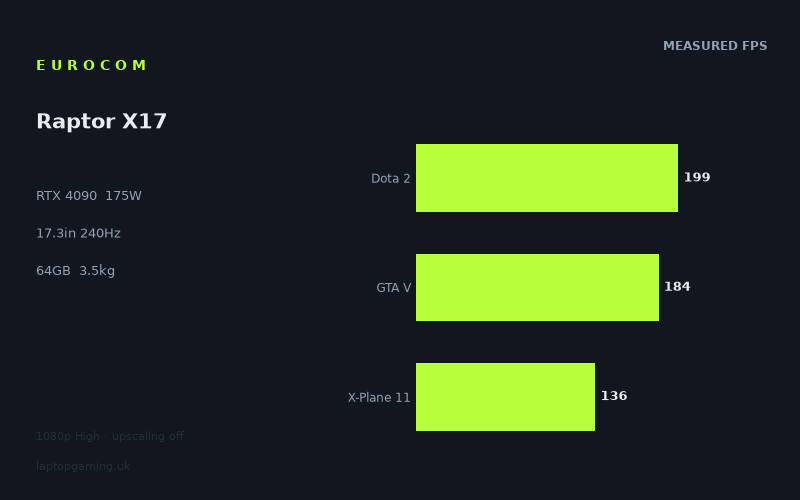
Frame rates
1920×1080, High preset, upscaling off.
Measured on this machine. Source: Notebookcheck, 2023-05-19.
Not scored: incomplete benchmark suite
Every scored laptop on this site is averaged over the same 5 games, and this one is short of Cyberpunk 2077, Baldur's Gate 3. A mean over 3 games is not comparable to a mean over 5, so we publish the figures we have and leave the score blank rather than rank it against machines tested on a different set. The numbers below are real - the suite is just incomplete.
How these numbers were produced
Frame rates here are not measured by us, and we label how each one was arrived at. A figure marked measured comes from a published run on that exact machine. A figure marked representative is derived from the GPU and its power limit (TGP) and cross-referenced against published reviews - a sound estimate of what that configuration delivers, but not a measurement of that specific laptop. Unless stated otherwise, numbers are 1920x1080, High preset, upscaling off. Where a laptop ships in several power configurations we use the wattage of the exact SKU listed, because a 140W RTX 5070 and a 115W one are not the same product.
In use
The short version
The Eurocom Raptor X17 is what a laptop looks like when nobody involved in designing it was asked to make it thin. 17.3in, 3.471kg, a Core i9-13900HX, 64GB of memory, a 99Wh battery, and an RTX 4090 running at a 175W power limit. It is a desktop that folds, and every compromise in it has been made in the same direction.
The measured figures are correspondingly emphatic. Notebookcheck's numbers show The Witcher 3 at 388fps, Strange Brigade at 341fps, and nothing on the record below 136fps except one version-tagged run discussed separately below. Across the three scoring-suite games we hold, it averages 173fps. This is the fastest machine in its immediate group and it is not a close contest against anything below the top tier — it beats a 140W RTX 4050 machine by an average of 104fps across six shared games, which is the widest margin and the best sample size in this comparison set.
What is more interesting, and more useful to a buyer, is where it does not pull ahead. Across the games they share, this machine is level with a 140W RTX 4070 laptop and level with another 175W RTX 4090 laptop — and it is 26fps behind a different RTX 4090 machine. Those results, sitting alongside the 104fps demolition of the entry-tier machine, are the most instructive thing in this review, and they say something specific about what a 4090 buys you at 1080p.
Buy it if you want maximum sustained performance and a large screen and you genuinely do not care about weight. Look elsewhere if the laptop needs to travel, or if your gaming is at 1080p in mainstream titles, because at that resolution the data shows far cheaper hardware keeping pace.
Why there is no score on this page
Every scored machine on this site is averaged across the same five games so the leaderboard compares like with like. For this configuration we hold three of them — Dota 2, GTA V and X-Plane 11 — and we have no Cyberpunk 2077 figure and no Baldur's Gate 3 figure. A three-game average cannot be ranked against five-game averages without distorting the comparison, so there is no score.
There is a subtlety here worth being explicit about. We do hold a Cyberpunk 2077 1.6 result for this machine, at 104fps. That is not the same benchmark as the untagged Cyberpunk 2077 run that the scoring suite uses. A version-tagged result reflects a specific build of the game with its own settings behaviour and its own rendering cost, and treating it as interchangeable with the untagged run would silently corrupt every comparison it touched. So it counts towards no suite, it is never merged into an average, and it appears in this review as context only. It tells you something real about the machine. It does not fill the gap.
The two missing titles are also the two heaviest in the suite — precisely the games that would test this GPU rather than the processor in front of it. Their absence is the main reason the record below, striking as it is, tells you less about the RTX 4090 than it first appears to.
Performance
The figures are Notebookcheck's, dated 19 May 2023, taken at 1920x1080 on the High preset with upscaling turned off. Ten games, spanning from GTA V to Returnal, with the caveat about the version-tagged Cyberpunk run above.
A 175W RTX 4090 is the entire point of this machine
The mobile RTX 4090 is Nvidia's top laptop part of its generation, and — like every other GPU in the range — it is configurable across a power band rather than being a fixed quantity. Where a manufacturer sets that limit is the difference between a top-tier GPU performing like one and a top-tier GPU performing like the tier below. This machine runs it at 175W, which is at the upper end of what mobile silicon of this generation is given.
The 3.471kg mass and the 17.3in chassis are not incidental to that figure; they are what makes it possible. A 175W GPU alongside a Core i9-13900HX generates a large amount of heat that has to leave the machine continuously, and the physical volume required to do that is exactly what a thin laptop does not have. Eurocom has resolved that tension by not attempting to be thin. The weight is the cost of the wattage, stated plainly, and the machine is honest about the trade in a way that thin-and-powerful laptops rarely are.
What that buys in practice is not just peak performance but the ability to hold it. Benchmark runs are short; gaming sessions are not. A large chassis has more heatsink area, larger and slower-turning fans, and far more thermal mass to absorb a sustained load, and everything else being equal it will sustain a given power level more comfortably than a thin one. We hold no temperature, noise or sustained-load measurements for this machine and we are not going to characterise any of them — but the physics favours it, and that is the structural argument for buying a laptop that weighs this much.
The top of the record: 388fps and 341fps
The Witcher 3 returns 388fps and Strange Brigade returns 341fps. Both are extraordinary numbers and both need to be read for what they are rather than taken at face value.
Strange Brigade at 341fps is the near-best-case rasterisation figure. It is a well-optimised Vulkan title used throughout the industry precisely because it establishes what hardware can do when the software is not in the way, and 341fps is a statement about the hardware ceiling rather than about anything you are likely to play.
The Witcher 3 at 388fps is the highest figure on the record and it is a decade-old open-world game running on an engine that was efficient when it shipped. We hold it as an untagged result, which matters: the version-tagged next-generation runs reflect a substantially heavier workload and we never merge the two. At 388fps, the game is running so far beyond any display this machine has — and beyond most displays anyone owns — that the number's practical value is close to zero. Its analytical value is high, though. It tells you the GPU is not the constraint here, and that when a game is light enough, this machine hits a ceiling set by the processor, the API and the engine rather than by the graphics card. Hold on to that, because it explains the comparison results later.
The 200fps band: Tiny Tina's, Dota 2, F1 22 and GTA V
Tiny Tina's Wonderlands at 203fps, Dota 2 at 199fps, F1 22 at 199fps and GTA V at 184fps make up the next tier, and this band is where the machine's practical character sits.
Dota 2 at 199fps is one of the two most useful numbers on the record. MOBAs are latency-sensitive and punish weak processors during teamfights when unit and particle counts spike, and they are almost entirely CPU-bound. 199fps is a strong figure and it is substantially a statement about the Core i9-13900HX. For competitive play on a 240Hz panel, this is close to what you would want: not quite at the display's ceiling, but well into the region where frame rate has stopped being the limiting factor on your performance.
F1 22 at 199fps is the other genuinely useful one. Racing benefits from frame rate more than almost any genre — input latency and the perceived fidelity of motion at speed both improve measurably — and 199fps means you can run at high settings and still be feeding the panel generously in a full-grid wet start.
Tiny Tina's Wonderlands at 203fps is a modern, visually busy shooter running at more than three times the frame rate most people would consider necessary, and it is the clearest single indication that this machine is over-provisioned for 1080p.
GTA V at 184fps is the one figure in this band that is lower than the pattern suggests, and the reason is the same one that appears on every machine we cover: GTA V has been bounded by single-thread CPU throughput and driver overhead rather than by the graphics card for most of a decade. On a machine returning 388fps in The Witcher 3, GTA V at 184fps is not a GPU result at all. It is a ceiling.
The heavier end: Final Fantasy XV, Returnal and X-Plane 11
Final Fantasy XV at 172fps, Returnal at 159fps and X-Plane 11 at 136fps are the lowest untagged figures on the record, and it is worth pausing on how remarkable that sentence is. The worst result this machine posts in the untagged set is 136fps.
Returnal at 159fps is the most informative of the three. Housemarque's engine is genuinely demanding — heavy particle work, aggressive lighting, high geometric complexity in the later biomes — and it is one of the few titles in this record that meaningfully taxes a modern GPU at 1080p. 159fps is an emphatic result and it means the machine has enormous latitude: you could raise the resolution well beyond 1080p, or turn on ray tracing, and still land somewhere very comfortable.
Final Fantasy XV at 172fps is the expected outcome for a port that has always been inefficient relative to how it looks. It leans on the GPU harder than its visuals justify and it is the kind of title where a top-tier card earns its money.
X-Plane 11 at 136fps is the lowest untagged figure and it is not a GPU result. Flight simulators are dominated by single-threaded scenery and physics work, and 136fps here reflects the i9-13900HX. It is a very good number for a CPU-bound title. It is also worth noting that X-Plane 11 is an older build, and the current generation of simulators behaves differently on the same hardware — if simulation is your reason for buying, do not read this figure as a prediction for a newer title.
Cyberpunk 2077 1.6 at 104fps: context, and nothing more
The version-tagged Cyberpunk 2077 1.6 run returns 104fps. It is the lowest figure anywhere on this machine's record and by some distance.
To repeat the point made above, because it matters: this is not the untagged Cyberpunk 2077 benchmark that our scoring suite uses, it is not comparable to it, and it does not fill the gap in the suite. Version-tagged results reflect a specific build with its own settings behaviour and its own rendering cost. Merging them with untagged runs would produce comparisons that look rigorous and are not. It counts towards no suite average on this site.
What it can honestly be used for is context, and the context is informative. Even in this machine's most demanding measured workload, at 1080p High with upscaling off, the result is over 100fps. There is no title on this record — tagged or untagged — where a 175W RTX 4090 in this chassis is anywhere near uncomfortable at the test resolution. That is a meaningful thing to know, and it is the correct amount of weight to give a figure we cannot compare.
Where the spread comes from, and what it reveals
388fps at the top and 136fps at the bottom of the untagged set is a range of a little under three to one, and the composition of that range is more revealing than its width.
Look at where the low results cluster. X-Plane 11 at 136fps, GTA V at 184fps, Dota 2 at 199fps — these are the three most processor-dependent titles in the set, and they are not the ones that stress the graphics card. Meanwhile Returnal, a genuinely GPU-heavy modern game, sits at 159fps, and Tiny Tina's Wonderlands at 203fps. The machine's floor is being set as much by CPU-bound workloads as by rendering cost, which is not the shape you see on mid-tier machines and is a direct consequence of having a GPU this powerful.
That is the central finding of this record and it should govern how you interpret everything below. At 1920x1080, this machine is frequently not GPU-limited at all. The RTX 4090 is finishing its work and waiting. Whatever you paid for the difference between this GPU and a mid-tier one is, at 1080p in these titles, largely unrealised — and the comparison section demonstrates that with uncomfortable clarity.
The corollary is that the way to use this machine is to give the GPU something to do: run at the panel's native 2560x1440, turn on ray tracing, raise settings, or drive an external display at a higher resolution. All of those convert idle GPU capacity into something you can see. Running 1080p on this hardware is buying a lorry to carry a bag of shopping.
64GB of memory and 1TB of storage
64GB is far beyond what any game currently uses and it tells you who Eurocom expects to buy this. It is a workstation specification — virtual machines, large datasets, heavy content creation, simulation work — and on a machine that is already a desktop replacement in every other respect, it fits. For gaming alone it is over-specification, and nothing on this record is being helped by it.
1TB of SSD is the one specification that looks modest against the rest. Modern installs are large, and a handful of them will fill a terabyte. On a machine specified this generously elsewhere it is the component most likely to become the practical constraint, and it is worth checking what the specific unit you are buying allows in the way of additional storage rather than assuming.
The screen
17.3in, 2560x1440, IPS, 240Hz. This is a gaming panel with no ambitions beyond gaming, and for once that is the right decision.
1440p on a 4090 is a sensible pairing
2560x1440 is 3.7 million pixels against 1920x1080's 2.07 million — a little under twice the rendering work of everything measured above. That is a modest step compared with the high-resolution panels fitted to premium machines, and it is the right target for this hardware.
The reasoning follows directly from the performance section. At 1080p this GPU is repeatedly finishing early and waiting on the processor. Roughly doubling the pixel count gives it something to do without moving the machine into territory where frame rates collapse. Rendering cost does not scale linearly with resolution and the CPU-bound titles would barely move at all, so a good many of the figures above would remain very comfortable at native resolution. We hold no measurements at 2560x1440 and this is reasoning rather than data — but the direction is not in doubt, and a machine with a 388fps result and a 203fps result has a great deal of room to give away.
What Eurocom has avoided is the trap that catches premium thin laptops: fitting a panel the GPU cannot feed. A 4K-class display on this machine would have looked more impressive on a specification sheet and would have made the hardware behave worse. 1440p is the resolution at which an RTX 4090 does its best work in a laptop, and the panel is specified accordingly.
240Hz, and how much of it is reachable
240Hz is a serious competitive specification, and this is one of the few machines where it is not simply decorative. But be precise about how far it goes: two of the ten measured titles exceed 240fps at 1080p. The Witcher 3 at 388fps and Strange Brigade at 341fps clear it. Tiny Tina's Wonderlands at 203fps, Dota 2 at 199fps and F1 22 at 199fps come close but do not reach it. Everything else falls further short.
That is at 1080p, with the panel running at 1440p. At native resolution, fewer titles still would approach the ceiling. So the honest position is that even the fastest laptop GPU of its generation, in a chassis that lets it draw 175W, does not saturate a 240Hz display in most games. Anyone selling you a 240Hz panel on the basis that you will see 240fps in modern titles is overselling it, and that is true here as it is everywhere.
None of which makes the panel a waste. High refresh improves the display of frame rates far below its ceiling: with variable refresh, 159fps on a 240Hz panel is delivered with less judder and lower latency than the same 159fps on a 144Hz one, and the difference is perceptible in fast games. For competitive shooters, where you would reduce settings to chase frames anyway, the ceiling is genuinely reachable. And 199fps in Dota 2 is close enough to the panel's capability that the display is doing real work in exactly the games where it matters most.
IPS, and what we do not know
IPS is on record, which tells you something real about viewing angles and colour consistency. It also tells you what this panel is not: it is not an OLED, so it will not deliver the contrast that per-pixel emission gives you, and blacks in dark games will be dark grey rather than black. On a gaming panel prioritising refresh rate and response, that is a conventional and defensible trade.
We hold no brightness, colour gamut, contrast or response time measurements for this panel. Those are exactly the specifications where displays vary most and where "1440p 240Hz IPS" on a spec sheet can describe anything from excellent to mediocre. We are not going to characterise it. If panel quality specifically matters to you, verify it for the exact configuration before buying.
Build, size and portability
3.471kg. That is the number that defines this machine and it should be confronted rather than explained away.
To put it in context, this is roughly half as heavy again as the premium 16in machines that dominate laptop reviews, and comfortably above the weight at which most people stop carrying a computer voluntarily. It is not a laptop in the sense that most people use the word. It is a portable desktop, and the honest way to think about it is as a machine that lives in one place and occasionally moves between places rather than one that travels.
The power adapter compounds this. A machine that permits a 175W GPU alongside a Core i9-13900HX requires a substantial power supply, and the 3.471kg figure is for the laptop alone. Packed for a day out, the total is considerably more. If you were considering carrying this on a commute alongside anything else, do not.
What the mass buys
All of that weight is doing something and it is worth being clear about what. Internal volume permits larger heatsinks with more fin area, and larger fans that can move a given quantity of air at lower rotational speed. Thermal mass absorbs transient loads, so the machine reaches equilibrium more slowly and holds it more steadily. Physical size allows more comprehensive port provision and more room for airflow paths that do not fight each other.
The measured evidence for this working is indirect but real. A 175W GPU power limit is not something a manufacturer can specify by choice alone — the chassis has to be able to remove that heat continuously or the limit is theoretical. Eurocom has specified 175W and the frame rates are consistent with the GPU being fed properly. We hold no thermal or acoustic measurements and we are not going to invent an impression of how it sounds under load, but the structural case is sound.
The 17.3in screen is the other half of the trade. A 17.3in panel is a genuinely different working and gaming experience from a 15.6in one, and if the machine is going to sit on a desk anyway, there is no reason to accept a smaller display. Combined with 2560x1440, the pixel pitch is comfortable rather than cramped and the screen is large enough to make an external monitor optional rather than necessary.
The 99Wh battery
99Wh is at the very top of what is fitted to laptops. On a machine of this power draw, that is not a promise of long endurance so much as an acknowledgement that anything smaller would be pointless.
We hold no measured runtime figure for this configuration and we will not estimate one. What can be said structurally applies to every machine of this class: gaming unplugged with a 175W GPU is not a meaningful proposition, because the GPU will be power-limited away from the mains and none of the frame rates in this review would apply. The battery exists so the machine can be moved between desks without shutting down and so it can do light work away from a socket. Treat it as a large uninterruptible power supply rather than as a mobility feature.
How it compares
Each comparison is against a machine of the same GPU generation, computed only on games both hold, preferring the scoring suite. The spread is deliberate — the two closest, the machine this one beats by the widest margin, and the machine that beats it by the widest — because a single nearest-rival figure gives you no way to judge whether a small difference means anything at all. In this case the spread is unusually revealing.
Against the Schenker XMG Apex 15 (Late 23), RTX 4050 at 140W: +104fps across 6 shared games
104fps across six shared games. That is the widest margin in this comparison set and it comes with the best sample size, which makes it the most trustworthy result in the section.
The Apex 15 carries an RTX 4050 at 140W — an entry-tier GPU running at a generous power limit, which is worth noting because it means this is not a comparison against a badly configured machine. The Apex is being fed properly. It is simply four GPU tiers below, and across six games the gap averages 104fps.
This result does two jobs. The first is obvious: it establishes that this machine is genuinely, dramatically faster than entry-tier hardware, and that nobody should mistake the ties described below for evidence that GPU tier does not matter. The second is methodological and more important. A six-game shared average at 1080p detected a 104fps difference. That is the largest margin anywhere in this review and it proves conclusively that the comparison method can separate machines when machines are separable. Everything that follows should be read against that fact.
Against the Razer Blade 16 Early 2023, RTX 4090 at 175W: +0fps across 3 shared games
An exact tie against another 175W RTX 4090. Same GPU, same power limit, three shared games, no difference.
This is the least surprising result in the section and the one that most deserves to be stated plainly, because it confirms something the specification sheet already implied: when two machines run the same silicon at the same power limit, they perform the same. The Razer Blade 16 is a far thinner and lighter machine than this one, and at 1080p across these three games it gives up nothing.
Three shared games is a thin sample and the exact zero should not be over-read. What this comparison cannot tell you is how the two behave over a long session, where chassis volume and thermal mass matter, or at higher resolutions where sustained GPU load is heavier. A 3.471kg 17in machine has structural advantages over a thin 16in one in exactly those conditions, and none of them appear in a short benchmark run. We hold no sustained-load data for either machine, so this remains an open question rather than settled in either machine's favour.
The buying implication, narrowly: on 1080p frame rates in these titles, these two are equivalent, and the choice between them is a choice about form factor and everything else. The Raptor X17 is not buying you speed over the Blade. It is buying you size, and whatever the size delivers.
Against the Schenker XMG Fusion 15 (Early 24), RTX 4070 at 140W: +0fps across 3 shared games
And here is the uncomfortable one. An exact tie against a machine with a 140W RTX 4070 — two GPU tiers below, at a lower power limit — across three shared games.
The explanation is the one established in the performance section, and this is where it pays off. At 1920x1080, a large fraction of any shared game set consists of titles that are CPU-bound rather than GPU-bound. GTA V, Dota 2 and X-Plane 11 are all limited by processor throughput and API overhead long before the graphics card saturates. In those titles an RTX 4090 and an RTX 4070 return similar numbers because in neither case is the GPU the constraint — this machine's 388fps in The Witcher 3 and 184fps in GTA V, side by side, are the fingerprint of exactly that. A three-game average weighted towards such titles compresses a genuine two-tier GPU difference to nothing.
Is the tie therefore an artefact? No, and this is precisely why the 104fps result above matters so much. The same method, on the same kind of shared-game average, found a 104fps gap against the RTX 4050 machine across six games and a 26fps gap against another RTX 4090 machine described below. It is not blind. It reports large differences where large differences exist. So the tie against the Fusion 15 is a real result about 1080p performance in these titles, not a failure of measurement.
What it means for a buyer is direct and slightly brutal. If your gaming is at 1080p in mainstream titles, an RTX 4090 buys you very little over an RTX 4070, and the money is better spent elsewhere. The case for this machine's GPU has to be made at higher resolutions, with ray tracing enabled, in heavier titles, or on an external display — all of which are legitimate, and none of which this particular comparison measures. Buy the 4090 for what it does when it is actually working. Do not buy it for 1080p.
Against the Asus ROG Strix Scar 17 (RTX 4090): −26fps across 3 shared games
The Strix Scar 17, also carrying an RTX 4090, averages 26fps more across the three games both machines hold. That is a clear deficit against a machine with the same tier of graphics card.
The obvious explanation would be a power limit difference, and we are not going to reach for it because we hold no GPU power figure for the Strix Scar 17. Without that, attributing the gap to wattage would be a guess dressed as an analysis. What can be said is that the shared games between these two are drawn from the same CPU-sensitive pool that produced ties elsewhere in this section, which means a 26fps difference in that pool is unlikely to be purely about the graphics card. Processor configuration, memory speed, cooling behaviour during the run and driver version all plausibly contribute. Three shared games is a thin sample and the figure should be held loosely.
What the result does establish, alongside everything else here, is that the comparison method resolves differences between machines of the same GPU tier when those differences exist — it reported a tie against one RTX 4090 laptop and a 26fps deficit against another. That is a method behaving sensibly, and it is why the ties in this section can be trusted.
What the four comparisons say together
Against a 140W RTX 4050 across six games: +104fps. Against a 175W RTX 4090 across three: +0fps. Against a 140W RTX 4070 across three: +0fps. Against another RTX 4090 across three: −26fps.
The pattern is the clearest illustration in this batch of what 1080p benchmarking can and cannot resolve. A four-tier GPU gap shows up as a 104fps chasm — the method sees it, unambiguously, with the best sample size in the set. A two-tier gap between a 175W 4090 and a 140W 4070 shows up as nothing at all, because at 1080p in the shared titles neither GPU is doing the limiting.
For this machine specifically, the honest summary is that its enormous GPU is not what distinguishes it at the test resolution. What distinguishes it is the chassis that permits 175W, the 17.3in 1440p 240Hz panel that gives the GPU somewhere to put its surplus, the i9-13900HX behind it, and the 64GB of memory. Those are the reasons to buy it. The frame rates at 1080p are not, because cheaper machines match them.
Who it's for
Buy it if
The machine will not move. This is the precondition for everything else. At 3.471kg plus a large power adapter, this is a desktop replacement in the literal sense — it replaces a desktop, and it should be evaluated against one. If that is what you want, the weight is not a compromise, it is the specification that makes the rest possible.
You want the GPU to actually work. At 2560x1440, with ray tracing on, at high settings, or driving a high-resolution external display, a 175W RTX 4090 delivers something a mid-tier card cannot. The measured 1080p figures understate it precisely because they are 1080p. If you intend to run the machine in those conditions, the hardware is genuinely justified.
You do professional work as well as gaming. 64GB of memory, a Core i9-13900HX and a 17.3in panel are a workstation specification. Simulation, rendering, virtual machines, large datasets — this machine is built for that as much as for games, and the memory configuration in particular makes no sense for gaming alone.
Sustained performance matters more to you than peak. Long sessions, long renders, long compiles. The chassis volume is the argument, and it is a real one even though we hold no sustained-load measurements to quantify it.
Buy something else if
Your gaming is at 1080p in mainstream titles. The +0fps against a 140W RTX 4070 machine is unambiguous and it is the single most important sentence in this review for most readers. At that resolution, in those games, far cheaper hardware keeps pace. Paying top-tier prices for performance you cannot observe is a bad purchase however good the machine is.
The laptop needs to travel. 3.471kg plus adapter is genuinely burdensome and there is no way around it. If you carry a machine even weekly, this is the wrong one, and a lighter laptop with a lower-tier GPU will serve you better in practice than a faster one that stays at home.
You want 240fps in modern games. Two of ten measured titles exceed 240fps at 1080p, and the panel runs at 1440p. The refresh rate is genuinely useful below its ceiling, but it is not a promise the hardware can keep in demanding titles.
You want our score today. Two of the five scoring-suite games are missing, and the Cyberpunk 2077 1.6 figure we do hold is a different workload that we will not substitute in. The ten measured titles above tell you a great deal, but the leaderboard position will have to wait for the untagged Cyberpunk 2077 and Baldur's Gate 3 runs.
The honest summary
The Eurocom Raptor X17 is an unapologetic desktop replacement that does exactly what its specification implies. A 175W RTX 4090 in a 3.471kg 17.3in chassis produces the fastest measured figures in this group by a wide margin over anything below the top tier — 104fps clear of a well-fed entry-tier machine across six shared games — and its lowest untagged result is 136fps in a CPU-bound flight simulator. There is no game on this record that troubles it at the test resolution.
Its weakness is not performance. Its weakness is that at 1920x1080 the GPU is frequently idle, waiting on the processor and the engine, which is why it ties with a 140W RTX 4070 laptop across the games they share. The machine's value depends entirely on whether you will run it in conditions that let the graphics card do its job: native 1440p, ray tracing, high settings, or a demanding external display. In those conditions it is a genuinely formidable machine. In 1080p mainstream gaming it is expensive hardware doing very little, and the data says so plainly.
We have no confirmed UK price for this configuration and two of the five scoring-suite games are missing, so there is no score. What there is instead is a clear picture: a large, heavy, powerful, honestly-engineered laptop with a well-matched panel, aimed at someone who wants a desktop they can occasionally move. If that is you, very little else does the job as directly.