Review
Aorus Elite 16 review
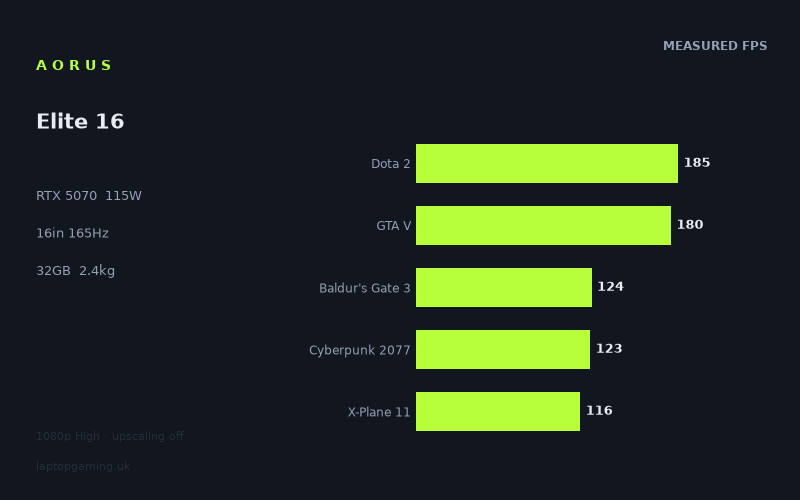
Frame rates
1920×1080, High preset, upscaling off. Averages 145fps across the 5 core benchmark games.
Measured on this machine. Source: Notebookcheck, 2025-08-08.
Not scored: no confirmed UK price
We have the full benchmark suite for this machine, so it ranks on the frame rate leaderboard like any other. What we don't have is a UK listing for this exact configuration - it's sold as a European review unit, or only in specifications that differ from the one tested. Since 30% of our score is value for money, scoring it would mean pretending price is no object, which would flatter it against every laptop you can actually buy. The frame rates below are real and comparable; there is just no buying recommendation to make yet.
How these numbers were produced
Frame rates here are not measured by us, and we label how each one was arrived at. A figure marked measured comes from a published run on that exact machine. A figure marked representative is derived from the GPU and its power limit (TGP) and cross-referenced against published reviews - a sound estimate of what that configuration delivers, but not a measurement of that specific laptop. Unless stated otherwise, numbers are 1920x1080, High preset, upscaling off. Where a laptop ships in several power configurations we use the wattage of the exact SKU listed, because a 140W RTX 5070 and a 115W one are not the same product.
In use
The short version
The Aorus Elite 16 is a machine built from parts that do not obviously belong together. The processor is a Core Ultra 9 275HX, which is flagship-class provisioning — the same chip you find in 18in desktop replacements costing a great deal more. There is 32GB of memory alongside it, and a 1TB SSD. The panel is a 16in 2560x1600 IPS at 165Hz, which is a proper high-resolution display rather than a token one. And then the graphics card is an RTX 5070 held to a 115W total graphics power limit, with 8GB of VRAM.
That is a mid-range GPU with an entry-level frame buffer, sitting behind a flagship processor and driving a panel with almost twice the pixels of the resolution everything was measured at. Every interesting question about this laptop comes out of that mismatch.
Notebookcheck's measurements, taken at 1920x1080 on the High preset with upscaling off, run from 185fps in Dota 2 down to 62fps in Star Wars Outlaws. The five titles in our scoring suite average 146fps. That is a genuinely good set of numbers, and in the games most people spend most of their time in, this machine is comfortably fast.
The comparison data sharpens it considerably. Across five shared games, the Elite 16 is level with two separate RTX 5070 Ti machines — the Acer Predator Helios Neo 16S AI and the Lenovo Legion 5 Pro — with a nil average difference in both cases. It is 57fps clear of an RTX 5050 laptop that costs GBP 984. And it is 55fps behind a Schenker XMG Neo 16 A25 carrying an RTX 5090. Those four results place it precisely: solidly mid-range, punching at the level of the tier immediately above it on this particular workload, and a long way short of the flagship tier.
The case for it rests on the CPU, the memory and the 2.386kg, all of which are better than the class usually offers. The case against it is the 8GB of video memory, which is the one specification here that a fast processor cannot compensate for, and which the machine's own 2560x1600 panel will press on harder than any of the measurements above.
One housekeeping note, stated once and then left alone: we have no confirmed UK price for this exact configuration, and value is a substantial part of how we score a laptop. Without a price we cannot compute it, so this review carries no score. That is a gap in our data, not a fault in the machine — the benchmark suite is complete and it ranks normally on the frame-rate leaderboard.
Performance
What a 115W power limit actually governs
The number that matters most on a gaming laptop's specification sheet is not the GPU's name. It is the total graphics power the manufacturer has decided to give it. Two laptops can carry identical graphics silicon and behave like meaningfully different products, because the chassis, the cooling and the power delivery determine how much of that silicon's capability is actually reachable.
A modern GPU runs against two ceilings simultaneously. There is a clock-and-voltage ceiling set by the silicon itself, and a power ceiling set by the laptop's configuration. At any given instant one of them binds and the other has slack, and which one binds depends entirely on how hard the scene is leaning on the chip.
In a light scene — a simple engine, modest lighting, few draw calls — only a fraction of the GPU's execution units are busy at once. Power draw stays comfortably beneath the limit, so the power ceiling is doing nothing at all and the card runs up against its clock ceiling instead. Under those conditions a 115W part behaves almost identically to the same chip given 140W, because the restriction never becomes relevant. In a heavy scene, with shading, geometry, memory traffic and lighting all saturated at once, power draw climbs until it meets the configured limit. At that point the GPU has one lever remaining: it reduces clock speed until consumption fits the budget. The frame rate falls with the clocks.
The consequence is worth stating plainly, because it is routinely misunderstood. A power limit is not a flat tax on performance. It costs almost nothing in light workloads and progressively more as workloads get heavier, because the heavier the scene, the greater the proportion of time the power ceiling is the binding constraint. It is a tax that scales with the size of the job.
There is a genuine counterweight, and it deserves stating because it is the strongest technical argument in favour of this configuration. Power consumption does not rise linearly with clock speed — it rises steeply, because higher clocks demand higher voltages and power scales with voltage squared. The final few hundred megahertz on any graphics processor are disproportionately expensive in watts. So reducing a power budget by a given fraction does not reduce clock speed by that fraction, and it certainly does not reduce frame rate by it. 115W is a middling allocation for this class of part rather than a punitive one — this GPU is neither strangled nor generously fed, and the measured figures below reflect a chip working within a sensible envelope rather than one gasping.
The measured spread, band by band
Twelve games is an unusually complete data set, and it lets you see the machine's character properly rather than guessing from three or four headline numbers. Every figure below was measured by Notebookcheck at 1920x1080, High preset, upscaling off:
- Dota 2: 185fps
- GTA V: 180fps
- Civilization 7: 166fps
- Final Fantasy XV: 151fps
- Baldur's Gate 3: 124fps
- Cyberpunk 2077: 123fps
- X-Plane 11: 116fps
- Kingdom Come Deliverance 2: 103fps
- Space Marine 2: 99fps
- Until Dawn: 81fps
- Assassin's Creed Shadows: 63fps
- Star Wars Outlaws: 62fps
The top figure is very close to three times the bottom one — 185 divided by 62 is a shade under 3.0. That is the same computer, at the same settings, on the same afternoon, delivering three times the frame rate in one title as in another. Understanding where that factor of three comes from is the single most useful thing a buyer can take from this data, because it determines whether the machine feels fast or merely adequate to any particular person.
The top band — Dota 2 at 185fps and GTA V at 180fps. These are the two entries that say least about the graphics card. Both are mature engines with modest lighting models and low per-frame overhead, and at 1920x1080 neither comes close to saturating a GPU of this class. What limits them here is much more likely to be the processor, the driver and the engine's draw-call path than the 5070 itself. That is not a criticism — it is simply what these numbers are. Anyone whose library consists mainly of titles like these is not buying graphics performance at all, and would see much of the same result from considerably cheaper hardware.
The upper-middle band — Civilization 7 at 166fps and Final Fantasy XV at 151fps. Heavier, but not modern-renderer heavy. Civilization 7 in particular leans on the processor for simulation work in a way that has little to do with graphics throughput, and the Core Ultra 9 275HX is a considerable asset there. These are the numbers that show the machine's unusual CPU provisioning earning its place.
The middle band — Baldur's Gate 3 at 124fps, Cyberpunk 2077 at 123fps, X-Plane 11 at 116fps. This is the most representative part of the list, and it is where the machine's real character sits. Cyberpunk 2077 is the useful one to hold onto: it remains a demanding renderer, and 123fps at native 1080p with no upscaling is a strong result that leaves substantial headroom for turning settings up or resolution up. X-Plane 11 needs separating from the others, because it is a flight simulator and its frame rate is overwhelmingly a function of single-thread processor performance rather than graphics capability. Reading 116fps as a GPU verdict would be a mistake; it is a platform figure, and a decent one.
The lower-middle band — Kingdom Come Deliverance 2 at 103fps and Space Marine 2 at 99fps. Here the modern rendering cohort begins to bite. Both are large, dense, heavily-lit games, and both sit either side of 100fps. This is where the 115W ceiling starts to become the binding constraint rather than an irrelevance, and where the difference between this machine and a better-fed one would begin to be visible if we had the figures to show it.
The floor — Until Dawn at 81fps, Assassin's Creed Shadows at 63fps, Star Wars Outlaws at 62fps. These three are the most important entries in the entire table and they are the ones a buyer is most likely to skip past. They represent contemporary rendering at its most demanding: dense geometry, elaborate lighting, heavy shader and memory loads. At 1920x1080 — a resolution well below this machine's own panel, with upscaling switched off — two of them sit in the low 60s.
Why the bottom of the list matters more than the top
It is tempting to average the twelve numbers and call it a day. That would be misleading, because the fast entries dominate any average in absolute terms while telling you least about the hardware, and because nobody plays an average.
The more useful reading is directional. The games at the top of this list are finished products running on mature engines; they are not going to get more demanding. The games at the bottom are the current state of the art, and the state of the art moves in one direction only. A title released two years from now will look more like Star Wars Outlaws than like Dota 2 in what it asks of the hardware. So the bottom three entries are the honest forecast, and the top two are a description of the back catalogue.
That framing changes the verdict considerably. Judged on its top half, this is a fast machine with room to spare. Judged on its bottom half, it is a laptop that already needs settings compromises or upscaling in the heaviest current releases at a resolution lower than its own screen. Both statements are true. Which one matters depends entirely on what you actually play, and a buyer who plays new AAA releases on launch day should weight the second far more heavily than the first.
It is worth adding, in fairness, that all of these figures were recorded with upscaling switched off, which is the strictest possible test point and not how most people run demanding games. Nvidia's upscaling is available on this hardware and is the obvious lever for the titles at the bottom of the list. We do not hold measured figures with it enabled, so we will not put a number on the improvement — but the option exists, and it materially changes the practical picture for the heaviest games.
Memory: 8GB, and why the panel makes it matter
The 8GB frame buffer is the specification decision that deserves the most scrutiny, and it deserves a calm treatment rather than an alarmed one.
Video memory does not behave like shader throughput. When a GPU lacks processing power, the result is a lower frame rate that is nevertheless smooth and consistent — unpleasant, perhaps, but predictable, and easily fixed by lowering settings. When a GPU runs out of video memory, the result is different in kind: assets have to be fetched across the PCIe bus mid-frame, and the symptom is stutter, hitching and visible texture pop rather than a graceful reduction in speed. A frame-time spike is far more noticeable than a lower average, which is why running short of VRAM feels worse than the raw numbers suggest.
Two things make this more pointed on the Elite 16 than it would be on a 1080p laptop. The first is the panel. Frame-buffer requirements scale with resolution, and this machine's display is 2560x1600 — that is 4,096,000 pixels against 1920x1080's 2,073,600, or just under twice as many. Every measurement in this review was taken at the lower figure. The buyer's own screen will ask for meaningfully more, and none of the published data captures that.
The second is the company the 8GB keeps. It sits alongside 32GB of system memory, a Core Ultra 9 275HX and a 1TB SSD — a configuration that is otherwise notably generous. That combination makes the frame buffer look like a deliberate cost line rather than an oversight, and it is the one component in the machine that a fast processor cannot compensate for. You cannot solve a memory-capacity problem with CPU headroom.
There is a direct connection to the comparison data below. The Elite 16 matches two RTX 5070 Ti laptops on measured 1080p frame rates while carrying less video memory than that class typically offers. The frame rate is the metric a CPU-bound test point can flatter. The frame buffer is not — it is precisely the specification least likely to be rescued by the fact that these measurements were taken at a low resolution. Where the ties above look good for this machine, the memory comparison quietly does not.
None of which makes 8GB unusable today. At 1920x1080 it is broadly adequate, and a great many people will own this laptop for three years and never think about it. It is a statement about the machine's fourth and fifth years, and about anyone who intends to run the panel at its native resolution with textures turned up.
The screen
A 16in 2560x1600 IPS panel at 165Hz is a well-judged specification, and the 16:10 aspect ratio is a genuine and underrated advantage. The extra vertical space is worth real money to anyone who writes, codes, edits or works in spreadsheets, and on a machine carrying this processor and this much memory, the assumption that it will be used for more than games is a reasonable one.
IPS at this size and resolution is the sensible, unglamorous choice. It avoids the static-element burn-in question that hangs over OLED on a machine likely to display the same taskbar and the same game HUD for years, at the cost of OLED's black levels. We hold no measured brightness, contrast or colour-gamut figures for this panel, so we are not going to characterise its image quality beyond the panel technology itself.
The more answerable question is whether the graphics card can actually feed 165Hz, and the honest answer is: in a minority of the measured games, and only at a resolution lower than the panel's own. Of the twelve titles measured at 1920x1080, three clear 165fps — Dota 2, GTA V and Civilization 7. Final Fantasy XV at 151fps comes close. Everything else, which is to say two-thirds of the list, sits below the refresh ceiling, and the bottom of the list sits a very long way below it.
At the panel's native 2560x1600 the count would be lower still. We do not have native-resolution measurements and will not estimate them, but the direction is not in doubt: nearly twice the pixels per frame is not free, and the games that already sit below 165fps at 1080p will not rise above it at 1600p.
That is not an argument against the panel. A high-refresh display remains worth having when the frame rate sits below its ceiling — the latency from input to photon is lower at 165Hz than at 60Hz regardless of what the GPU delivers, and a variable-refresh implementation smooths the gap between the two. We have no confirmation of what adaptive-sync support this specific configuration carries, so check the specification if that matters to you. The point is narrower: anyone choosing this machine specifically for the 165Hz number should know that in most of the measured library, the panel is not the limiting factor. The GPU is.
Build, size and portability
At 2.386kg, the Elite 16 is on the good side of its class. A 16in gaming laptop carrying a Core Ultra 9 275HX and a 115W graphics card could easily weigh more, and a couple of hundred grams is the difference between a machine that goes into a rucksack without much thought and one that gets left at home. Combined with a 16in 16:10 panel, this is a laptop that can plausibly serve as a primary computer rather than a gaming appliance — and the processor and 32GB of memory support that reading.
It is worth being clear that "portable for its class" is not the same as portable. This is still a 16in machine, and it still requires the power supply that a 115W GPU and a flagship mobile processor demand. That brick has real mass and volume, and any honest assessment of what you carry has to include it. This is a laptop that travels between home, office and desk comfortably. It is not an ultraportable.
The battery is 99Wh, which is effectively the largest capacity permitted in aircraft cabin baggage. On a gaming laptop that figure is easy to misread. It does not translate into extended gaming away from a socket: a 115W graphics card and a 275HX cannot run at anything close to full output on battery power, and no laptop in this class attempts it. The sensible way to read a large battery here is as away-from-gaming endurance — the browsing, writing and video that fill most of a laptop's life. We hold no measured battery runtimes for this machine, so we will not put a number on any of it.
The 1TB SSD is adequate rather than generous. Modern installations routinely exceed 100GB each, and a 1TB drive holds fewer contemporary games than most buyers expect. It is not a problem so much as a thing to plan around.
How it compares
Every comparison below is drawn only from games both machines have been measured on, and each of these four rests on the same sample size: five shared titles. What makes this set unusually informative is that all four rivals carry current-generation silicon, so there is no cross-generation argument about drivers or architectural era to have. This is a clean reading of where a 115W RTX 5070 sits among its contemporaries.
Level with two separate RTX 5070 Ti machines
The strongest finding in the data is that this machine is level with the tier above it — twice over, independently.
Against the Acer Predator Helios Neo 16S AI, which carries an RTX 5070 Ti and has a confirmed UK price of GBP 2,679, the average difference across five shared games is nil. Against the Lenovo Legion 5 Pro, also carrying an RTX 5070 Ti, the average difference across five shared games is also nil. Two different manufacturers, two different chassis, both fitted with the next graphics card up, and neither shows a measurable average advantage.
That is a real result and it should be explained rather than simply celebrated. A nil average across five shared games at 1920x1080 on the High preset means those titles are frequently limited by something other than graphics throughput — the processor, the engine, the draw-call path, plain frame-time overhead. When that happens, two GPUs of genuinely different capability converge, because neither is being asked for everything it has. The Core Ultra 9 275HX in this machine is a strong processor, which helps it hold its own in precisely the CPU-sensitive titles where these convergences occur.
What the result does not mean is that a 5070 at 115W and a 5070 Ti are equivalent parts. They are not. It means this measurement cannot separate them. The place they would separate is the heavier end of the library and the higher end of the resolution range — which is to say, at the Elite 16's own 2560x1600 panel, and in the titles at the bottom of the measured list. We do not hold figures at that resolution, and we are not going to invent them. But a larger GPU with more memory has more room to grow into a harder workload, and that is where the tier difference would show.
Comfortably clear of the entry tier
The MSI Cyborg 15 runs an RTX 5050 and costs GBP 984. Across five shared games, the Elite 16 averages 57fps ahead.
This comparison does essential analytical work, and it is the reason the two ties above can be trusted. A sceptic could dismiss any tie as an artefact of an undemanding test — the claim being that 1920x1080 simply cannot separate anything, so of course everything comes out level. The Cyborg result refutes that directly. Where a genuine capability gap exists, this test point still shows it, and shows it emphatically: 57fps is an enormous, unambiguous margin, nothing like run-to-run variance.
The measurement is not blind. It resolves real differences perfectly well when real differences are present. Which means the ties against the two 5070 Ti machines are findings, not failures — on this workload, those laptops genuinely are delivering what this one delivers.
The ceiling, and it is a long way up
The Schenker XMG Neo 16 A25 carries an RTX 5090. Across five shared games, it averages 55fps ahead of the Elite 16.
State that plainly: this is a mid-range graphics card, and the money above it buys real, measured performance. Fifty-five frames per second is far outside anything explicable by benchmark variance, and it is a useful corrective to the ties above. The tier structure has not collapsed. It is simply that the step from a 5070 to a 5070 Ti is invisible at this test point while the step to a 5090 is not.
We do not have the Schenker's power limit in our data, so we will not attribute the gap to any specific cause beyond the obvious difference in graphics tier. What matters for a buyer is the shape of the result rather than its precise mechanism.
What the four results add up to
Arranged on a line, the machine's position is unusually legible. It is 57fps clear of an RTX 5050 laptop at GBP 984. It is level with an RTX 5070 Ti laptop at GBP 2,679, and level with a second RTX 5070 Ti laptop. And it is 55fps behind an RTX 5090.
Two of those four rivals have confirmed prices, and together they bracket the decision in a way that is rare in our data. At the lower bound, GBP 984 buys a machine this one beats decisively. At the upper bound, GBP 2,679 buys a machine that matches it on measured output while carrying more graphics headroom and a larger frame buffer for the future.
That upper bound is the harder of the two for the Elite 16. If a quoted price lands at or above GBP 2,679, the argument becomes difficult: the buyer would be paying the same or more for the same measured frame rates, less video memory and less headroom, in exchange for the CPU, the memory and the lower weight. Those are real advantages and some people should take them. But they are the advantages of a different product, not a better graphics laptop. The Elite 16 needs to land meaningfully below that figure to make straightforward sense.
Why there is no score
We have no confirmed UK price for this exact configuration. Value carries substantial weight in how we score a laptop, and it cannot be computed without a price, so this machine is unscored.
That is worth separating from any judgement about the machine itself. The benchmark suite is complete — all five scoring-suite titles are present, and the Elite 16 ranks normally on the frame-rate leaderboard against everything else we hold. The missing piece is commercial, not technical. We will not guess at what it costs, because a guessed price would produce a fabricated score, and a fabricated score is worse than none.
Who it's for
This machine suits someone who needs a computer as much as a games console. The Core Ultra 9 275HX, the 32GB of memory and the 16:10 2560x1600 panel are a serious work configuration, and they are meaningfully better than what this class usually offers. If you compile, render, edit, model or simply keep forty browser tabs and a virtual machine open, that provisioning is doing something for you every hour you are not gaming, and it is the strongest argument for choosing this over a laptop with a bigger GPU and a weaker platform.
It suits someone whose library sits in the top half of the measured list. If what you play is strategy, simulation, esports and the back catalogue, this machine is comfortably fast — several of those titles are already running past the panel's refresh ceiling, and the comparison data shows that spending more on graphics would buy you very little.
It suits someone who moves their laptop. 2.386kg for a 16in machine with this processor is genuinely good, and the difference between this and a 3kg-plus alternative is the difference between a laptop that travels and one that does not.
Who should buy something else
Anyone who plays new AAA releases at the panel's native resolution. The bottom of the measured list — the low 60s in the two heaviest titles, at 1920x1080, with upscaling off — is the relevant number, and the machine's own screen asks for nearly twice those pixels. You will be using upscaling and reducing settings from the start, and that is not what a 2560x1600 panel is for.
Anyone keeping a laptop four or five years. The 8GB frame buffer is the reason, and it is not a marginal concern. It is the specification least likely to be rescued by anything else in the machine, and the one that produces the most unpleasant failure mode when it runs short.
Anyone who can buy an RTX 5070 Ti machine for a price they can actually see. The Helios Neo 16S AI at GBP 2,679 ties this laptop across their shared games while holding more graphics headroom and more video memory. Unless the Elite 16 is quoted well below that, the comparison is uncomfortable.
Anyone shopping purely on frame rate per pound. The GBP 984 MSI Cyborg 15 sits 57fps behind, which is a real gap — but it is also less than half the price of the only comparable machine in this set that has one. If measured frames are all you want and your budget is the binding constraint, the cheaper machine is not embarrassed here.
The honest summary is that the Aorus Elite 16 is a good laptop with one weak component and one missing number. The weak component is the frame buffer, and it will matter more over time rather than less. The missing number is the price, and until it exists, the most useful thing we can tell you is exactly where the measured performance sits: level with the tier above at 1080p, well clear of the tier below, and a long way short of the top.