Review
Alienware m18 R1 review
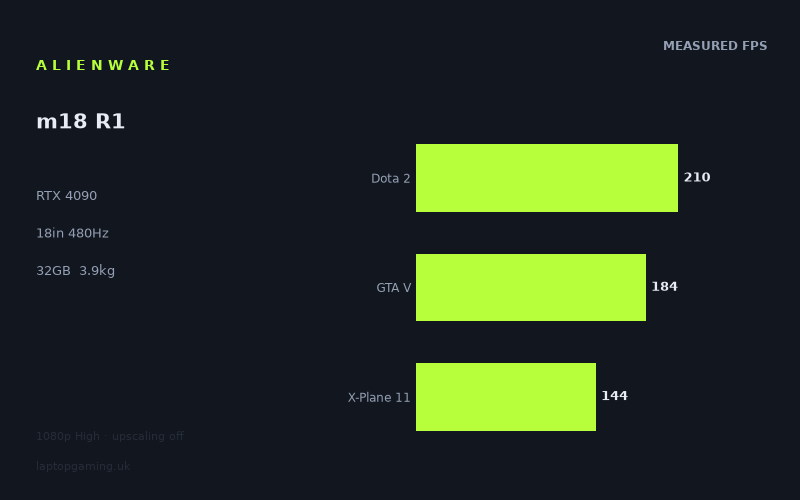
Frame rates
1920×1080, High preset, upscaling off.
Measured on this machine. Source: Notebookcheck, 2023-04-03.
Not scored: incomplete benchmark suite
Every scored laptop on this site is averaged over the same 5 games, and this one is short of Cyberpunk 2077, Baldur's Gate 3. A mean over 3 games is not comparable to a mean over 5, so we publish the figures we have and leave the score blank rather than rank it against machines tested on a different set. The numbers below are real - the suite is just incomplete.
How these numbers were produced
Frame rates here are not measured by us, and we label how each one was arrived at. A figure marked measured comes from a published run on that exact machine. A figure marked representative is derived from the GPU and its power limit (TGP) and cross-referenced against published reviews - a sound estimate of what that configuration delivers, but not a measurement of that specific laptop. Unless stated otherwise, numbers are 1920x1080, High preset, upscaling off. Where a laptop ships in several power configurations we use the wattage of the exact SKU listed, because a 140W RTX 5070 and a 115W one are not the same product.
In use
The short version
The Alienware m18 R1 is the most single-minded machine in this part of our data, and understanding it means understanding one decision. Dell has taken an RTX 4090 and a Core i9-13980HX — as much hardware as this generation offered — and attached them not to a high-resolution panel but to an 18in display running at 1920x1200 and 480Hz. That is a deliberate and unusual combination. It is a flagship built to produce frames rather than pixels.
Notebookcheck's measurements show it doing exactly that. The Witcher 3 runs at 442fps, Strange Brigade at 388fps, F1 22 at 318fps, Tiny Tina's Wonderlands at 232fps. The three scoring-suite games we hold average 179fps: Dota 2 at 210fps, GTA V at 184fps and X-Plane 11 at 144fps. Nothing in the measured set falls below 144fps. This is the fastest set of numbers in this group of machines, and it is not close.
The comparison data is the clearest demonstration in our whole database of what a benchmark can and cannot resolve. Against a Lenovo Yoga Pro 9 16IMH9 carrying an RTX 4050 at 100W, the m18 R1 is 144fps ahead across seven shared games — the widest margin anywhere in this batch, by a large distance. Against a Lenovo Legion 9 with an RTX 4090 at 175W it is two frames ahead across three games, and against a Schenker XMG Neo 16 with an RTX 4090 at 175W it is one frame behind. Against an Asus ROG Strix Scar 17, also an RTX 4090, it is 20fps behind.
Read those four together and the picture is unambiguous. The instrument has an enormous range — it found 144fps between this machine and a 4050 laptop. When it finds no meaningful gap between this machine and two other 4090 laptops, that is a real result: at this resolution, in these games, three flagship machines with the same graphics silicon are the same product. And the 20fps deficit to a fourth 4090 machine says they are not quite all the same, which is worth taking seriously.
The costs are substantial and honestly stated. This machine weighs 3.891kg, which is the heaviest in this group and heavy in absolute terms. The panel's 1920x1200 resolution across 18in is a low pixel density — you are trading sharpness for frame rate, deliberately. And our record holds no GPU power limit for it, which is frustrating on a machine where two of its direct rivals have theirs recorded at 175W.
There is no score on this page. Our scoring suite is five games and we hold three: Dota 2, GTA V and X-Plane 11. We have no Baldur's Gate 3 figure, and while our record does hold a Cyberpunk 2077 result, it is from the game's 1.6 build rather than the version the suite uses, so it cannot substitute. Ranking a three-game average against every other machine's five-game average would corrupt the leaderboard, so we publish none.
Buy it if you play competitive titles at 1200p and want the frame rate ceiling raised as far as this generation could raise it. Look elsewhere if you want a sharp screen, if you need to carry the machine, or if your games are heavy single-player releases where the panel's resolution stops being the point.
Performance
The power limit our record does not hold
Nvidia's laptop GPUs ship to manufacturers with a configurable power limit rather than a fixed one, and the manufacturer chooses where in that band to run it based on what the chassis can cool and how much noise is acceptable. This is the most consequential variable in laptop gaming and the least advertised, because the performance range within a single GPU model routinely exceeds the gap between adjacent models. It is why two laptops carrying the same RTX 4090 can be meaningfully different machines.
Our record holds no power limit for the m18 R1. It does hold one for two of its rivals: 175W for the Legion 9's RTX 4090 and 175W for the Schenker XMG Neo 16's. That asymmetry is unfortunate, because the comparison data below is exactly the kind a power limit would explain in a sentence.
We will not estimate it. What can be said without estimating is that the machine performs level with both of those 175W laptops across three shared games — two frames ahead of one, one frame behind the other. That is consistent with a similarly aggressive configuration, and it is consistent with all three machines hitting a ceiling imposed by something other than their graphics cards. Those two readings are not the same and our data cannot separate them.
What context does support is that the chassis is not the limiting factor. This is an 18in machine weighing 3.891kg with a 97Wh battery — a laptop built without any evident concern for portability, which is precisely the design brief under which manufacturers configure GPUs aggressively. There would be very little point building a machine this large and then starving the graphics card.
The measured set, and why it is unusually light
Nine games at 1920x1080 on the High preset with upscaling off, spanning 442fps to 144fps. That range is a factor of about three, which is narrow, and the floor of 144fps is extraordinarily high. On most machines in our data the bottom of the table is where the interesting analysis lives. Here there is no bottom to speak of.
Before reading anything into that, the composition of the set has to be acknowledged, because it does a great deal of the work. These measurements are from April 2023, and the games reflect it: The Witcher 3, Strange Brigade, F1 22, GTA V, Dota 2, Final Fantasy XV and X-Plane 11 are all titles that were mature or old at the time of testing, and several of them are among the least GPU-dependent games in regular benchmark use. This is a light, old test set, and it is asking an RTX 4090 almost nothing.
That is not a criticism of the measurements, which are what they are and were taken when they were taken. It is essential context for interpreting them, and it is the reason our comparisons are restricted to games both machines hold rather than comparing overall averages — an overall-average comparison against a machine measured on a heavier, later set would be meaningless.
The top of the table — The Witcher 3 at 442fps, Strange Brigade at 388fps, F1 22 at 318fps — is remarkable to look at and tells you relatively little about the graphics card. Figures at that level in those titles are governed by how quickly the processor can prepare frames and by engine limits, not by GPU capacity. The Core i9-13980HX is producing exceptional numbers, and that is genuinely the point of this machine given the panel it is attached to, but it should not be mistaken for a demonstration of what the 4090 can do under load.
The middle — Tiny Tina's Wonderlands at 232fps, Dota 2 at 210fps, Final Fantasy XV at 195fps, GTA V at 184fps — includes two of our three scoring-suite results. Both are heavily processor-bound at this resolution. Dota 2 does not trouble any RTX 40-series card; GTA V leans on single-thread processor performance and stopped being GPU-limited on hardware of this class years ago. Neither number is measuring the graphics card.
The bottom — Cyberpunk 2077 1.6 at 148fps and X-Plane 11 at 144fps — contains the only title in the set that is genuinely a graphics test, and it is not in the scoring suite. Cyberpunk at 148fps is the single most informative number here, because Cyberpunk will consume whatever GPU capacity is available. X-Plane 11 at 144fps is the opposite: its simulation loop is famously processor-heavy and largely indifferent to graphics hardware, so a figure at the bottom of the table is not a comment on the 4090 at all.
The honest summary of the performance section is therefore uncomfortable but accurate. Of nine measured games, one is a real test of the graphics card, and it is excluded from our scoring suite on a technicality about game versions. The rest demonstrate that the processor is very fast and that the machine can feed a high-refresh panel — which, given what this laptop is for, is arguably the more relevant capability.
The Cyberpunk version problem, and why there is no score
We hold three of our five scoring games: Dota 2 at 210fps, GTA V at 184fps and X-Plane 11 at 144fps, averaging 179fps. We have no Baldur's Gate 3 result. We do have a Cyberpunk 2077 number, at 148fps, but it is from the game's 1.6 build.
That distinction is worth explaining rather than glossing over, because it looks like pedantry and is not. Cyberpunk 2077 changed substantially across its major updates in ways that affect how it loads graphics hardware. A figure measured on one build cannot be dropped into an average assembled from another without introducing precisely the kind of quiet, invisible error our scoring exists to prevent. So the 1.6 result stays in the results table, where it is genuinely useful, and out of the suite average.
The consequence is that we publish no score, and — as with the light test set — the specific data missing is the data that would show this machine at its most interesting. Baldur's Gate 3 and a current-build Cyberpunk are the two most GPU-bound titles in our suite. Without them, the three games we hold are all processor-bound, and the average is close to a measurement of the Core i9-13980HX with a 4090 attached.
What the frame rates mean in practice
At 1080p, in the games measured, there is no scenario in this data where the machine struggles. A floor of 144fps across nine titles is not a performance profile that requires planning around; it is a machine that will run anything from its era with enormous headroom.
The useful question is what that headroom is for, and this machine answers it more clearly than most. It is not for higher resolution — the panel is 1920x1200. It is not for future-proofing at high settings, though it provides that incidentally. It is for feeding a 480Hz display, which is a use case that requires exactly this combination of a very fast processor and a graphics card with capacity to spare, and which no lesser machine can serve.
The screen
1920x1200 on an 18in panel — the central trade
The panel is an 18in IPS unit at 1920x1200, a 16:10 ratio, refreshing at 480Hz. The resolution is the most consequential decision in the entire specification and it deserves to be assessed on its own terms rather than dismissed.
The immediate benefit for a reader of this review is unusual and worth stating: the measured figures here are close to what the machine does on its own screen. Every frame rate above was taken at 1920x1080. The panel is 1920x1200 — the same width, with a strip of extra vertical pixels, amounting to roughly a tenth more in total. That is close to nothing in GPU terms. On most machines in this generation, 1080p benchmark figures require a substantial mental discount because the fitted panel is 1440p or 1600p. Here that correction is negligible. When this review says Cyberpunk 2077 ran at 148fps, that is approximately what the machine will do on the display in front of you.
The cost is sharpness, and it is a real cost. 1920x1200 spread across an 18in diagonal is a low pixel density — noticeably lower than a 16in panel at 2560x1600, which is the configuration most of this machine's rivals chose. Text will look coarser, fine detail in games will be less resolved, and the difference is visible at normal viewing distance rather than theoretical. Anyone who spends significant time reading or working on the machine will notice.
Whether that trade is correct depends entirely on why you are buying it. For competitive play, frame rate and latency beat pixel density, and a machine that can push a high-refresh panel at native resolution in real games is doing the thing that matters. For everything else — single-player games with detailed environments, media, desktop work, anything where you are looking at the image rather than reacting to it — a 16in 1600p panel is the better display, and there are machines in the comparison set below that have one.
480Hz against what the hardware produces
480Hz is an extreme number and it is worth checking honestly against the data. No measured game reaches it. The Witcher 3 at 442fps is the closest, followed by Strange Brigade at 388fps and F1 22 at 318fps. Everything else is well below.
But the assessment here has to be different from the one that applies to most high-refresh panels, and the reason is that this is the only pairing in our data where the number is nearly attainable. Most high-refresh laptops are attached to GPUs that cannot come close to their panel's rate in any real game. This machine produced 442fps in a large open-world title at the High preset. A competitive player running a Counter-Strike-class game at reduced settings — the actual use case a 480Hz panel is designed for — would plausibly be in the range where the panel is genuinely the limit rather than the GPU.
We hold no measurement of such a title for this machine, so that is an inference from the surrounding data rather than a fact, and it should be read as such. What is a fact is that this hardware gets nearer to feeding its panel than anything else in this group of machines, and that the panel choice and the silicon choice are coherent with each other. Dell has built the whole laptop around one idea and has not compromised on any part of it.
The secondary benefit applies at every frame rate regardless. A high-refresh panel lowers the persistence blur and input latency floor even when the frame rate is far below its ceiling — a game at 184fps on a 480Hz panel with variable refresh is smoother and more responsive than the same 184fps on a slower display. Every result in this table sits comfortably in that band.
IPS, and what our record does not hold
Our record identifies the panel as IPS, which rules out the poor off-axis behaviour of TN and rules out OLED, whose contrast an IPS panel structurally cannot match. Beyond that we hold no brightness figure, no colour gamut coverage and no pixel response time.
The response time gap matters more here than on any other machine in this batch. A 480Hz refresh rate is meaningless if the pixels cannot change state fast enough to keep up — the panel would display new frames while still showing traces of old ones, and the entire premise of the machine would be undermined. Panels sold at these refresh rates are generally specified with fast response in mind, but "generally" is not a measurement of this display and we are not going to assert one. For a buyer whose reason for considering this laptop is the refresh rate, that is the specific number worth hunting down before committing.
Build, size and portability
3.891kg
This is a very heavy laptop. At 3.891kg it is the heaviest machine in this group and heavy by any standard — closer to a small desktop than to a portable computer, and that is before the power adapter, whose weight our record does not hold but which will be considerable for a machine feeding an RTX 4090 and a Core i9-13980HX.
There is no interpretation under which this is portable. An 18in chassis at nearly four kilograms will not fit most laptop backpacks, will not sit comfortably on a tray table or a small desk, and is not a machine anyone opens casually. It gets set up. If the intention is to move it between a bedroom and a living room, or occasionally by car to somewhere it will be plugged in and left, none of that matters. If it needs to travel with any regularity, this is the wrong category entirely, and the comparison set below includes a 16in machine that matches it across three shared games.
The weight is also the reason the machine performs as it does. The chain from chassis volume to cooling capacity to sustained GPU power to frame rate is direct and unavoidable, and a laptop this size has as much of the first as the category offers. Dell has not made a compromise here — it has made a choice, and the choice is coherent with everything else about the machine.
The 97Wh battery
97Wh is a very large battery, at the practical ceiling that aviation rules impose on lithium cells in cabin baggage. Dell has fitted about as much capacity as it is permitted to.
In the context of this hardware it is still, unavoidably, a small battery. No pack of that size sustains an RTX 4090 and a Core i9-13980HX at anything approaching their plugged-in draw, and no laptop battery could. Our record holds no measured runtime, so we will not state one. The structural point is that a machine of this class is designed around mains power; the battery exists to move it between sockets and to handle light work.
That is not a flaw specific to this laptop — it is what an 18in flagship is. A buyer expecting meaningful unplugged gaming has misunderstood the category, and a buyer who wants a large screen with real endurance should be looking at a different kind of computer entirely.
Memory, and what our record omits
32GB of memory is the right amount for this class and is generous by the standards of the generation. It is comfortably beyond what gaming requires, it supports the content work that a machine with this much processor invites, and it removes the specification most likely to feel constrained on lesser laptops.
Our record holds no storage capacity for this configuration, which is a gap worth flagging rather than glossing. A machine of this class would normally carry a large SSD and an 18in chassis normally has room for more than one drive, but neither is a fact about this specific configuration and we are not going to assert either. Confirm both at the point of purchase, along with whether the memory is expandable.
How it compares
Four rivals from the same GPU generation, compared only on games both machines hold, with the scoring suite preferred. None has a confirmed UK price in our record, and neither does this machine, so all four comparisons are about performance alone.
Lenovo Yoga Pro 9 16IMH9 (RTX 4050 at 100W) — 144fps ahead across seven games
This is the widest margin in this batch of reviews by a very large distance, and it is measured across seven shared games rather than the three that support most of the comparisons below. That makes it both the biggest result and the best-founded one.
The Yoga Pro 9 carries an RTX 4050 configured at 100W — the entry tier of this generation, in a machine that is not primarily a gaming laptop. Across seven games it loses by an average of 144fps.
Its function in this analysis is to establish the dynamic range of the instrument beyond any argument. When the comparison method below returns a one- or two-frame difference between this machine and two other RTX 4090 laptops, nobody can reasonably claim that the method simply cannot distinguish machines. The same method, on a broader base of games, produced a 144fps separation. The near-ties are findings, not failures.
It also quantifies the distance across this GPU generation in a way the raw specifications do not. Even in a light, processor-friendly test set, the top and the bottom of the RTX 40 stack are separated by an enormous margin. The compression discussed throughout this review is real, but it operates on differences that are already small — it does not survive a genuine gap.
Lenovo Legion 9 (RTX 4090 at 175W) — two frames ahead across three games
Same GPU tier, and the rival's power limit is recorded at 175W. Across three shared games there is no meaningful difference between the two machines.
Taken alone this is what you would expect. Two RTX 4090 laptops, both presumably configured aggressively, running games where the graphics card is not the limiting component, will converge. The frame rate is being set by the processors and the engines, and both machines have very fast processors.
The comparison is more useful as a calibration point for this machine's own missing power limit. Performing level with a laptop whose 4090 is recorded at 175W is consistent with a similarly aggressive configuration — though it is equally consistent with both machines being limited by something other than the GPU, which in these games they almost certainly are. Our data cannot separate those readings and we are not going to pretend otherwise.
For a buyer the practical point is that the choice between these two should be made on chassis, screen and price rather than on frame rates. The Legion 9 is a 16in machine and this is an 18in one; the m18 R1's panel is 1200p at 480Hz. Those are the differences that matter, and none of them is visible in a benchmark table.
Schenker XMG Neo 16 (Early 24) (RTX 4090 at 175W) — one frame behind across three games
The same result from the other direction, against another 4090 also recorded at 175W. Across three shared games this machine is a single frame per second behind. That is as close to identical as two different laptops get.
Together with the Legion 9 comparison, this establishes a group: three RTX 4090 laptops, two of them at a recorded 175W, all producing the same frame rates in the shared games. The most economical explanation is that all three are configured similarly and that the games do not stress the graphics cards enough to separate them regardless.
There is a genuine buying implication in that. If three flagship machines with the same graphics silicon perform identically in the games we can compare, then the differences that should drive a purchase are the ones outside the benchmark table — screen resolution and refresh rate, chassis size and weight, cooling noise, keyboard, build quality and price. The Schenker is a 16in machine and this is an 18in one at nearly four kilograms; that is a far larger practical difference than one frame per second.
Asus ROG Strix Scar 17 (RTX 4090) — 20fps behind across three games
The Scar 17 carries the same RTX 4090 and beats this machine by an average of 20fps across three shared games. Our record holds no power limit for the Scar 17's GPU, and none for this machine either, so the field that would most plausibly explain the gap is empty on both sides.
20fps is a smaller margin than the ones separating flagships from entry-level machines, and it is measured on a narrow three-game base — worth noting, and worth not over-reading. But it is also clearly larger than the one- and two-frame differences that separate this machine from the other two 4090 laptops, and that pattern is the interesting part. Three of the four 4090 machines in this comparison form a tight group; the fourth sits meaningfully ahead of all of them.
The candidate explanations are the ordinary ones: a different sustained power limit, different cooling behaviour, a different processor pairing, or differences in measurement date and conditions. These measurements are from April 2023 and we cannot see the Scar 17's methodology from here. We are not going to choose between those explanations without evidence, and we are not going to invent a power limit for either machine to make the story tidier.
The defensible conclusion is narrow and worth stating anyway: this is a very fast RTX 4090 laptop, and not the fastest RTX 4090 laptop in our data. On a machine whose entire proposition is occupying the top of the stack, that is a caveat a buyer should know about.
Reading the four together
An enormous win against the entry tier over seven games. Two statistical dead heats against 4090 laptops recorded at 175W. A clear but modest loss to a third 4090 machine. That is a coherent set, and the story it tells is that the top of this GPU generation is a plateau at 1080p — several machines with the same silicon, in a light test set, all arriving at the same place, with the separation between them driven by configuration and cooling rather than by which GPU is fitted.
The corollary for this machine specifically is that its case does not rest on the benchmark comparison. It rests on the panel: 1200p at 480Hz on 18in, fed by hardware fast enough to get within reach of it. No other machine in the comparison set is trying to do that.
Who it's for
The case for buying it
This machine suits a competitive player, and more specifically one who wants a large screen while playing competitively. That is a narrow group, and for that group the specification is not just defensible but close to ideal. The 1920x1200 panel keeps the pixel count low enough for very high frame rates, the 480Hz refresh rate raises the display ceiling further than anything else in this generation, and the RTX 4090 with a Core i9-13980HX is the hardware combination most likely to approach it. The Witcher 3 at 442fps and F1 22 at 318fps show the machine operating in a range almost nothing else reaches.
It suits someone who wants benchmark figures they can trust to translate. The panel is essentially the resolution these games were measured at, so the numbers in this review need almost no discounting — which is not true of most machines in this class, whose 1600p panels make every published 1080p figure an overstatement.
And it suits someone for whom the machine never moves. If it is going to sit on a desk permanently, the 3.891kg is free, the 18in footprint is a benefit rather than a cost, and the mains-power design is irrelevant.
The case against
Do not buy it if you want a sharp screen. 1920x1200 across 18in is a low pixel density and the softness is visible in ordinary use, not just in theory. Rivals in this comparison set are 16in machines at higher resolutions and they will look considerably better for anything that is not competitive gaming.
Do not buy it if it has to move. Nearly four kilograms plus a substantial adapter, in an 18in footprint, is the least portable configuration in this batch. There are 16in laptops here matching its frame rates across shared games at a fraction of the bulk.
Do not buy it for the raw frame rates alone. Across three shared games it is level with two other 4090 laptops and 20fps behind a third. If the goal is simply the highest numbers, this data does not identify this machine as the way to get them — and if the goal is high frame rates at 1080p or 1200p generally, the comparison plateau suggests several machines will serve equally well.
Do not buy it expecting these numbers to characterise modern heavy games. The measured set is from April 2023 and it is light — seven of the nine titles are older or well-optimised games, and only the Cyberpunk 1.6 result asks the graphics card a serious question. A 144fps floor across this set is impressive and it is not a promise about later, heavier releases, which our record does not cover for this machine.
What would change the analysis
Four gaps in our record would sharpen this page considerably. A GPU power limit is the most valuable of them — two of this machine's direct rivals have theirs recorded at 175W, and having this one would turn a set of inferences about configuration into a straightforward comparison. Baldur's Gate 3 and current-build Cyberpunk 2077 figures would let us score the machine and, more usefully, would add genuinely GPU-bound titles to a scoring set composed entirely of processor-bound ones. Measurements of a modern competitive title would test the machine's actual purpose, which the current set does not. And a confirmed UK price would turn all of this into a purchasing recommendation rather than an assessment.
Until then: exceptionally fast, coherently designed around a single unusual idea, level with the other flagships of its generation in everything we can compare, and carrying two real costs — a soft screen and a very heavy chassis — that are the direct and deliberate price of what it does well.