Review
Asus ROG Flow X16 review
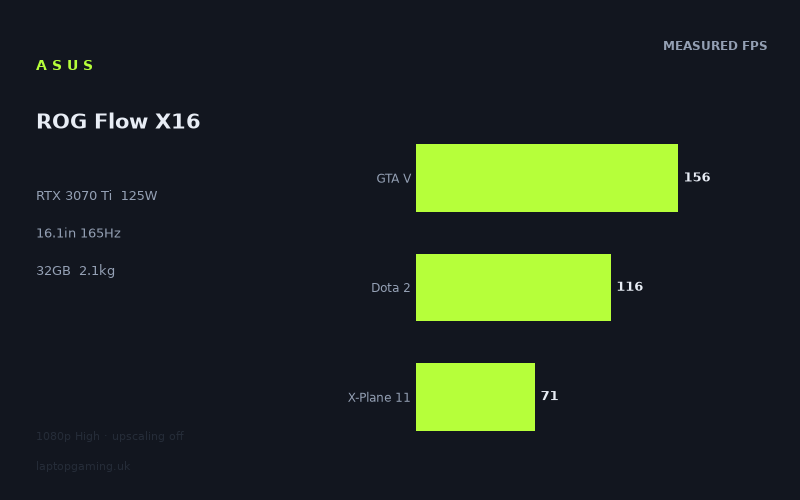
Frame rates
1920×1080, High preset, upscaling off.
Measured on this machine. Source: Notebookcheck, 2022-08-04.
Not scored: incomplete benchmark suite
Every scored laptop on this site is averaged over the same 5 games, and this one is short of Cyberpunk 2077, Baldur's Gate 3. A mean over 5 games is not comparable to a mean over 5, so we publish the figures we have and leave the score blank rather than rank it against machines tested on a different set. The numbers below are real - the suite is just incomplete.
How these numbers were produced
Frame rates here are not measured by us, and we label how each one was arrived at. A figure marked measured comes from a published run on that exact machine. A figure marked representative is derived from the GPU and its power limit (TGP) and cross-referenced against published reviews - a sound estimate of what that configuration delivers, but not a measurement of that specific laptop. Unless stated otherwise, numbers are 1920x1080, High preset, upscaling off. Where a laptop ships in several power configurations we use the wattage of the exact SKU listed, because a 140W RTX 5070 and a 115W one are not the same product.
In use
The short version
The Asus ROG Flow X16 GV601RW-M5082W is a powerful but unusually balanced gaming laptop specification: an RTX 3070 Ti configured at 125W, a Ryzen 9 6900HS, 32GB of memory, a 1TB SSD and a 16.1in Mini LED display with a 2560x1600 resolution and 165Hz refresh rate. The measured gaming figures are strong across a broad set of titles, with Notebookcheck recording a mean of 124fps across the scoring-suite games at 1920x1080 on the High preset with upscaling disabled.
That headline result needs reading properly. This is not a machine that reaches the display’s 165Hz ceiling in every game. It gets there in the lighter and older titles represented by The Witcher 3, Strange Brigade and GTA V, but it is well below that level in Cyberpunk 2077, Assassin’s Creed Valhalla, Metro Exodus, God of War and Dying Light 2. The RTX 3070 Ti is clearly capable, but the 125W power limit places it in a different class from the biggest, heaviest RTX 3080 Ti systems. It is a performance-oriented laptop rather than an attempt to deliver desktop-replacement frame rates at any cost.
The important point is that the ROG Flow X16 does not look underpowered for its specification. Its performance is almost identical to the MSI Katana GF66 with an RTX 3070 at 85W and the Alienware x14 i7 RTX with an RTX 3060 in the shared benchmark sets. That may sound surprising given the names on the GPU badges, but the shared games include lighter titles at 1080p, where CPU limits can compress the difference between graphics chips. The result is still useful: the Asus delivers consistently high frame rates, but not every benchmark exposes the advantage that the RTX 3070 Ti and its 125W limit should provide in more GPU-bound workloads.
This is therefore a sensible choice for the buyer who wants a relatively portable 2.08kg gaming machine with plenty of memory, a large high-resolution display and frame rates that are comfortably above the level needed for responsive play in most of the measured games. It is less compelling for someone whose priority is making full use of 165Hz in every modern demanding game, or for someone who wants hard evidence of native-resolution performance before buying. The available gaming measurements are all at 1920x1080 rather than the screen’s native 2560x1600 resolution.
There is no overall score for this exact configuration because no confirmed UK price is available. The benchmark suite is complete and the laptop ranks normally on the frame-rate leaderboard, but value cannot be calculated without a price. That is not a performance caveat; it simply means there is no responsible way to judge whether this configuration represents good value in the UK at present.
Performance
A strong RTX 3070 Ti result, but not an unrestricted one
The core of this machine is the RTX 3070 Ti running at a 125W GPU power limit. That figure matters. Laptop GPUs with the same name can perform very differently depending on their configured power limit, cooling capacity and chassis design. The GPU name tells you the broad hardware family; the power limit tells you much more about the performance class the laptop is targeting. At 125W, the ROG Flow X16 is configured for serious gaming throughput, but it is not in the same power category as the MSI Raider GE77 HX with its RTX 3080 Ti at 175W.
Notebookcheck’s figures show the Asus handling 1080p High gaming very well across the whole test selection. The benchmark data was recorded at 1920x1080, using the High preset with upscaling disabled, so these are useful clean comparisons of the underlying hardware rather than results lifted by an upscaling mode. That is particularly valuable in games where upscaling settings can produce very different apparent performance between systems.
The mean across the five scoring-suite games is 124fps. That is a high result for a laptop that weighs 2.08kg and uses a 16.1in display rather than a much larger desktop-replacement chassis. It tells you that the ROG Flow X16 is not merely capable of running contemporary games: in the right titles and settings, it has enough performance headroom for high-refresh play. It also has enough RAM that memory capacity should not be the obvious limiting factor in the games represented here.
However, a mean is only a starting point. Gaming laptops are bought to play particular games, and the spread here is large. The range runs from 189fps in The Witcher 3 to 71fps in Dying Light 2 and X-Plane 11. That is not evidence of inconsistency from the laptop. It is evidence that games place very different demands on a system, and that a machine which is excellent for one kind of game is not automatically capable of saturating a 165Hz panel in another.
The games where the 165Hz display is genuinely useful
The Witcher 3 runs at 189fps in the measured configuration. That is above the 165Hz refresh rate of the panel, so the display has sufficient refresh capability to show the benefit of this result rather than becoming the immediate ceiling. For a player who spends time in games with similar performance demands, the ROG Flow X16 has the headroom needed for a very fluid experience at the tested settings.
Strange Brigade reaches 184fps, again above the display refresh rate. It is one of the scoring-suite games and helps explain why the laptop’s scoring-suite mean is so high. This is an example of the RTX 3070 Ti configuration having more than enough throughput for the selected 1080p High workload. It also illustrates why it would be wrong to describe the ROG Flow X16 as merely adequate for a 165Hz panel. In suitable games, it clearly has the speed to take advantage of one.
GTA V records 156fps. That is just below the panel’s stated refresh rate but still firmly in high-refresh territory. A result at this level is not a claim that every scene or every user setting will behave identically, but it does show that the machine is well suited to games where responsiveness and smooth motion are priorities. It is also a useful reminder that a system does not have to reach exactly 165fps to make a 165Hz display worthwhile. A display with that refresh capacity still has room for a frame rate such as this.
Hunt Showdown runs at 126fps, Shadow of the Tomb Raider at 124fps, and Dota 2 at 116fps. These are all strong results, although they sit below the panel’s maximum refresh rate. In practical buying terms, these figures place the ROG Flow X16 in a comfortable position for high-refresh gaming rather than in the narrower category of machines that can be expected to max out the panel across a wide library. That distinction matters because the display specification can otherwise set unrealistic expectations.
Tiny Tina’s Wonderlands reaches 115fps and Far Cry 5 records 113fps. Both results remain comfortably above the frame rates associated with ordinary console-style performance targets, but neither uses the full 165Hz capability of the display. That is not a criticism of the machine. It is the normal reality of pairing a high-refresh, high-resolution panel with a mobile GPU: some games will run far above 100fps, some will approach the refresh ceiling, and some will need settings choices if the player wants a specific higher frame-rate target.
Where the laptop remains fast, but no longer high-refresh in every sense
Final Fantasy XV records 95fps in the scoring suite. Borderlands 3 reaches 92fps. Cyberpunk 2077 1.6 produces 89fps, while Assassin’s Creed Valhalla and Metro Exodus each record 88fps. God of War follows at 84fps. These are not weak results. They show that the ROG Flow X16 can run a group of graphically substantial games at well above 60fps under the measured 1080p High conditions without relying on upscaling.
But they are also the numbers that should shape expectations around the 165Hz screen. Anyone buying the Flow X16 primarily because they want every modern single-player game to operate near the panel maximum should not assume that will happen. In this part of the benchmark list, the laptop is delivering a very good level of performance, but it is not producing the sort of frame rate that makes 165Hz the central story. The benefit of the panel in these games is more about its available headroom and general smoothness than about operating at the display’s limit.
Cyberpunk 2077 1.6 at 89fps is especially useful as a reality check because it is one of the more demanding titles in the data. The result shows that the RTX 3070 Ti at 125W has real strength when upscaling is off, but it also confirms that this is not a no-compromise configuration. The laptop can deliver a high frame rate in Cyberpunk 2077 under the stated settings, yet it remains well short of 165fps. Buyers who intend to prioritise maximum visual settings, native 2560x1600 output and the highest possible refresh should regard the 1080p result as a starting point, not a guarantee of what they will see on the internal panel.
Assassin’s Creed Valhalla and Metro Exodus both reaching 88fps reinforces the same conclusion. The ROG Flow X16 is comfortably able to produce a smooth, responsive result in these games at the measured settings. The 125W GPU configuration is doing meaningful work here. But the frame rates also show why raw GPU naming is not enough. An RTX 3070 Ti laptop can be fast enough to feel premium without being able to erase the performance gap to a high-power desktop-replacement system.
God of War at 84fps belongs in the same category. It is well above a basic playable threshold, and the absence of upscaling in the test conditions makes it a respectable result. Yet it is another game where the screen’s 165Hz rating should not be read as an expected frame rate. The display is capable of 165Hz; the measured game performance depends on the workload.
The demanding end of the data
Dying Light 2 reaches 71fps, while X-Plane 11 also records 71fps. These are the lowest figures in the supplied benchmark set. They remain above 60fps, which is important, but they are far removed from the frame rates seen in The Witcher 3, Strange Brigade and GTA V. This is where the broad benchmark spread becomes most meaningful for a buying decision.
Dying Light 2 demonstrates that the ROG Flow X16 should not be chosen on the assumption that every demanding modern game will run at a high-refresh pace at the tested settings. The laptop can still provide a solid result, but the data gives no basis for claiming that it will approach the 165Hz panel limit in this title. A buyer who regards 60fps to 90fps as a good outcome in visually demanding games will find the result reassuring. A buyer who considers anything below 165fps unacceptable should look for a different class of machine or be prepared to make their own settings decisions.
X-Plane 11 at 71fps is also a useful counterweight to the games that run above 100fps. Flight simulation workloads can behave differently from conventional action games, and this result shows that a high-end CPU and capable mobile GPU do not make every title equally easy to run. The Ryzen 9 6900HS is a strong processor specification, but the benchmark figure is what matters here: the measured configuration delivers 71fps in X-Plane 11 under the stated test conditions.
The key lesson from the low end of the results is not that the ROG Flow X16 struggles. It does not. The lesson is that the laptop is best understood as a machine with broad, high-quality 1080p High performance rather than one with a fixed expected frame rate across all games. The difference between 189fps in The Witcher 3 and 71fps in Dying Light 2 is substantial, and it should influence how a buyer thinks about the 165Hz display, the internal resolution and their own game library.
What the 125W limit means in practice
The 125W GPU power limit positions the ROG Flow X16 between lower-power thin-and-light gaming designs and much larger high-power machines. The comparison data supports that reading. It is dramatically ahead of the MSI Prestige 15 with an RTX 3050 Ti at 105W, while it is not able to match the MSI Raider GE77 HX with an RTX 3080 Ti at 175W. That is exactly the performance territory a buyer should expect from a 125W RTX 3070 Ti configuration: fast enough to deliver excellent results across many games, but not designed to beat the highest-power GPU implementation in the group.
It is important not to reduce that conclusion to a simplistic rule that more watts automatically explain every frame-rate difference. The shared-game comparisons with the MSI Katana GF66 and Alienware x14 show why. The Asus is only 2fps ahead of each of those machines in their respective shared sets, despite the different GPU labels and power configurations. At 1080p, lighter games in the shared selection can be CPU-bound, which compresses genuine GPU differences. In those circumstances, the graphics chip has more potential than the game engine or processor-side workload is allowing it to show.
That means the ROG Flow X16’s 125W limit should be treated as an important specification, not as a promise that it will always beat any lower-labelled or lower-power rival by a large amount. It provides the capacity for strong GPU performance, and the broader game results confirm that the Asus is fast. But the actual advantage over another laptop depends on the game, its engine, the resolution, the selected preset and whether the workload is limited by the GPU or elsewhere.
The supplied measurements are also deliberately useful because upscaling was switched off. That lets the numbers show what the machine can do before introducing another variable. It does not tell us what every available performance mode, graphical setting or resolution choice will produce. It tells us that at 1920x1080 on High, the RTX 3070 Ti and Ryzen 9 6900HS combination is capable of results ranging from 71fps to 189fps across the listed games.
The screen
A display specification that exceeds the measured resolution
The ROG Flow X16 has a 16.1in Mini LED display with a 2560x1600 resolution and a 165Hz refresh rate. On paper, that is an ambitious screen for a 2.08kg gaming laptop. It gives the machine a larger and sharper workspace than a conventional 1920x1080 panel, while the 165Hz refresh rate provides considerably more refresh capacity than a standard 60Hz display.
The most important caveat is straightforward: the gaming figures available here were measured at 1920x1080, not at the display’s native 2560x1600 resolution. There are no supplied native-resolution frame rates for this configuration. It would therefore be wrong to claim that Cyberpunk 2077, Dying Light 2, Assassin’s Creed Valhalla or any other listed game runs at a specific frame rate on the panel at its native setting. We do not have those measurements.
This matters more for the lower part of the benchmark list than for the very highest results. The Witcher 3 at 189fps and Strange Brigade at 184fps provide considerable 1080p performance, but the native panel resolution is a more demanding workload. The data supports confidence that the laptop has strong gaming capability; it does not support a numerical prediction for native 2560x1600 gaming.
For games such as Dying Light 2 and X-Plane 11, both measured at 71fps at 1920x1080 High, a buyer should be especially careful not to assume that the same result will carry over unchanged to 2560x1600. The display is higher resolution than the benchmark setting, and the fact sheet contains no measurement that quantifies the difference. The honest position is that the screen offers a high-resolution option, while the supplied game data establishes performance at 1080p.
When 165Hz matters on this laptop
The 165Hz refresh rate is not wasted. Several of the measured results are high enough to make it meaningful. The Witcher 3 at 189fps and Strange Brigade at 184fps both exceed the display refresh rate, while GTA V at 156fps comes close. Hunt Showdown at 126fps, Shadow of the Tomb Raider at 124fps and Dota 2 at 116fps are also in a range where a high-refresh display is relevant.
That said, the 165Hz label should be seen as the screen’s capability rather than the machine’s universal gaming target. The benchmark spread does not support a claim that the ROG Flow X16 will operate at 165fps in every game. It clearly will not under the tested settings in Final Fantasy XV, Borderlands 3, Cyberpunk 2077 1.6, Assassin’s Creed Valhalla, Metro Exodus, God of War, Dying Light 2 or X-Plane 11.
For a mixed library, the screen is a good fit. Faster and less GPU-limited titles can make worthwhile use of the high refresh rate, while more demanding games can still run at strong frame rates below the maximum. The better interpretation is not that the panel is over-specified, but that it gives the laptop room to show its strengths in games where the hardware can produce very high frame rates.
The Mini LED panel type is another potentially important part of the specification, but the fact sheet does not provide measured brightness, contrast, colour coverage, response time or HDR performance. It would be easy to assume qualities from the panel label alone, but that would not be responsible. What can be said is that this is a Mini LED display rather than a basic panel type, and that its 2560x1600, 165Hz specification is distinctly more ambitious than a simple entry-level gaming screen.
The practical resolution choice
The screen’s native 2560x1600 resolution and the benchmark resolution of 1920x1080 create a real decision for the owner. The high-resolution panel is attractive for general desktop work, creative work and games where image detail is prioritised. The 1080p benchmark data, meanwhile, demonstrates the level of frame rate available when performance is the priority. The right choice depends on the game and the player’s priorities.
In games where the measured performance is already close to or above 165fps, the laptop has substantial room for high-refresh gaming at the test resolution. In titles around 84fps to 95fps, the data suggests a different balance: the laptop is fast, but the display’s full refresh capacity is not the defining advantage. In Dying Light 2 and X-Plane 11, the measured 71fps results make it particularly clear that the user may value image quality and panel resolution differently from a player chasing the highest possible refresh.
There is no single correct setting for every game, and the fact sheet does not provide enough information to prescribe exact native-resolution settings. The sensible conclusion is simply that the display is capable of much more than the benchmark resolution, while the published measurements establish a reliable 1080p High baseline. Buyers should treat those as two separate facts rather than blending them into an unsupported native-resolution performance claim.
Build, size and portability
Portable by gaming-laptop standards, not lightweight in absolute terms
The Asus ROG Flow X16 weighs 2.08kg. That is a meaningful figure because it places the machine in a more transportable category than the largest high-power gaming laptops, without pretending that it is weightless. A 2.08kg laptop is realistic to carry between home, work, university or another regular location, particularly when the buyer values having a 16.1in screen and a 125W RTX 3070 Ti configuration in the same system.
It is not a machine that should be thought of as a tiny ultraportable. The display is 16.1in, there is a 90Wh battery, and the gaming hardware is substantial. The sensible expectation is a laptop intended to move when needed rather than one that disappears into a bag. For many buyers, that is the useful middle ground: enough portability to avoid owning a permanently desk-bound gaming system, but enough specification to run demanding games properly.
No dimensions are provided in the fact sheet, so there is no basis for claims about its thickness, footprint, bag fit or desk space beyond the stated 16.1in screen size and 2.08kg weight. Anyone whose buying decision depends on a particular bag, airline allowance or narrow desk should check the exact physical dimensions before purchasing. The available specification supports a judgement on weight, not a complete judgement on physical volume.
Memory and storage suit the performance level
The 32GB memory allocation is appropriate for a laptop at this performance level. The benchmark data does not identify memory capacity as a limitation, and the specification gives the machine more headroom than a basic gaming configuration. For a buyer who moves between demanding games, multiple applications and heavier general workloads, 32GB is a reassuring part of the package.
The 1TB SSD is similarly sensible. It is enough capacity to make the laptop usable as a primary machine for a meaningful game library and normal everyday storage, though the fact sheet does not state the SSD model, its speed, how much usable capacity remains after software, or whether further storage upgrades are possible. Those details should not be assumed.
The Ryzen 9 6900HS is a strong CPU pairing for the RTX 3070 Ti. More importantly, the measured results show no obvious general collapse in performance that would suggest a poorly balanced specification. The machine ranges from very high frame rates in games such as The Witcher 3 and Strange Brigade to strong results in more demanding titles. The compressed results against some rivals in shared 1080p tests also underline that processor-side limits can become relevant in lighter games, which is normal at high frame rates.
Battery capacity is known; battery life is not
The ROG Flow X16 has a 90Wh battery. That is a substantial battery capacity for a gaming laptop, but capacity is not the same as measured battery life. There are no battery runtime figures in the fact sheet, so no responsible claim can be made about web browsing, video playback, office work or gaming away from mains power.
Buyers should also avoid assuming that the 90Wh battery turns this into a gaming laptop designed for sustained high-performance play away from a charger. The supplied frame-rate figures are benchmark results, not battery-mode gaming results, and they do not establish performance or endurance on battery power. The battery specification is a positive part of the hardware list, but runtime remains unconfirmed here.
How it compares
Against the MSI Prestige 15: a decisive performance advantage
The clearest comparison is with the MSI Prestige 15, which uses an RTX 3050 Ti at 105W. Across four shared games, the Asus ROG Flow X16 averages 56fps more. That is a large margin, not a marginal lead created by one favourable title. It confirms that the RTX 3070 Ti at 125W belongs in a substantially stronger gaming tier than the RTX 3050 Ti configuration in the Prestige 15.
For someone choosing between these two on gaming performance alone, the Asus is the obvious machine. A 56fps shared-game advantage changes the kind of frame rates a player can expect, particularly for games where the Prestige’s lower-tier GPU would be closer to the limits of comfortable performance. The ROG Flow X16’s 124fps scoring-suite mean and its wide collection of results above 100fps make its position clear.
That does not establish which machine is better for every buyer. No price is confirmed for either configuration, and the fact sheet does not provide the Prestige 15’s weight, display specification, battery result or other ownership details. But if the question is straightforward gaming throughput in the shared games, the Asus has a decisive lead.
Against the MSI Katana GF66: virtually tied in the shared set
The MSI Katana GF66 uses an RTX 3070 at 85W. Across five shared games, the ROG Flow X16 averages only 2fps more. That is a near-zero difference in practical terms, and it should not be exaggerated into a meaningful overall gaming win for the Asus.
The comparison is interesting because the Asus has an RTX 3070 Ti at 125W, while the Katana uses an RTX 3070 at 85W. On specifications alone, it would be tempting to expect the Flow X16 to be much faster. The shared-game result says otherwise, but it does not prove that the GPUs are equivalent. The supplied comparison notes explain why: at 1080p, the lighter titles in the shared set can be CPU-bound, compressing genuine GPU gaps.
This is exactly why benchmark context matters. If a game is limited by processor-side work rather than graphics throughput, a stronger GPU cannot necessarily translate its extra potential into a large frame-rate lead. The ROG Flow X16’s broader figures still show strong performance, including 189fps in The Witcher 3 and 184fps in Strange Brigade. But against the Katana in the particular five-game shared sample, the available evidence says the two are effectively tied.
That makes the choice between them dependent on factors not supplied here, including exact UK pricing and the rest of their specifications. It would be wrong to claim that the Asus’s RTX 3070 Ti automatically makes it a substantially faster gaming machine in every situation. The shared data does not support that claim.
Against the Alienware x14 i7 RTX: another near-tie explained by the workload
The Alienware x14 i7 RTX uses an RTX 3060, yet the Asus averages only 2fps more across four shared games. Again, that is effectively a tie in the available sample. It is not evidence that an RTX 3060 is broadly equivalent to an RTX 3070 Ti at 125W. It is evidence that the particular shared games, at the particular 1080p settings, do not expose a large GPU advantage.
The CPU-bound explanation is important here. At 1080p in lighter titles, a laptop can reach a point where the GPU has capacity left but another part of the system is setting the pace. This compresses the difference between machines that would separate more clearly in a heavier GPU workload. The ROG Flow X16’s advantage over the Alienware in the shared set is therefore real but too small to use as a meaningful buying argument by itself.
For buyers, the useful takeaway is that the Asus should not be selected simply because it appears to offer a much higher GPU tier on paper. It should be selected because the full benchmark list shows strong performance across a broad range of games, because it has 32GB of memory, because it offers a 16.1in 2560x1600 Mini LED display, and because its 2.08kg weight may fit the intended use better. The shared-game comparison alone is too close to settle the matter.
Against the MSI Raider GE77 HX: the high-power machine pulls away
The MSI Raider GE77 HX is the machine that beats the Asus by the largest margin in the listed rival group. It uses an RTX 3080 Ti at 175W, and the ROG Flow X16 averages 45fps less across five shared games. That is a substantial deficit, and unlike the 2fps gaps against the Katana and Alienware, it should be treated as a real performance separation.
The comparison neatly demonstrates the trade-off involved in the ROG Flow X16 specification. The Asus is 2.08kg and has a 125W RTX 3070 Ti. The Raider is configured around a 175W RTX 3080 Ti. The Raider’s extra graphics power produces a clear advantage in the shared games. Buyers whose main aim is maximum gaming performance should not expect the Flow X16 to compete directly with that kind of high-power RTX 3080 Ti system.
That does not make the Asus a poor performer. The ROG Flow X16 remains fast enough to produce 124fps across the scoring suite and to exceed 100fps in several games. The Raider comparison simply puts the performance ceiling in context. A 45fps shared-game deficit is the cost of choosing a more portable 2.08kg machine with a different GPU power target rather than a larger high-power design.
As with every rival in this group, no confirmed UK price is available for the exact configuration. There is therefore no evidence-based way to say whether the Raider’s extra performance is worth any possible price difference. The only firm conclusion from the data is performance: the Raider is materially faster in the shared set, while the Asus offers a different balance of speed and portability.
Who it’s for
Buy it for a balanced high-end gaming specification
The ROG Flow X16 makes sense for the buyer who wants high-quality gaming performance without committing to the weight and power target of a large RTX 3080 Ti laptop. At 2.08kg, it is substantially easier to view as a laptop that travels between locations rather than one that is effectively a portable desktop. The 16.1in display, 32GB memory, 1TB SSD and 90Wh battery support that idea of an all-round premium machine, even though the available data does not establish battery runtime.
It is particularly well suited to someone whose game library includes a mixture of older titles, competitive games, action games and demanding modern releases. The measurements show that the machine can run The Witcher 3 at 189fps, Strange Brigade at 184fps, GTA V at 156fps, Hunt Showdown at 126fps and Shadow of the Tomb Raider at 124fps. That is enough performance to make the 165Hz screen meaningful in the right games.
It also suits buyers who are happy with strong rather than absolute maximum performance in demanding titles. Cyberpunk 2077 1.6 at 89fps, Assassin’s Creed Valhalla at 88fps, Metro Exodus at 88fps and God of War at 84fps are all good results under the measured 1080p High settings with upscaling off. A player who values a smooth high-frame-rate experience but does not insist on hitting 165fps in every game should find the ROG Flow X16 well matched to their expectations.
The large memory allocation makes it a more convincing choice for someone who wants one machine for gaming and demanding general use. The fact sheet does not supply application benchmarks, so that should not be translated into claims about specific editing, rendering or compilation performance. But 32GB is a strong specification for a machine expected to handle more than a minimal gaming workload.
Buy something else if 165fps in demanding games is non-negotiable
The ROG Flow X16 is not the right choice for a buyer who interprets a 165Hz display as a requirement that every game run at or near 165fps. The data directly contradicts that expectation. Dying Light 2 and X-Plane 11 are both at 71fps, while God of War is at 84fps, Metro Exodus and Assassin’s Creed Valhalla are at 88fps, Cyberpunk 2077 1.6 is at 89fps, Borderlands 3 is at 92fps and Final Fantasy XV is at 95fps.
Those figures are good, but they are not high-refresh saturation results. If the main purpose of the purchase is competitive play in games where an extremely high and consistent frame rate is the only priority, the buyer should focus on systems with benchmark evidence in those specific games. The screen’s 165Hz capability is valuable, but the machine’s measured performance varies too much across titles for it to be treated as a universal 165fps device.
Buyers who want the highest possible gaming throughput should also look elsewhere. The MSI Raider GE77 HX is 45fps ahead across five shared games. Its RTX 3080 Ti at 175W is configured for a higher performance target than the Asus’s RTX 3070 Ti at 125W. The Raider may not suit the same portability priorities, but the benchmark data is clear about the gaming advantage.
Buy something else if native-resolution proof is essential
A buyer who intends to run every game at the panel’s native 2560x1600 resolution should not purchase on the assumption that the 1080p figures translate directly. They do not. The supplied data contains no native-resolution frame rates, and no review should fill that gap with a guess.
The 2560x1600 Mini LED display is a major attraction of the ROG Flow X16, but it also creates a higher performance expectation than a 1920x1080 panel. The laptop’s benchmark results are strong enough to establish that it is a capable gaming machine, yet only tested native-resolution data can establish the frame rates a buyer should expect at that setting. If that distinction matters to you, wait for measurements that match the resolution you plan to use.
The bottom line
The Asus ROG Flow X16 GV601RW-M5082W is a strong RTX 3070 Ti gaming laptop with a meaningful 125W GPU configuration, excellent 1080p High benchmark performance and a more portable 2.08kg weight than the largest performance-first systems. Its best results are genuinely high-refresh: 189fps in The Witcher 3, 184fps in Strange Brigade and 156fps in GTA V. Its lower results remain respectable, with 71fps in Dying Light 2 and X-Plane 11, but they show that the 165Hz display is an opportunity rather than a universal target.
The right buyer is someone who values a high-resolution 16.1in Mini LED panel, 32GB of memory, 1TB of SSD storage and broad gaming strength in a machine that can be transported more realistically than a full desktop replacement. The wrong buyer is someone seeking the outright fastest frame rates, guaranteed native 2560x1600 performance figures, or a laptop that reaches 165fps in every demanding release.
On measured gaming data alone, the ROG Flow X16 is easy to respect. It is vastly ahead of the RTX 3050 Ti MSI Prestige 15, effectively tied with the MSI Katana GF66 and Alienware x14 in their lighter shared 1080p samples, and clearly behind the high-power RTX 3080 Ti MSI Raider GE77 HX. That is a coherent position in the market: powerful, portable enough to move around, and capable of excellent gaming results, but not a substitute for the heaviest machines built around maximum GPU power.