Review
Aorus 15 BSF review
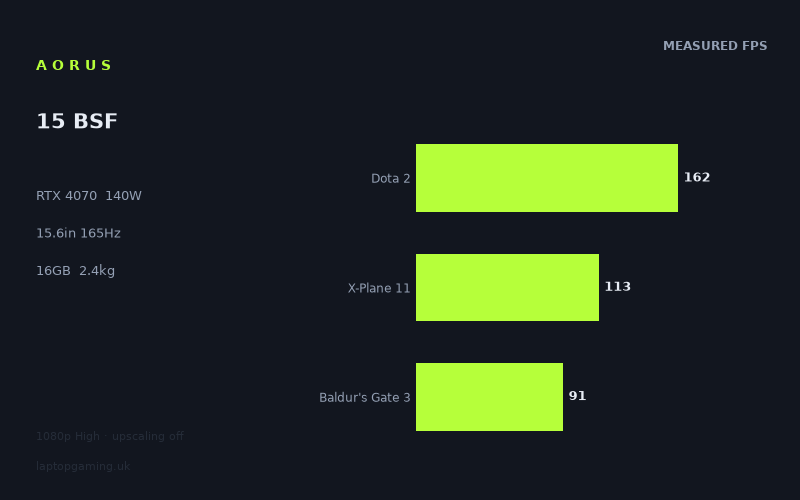
Frame rates
1920×1080, High preset, upscaling off.
Measured on this machine. Source: Notebookcheck, 2023-08-15.
Not scored: incomplete benchmark suite
Every scored laptop on this site is averaged over the same 5 games, and this one is short of Cyberpunk 2077, GTA V. A mean over 3 games is not comparable to a mean over 5, so we publish the figures we have and leave the score blank rather than rank it against machines tested on a different set. The numbers below are real - the suite is just incomplete.
How these numbers were produced
Frame rates here are not measured by us, and we label how each one was arrived at. A figure marked measured comes from a published run on that exact machine. A figure marked representative is derived from the GPU and its power limit (TGP) and cross-referenced against published reviews - a sound estimate of what that configuration delivers, but not a measurement of that specific laptop. Unless stated otherwise, numbers are 1920x1080, High preset, upscaling off. Where a laptop ships in several power configurations we use the wattage of the exact SKU listed, because a 140W RTX 5070 and a 115W one are not the same product.
In use
The short version
The Aorus 15 BSF is one of the more coherent machines in this generation's mid-to-upper bracket, and the reason is a single specification: our record lists its RTX 4070 running at a 140W power limit. That is the top of the band this graphics card is sold in, and in a generation where the same GPU model routinely appears at wildly different power budgets, being at the top of the band matters more than the model number does. Everything good about this machine's benchmark record traces back to that number.
The rest of the specification is sensible rather than exotic: a Core i7-13700H, 16GB of memory, a 1TB SSD, a 15.6in 2560x1440 IPS panel at 165Hz, a 99Wh battery and a 2.413kg chassis. Our record holds no confirmed UK price, so this review cannot tell you whether it is good value — only what it does and how it stands against its peers. That is a real limitation and it is stated here rather than buried.
Notebookcheck's measured frame rates, at 1920x1080 on the High preset with upscaling off, describe a machine performing exactly as a well-fed RTX 4070 should. Strange Brigade and The Witcher 3 both at 231fps, F1 23 at 209fps, Dota 2 at 162fps, Far Cry 5 at 149fps. At the heavy end, Returnal at 104fps, Baldur's Gate 3 at 91fps and Ratchet & Clank Rift Apart at 62fps. Nothing measured falls below the 60-frame mark, and the eleven-title spread from top to bottom is nearly four to one, which tells you the test set is doing its job of covering both light and punishing software.
The comparison data is where the 140W configuration proves itself, though not in the way a spec-sheet reader might expect. Across five shared games the Aorus 15 BSF averages one frame per second ahead of a Schenker XMG CORE 16 (L23), also on an RTX 4070. Across eight shared games it averages one frame per second behind a Schenker XMG Pro 16 Studio (Mid 23), on an RTX 4070 also configured at 140W. Two ties, both against the same graphics card. That is the correct and expected result: when the power limits match, the machines match, and the ties are confirmation that the measurement is behaving sensibly rather than evidence that something is wrong.
The wide margins in the same table prove the benchmark can separate hardware when hardware genuinely differs. Against a Samsung Galaxy Book4 Ultra with an RTX 4050 the Aorus is 71fps ahead across seven games. Against an Asus ROG Strix Scar 17 with an RTX 4090 it is 121fps behind across eight. A method that produces a 71fps surplus at one end and a 121fps deficit at the other is not a blunt instrument; it can see differences perfectly well. When it reports a tie between two 4070s, that tie is a genuine finding about the hardware being equivalent.
There is no score on this page. Our scoring suite is five games and we hold three of them here: Dota 2 at 162fps, X-Plane 11 at 113fps and Baldur's Gate 3 at 91fps, averaging 122fps. We have no GTA V figure and no Cyberpunk 2077 figure. We do hold a Cyberpunk 2077 1.6 result at 97fps, but that is a different build of the game and therefore a different workload — it is context, not a substitute, and it does not enter the average. Three games cannot be ranked against every other machine's five.
Buy the Aorus 15 BSF if you want a 15.6in machine that runs its graphics card at full power, holds 91fps or better in every measured title bar one, and does so in a chassis under 2.5kg with a large battery. Look elsewhere if you need the absolute top of this generation's performance, if 16GB of memory is a constraint for your workload, or if you cannot establish what the machine actually costs — because without a price, no value judgement is possible.
Performance
What a 140W power limit actually buys
Nvidia's laptop graphics cards are configurable products. The same silicon is sold to manufacturers with a power budget they choose within a defined band, and that choice is driven by what the chassis can cool, how much fan noise the target buyer will accept, and where in the market the machine is positioned. The result — well documented and worth stating plainly because it drives every comparison below — is that the gap between a starved example of a GPU and a fully fed one of the same model is routinely larger than the gap between adjacent model numbers. In this generation a 140W RTX 4070 and a low-power RTX 4070 are, for practical purposes, different products sold under one name.
Our record puts the Aorus 15 BSF at the top of that band. 140W is as much power as this GPU is configured with in laptops, and the physical machine described in the specification is consistent with it: a 15.6in chassis at 2.413kg. That is not a thin-and-light. It is a properly built gaming laptop with the volume to support fan diameter, heat pipe cross-section and exhaust area appropriate to a graphics card drawing that much power alongside a Core i7-13700H. There is nothing in the specification that makes the 140W figure implausible, and the measured frame rates corroborate it.
The practical meaning of a full-power configuration shows up in a specific place: the heavy end of the test set. Light games are decided by the processor and the engine; they will run fast on almost any modern graphics card. Where power limits express themselves is in titles that will consume every watt available — and those are the titles at the bottom of this machine's table. Returnal at 104fps and Ratchet & Clank Rift Apart at 62fps are the results that a restrained configuration would not produce. They are the evidence that the 140W figure is real.
The measured spread, from top to bottom
Eleven games are recorded, all at 1920x1080 on High with upscaling disabled. The set runs from 231fps down to 62fps, which is close to a four-to-one spread and immediately tells you the titles are not interchangeable. What this machine feels like depends heavily on which end of that range your library sits in.
Strange Brigade at 231fps heads the table alongside The Witcher 3, also at 231fps. Strange Brigade has been in benchmark suites for years precisely because its Vulkan renderer scales predictably and asks little of the processor; a figure in that region is a healthy sanity check confirming the graphics card is being fed properly. The Witcher 3 matching it exactly is a coincidence of rounding rather than a finding, but it makes the same point: a well-optimised older engine at 1080p High is not a challenge for this hardware.
F1 23 at 209fps is a more modern result and a more useful one. Racing games place a premium on consistent frame delivery rather than raw peak, and a title of that vintage running that far beyond the panel's ceiling at 1080p High indicates substantial headroom. Anyone playing sim racing on this machine has room to raise settings, raise resolution, or both.
Dota 2 at 162fps is a scoring-suite title and deserves a note. 162fps is a good number in absolute terms but it is nowhere near what an RTX 4070 at 140W is capable of producing in a game of Dota 2's visual complexity. That result is not a measurement of the graphics card; it is very largely a measurement of the Core i7-13700H and the engine's own behaviour. The same caveat applies with even less ambiguity to X-Plane 11 at 113fps, whose simulation loop is famously processor-bound and famously unmoved by graphics hardware. Both titles are in the suite because people genuinely buy machines like this to play them, not because they discriminate between graphics cards.
Far Cry 5 at 149fps and Final Fantasy XV at 115fps occupy the middle. Both are comfortably above any threshold where responsiveness becomes a concern, and both are old enough that the settings are not stressing the hardware in the way a 2023 release would.
The bottom of the table is where the graphics card is genuinely working. Returnal at 104fps is a strong showing for a demanding modern title. Baldur's Gate 3 at 91fps is the third scoring-suite figure and the most graphically meaningful of the three, though Baldur's Gate 3 also has a well-documented appetite for processor performance in its later act, so it is not a clean GPU test either. Ratchet & Clank Rift Apart at 62fps is the floor, and it is worth understanding why: that port combines heavy geometry throughput with streaming demands during its transition sequences, and it punishes machines with less graphics power and less memory bandwidth than this one has. Holding 62fps there at 1080p High with upscaling off is a respectable worst case, and it means the machine never drops below playable in anything our record covers.
The Cyberpunk problem, and why we will not fudge it
Our record contains a Cyberpunk 2077 1.6 result of 97fps for this machine, and it does not contain a Cyberpunk 2077 result. Those are two different things and the distinction is not pedantry.
Cyberpunk 2077 has been substantially rebuilt across its lifetime. The 1.6-era game and the current game differ in their rendering paths, their engine behaviour and their performance characteristics, to the extent that a frame rate measured on one build tells you very little precise about the other. Our scoring suite uses the current title. A measurement taken on 1.6 is a measurement of different software running on the same hardware, and folding it into the suite average would be inventing a comparison that does not exist.
So the 97fps figure stays where it belongs: as useful background about how this machine handled a heavy, ray-tracing-capable open-world title at 1080p High in 2023, and as further corroboration that the 140W configuration is producing real work at the demanding end. It is not, and will not be treated as, a Cyberpunk 2077 suite result. Anyone who wants to compare this machine to a scored laptop on Cyberpunk 2077 needs a figure we do not have.
Why three of these numbers count and the other eight are context
Our scoring suite exists so machines can be compared on identical software rather than on whichever titles were current when each was reviewed. For the Aorus 15 BSF we hold three of five: Dota 2 at 162fps, X-Plane 11 at 113fps and Baldur's Gate 3 at 91fps, a mean of 122fps. GTA V and Cyberpunk 2077 are both missing.
Look at that list against the analysis above and a structural issue is obvious. Two of the three surviving titles — Dota 2 and X-Plane 11 — are substantially processor-limited at 1080p on hardware of this class. Only Baldur's Gate 3 asks the graphics card a serious question, and even that one is mixed. The three-game mean therefore carries a heavy processor weighting and a light graphics weighting, which is the opposite of what a buyer choosing between graphics cards wants it to measure.
The two missing games would have helped in opposite directions. GTA V is an old, single-thread-dependent title that would have added a fourth processor-weighted result. Cyberpunk 2077 is the closest thing the suite has to a pure graphics test at 1080p and would have been the one number capable of separating a 140W RTX 4070 from a restrained one. Its absence is the more costly of the two.
The consequence is procedural: no score. A three-game average cannot be ranked against machines averaged over five without introducing a systematic bias whose direction depends on which games are absent. We publish the three numbers, publish their mean, and decline to publish a ranking that would not mean what it appears to mean.
What this means when you actually play something
Setting comparisons aside, the practical picture is straightforward and good. Every measured title runs above the 60-frame mark. Eight of the eleven reach 104fps or better. Five reach 149fps or better. If your library is competitive shooters, strategy games, racing or anything predating the heaviest 2023 releases, this machine will produce frame rates beyond what the panel can display, and will do so with enough headroom that raising settings is a genuine option rather than a theoretical one.
If your library is the heavy end — the Returnal and Ratchet & Clank tier and whatever has followed them — you are looking at the 62 to 104fps band at 1080p with upscaling switched off. That is entirely playable, and the fact that it was achieved without DLSS means upscaling remains available as headroom rather than as a requirement. As games have continued to get heavier since these measurements were taken in August 2023, that headroom is the thing that keeps a machine of this tier usable.
What our record does not contain is any measurement at the panel's native 2560x1440. That resolution carries roughly 78 per cent more pixels than the 1920x1080 the benchmarks use, and essentially all of that additional load falls on the graphics card. A machine running its RTX 4070 at 140W is better placed to absorb that increase than one running the same card conservatively — that is exactly what the extra power is for — but this review will not put numbers on it, because we do not have them.
The screen
15.6in at 2560x1440
The panel is a 15.6in 2560x1440 IPS at 165Hz. That is a well-judged specification for the hardware behind it, and the reason is that QHD is the resolution an RTX 4070 was built to drive. 1920x1080 leaves this class of graphics card idling in a majority of titles — the 231fps results at the top of the table are the proof — while 4K would leave it struggling in anything demanding. 2560x1440 sits in the band where the card is meaningfully loaded but not overwhelmed, which is where you want your native resolution to be.
On a 15.6in diagonal, QHD produces a pixel density high enough that the improvement over 1080p is clearly visible without display scaling becoming mandatory for desktop work. The aspect ratio is 16:9 rather than the 16:10 that became more common later in this generation, which costs some vertical working space in productivity applications but matches full-screen video exactly.
165Hz, and what actually reaches it
A high refresh rate is only worth what the machine can feed it. Working through the measured set at 1080p: Strange Brigade at 231fps, The Witcher 3 at 231fps and F1 23 at 209fps all clear 165fps comfortably. Nothing else in the table does. Dota 2 at 162fps arrives within touching distance. Far Cry 5 at 149fps, Final Fantasy XV at 115fps, X-Plane 11 at 113fps and Returnal at 104fps sit well below it, and Baldur's Gate 3 at 91fps and Ratchet & Clank at 62fps are far below.
At the panel's native 2560x1440 those figures would all fall further. The realistic reading is that 165Hz is reachable in light and older titles and aspirational in everything else, which is the normal position for a gaming laptop of this tier and generation rather than a criticism specific to this machine.
The value of the refresh rate is not that games hit the ceiling. It is that the panel is never the limiting factor: whatever frame rate the machine produces is displayed without tearing or judder, motion clarity improves across the whole range rather than only at the top, and competitive players who lower settings deliberately have somewhere for the extra frames to go. A machine that reaches 231fps in Strange Brigade and 162fps in Dota 2 has real use for a 165Hz panel even if Ratchet & Clank never troubles it.
IPS, and what our record does not say
The panel technology is listed as IPS. IPS in a gaming laptop is the pragmatic choice: consistent behaviour over a long ownership, no risk of image retention, no aggressive automatic dimming on static content, and generally good viewing-angle stability. What it will not give is the black level and contrast of an OLED, which by this generation had started appearing in competing machines.
Our record holds no brightness, contrast, colour coverage or response time measurements for this display, and the gap between a good IPS gaming panel and a mediocre one is substantial. This review can tell you the specification is sensibly matched to the hardware; it cannot tell you whether the specific panel is well made. Anyone buying on the strength of the screen should look at one, or find measurements, before committing.
Build, size and portability
2.413kg
At 2.413kg the Aorus 15 BSF sits in the traditional 15.6in gaming laptop band — heavier than an ultraportable by a wide margin, lighter than the 17in and 18in machines that dominate the top of this generation's performance charts. In practical terms it is a machine that moves between places rather than one you carry all day, and the charger needed to feed a 140W graphics card alongside a Core i7-13700H adds meaningfully to what goes in the bag.
The weight is not incidental, though, and this is the point worth making. Cooling capacity is a function of internal volume: fan diameter, heat pipe cross-section, fin stack area, exhaust aperture, and simple thermal mass to absorb transient loads. A 140W graphics card in a 15.6in chassis requires real engineering, and 2.413kg is roughly what that engineering weighs. The weight is the price of the power limit, and the power limit is what produces 104fps in Returnal and 62fps in Ratchet & Clank. A lighter machine with the same GPU model would very probably run it at a lower budget and produce lower numbers at the heavy end of the table.
Against 17in and 18in alternatives, 2.413kg is a genuine advantage. A machine of this weight fits in normal bags, sits comfortably on a normal desk, and does not require a dedicated travel plan. Buyers who have used both know the difference is larger in daily life than the numbers suggest.
The 99Wh battery
Our record lists a 99Wh battery. That is effectively the largest cell a laptop can carry and remain airline-compliant, and its presence tells you something about the design intent: this is a machine expected to leave a desk and be used away from mains power, not a desktop replacement with a token cell.
Our record holds no battery runtime measurement, so this review will not tell you how long it lasts. What can be said structurally is that no laptop of this generation runs a 140W graphics card at anything near full power from the battery — the draw exceeds what any cell can deliver — so unplugged gaming means substantially reduced performance regardless of capacity. A 99Wh cell earns its keep in everything else: browsing, video, document work, development, the ordinary hours in which a machine like this is switched on but not gaming. Combined with a 15.6in chassis under 2.5kg, it makes for a laptop that is genuinely usable as a laptop, which is not true of every machine in this performance class.
16GB of memory and 1TB of storage
The configuration in our record has 16GB of memory and a 1TB SSD. 16GB was the standard allocation for machines at this level in 2023 and is adequate for gaming at the settings these benchmarks used. It is worth being clear-eyed that it has become the constraint rather than the comfortable default in the years since: heavier modern titles, streaming software running alongside a game, and browser tabs left open all consume it, and 32GB has become the more comfortable figure for anyone who does more than play one game at a time. Whether the memory is upgradeable in this chassis is not something our record covers.
1TB of storage is a reasonable starting point and a limited one. Modern installations of large titles run to substantial fractions of it and a handful of them will fill the drive. Most machines of this type offer a second M.2 slot; our record does not confirm whether this one does, and it is worth checking if storage matters to you.
How it compares
Four machines from the same graphics generation are set against the Aorus 15 BSF, chosen to give a spread rather than only the nearest neighbours: the two closest results, the machine it beats by the widest margin, and the machine that beats it by the widest margin. Each comparison uses only the games both machines hold, preferring scoring-suite titles. None of the four has a confirmed UK price in our record, and neither does the Aorus, so nothing here is a value claim. It is a claim about measured performance.
Samsung Galaxy Book4 Ultra — the widest win
The Galaxy Book4 Ultra carries an RTX 4050, and across seven shared games the Aorus averages 71fps ahead of it. That is a decisive margin and it needs no interpretation: two tiers of graphics hardware separate these machines and the benchmark records the difference cleanly.
This comparison does two jobs. The obvious one is establishing that the Aorus is genuinely a step up from the entry level of this generation. The more important one is establishing the sensitivity of the measurement. A comparison method that reports a 71fps advantage where the hardware genuinely differs is not incapable of detecting differences — which becomes the essential context for the two ties that follow.
It is also worth noting what the Galaxy Book4 Ultra represents: a thinner, lighter machine built primarily for other purposes with gaming capability attached. The 71fps gap is what that design trade costs in games. Buyers weighing a slim machine against a proper gaming chassis should read that number as the size of the decision.
Schenker XMG CORE 16 (L23) — level, on the same GPU
The XMG CORE 16 (L23) carries an RTX 4070, and across five shared games the Aorus averages one frame per second ahead. Our record holds no power limit for the Schenker's graphics card, which limits how precisely this can be read.
A one-frame difference across five games is a tie in every sense that matters. Two machines with the same graphics card producing the same frame rates is the expected outcome, not a surprise, and it is worth saying plainly: this comparison confirms that the benchmark is behaving correctly. Identical hardware should produce identical results, and it does.
What the tie does not tell us is anything about power limits, because at 1080p a substantial fraction of the shared games will have been limited by the processor rather than the graphics card. If the Schenker's RTX 4070 were configured lower than 140W, a 1080p shared-game set weighted towards lighter titles would be exactly the place where that difference failed to appear. The measurement cannot distinguish those cases, and this review will not pretend it can.
Schenker XMG Pro 16 Studio (Mid 23) — level, on the same GPU at the same power
This is the most instructive comparison in the set. The XMG Pro 16 Studio (Mid 23) carries an RTX 4070 at a 140W power limit — the same card at the same power as the Aorus — and across eight shared games the Aorus averages one frame per second behind it.
Eight games is a large sample and a one-frame difference across it is as close to a null result as this kind of comparison produces. That is precisely what it should be. Two machines running the same graphics card at the same power budget, with processors of broadly similar capability, ought to produce the same frame rates, and they do. This is not a disappointment for the Aorus; it is the control experiment that validates everything else in this section.
It also carries a buying implication. If two machines with matched graphics configurations perform identically, then the choice between them turns on everything other than the graphics card: chassis, screen, keyboard, cooling noise, battery, upgradeability, warranty and price. The graphics card has stopped being a differentiator between these two machines, and a buyer should stop treating it as one. The Aorus's arguments become its 15.6in size against the Schenker's 16in, its 99Wh battery, and whatever the price turns out to be.
Asus ROG Strix Scar 17 — the widest loss
The Scar 17 carries an RTX 4090, and across eight shared games the Aorus averages 121fps behind it. Our record holds no power limit for that machine's graphics card, but the margin is large enough that the configuration barely affects the conclusion.
121fps across eight games is an enormous separation and it is the most informative single number in this section. It establishes decisively that the shared-game set is capable of resolving high-end hardware differences — the same kind of games that produced ties between the 4070 machines produced a very large gap here. That validates the ties as real findings rather than as measurement failure, which is the argument this review has been building.
It also sets the price of the top of this generation. Moving from a fully fed RTX 4070 to an RTX 4090 in a 17in chassis costs a great deal of money, weight and noise, and buys roughly this much performance. Whether that is worth it depends entirely on what you play: in the light and processor-bound titles the gap will be much smaller than 121fps, and in the heaviest ones it will be much larger. The average conceals a wide range.
What the spread proves
Set the four side by side: 71fps ahead of a 4050, level with a 4070, level with a 4070 at 140W, 121fps behind a 4090. That is a clean, orderly pattern with no anomalies in it, and it is exactly the pattern a correctly functioning benchmark should produce for a machine running its graphics card at full power.
The two ties are not warning signs. They are the expected outcome of matching hardware against matching hardware, and they are the strongest available evidence that the Aorus's 140W configuration is genuine — because a starved RTX 4070 would not tie a 140W one across eight games, it would lose. The absence of a gap where no gap should exist is a positive result, and it is the cleanest thing in this machine's record.
What the pattern also shows is the limit of the machine's ambition. It is not competing with the top of the generation and does not pretend to. It is competing with other well-configured RTX 4070 laptops, where it holds its own exactly, and with the entry tier, which it comprehensively beats.
Who it's for
Buy it if
You want a 15.6in machine that runs its graphics card at full power. This is the central case for the Aorus 15 BSF. A 140W RTX 4070 in a chassis under 2.5kg is a well-judged combination, and the measured results at the demanding end of the test set — Returnal at 104fps, Ratchet & Clank at 62fps — are the proof that the configuration is real rather than nominal.
You want QHD to be the native resolution rather than an aspiration. 2560x1440 is the resolution this class of graphics card was designed for. The panel and the hardware are matched, which is not true of every machine sold with a high-resolution screen.
You need the machine to move. 2.413kg and a 99Wh battery describe a laptop that is genuinely usable as one. Within the population of machines running a graphics card this hard, that combination is at the more portable end.
Your library spans light and heavy titles. The measured set covers both, and the machine handles both — 231fps at the top, 62fps at the bottom, nothing below the 60-frame mark. That breadth is the practical argument for this tier of hardware.
Buy something else if
You want the fastest machine in the generation. The Scar 17 comparison is a 121fps gap across eight games. No amount of good configuration at the 4070 tier closes that. Buyers whose priority is frame rate above all else are shopping in a different class, and should accept the weight, heat and cost that come with it.
16GB of memory is a constraint for you. If you stream while playing, run heavy applications alongside games, or work in software that is memory-hungry, this configuration will be the first thing you notice. Check whether the memory is upgradeable before buying, or specify a machine with more.
You care about contrast more than motion. The panel is IPS, and our record holds no measurements of its quality. If deep blacks in dark games matter to you, OLED alternatives existed in this generation and are worth seeking out.
You need a Cyberpunk 2077 comparison specifically. Our record does not have one for this machine. It has a Cyberpunk 2077 1.6 result of 97fps, which is a different build of the game and cannot be substituted for the current one. If that specific title is the deciding factor in your purchase, this machine's record cannot answer the question.
You cannot establish the price. Our record has no confirmed UK figure, and every value judgement depends on one. The performance case for this machine is solid and self-contained; the value case cannot be made without a number, and buyers should not assume one exists in their favour.
The thing worth checking
The specification and the measurements in this machine's record are internally consistent — a 140W RTX 4070 in a 2.413kg 15.6in chassis producing frame rates level with another 140W RTX 4070 is exactly what it should be, and there is nothing here that invites suspicion. The gaps in our record are gaps rather than contradictions: no confirmed price, no battery runtime, no display measurements, no Cyberpunk 2077 or GTA V figure.
Of those, the price is the one that determines whether this machine is worth buying, and the Cyberpunk 2077 figure is the one that would let it be ranked against the rest of the site. Neither is available. What is available is a clear and creditable performance record that describes a properly built, properly configured mid-to-upper machine of its generation, and buyers can make a decision on that basis with more confidence than most laptops of this vintage allow.