Details
Product prices and availability are accurate as of the date/time indicated and are subject to change. Any price and availability information displayed on Amazon.co.uk at the time of purchase will apply to the purchase of this product.Review
Schenker XMG Neo 16 A25 review
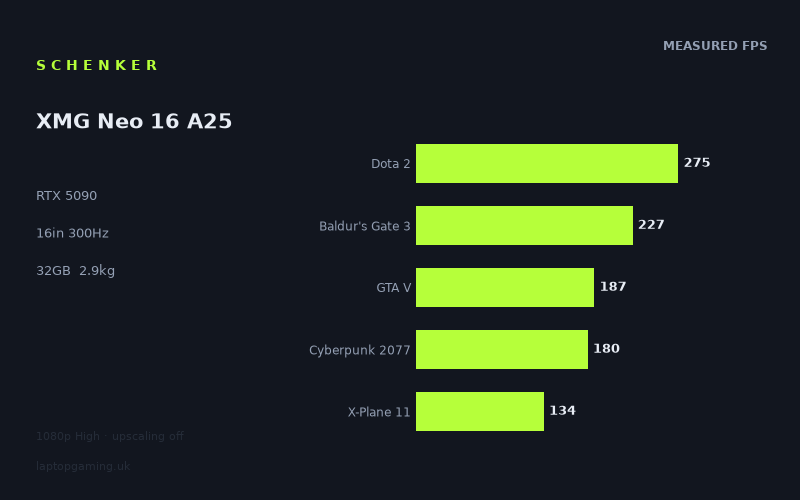
Frame rates
1920×1080, High preset, upscaling off. Averages 200fps across the 5 core benchmark games.
Measured on this machine. Source: Notebookcheck, 2025-06-01.
Not scored: no confirmed UK price
We have the full benchmark suite for this machine, so it ranks on the frame rate leaderboard like any other. What we don't have is a UK listing for this exact configuration - it's sold as a European review unit, or only in specifications that differ from the one tested. Since 30% of our score is value for money, scoring it would mean pretending price is no object, which would flatter it against every laptop you can actually buy. The frame rates below are real and comparable; there is just no buying recommendation to make yet.
How these numbers were produced
Frame rates here are not measured by us, and we label how each one was arrived at. A figure marked measured comes from a published run on that exact machine. A figure marked representative is derived from the GPU and its power limit (TGP) and cross-referenced against published reviews - a sound estimate of what that configuration delivers, but not a measurement of that specific laptop. Unless stated otherwise, numbers are 1920x1080, High preset, upscaling off. Where a laptop ships in several power configurations we use the wattage of the exact SKU listed, because a 140W RTX 5070 and a 115W one are not the same product.
In use
The short version
The XMG Neo 16 A25 in this configuration is, on the numbers our database holds, the fastest 16-inch gaming laptop we have benchmark data for. It pairs a mobile RTX 5090 with 24GB of VRAM and AMD's Ryzen 9 9955HX3D, and the measured results put it ahead of every comparable machine in our comparison set — including another Schenker 5090 in a different chassis, and including two RTX 5090 machines from Asus. That is not a small distinction. The mobile 5090 is not one product with one performance level; it is a piece of silicon that behaves very differently depending on how much power the chassis is willing to feed it and how much heat the cooling system can move. This machine sits at the top of that band rather than the middle of it, and the benchmark data makes that visible in a way spec sheets never do.
Notebookcheck's figures, measured at 1920x1080 on High presets with upscaling switched off, run from 357fps in F1 24 down to 97fps in Assassin's Creed Shadows, with a mean of 201fps across the five titles in our scoring suite. That spread is the interesting part of the story. It is not evidence of inconsistency — it is evidence that in 2025 the difference between a lightly-rendered racing title and a game with mandatory ray-traced global illumination is now larger than the difference between two GPU tiers. A machine like this makes the fast games absurd and the heavy games merely comfortable.
The obvious buyer is someone who wants the highest sustained frame rates available from a 16-inch chassis and is prepared to treat the machine as a desktop replacement that occasionally travels, rather than a portable. At 2.855kg before the charger, it is a laptop in the sense that it folds shut and runs off an internal battery, not in the sense that you will enjoy carrying it daily. The less obvious buyer — and possibly the better-served one — is the person running CPU-heavy simulation, strategy or large-world titles, where the 3D V-Cache on the 9955HX3D does work that no GPU upgrade can do for you.
One piece of housekeeping, stated plainly and then dropped: we have no confirmed UK price for this exact configuration, so this page carries no score. Value is 30% of our scoring model and it cannot be computed without a price. Nothing is wrong with the machine, the benchmark suite is complete, and it ranks normally on our frame rate leaderboard. We simply will not put a number on the value of something we cannot price, and we will not guess at what it costs.
Performance
What the numbers actually represent
Every frame rate below comes from Notebookcheck, measured on 2025-06-01, at 1920x1080 with High presets and upscaling disabled. Three things follow from that methodology and they colour everything else in this section.
First, these are 1080p numbers on a 2560x1600 panel. The native resolution carries roughly double the pixel count of the test resolution. Any title in the list that is genuinely GPU-limited will drop substantially when run at the panel's native resolution, and the ones near the bottom of the list will drop the hardest in absolute terms. This is not a criticism of the test method — a fixed resolution is what makes cross-machine comparison possible, and it is the reason we can put this laptop next to five rivals with any confidence. But it does mean you should read the 1080p figures as a measure of how much GPU there is, not as a prediction of what you will see on the built-in display.
Second, upscaling is off. DLSS, frame generation and whatever else the driver stack offers are all left on the table. In practice nobody buying an RTX 5090 will run this way in the games that need help; the value of the upscaling-off figure is that it is a clean measurement of raw rendering throughput, uncontaminated by which reconstruction techniques a given title happens to support. The measured numbers are therefore a floor for what the machine can do in the games that support modern upscaling, not a ceiling.
Third, High is not Ultra, and in several of the titles below the gap between those two presets is where the ray tracing settings live. Read the numbers as a consistent, comparable operating point rather than as the maximum visual fidelity the machine is capable of driving.
The top of the chart: where the panel becomes the limit
The measured figures open with F1 24 at 357fps. That is the only title in the suite that clears the panel's 300Hz refresh rate outright at the test resolution, and it does so with room to spare. It is worth understanding why: the F1 games are built around a rendering budget that has to hold up on consoles at high frame rates during a race, with a camera that is mostly looking at a well-lit track surface and a limited number of complex objects on screen. Handed a top-tier mobile GPU at 1080p, the engine simply runs out of work to do.
Then comes the single most instructive pair of numbers in the whole set. F1 25 measures 291fps — the same franchise, one year on, on the same test bench, and it no longer clears the panel's refresh rate. Whatever the newer entry is doing with its lighting and reflection budget costs a meaningful chunk of the older one's headroom. If you want a single, compact illustration of why a machine that comfortably exceeds 300fps today will not do so across your whole library in three years, this is it. Rendering budgets grow faster than mobile GPUs do.
Dota 2 at 275fps is the third-fastest result and, in a sense, the most revealing. Dota 2 is not a demanding game for a 5090 in any graphical sense; at 1080p on High the GPU is largely idling between frames. What limits it is the engine and the CPU, and 275fps is roughly where a top-end mobile part lands. If you play MOBAs or older competitive titles and you were hoping that a 5090 would somehow unlock a further tier of frame rate, this number is the corrective: past a certain point, the graphics card stops being the thing standing between you and the refresh rate.
Baldur's Gate 3 at 227fps sits just below. BG3 is a hybrid case — its dense scenes push the GPU but its draw-call load and simulation overhead lean on the CPU, and the 9955HX3D's large cache is exactly the kind of hardware that helps there. 227fps in a game that will happily bring lesser machines down into double figures in the busier city areas is a strong result, and it is the sort of number that matters more for smoothness in crowded scenes than for peak frame rate.
The middle band: 150–210fps
Final Fantasy XV at 208fps and GTA V at 187fps are the two oldest titles in the suite, and they behave in opposite ways. FFXV is genuinely GPU-heavy for its age — it shipped with a pile of expensive effects work bolted on — so its number scales with GPU power. GTA V does not, in any meaningful sense. Its renderer is a product of an era of single-threaded engine design, and 187fps from a machine with this much GPU and this much CPU is an engine ceiling rather than a hardware one. That is worth internalising, because it tells you something about a whole category of games: if you spend your evenings in older titles, modded titles, or anything built on a DX11-era engine, this machine's advantage over cheaper hardware will be far smaller than the headline numbers suggest.
Cyberpunk 2077 at 180fps is the reference point most buyers will reach for. On High with upscaling off, at 1080p, that is a very strong figure — Cyberpunk remains a genuinely demanding rasterised workload before you touch its ray tracing options at all, and 180fps means there is real headroom to spend on higher settings, higher resolution, or both. It also means that the various ray tracing modes, which is where Cyberpunk gets expensive, start from a position of strength rather than desperation.
Indiana Jones and the Great Circle at 152fps is the first title in the list where a modern rendering approach visibly changes the arithmetic. The Great Circle's engine uses hardware ray tracing as part of its baseline lighting rather than as an optional extra, so even at a High preset the GPU is doing ray traversal work in every frame. 152fps in that context is excellent — but the drop relative to Cyberpunk is not a matter of the game being "heavier" in some vague sense, it is a specific architectural cost. It is also a preview of where the next several years of releases are going.
X-Plane 11 at 134fps is the odd one out and needs to be read carefully. Flight simulators of this generation are dominated by single-threaded engine work and draw-call submission; the GPU is rarely the limit. 134fps from this machine, sitting third from the bottom of an eleven-game list, is not a statement about the 5090 at all. It is a statement about the CPU, and specifically about what the fastest available mobile CPU with a large cache can extract from an engine that fundamentally does not parallelise well. Two implications follow: if you fly, this is close to the ceiling of what any laptop will do for you, and no amount of extra GPU will move it; and if you are comparing this machine against a rival with a lesser CPU, the flight sim number is where you will see the gap, not the shooter numbers.
The floor: Alan Wake 2 and Assassin's Creed Shadows
Alan Wake 2 at 128fps and Assassin's Creed Shadows at 97fps define the bottom of the range, and they are the two results that should shape your expectations more than any of the fast ones.
Alan Wake 2 was, at launch, the most aggressively forward-looking renderer on the market — heavy use of mesh shaders, expensive volumetrics, a lighting model that punishes older hardware disproportionately. 128fps at 1080p High with no upscaling is a result that a great many current machines cannot approach. But it is also less than half the F1 24 figure, on the same bench, on the same day.
Assassin's Creed Shadows at 97fps is the only measured title in the set that does not clear 100fps. Ubisoft's current Anvil build carries a substantial permanent lighting cost and a very large streamed world, and it is a workload that hammers the GPU, the memory subsystem and the storage path simultaneously. 97fps is still a thoroughly playable, high-refresh result — but note what it means in context: at 1080p, with upscaling off, on the fastest 16-inch laptop in our database, one of 2025's headline releases sits just under the hundred mark. At the panel's native 2560x1600, without upscaling, it will be a good deal lower. This is the number to hold in your head when a spec sheet tries to sell you a 300Hz display.
Where the spread comes from
From 357fps at the top to 97fps at the bottom is a range of roughly three and a half to one across eleven games, all at the same resolution and the same preset tier. It is worth being precise about the causes, because they are not all the same kind of thing:
- Ray tracing that cannot be switched off. Indiana Jones and, to a degree, the newest Ubisoft and Remedy engines build ray-traced lighting into their baseline rather than offering it as a toggle. This is a structural cost that scales with GPU ray throughput and does not go away at lower presets.
- Engine-era ceilings. GTA V, Dota 2 and X-Plane 11 are limited by how much work their engines can dispatch per frame, not by how fast the graphics card can complete it. On these, a faster GPU buys you very little; a faster CPU with more cache buys you something.
- Genuine rasterisation load. Cyberpunk, Alan Wake 2 and Final Fantasy XV are, in different ways, simply drawing a lot of expensive pixels. These are the titles that scale most cleanly with GPU power limits, and they are where this machine's advantage over lower-powered 5090 implementations shows up most clearly.
- Deliberately light rendering budgets. The F1 games and, again, Dota 2 are built to run fast. Their numbers tell you about the ceiling of the platform, not about how it will handle your library.
The mean of 201fps across our five scoring-suite titles — Dota 2, Baldur's Gate 3, GTA V, Cyberpunk 2077 and X-Plane 11 — is a fair summary figure precisely because that suite deliberately mixes the categories above. It contains one engine-limited old title, one CPU-limited simulator, one modern GPU-limited showpiece, one hybrid RPG and one competitive title. A machine cannot post 201fps across that mix by being good at one thing.
The GPU power limit, and what our data can and cannot tell you
Our fact sheet does not record a TGP figure for this configuration of the Neo 16 A25, so we are not going to state one. What we do have is something arguably more useful: measured results from three other RTX 5090 laptops, two of which our data explicitly records as running the GPU at 175W, and all of which this machine beats.
Against the Asus ROG Strix Scar 18, a 5090 at 175W, the Neo 16 A25 averages +9fps across eleven shared games. Against Schenker's own XMG Neo 16 E25 with a 5090 at 175W, it averages +18fps across ten shared games. Against the Asus ROG Strix Scar 16, another 5090, it averages +27fps across nine shared games, and against the Medion Erazer Beast 16 X1 Ultimate, also a 5090, +27fps across seven.
Four machines, the same GPU model, four different levels of performance, and this one on top of all of them. That is the practical meaning of a GPU power limit, and it is the single most important thing a buyer can understand about this generation of gaming laptops. "RTX 5090" on a spec sheet is a description of the silicon, not a description of what you will get. The gap between the fastest and slowest 5090 in our comparison set is wide enough to swallow a whole GPU tier in some titles.
The mechanism is straightforward. A mobile GPU has a configurable power ceiling; the chassis vendor picks a number based on what the cooling system can sustain and how much noise they are prepared to make. Under a sustained load — which is to say, any actual gaming session as opposed to a thirty-second benchmark run — the card will clock up until it hits either a thermal limit or that power ceiling, and then sit there. A higher ceiling with cooling that can actually support it means higher sustained clocks, which means higher frame rates in every GPU-limited title. It does essentially nothing for the CPU-limited ones, which is exactly the pattern you would expect to see and, as far as our comparative averages can show, roughly what does appear.
What we can say with confidence: on the measured evidence, the Neo 16 A25 is extracting more from a 5090 than any other machine we hold data for, including two that we know are running at 175W. What we cannot say, because we do not have the figure: precisely what power ceiling it is running at, or how much of its advantage comes from that ceiling versus a cooling design that lets it hold the ceiling for longer. We also do not hold sustained-load or thermal-throttling data for this machine, so we cannot tell you whether the benchmark figures represent a first-run peak or a steady state. Notebookcheck's methodology is generally sound on this point, but we are not going to characterise data we do not have in front of us.
The CPU, and why it matters more than it usually does
The Ryzen 9 9955HX3D is AMD's 3D V-Cache-equipped HX-series part, and its presence changes what this machine is good at in ways that are visible in the benchmark spread. The very large L3 cache is worth little to a game that is purely GPU-bound — Cyberpunk at 180fps is not being helped much by it — but it is worth a great deal to games with large working sets and heavy simulation: flight sims, grand strategy, factory builders, large-world RPGs with dense NPC logic, and anything with a lot of draw calls issued from a single hot thread.
Look at the results through that lens. X-Plane 11 at 134fps is a number you get from a CPU, not from a GPU. Baldur's Gate 3 at 227fps is a hybrid result where the CPU is doing real work. Dota 2 at 275fps is very close to a pure CPU-and-engine measurement. Three of the five titles in our scoring suite lean at least partly on the processor, and the machine does well in all three.
This is the argument for the A25 that has nothing to do with the GPU power limit. If your library is dominated by simulation and strategy — the genres where laptop buyers are routinely disappointed after spending heavily on graphics hardware that the game never touches — the CPU here is doing something a lesser processor cannot, and no amount of extra GPU budget substitutes for it.
Memory, VRAM and storage as performance factors
24GB of VRAM is more than any current game needs at 1080p and comfortably more than they need at 2560x1600. That is not wasted, though. It matters in three specific situations: ray-traced titles with large BVH structures, which is an increasing share of new releases; games run with high-resolution texture packs or heavy modding, where VRAM exhaustion produces stutter rather than a clean frame rate drop; and non-gaming GPU work — local model inference, video editing with heavy timelines, 3D rendering — where VRAM capacity is often a hard gate rather than a performance curve. If you are buying this machine for a mix of gaming and creative work, the VRAM figure is one of its strongest points and it will remain relevant long after the frame rates stop looking exceptional.
32GB of system memory is the right amount for this class of machine — enough that you will not be managing it, and matched to a CPU that benefits from being kept fed.
The 1024GB SSD is the specification that will annoy you first. Assassin's Creed Shadows, Indiana Jones and the Great Circle, Alan Wake 2, Baldur's Gate 3 and Cyberpunk 2077 — five of the eleven titles measured here — would consume a substantial fraction of that drive between them, before Windows, before the driver stack, before anything else. Our fact sheet does not record what storage expansion this chassis offers, so we cannot tell you whether adding a second drive is straightforward, and we are not going to assume. What we can tell you is that a terabyte is a working constraint on a machine of this performance level, and you should plan for either an upgrade or a fairly active install-and-delete routine.
The screen
The panel is 16 inches at 2560x1600 with a 300Hz refresh rate. That is a 16:10 aspect ratio, which is the right choice for a machine that will spend a good deal of its life doing non-gaming work — the extra vertical space is genuinely useful in code editors, timelines and spreadsheets, and the loss relative to 16:9 in games is negligible.
Our fact sheet does not record the panel technology, response time, colour gamut coverage, peak brightness or whether variable refresh rate is supported, so we are not going to characterise any of those. That is a real gap and it matters — a 300Hz specification tells you about the refresh ceiling and nothing about pixel response, and a fast panel with slow pixels produces smearing that no frame rate fixes. If those characteristics are decisive for you, wait for measurements rather than trusting the refresh number.
Can the GPU drive it?
This is the question that actually matters, and the honest answer is: for some things, comfortably; for others, not at native resolution without help.
Take the 300Hz figure first. At the tested 1920x1080, exactly one of the eleven measured titles — F1 24 at 357fps — exceeds the refresh rate. F1 25 at 291fps comes very close. Dota 2 at 275fps is in the same territory. Everything else is below, and most things are well below. And all of that is at a resolution with roughly half the pixels of the panel.
So the practical picture at native 2560x1600, with upscaling off, is that the 300Hz refresh rate will be genuinely saturated by essentially nothing in the measured set. That sounds like a criticism and it is not, quite — it is a description of how high-refresh panels work in 2025. A 300Hz panel is not a promise that you will see 300 frames per second; it is a promise that when a title can produce very high frame rates, the display will show them, and that in everything else the reduced frame time granularity makes for smoother frame delivery even at lower rates. Competitive players running older or lighter titles at reduced settings are the ones who will actually see the top of that range. Everyone else is buying a fast panel for its latency and motion characteristics, not for its headline number.
The more useful reading is by category:
- Competitive and esports titles — the Dota 2 result at 275fps suggests these will run at very high rates even at native resolution, because they are limited by the CPU and engine rather than by pixel count. This is where the 300Hz panel earns its keep.
- Modern single-player rasterised titles — Cyberpunk at 180fps and Final Fantasy XV at 208fps at 1080p suggest comfortable high-refresh play at native resolution, well clear of the 120fps mark that most people treat as the threshold for "genuinely smooth".
- Ray-traced and current-generation showpieces — Indiana Jones at 152fps, Alan Wake 2 at 128fps and Assassin's Creed Shadows at 97fps at 1080p mean that at native resolution, without upscaling, you are looking at a substantially lower operating point. This is the category where DLSS stops being optional and starts being the intended way to play. With upscaling and frame generation engaged, high-refresh play at native panel resolution is very much on the table — but the measured numbers here deliberately do not include that, and we are not going to invent figures for it.
One more thing worth saying about resolution: a 5090 with this much power headroom is one of the few mobile GPUs where driving an external 4K display at high refresh is a realistic proposition rather than an aspiration. If this machine spends most of its life on a desk, the internal panel may not be the display that determines your experience, and the GPU has enough capability that a large external monitor is a sensible pairing.
Build, size and portability
The recorded weight is 2.855kg. Our fact sheet does not include chassis dimensions, material, hinge design or cooling layout, and we have not handled the machine, so this section is an analysis of what that weight figure implies rather than an account of what it feels like to carry.
2.855kg for a 16-inch laptop is heavy in the general laptop market and unremarkable in the high-power gaming segment. It is roughly the point at which a machine stops being something you throw in a bag without thinking about it. Add the power supply — we do not have a wattage or weight for the charger, but a 5090 running at the power levels these benchmark results imply will require a substantial one, and it is not a thing you leave at home, because gaming performance on battery on any machine in this class is a fraction of what it is plugged in — and the realistic door-to-door carry weight is meaningfully higher than the laptop figure alone.
What that means in practice:
- As a desk machine that occasionally moves — home to office, home to a friend's, home to a hotel for a week — it is entirely fine. You will notice it in a bag, you will not resent it.
- As a daily commuter — carried on foot, on public transport, five days a week — it is the wrong tool. There are 14-inch machines with meaningfully lower performance that will make your life better if that is the pattern of use, and the gap in gaming performance is a fair trade for the gap in shoulder pain.
- As a LAN or tournament machine — it is well-suited, because that use case involves carrying it a short distance and then plugging it into mains power for hours, which is exactly the scenario in which a high power ceiling is an asset and a heavy charger is irrelevant.
Two things we cannot tell you and will not guess at: battery life and fan noise. We hold no figures for either. Both are things you should weigh before buying, and both are things that a machine extracting this much sustained performance from a 5090 is unlikely to lead its class in. That is a reasonable expectation from the physics rather than a measurement, and you should treat it as such — if quiet operation is a hard requirement, find measured acoustic data before committing.
The 16-inch, 16:10 format itself is the sensible middle of the gaming laptop market at the moment. It gives you enough screen to use the machine for work without an external display, a keyboard deck wide enough for a proper layout, and a chassis with enough internal volume for cooling that can actually support a high-power GPU. The 18-inch alternatives — the Strix Scar 18 in our comparison set being one — buy you more cooling volume and more screen at the cost of being genuinely awkward to transport. On the evidence of the measured results, this machine does not need the extra volume to beat that 18-inch rival, which is a point in favour of the format.
How it compares
Before the individual comparisons, a caveat about how to read them. Each average below is computed only across games that both machines have measured results for, and the number of shared games differs between comparisons — eleven for one rival, seven for another. That means the averages are not directly comparable with each other. A +27fps average across seven games and a +14fps average across eight are measuring different things over different mixes of titles, and the mix matters enormously given how wide the spread across games is. Use each figure to judge that specific pairing, not to rank the rivals against one another.
Asus ROG Strix Scar 18 — RTX 5090 at 175W
The closest competitor in our data, and the one that comes nearest on raw performance: the Neo 16 A25 averages +9fps across eleven shared games. Eleven shared titles is the broadest overlap in the set, which makes this the most reliable of the five comparisons.
A 9fps average across a suite that spans 97fps to 357fps is a modest gap in relative terms — call it a consistent but not dramatic advantage. What makes it notable is that the Scar 18 is an 18-inch chassis with more internal volume to work with, and it still comes out behind a 16-inch machine. That says something about the Neo's thermal and power configuration.
The Scar 18 has no confirmed UK price in our database either, so this is a comparison on performance alone. If you are choosing between them, the deciding factors are unlikely to be the frame rates — 9fps on average is not something you will perceive — and much more likely to be the form factor, the panel specification, the keyboard, and whichever one you can actually buy at a sensible price. The 18-inch machine gives you more screen; the 16-inch machine gives you a bag you can close. Both are desk machines.
Lenovo Legion Pro 7i 16 Gen 10 — RTX 5080 at 175W, £3,662
This is the most interesting comparison in the set, because it is the only rival with a confirmed UK price and the only one with a different GPU tier. The Neo 16 A25 averages +14fps across eight shared games.
Sit with that for a moment. A full GPU tier down — 5080 rather than 5090 — and running at 175W, and the gap across eight shared titles averages 14fps. Meanwhile Schenker's own 5090-equipped E25, also at 175W, is 18fps behind across ten shared games. The game sets differ, so this is not an apples-to-apples statement and should not be treated as one. But the direction is clear enough to be worth stating: on this evidence, the power ceiling and cooling configuration a manufacturer chooses can matter as much as the GPU tier printed on the box. A well-fed 5080 and a constrained 5090 are much closer together than their names suggest.
For a buyer, that reframes the question entirely. The Legion is a known quantity at £3,662 with a confirmed price you can act on today. The Neo is faster, by an amount that is real but not transformative across the shared titles, and its price is unknown. If the games you play are the CPU-limited kind — and note the Legion pairs its GPU with an Intel platform rather than the 3D V-Cache AMD part here — the Neo's advantage may be larger than the average suggests in exactly the titles you care about. If you play modern GPU-bound single-player games, the 14fps average is a fair summary, and £3,662 for a machine you can buy now is a serious argument.
Schenker XMG Neo 16 E25 RTX 5090 — 5090 at 175W
Same manufacturer, same screen size, same GPU model, and the A25 averages +18fps across ten shared games. This is the comparison that most clearly demonstrates the point made throughout this review.
Two machines from the same company, both carrying an RTX 5090, both 16-inch, and one is meaningfully faster than the other across a ten-game overlap. Our data records the E25's GPU at 175W and does not record a figure for the A25, but the results are consistent with the A25 running a higher sustained power ceiling, having cooling that holds clocks for longer, benefiting from the CPU pairing, or some combination of all three. We are not going to attribute it more precisely than the data supports.
The practical advice is simple: if you are shopping Schenker's 16-inch range, do not assume the GPU name tells you what you are getting. These two machines are not interchangeable, and the difference between them is larger than the difference between this machine and an entire GPU tier down at Lenovo. Check the specific model designation, and check the power figures for the exact configuration you are ordering.
Medion Erazer Beast 16 X1 Ultimate — RTX 5090, £4,884
The Neo 16 A25 averages +27fps across seven shared games, the smallest overlap in the comparison set and therefore the figure to treat with the most caution — seven games is enough to establish a direction but not enough to be confident about the magnitude.
What makes this comparison useful is the confirmed price. The Medion is a £4,884 machine with an RTX 5090 that, on the games both have measured, is 27fps behind on average. That is a substantial performance gap between two laptops carrying the same graphics card, and it is a reference point any buyer can use: a 5090 laptop at the top of the UK market, priced, benchmarked, and beaten on the shared titles. Whatever the Neo turns out