Review
Aorus 17X AZF review
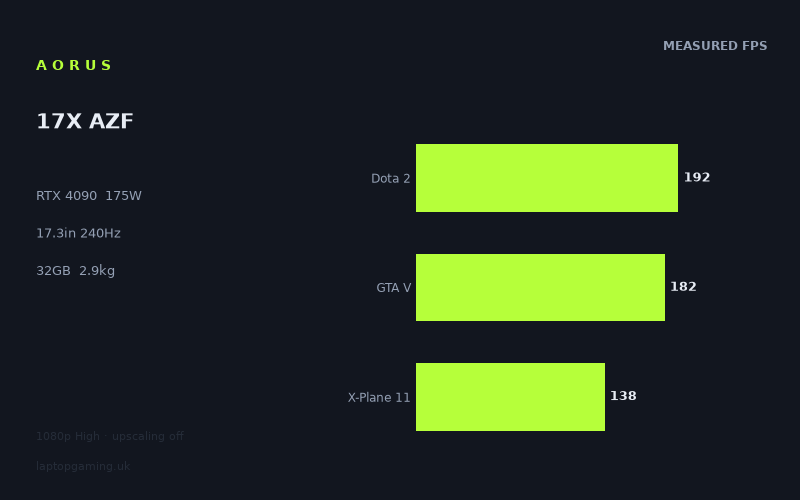
Frame rates
1920×1080, High preset, upscaling off.
Measured on this machine. Source: Notebookcheck, 2023-04-18.
Not scored: incomplete benchmark suite
Every scored laptop on this site is averaged over the same 5 games, and this one is short of Cyberpunk 2077, Baldur's Gate 3. A mean over 3 games is not comparable to a mean over 5, so we publish the figures we have and leave the score blank rather than rank it against machines tested on a different set. The numbers below are real - the suite is just incomplete.
How these numbers were produced
Frame rates here are not measured by us, and we label how each one was arrived at. A figure marked measured comes from a published run on that exact machine. A figure marked representative is derived from the GPU and its power limit (TGP) and cross-referenced against published reviews - a sound estimate of what that configuration delivers, but not a measurement of that specific laptop. Unless stated otherwise, numbers are 1920x1080, High preset, upscaling off. Where a laptop ships in several power configurations we use the wattage of the exact SKU listed, because a 140W RTX 5070 and a 115W one are not the same product.
In use
The short version
The Aorus 17X AZF is a 17.3in desktop replacement built around an RTX 4090 running at a 175W total graphics power limit, a Core i9-13900HX, 32GB of memory and a 2TB SSD, driving a 2560x1440 IPS panel at 240Hz. It weighs 2.92kg and carries a 99Wh battery. Everything in that sentence points the same way: this is a machine designed to be plugged in, sat on a desk, and asked for as much performance as a laptop of its era could deliver.
What makes it unusually easy to judge is the depth of the measured evidence. Notebookcheck published twenty-five games for this laptop on 18 April 2023, all at 1920x1080 on the High preset with upscaling switched off. Twenty-five titles is a rare luxury in laptop benchmarking, and it changes what you can say. With four or five results you are guessing at a shape. With twenty-five you can see it: the top is 414fps in Strange Brigade, the bottom is 101fps in Hogwarts Legacy, and the distribution in between tells you exactly which kinds of software make this hardware work and which do not.
The short verdict is that the floor is the story. Anyone can quote a four-hundred-frame result from a benchmark-friendly shooter. What matters is that across twenty-five games, including the heaviest releases available when these figures were recorded, nothing measured fell below a hundred frames a second. That is a genuinely unusual result and it is the strongest argument for the machine.
The reservations are the predictable ones for the category. At 2.92kg this is not a laptop in any meaningful sense of carrying it around; it is a portable desktop. And the 240Hz panel is aspirational in a specific way that the data makes clear — the machine feeds it comfortably in most of the suite and not at all in the heaviest few titles. Neither point undermines the machine. Both determine who should be buying it.
Performance
What the power limit means here
The RTX 4090 was the top mobile graphics part of its generation, and like every mobile GPU of that era it shipped under a wide range of operating conditions. The specification that decides how it actually behaves is the power limit, and this one is set to 175W.
That figure matters more at this tier than at any other. A large graphics processor with a great many shader units is, in a sense, a power-conversion device: give it more watts and it holds higher clocks for longer under load. Starve it and you have paid for silicon that spends its time waiting for thermal and electrical headroom that never arrives. A 175W ceiling in a 17.3in chassis is a serious allocation, and the shape of the results confirms the card is being allowed to work rather than merely being present.
The evidence for that is in the bottom half of the chart rather than the top. Light games run fast on almost anything; that proves nothing about power delivery. Heavy games are where a constrained card falls away, because they are the ones asking for every watt available in every frame. When a machine records 136fps in Far Cry 6, 134fps in Metro Exodus, 109fps in The Last of Us and 101fps in Hogwarts Legacy — four of the most demanding titles of the period — the graphics card is clearly not being held back by its power budget in the way that a trimmed-down implementation would be.
The other thing a generous power limit buys is consistency under sustained load. Benchmark runs are short. Play sessions are not. A machine that is comfortably inside its thermal envelope at 175W behaves the same in hour three as in minute one; a machine that is fighting its cooling does not. We have no measured thermal or acoustic data for this laptop, so we cannot demonstrate that directly — but the combination of a 17.3in chassis, 2.92kg of it, and a 175W ceiling is the configuration that gives cooling the best chance.
The top of the chart: where the panel becomes the limit
Six games here sit at or above 240fps: Strange Brigade at 414fps, The Witcher 3 at 396fps, F1 2021 at 356fps, F1 2020 at 344fps, F1 22 at 283fps, and Company of Heroes 3 exactly at 240fps.
These are results where the graphics card has stopped being the constraint in any practical sense. At 414fps a frame is being finished in well under three milliseconds, and the interesting question is no longer whether the GPU can keep up but what else in the chain can. In several of these titles the answer is the processor: the i9-13900HX is issuing draw calls, running game logic and feeding the pipeline as fast as it can, and the graphics card is finishing early and idling. That is not a criticism of either component. It is what happens when hardware of this class meets software written for hardware several generations older.
The practical reading is that against a 240Hz panel these six titles are done. The screen is the bottleneck, the machine has margin to spare, and the margin is what keeps the frame rate above the refresh ceiling during the busy moments rather than only the quiet ones. For competitive play, headroom of that size is exactly what you want — not because 414fps is visible on a 240Hz display, but because a game averaging 414fps does not fall below 240 when the screen fills up.
The F1 sequence, and what it proves
One of the advantages of a twenty-five-game data set is that it contains series. Three F1 titles were measured on this machine: F1 2020 at 344fps, F1 2021 at 356fps and F1 22 at 283fps.
This is a controlled experiment that no amount of cross-laptop comparison can give you. Same hardware, same settings, same test methodology, same studio, same broad engine lineage — and a spread from 356fps down to 283fps. The only variable that changed is the software. F1 22 is not a fundamentally different genre from F1 2021; it is the same kind of game with more work per frame, and it costs the machine roughly a fifth of its throughput.
The same pattern appears in the Far Cry entries: Far Cry 5 at 161fps, Far Cry New Dawn at 145fps and Far Cry 6 at 136fps. Three titles from one engine family, in release order, falling steadily. Again, the hardware is fixed. The software got heavier.
That is the most important lesson in this data set for anyone deciding how long a laptop will last. Frame rates do not decline because a machine ages; they decline because the software it is asked to run gets more expensive, and it does so relentlessly, even within a single franchise on a single engine. A machine whose floor today is around a hundred frames a second has room for a great deal of that. A machine whose floor is already near sixty does not.
The broad middle
The bulk of the suite — seventeen of the twenty-five titles — lands between roughly 134fps and 211fps, and it is a genuinely varied group: High On Life at 211fps, Shadow of the Tomb Raider at 210fps, Tiny Tina's Wonderlands at 194fps, Dota 2 at 192fps, GRID Legends at 190fps, GTA V at 182fps, Final Fantasy XV at 178fps, Returnal at 176fps, Atomic Heart at 167fps, God of War at 167fps, Borderlands 3 at 164fps, Far Cry 5 at 161fps, Far Cry New Dawn at 145fps, Dead Space Remake at 142fps, X-Plane 11 at 138fps, Far Cry 6 at 136fps and Metro Exodus at 134fps.
Two things are worth drawing out of that list.
First, the modern single-player titles in it — Returnal, Atomic Heart, God of War, Dead Space Remake — are all comfortably above 142fps. These were the demanding releases of their moment, played with settings high and no upscaling assistance, and they sit closer to the top of the range than the bottom. That is what an unconstrained flagship graphics card looks like when the software is genuinely asking it for work.
Second, Dota 2 at 192fps and X-Plane 11 at 138fps stand out as anomalies in the wrong direction. Dota 2 is one of the least demanding games in the suite and it lands below Shadow of the Tomb Raider, a substantially heavier title. X-Plane 11 at 138fps sits below Metro Exodus. Neither result reflects a graphics limitation. Both are titles whose frame rate is set almost entirely by single-thread processor performance and by how quickly the engine can prepare work, and on a machine with this much graphics capability they measure the platform rather than the card. Keep that in mind when you get to the comparison section, because it explains results there that otherwise look absurd.
The floor
Two titles sit at the bottom: The Last of Us at 109fps and Hogwarts Legacy at 101fps.
Both were, at the time these figures were recorded, notorious. Both are large, streaming-heavy, texture-heavy games that punished hardware indiscriminately. And both are above a hundred frames a second here, at High settings, with upscaling switched off.
That is the number to hold on to. The worst measured result across twenty-five games — including the two worst-behaved releases of the period — is 101fps. Everything else in the suite is faster. For a buyer, this reframes the whole question of what the machine can do: rather than asking whether it can run something, you are asking how far above the comfort threshold it will be, and the answer across an unusually broad sample is a long way.
It is worth being precise about what this does and does not predict. It does not mean a game released years later will run at 101fps; the F1 and Far Cry sequences above show software costs rising steadily, and a heavy modern title at native resolution will ask considerably more. What it does mean is that the machine started from an exceptionally high floor, and a high floor is the single best predictor of a long useful life.
Why there is no overall score
Every laptop we score is averaged over the same five games, so that positions on the leaderboard mean something. For this machine we have three of them — Dota 2 at 192fps, GTA V at 182fps and X-Plane 11 at 138fps, averaging 171fps — but no figures for Cyberpunk 2077 or Baldur's Gate 3.
There is a particular irony in that gap here. The three scoring titles we do have are, as noted above, among the least graphics-limited games in the entire twenty-five-title set. The two we are missing are the two that would have asked the graphics card the hardest questions. A three-game average built on the CPU-bound end of the suite would systematically understate a machine of this class, which is precisely why we do not publish partial averages as if they were complete ones. The twenty-five games above are far more informative than a truncated score would be.
The screen
A 17.3in IPS panel at 2560x1440 and 240Hz is a sensibly matched specification for this hardware, and it is one of the few cases in this class where the panel and the graphics card are close to being in balance.
The resolution choice is the interesting part. A 17.3in machine at this tier could have carried a higher-resolution panel, and plenty did. 2560x1440 is the more useful decision for a gaming machine, because it leaves the graphics card enough headroom to exploit the refresh rate rather than merely reach it. Every figure quoted above was measured at 1920x1080, and 1440p carries roughly 78 per cent more pixels, so native-resolution performance will be lower than the numbers here in every title that is genuinely graphics-limited. But when the starting point in more than half the suite is between 161fps and 414fps, a substantial reduction still leaves a great deal of the chart comfortably above what the panel can display.
Where it will not be above it is the heavy end. The Last of Us at 109fps and Hogwarts Legacy at 101fps at 1080p are not going to be near 240fps at 1440p, and nor are Metro Exodus, Far Cry 6 or Dead Space Remake. Those titles will run well — the starting figures are high enough that they have a long way to fall before becoming uncomfortable — but the 240Hz refresh rate will be doing nothing for them. That is the normal arrangement, and it is why high refresh and high resolution are complementary rather than competing claims: the refresh rate serves your competitive and older titles, the resolution serves your heavy single-player ones, and you rarely get both from the same game.
IPS at 17.3in is a reasonable choice for a machine of this shape. It gives dependable viewing angles at a size where you may well be sitting further back than usual, and it avoids the risk profile that comes with static interface elements on a self-emissive panel over a long ownership period. What we do not have is any measured panel data — brightness, contrast, colour gamut or response time are all absent from our figures, and a 240Hz specification tells you about the refresh interval, not about how quickly individual pixels settle. If image quality rather than speed is your deciding factor, this review cannot answer it.
Build, size and portability
At 2.92kg with a 17.3in screen, this is a desktop replacement, and it is more useful to treat it as such than to pretend otherwise.
The practical implications are concrete. A machine of this footprint does not fit comfortably on a train table or an economy airline tray. It needs a large backpack rather than a normal one. And the 2.92kg figure excludes the power supply, which for a laptop feeding a 175W graphics card alongside a Core i9-13900HX is not a small object — anyone who moves this machine moves a substantial brick with it. Realistically, this is a laptop that lives in one place and relocates occasionally: between home and a second home, at the end of a university term, to a friend's house for a weekend, to an event.
What you get for accepting that is the reason the performance figures look the way they do. Cooling capacity scales with volume and mass. A 175W graphics power limit alongside a high-core-count processor needs somewhere for that heat to go, and a 17.3in chassis at 2.92kg has the fan area, the heat pipe runs and the exhaust volume to provide it. Lighter machines in this generation carrying the same graphics card name almost invariably ran it at lower limits, because they had no choice. The weight is not incidental to the performance; it is a precondition for it.
The 99Wh battery is the largest capacity generally permitted in aircraft cabins, and specifying exactly that figure is a deliberate decision rather than an accident. It will help materially with the things this machine does when it is not gaming — browsing, video, document work — where the graphics card is largely idle and the processor is loafing. It will not deliver meaningful unplugged gaming, and no machine at this power level does. We have no measured runtime figures at all, so we will not put a number on any of it.
The 2TB SSD is worth a specific mention because it is one of the few specifications here that is generous in a way that is immediately, practically useful. Modern game installations are enormous, and the difference between a 1TB and a 2TB drive is the difference between curating your library and not thinking about it. Combined with 32GB of memory, the machine is provisioned so that storage and memory are unlikely to be the thing that annoys you first.
How it compares
Four machines from the same graphics generation give the spread here. Each comparison uses only games both machines have recorded, which is why the number of shared titles differs from one to the next — and, as will become clear, that difference in sample size is not a footnote. It is the whole explanation for two of these results.
Against the Lenovo Yoga Pro 9 16IMH9 RTX (RTX 4050 at 100W)
Across eight shared games, this machine averages 115fps more than the Yoga Pro 9. That is the largest margin in the set and, crucially, it is measured over the largest sample.
Eight shared titles is enough to include heavy games as well as light ones, and that is exactly why the gap is so wide. When the comparison set spans the full range of software behaviour, the difference between a 175W flagship and a 100W entry-level part has room to express itself. In the light titles the two machines will be closer than the average suggests; in the heavy ones they will be far further apart than it suggests. The 115-frame figure is the honest middle of a very wide distribution.
The comparison is also a useful reminder that these two machines are not really competing for the same buyer. The Yoga Pro 9 is a slim, mixed-use laptop with a graphics card fitted; this is a gaming machine with a chassis built around a graphics card. Nobody is choosing between them on frame rate alone. But if you are wondering what the gap between the top and bottom of a single graphics generation actually looks like when measured properly, this is it.
Against the MSI Raider 18 HX (RTX 4080 at 175W)
Across three shared games, these two machines are level to within a frame.
Taken at face value that says an RTX 4080 matches an RTX 4090, which is not true. What it actually says is that the three games they have in common are not testing the graphics card. As established above, the shared set here is drawn from the scoring suite — Dota 2, GTA V and X-Plane 11 — and all three are titles where a high-end processor and the game engine set the pace at 1920x1080. Both machines run out of processor before they run out of graphics card, so both stop at roughly the same place.
There is a second factor. Both cards are running at the same 175W limit. At a fixed power budget, the gap between two large graphics processors narrows, because the bigger one cannot use its extra silicon without extra watts to feed it. The 4090's advantage is at its greatest when it is allowed to draw considerably more power than the tier below; when both are pegged at the same ceiling, some of that advantage is unavailable by construction.
The practical conclusion is not that these machines are equivalent. It is that this particular three-game comparison cannot tell you which is faster, and you should not let a chart built on it persuade you either way. The twenty-five-game picture for this laptop is far more informative than a three-game head-to-head.
Against the Lenovo Legion Pro 5 16IRX9 G9 (RTX 4060)
Also level to within a frame across three shared games — and this one is genuinely striking, because it is an RTX 4060 landing in the same place as a 175W RTX 4090.
If the previous comparison suggested the shared-game set was compressing real differences, this one demonstrates it beyond argument. Nobody believes those two graphics cards are equivalent. The measurement is not wrong; it is simply answering a different question from the one people assume it answers. At 1920x1080, in Dota 2, GTA V and X-Plane 11, both machines are limited by how fast their processors can prepare frames, and neither graphics card is being stretched. Under those conditions the result is a tie, and the tie is real — it just does not generalise.
This is why we publish the number of shared games alongside every comparison, and why the eight-game result against the Yoga Pro 9 carries far more weight than either of these three-game ties. It is also why a buyer should never choose between machines on a single averaged delta without asking what went into it. If your games look like Dota 2, the Legion Pro 5 result is genuinely relevant to you and you should take it seriously. If your games look like Hogwarts Legacy, it tells you nothing.
Against the Asus ROG Strix Scar 17 (RTX 4090)
Across three shared games this machine averages 28fps less than the Scar 17. It is the only comparison here that this laptop loses.
The instructive part is where the loss comes from. Both machines carry an RTX 4090, so the graphics card is not the variable. And the three shared games are the CPU-limited trio, which is precisely the set where the graphics card was never going to be the variable anyway. What is being measured is the rest of the platform: the processor, the memory subsystem and how efficiently the whole chain can push frames when the GPU is waiting for work.
A 28-frame average difference on that basis is a real result and worth knowing, but it needs framing carefully. It is evidence about how these two machines handle lightly-loaded, high-frame-rate titles. It is not evidence about how they handle Hogwarts Legacy or Metro Exodus, where both would be graphics-limited and where the same-tier graphics cards would be doing the deciding. Someone who plays predominantly competitive titles at very high frame rates should take this result seriously. Someone who plays heavy single-player games should treat it as close to irrelevant.
Reading the four together
The comparison set tells a consistent story once you sort it by sample size rather than by margin. The one comparison built on a genuinely broad set of games — eight titles against the Yoga Pro 9 — produces a large, believable gap in this machine's favour. The three comparisons built on narrow, CPU-limited sets produce two ties and one modest loss, none of which reflect graphics performance at all.
That is not a flaw in the data. It is the data doing exactly what it should: telling you the truth about the conditions it was collected under. The lesson for a buyer is to ask, every time, what a comparison was measured on. A wide margin over a broad set is a fact about hardware. A narrow margin over three light games is a fact about the games.
Who it's for
This suits someone who wants maximum performance from a machine that is nominally portable and is honest with themselves about what that means. If you need one computer that plays everything at high settings, handles heavy professional work, and can be moved to a different room or a different house when required, the Aorus 17X AZF is built precisely for that. A 175W RTX 4090, a Core i9-13900HX, 32GB of memory and a 2TB drive is a coherent set of choices rather than a marketing bundle, and the twenty-five-game floor of 101fps is the proof.
It suits high-refresh players with broad libraries. Six titles in this suite are at or above the panel's 240Hz refresh rate, and a further group sits close enough that the panel is delivering real benefit. If your list is competitive shooters, racing titles and older favourites, this machine overshoots the screen with room to spare, which is the condition under which a 240Hz panel is actually worth having.
It suits someone buying for the long term. The strongest argument here is the floor rather than the ceiling. A machine whose worst measured result across a twenty-five-game suite is above a hundred frames a second has a great deal of decline available to it before it becomes a problem, and the F1 and Far Cry sequences in the data show exactly how that decline arrives — steadily, through software, over years.
Who should buy something else
Anyone who needs to carry a laptop regularly. 2.92kg plus a large power supply is not a commuting machine, and no amount of performance changes that. If you are on a train twice a week, this is the wrong shape of computer and you will resent it within a month.
Anyone whose games are all in the light half of this chart. If your library is Dota 2, older shooters and competitive titles, the comparison data is unusually blunt about the consequence: a machine with a far cheaper graphics card lands in the same place as this one in exactly those games. You would be buying capability that your software never asks for.
Anyone for whom quiet operation is a priority. We have no acoustic data at all, and that is a genuine gap rather than a formality. A 175W graphics card and a high-core-count processor under sustained load produce a great deal of heat, and that heat has to be moved. If fan noise is the thing that would make you fall out with a machine, get in front of one before committing, because this review cannot settle it for you.
Anyone who wants a ranked position before they buy. We do not have Cyberpunk 2077 or Baldur's Gate 3 figures for this laptop, so it cannot be placed on our scored leaderboard. Given that the three scoring titles we do have are the least graphics-limited games in the entire suite, a partial average would have flattered the machines it competes with rather than this one. The twenty-five-game picture above is the better guide, and it is the reason we would rather publish a detailed argument than an incomplete number.
The bottom line
The Aorus 17X AZF is one of the better-documented gaming laptops in our database, and the documentation is flattering. Twenty-five measured games, a range from 414fps down to 101fps, and nothing below a hundred: that is the profile of a machine whose graphics card is being properly fed and whose processor and memory are not getting in the way. The trade is weight, and it is a real one — 2.92kg is a desktop with a lid, not a laptop you carry. If you can accept that, very little else about the machine requires an apology.