Details
Product prices and availability are accurate as of the date/time indicated and are subject to change. Any price and availability information displayed on Amazon.co.uk at the time of purchase will apply to the purchase of this product.Review
Medion Erazer Crawler E40 - MD review
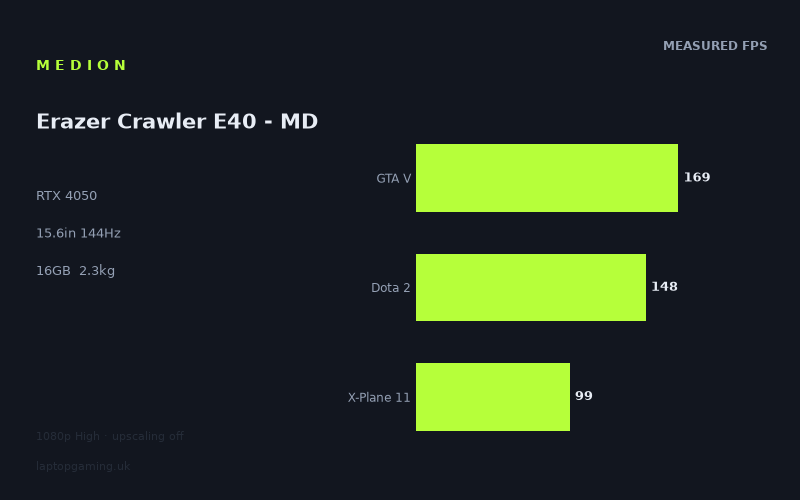
Frame rates
1920×1080, High preset, upscaling off.
Measured on this machine. Source: Notebookcheck, 2023-11-30.
Not scored: incomplete benchmark suite
Every scored laptop on this site is averaged over the same 5 games, and this one is short of Cyberpunk 2077, Baldur's Gate 3. A mean over 3 games is not comparable to a mean over 5, so we publish the figures we have and leave the score blank rather than rank it against machines tested on a different set. The numbers below are real - the suite is just incomplete.
How these numbers were produced
Frame rates here are not measured by us, and we label how each one was arrived at. A figure marked measured comes from a published run on that exact machine. A figure marked representative is derived from the GPU and its power limit (TGP) and cross-referenced against published reviews - a sound estimate of what that configuration delivers, but not a measurement of that specific laptop. Unless stated otherwise, numbers are 1920x1080, High preset, upscaling off. Where a laptop ships in several power configurations we use the wattage of the exact SKU listed, because a 140W RTX 5070 and a 115W one are not the same product.
In use
The short version
The Medion Erazer Crawler E40 - MD is a straightforward entry-level gaming laptop built around an RTX 4050, a Core i5-13500H, 16GB of memory and a 1080p 144Hz IPS display. The published benchmark data shows that it can deliver very strong frame rates in several older, lighter or less GPU-demanding games, with figures reaching 170fps in The Witcher 3, 169fps in GTA V, 168fps in Strange Brigade and 148fps in Dota 2. That makes the 144Hz panel meaningfully useful in a sizeable part of the measured library.
The caveat is that the same machine is not remotely a universal 144fps laptop when the game becomes more demanding. Notebookcheck’s figures fall to 133fps in Far Cry 5, 99fps in X-Plane 11 and 85fps in Final Fantasy XV, all at 1920x1080 with the High preset and upscaling disabled. That is still respectable 1080p performance, but it changes the buying case. This is a laptop for someone who values smooth mainstream gaming at sensible settings, not someone who expects every modern game to run at the screen’s maximum refresh rate without compromises.
There is also an important limitation in how far the available data can take us. The scoring-suite results cover GTA V, Dota 2 and X-Plane 11, producing a mean of 139fps across those games. However, there are no supplied figures for Cyberpunk 2077 or Baldur’s Gate 3. Because the wider ranking system uses the same complete game set for every scored machine, this partial result cannot be used to place the Crawler E40 fairly against scored laptops. It would be misleading to turn a strong partial average into a broad claim about its position in the market.
That does not make the available results useless. Quite the opposite: they give a clear picture of the kind of gaming this Medion handles well. The Crawler E40 looks comfortable in games that can exploit a high-refresh 1080p panel without leaning too heavily on the GPU. It is also capable of solid performance in more demanding titles, but the numbers show that the display’s 144Hz ceiling is a target rather than a guarantee. Buyers should treat 144Hz as useful headroom for esports, older games and well-optimised releases, not as a promise that every game will sit at 144fps on High settings.
The machine’s appeal will depend heavily on its eventual UK price, which is not confirmed in the available information. That matters more here than it would on a premium laptop with a clearly exceptional screen, larger battery or higher-tier graphics processor. The Crawler E40 has a sensible core specification, but it is not a specification that should be bought at any price simply because it carries an RTX badge and a 144Hz panel. Without a confirmed UK price, the honest conclusion is conditional: it could be a sensible purchase if positioned as an affordable 1080p gaming laptop, but the frame-rate evidence alone does not justify paying a premium for it.
The best buyer is someone whose regular games resemble GTA V, Dota 2, The Witcher 3, Strange Brigade or Far Cry 5, and who wants a conventional 15.6in laptop rather than a larger desktop replacement. It also makes sense for a buyer who accepts that settings decisions will still matter in the more demanding games. The wrong buyer is someone shopping specifically for demanding new releases at consistently high frame rates, someone who wants a proven all-day portable machine, or someone who expects a 144Hz screen to be saturated in every title.
Performance
What the measured numbers actually say
Notebookcheck measured the Medion Erazer Crawler E40 - MD at 1920x1080 using the High preset with upscaling turned off. That test method matters. These are not figures inflated by lower-than-native rendering, and they are not maximum frame rates achieved by reducing settings until the game becomes unrecognisable. They show what the laptop can do at its panel’s native resolution with a reasonably demanding graphics preset.
The strongest result is The Witcher 3 at 170fps. GTA V follows at 169fps, while Strange Brigade reaches 168fps. Those are all comfortably above the display’s 144Hz refresh rate. Dota 2 is also above that threshold at 148fps. In those games, the Crawler E40 has enough performance to make a high-refresh panel more than a box-ticking specification. A player will not necessarily see a perfectly locked 144fps at every moment, because published averages do not describe every demanding scene or frame-time spike, but the measured averages establish that the hardware is operating in the right performance territory.
That is particularly relevant for Dota 2. Competitive games are often played for long sessions and reward responsiveness and consistency as much as outright visual fidelity. A measured result of 148fps at 1080p High suggests that the Medion can make sensible use of its 144Hz display in this sort of game without requiring upscaling. It is not a claim that every match condition will remain identical, nor does it prove anything about latency, but it is strong evidence that the laptop is not wasting its high-refresh screen in one of the games most likely to benefit from it.
GTA V at 169fps tells a similar story. It is an older title, and its high result should not be projected directly onto newer games, but it remains a useful indication of how the Core i5-13500H and RTX 4050 combination behaves when a game is able to run at very high frame rates. The Crawler E40 is not merely capable of reaching 60fps in this class of title. It has sufficient headroom to make the panel feel appropriately specified rather than excessive.
Strange Brigade at 168fps reinforces the point. This is not a one-game fluke in the supplied results. Several games cluster close to 170fps, while Dota 2 remains close enough to the display refresh rate to count as a genuine high-refresh result. The Crawler E40’s best-case behaviour is therefore clear: at 1080p High, in games that are not especially punishing for this hardware, it can play in the 144Hz class.
The middle of the result range is Far Cry 5 at 133fps. This is below the panel’s refresh rate, but it should not be described as poor performance. A figure of 133fps is still clearly high-frame-rate gaming. The significance is not that Far Cry 5 becomes unpleasant; it is that it shows where the laptop starts to run out of the headroom needed to keep a 144Hz display fully fed. The difference between 133fps and 144fps is not a dramatic divide in playability. It is, however, a useful reminder that a 144Hz label on a laptop does not mean that every High-preset game will match it.
X-Plane 11 at 99fps is more revealing still. Flight simulation performance can depend heavily on the wider system as well as the graphics processor, with CPU work, simulation complexity and scenery all potentially relevant. The supplied result demonstrates that the Crawler E40 can still produce a high frame rate in this game, but it is no longer close to the display’s upper limit. This is the sort of title where the laptop’s screen gives headroom rather than a performance target that the machine demonstrably reaches.
Final Fantasy XV is the lowest supplied result at 85fps. Again, that is not a bad 1080p High result. It is comfortably beyond the conventional 60fps target and should support smooth-looking play. But it is a long way from 144fps, and that difference is important for anyone choosing the Medion principally because of its panel. In this part of the benchmark spread, the RTX 4050 is being asked to do substantially more work. The laptop remains capable, but settings, rendering features and expectations become more important.
The spread from 170fps in The Witcher 3 to 85fps in Final Fantasy XV is the central performance story. It is tempting to take the highest result and use it as a shorthand for the laptop’s ability, especially when it is above 144fps. That would give the wrong impression. The measured data instead shows a machine with strong variation between titles. It can be an excellent match for high-refresh gaming in some games, a near-match in others, and a more conventional high-settings 1080p machine in the most demanding result supplied.
The partial scoring-suite average
Across the supplied scoring-suite games, GTA V, Dota 2 and X-Plane 11, the mean is 139fps. That is a useful summary of the data available, but it needs handling with care. It sits just below the 144Hz panel refresh rate, which broadly reflects the individual figures: very high performance in GTA V, a result slightly above 144fps in Dota 2, and a much lower result in X-Plane 11.
As a description of these particular games, 139fps is encouraging. It says that the laptop can deliver high-refresh-class performance over a mixed set rather than only in one unusually favourable benchmark. It also underlines that the display is not absurdly ambitious for the hardware. A lower-refresh panel would leave performance unused in GTA V, The Witcher 3, Strange Brigade and Dota 2, while a much higher-resolution panel would make the GPU work harder for a visual benefit that is not guaranteed to justify the lost frame rate.
It is not, however, a complete cross-laptop ranking result. Cyberpunk 2077 and Baldur’s Gate 3 are missing from the available figures. Those games matter because the standard scored comparison uses the same complete set for every laptop. Without them, the Crawler E40’s partial average cannot be compared fairly with laptops that have a complete average. That is not an administrative technicality. A more demanding game can alter the overall picture substantially, particularly for a laptop built around an RTX 4050 rather than a higher-tier GPU.
The sensible reading is therefore narrow and useful: in the supplied suite subset, the Crawler E40 averages 139fps. That supports the view that it is capable of strong 1080p gaming. It does not support a claim that it is definitively ahead of, level with or behind another scored laptop across a full five-game set.
GPU power limit: an important missing specification
The GPU power limit is not provided in the fact sheet, so there is no basis for stating a wattage or claiming that this is a high-power or low-power RTX 4050 implementation. That distinction matters because laptop graphics chips are not defined by their name alone. Different laptop designs can configure the same GPU differently, and the resulting sustained performance can vary. It would be easy to assume that every RTX 4050 laptop behaves the same way. The benchmark evidence shows why that assumption is unsafe.
What can be said is that the Crawler E40’s actual published frame rates are the outcomes that matter more than an unconfirmed power figure. In the games where it achieves 170fps, 169fps, 168fps and 148fps, the system has ample performance for its 144Hz 1080p screen. In Final Fantasy XV at 85fps and X-Plane 11 at 99fps, it clearly does not have enough headroom to turn the same display into a universal 144fps experience at the tested settings. The practical conclusion comes from the measurements, not from a wattage figure that has not been supplied.
This is also why GPU labels need context when comparing laptops. An RTX 4050 in one machine can sometimes approach or match a laptop with a nominally stronger GPU in a limited shared set, especially at 1080p in lighter games. Conversely, a higher-tier GPU can pull well ahead once the workload becomes sufficiently graphics-limited. The Crawler E40’s comparison results demonstrate both sides of that issue. Buyers should not treat its apparent parity with some more expensive-looking hardware in a handful of shared games as proof that it will always perform like that class of machine.
Where the 144Hz target is realistic
The screen can refresh at 144Hz, but the measured figures determine how often the laptop can realistically take advantage of that capability. The evidence is strongest in The Witcher 3, GTA V, Strange Brigade and Dota 2. Each of those results is at or above 144fps. For a buyer whose library leans towards competitive games, established multiplayer titles, older action games and games with modest GPU demands, that is a meaningful advantage over a standard 60Hz laptop panel.
Far Cry 5 at 133fps is close enough that the difference should not be exaggerated. It is below the panel’s maximum refresh rate, but it remains a high frame rate and should make the screen’s higher refresh more useful than a 60Hz display. It simply does not provide evidence of a fully saturated 144Hz experience at the tested preset.
X-Plane 11 and Final Fantasy XV make a different case for the panel. At 99fps and 85fps respectively, the display still has a refresh rate high enough not to impose a visible ceiling on the published averages. That is useful. The panel is not holding the laptop back. But there is a difference between a screen that gives performance room and one that the GPU can consistently fill. In these games, the Crawler E40 is better understood as a laptop delivering smooth 1080p gaming rather than a high-refresh specialist.
There is no reason to assume that reducing settings would be necessary in every demanding game, because both X-Plane 11 and Final Fantasy XV are already above 60fps at High. But buyers who specifically prioritise the highest possible refresh rate should expect to make setting choices in games that resemble the lower end of this benchmark range. The available data does not include upscaling results, so there is no basis for promising what a particular upscaling mode would achieve. It is enough to say that the no-upscaling results establish a useful baseline: native-resolution High settings are viable, but not universally 144fps viable.
What the CPU and memory specification mean in context
The Core i5-13500H is paired with 16GB of memory. The supplied gaming results show that this platform can support very high frame rates in games such as GTA V and Dota 2, where the system needs to avoid becoming an obvious bottleneck before the GPU reaches its limits. The Crawler E40 does not appear, from these results, to be fundamentally unable to deliver high frame rates because of its processor or memory configuration.
That should not be stretched into a claim about every game or every non-gaming workload. There are no supplied productivity benchmarks, no memory speed information and no detailed CPU performance figures. Still, the gaming evidence is enough to make a practical point: the laptop’s processor, memory and RTX 4050 form a coherent combination for 1080p gaming. There is no sign in the supplied figures that the display refresh rate is irrelevant because the rest of the system cannot reach high frame rates at all.
The 512GB SSD is more difficult to judge beyond capacity because there are no supplied storage performance figures. For gaming, 512GB is a usable starting point, but buyers should not infer anything about load times, additional storage space or upgrade options from the information available. The capacity figure tells you how much headline storage is included; it does not establish how quickly it performs or how easily the laptop can be expanded.
The screen
The Medion uses a 15.6in IPS panel with a 1920x1080 resolution and a 144Hz refresh rate. On paper, that is a sensible pairing for an RTX 4050 laptop. A 1080p screen asks much less of the GPU than a higher-resolution panel would, which gives the hardware a realistic chance of producing the frame rates needed to make 144Hz worthwhile. The benchmark data supports that logic in several games.
The display resolution is especially well aligned with the stronger results. At 1920x1080, with High settings and upscaling disabled, Notebookcheck recorded 170fps in The Witcher 3, 169fps in GTA V, 168fps in Strange Brigade and 148fps in Dota 2. Those figures show that the laptop is not simply driving a 144Hz screen in name only. In the right games, it can produce enough frames for the panel to display more updates than a conventional 60Hz screen.
That said, the screen should not be judged only by whether a benchmark crosses 144fps. The 99fps result in X-Plane 11 and the 85fps result in Final Fantasy XV are still meaningful examples of why a 144Hz panel can make sense on this laptop. A display with a high refresh ceiling does not require the GPU to sit at that ceiling at all times to be useful. It gives the system room to run without the panel becoming the immediate limiter. The important distinction is that the panel is capable of showing high frame rates, while the hardware’s ability to deliver them depends strongly on the game.
The IPS panel type is welcome in a gaming laptop at this level because it avoids describing the machine as purely a specification exercise built around refresh rate alone. However, there are no supplied measurements for brightness, colour coverage, response times, contrast, backlight behaviour or outdoor visibility. Those omissions matter. A 144Hz IPS panel can be excellent, ordinary or disappointing depending on those characteristics. The available information confirms the panel technology, size, resolution and refresh rate; it does not establish its image quality beyond those basics.
For that reason, buyers who need accurate colour for professional work should not treat the IPS label as a guarantee. Buyers who play fast competitive games should likewise avoid assuming a particular pixel response performance just because the panel is rated at 144Hz. The gaming frame-rate data tells us that the GPU can make sensible use of the refresh rate in several titles. It does not tell us how cleanly the panel handles motion or how it performs in different lighting.
The 1080p resolution is arguably the most pragmatic part of the display specification. It keeps the performance target sensible for an RTX 4050. A higher-resolution screen would offer more desktop space and potentially sharper imagery, but it would also place more pressure on the GPU in games. Given that the Crawler E40 is already at 85fps in Final Fantasy XV at 1080p High without upscaling, there is little reason to wish this particular specification had been paired with a more demanding native resolution. The supplied figures suggest that Medion’s basic resolution choice is appropriate for the level of graphics hardware.
There is also a useful balance here between the two main ways people use a gaming screen. For less demanding games, the laptop can move into genuinely high-refresh territory. For more demanding games, it retains enough resolution restraint to remain well above 60fps in the lowest supplied result. That is preferable to a configuration where the panel offers more pixels than the GPU can comfortably drive. The screen is not proven to be exceptional, but its headline resolution and refresh rate are well matched to the measured performance profile.
Build, size and portability
The Crawler E40 has a 15.6in screen and weighs 2.278kg. That places it firmly in the conventional gaming-laptop category rather than the ultraportable category. It is a machine that can be moved between home, work, study and occasional travel, but the weight means that portability should be understood as transportability rather than effortless everyday carrying.
A weight of 2.278kg is not unusual for a gaming laptop with a dedicated RTX 4050, but it is substantial enough to matter if the machine will be in a backpack every day. Buyers moving from a thin non-gaming laptop should expect a different ownership experience. The Crawler E40 may still be practical for commuting or taking to classes, but it is not a machine whose physical presence disappears once it is packed away.
No dimensions are supplied, so there is no basis for claiming that the chassis is particularly thin, compact or large for a 15.6in laptop. The screen size tells us the general category, while the weight gives the clearest available portability indicator. Beyond that, it would be speculation to discuss desk footprint, thickness, hinge design, keyboard layout, ports, charger size or material quality.
The 54Wh battery is also known, but there are no battery-life measurements in the available facts. It would be wrong to convert that capacity into an estimate of working time, video playback time or gaming time. Battery duration depends on screen behaviour, processor activity, graphics switching, software configuration and workload. A battery capacity is not a battery-life result.
For a buyer deciding whether this can function as a mixed-use laptop, the honest position is limited but still useful. The 2.278kg weight says it is not especially light. The 54Wh battery does not provide enough information to promise endurance away from the mains. Its strongest case is therefore likely to be as a laptop that can be transported when needed, then used primarily where charging is available. That is a sensible pattern for many gaming machines, but anyone placing battery life or low carrying weight at the top of the priority list should seek confirmed measurements before committing.
There are likewise no supplied figures for temperature or fan noise. Gaming laptops can differ dramatically in both areas, and neither can be inferred reliably from the GPU name, screen size or weight. A buyer sensitive to fan noise should not assume quiet operation. A buyer worried about surface temperatures should not assume the opposite. These are meaningful ownership factors, but the available evidence does not answer them.
What can be said is that the laptop’s weight and conventional 15.6in format align with its gaming performance profile. This is not presented as an ultra-light machine trying to fit gaming-class hardware into the smallest possible frame. It is a standard-sized gaming laptop, with a screen resolution and refresh rate designed for its RTX 4050. The practical compromise is familiar: enough size for a proper gaming panel and dedicated graphics, but not the kind of weight that makes it an obvious choice for buyers who spend most of their time away from a desk.
How it compares
Against the MSI Thin GF63 with RTX 4050
Against the MSI Thin GF63 with the same RTX 4050 GPU generation, the Medion averages 51fps ahead across three shared games. That is a substantial gap. The two laptops may have broadly similar graphics branding, but the available shared-game data says they do not deliver similar performance in practice.
This is exactly why buyers should not shop by GPU name alone. The RTX 4050 label tells you the broad graphics class, but it does not fully describe how a particular laptop is configured or how the wider system behaves. The Crawler E40’s advantage over the MSI Thin GF63 is large enough that it should influence a buying decision if the two machines are being considered at similar prices. There is no confirmed UK price for either machine in the available information, so no value verdict can be made from performance alone. But all else being equal, a 51fps shared-game advantage is not a minor distinction.
The result also gives some context to the Medion’s own numbers. The Crawler E40 is not merely producing respectable RTX 4050 results in isolation. It is materially ahead of another RTX 4050 laptop in the shared set. That does not mean it will lead in every title, because only three shared games are included in this comparison, but it is credible evidence that this Medion is not an underperforming implementation within its GPU category.
Against the MSI Stealth 17 Studio with RTX 4080
The comparison with the MSI Stealth 17 Studio is more surprising on the surface. The Medion averages 1fps ahead across three shared games despite the MSI using an RTX 4080. That near-zero result should not be read as proof that an RTX 4050 is equivalent to an RTX 4080. It is a result about a limited shared game set at 1080p, not a universal statement about graphics performance.
At 1080p, lighter games can become CPU-bound, which compresses genuine GPU gaps. Once the processor or another part of the system becomes the limiting factor, a more powerful GPU cannot necessarily translate its potential into a much higher average frame rate. The shared games therefore appear to be poor vehicles for demonstrating the full difference between these graphics classes. The Medion’s 1fps lead is real within the supplied comparison, but it does not overturn the basic reality that the RTX 4080 is a much higher-tier GPU.
This is a useful warning against simplistic comparison tables. A buyer might see the shared-game result and conclude that the Medion offers the same performance for less money. There is no confirmed UK price for the MSI Stealth 17 Studio, so even the price part of that conclusion is unavailable. More importantly, the limited game set does not tell us how the machines separate in heavily GPU-limited games, at higher resolutions or with more demanding visual settings. The correct interpretation is narrower: in these particular three shared games, the Crawler E40 is effectively level with the MSI Stealth 17 Studio.
That still reflects well on the Medion. Achieving practical parity in a set of 1080p shared games against a laptop carrying an RTX 4080 is evidence that the Crawler E40 can produce very high frame rates where the workload allows it. It should simply not be used as a reason to expect RTX 4080-class performance in demanding modern games.
Against the Schenker XMG Core 15 with RTX 4060
Against the Schenker XMG Core 15 with RTX 4060, the Medion averages a difference of 0fps across three shared games. That is another near-zero result, and it deserves the same careful treatment. It does not mean the RTX 4050 and RTX 4060 are interchangeable in every game. It means that, in the supplied shared set at 1080p, the practical average difference disappears.
The likely explanation is again that lighter 1080p games can become CPU-bound and compress GPU differences. Where a game does not fully exploit the additional graphics capability of a stronger GPU, the machine with the nominally lower GPU can look surprisingly competitive. This is especially relevant to buyers whose gaming habits are dominated by esports, older games or titles that already run at very high frame rates. In that usage pattern, paying for more GPU can produce less visible benefit than expected.
For the Medion, the comparison is encouraging because it supports the idea that its 1080p configuration is well balanced. It can keep pace with an RTX 4060 laptop in the available shared games rather than falling behind merely because its GPU tier is lower. But a buyer should resist treating that as a blanket equivalence. The Crawler E40’s own benchmark range already shows that game demands matter greatly. A higher-tier GPU is likely to matter more once the workload becomes properly graphics-limited, and the supplied comparison does not include enough games to establish the broader gap.
Against the Asus ROG Strix Scar 17 with RTX 4090
The Asus ROG Strix Scar 17 with RTX 4090 is the machine that beats the Medion by the largest supplied margin. The Crawler E40 averages 60fps behind across three shared games. That is a decisive difference and a useful reminder of where the Medion sits in the wider gaming-laptop landscape.
The Asus is listed at £4,864, while the Medion’s UK price is not confirmed. That means no direct value calculation is possible from the available information. The price gap may be enormous, but it would be wrong to invent a Medion price or claim exactly how much cheaper it is. What the performance comparison does establish is that the RTX 4090 machine has substantially more headroom in the shared game set.
A 60fps shared-game deficit is not a marginal difference that can be explained away by measurement noise or a title behaving unusually. It is the sort of gap that changes what settings, resolutions and frame-rate targets are realistic. The Medion can be very quick in the right games, but it is not a substitute for a high-end desktop-replacement laptop when raw gaming performance is the priority.
That does not make the Asus automatically the better purchase for every buyer. The two laptops are aimed at very different expectations and, based on the confirmed Asus price, potentially very different budgets. The more useful lesson is about buying according to need. If the goal is high-refresh 1080p gaming in mainstream titles, the Medion’s data is persuasive. If the goal is maximum possible performance and substantial graphics headroom, the comparison shows that the Crawler E40 is in a different class.
The wider lesson from the rivals
The rival spread is more informative than a comparison with only one neighbouring machine. The Medion is far ahead of the MSI Thin GF63 despite both using RTX 4050 graphics. It is effectively level with the MSI Stealth 17 Studio and Schenker XMG Core 15 in the limited shared 1080p set, despite those machines using RTX 4080 and RTX 4060 graphics respectively. It then falls clearly behind the Asus ROG Strix Scar 17 with RTX 4090.
That pattern should make buyers cautious in two directions. First, do not dismiss the Crawler E40 just because it has an RTX 4050. The MSI Thin GF63 comparison shows that the same GPU label can conceal large real-world differences. Second, do not assume the Medion has somehow erased the usual hierarchy of graphics hardware because it is level with stronger laptops in a few shared games. The RTX 4090 comparison and the nature of 1080p lighter games show why shared results can compress differences.
The fairest conclusion is that the Crawler E40 is competitive where its 1080p platform is well matched to the game, but it should not be bought on the assumption that it will match higher-tier GPU laptops in every workload. Its benchmark data supports a strong mainstream gaming case, not a claim of high-end dominance.
Who it’s for
The Medion Erazer Crawler E40 - MD is for buyers who want a conventional 15.6in gaming laptop focused on 1080p performance rather than maximum specification numbers. It suits players whose regular games include titles where the measured results are particularly strong: The Witcher 3, GTA V, Strange Brigade and Dota 2. In these games, the laptop reaches or exceeds the screen’s 144Hz refresh rate at 1920x1080 High settings with upscaling disabled. That is the clearest strength in the data.
It also suits someone who wants high frame rates without moving to a larger, heavier-looking premium desktop replacement category. At 2.278kg, it is not light, but it is still a familiar 15.6in gaming-laptop format rather than an enormous machine defined solely by maximum GPU power. For a buyer who mainly games at a desk but occasionally takes the laptop elsewhere, that balance may be acceptable.
It is a reasonable option for a buyer who understands the difference between “high refresh capable” and “always 144fps”. The Crawler E40 has the former. It can run Far Cry 5 at 133fps, X-Plane 11 at 99fps and Final Fantasy XV at 85fps in the supplied test conditions. Those are usable and often very good results, but they establish a performance profile rather than an unlimited one. A sensible owner will choose settings according to the game rather than assuming that High settings always produce panel-matching frame rates.
It may also appeal to a buyer comparing it with another RTX 4050 machine. The 51fps shared-game lead over the MSI Thin GF63 is significant enough that the Medion deserves serious consideration if both are available at sensible prices. Since neither has a confirmed UK price in the supplied information, the final purchase decision cannot be made purely from value. But performance evidence strongly favours the Medion in that direct shared-game comparison.
Buy something else if your main priority is demanding modern games at the highest possible settings and frame rates. The Crawler E40’s lowest supplied result is 85fps in Final Fantasy XV, and no figures are available for Cyberpunk 2077 or Baldur’s Gate 3. That does not prove poor performance in those missing games; it means there is no attributable evidence to support a confident claim. Buyers who know that their library is dominated by demanding new releases should look for complete benchmark coverage and more graphics headroom rather than relying on this laptop’s strongest results.
Buy something else if you need proven battery endurance. The laptop has a 54Wh battery, but no battery-life measurement is supplied. A buyer who regularly works or studies away from mains power should not make a purchasing decision based on capacity alone. Likewise, anyone who needs a particularly light daily-carry laptop should take the 2.278kg weight seriously. This Medion is portable in the sense that it is a laptop, but it is not presented by the available data as a lightweight travel-first machine.
Buy something else if display quality beyond refresh rate and panel type is central to your purchase. The laptop has a 15.6in 1080p 144Hz IPS display, and that specification is well matched to the benchmark results. But there are no supplied measurements for brightness, colour, contrast or response time. Content creators, photographers and buyers who use their laptop outdoors regularly should seek those details before treating the panel as a known quantity.
Finally, wait for a confirmed UK price before making a value judgement. The Crawler E40’s hardware and measured frame rates make sense for a budget-conscious 1080p gaming laptop, especially given its strong results in several games and its sizeable advantage over the MSI Thin GF63 in the shared set. But value is inseparable from price, and the price is not confirmed here. The right verdict is not that this Medion is automatically a bargain or automatically poor value. It is that the benchmark data gives it a credible performance case, while the eventual asking price will decide whether that case is compelling.