Review
HP Victus 16-r0077ng review
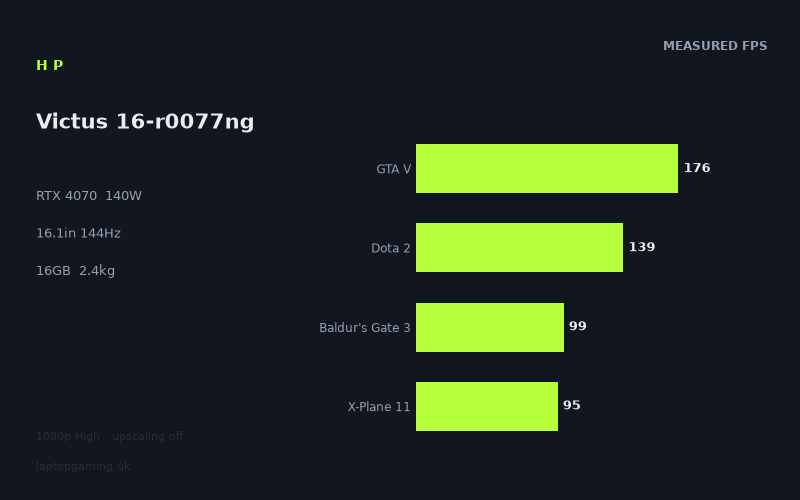
Frame rates
1920×1080, High preset, upscaling off.
Measured on this machine. Source: Notebookcheck, 2023-09-26.
Not scored: incomplete benchmark suite
Every scored laptop on this site is averaged over the same 5 games, and this one is short of Cyberpunk 2077. A mean over 4 games is not comparable to a mean over 5, so we publish the figures we have and leave the score blank rather than rank it against machines tested on a different set. The numbers below are real - the suite is just incomplete.
How these numbers were produced
Frame rates here are not measured by us, and we label how each one was arrived at. A figure marked measured comes from a published run on that exact machine. A figure marked representative is derived from the GPU and its power limit (TGP) and cross-referenced against published reviews - a sound estimate of what that configuration delivers, but not a measurement of that specific laptop. Unless stated otherwise, numbers are 1920x1080, High preset, upscaling off. Where a laptop ships in several power configurations we use the wattage of the exact SKU listed, because a 140W RTX 5070 and a 115W one are not the same product.
In use
The short version
The HP Victus 16-r0077ng is a mainstream 16in gaming laptop carrying a component list that is not mainstream at all. The GPU is an RTX 4070 running at a 140W power limit, the CPU is a Core i7-13700H, the panel is a 16.1in 1920x1080 IPS unit at 144Hz, and there is 16GB of memory. The frame rates below were measured by Notebookcheck on 26 September 2023, at 1920x1080 with the High preset and upscaling switched off, and that last detail matters more than anything else on the spec list.
The single most important number here is the wattage, not the GPU name. Mobile RTX 40-series parts shipped inside wide power bands, and the same silicon in a thin chassis at a low limit behaves like a different product from the same silicon fed properly. At 140W this is the RTX 4070 running at the top of the allowance it was commonly given, which means the measured figures should be read as close to a best case for an RTX 4070 laptop rather than a typical one. If you are cross-shopping other Victus configurations, or any other machine that simply says "RTX 4070" on the box, that distinction is the whole argument.
What comes out of that pairing is a machine that behaves in three clearly separate ways depending on what you point it at. In older and lighter titles it runs past the panel's refresh ceiling and stops being limited by the graphics card at all. Through the broad middle of a mixed library it sits in a band running from the high eighties to the high one-twenties, which is exactly the range a 144Hz panel is built to display. And in the heaviest releases of the year it launched into, it falls to the low fifties with upscaling off. The spread between the fastest and slowest measured titles is 141 frames, which is a wide range by any standard and tells you that the workload, not the hardware, decides the experience on this machine.
No ranking is attached to this review, and the reason is worth stating plainly rather than burying. Every scored laptop on this site is averaged over the same five games so that the ranking means something. The data set here covers four of them — GTA V at 176fps, Dota 2 at 139fps, Baldur's Gate 3 at 99fps and X-Plane 11 at 95fps, for a mean of 127fps — but there are no figures for Cyberpunk 2077. A four-game mean cannot be honestly ranked against five-game means from other machines, and in this specific case the missing title is the heaviest of the set, so the partial average flatters the result. Better to say so than to publish a number that quietly is not comparable.
Buy it if you have accepted that 1080p is where you are playing for the next several years and you want the machine that holds high settings there longest. Look elsewhere if you want a higher-resolution panel, if a machine that weighs 2.372kg before the charger is going to annoy you every day, or if your library is entirely esports titles that a much cheaper card already runs past the refresh ceiling.
Performance
What 140W actually buys
The practical consequence of a 140W limit is that this laptop's RTX 4070 is not being asked to work around its cooling. Lower-wattage versions of the same part exist in slimmer chassis, and they lose real performance — not a rounding error, but a visible chunk of frame rate, concentrated precisely in the demanding titles where you notice it. The benchmark data here is consistent with a GPU allowed to run rather than one throttled back into a thermal envelope it does not fit.
What it does not buy is immunity from the CPU. At 1920x1080 the graphics card finishes its work quickly in anything that is not pushing modern lighting or heavy geometry, and the bottleneck moves upstream to the processor's ability to issue draw calls and run game logic. That single mechanism explains most of the shape of the results below, and it explains almost all of the comparison results further down the page. It is also why buying a 140W card and then running it at 1080p is a slightly odd allocation of money in older games and exactly the right one in newer ones.
One more thing about the wattage, since it is easy to over-read: there are no temperature, fan-noise or battery-runtime measurements in this data set. A machine sustaining 140W into the GPU alongside an eight-core-plus-efficient-cores mobile CPU has to move a lot of heat, and it is reasonable to assume that it is audible under load, because every machine in this class is. But "reasonable to assume" is not a measurement, and this review will not invent one. If quiet operation is a hard requirement, that is a question to answer from a source that measured it.
The titles that run past the panel
Two measured games exceed the 144Hz refresh outright. Strange Brigade returns 192fps and GTA V returns 176fps. Neither is a surprise. Strange Brigade is a Vulkan title from an engine built for efficiency and it has been used as a benchmark for years precisely because it scales cleanly and rewards raw throughput. GTA V is a 2015 PC release running on hardware from eight years later; the interesting thing is not that it is fast but that it is only fast, rather than absurd, which tells you the CPU is doing the limiting.
Frames above the panel's ceiling are not wasted, but they are not doing what people assume. You will not see the extra motion — the display cannot show it. What you get is lower input latency and a buffer of headroom, so that a busy scene which halves the frame rate still lands above the refresh rather than below it. At 192fps and 176fps respectively that buffer is generous in both titles, and the sensible setup on each is a frame cap at or slightly under the refresh, which stops the GPU burning power for output nobody sees and keeps frame pacing steadier than an uncapped run bouncing off the ceiling.
Just underneath sit Dota 2 at 139fps and Company of Heroes 3 at 135fps. Dota 2 is the more instructive of the two. It is an old engine, it is not remotely demanding on a 140W RTX 4070, and 139fps is emphatically not a graphics result — it is the Core i7-13700H's number. Hold that thought, because it comes back with force when this machine is set against a laptop with a much weaker GPU. Company of Heroes 3 at 135fps is a different case: a real-time strategy title with a large simulated unit count, where the processor again does a great deal of the work, and where the frame rate you get in a benchmark run is friendlier than what a late-game battle with hundreds of entities will produce.
The comfortable middle, and why it is wide
The bulk of the measured library lands between the high eighties and the high one-twenties, and this band is where the machine spends most of its life. Atlas Fallen and High On Life both return 127fps. Final Fantasy XV manages 109fps. Armored Core 6 gives 102fps, Baldur's Gate 3 gives 99fps, X-Plane 11 gives 95fps, Sons of the Forest gives 88fps and Atomic Heart gives 86fps.
That is a 41-frame spread inside what looks like a single tier, and the reason is that these titles are limited by different things. High On Life is a stylised Unreal Engine 4 game with modest lighting cost; its 127fps is a GPU result with room to spare. Atlas Fallen matching it at 127fps comes from a different direction — an action title with large open spaces and a lot of particle and surface work, which is more demanding per pixel but less demanding on the processor. Final Fantasy XV at 109fps is a 2018 port with an engine that was never especially efficient and that leans on expensive post-processing, so it costs more than its age suggests.
Armored Core 6 at 102fps reflects a FromSoftware engine that is not built around raw throughput; the arenas are geometrically dense and the effects work during combat is heavy, and the result is a title that a 140W card handles comfortably without ever running away with it. Baldur's Gate 3 at 99fps is the one to read most carefully, because it is the measured title whose benchmark number is least representative of the whole game. Larian's engine is heavily processor-bound in dense scenes with many active characters, and a repeatable benchmark run does not capture the worst of it. A crowded city district in the third act will sit meaningfully below 99fps on any machine, this one included, and that is a property of the game rather than a fault in the laptop.
X-Plane 11 at 95fps is the clearest processor result in the entire set. Flight simulators of that generation are draw-call heavy and lean hard on single-thread performance, which is why a card with this much headroom is nowhere near its limit and the number is decided by clock speed and memory latency instead. Sons of the Forest at 88fps and Atomic Heart at 86fps close the band from below — the first because of dense vegetation and the shadow and foliage cost that comes with it, the second because it carries a genuinely expensive lighting and reflection pipeline that punishes mid-range hardware harder than its art style implies.
The practical reading is that a 144Hz panel and this GPU are well matched through this whole band. Everything here is displayable in full by the screen, none of it requires settings compromises to stay smooth, and the variance from title to title is small enough that you are not constantly renegotiating the graphics menu.
Where it drops, and why that group is what it is
Four titles land in the fifties and sixties: The Crew Motorfest at 60fps, Ratchet & Clank Rift Apart at 58fps, Immortals of Aveum at 56fps and Starfield at 51fps. Every one of them is a 2023 release, and that is not a coincidence — it is the defining fact about this machine's position.
Starfield at 51fps is the hardest result on the list and the most misleading if read carelessly. Bethesda's engine is unusually processor-hungry in populated areas, its shading cost is high for what it renders, and at launch it had no upscaling support of the kind its competitors shipped with. A 140W RTX 4070 delivering 51fps at 1080p High says considerably more about the game than about the laptop. Immortals of Aveum at 56fps is the purest statement of where the industry was heading: an Unreal Engine 5 title built around Lumen and designed from the start on the assumption that the player is running temporal upscaling. Native 1080p is not the way that game was meant to be rendered, and the figure reflects that.
Ratchet & Clank Rift Apart at 58fps carries ray-traced reflections and an aggressive asset-streaming model ported from console hardware with dedicated decompression. The Crew Motorfest at 60fps is an open-world racer with long draw distances and a heavy streaming budget, and it is also the title in this group most likely to feel fine at its measured number, because a racing game at a stable 60fps with a controller is a genuinely acceptable experience in a way that a first-person shooter at 56fps is not.
The essential caveat on all four is that these were recorded with upscaling off. Three of them ship with DLSS, this GPU supports it, and Quality-mode upscaling at 1080p would move these numbers upward. By how much is not something to guess at — there are no measured upscaled figures in this data set, and inventing one would defeat the point of the exercise. What can be said with confidence is that the native figures are the floor, not the ceiling, and that a buyer who is comfortable enabling upscaling in the heaviest handful of games has more headroom than the raw list implies.
The wider point is about ageing. This machine's weakest results are all from the year it launched, which means the trend line was already visible on the day it went on sale. If Starfield returns 51fps in 2023, the demanding releases of 2025 and 2026 are not going to be running at native 1080p High on this hardware either. That is not a criticism — it is true of every mid-range laptop GPU ever sold — but it does define the honest expectation: a machine that stays excellent for the older and mid-weight majority of a library for years, while the flagship releases increasingly require either upscaling or a step down from High.
The processor's share of the result
The Core i7-13700H is a hybrid design with performance and efficiency cores, and at 1920x1080 it is doing more to set these numbers than buyers typically expect. Dota 2 at 139fps, X-Plane 11 at 95fps, GTA V at 176fps and Company of Heroes 3 at 135fps are all substantially processor-determined. That has two consequences worth acting on.
The first is that this machine would show a larger fraction of its GPU's capability on a higher-resolution panel, because raising the pixel count moves the work back onto the graphics card and the CPU stops being the limiter. HP did not fit one, so that capability stays partly latent in the light titles. The second is that in the four heavy titles the balance flips completely: there the GPU is saturated and the processor has spare capacity. A 140W RTX 4070 paired with a strong mobile i7 is a sensible combination precisely because it is not lopsided in either direction, and the measured set demonstrates both halves of that.
Why this machine carries no ranking
The four scoring-suite results available here average 127fps, which sounds healthy and is. The problem is comparability. Cyberpunk 2077 is the fifth game in the suite and there is no figure for it, and Cyberpunk is the heaviest title in that group by a considerable margin. Averaging the four that remain removes the workload most likely to pull the mean down, so the 127fps figure sits above where a complete five-game average would land. Publishing a rank built on that would put this laptop ahead of machines measured across the full set for reasons that have nothing to do with the hardware. The mean is quoted here because it is a genuine measurement of four genuine runs; it simply is not a league-table entry, and pretending otherwise would be the kind of thing that makes benchmark tables useless.
The screen
A 16.1in IPS panel at 1920x1080 and 144Hz is a deliberate set of trade-offs, and it is worth separating the good decisions from the compromises.
The refresh rate and the GPU are properly matched, which is rarer than it should be. Only two measured titles exceed 144Hz, and both — Strange Brigade at 192fps and GTA V at 176fps — are titles where a frame cap costs you nothing perceptible. Everything else in the measured set is inside the panel's displayable range, which means the screen is showing you the machine's actual output almost all the time. Compare that with the common alternative of a much higher-refresh panel bolted to hardware that only reaches those rates in a handful of esports titles, where most of the specification is marketing rather than experience. Here the numbers line up.
The resolution decision is the one that will divide buyers. Choosing 1080p is defensible on performance grounds and the heavy titles prove it: Starfield at 51fps, Immortals of Aveum at 56fps and Ratchet & Clank Rift Apart at 58fps are native 1080p results, and moving to a 1440p panel would push all three well below where anyone would want them, on day one, without upscaling. The GPU is correctly specified for the panel in the games that actually stress it. Against that, 1080p spread across a 16.1in diagonal is a lower pixel density than the same resolution on a 15.6in or 14in screen, and it shows — edges are softer, text and interface elements are coarser, and if you also use the machine for work at a normal desk distance you will notice it before you notice anything about the frame rate. This is a screen chosen for gaming performance first and everything else second.
IPS is the right panel technology at this level, since the alternative at similar cost is usually a TN unit with worse colour and worse off-axis behaviour. What the data does not include is any measurement of brightness, colour gamut coverage, contrast or pixel response time, and those vary enormously between IPS panels — including between different panel suppliers used in the same laptop model. This review will therefore not characterise the panel's brightness or colour performance at all, and a buyer who cares about either should find a source that measured the specific variant.
The specification list also does not state whether adaptive sync is present. That is not a trivial gap on this particular machine. The four heaviest measured titles run in the fifties and sixties, which is exactly the range where variable refresh makes the difference between smooth and visibly uneven, and where its absence forces you into vertical sync and its latency penalty or into tearing. In the comfortable middle band it matters much less. Worth confirming on the specific SKU before buying.
Build, size and portability
At 2.372kg this sits where 16in gaming laptops of this generation generally landed, and the number by itself understates the reality of moving it. A machine that pulls 140W into the graphics card alone, on top of a mobile i7, requires a power supply sized to match, and gaming-laptop chargers of that class are large and heavy objects. The figure that matters for a rucksack is the laptop plus that brick plus its cable, and it is meaningfully more than 2.372kg. The specification list here does not state the charger's rating, so no number is claimed — but nobody has ever described carrying one of these as a light load.
The chassis footprint follows from the 16.1in panel. That is a size that fits most laptop rucksacks designed for 16in machines and will not fit a compact 14in sleeve, and it is a size that needs a real desk rather than a train tray table. Combined with the weight, the honest use case is a machine that moves between fixed locations — home and a flat, a bedroom and a study, term-time and holidays — rather than one you carry daily. Anyone genuinely commuting with a laptop every day should be looking at a smaller and lighter class of machine and accepting the performance consequence, because the performance consequence is smaller than the daily annoyance of an extra kilogram and a brick.
The 83Wh battery is a reasonable capacity for the class, and it sits comfortably under the 100Wh limit that airlines apply to lithium cells in cabin baggage, so it is not a machine that creates problems at check-in. What that capacity translates to in hours is not something the data covers, and there is no measured runtime figure here to quote. What can be said as a general property of the hardware rather than a claim about this specific unit is that a discrete GPU of this class cannot draw anything close to its full power allowance from a battery, so unplugged gaming performance on any 140W machine is substantially below the plugged-in figures above. Every number in this review is a mains-powered number. Treat the battery as something that gets you through office work and browsing between sockets, not as a way to play Starfield on a train.
On memory: 16GB was the standard fitment for this class in 2023 and is adequate for everything in the measured list, but it is the component most likely to feel tight first, particularly with a heavily populated browser sitting behind a game. The specification here does not state whether the memory is soldered or in SO-DIMM slots, and on Victus machines that has varied by configuration. If you expect to want 32GB later, establish which arrangement your specific SKU uses before you buy — it is the difference between a twenty-minute upgrade and no upgrade at all.
How it compares
The comparisons below are drawn only from games that both machines have measured figures for, with the scoring-suite titles preferred. That method is the honest one, but it has a bias that has to be stated up front or the results will be misread. At 1920x1080 with High settings, the lighter shared titles — Dota 2, GTA V, Strange Brigade, X-Plane 11 and similar — are limited by the processor rather than the graphics card. Two laptops with genuinely different GPUs will therefore return similar numbers in those games, because neither GPU is the thing being measured. When a shared set is small and weighted towards those titles, it compresses real hardware differences and flatters the weaker card. Where a comparison below lands near level, the interesting question is not whether the machines are equal but whether the shared set was capable of detecting a difference at all.
Against the MSI Thin GF63 (RTX 4050)
This is the widest gap on the list among the cards below it: an average of 46 frames ahead across four shared games. It is also the comparison where the shared-set bias does the least damage, and the reason is a useful piece of benchmark logic. When the faster machine is limited by its processor in a light title and the slower machine is still limited by its graphics card in that same title, the difference you measure is the slower card's genuine shortfall rather than an artefact. The RTX 4050 has less of everything — fewer shader units, a narrower memory bus, less video memory — and it runs out of graphics capability in titles where the 140W RTX 4070 has already handed the limiting role over to the i7-13700H. An average gap of 46 frames across four games is not a tuning difference or a run-to-run wobble; it is a full performance tier.
None of which means the GF63 is a bad purchase in the abstract. It is a thinner and lighter machine built to a different brief, and there are people for whom carrying weight matters more than frame rate. But if the two are being cross-shopped on gaming performance, this is not a close contest, and the shared-game method — which usually understates gaps — is showing a large one anyway. There is no confirmed UK price for either machine in this data, so the value comparison cannot be completed here; what can be said is that the performance difference is large enough that a modest price gap would be worth paying, and only a very large one would not.
Against the Asus TUF Gaming A15 (RTX 4060)
An average of one frame ahead across four shared games. Taken at face value that reads as a dead heat between an RTX 4060 and a 140W RTX 4070, which would be an extraordinary claim, and it is not what is happening.
This is the comparison the method distorts most severely. The shared set here is weighted towards the light end — the class of title where the i7-13700H, or whatever processor the A15 carries, decides the frame rate long before either graphics card is working hard. Both machines run into the same ceiling from below, and both report roughly the same number, so the average collapses to nothing. The comparison is not measuring the GPUs; it is measuring two processors that happen to be similarly capable at 1080p in undemanding games.
Where the difference would show is precisely where there is no shared data: in Starfield, Immortals of Aveum, Ratchet & Clank Rift Apart and The Crew Motorfest, the four titles that drive this machine into the fifties and sixties. Those are GPU-saturated workloads, and a card with fewer resources separates from a 140W RTX 4070 clearly in them. The shared four have nothing to say about that scenario.
The practical advice splits cleanly. If your library is genuinely dominated by esports, older titles and mid-weight games — and for a very large number of people it honestly is — then the near-tie is telling you something real about your own experience, and the cheaper machine is the better buy. If you expect to play the demanding releases of 2024 onwards at native resolution, the near-tie is an artefact and you should not let it talk you out of the stronger card.
Against the Asus TUF Gaming A17 (RTX 4070 at 140W)
An average of one frame ahead across three shared games, and here the near-identical result is exactly what it appears to be. Both machines carry the same GPU at the same 140W limit, so a margin of one frame across three games is comfortably inside normal run-to-run variance and driver-version differences. This is the comparison that validates the argument made at the top of this review: the wattage is the specification that decides performance, and when two laptops match on it, they perform the same regardless of badge.
That leaves the decision to everything else, which is not a cop-out — it is the correct answer. The specification data here does not list the A17's processor, so the tiny margin cannot be attributed to platform differences with any confidence, and it would be wrong to try. What differs between these two machines is the chassis, the keyboard, the panel specification, the port layout, the noise behaviour under load, the warranty and the price, and none of those is a benchmark question. If the A17 follows Asus's usual naming convention it is the physically larger machine of the two, which pushes it further towards desk use and away from carrying, and for some buyers that alone settles it. On raw gaming output there is nothing here to choose between them, and anyone claiming otherwise from a three-game shared set is reading noise as signal.
Against the Asus ROG Strix Scar 17 (RTX 4090)
An average of 62 frames behind across three shared games, which is the largest margin in either direction on this page and the clearest demonstration that the shared-set compression is not universal.
That last point deserves unpacking, because a 62-frame average gap is only possible if the shared titles here allow both machines to stretch. If this comparison drew on the same processor-bound light games that flattened the A15 result, a flagship card would have shown a fraction of that margin, for the same reason the RTX 4060 did not lose ground. The size of the gap tells you the shared set leans on workloads where the GPU still matters and where the Scar's substantially larger card, and the higher-tier platform around it, both get to work. The comparison is measuring something real.
One note on the specification listed for that machine: the power figure recorded against its RTX 4090 is 25W, which is not a plausible sustained gaming limit for that GPU and should be treated as a data artefact rather than a genuine configuration. It does not change the measured result — the frame rates are what they are — but it is not a number to reason from, and it is flagged here rather than quietly used.
The more useful question is what a buyer should do with the information, and the answer is not simply "buy the faster machine". The Scar 17 belongs to a different class entirely, and while there is no confirmed price for either laptop in this data so no value verdict can be reached, the structural point stands: flagship mobile GPUs command flagship prices, and the gap is not small. More importantly, on a 1920x1080 144Hz panel, most of a 62-frame advantage is invisible. In the light titles it produces frames the display cannot show. The advantage only becomes an experience in the four heavy titles where this machine sits in the fifties and sixties — a real benefit, but a narrower one than the headline suggests. The sensible way to spend flagship money is on a machine with a higher-resolution or higher-refresh panel that can actually display the surplus, which is precisely what the Victus does not have and does not pretend to have.
What these comparisons cannot settle
Three limits are worth keeping in view. The shared sets are small — three or four games each — so a single unrepresentative title moves the average noticeably. None of the four rivals has a confirmed UK price in this data, which means no value ranking can be produced, and value is usually the deciding factor between machines whose performance is this close. And every figure quoted is a native-resolution result with upscaling off, so a buyer who intends to use DLSS in the demanding titles is looking at a comparison that does not reflect how they will actually play. The numbers are solid; the conclusions they support are narrower than the confident tone of most comparison tables would suggest.
Who it's for
The clearest case for this machine is the buyer who has made peace with 1080p and wants the longest possible runway there. That is a more sensible position than it sounds. Choosing a 140W RTX 4070 and a 1080p panel means the GPU is over-specified for older and mid-weight titles — which is why the top of the measured list bunches up against the processor — and correctly specified for the demanding end, where 51fps in Starfield and 56fps in Immortals of Aveum at native resolution are respectable results for the era. A weaker card on the same panel would have handled today's library and struggled with tomorrow's. This configuration handles both, with the caveat that "tomorrow's" increasingly means enabling upscaling.
It suits a mixed library particularly well. Someone who moves between an esports title, a large single-player release, a strategy game and whatever came out this month gets a genuinely consistent experience: Dota 2 at 139fps, Baldur's Gate 3 at 99fps, Company of Heroes 3 at 135fps and Armored Core 6 at 102fps all sit inside the panel's range and all feel like the same machine. There is no category of game here that is embarrassing.
It suits someone with a desk. At 2.372kg plus a substantial charger, this is a laptop as a space-saving desktop with the option to relocate, not a portable. If that describes your situation — a machine that lives in one room and occasionally travels between two homes — the weight is a non-issue and the 16.1in screen is a benefit rather than a burden.
Now the other side, stated just as concretely.
- Do not buy it if you want a higher-resolution screen. There is no 1440p option in this specification, and the panel is what you get. If you want more desktop space or sharper text, this machine is the wrong shape for you regardless of how fast the GPU is.
- Do not buy it if you carry a laptop every day. A total travel weight comfortably above 2.372kg once the power supply is included, in a 16.1in footprint, is a genuine daily cost. The performance is not worth it if you resent the machine every morning.
- Do not buy it if you only play esports titles. Dota 2 at 139fps is a processor result, not a graphics one, and a considerably cheaper machine will produce a very similar figure. Paying for a 140W RTX 4070 to run games that do not use it is money spent on capability you will never call on.
- Think carefully if you need more than 16GB. The capacity is fine for the measured games but it is the first specification here likely to age badly, and whether it can be increased depends on a configuration detail the data does not state.
- Do not buy it expecting flagship performance in the heaviest releases. The measured fifties in Starfield and Immortals of Aveum are honest results for a mid-range card at native resolution, and they were recorded in the machine's own launch year. Anyone whose priority is playing the most demanding new releases at maximum settings without upscaling needs a different class of hardware and should budget accordingly.
On price, this review can only give you the shape of the argument rather than the answer, because there is no confirmed UK figure in the data. But the shape is straightforward and it is worth carrying into a shop. If this machine is priced against RTX 4060 laptops, it is a strong buy, because the shared-game near-tie against the Asus TUF Gaming A15 is an artefact of processor-bound test titles and the real gap opens up in exactly the games that will decide how long the laptop stays useful. If it is priced close to laptops carrying a tier above, the argument weakens considerably, because at that point you are paying near-flagship money for a 1080p panel and the surplus performance has nowhere to go. And if it is priced against another 140W RTX 4070 machine such as the Asus TUF Gaming A17, the frame rates genuinely cannot separate them and you should choose on chassis, keyboard, noise, warranty and whichever is cheaper on the day.
What the benchmark data supports, stripped of everything else, is this: the HP Victus 16-r0077ng is a properly fed RTX 4070 laptop rather than a nominal one, its 140W limit is the specification that earns it its place, and its panel and GPU are matched to each other rather than to a marketing sheet. Its weaknesses are a coarse pixel density for the diagonal, a weight that rules out daily carrying, and the ordinary mid-range reality that the most demanding titles of its own launch year already required compromise. Judged against what an RTX 40-series mid-range machine was supposed to deliver in 2023, it delivers it — and the four-game mean of 127fps, incomplete as it is for ranking purposes, is not flattering it by much.