Details
Product prices and availability are accurate as of the date/time indicated and are subject to change. Any price and availability information displayed on Amazon.co.uk at the time of purchase will apply to the purchase of this product.Review
Dell XPS 16 review
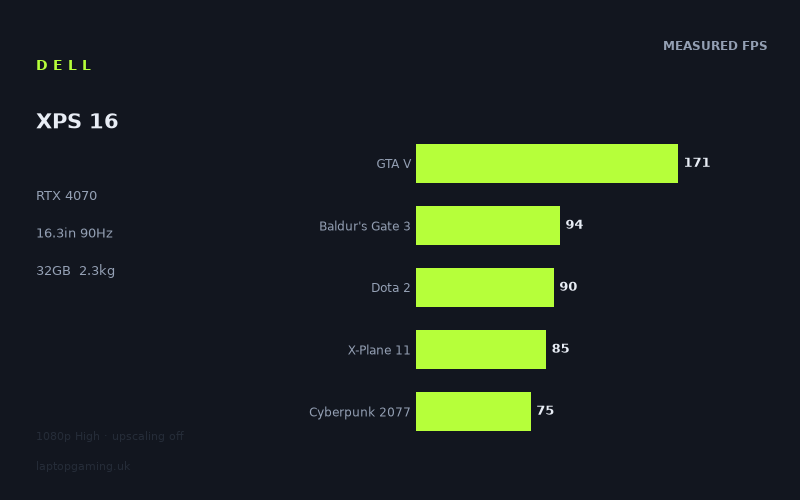
Frame rates
1920×1080, High preset, upscaling off. Averages 103fps across the 5 core benchmark games.
Measured on this machine. Source: Notebookcheck, 2024-04-11.
Not scored: no confirmed UK price
We have the full benchmark suite for this machine, so it ranks on the frame rate leaderboard like any other. What we don't have is a UK listing for this exact configuration - it's sold as a European review unit, or only in specifications that differ from the one tested. Since 30% of our score is value for money, scoring it would mean pretending price is no object, which would flatter it against every laptop you can actually buy. The frame rates below are real and comparable; there is just no buying recommendation to make yet.
How these numbers were produced
Frame rates here are not measured by us, and we label how each one was arrived at. A figure marked measured comes from a published run on that exact machine. A figure marked representative is derived from the GPU and its power limit (TGP) and cross-referenced against published reviews - a sound estimate of what that configuration delivers, but not a measurement of that specific laptop. Unless stated otherwise, numbers are 1920x1080, High preset, upscaling off. Where a laptop ships in several power configurations we use the wattage of the exact SKU listed, because a 140W RTX 5070 and a 115W one are not the same product.
In use
The short version
The Dell XPS 16 (9640) is not a gaming laptop and was never meant to be one. It is a 2.313kg premium 16.3in workstation-adjacent machine with a 3840x2400 OLED panel, 32GB of memory, a Core Ultra 7 155H and — the reason it appears on this site at all — an RTX 4070. The interesting question is not whether it competes with gaming laptops on their terms. It does not. The question is what a serious GPU actually delivers inside a chassis built to entirely different priorities, and the measured figures answer that with more nuance than either the sceptics or the marketing would predict.
Notebookcheck's numbers put it at 103fps averaged across the five scoring-suite games, with Strange Brigade at 202fps at the top and Horizon Forbidden West at 58fps at the bottom. That floor is the only sub-60fps result on the record, and it is a native-1080p figure on a machine whose panel is more than four times that pixel count. Ten of eleven measured titles clear 60fps; seven clear 90fps, which happens to be the panel's refresh ceiling.
That last point is the one most reviews of this machine get wrong. The XPS 16 runs a 90Hz display, not a 165Hz or 240Hz one, and for a gaming assessment that is not a weakness — it is the specification that makes the GPU's job achievable. A high-refresh gaming panel would spend its life unfed. A 90Hz panel is one this graphics card can actually saturate in a majority of the games we hold.
Buy it if you want a genuinely premium machine for professional work, on an exceptional screen, that also plays modern games properly in the evening. Do not buy it as a gaming laptop — the −84fps deficit against a top-tier machine in the comparison section is the largest in this class and it is not close.
Why there is no score on this page
We have no confirmed UK price for this exact configuration, so there is no score. That is worth stating clearly because the absence can be misread: nothing is wrong with the machine and nothing is missing from its benchmark record. The scoring suite is complete — all five games are on record — and it ranks normally on our frame rate leaderboard.
Value carries 30% of our score, and without a price there is no honest way to compute it. We are not going to estimate what an XPS 16 in this configuration costs, and you should treat any publication that does with suspicion, because premium Dell configurations vary enormously and move constantly. When a confirmed UK price appears, the score appears with it.
Performance
The figures are Notebookcheck's, dated 11 April 2024, all taken at 1920x1080 on the High preset with upscaling turned off. That condition matters here more than on almost any other machine we cover, because the XPS 16's native panel is 3840x2400 — nearly four and a half times the tested pixel count — and because this is the GPU generation that made upscaling the default assumption. What follows is unassisted rasterisation performance at a resolution the machine will rarely run. It is the honest floor, and it is the only basis on which machines can be fairly compared, but do not mistake it for a description of how you would use the laptop.
An RTX 4070 in a 2.313kg chassis, and the figure we do not hold
The mobile RTX 4070 is not a single fixed product. It is a die and a memory configuration that a manufacturer can run across a wide power band, and where that limit is set has a substantial effect on delivered performance — enough that two laptops carrying the same GPU name can behave like different tiers of hardware.
Our record does not list a GPU power limit for this configuration, and we are not going to supply one from inference. That is a genuine gap. What we can say is what the chassis implies and what the measured figures show. A 2.313kg 16.3in machine with a thin profile, a very high-resolution OLED panel drawing real power, and a design brief that prioritises acoustics and finish is not a chassis in which any manufacturer runs a GPU at the top of its envelope. The measured results are consistent with a GPU that is being run conservatively rather than aggressively, and one comparison in particular — against a machine with the same GPU tier at a stated 140W — is instructive on exactly that point.
The compensating component is the Core Ultra 7 155H, and it is worth flagging early that this processor's behaviour is visible in the record in an unusual way. Two of the results below are CPU-limited titles returning figures noticeably lower than the pattern would predict, and that is the most interesting thing in this machine's data.
The top of the record: 202, 195, 175, 171
Strange Brigade returns 202fps, The Witcher 3 195fps, F1 23 175fps and GTA V 171fps. All four are comfortably past the panel's 90Hz refresh — more than double it, in three cases — which means that in these games the display is the constraint on what you see and the GPU has enormous headroom to spend elsewhere.
That headroom is the practical story of this machine and it should be read as an instruction rather than a statistic. If The Witcher 3 runs at 195fps at 1080p and your panel tops out at 90Hz, most of those frames are being discarded. The correct thing to do with it is to raise the resolution — towards 1600p, or towards native with reconstruction — until the frame rate lands near 90 and the display is doing the limiting. That is a far better use of the hardware than running 1080p on a 3840x2400 screen and watching frames get discarded.
Strange Brigade at 202fps is the near-best-case rasterisation figure — a well-optimised Vulkan title that establishes the hardware ceiling and tells you relatively little about anything you would actually play. F1 23 at 175fps is more useful: racing is the genre that most rewards frame rate, and 175fps means capping at 90Hz and holding it is effortless even in a wet, full-grid start.
GTA V at 171fps is where the record starts to get interesting, though you would not know it from the number alone. GTA V is bounded by single-thread CPU throughput and driver overhead rather than by the graphics card, so 171fps is substantially a statement about the Core Ultra 7 155H. Taken in isolation it looks fine. Taken alongside the two figures discussed below, it becomes part of a pattern.
The middle band: Far Cry 5, Baldur's Gate 3 and Final Fantasy XV
Far Cry 5 at 122fps, Baldur's Gate 3 at 94fps and Final Fantasy XV at 93fps sit between the fast old titles and the demanding modern ones, and all three still clear the panel's refresh rate.
Baldur's Gate 3 at 94fps is the important one, both because it is in the scoring suite and because it is a genuinely modern, genuinely demanding game. Larian's engine leans hard on the processor in the later acts, where large numbers of simulated actors combine with lighting-heavy interiors, and 94fps at 1080p High is a comfortable average. A turn-based RPG does not need high frame rates; it needs never to stutter, and this figure gives enough margin above the panel's 90Hz that the display remains the limiting factor through most of the game. Act 3 will be heavier than the average implies, but there is room.
Far Cry 5 at 122fps is a good result for an open-world shooter and reflects an efficient, well-threaded engine. Final Fantasy XV at 93fps is the expected outcome for a port that has always been inefficient relative to how it looks; it is the first title in the record where the GPU is plainly working.
Dota 2 at 90fps and X-Plane 11 at 85fps: the record's real anomaly
Dota 2 returns 90fps and X-Plane 11 returns 85fps, and these two figures are the most unusual thing in this machine's data. They deserve to be examined rather than filed away.
Both are CPU-bound titles. Neither is a serious GPU workload — a MOBA renders a small number of relatively simple objects, and X-Plane 11 is dominated by single-threaded scenery and physics work. On most machines carrying this class of hardware, both sit well clear of the middle of the pack precisely because the graphics card is idling. Here they do not. Dota 2 lands level with the panel's refresh rate and X-Plane 11 lands below it, and both sit beneath Final Fantasy XV — a game that leans on the GPU far harder.
The measured figures are what they are and we are not going to argue with them. What we can offer is a reading, clearly labelled as reasoning rather than data: this is the signature of a processor operating within a constrained power and thermal budget. The Core Ultra 7 155H is a capable part, but in a 2.313kg premium chassis with a power-hungry OLED panel, the sustained CPU power available is not what it would be in a thick gaming machine, and CPU-limited titles are exactly where that shows. We hold no CPU power or thermal measurements for this laptop, so this is inference and you should treat it as such. But the pattern is consistent: the three most processor-dependent titles in the record (GTA V, Dota 2, X-Plane 11) all sit lower relative to the GPU-bound titles than they typically do.
Practically, what does this mean for a buyer? If your gaming is competitive — MOBAs, shooters, anything where you want the highest possible frame rate in a visually simple game — this is not the machine's strength, and 90fps in Dota 2 on a 90Hz panel means you are exactly at the limit with no margin. If your gaming is single-player and visually rich, the pattern works in your favour, because the GPU-bound titles are where this machine performs relatively better.
The floor: Cyberpunk 2077 at 75fps and Horizon Forbidden West at 58fps
Cyberpunk 2077 returns 75fps and Horizon Forbidden West returns 58fps. These are the two numbers that define the machine's real limit.
Cyberpunk 2077 at 75fps at 1080p High with upscaling off is a good result. It remains one of the heaviest pure-rasterisation workloads in common use, and 75fps means the machine has options: you can raise the internal resolution substantially and reconstruct to native, or turn on some ray tracing with DLSS carrying the load, and land somewhere sensible in either case. Critically, 75fps is below the panel's 90Hz ceiling, which means this is the first title in the record where the GPU rather than the display is doing the limiting.
Horizon Forbidden West at 58fps is the only sub-60 figure on the record and the most informative single number here. Guerrilla's port is GPU-hungry in ways that are hard to design around — dense foliage, long draw distances, expensive volumetrics — and it does not reward a fast processor the way the CPU-bound titles do. 58fps at 1080p High is playable but marginal, and it is a native-resolution figure at a resolution this machine's panel is four and a half times larger than.
The honest conclusion from these two is that in the heaviest modern titles, the XPS 16 is a machine that needs DLSS to be comfortable at its native resolution. That is not a scandal — it is true of the great majority of laptops carrying this class of GPU, and it is what the technology exists for. But it should be said clearly rather than buried, because a buyer looking at "RTX 4070" and "3840x2400" on a spec sheet could reasonably infer something the hardware does not deliver.
Reading the spread and the 103fps average
202fps at the top and 58fps at the bottom is a spread of about three and a half to one across eleven games, and three mechanisms produce it.
The first is straightforward rendering cost: Horizon Forbidden West asks the GPU to do vastly more work per frame than Strange Brigade does, and nothing else in the machine changes that. The second is CPU limitation, which on this machine is unusually visible and pushes GTA V, Dota 2 and X-Plane 11 lower than they would sit on a chassis with more processor headroom. The third is optimisation quality independent of visual ambition — The Witcher 3 at 195fps and Final Fantasy XV at 93fps are separated as much by how well they were written as by how they look.
The 103fps scoring-suite average is a legitimate leaderboard position and it is computed on the same five games as every other scored machine on the site. But it is not a prediction. It contains two CPU-limited titles that this chassis handles relatively poorly and one very heavy GPU-bound title. If you want to know how this machine will handle something we have not measured, ask which mechanism dominates that game: modern GPU-heavy showcase title, look at Horizon Forbidden West and Cyberpunk 2077; competitive or older title, look at Dota 2 and GTA V; well-optimised mid-weight game, look at Far Cry 5.
32GB of memory
32GB is above what any current game needs and is there because this is a professional machine. It is genuinely useful if you are running design software, large datasets or many browser tabs during the day and gaming at night, which is precisely the use case this laptop is built for. On a gaming laptop it would be over-specification. Here it is correct.
Our record does not list a storage configuration or a battery capacity for this machine, so we are not going to characterise either. Both vary across XPS 16 SKUs and both are worth checking against the specific unit you are considering.
The screen
16.3in, 3840x2400, OLED, 90Hz. This is the most expensive-feeling specification on the machine and the one that most shapes how it should be used.
Four and a half times the tested pixel count
3840x2400 is 9.2 million pixels. 1920x1080 is 2.07 million. The native panel asks for roughly four and a half times the rendering work of everything measured above. That is the largest gap between test resolution and native resolution of any machine in this class, and it reframes the entire performance section.
Rendering cost does not scale linearly with pixel count — a portion of per-frame work is resolution-independent, and the CPU-limited titles would barely move at all — but for a GPU-bound game the direction and rough magnitude hold. Strange Brigade and The Witcher 3 have enough headroom that native resolution is a realistic proposition. Horizon Forbidden West at 58fps at 1080p does not, and asking a 4K-class panel to be driven natively in that game with upscaling off is simply not something this hardware can do. We hold no measurements at 3840x2400, so this is reasoning rather than data — but it is not close enough to require careful arithmetic.
What makes this less of a problem than it sounds is the pixel density. Reconstruction artefacts that are visible on a 1080p 15in panel are genuinely difficult to see on a 16.3in display at this resolution, because the individual pixels are far below the threshold at which most people can resolve them at normal viewing distance. Rendering internally at around 1440p and reconstructing to native is, in practice, a very good-looking result on a screen like this. The sensible operating model for this machine is: native resolution for everything on the desktop, reconstructed output for anything demanding in games. That is not a compromise forced by weakness. It is the intended design of the hardware generation.
90Hz is the right decision, and it changes the gaming assessment
Most gaming-focused reviews would treat a 90Hz refresh rate as a failure. On this machine it is the opposite, and the numbers make the case directly.
Of the eleven measured titles, seven clear 90fps at 1080p: Strange Brigade, The Witcher 3, F1 23, GTA V, Far Cry 5, Baldur's Gate 3 and Final Fantasy XV. An eighth, Dota 2, lands exactly on it. Only X-Plane 11, Cyberpunk 2077 and Horizon Forbidden West fall below. That is a far higher proportion of games in which the display, rather than the graphics card, is the limiting factor than you get on a 165Hz machine with the same GPU.
The consequence is a well-matched system. On a 165Hz panel, a GPU like this one is perpetually behind the display in everything except old titles, and the refresh rate is a specification you paid for and rarely use. Here, in most of what you play, the GPU has surplus performance and the sensible thing to do is convert it into resolution and settings rather than into frames you cannot see. A 90Hz OLED is also a considerable improvement over the 60Hz panels that high-resolution creator machines traditionally shipped with — window dragging, scrolling and cursor motion all feel materially better, every hour of the day.
Where 90Hz genuinely costs you is competitive gaming. If you play shooters seriously and want a high-refresh display, this panel cannot show it, and the Dota 2 result at exactly 90fps means you would not have the frames to feed a faster display anyway. That is a real limitation and it should rule the machine out for that buyer — but it should rule it out on the basis of what the machine is, not on the basis that 90Hz is a low number.
What OLED brings
OLED is on record and it is a meaningful specification rather than a marketing term. Each pixel emits its own light, which means black is the absence of emission rather than a backlight leaking through a shutter. In practice that produces contrast that no IPS panel can approach, and it matters most in exactly the content this machine is bought for: dark scenes in games, film and video work, photography, and any interface with a dark theme.
OLED also has very fast pixel response, which means that at any given frame rate motion looks cleaner than on a comparable IPS panel. On a 90Hz display that is worth having — it partially compensates for the lower refresh rate, because a large part of what makes low-refresh displays feel poor is smearing rather than the refresh rate itself.
The trade-offs of the technology are well known and we are not going to pretend otherwise: static interface elements displayed for very long periods carry a retention risk that IPS does not have, and OLED panels typically draw more power on bright content than on dark. We hold no measurements of brightness, colour coverage or power draw for this specific panel, so we are not going to quantify any of it. If precise colour work is the reason you are buying, verify the gamut coverage figures for the exact SKU.
Build, size and portability
2.313kg for a 16.3in laptop carrying an RTX 4070 and a 4K-class OLED panel is a genuinely impressive structural achievement, and it is the whole argument for this machine over a gaming laptop.
Consider what that figure means against the alternatives in this review. The machines that comprehensively out-perform the XPS 16 are large 17in laptops with top-tier GPUs, and as a class they are far heavier — we hold no confirmed weight for the specific rival compared below, so read that as a statement about the category. The difference between the two categories sits precisely on the line between a laptop you carry daily without thinking and one you plan around. At 2.313kg you will know it is in the bag, but you will still put it there. Above about 3kg, most people stop.
The 16.3in screen size at 16:10 is unusually generous and is worth real productivity — considerably more vertical space than a 15.6in 16:9 panel, which translates into more code, more timeline, more document. Combined with the resolution, this is one of the best working displays available on a portable machine, and it is the reason the XPS 16 exists.
What the thin chassis costs
Everything has a price and here the price is thermal headroom. A 2.313kg 16.3in machine has a smaller heatsink, less air volume and less thermal mass than a 3kg gaming laptop, and the consequences show in the measured data rather than in any spec sheet: the CPU-limited titles returning lower figures than the pattern would predict, and a GPU that — on the evidence of the comparison against a machine running the same GPU tier at 140W — is not being run at the top of its envelope.
We hold no temperature, noise or sustained-load measurements for this machine, so we are not going to tell you how hot or how loud it gets, and any assessment that does so without measurements is guessing. What can be said is that benchmark runs are short and gaming sessions are not, and a thin chassis has less capacity to absorb a long load than a thick one. Treat the measured figures as representative of a benchmark run rather than as a guarantee about hour three. That caveat applies to every thin machine carrying a serious GPU and it applies here.
The other structural point is the power adapter. Any laptop running an RTX 4070 needs a substantial one, and the weight figure quoted above is for the machine alone. A premium thin laptop and a gaming laptop converge somewhat once both are packed for a day out.
How it compares
Each comparison is against a machine of the same GPU generation, computed only on games both hold, preferring the scoring suite. The four form a deliberate spread — the two closest, the machine this one beats by the widest margin, and the machine that beats it by the widest — because a single nearest-rival figure gives you no way of judging whether a small difference means anything.
Against the MSI Thin GF63 (RTX 4050): +26fps across 5 shared games
26fps across a five-game shared set is a clear, decisive win and the widest margin on this machine's record. Five games is also the best sample size in this section, which makes the result more trustworthy than the thinner comparisons that follow.
The Thin GF63 sits two GPU tiers below and in a machine built to a budget in a very thin chassis, so the direction of the result is unsurprising. Its value here is as a calibration point. It establishes that a five-game shared average at 1080p is capable of detecting a real difference of this magnitude — which is exactly what you need to know before reading the +1fps and +0fps results below and deciding whether they mean anything.
It is also worth noting what the margin is not. 26fps is a decisive win, but it is a narrower one than a two-tier GPU gap might lead you to expect, and the CPU-limited titles discussed in the performance section are part of why. Three of the five shared games are ones where this machine's processor, not its graphics card, sets the ceiling — and that pulls the average in against it.
Against the Schenker Key 14 (M24), RTX 4060 at 100W: +1fps across 5 shared games
A 1fps average advantage across five shared games against a machine with a 100W RTX 4060 — a GPU one tier below. That is a tie, and five shared games is a solid enough sample that it should be taken seriously rather than dismissed as noise.
The explanation is the test resolution. At 1920x1080, a substantial fraction of any shared game set is not GPU-bound at all: GTA V, Dota 2 and X-Plane 11 are limited by processor throughput and API overhead rather than by the graphics card, and those are precisely the titles where this machine underperforms relative to its GPU tier. A five-game average that includes three CPU-sensitive titles compresses a genuine one-tier GPU difference towards zero — and on this particular machine, where the processor appears to be working within a tight budget, the compression works against it.
There is a second factor. The Key 14's RTX 4060 is running at a stated 100W, which is a healthy allocation for that GPU. A well-fed lower tier routinely matches an underfed higher tier, and this is the clearest demonstration of it in this review. The number on the GPU box tells you less than the power the chassis allows it.
For a buyer, the conclusion is straightforward: at 1080p, in these five games, these two machines are equivalent. Everything you pay above the Schenker for the XPS 16 buys the OLED panel, the 32GB of memory, the build and the industrial design — not frames. Whether that is worth it depends entirely on what you want the laptop for, and it is a completely reasonable thing to want.
Against the Acer Nitro 17 (RTX 4070 at 140W, £1,946): +0fps across 4 shared games
An exact tie against a 140W RTX 4070 in a dedicated 17in gaming laptop costing £1,946. Same GPU tier, considerably more power allowed, and across four shared games there is nothing between them.
This is the comparison that best captures what the XPS 16 is. A 2.313kg premium laptop matching a 17in gaming machine at 1080p is a genuine achievement of engineering, and it is also — read carefully — a warning about the limits of 1080p comparison. Four shared games at a resolution where several titles are CPU-bound is not a test that can fully resolve a 140W GPU from a more conservatively configured one. The Nitro 17's power advantage would express itself at higher resolutions and in sustained GPU-bound work, and we have no data on either for this pairing.
What the tie does establish, narrowly and usefully: if your gaming is at 1080p and consists of the kinds of games in this shared set, the XPS 16 gives up nothing to a dedicated gaming laptop of the same GPU tier. You are not paying a performance penalty for the thin chassis in that specific scenario. You are paying it in the heavier titles, at higher resolutions, and over long sessions — none of which this particular comparison measures.
The Nitro 17 also has a confirmed price and this machine does not, which means the value comparison cannot be made here at all. £1,946 buys a 17in gaming laptop with a 140W RTX 4070. What an XPS 16 in this configuration costs, we do not know, and we are not going to guess.
Against the Asus ROG Strix Scar 17 (RTX 4090): −84fps across 3 shared games
84fps behind, on average, across three shared games. That is the largest deficit on this machine's record and one of the largest in this class, and it needs no softening.
Three shared games is a thin sample and the exact figure should carry correspondingly less weight than the five-game comparisons above. The direction and the scale, however, are not in question. The Strix Scar 17 is a large 17in gaming laptop with a top-tier GPU at high power and a cooling system built to sustain it. It exists to convert electricity into frames and accepts every consequence of that — the weight, the size, the noise, the power draw, the fact that it is not a machine you take to a client meeting.
The value of this comparison is twofold. First, it settles the question of whether the XPS 16 is a gaming laptop: it is not, and the gap is enormous. Second, and more subtly, it validates every other number in this section. A method that can report an 84fps deficit is not a method that is blind to GPU differences. So when the same approach reports a tie against a 140W RTX 4070 machine, that tie is a real finding about 1080p performance in those specific titles — not an artefact of a test too coarse to see the difference.
What the four comparisons say together
Against an RTX 4050 budget machine: +26fps. Against a 100W RTX 4060: +1fps. Against a 140W RTX 4070 at £1,946: +0fps. Against an RTX 4090: −84fps.
Two large numbers bracketing two ties is the signature of a working measurement. The picture is of a broad middle band at 1080p containing a well-fed RTX 4060, this machine's RTX 4070, and a 140W RTX 4070 in a gaming chassis — inside which the GPU badge does very little work and the CPU, the chassis and the shared game selection do most of it. Below sits the entry tier. Far above sits the top tier.
The XPS 16 is squarely in that middle band, and its case is not that it is fast. Its case is that it delivers middle-band frame rates in a 2.313kg chassis with a 3840x2400 OLED panel and 32GB of memory, and that no gaming laptop offers that combination at any price. Whether that is what you want is the only question that matters, and it is not really a performance question at all.
Who it's for
Buy it if
You need one premium machine for professional work that also games seriously. This is the case, and it is a strong one. A 3840x2400 OLED panel, 32GB of memory and a 16.3in 16:10 working area cover design, video, photography, development and heavy multitasking — and then run Baldur's Gate 3 at 94fps and Cyberpunk 2077 at 75fps in the evening. Very few machines do both halves properly and fewer still do the professional half this well.
The screen is the reason you are buying. If you want the best portable display you can get and the gaming capability is a bonus rather than the point, this machine's priorities match yours exactly. OLED contrast on a panel this dense is a genuinely different experience from an IPS gaming panel, and no amount of refresh rate compensates for it if image quality is what you care about.
Portability is a hard requirement. 2.313kg genuinely travels. If your laptop goes into a bag several times a week, the difference between this and a 3kg-plus gaming machine is not a specification detail — it decides whether you take it or leave it.
You are comfortable using DLSS. At 9.2 million native pixels, upscaling is how demanding games get played on this machine. It works very well at this pixel density. But it needs to be a choice you are happy with rather than a discovery you make after buying.
Buy something else if
Gaming is the primary purpose. The −84fps result is the argument and it is not close. If you want maximum frames and do not need the machine to be portable, quiet or presentable, that money buys dramatically more performance in a chassis built for it. Buying a premium ultraportable for gaming and then resenting it for not being a gaming laptop is a mistake this review is trying to prevent.
You play competitively. A 90Hz panel cannot display high frame rates, and the Dota 2 figure of 90fps means the hardware would not supply them in any case. For competitive shooters and MOBAs at high refresh, this is the wrong machine on both counts — display and CPU-limited performance — and it is the clearest disqualification in this review.
You want to play heavy modern titles at high settings without upscaling. Horizon Forbidden West at 58fps is measured at roughly a fifth of the panel's pixel count. That is the warning, and it is a clear one.
You want value measured in frames per pound. The +0fps against a £1,946 gaming laptop and the +1fps against a 100W RTX 4060 machine say plainly that cheaper hardware matches this on frame rates. Everything you spend above them goes to the screen, the memory, the weight and the build. Those are real things and worth real money — but if frames are your metric, this is a poor way to buy them.
The honest summary
The Dell XPS 16 is an excellent premium laptop that plays games considerably better than its category usually manages. Notebookcheck's figures show it matching a 140W RTX 4070 gaming laptop and a 100W RTX 4060 machine at 1080p, clearing 90fps in seven of eleven measured titles, and falling below 60fps only in Horizon Forbidden West. The 90Hz panel that a gaming reviewer would criticise is in fact well matched to what the GPU can deliver, and it is the OLED image quality rather than the refresh rate that justifies it.
Its weaknesses are visible in the data if you read carefully. The CPU-limited titles sit lower than the pattern predicts, which points at a processor working within a tight budget, and the gap to a genuine gaming machine is enormous. It is not a competitive gaming laptop and it should not be sold as one.
Whether it is worth buying comes down to the thing we do not have: a confirmed UK price. Value carries 30% of our score and we will not estimate it. What we can say without a price is that the machine does what it sets out to do, and that the RTX 4070 inside it is not decoration — it is a genuinely capable gaming GPU in a laptop you would happily carry to work.