Review
MSI Thin GF63 review
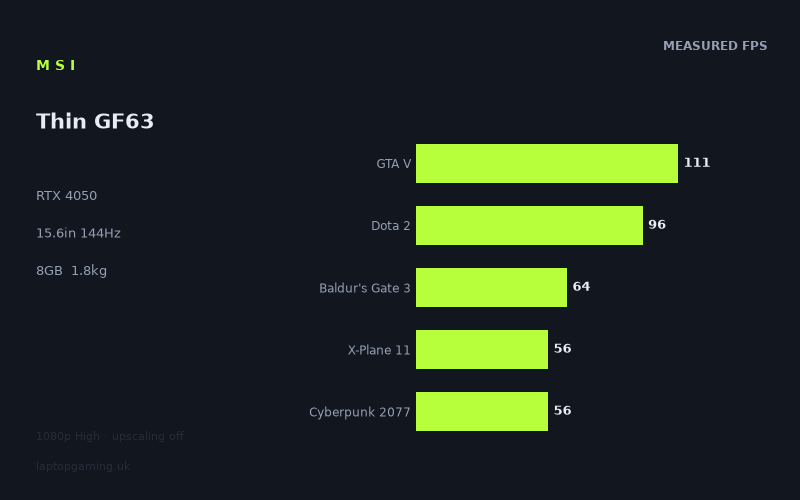
Frame rates
1920×1080, High preset, upscaling off. Averages 76fps across the 5 core benchmark games.
Measured on this machine. Source: Notebookcheck, 2025-04-03.
Not scored: no confirmed UK price
We have the full benchmark suite for this machine, so it ranks on the frame rate leaderboard like any other. What we don't have is a UK listing for this exact configuration - it's sold as a European review unit, or only in specifications that differ from the one tested. Since 30% of our score is value for money, scoring it would mean pretending price is no object, which would flatter it against every laptop you can actually buy. The frame rates below are real and comparable; there is just no buying recommendation to make yet.
How these numbers were produced
Frame rates here are not measured by us, and we label how each one was arrived at. A figure marked measured comes from a published run on that exact machine. A figure marked representative is derived from the GPU and its power limit (TGP) and cross-referenced against published reviews - a sound estimate of what that configuration delivers, but not a measurement of that specific laptop. Unless stated otherwise, numbers are 1920x1080, High preset, upscaling off. Where a laptop ships in several power configurations we use the wattage of the exact SKU listed, because a 140W RTX 5070 and a 115W one are not the same product.
In use
The short version
The MSI Thin GF63 (12VE) is a relatively light 15.6in gaming laptop built around an RTX 4050, a Core i5-12450H, 8GB of memory and a 512GB SSD. Its published gaming figures show a machine that can produce convincing 1080p results in a broad spread of games, but not one that can routinely fill its 144Hz display at the stated High preset with upscaling disabled.
That distinction matters. The panel specification sounds fast, and 144Hz is unquestionably more demanding as a target than the frame rates most gaming laptops sustain in demanding games at High settings. Notebookcheck’s figures put the Thin GF63 at 130fps in Strange Brigade, which is close to the display’s refresh ceiling, but the rest of the measured results sit lower. GTA V reaches 111fps, F1 22 records 99fps and Dota 2 reaches 96fps. Those are strong enough figures for a visibly responsive experience on a 144Hz screen, even if they do not fully occupy every refresh. The more demanding end of the list is more restrained: Tiny Tina’s Wonderlands runs at 72fps, Baldur’s Gate 3 and Final Fantasy XV each reach 64fps, while Cyberpunk 2077 and X-Plane 11 each record 56fps.
The broad conclusion is simple: this is a 1080p gaming laptop whose benchmark data supports High-preset play across the listed games, but it should not be bought on the assumption that an RTX 4050 automatically means 144fps gaming. The measured mean across the scoring-suite games is 77fps. That is a useful average, but it is not a promise for every title, and the range from 111fps in GTA V to 56fps in Cyberpunk 2077 and X-Plane 11 is the more important story. A buyer choosing this MSI needs to be comfortable with settings choices in the heaviest games if the goal is to pursue the screen’s full refresh rate.
The Thin GF63 is best suited to someone who values a 15.6in 1080p IPS display, a 144Hz refresh rate and a 1.82kg weight, while accepting that the frame-rate experience will depend heavily on the game. It makes most sense for players whose regular games resemble the faster results in the data, particularly Strange Brigade, GTA V, F1 22 or Dota 2. It is also a plausible option for somebody who is content with the lower figures seen in Baldur’s Gate 3, Final Fantasy XV, Cyberpunk 2077 and X-Plane 11 rather than treating 144Hz as a minimum requirement.
There is no confirmed UK price for this exact configuration. That means no value judgement can be calculated here, not because the benchmark suite is incomplete or because there is anything unusual about the machine’s performance data, but because price is required for a proper value assessment. The published frame rates can still be judged normally; the missing price simply means it would be irresponsible to declare the laptop good or poor value without knowing what a UK buyer would actually pay.
The more cautious recommendation is for buyers who are looking at the Thin GF63 because it is light for a gaming laptop and because its measured 1080p results are sufficient for the games they actually play. The less convincing use case is somebody shopping specifically for the highest possible frame rates in demanding releases, someone who wants a machine demonstrably capable of matching 144Hz more often, or someone who needs confidence about long-term memory and storage capacity from the supplied configuration. This model has 8GB of memory and a 512GB SSD; those are the stated specifications, and they should be considered as part of the whole package rather than treating the GPU name as the only purchasing criterion.
Performance
What the measured results say
Notebookcheck measured the MSI Thin GF63 at 1920x1080 using the High preset with upscaling disabled. That test setup is useful because it removes one major variable: these are native-resolution figures rather than results lifted by upscaling. It also means the results are directly relevant to the laptop’s own 1920x1080 display. There is no need to guess how the system might behave at an unrelated resolution, and there is no need to convert a benchmark result from a lower preset into a claim about High settings. The data already describes the configuration at the screen’s native resolution and at a recognisable quality target.
At the top of the result list, Strange Brigade reaches 130fps. That is the closest recorded figure to the panel’s 144Hz refresh rate. It does not quite equal the screen’s refresh ceiling, but it is close enough to show that the Thin GF63 can deliver a very high-refresh experience in the right game. This is important because it demonstrates that the 144Hz panel is not wholly ornamental. In a title with performance characteristics similar to Strange Brigade, the laptop can get near the rate needed to make regular use of a 144Hz screen.
GTA V follows at 111fps. That is below 144Hz, but it remains a high result and is comfortably above the measured mean across the scoring-suite games. For a player who spends a great deal of time in GTA V, the data supports the idea that the Thin GF63 can provide an experience that makes practical use of a high-refresh display, even if the panel is not being fully supplied with a new frame on every refresh. The gap between 111fps and 144Hz is still real. It should not be disguised by saying the laptop “drives” the panel without qualification. But 111fps is materially closer to that target than the lower figures from the more demanding games.
F1 22 records 99fps and Dota 2 reaches 96fps. These are closely grouped results, and both sit in the part of the data where the display’s 144Hz capability remains relevant even though it is not fully met. A buyer moving from a standard-refresh laptop may reasonably care about those figures because they are substantially above the lower end of the benchmark list. At the same time, the numbers make a useful case against buying on specification-sheet assumptions alone. The screen can refresh at 144Hz, but the measured figures in F1 22 and Dota 2 show that the system does not simply produce 144fps whenever a game is less demanding than Cyberpunk 2077.
Far Cry 5 reaches 82fps. This is a more moderate result, below the faster group of Strange Brigade, GTA V, F1 22 and Dota 2, but above the heaviest results in the list. It is also a useful reminder that the laptop’s gaming profile is not binary. The Thin GF63 is not divided neatly into games that hit 144fps and games that struggle. There is a substantial middle ground, represented here by Far Cry 5 at 82fps and Tiny Tina’s Wonderlands at 72fps, where the machine provides a clear improvement over the results in the mid-fifties while remaining well short of the panel’s maximum refresh rate.
Tiny Tina’s Wonderlands records 72fps. That figure is close to the scoring-suite mean of 77fps and is therefore a good illustration of what an average result means in practice for this laptop. It is not close to 144Hz, yet it is clearly not in the same position as the 56fps results either. Buyers should read the mean as a broad indication of the laptop’s centre of gravity at the stated settings, not as a target that every game will approach. A mean is useful because it stops one exceptional result, such as 130fps in Strange Brigade, from becoming the sole story. It is insufficient on its own because it hides the difference between 56fps and 111fps.
Baldur’s Gate 3 and Final Fantasy XV each reach 64fps. The matching figures are significant because they sit just below the scoring-suite mean and show that even games outside the very bottom of the list can land far from the screen’s 144Hz potential. Neither result supports a claim that the Thin GF63 is a 144fps High-preset laptop across modern and demanding games. Instead, they show a machine that remains viable at 1080p High settings while delivering a more conventional frame-rate level than the display specification alone might lead a buyer to expect.
Cyberpunk 2077 and X-Plane 11 both record 56fps. These are the lowest figures provided and are the clearest evidence for setting expectations carefully. They do not say that the laptop cannot run these games at 1920x1080 High with upscaling disabled; Notebookcheck’s figures demonstrate that it can. They do say that the experience is far removed from the 144Hz panel’s ceiling. Anyone whose buying decision centres on Cyberpunk 2077 or X-Plane 11 should regard these results as more relevant than the 130fps recorded in Strange Brigade. The correct benchmark to prioritise is the one closest to the games that will actually occupy the laptop.
The five scoring-suite games produce a mean of 77fps: GTA V at 111fps, Dota 2 at 96fps, Baldur’s Gate 3 at 64fps, Cyberpunk 2077 at 56fps and X-Plane 11 at 56fps. This selection is especially useful because it includes both the stronger and weaker ends of the Thin GF63’s performance range. GTA V and Dota 2 pull the average upward, while Cyberpunk 2077 and X-Plane 11 pull it down. Baldur’s Gate 3 sits between those extremes. The resulting 77fps mean describes a laptop that is capable of good native-1080p gaming at High settings, but it also confirms that the performance headroom is not consistent enough to promise high-refresh output in every sort of game.
The spread matters more than a single average
The headline performance lesson is that the MSI Thin GF63 has a wide spread across the measured titles. The difference between 130fps in Strange Brigade and 56fps in Cyberpunk 2077 or X-Plane 11 is too large to reduce to a simple statement such as “the laptop runs games at around 77fps”. The mean has value, but it cannot tell a buyer whether their own library looks more like Strange Brigade or more like Cyberpunk 2077.
For buyers who mostly play games near the top of the list, the laptop’s 144Hz panel is a sensible pairing. Strange Brigade at 130fps is near the panel’s refresh rate, while GTA V at 111fps, F1 22 at 99fps and Dota 2 at 96fps are all high enough to make the faster panel more than a paper specification. These results do not fully saturate 144Hz, but they occupy enough of the display’s capability to distinguish the Thin GF63 from a machine whose measured output was consistently in the lower range.
For buyers whose favourites resemble Far Cry 5, Tiny Tina’s Wonderlands, Baldur’s Gate 3 or Final Fantasy XV, the laptop’s display is still a capable 1080p IPS panel with a 144Hz refresh rate, but its headline refresh figure should not define expectations. At 82fps, 72fps and 64fps, the benchmark data supports a solid native-resolution result without supporting a claim that the machine is operating as a full 144Hz gaming system in those titles. A sensible buyer would view the extra refresh capability as headroom for lighter titles and less demanding settings choices, not as something automatically realised at High settings with upscaling off.
Cyberpunk 2077 and X-Plane 11 make the same point more sharply. Both record 56fps at the stated test conditions. That is not a failure of the laptop or of the RTX 4050 label; it is simply the measured result. But it means the 144Hz number should not be allowed to dominate the purchasing decision for someone primarily interested in demanding games. In these titles, the screen can refresh far more frequently than the game is supplying frames. The limiting factor is not the panel specification. It is the performance available from this particular laptop configuration at 1920x1080, High settings and with upscaling disabled.
This is why frame-rate attribution matters. A retailer listing might place “RTX 4050” and “144Hz” beside each other and leave a buyer to infer that the combination delivers high-refresh gaming in a general sense. Notebookcheck’s numbers allow a more precise conclusion. The combination can come close in Strange Brigade, gets reasonably near in GTA V, F1 22 and Dota 2, lands in a broad middle range in Far Cry 5 and Tiny Tina’s Wonderlands, and is much further from the panel limit in Baldur’s Gate 3, Final Fantasy XV, Cyberpunk 2077 and X-Plane 11.
GPU power limit: what cannot be concluded from this sheet
The supplied information identifies the GPU as an RTX 4050, but it does not give a GPU power limit for the MSI Thin GF63. That omission matters because a GPU name alone does not fully describe how a gaming laptop performs. It would be wrong to state a wattage for this model, infer one from the laptop’s name, or treat another RTX 4050 laptop as automatically equivalent. The benchmark data is the reliable evidence here, and the benchmark data should be used directly.
What can be said is that the measured results describe the complete MSI Thin GF63 configuration: RTX 4050, Core i5-12450H, 8GB of memory, 512GB SSD, and 1920x1080 display. The figures are not a generic promise for every RTX 4050 laptop. They belong to this machine under Notebookcheck’s stated 1920x1080 High-preset, upscaling-off conditions. That is more useful than an unverified power-limit claim because it tells a prospective buyer what this exact configuration has achieved in the listed games.
The missing power-limit figure also means that buyers should resist over-reading the rival comparison. The HP Omen Transcend 14-fb0014 is explicitly listed with an RTX 4060 at 50W, while no equivalent GPU power figure is supplied for the MSI. It would be unsound to convert the performance gap between the two systems into a claimed power-limit explanation for the Thin GF63. The published data shows the performance difference. It does not establish every hardware or system-level reason behind it.
There is a practical consequence. If a buyer is comparing multiple laptops carrying an RTX 4050 badge, the Thin GF63 should be judged by its own listed figures rather than assumed to match any other RTX 4050 result. The 130fps result in Strange Brigade, 111fps in GTA V, 99fps in F1 22, 96fps in Dota 2 and 56fps in Cyberpunk 2077 and X-Plane 11 are the evidence available for this laptop. They are enough to place it sensibly in the performance conversation, even though the fact sheet does not permit a detailed power-limit analysis.
Memory and storage in the stated configuration
The supplied configuration has 8GB of memory and a 512GB SSD. These are not benchmark results, so the frame-rate data does not isolate their effect. It would be inappropriate to claim that either specification explains a particular result in a particular game. The proper reading is more restrained: the published performance figures belong to a machine with 8GB of memory and 512GB of SSD storage, and a purchaser should assess those capacities alongside the gaming results.
The 512GB SSD specification is particularly relevant to a buyer deciding whether this is intended as a focused gaming machine for a selected library or a laptop expected to hold a large collection at once. No usable-capacity figure is supplied, so none should be invented. Equally, no storage expansion information is supplied, so it should not be assumed. The factual position is simply that this configuration is listed with a 512GB SSD.
The same caution applies to the 8GB memory figure. The fact sheet does not state memory speed, memory layout, upgrade options or measured memory behaviour. There is no basis for claims about any of those areas. What can be said is that this is the memory capacity attached to the benchmark results above, and buyers who place great importance on memory capacity should not overlook it while concentrating on the RTX 4050 badge and 144Hz panel.
The screen
The MSI Thin GF63 has a 15.6in IPS display with a 1920x1080 resolution and a 144Hz refresh rate. For gaming, those specifications are coherent with the benchmark setup because Notebookcheck’s figures were measured at 1920x1080. The published data therefore answers the central practical question: how closely can this laptop’s gaming performance approach the refresh capability of its own screen at native resolution, High settings and with upscaling disabled?
The answer is mixed in a useful rather than evasive way. Strange Brigade at 130fps comes nearest to 144Hz. GTA V at 111fps, F1 22 at 99fps and Dota 2 at 96fps are all well below the panel maximum but remain in the higher part of the data. Far Cry 5 at 82fps and Tiny Tina’s Wonderlands at 72fps form a middle tier. Baldur’s Gate 3 and Final Fantasy XV at 64fps, followed by Cyberpunk 2077 and X-Plane 11 at 56fps, show where the display’s refresh headroom becomes much larger than the measured frame rate.
That does not make the 144Hz panel a mismatch. It makes it a capability that is realised to different degrees depending on the game. A screen cannot make a 56fps result become 144fps, but it can still be the screen on which lighter titles and less demanding settings make better use of its maximum refresh rate. The crucial point is to buy the display specification with realistic expectations. The strongest measured result comes close to the refresh ceiling; the average scoring-suite result of 77fps does not.
The 1920x1080 resolution is also central to the interpretation of the numbers. These are not results from a higher-resolution test that has been adjusted into an estimate for the laptop’s display. They are direct figures at the panel’s native resolution. That makes the Thin GF63 easier to judge than a laptop whose available figures were gathered at a resolution it does not use. For the games listed, a buyer can read the result as the relevant native-screen output at High settings with upscaling off.
The IPS panel type is stated, but the fact sheet does not provide brightness, contrast, colour coverage, response behaviour, adaptive-sync information or any other display measurements. It would therefore be wrong to claim that the screen is bright, colour-accurate, fast in pixel response or particularly suitable for colour-sensitive work. The available evidence supports only the basics: it is a 15.6in IPS panel at 1920x1080 with a 144Hz refresh rate. For gaming, the frame-rate figures tell us how much of that refresh rate the system reaches in the listed titles; they do not provide a full image-quality review of the panel.
For a competitive or multiplayer-focused buyer, the screen makes most sense when their games resemble the faster side of the data. Dota 2 at 96fps and GTA V at 111fps provide considerably more use for 144Hz than Cyberpunk 2077 or X-Plane 11 at 56fps. For a player focused on the latter titles, the key attraction is less the prospect of reaching 144Hz at the stated preset and more the fact that the laptop has a native 1080p display aligned with the benchmark resolution.
There is also an important distinction between a high-refresh screen and a machine designed only for high-refresh gaming. The Thin GF63 has the former. The benchmark data does not establish the latter across the whole list. It would be misleading to treat 144Hz as a guarantee of 144fps. The accurate position is that the screen offers a 144Hz ceiling, the laptop reaches 130fps in Strange Brigade, and the remaining listed results range from 111fps down to 56fps.
Build, size and portability
The clearest portability figure supplied for the MSI Thin GF63 is its 1.82kg weight. That is the number to use when considering whether this laptop is intended to remain in one place or travel between home, work, study and other locations. A gaming laptop with an RTX 4050 and a 15.6in display is not automatically a travel-friendly machine simply because it is called “Thin”, but 1.82kg is the published weight for this configuration and provides a concrete basis for comparison with other laptops.
The 15.6in screen size places the Thin GF63 in the familiar larger-laptop format rather than the smaller format represented by the HP Omen Transcend 14-fb0014’s name. The fact sheet does not provide the MSI’s dimensions, thickness, charger weight or battery-life data, so no conclusions should be drawn about bag space, desk footprint, battery endurance or total carried weight. Those details matter to real-world portability, but they are not available here.
What can be said is that the combination of a 15.6in 1920x1080 IPS screen, 144Hz refresh rate and 1.82kg weight gives the Thin GF63 a clear practical identity. It is not merely a static desktop replacement in the information available, because weight is supplied and is below the sort of figure that would make movement an afterthought. At the same time, there is not enough information to market it as an ultra-portable machine. The absence of dimensions and battery figures means a buyer should treat the 1.82kg weight as useful but incomplete portability evidence.
This is especially relevant for shoppers deciding between performance and carryability. The measured gaming results show a laptop capable of 130fps in Strange Brigade and 111fps in GTA V at 1920x1080 High with upscaling off, while the listed weight is 1.82kg. That pairing may appeal to someone who wants gaming capability without choosing a machine solely around maximum benchmark output. But there is no basis in the supplied information for claims about chassis materials, keyboard quality, trackpad quality, webcam, port selection, cooling behaviour, fan noise or battery life. Those are all areas where a review should be specific or silent; here, silence is the responsible option.
How it compares
The rival data supplied here is deliberately a spread rather than a list of superficially similar names. It includes the two closest comparison points, the machine that the Thin GF63 trails by the most, and an RTX 4090 system that shows the far end of the same GPU generation. These are shared-game comparisons, using the games held in common and preferring the scoring suite. That is the correct basis for comparison because it avoids claiming an advantage or disadvantage from titles one machine did not measure.
Samsung Galaxy Book4 Ultra
Against the Samsung Galaxy Book4 Ultra with an RTX 4050, the MSI Thin GF63 averages 23fps lower across four shared games. This is an important comparison because both machines carry the same RTX 4050 GPU designation. It shows why the GPU label should not be treated as a complete performance description. The Thin GF63’s own results remain clear and usable in isolation, but the shared-game average indicates that another RTX 4050 laptop can produce materially higher figures in the overlapping set.
There is no confirmed UK price for the Samsung Galaxy Book4 Ultra in the supplied information, so this comparison cannot establish which machine would be the better purchase at retail. It is purely a performance comparison across shared games. The MSI is lower by 23fps on average across those four games; that is the evidence, and it is enough to say that the Galaxy Book4 Ultra is the stronger performer in that particular shared set.
The comparison also reinforces the importance of avoiding generic RTX 4050 conclusions. It would be tempting to assume that two RTX 4050 laptops should be close enough for the GPU badge to settle the matter. The data says otherwise. A 23fps average deficit across four shared games is not a near-zero result. It is substantial enough that a buyer who prioritises frame rate should investigate the specific laptop rather than selecting on GPU name alone.
HP Omen Transcend 14-fb0014
The HP Omen Transcend 14-fb0014 is listed with an RTX 4060 at 50W. Across five shared games, the MSI Thin GF63 averages 25fps lower. This is the closest of the supplied performance gaps in the rival spread, but “closest” should not be mistaken for negligible. A 25fps average difference across five shared games is a clear advantage for the HP in the games available for comparison.
The MSI’s position is still understandable in context. It has an RTX 4050 rather than the HP’s RTX 4060, and the HP’s GPU is specifically identified as 50W. However, the fact sheet does not provide the MSI GPU power limit. That means it would be wrong to claim that the entire 25fps difference is caused by power limit, or to state that the MSI uses a particular wattage. The robust conclusion is narrower: in the shared games, the HP produces the higher average frame rate by 25fps.
The two laptops also point towards different buyer priorities. The MSI has a 15.6in 1920x1080 IPS display at 144Hz and weighs 1.82kg. The HP name identifies it as the Omen Transcend 14-fb0014, but no display, weight or price specifications for the HP are supplied here beyond the RTX 4060 at 50W. The comparison must therefore remain centred on performance. Buyers should not infer a full portability, display or value verdict from this limited shared-game data.
Asus ROG Strix Scar 17
The largest gap in the supplied comparison set is against the Asus ROG Strix Scar 17 with an RTX 4090 at 25W. Across three shared games, the MSI Thin GF63 averages 111fps lower. That is a very large performance separation, and it makes clear that the Thin GF63 is not intended to compete with the highest-output system in this set.
There is no need to pretend that the MSI is close here. The 111fps shared-game average deficit is too large for that. But the comparison is still useful because it establishes the scale of the performance ladder. The Thin GF63 delivers 130fps in its fastest listed result, Strange Brigade, and a 77fps mean across the five scoring-suite games. The Scar 17 comparison shows that a machine with an RTX 4090 can sit in a very different performance class across the games the two systems share.
The Scar 17’s stated RTX 4090 power figure is 25W, but that should not be used to make assumptions about the MSI’s power limit, which is not provided. Nor should the comparison be stretched beyond its three shared games. The available conclusion is specific: over those three shared titles, the MSI averages 111fps lower. It is a useful warning to buyers who are expecting an RTX 4050 laptop to perform like a much higher-tier rival simply because both are gaming machines from the same GPU generation.
Why shared-game comparisons need interpretation
Near-zero differences in the shared set can be real results rather than proof that hardware differences do not matter. At 1080p, lighter titles in the shared set can become CPU-bound and compress genuine GPU gaps. That is why the comparison figures should be read as shared-game outcomes rather than as a universal ranking for every game, every setting and every resolution. A small gap does not necessarily mean the GPUs are effectively identical; it may mean the shared games are not exposing the full difference between the systems.
In this case, the supplied gaps are not near-zero. The Thin GF63 is 23fps lower than the Samsung Galaxy Book4 Ultra across four shared games, 25fps lower than the HP Omen Transcend 14-fb0014 across five shared games, and 111fps lower than the Asus ROG Strix Scar 17 across three shared games. Those are meaningful results, but the same principle of careful reading applies. Each figure belongs to a particular shared-game set. It should not be converted into a claim about every title a buyer might install.
The practical takeaway is that the Thin GF63 is not the performance leader among the listed rivals. The Samsung RTX 4050 system is ahead in its shared games, the HP RTX 4060 at 50W is ahead in its shared games, and the RTX 4090 Scar 17 is much further ahead in its smaller shared set. The MSI’s case therefore cannot rest on outright benchmark leadership. Its argument has to be based on the actual fit between its 1080p results, 15.6in 144Hz IPS screen, 1.82kg weight, and the buyer’s own game library. Without a confirmed UK price, it cannot yet make a defensible value argument against any of these machines.
Who it’s for
The MSI Thin GF63 is for the buyer who wants a relatively light 15.6in gaming laptop, values a 1920x1080 IPS screen with a 144Hz refresh rate, and plays games that can make meaningful use of that refresh capability. Strange Brigade at 130fps is the strongest indication of that use case. GTA V at 111fps, F1 22 at 99fps and Dota 2 at 96fps support it too. None of those results equals 144fps, but all are far closer to the display’s ceiling than the lowest figures in the data.
It is also for a buyer who understands the difference between a native-1080p High-preset gaming laptop and a machine that guarantees maximum-refresh performance in every game. Notebookcheck’s measurements were taken at 1920x1080, High settings and with upscaling disabled. On those terms, the Thin GF63 produces a broad range of results from 130fps down to 56fps. Someone who values the ability to run the listed games at those settings, while accepting that the more demanding titles will sit much further below 144Hz, has a sensible reason to consider it.
Players whose regular games resemble Far Cry 5, Tiny Tina’s Wonderlands, Baldur’s Gate 3 or Final Fantasy XV can also find a clear fit here, provided their expectations are based on the corresponding figures: 82fps, 72fps, 64fps and 64fps. These are not results that justify promising 144Hz operation at the stated settings. They are, however, the measured evidence for this laptop at its native resolution, and they give a more honest basis for a purchase than a generic claim about an RTX 4050.
The 1.82kg weight makes the laptop more relevant to a buyer who expects to move it than a gaming system judged only by desktop performance. That said, the fact sheet does not provide dimensions, battery life or charger weight. The Thin GF63 should therefore be considered by someone who sees 1.82kg as a useful portability point, not by someone who needs an evidence-backed promise about all-day battery use or minimal bag space.
The laptop is less suitable for a buyer whose priority is getting as close as possible to 144fps in demanding games at 1920x1080 High with upscaling disabled. Cyberpunk 2077 and X-Plane 11 both record 56fps, while Baldur’s Gate 3 and Final Fantasy XV record 64fps. Those figures are the reason to choose a more performance-focused alternative if the buyer’s standard is sustained high-refresh output in the hardest titles. The 144Hz panel is capable of more than the laptop supplies in those games.
It is also not the obvious choice for somebody who wants the strongest measured performance among the named rivals. The Samsung Galaxy Book4 Ultra is ahead by 23fps across four shared games. The HP Omen Transcend 14-fb0014 is ahead by 25fps across five shared games. The Asus ROG Strix Scar 17 is ahead by 111fps across three shared games. Those comparisons do not tell us which laptop is better value because no confirmed UK price is supplied for any of those named configurations here. They do tell us that the Thin GF63 should not be selected on the assumption that it leads this group in raw frame rate.
Buyers who require more certainty around memory capacity, storage capacity, panel quality beyond its basic specification, battery life, noise, temperatures, ports or upgrade options should also look for more information before committing. This MSI is specified with 8GB of memory and a 512GB SSD, but the supplied information does not go further. The responsible review position is not to fill those gaps with assumptions.
Ultimately, the Thin GF63 is a case for measured, game-specific buying. If your games look like Strange Brigade, GTA V, F1 22 or Dota 2, the data shows a convincing match for a 144Hz 1080p display. If they look like Cyberpunk 2077 or X-Plane 11, the same screen remains usable but the performance expectation must be lower. If your priority is outright benchmark pace, the named rivals lead it in their shared games. If your priority is a 15.6in 1080p IPS gaming laptop at 1.82kg with attributable RTX 4050 results, the MSI Thin GF63 has a clear and defensible place on the shortlist, subject to confirming an actual UK price before any value decision is made.