Review
Asus ROG Zephyrus Duo 15 SE review
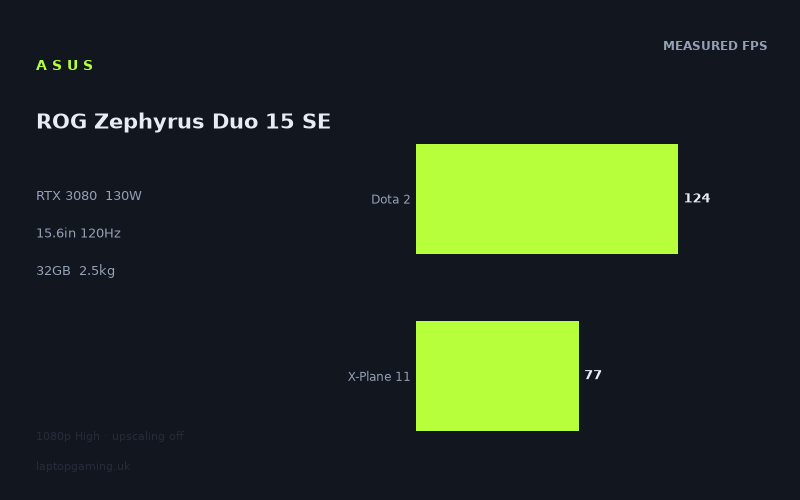
Frame rates
1920×1080, High preset, upscaling off.
Measured on this machine. Source: Notebookcheck, 2021-02-08.
Not scored: incomplete benchmark suite
Every scored laptop on this site is averaged over the same 5 games, and this one is short of Cyberpunk 2077, Baldur's Gate 3, GTA V. A mean over 4 games is not comparable to a mean over 5, so we publish the figures we have and leave the score blank rather than rank it against machines tested on a different set. The numbers below are real - the suite is just incomplete.
How these numbers were produced
Frame rates here are not measured by us, and we label how each one was arrived at. A figure marked measured comes from a published run on that exact machine. A figure marked representative is derived from the GPU and its power limit (TGP) and cross-referenced against published reviews - a sound estimate of what that configuration delivers, but not a measurement of that specific laptop. Unless stated otherwise, numbers are 1920x1080, High preset, upscaling off. Where a laptop ships in several power configurations we use the wattage of the exact SKU listed, because a 140W RTX 5070 and a 115W one are not the same product.
In use
The short version
The Asus ROG Zephyrus Duo 15 SE is a powerful gaming laptop on the evidence that matters most: the published game results. Notebookcheck’s measured figures show the RTX 3080 running at a 130W GPU power limit delivering very high frame rates at 1920x1080 on the High preset with upscaling disabled. In the lighter and better-scaling games, it is comfortably beyond the 120Hz refresh rate of the built-in screen. In the tougher games, particularly the more CPU-demanding or graphically demanding titles, it remains fast but does not consistently reach that same refresh target.
That makes this a machine for someone who wants high-end 1080p gaming performance from a laptop with a 15.6in 3840x2160 IPS display, 32GB of memory and a Ryzen 9 5900HX processor. The specification is clearly ambitious. The complication is that the screen’s native 3840x2160 resolution is much more demanding than the 1920x1080 benchmark setting used for the published results. The figures prove that the Zephyrus Duo 15 SE is very quick at 1080p High. They do not prove that it can sustain similarly high frame rates at the panel’s native resolution, because we do not have measured 3840x2160 gaming results here.
That distinction matters. A 120Hz display is most rewarding when a game can run at or above 120fps, but the benchmark data shows that this varies substantially by title. F1 2020, Strange Brigade, The Witcher 3 and Doom Eternal all exceed the refresh rate in the measured configuration. Gears Tactics, Dota 2 and Shadow of the Tomb Raider sit close enough to make the panel’s refresh rate relevant, though they do not all meet it. Far Cry 5, Total War: Three Kingdoms, Final Fantasy XV and X-Plane 11 are below 120fps in the published numbers, with X-Plane 11 particularly separated from the rest.
The key point is not simply that an RTX 3080 is fitted. It is that the GPU is configured at 130W, and laptops with ostensibly similar graphics hardware can behave very differently depending on their power limits, cooling design, processor and the games used. This is why the measured figures are more useful than a badge on the specification sheet. The Zephyrus Duo 15 SE has an RTX 3080, but it does not automatically outperform every laptop with a lower-tier GPU or lose to every laptop with a higher-tier GPU. The rival data demonstrates that clearly.
It matches the Gigabyte Aero 17 HDR YC, another RTX 3080 laptop, across the shared-game comparison. It is only narrowly behind the Gigabyte G5 KE despite the G5 KE using an RTX 3060 at 95W. It has a substantial lead over the MSI Prestige 15 with an RTX 3050 Ti at 105W, while the MSI Raider GE77 HX with an RTX 3080 Ti at 175W is materially faster. That is a credible and useful picture of where this Asus sits: it has serious performance, but it is not a universal answer to every high-end gaming requirement, particularly if the priority is extracting the maximum possible frame rate from demanding games.
There is no confirmed UK price for this configuration, so value cannot be settled honestly. A laptop can be compelling at one price and difficult to justify at another. Without a confirmed price, the sensible conclusion is narrower: the Zephyrus Duo 15 SE has the measured 1080p performance to interest buyers who want a premium, high-refresh gaming machine and are prepared to manage settings and resolution according to the game. It is not the obvious choice for someone who expects native-3840x2160 gaming at the screen’s 120Hz refresh rate without compromise, because the available benchmark data does not establish that capability.
The 2.508kg weight and 90Wh battery also put it in a particular class. This is portable in the sense that it is a laptop rather than a desktop system, but it is not a machine whose appeal rests on being especially light. It makes more sense as a transportable performance computer: suitable for moving between a desk, another room, work and travel, but less suited to someone whose main requirement is the smallest and lightest possible machine. There are no dimensions in the available specification, so we cannot make a precise claim about footprint or thickness.
Buy it for the combination of high 1080p frame rates, 32GB of memory, a Ryzen 9 5900HX, an RTX 3080 at 130W and a 120Hz 3840x2160 IPS display, provided the eventual UK price makes sense. Do not buy it solely because it carries an RTX 3080 badge, or because a 3840x2160 panel sounds like a guarantee of native-resolution high-refresh gaming. The measured results are strong, but they also show why settings discipline matters.
Performance
What the benchmark data actually says
All of the frame rates discussed here are Notebookcheck’s published measurements from 2021-02-08. They were recorded at 1920x1080, using the High preset with upscaling disabled. That is an important test configuration: it gives a clean view of conventional 1080p High gaming performance without an upscaling mode contributing extra frames, but it is not a direct test of the laptop’s 3840x2160 native display resolution.
The headline result is a mean of 124fps across the available scoring-suite games: Strange Brigade, Dota 2, Final Fantasy XV and X-Plane 11. That is a strong aggregate result, but the average needs reading alongside the individual game figures. An average can make a system look more even than it is. Here, the individual results range from 188fps in Strange Brigade to 77fps in X-Plane 11. Those are both legitimate outcomes from the same laptop, at the same stated resolution and preset, and they underline why a buyer should think about the games they actually play rather than treating one average as a promise for every title.
At the fast end of the results, F1 2020 runs at 191fps. Strange Brigade follows at 188fps, The Witcher 3 at 187fps and Doom Eternal at 183fps. These are not marginally above the screen’s 120Hz refresh rate; they are decisively beyond it in the measured setting. For players concentrating on these games or games with similar demands, the Zephyrus Duo 15 SE has more than enough performance at 1920x1080 High to make a 120Hz screen worthwhile. The panel will not show more than its own refresh rate, but having performance headroom above that point can still be useful where frame rate varies during play.
Gears Tactics is measured at 143fps. That remains above the display refresh rate and confirms that the laptop is not dependent on only the very lightest games to offer high-refresh performance. It also shows that the RTX 3080 and Ryzen 9 5900HX combination can keep a strategy game running at a frame rate that makes the 120Hz panel relevant in the published setting. It is a useful result because it sits below the group near 180fps and above the group around the refresh target, demonstrating that the machine’s performance is not confined to a single narrow band.
Dota 2 is measured at 124fps. That is only slightly above the screen’s 120Hz refresh rate, but it still clears it in the published result. This is one of the clearest examples of why a result needs interpretation rather than exaggeration. Dota 2 is not being presented as a game where this laptop has vast spare performance at 1080p High. It is being presented as a game where the published number aligns closely with the 120Hz panel. The laptop can make practical use of the display’s refresh rate here, but the result does not justify assuming an equally comfortable margin once conditions change.
Shadow of the Tomb Raider is measured at 121fps. Again, that is effectively on the screen’s 120Hz target. It is a good result because it means the Zephyrus Duo 15 SE can reach the panel refresh rate in this game at the stated benchmark settings. It is not a result that should be described as huge excess performance, because the margin is minimal. If the objective is matching the screen’s refresh rate at 1920x1080 High with upscaling off, the data says it does so. If the objective is preserving a large cushion for more demanding settings or a much higher resolution, the data does not establish that.
Far Cry 5 is measured at 114fps. This is close to 120Hz but below it. In practical terms, that still represents fast gaming performance, but it means the display’s full refresh rate is not met in the benchmark run. A buyer focused on the difference between a high frame rate and a panel-saturating frame rate should take that seriously. The system is not struggling in Far Cry 5, but neither does the published figure support a claim that every game will run at 120fps or more at the tested settings.
Total War: Three Kingdoms is measured at 108fps. This remains a strong result for a demanding strategy title, but it sits further below the panel refresh rate than Far Cry 5. It is also a reminder that genre alone does not determine performance. Gears Tactics reaches 143fps, while Total War: Three Kingdoms reaches 108fps. Buyers should not assume that one strategy game result predicts another. Game engines, scenes, simulation demands and processor behaviour can all affect the outcome, and the benchmark spread here is evidence that the Zephyrus Duo 15 SE should be judged title by title where possible.
Final Fantasy XV is measured at 105fps. That is another clearly playable high-frame-rate result, but it is below the 120Hz display target. It contributes to the 124fps mean across the available scoring-suite games, yet its individual result is more useful for a buyer trying to set expectations. In a game with this result, the Zephyrus Duo 15 SE can provide a fast experience at 1920x1080 High without upscaling, but it does not demonstrate an automatic 120fps lock. Buyers who regard a consistent 120fps as essential should expect to make settings decisions in games that land around this level.
X-Plane 11 is measured at 77fps, making it the lowest figure in the available results. It is still well above a conventional low-frame-rate result, but it is far from exploiting a 120Hz panel fully. This is precisely why it would be misleading to present the 124fps mean without context. The Zephyrus Duo 15 SE is quick, but it is not immune to titles that impose heavier demands on the overall platform. A flight simulation result of 77fps sits in a different performance class from the 180fps results in F1 2020, Strange Brigade, The Witcher 3 and Doom Eternal.
That spread is not a weakness unique to this Asus. It is how gaming laptops should be assessed. Hardware does not produce one universal frame rate. It produces different results depending on the game, engine, preset, resolution and wider system load. The useful conclusion from the Zephyrus Duo 15 SE’s figures is that it is excellent in several games, strong in many others and less able to meet its own 120Hz display target in the more demanding examples available here.
What the 130W RTX 3080 configuration means
The RTX 3080 in this machine is specified at a 130W GPU power limit. That matters because laptop GPU names alone do not describe the full performance picture. The power configuration is part of the specification that helps explain why direct comparison with other laptops needs care. An RTX 3080 in one laptop is not necessarily equivalent in real games to an RTX 3080 in another laptop, and it cannot safely be assumed to maintain the same lead over an RTX 3060 or RTX 3050 Ti across every title.
The performance results show that the 130W configuration can deliver excellent 1920x1080 High results. It reaches 191fps in F1 2020, 188fps in Strange Brigade, 187fps in The Witcher 3 and 183fps in Doom Eternal. These are the sort of figures that make a high-refresh display genuinely useful rather than decorative. In these games, the Zephyrus Duo 15 SE has enough measured performance to exceed 120Hz rather than merely approach it.
At the same time, the result against the Gigabyte G5 KE is a warning against simplistic GPU hierarchy arguments. The G5 KE uses an RTX 3060 at 95W, while the Asus uses an RTX 3080 at 130W. Yet across the shared games, the Asus is behind by 1fps on average. That is not an argument that the RTX 3060 is generally equivalent to the RTX 3080. It is an argument that a shared-game comparison at 1920x1080 can be compressed by the games selected, processor limits and lighter workloads. The supplied comparison notes identify this directly: lighter titles in the shared set can be CPU-bound at 1080p, reducing visible GPU gaps.
That is a real result rather than an error to be ignored. If the shared games are already limited by something other than the GPU, adding graphics power does not necessarily create a large visible frame-rate advantage. The Asus therefore should not be bought on the assumption that its GPU designation guarantees a dramatic lead in every 1080p game. Its advantage is more likely to matter where graphical load rises, where settings become more demanding, or where resolution increases, but we do not have benchmark figures here to quantify those situations for this machine.
The comparison with the MSI Raider GE77 HX points in the opposite direction. That MSI uses an RTX 3080 Ti at 175W and is ahead by 42fps across the shared games. The performance gap is large enough that it cannot be dismissed as ordinary run-to-run variation or a trivial distinction. The Raider is the machine to consider for a buyer whose priority is the highest available frame rate among these named rivals. The Zephyrus Duo 15 SE is powerful, but the available shared-game figures show it does not match the faster 175W RTX 3080 Ti configuration.
The sensible way to read the 130W limit is therefore neither as a flaw nor as a guarantee. It is a meaningful part of this laptop’s configuration, and the benchmark data tells us its practical outcome at 1920x1080 High. The outcome is high performance with some title-to-title variation, not universal dominance.
Frame-rate targets and sensible expectations
The 120Hz screen creates an obvious performance target: 120fps. In the available data, the Zephyrus Duo 15 SE exceeds that target in F1 2020, Strange Brigade, The Witcher 3, Doom Eternal, Gears Tactics, Dota 2 and Shadow of the Tomb Raider. The last two are close to the line, while the first group has a much larger margin.
Far Cry 5, Total War: Three Kingdoms, Final Fantasy XV and X-Plane 11 do not reach 120fps in the benchmark results. This does not make them poor results. It means that the panel and GPU are not perfectly matched in every game at the published settings. For someone who wants visual settings left high and upscaling disabled, that is useful information. This laptop can often use its 120Hz display well at 1080p High, but there are games where the realistic expectation is a frame rate below the refresh ceiling.
There is also an important practical distinction between using the built-in panel at its native 3840x2160 resolution and using a 1920x1080 gaming setting. The screen is 3840x2160, but all the figures here are from 1920x1080. We do not have measured native-resolution results, and they should not be guessed. A buyer who wants the sharpness of the 3840x2160 panel for desktop work, media or less demanding games may find that specification attractive. A buyer who wants every demanding game to run natively at 3840x2160 and 120Hz should not treat the 1080p results as proof that this will happen.
The machine’s strongest use case is therefore not “set every game to the maximum possible resolution and expect the same result”. It is “use the display and graphics settings deliberately”. At 1920x1080 High with upscaling off, the published figures show a great deal of speed in many games. At native resolution, no frame-rate claim can be made from this fact sheet. That is not a criticism of the hardware; it is simply the boundary of what the evidence supports.
The screen
The Zephyrus Duo 15 SE has a 15.6in IPS display with a 3840x2160 resolution and a 120Hz refresh rate. On paper, that is an unusually demanding combination for gaming: a high-resolution panel paired with a refresh rate that invites high frame-rate play. The benefit is flexibility. A 3840x2160 screen offers a much higher native resolution than the 1920x1080 setting used in the benchmark data, while 120Hz gives the panel the ability to display more motion updates than a standard 60Hz screen when the game can supply them.
The important caveat is that panel capability and measured game output are different things. The screen can refresh at 120Hz. The RTX 3080 at 130W does not produce 120fps in every measured game, even at 1920x1080 High with upscaling disabled. It exceeds 120fps in several titles, meets or narrowly clears it in Dota 2 and Shadow of the Tomb Raider, and falls below it in Far Cry 5, Total War: Three Kingdoms, Final Fantasy XV and X-Plane 11.
For F1 2020 at 191fps, Strange Brigade at 188fps, The Witcher 3 at 187fps and Doom Eternal at 183fps, the 120Hz screen is clearly justified by the available measurements. The laptop has more frame-rate output than the panel can display at its refresh ceiling in those specific benchmark runs. Gears Tactics at 143fps also sits comfortably above the display target. These are the games where the pairing of RTX 3080 hardware and 120Hz panel is most obviously coherent.
Dota 2 at 124fps and Shadow of the Tomb Raider at 121fps are different but still positive cases. The measured result is sufficient to reach the panel’s refresh rate, but there is little surplus. These figures support saying that the screen can be properly used in those games at the tested configuration. They do not support saying there is an enormous reserve for higher resolution or more demanding settings.
Far Cry 5 at 114fps, Total War: Three Kingdoms at 108fps and Final Fantasy XV at 105fps remain close enough to 120fps that the display is still relevant, but the numbers do not reach the full refresh target. X-Plane 11 at 77fps is further away. For these games, the 120Hz panel is not wasted, but it is not fully saturated by the published benchmark result.
The 3840x2160 resolution is the more complicated part of the specification. It gives the laptop a high-resolution screen, but it also means a buyer needs to decide how they intend to game. The benchmark data is entirely at 1920x1080. There are no published figures in this fact sheet for 3840x2160 High, 3840x2160 with upscaling, or any other native-resolution configuration. We cannot state what frame rate the Asus will deliver there.
That makes the display best understood as a premium panel with a high native resolution and a 120Hz refresh rate, rather than as a guarantee that both specifications can be exploited simultaneously in every modern game. Buyers who are comfortable choosing 1920x1080 for demanding titles will find the measured 1080p results encouraging. Buyers who see 3840x2160 as non-negotiable for gaming should wait for native-resolution benchmark data before making a decision.
The panel is IPS. The fact sheet does not provide brightness, colour coverage, contrast, response-time or adaptive-refresh information, so those aspects should not be assumed. It is enough to say that this is a 15.6in IPS panel with a 3840x2160 resolution and 120Hz refresh rate. The gaming evidence tells us how the system performs at 1920x1080 High, not how every aspect of image quality or motion handling compares with another display.
Build, size and portability
The Asus weighs 2.508kg. That places it firmly in the performance-laptop category rather than the ultra-portable category. It is a laptop that can be moved, packed and used away from a fixed desk, but the weight should be considered honestly by anyone who expects to carry it regularly. A 2.508kg machine is a different proposition from a lightweight everyday notebook.
The 15.6in screen helps explain the intended balance. This is not a large-screen desktop replacement in the most literal sense, but it is also not built around minimal mass. The combination of a 15.6in 3840x2160 120Hz panel, RTX 3080 at 130W, Ryzen 9 5900HX, 32GB of memory and 90Wh battery suggests a machine designed to carry substantial hardware in a relatively contained screen size. The measured gaming performance supports that reading: this is not a low-power design built mainly for light workloads.
There are no dimensions in the available facts, so no claim can be made about its exact width, depth or thickness. That matters because weight alone does not tell the entire portability story. A machine may be manageable in a bag because of its footprint, or awkward because of it; without the dimensions, that cannot be assessed precisely here. Nor do we have information about the size or weight of its charger, which can be highly relevant to real travel use for a performance laptop.
The 90Wh battery is a substantial specification, but there is no measured battery-life figure in the fact sheet. It would be wrong to turn the capacity into a claim about hours away from mains power. Battery endurance depends on workload, screen settings, system mode and many other variables. The useful statement is simply that the laptop has a 90Wh battery; we do not have a published runtime measurement to say how long it lasts in gaming, video playback, web use or general work.
For gaming specifically, the performance figures should be treated as benchmark data rather than evidence of unplugged gaming behaviour. There are no battery-powered frame rates supplied. A buyer should not assume the listed 1080p High results apply away from mains power, because this fact sheet does not provide a comparison between plugged-in and battery operation.
The best description of portability is therefore measured rather than romantic. This is a 2.508kg, 15.6in gaming laptop with a 90Wh battery. It is portable enough to be transported and used in more than one place, but it is not the natural choice for someone who wants the lightest possible device for daily carrying. Its appeal is performance in a laptop form factor, not minimal burden.
How it compares
Against the MSI Prestige 15
Against the MSI Prestige 15 with an RTX 3050 Ti at 105W, the Asus averages 48fps ahead across three shared games. That is the largest positive gap among the listed rivals and it is substantial. It supports the expectation that the Zephyrus Duo 15 SE belongs in a much higher gaming-performance category than the Prestige 15 in the shared benchmark set.
The comparison is useful for buyers deciding between a machine that may appeal for general-purpose portability and a laptop intended to deliver much stronger game performance. The Asus brings an RTX 3080 at 130W, a Ryzen 9 5900HX, 32GB of memory and a 120Hz 3840x2160 display. The shared-game result shows a clear gaming advantage, not a marginal one. If gaming performance is a principal reason for buying, the published comparison strongly favours the Zephyrus Duo 15 SE.
Neither machine has a confirmed UK price in the supplied information, so the value judgement cannot be completed. A 48fps shared-game lead is compelling evidence of superior performance, but it cannot tell us whether any price difference is proportionate. Buyers should treat this as a performance decision first and wait for a confirmed price before deciding which is better value.
Against the Gigabyte Aero 17 HDR YC
Against the Gigabyte Aero 17 HDR YC, also fitted with an RTX 3080, the Asus averages 0fps difference across three shared games. That near-zero result should not be repeated as though it were merely a tie without explanation. It is a meaningful outcome, but it is not proof that all RTX 3080 laptops are identical. The supplied comparison notes explain why these close 1080p results can occur: lighter titles in the shared set may become CPU-bound and compress genuine GPU performance gaps.
In other words, where a game is no longer mainly limited by graphics throughput at 1920x1080, a difference in GPU configuration may not turn into a visible difference in the final frame-rate figure. This is why a shared-game average at one resolution should not be stretched into a general claim that the Asus and Aero will perform the same way in every game or at every setting.
Still, the evidence available here says that the Zephyrus Duo 15 SE is not outperformed by the Aero 17 HDR YC in this shared comparison. For a buyer choosing specifically between these two, the gaming numbers supplied do not create a reason to prefer the Gigabyte. Other considerations may matter, but the fact sheet does not provide enough information about the Aero’s screen, weight, battery or pricing to make those comparisons here.
Against the Gigabyte G5 KE
The Gigabyte G5 KE is the most instructive comparison because it shows why GPU labels need context. It uses an RTX 3060 at 95W, while the Asus has an RTX 3080 at 130W. Yet the Asus averages 1fps behind across four shared games. That is a near-zero difference in practical terms, and the explanation supplied with the comparison is important: at 1080p, lighter titles in the shared set can be CPU-bound, compressing genuine GPU gaps.
This does not mean a buyer should conclude that an RTX 3060 laptop and an RTX 3080 laptop are interchangeable. It means that benchmark selection matters. The shared games have produced a result where the extra graphics capability implied by the Asus configuration does not become a clear average lead. That is exactly why Laptop Gaming’s approach of attaching frame-rate claims to a stated source and test setting is more useful than presenting GPU tier as a complete answer.
For the Zephyrus Duo 15 SE, the lesson is straightforward: its published individual figures are very strong, but it should not be sold in a buyer’s mind as an automatic winner over every lower-tier GPU laptop in every 1080p game. If the games played are similar to the shared set, the observed gap is effectively absent. If the workload changes, the result may change too, but we do not have figures here that quantify that possibility.
Again, there is no confirmed UK price for either machine in the supplied data. The G5 KE could be attractive if priced far lower, while the Asus could remain attractive if a buyer values its RTX 3080 configuration, 32GB memory, 3840x2160 120Hz IPS screen and Ryzen 9 5900HX. Price determines whether those advantages are worth paying for; the fact sheet does not allow that judgement.
Against the MSI Raider GE77 HX
The MSI Raider GE77 HX is the clear performance leader among the named comparisons. It has an RTX 3080 Ti at 175W and averages 42fps ahead of the Zephyrus Duo 15 SE across four shared games. Unlike the 0fps and 1fps comparisons, this is not a compressed result that can be described as effectively equal. It is a substantial performance advantage.
For a buyer whose main concern is achieving the highest possible frame rate in demanding games, the Raider is the stronger option on the evidence provided. The Asus remains fast, but the comparison shows a meaningful ceiling above it. This matters especially because the Zephyrus Duo 15 SE has a 120Hz display and a native 3840x2160 resolution. Extra performance headroom is valuable when a buyer wants to chase high refresh rates or increase visual demands, even though we do not have native-resolution results for either machine in this fact sheet.
The Asus may still make sense for buyers who specifically want its 15.6in form factor, 2.508kg weight, 90Wh battery, 32GB memory or display specification. But it cannot be recommended as the outright performance choice against the Raider based on the shared-game numbers. The MSI is ahead by enough to make performance-first buyers pause before choosing the Asus.
Neither laptop has a confirmed UK price in the supplied information. That prevents a full value conclusion. A 42fps advantage may be worth paying for to one buyer and not to another. Until pricing is confirmed, the responsible conclusion is simply that the Raider offers higher measured shared-game performance, while the Asus offers a different combination of specification and size.
Who it’s for
The Zephyrus Duo 15 SE suits buyers who want a high-end gaming laptop that can deliver fast 1920x1080 High performance in a broad range of games. It is especially convincing for players of F1 2020, Strange Brigade, The Witcher 3 and Doom Eternal, where Notebookcheck’s measurements are all well beyond 120fps. Gears Tactics is also above the display refresh target, while Dota 2 and Shadow of the Tomb Raider are close enough to show that the 120Hz panel can be properly used in the tested configuration.
It also suits someone who values the hardware package rather than gaming performance in isolation. The Ryzen 9 5900HX, 32GB of memory, RTX 3080 at 130W and 15.6in 3840x2160 120Hz IPS panel make this a clearly premium specification. The 90Wh battery may appeal to buyers who want substantial battery capacity, while recognising that no battery-life measurement is available here. The 2.508kg weight makes it more practical for occasional transport than a fixed desktop system, provided the buyer is not expecting an ultra-light machine.
It is a sensible choice for the buyer who understands that a high-resolution screen can be used flexibly. The measured performance is at 1920x1080 High with upscaling off, and it is strong. Someone happy to play demanding titles at that resolution while using the 3840x2160 screen for other uses has a clearer case for buying this Asus than someone who insists on native-resolution gaming in every title.
It is also suitable for buyers who care about evidence rather than branding. The RTX 3080 designation is attractive, but the actual published data is more informative: this machine is very fast in some games, near the 120Hz target in others and below it in the more demanding examples. That is a better basis for a purchase than assuming the GPU name answers every performance question.
It is not the best fit for someone who wants the highest available frame rates among the named rivals. The MSI Raider GE77 HX is ahead by 42fps across the shared games, and that is the comparison to prioritise if maximum gaming throughput is the goal. The Asus is powerful, but the evidence does not support calling it the fastest option in this group.
It is not the obvious option for someone who wants a lightweight everyday laptop. At 2.508kg, it is better described as transportable than effortlessly portable. The 15.6in screen size may be manageable for travel, but the available facts do not support a claim that it is compact in dimensions, because those dimensions are not provided.
It is not the machine to buy blindly for native 3840x2160 gaming. The screen has that resolution, but the measured game results are at 1920x1080. There is no native-resolution performance data in the supplied information. A buyer who expects 3840x2160 High gaming at 120Hz should seek measurements at that exact resolution and setting rather than infer them from the 1080p figures.
It is also not the machine to choose purely on the assumption that an RTX 3080 must beat laptops with lower-numbered GPUs by a wide margin in every game. The Gigabyte G5 KE comparison shows the Asus 1fps behind on average across the shared games, despite the G5 KE using an RTX 3060 at 95W. At 1080p, lighter shared titles can become CPU-bound and compress GPU differences. That does not undermine the Asus’s performance, but it does show why game-specific data is essential.
Finally, it is impossible to give a firm value recommendation without a confirmed UK price. The performance case is strong. The screen specification is ambitious. The portability is moderate rather than exceptional. The rival results show both where the Asus is clearly ahead and where it is matched or beaten. But value depends on the price asked. Until that is confirmed, the most honest verdict is that the Asus ROG Zephyrus Duo 15 SE is a capable premium gaming laptop with excellent measured 1080p performance, a high-resolution 120Hz IPS display and meaningful limitations that should be understood before buying.
The incomplete scoring-suite data should also be acknowledged. We do not have a figure for GTA V, so this laptop cannot be ranked against fully scored machines using the site’s standard shared-game approach. Every scored laptop is averaged across the same five games, and a partial set would not be a fair basis for a direct ranking. The available benchmark data is still useful, particularly the individual game figures and the stated shared-game rival comparisons, but it should not be turned into a league-table claim that the evidence cannot support.