Review
Aorus 17 XE4 review
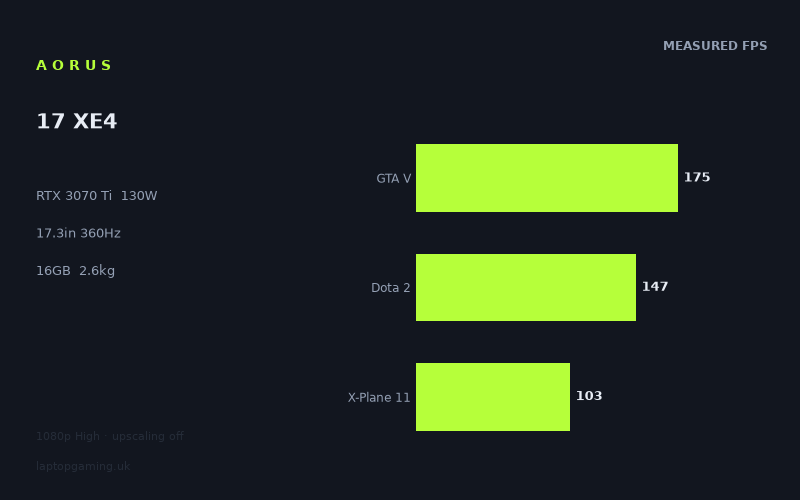
Frame rates
1920×1080, High preset, upscaling off.
Measured on this machine. Source: Notebookcheck, 2022-04-13.
Not scored: incomplete benchmark suite
Every scored laptop on this site is averaged over the same 5 games, and this one is short of Cyberpunk 2077, Baldur's Gate 3. A mean over 5 games is not comparable to a mean over 5, so we publish the figures we have and leave the score blank rather than rank it against machines tested on a different set. The numbers below are real - the suite is just incomplete.
How these numbers were produced
Frame rates here are not measured by us, and we label how each one was arrived at. A figure marked measured comes from a published run on that exact machine. A figure marked representative is derived from the GPU and its power limit (TGP) and cross-referenced against published reviews - a sound estimate of what that configuration delivers, but not a measurement of that specific laptop. Unless stated otherwise, numbers are 1920x1080, High preset, upscaling off. Where a laptop ships in several power configurations we use the wattage of the exact SKU listed, because a 140W RTX 5070 and a 115W one are not the same product.
In use
The short version
The Aorus 17 XE4 is a large-screen gaming laptop built around a Core i7-12700H and an RTX 3070 Ti configured at a 130W GPU power limit. The published benchmark data gives it a clear identity: this is a very capable 1080p machine for high-refresh gaming, but its 360Hz screen is more ambitious than the frame rates achieved in the demanding games measured at the High preset with upscaling switched off.
Notebookcheck’s figures show strong results across a wide range of games. Doom Eternal reaches 207fps, Strange Brigade records 200fps, F1 2021 reaches 196fps, and The Witcher 3 runs at 180fps. These are the sort of results that make a high-refresh 1920x1080 screen useful rather than decorative. Competitive and lighter-running games should feel like a sensible match for this hardware, and the Aorus is not limited to a narrow group of easy titles either: Hitman 3 reaches 166fps, GRID Legends manages 149fps, Dota 2 records 147fps, Far Cry 5 reaches 138fps, and Death Stranding manages 137fps.
The more important part of the picture is the lower end of the benchmark spread. The same RTX 3070 Ti produces 113fps in Halo Infinite, 103fps in Far Cry 6, 101fps in Battlefield 2042, 96fps in Final Fantasy XV and Watch Dogs Legion, 90fps in Assassin’s Creed Valhalla, 85fps in God of War, and 84fps in Cyberpunk 2077 1.6. Those are still substantial frame rates at 1920x1080 on the High preset without upscaling, but they make it clear that this is not a laptop that can simply treat its 360Hz panel as a target in every modern demanding game.
That distinction matters. The Aorus 17 XE4 is not short of performance; the benchmark data is plainly strong. It is better understood as a laptop that can deliver high frame rates in a broad selection of games while retaining enough headroom for visually heavier releases, rather than one that can keep a 360Hz display saturated across the board. Buyers who mainly play games such as Doom Eternal, F1 2021, Strange Brigade, GTA V, Dota 2, or Rainbow Six Extraction have a much more direct case for the screen than buyers whose library is dominated by Cyberpunk 2077 1.6, God of War, Assassin’s Creed Valhalla, or Battlefield 2042.
The 17.3in IPS display, 16GB of memory, 1TB SSD, 99Wh battery and 2.618kg weight place it firmly in the desktop-replacement side of gaming laptops. It is not presented by the available specifications as a slim, low-weight machine for frequent travel. The 99Wh battery is a sizeable capacity on paper, but there is no measured battery-life figure in the supplied data, so it would be wrong to turn that capacity into an endurance claim.
There is no confirmed UK price for this exact configuration, so value cannot be assessed properly and no overall score can be calculated. That is not a criticism of the machine or its benchmark coverage: the benchmark suite is complete and the Aorus ranks normally on the frame-rate leaderboard. It simply means that, without a price, there is no responsible way to decide whether this performance is a bargain, fair, or expensive in the UK.
Buy the Aorus 17 XE4 if you want a 17.3in 1080p gaming laptop whose measured figures are consistently strong, particularly in games that respond well to high frame rates, and if the larger chassis and 2.618kg weight fit how you use a laptop. Look elsewhere if you need a genuinely light machine, if you expect every modern demanding game to run anywhere near 360fps at the stated settings, or if buying decisions must be made around confirmed UK pricing rather than performance alone.
Performance
A 130W RTX 3070 Ti with convincing 1080p results
The core performance specification is the RTX 3070 Ti at a 130W GPU power limit, paired with Intel’s Core i7-12700H. On paper, that is a serious combination for a 1920x1080 gaming laptop. More importantly, the measured results support that expectation. Notebookcheck’s figures were recorded at 1920x1080 using the High preset with upscaling off, which is a useful test condition because it shows what the machine can do without relying on an upscaling mode to inflate the result.
The benchmark data has a broad spread, from 207fps in Doom Eternal down to 84fps in Cyberpunk 2077 1.6. That is not evidence of inconsistency in the laptop. It is evidence that games ask very different things of the same hardware. Some titles are capable of producing very high frame rates at this resolution and preset, while others remain demanding enough that even a high-power RTX 3070 Ti settles closer to the region around 100fps. The useful question is not whether one headline figure is high; it is where the games you actually play fall within this range.
At the fast end, Doom Eternal leads the list at 207fps. Strange Brigade follows at 200fps, F1 2021 reaches 196fps, The Witcher 3 records 180fps, Rainbow Six Extraction manages 177fps, and GTA V reaches 175fps. These are emphatic results for a laptop running at 1920x1080 High without upscaling. They also demonstrate why a 360Hz display is not absurdly mismatched with the hardware, even if the laptop does not reach 360fps in the supplied measurements. A display with a very high refresh ceiling is most relevant when the frame rate is well above ordinary laptop gaming levels, and several games here are well into that territory.
Hitman 3 at 166fps is another strong result, as is GRID Legends at 149fps and Dota 2 at 147fps. Far Cry 5 reaches 138fps, while Death Stranding records 137fps. Alan Wake Remastered follows at 130fps. This middle-upper group is arguably where the Aorus 17 XE4 is most persuasive as an all-round 1080p gaming machine. These are not just a few unusually light titles producing dramatic results. There is a substantial run of games covering different styles of play, from racing to strategy-oriented multiplayer, open-world action and cinematic third-person games, all delivering frame rates that suit a fast panel far better than a standard low-refresh display.
The five-game scoring-suite mean is 144fps. That figure comes from Strange Brigade, GTA V, Dota 2, X-Plane 11 and Final Fantasy XV, rather than from every game listed. It should therefore be read as a consistent reference point rather than a promised result for every new release. Even so, it is useful because it covers games with very different performance characteristics. Strange Brigade records 200fps, GTA V reaches 175fps and Dota 2 manages 147fps, while X-Plane 11 records 103fps and Final Fantasy XV reaches 96fps. The gap within that group captures the central reality of this laptop: it has plenty of performance, but the experience depends heavily on the game engine and workload.
The point where demanding games pull the average down
Forza Horizon 5 reaches 124fps, Riders Republic manages 115fps, Halo Infinite records 113fps, and both Dirt 5 and Mafia Definitive Edition reach 112fps. Guardians of the Galaxy is just behind at 111fps. This is still a very healthy part of the results table. None of these figures suggests that the Aorus is struggling to run the games at the stated settings. Rather, they show the point at which the machine moves away from the exceptionally high frame rates seen in Doom Eternal and F1 2021 and into results that are strong but no longer especially close to the potential of a 360Hz panel.
Far Cry 6 and X-Plane 11 both record 103fps. Battlefield 2042 reaches 101fps. Final Fantasy XV and Watch Dogs Legion both manage 96fps. Assassin’s Creed Valhalla reaches 90fps, Elex 2 records 89fps, God of War manages 85fps, and Cyberpunk 2077 1.6 comes in at 84fps. These are the games that prevent any simplistic claim that the RTX 3070 Ti can make a 360Hz display fully relevant in all circumstances. Their results remain well above the point where 1080p High gaming would feel compromised, but they are a long way from the display’s maximum refresh rate.
That is not a reason to dismiss the screen or the GPU. It is a reason to set expectations correctly. The Aorus 17 XE4 has enough performance to run Cyberpunk 2077 1.6 at 84fps, God of War at 85fps, Assassin’s Creed Valhalla at 90fps, and Battlefield 2042 at 101fps at the tested settings. Those are useful figures, especially given that upscaling was off. But buyers choosing the machine primarily because the specification says 360Hz should recognise that the panel’s full ceiling is not reached by any of the supplied benchmark results. The laptop is delivering a high-refresh experience, not a universal 360fps experience.
There is a meaningful difference between a machine that produces 84fps in Cyberpunk 2077 1.6 and one that produces 207fps in Doom Eternal, even though both results come from the same laptop and the same general test conditions. In the first case, the GPU workload is sufficiently demanding that the performance focus is on maintaining a strong, smooth result at High settings. In the second, the hardware has room to push much higher frame rates. The Aorus should therefore be selected according to the games that dominate your library, not simply because its best result is above 200fps.
What the 130W GPU power limit means in practice
The RTX 3070 Ti here is not just identified by its name; it is specified with a 130W GPU power limit. That matters because laptop graphics chips with the same name are not automatically equivalent in practical performance. The GPU configuration is part of the machine’s performance identity, and the benchmark results provide the evidence for this particular 130W implementation rather than for an abstract RTX 3070 Ti label.
In practical terms, the figures show that this configuration is capable of high 1080p performance across both lighter and more demanding games. The 207fps result in Doom Eternal, 200fps in Strange Brigade, 196fps in F1 2021, 180fps in The Witcher 3, and 177fps in Rainbow Six Extraction show the laptop operating in a frame-rate-rich part of the performance spectrum. The 84fps to 103fps results in Cyberpunk 2077 1.6, God of War, Elex 2, Assassin’s Creed Valhalla, Final Fantasy XV, Watch Dogs Legion, Battlefield 2042, Far Cry 6 and X-Plane 11 show that it also has enough GPU performance to handle substantially heavier titles at the tested settings.
What the 130W figure does not mean is that every game will scale in the same way. The shared-game comparison data reinforces this. At 1920x1080, lighter titles in the shared set can become CPU-bound, compressing genuine GPU gaps. That is why a machine with this RTX 3070 Ti can be effectively level with some laptops fitted with RTX 3080 Ti or RTX 3080 graphics in the selected shared games, despite those names sounding more expensive or more powerful. The result is not that GPU power limits do not matter. The result is that game workloads, resolution and processor limitations can all reduce the visible difference in a particular benchmark set.
The Aorus therefore needs to be judged by the actual published results. Its 130W RTX 3070 Ti is not merely adequate: the data shows it is a strong 1080p configuration. But the demanding-game results also show why buyers should not read “130W” as a guarantee of an extreme frame rate in every game. Cyberpunk 2077 1.6 at 84fps and God of War at 85fps are very different outcomes from Doom Eternal at 207fps. Both are valid descriptions of the same laptop’s capabilities.
Where the Aorus is strongest
The clearest strength is gaming at 1920x1080 where high frame rates are the priority. Doom Eternal, Strange Brigade, F1 2021, The Witcher 3, Rainbow Six Extraction, GTA V and Hitman 3 all sit at 166fps or above. That is a substantial set of results rather than a single favourable outlier. It includes shooters, racing, open-world gaming and action games, and it gives the Aorus a convincing case for players who care about responsiveness and a fast display.
The machine also looks well suited to buyers who want one laptop to cover both fast games and heavier cinematic releases without immediately needing to retreat from the High preset used in the published tests. Forza Horizon 5 at 124fps, Halo Infinite at 113fps, Guardians of the Galaxy at 111fps, Far Cry 6 at 103fps and Battlefield 2042 at 101fps all show that the Aorus remains capable when games become more demanding. The frame-rate headroom is reduced compared with Doom Eternal or F1 2021, but the results remain solidly in high-frame-rate territory.
It is less compelling for anyone whose definition of success is “as close to 360fps as possible in every game”. Nothing in the supplied measurements reaches the screen’s 360Hz refresh rate. The machine can exploit the screen far more effectively in some games than in others, but the display specification should not be mistaken for a performance guarantee. A 360Hz panel is a ceiling. The benchmark results tell you how often the laptop can move towards that ceiling, and the answer varies dramatically by title.
The screen
A 17.3in 1920x1080 IPS panel built around refresh rate
The Aorus 17 XE4 uses a 17.3in IPS screen with a 1920x1080 resolution and a 360Hz refresh rate. That combination makes its priorities very clear. This is a large 1080p panel aimed at speed. The resolution is matched directly to the benchmark data, which was also collected at 1920x1080, so there is no need to guess how the laptop performs when driving a different native resolution. The published frame rates are directly relevant to the screen fitted to the machine.
The IPS designation tells us the panel type, but the supplied specifications do not include brightness, colour coverage, contrast, response-time measurements or any assessment of image quality. Those are important aspects of a screen, particularly for buyers who want to use a large 17.3in laptop for creative work, films or general desktop use as well as games. There is no basis here for claiming that the panel is especially colour-accurate, unusually bright, or superior to another IPS screen in visual quality. What can be assessed is the relationship between its resolution, refresh rate and the measured gaming results.
At 1920x1080, the RTX 3070 Ti has the opportunity to generate high frame rates in a way that would be harder to assume at a higher-resolution screen. The benchmark data shows exactly that in several games. Doom Eternal at 207fps, Strange Brigade at 200fps, F1 2021 at 196fps, The Witcher 3 at 180fps, Rainbow Six Extraction at 177fps and GTA V at 175fps all make strong use of a panel designed for rapid refresh. The screen is not excessive in those games; it is aligned with what the hardware can deliver.
At the same time, the 360Hz figure should be treated as the display’s maximum refresh capability rather than a universal gaming expectation. None of the supplied results reaches 360fps. Even the fastest result, Doom Eternal at 207fps, is below that maximum. The laptop’s screen can display a higher refresh rate than the GPU achieves in the measured games at the stated settings. That does not make the panel pointless, but it does mean that a buyer should value it for its headroom and for the games that run especially quickly, rather than assume the number applies to every title.
How the measured games fit the 360Hz panel
The results naturally divide into several practical groups. The first contains the games above 175fps: Doom Eternal, Strange Brigade, F1 2021, The Witcher 3, Rainbow Six Extraction and GTA V. These are the titles where the screen’s high-refresh focus is most obviously justified. Their measured frame rates are high enough that the Aorus is clearly doing more than merely meeting a basic smoothness standard. It is pushing into the kind of performance territory that makes a 360Hz panel a sensible design choice.
The next group includes Hitman 3 at 166fps, GRID Legends at 149fps, Dota 2 at 147fps, Far Cry 5 at 138fps, Death Stranding at 137fps and Alan Wake Remastered at 130fps. Here, the machine remains a strong fit for a fast display, but the gap between actual frame rate and the panel’s 360Hz maximum is more apparent. These are still results that benefit from a high-refresh approach, yet they are not close to filling the panel’s full specification.
Forza Horizon 5 at 124fps, Riders Republic at 115fps, Halo Infinite at 113fps, Dirt 5 and Mafia Definitive Edition at 112fps, and Guardians of the Galaxy at 111fps form another useful section of the data. The Aorus is still producing substantial frame rates, and it is difficult to describe these as weak results at 1920x1080 High with upscaling off. But for a buyer focused specifically on a 360Hz screen, these titles show the limit of using refresh rate as the main purchase argument. The panel remains fast, but the GPU does not need to produce 360fps before the laptop becomes worthwhile.
In the heavier titles, the distinction becomes clearer still. Far Cry 6 and X-Plane 11 at 103fps, Battlefield 2042 at 101fps, Final Fantasy XV and Watch Dogs Legion at 96fps, Assassin’s Creed Valhalla at 90fps, Elex 2 at 89fps, God of War at 85fps and Cyberpunk 2077 1.6 at 84fps are all far below 360fps. They are also far from poor. The sensible reading is that the Aorus offers robust 1080p High performance across demanding games, while the panel’s maximum refresh rate is most relevant to lighter-running or more competitively focused titles.
This is why the screen and GPU pairing should be called specialised rather than mismatched. A 17.3in 1080p screen reduces the rendering burden compared with a higher-resolution screen, helping the RTX 3070 Ti generate strong frame rates. The 360Hz refresh rate then gives the machine room to show those higher results in suitable games. The pairing is not designed around maximum pixel count; it is designed around speed. Buyers who prefer a larger working area or who prioritise resolution above frame rate may want a different kind of display specification, but that is a preference question rather than a flaw exposed by these results.
Build, size and portability
Large-screen gaming first, portability second
The Aorus 17 XE4 weighs 2.618kg and uses a 17.3in display. Those two facts are enough to establish its broad role: this is a substantial gaming laptop, not a compact machine built around minimum carrying weight. It may still be transportable between home, work, university accommodation or events, but it should be approached as a machine you carry when needed rather than one chosen specifically because it disappears into a bag.
The supplied information does not include chassis dimensions, so there is no basis for describing it as thin, thick, narrow or especially deep. It would also be wrong to infer a precise footprint from the screen size alone. What can be said is that a 17.3in panel and 2.618kg weight put the machine firmly on the larger side of the gaming-laptop concept. That is relevant because the defining advantages here are performance and screen size, not the convenience of a small chassis.
For stationary use, the larger format is easier to justify. The 17.3in screen gives games more physical display area than a smaller laptop screen, while the 1920x1080 resolution keeps the GPU focused on frame rate rather than on driving a higher pixel count. This is a coherent pairing for a machine likely to spend much of its time on a desk, table or other regular gaming space. The weight becomes less important when the laptop is primarily moved occasionally rather than carried throughout the day.
For regular commuting, the 2.618kg figure deserves more attention. The machine is not defined solely by weight, and the supplied information does not list the weight of its power supply or any accessories, so a complete travel load cannot be calculated. Even so, 2.618kg is not a number to ignore if you expect to carry the laptop frequently. Buyers who need maximum mobility should compare it with lighter alternatives rather than assume that every gaming laptop is equally manageable away from a desk.
Battery capacity is known; battery life is not
The Aorus 17 XE4 has a 99Wh battery. That is a specific capacity figure, and it is useful as part of the specification. However, there is no measured battery-life result in the available data. It would therefore be irresponsible to claim a number of hours for work, video playback, web use or gaming. Battery capacity and battery endurance are not interchangeable measurements.
The practical conclusion is straightforward: the battery should be treated as a known hardware specification rather than as evidence of a known runtime. Buyers who need a laptop to spend long periods away from mains power should look for published endurance testing before making a decision. The performance data here is extensive, but it is gaming data collected at 1920x1080 High with upscaling off, not battery-life data.
That limitation is particularly important because this is a performance-oriented 17.3in machine with a 360Hz display and a 130W RTX 3070 Ti configuration. It would be tempting to make assumptions about how those specifications affect battery use, but the supplied information does not provide an endurance measurement. The only responsible position is that it has a 99Wh battery and that real battery life is not confirmed here.
Memory and storage are adequate, but not the reason to choose it
The configuration includes 16GB of memory and a 1TB SSD. Those are sensible core specifications for a gaming laptop of this class, but the available data does not include memory speed, storage performance, upgrade access or additional drive slots. The most useful way to view these components is as part of a balanced baseline around the Core i7-12700H and RTX 3070 Ti rather than as headline reasons to choose the Aorus over another machine.
There is no indication in the supplied information that memory capacity or storage capacity is holding back the benchmark results. The frame rates show a laptop capable of producing 207fps in Doom Eternal, 200fps in Strange Brigade and 196fps in F1 2021, while also maintaining 84fps in Cyberpunk 2077 1.6. But there is also no data here that would justify claims about upgradeability, sustained SSD behaviour or productivity performance. The review should remain focused on what is actually documented: a 16GB and 1TB configuration supporting strong measured 1080p gaming performance.
How it compares
Against the MSI Prestige 15: a decisive gaming advantage
The widest gap in the listed comparison group is against the MSI Prestige 15, which uses an RTX 3050 Ti at 105W. Across four shared games, the Aorus 17 XE4 averages 76fps more. That is not a marginal difference and it is not the sort of result that needs complicated interpretation. For gaming performance in the shared titles, the Aorus is in a substantially stronger class.
The comparison also helps explain what the Aorus is buying you beyond a specification sheet. Its RTX 3070 Ti is configured at 130W, while the MSI uses an RTX 3050 Ti at 105W. The names and power limits differ, but the important evidence is the published shared-game result: the Aorus holds a 76fps average advantage. For someone choosing primarily on gaming frame rates, that is a meaningful reason to prefer the Aorus.
There is no confirmed UK price for the MSI Prestige 15 in the supplied information, so this cannot become a value verdict. It is a performance comparison only. The Aorus is substantially quicker in the shared games, but without confirmed prices for both exact configurations there is no responsible way to say which is the better purchase financially.
Against the Acer Predator Triton 500 SE: effectively level in the shared set
The Acer Predator Triton 500 SE PT516-52s-70KX uses an RTX 3080 Ti and is listed at GBP 2,413. Across five shared games, the Aorus averages a difference of 0fps. That is a striking result because the Acer carries the higher-tier RTX 3080 Ti name, yet the shared-game data does not show a frame-rate advantage for it in this comparison.
The right interpretation is not that the RTX 3070 Ti and RTX 3080 Ti are universally identical. The supplied comparison notes explain why near-zero results can happen: at 1080p, lighter titles in the shared set can be CPU-bound and compress genuine GPU gaps. In other words, the shared games can reach a point where processor limitations reduce the visible advantage of a stronger graphics chip. The result is real, but it should not be stretched into a claim that every game, setting or resolution would produce the same tie.
For a buyer focused on the shared games at 1080p, though, the data is favourable to the Aorus. It keeps pace with the Acer’s RTX 3080 Ti in those five games. The Acer’s confirmed GBP 2,413 price is a useful fact, but the Aorus has no confirmed UK price, so it is impossible to turn that performance parity into a direct value conclusion. The comparison demonstrates performance parity in the selected workload, not a reason to call either machine cheaper or better value.
Against the Razer Blade 15 Advanced: another near tie that needs context
The Razer Blade 15 Advanced from Mid 2021 uses an RTX 3080 at 105W. Across five shared games, the Aorus averages 1fps less. Again, the result is effectively level in the shared set. A single frame per second across five shared games is not a meaningful practical gap, and the data should not be presented as though it proves a decisive win for either machine.
The notable part is that the Aorus achieves this near tie with an RTX 3070 Ti configured at 130W. That does not erase the hardware difference between the two models, but it does show why laptop GPU labels alone are incomplete. GPU power configuration and the games being tested matter, while 1080p shared-game results can be compressed by CPU-bound behaviour in lighter titles. The Aorus’s Core i7-12700H and its 130W graphics configuration combine to produce results that are essentially level with the Razer in this selected comparison.
Neither machine has a confirmed UK price in the supplied information, so there is no value judgement to make. The performance conclusion is narrow but useful: on the five shared games, the Aorus is effectively tied with the Razer Blade 15 Advanced.
Against the MSI Raider GE77 HX: the faster rival is meaningfully faster
The MSI Raider GE77 HX is the comparison that demonstrates the limits of the Aorus’s performance position. It uses an RTX 3080 Ti at 175W and averages 25fps more across five shared games. This is not a near-zero result and should not be explained away. In the shared games, the Raider is meaningfully quicker.
The 25fps gap also provides context for the Aorus’s 130W RTX 3070 Ti. The Aorus is strong enough to match some higher-named GPU configurations in selected 1080p shared games, but it does not overcome every stronger configuration. The Raider’s RTX 3080 Ti at 175W establishes a clearer lead. That is exactly why published frame-rate comparisons are more useful than assuming that a laptop GPU name alone tells the whole story.
There is no confirmed UK price for the MSI Raider GE77 HX in the supplied information. As with the other comparisons, performance can be discussed but value cannot. A buyer who wants the highest shared-game frame rates among these listed machines should note that the Raider is ahead. A buyer who is deciding between them on price cannot reach a conclusion from these facts alone.
What the rival set says about the Aorus
The four comparisons position the Aorus 17 XE4 clearly. It is far ahead of the MSI Prestige 15, effectively tied with the Acer Predator Triton 500 SE and Razer Blade 15 Advanced in their selected shared games, and behind the MSI Raider GE77 HX. That is a credible place for a 130W RTX 3070 Ti laptop to sit: strong enough to compete closely with some systems carrying RTX 3080-class names in 1080p shared-game testing, but not the outright fastest option when faced with a 175W RTX 3080 Ti configuration.
The near ties should be treated as evidence about the stated shared games, not as a universal hierarchy for all workloads. The supplied notes are explicit that 1080p lighter titles can be CPU-bound and compress genuine GPU gaps. That explanation matters because otherwise a 0fps difference against the Acer or a 1fps difference against the Razer could be misread as proof that GPU power limits and GPU tiers no longer matter. The Raider comparison shows that they still do.
For the Aorus buyer, the reassuring part is that the laptop’s benchmark position is not narrowly dependent on one game. The main results cover a wide performance range, and the rival data shows it can hold its own in selected shared games against more prestigious GPU labels. The caution is that a stronger rival can still create a substantial advantage, and no price conclusion can be drawn until there is a confirmed UK price for the exact Aorus configuration.
Who it’s for
Buy it for strong 1080p gaming on a large, fast display
The best-fit buyer is someone who wants a large 17.3in gaming laptop centred on 1920x1080 performance rather than on maximum resolution. The measured data supports that use case exceptionally well. Doom Eternal at 207fps, Strange Brigade at 200fps, F1 2021 at 196fps, The Witcher 3 at 180fps, Rainbow Six Extraction at 177fps and GTA V at 175fps show that the Aorus can deliver very high frame rates in games that suit its hardware.
It also suits players who mix fast-running titles with heavier releases and want one machine that remains capable in both. The lower results are still strong: Battlefield 2042 at 101fps, Final Fantasy XV and Watch Dogs Legion at 96fps, Assassin’s Creed Valhalla at 90fps, God of War at 85fps and Cyberpunk 2077 1.6 at 84fps. The Aorus is not a laptop that falls apart when games become demanding. It simply stops being a machine that can approach the extreme top end of its display refresh capability.
It is particularly suitable for buyers who understand that a 360Hz screen is most valuable in the games where frame rates are high, rather than treating it as a promise that every game will run at 360fps. The benchmark data shows a good match for speed-focused play, especially in Doom Eternal, Strange Brigade, F1 2021, Rainbow Six Extraction, GTA V and Hitman 3. The screen’s specification makes sense for that audience.
The Aorus also makes sense for buyers who mostly use their laptop in one main location. At 2.618kg with a 17.3in screen, it is better matched to desk-based or semi-stationary use than to constant carrying. The 1TB SSD and 16GB memory provide a sensible baseline configuration, while the 99Wh battery is a known capacity figure for buyers comparing hardware specifications. Battery-life expectations should remain open until measured endurance data is available.
Buy something else if portability or universal 360Hz gaming is the priority
Buy something else if low weight is central to the purchase. The Aorus weighs 2.618kg, and although the supplied information does not provide dimensions, it is plainly not positioned as a small, lightweight gaming laptop. A buyer who carries a machine every day should put more weight on portability than on the appeal of a 17.3in 360Hz panel.
Also buy something else if your expectation is to run every modern demanding game at or near the display’s 360Hz maximum using the stated 1920x1080 High settings without upscaling. The published data does not support that expectation. The fastest result is Doom Eternal at 207fps, while Cyberpunk 2077 1.6 reaches 84fps, God of War manages 85fps, Assassin’s Creed Valhalla records 90fps and Battlefield 2042 reaches 101fps. Those are good results, but they are not close to 360fps.
Buyers whose games are concentrated in the demanding end of the list should think carefully about what they value more: the Aorus’s consistently strong High-preset frame rates, or a faster graphics configuration such as the MSI Raider GE77 HX’s RTX 3080 Ti at 175W. The Raider averages 25fps more across five shared games. That is the clearest performance lead in the listed rival group, although its lack of a confirmed UK price means the comparison cannot become a value recommendation.
Finally, buyers who need a clear value verdict should wait for a confirmed UK price for this exact Aorus 17 XE4 configuration. The performance evidence is extensive and favourable, but price is essential to deciding whether the laptop is sensible to buy rather than merely impressive on a benchmark chart. Until that figure is confirmed, the honest verdict is performance-first: a strong 1080p gaming laptop with a large, fast IPS display, convincing frame rates across the measured games, and a 360Hz panel that is best appreciated in the titles where its RTX 3070 Ti can really stretch its legs.